
Asana vs Monday is a problem most teams recognise at once: work is scattered across email, chat, spreadsheets and meetings, nobody knows what is due this week, and the same status update gets asked for three times a day. Both tools promise to fix that, and both can, but they fix it in different ways. Asana gives a team a structured way to plan, assign and track work across projects and portfolios. Monday gives a team a highly visual, customisable workspace that can be shaped into almost any workflow, from project tracking to CRM and operations. The choice is not about which tool has more features on a list. It is about which structure your team will actually maintain after the first month.
Prices quoted here reflect publicly listed October 2026 figures, and you should check checkout before you commit, because both vendors adjust plans, seat minimums and automation limits. Asana Starter is commonly listed at about $10.99 per user a month on annual billing, with Advanced at about $24.99 per user a month. Monday Basic is commonly listed at about $9 per seat a month, Standard at about $12, and Pro at about $19, all on annual billing, with a three seat minimum on paid plans. Those numbers already hint at the real story: Asana can be cheaper for a very small team, while Monday is often cheaper when you compare plans with similar features at mid tier and above. The rest of this guide tests how that story holds up in daily use.
The Decision in One Paragraph
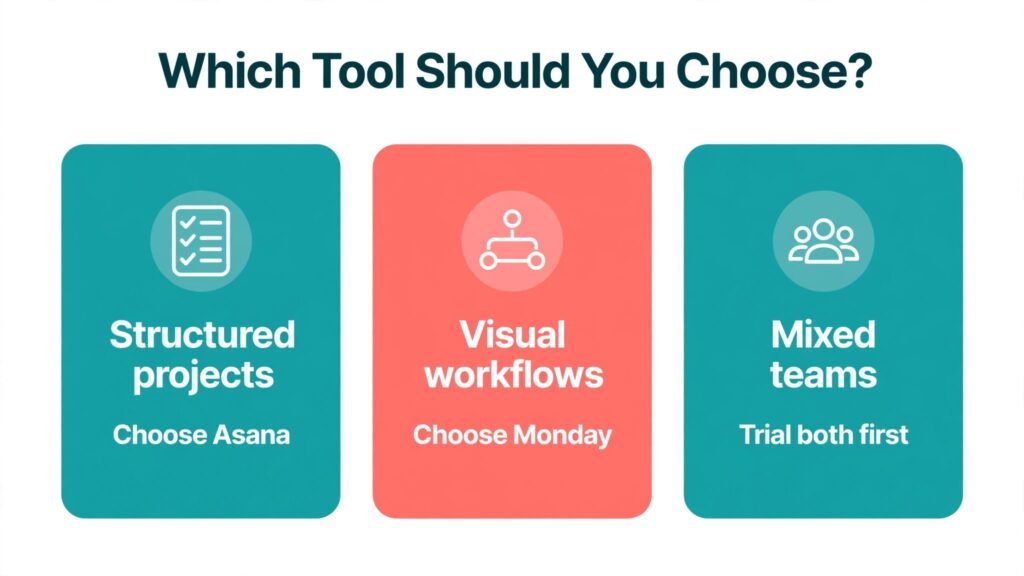
If your team runs structured projects with dependencies, timelines, portfolios and resource planning, choose Asana. It handles the discipline of project management with less custom building, and managers get portfolio views and workload views that work out of the box. If your team wants a visual workspace that non technical people can shape themselves, with colourful boards, flexible columns and automations that feel like building blocks, choose Monday. It is the better tool for operations, intake, CRM style tracking and teams that need one workspace to cover many different kinds of work. Small teams on a tight budget should trial both for two weeks with a real project, because adoption, not the feature list, will decide which tool survives.
How We Compared Them
We compared Asana and Monday on the work a project tool must do every week: set up a project fast, assign and track tasks, manage dependencies and deadlines, automate routine updates, report progress to a manager, onboard a new team member, and keep the system clean as the team grows. Each test below ends with a verdict. We also looked at pricing at team sizes of five, ten and twenty five, because a tool that looks cheap for one person can become expensive at team scale, and a tool that looks expensive for one person can become good value when its mid tier includes features a rival reserves for a higher tier.
We paid special attention to maintenance. Many teams choose a tool in a week and then live with it for years, and the cost that matters most is not the subscription. It is the weekly admin time spent fixing boards, chasing updates, rebuilding reports and training new hires. A tool that is easy to set up but hard to keep clean will cost more over a year than a tool that takes a day longer to learn but stays tidy with less effort.
Asana in Depth: Structure That Managers Trust
Asana feels like a project management tool first, and that focus shows in its structure. Work lives in projects, projects roll up into portfolios, and portfolios give managers a single view of progress, risk and workload across many projects at once. Tasks have assignees, due dates, dependencies, subtasks, custom fields and comments, and views include list, board, timeline, calendar and workload. A manager who needs to answer the question “what is at risk this month, and who is overloaded” can usually answer it from Asana without building a custom report.
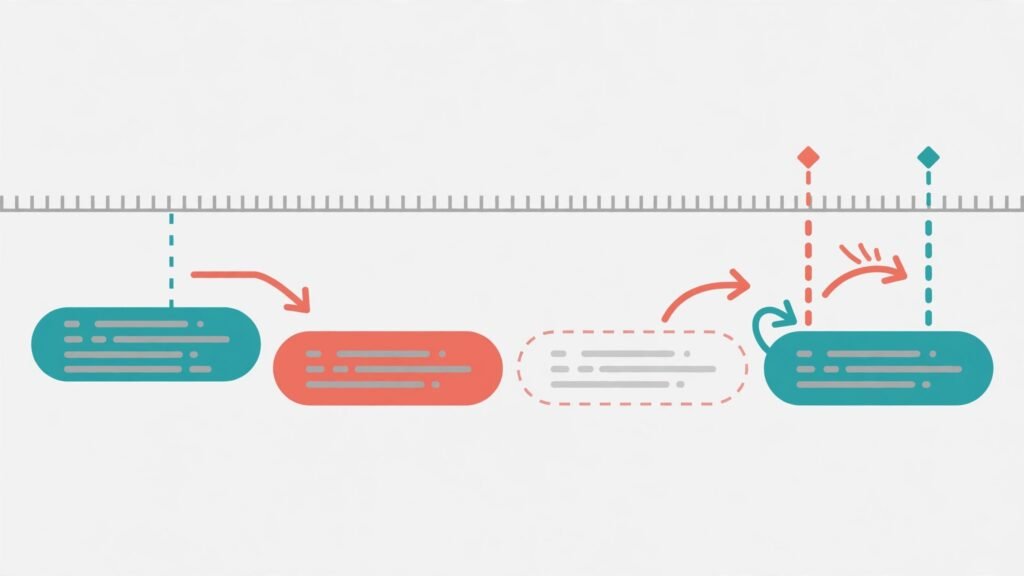
Dependencies are where Asana earns its keep for structured teams. If a design task slips by three days, dependent tasks shift, the timeline shows the impact, and the team can see the knock on effect before it becomes a missed launch. That is the kind of planning that spreadsheets and simple boards handle poorly, and it is why agencies, product teams, marketing teams with campaign calendars and operations teams with repeatable processes often choose Asana even when a rival looks more colourful. The tool also supports goals and OKR style tracking on higher plans, which helps leadership connect daily tasks to quarterly objectives without a separate reporting tool.
Asana also benefits from a large integration library, including Slack, Google Drive, Microsoft Teams, Gmail and many others, so tasks can be created from messages and files can be attached without leaving the workflow. For teams that already live in those tools, Asana slots in rather than demanding a new home for all work. The trade off is flexibility: Asana boards and projects are structured, and teams that want to turn a project tool into a full CRM, a sales pipeline and an inventory tracker will find Asana less willing to bend than Monday.
Asana Pricing, Best For and Watch Outs
Asana offers a free plan for small teams getting started, with core task and project features, and paid plans that add timeline views, advanced search, custom fields, portfolios, goals, workload and automation at higher tiers. Starter at about $10.99 per user a month on annual billing suits teams that need timeline and custom fields without portfolio management. Advanced at about $24.99 per user a month adds portfolios, goals, resource management and stronger reporting, and Enterprise plans are quoted on request for large organisations with advanced security and admin needs. Check checkout for monthly billing rates, which are higher, and for seat rules, because Asana adds seats in increments that can mean paying for a few more seats than you use at certain team sizes.
Asana is best for project managers, marketing teams, agencies, product teams and operations teams that run repeatable projects with deadlines, dependencies and multiple stakeholders. It is also strong for organisations that need portfolio reporting for leadership. Watch out for the price jump to Advanced if you need portfolios and workload views, because those features are not in Starter, and a team that buys Starter expecting portfolio reporting will be disappointed. Watch out also for feature creep in projects: Asana stays clean only if someone owns naming, custom fields and archiving, otherwise old projects pile up and search becomes noisy.
Monday in Depth: A Visual Workspace You Can Shape
Monday feels like a workspace builder first, and that flexibility is its main selling point. Work lives on boards, boards are made of groups and items, and columns can be status, person, date, number, dropdown, timeline, formula and many more. A team can build a project tracker on Monday morning, a content calendar on Monday afternoon, and a simple CRM by Tuesday, all in the same account, without writing code. For non technical teams, that building block approach is empowering, because they can shape the tool to their process instead of shaping their process to the tool.
Automations and integrations are central to Monday value. Rules such as “when a status changes to done, notify the manager and move the item to the completed group” remove routine chasing and keep boards up to date without manual effort. Monday also offers a large app marketplace and integrations with Slack, Gmail, Zoom, Salesforce and many others, plus dashboards that combine boards into charts, timelines and workload views. For operations teams, the ability to see sales, delivery, content and support work in one visual system is a real advantage, and it explains why Monday is often bought as a work operating system rather than just a project tracker.
The cost of that flexibility is governance. A board that anyone can reshape can quickly become a board that nobody understands, with duplicate columns, inconsistent status labels and automations that conflict. Monday works best when a small group of admins owns board templates, status definitions and automation rules, while the wider team uses the boards rather than rebuilding them. Teams that give everyone full building rights without templates usually end up with a colourful mess that looks productive but hides real progress.
Monday Pricing, Best For and Watch Outs
Monday offers a free plan for up to two seats with limited boards and docs, which is enough to test the core idea but not enough for a real team. Basic at about $9 per seat a month on annual billing covers simple boards and views, Standard at about $12 adds timeline, calendar, guest access and limited automations, and Pro at about $19 adds time tracking, private boards, formula columns and higher automation limits. Enterprise is quoted on request. Paid plans carry a three seat minimum, so a solo user or a two person team pays for three seats, which changes the small team maths. Check checkout for monthly rates and for automation and integration limits on each tier, because those limits, not the headline price, often decide whether a plan fits.
Monday is best for operations teams, marketing teams, sales teams, startups and small businesses that want one visual system for many kinds of work, including projects, pipelines, content and client tracking. It is also strong for teams with many non technical users, because boards are visual and easy to explain. Watch out for automation limits on lower tiers, because a team that automates heavily can hit monthly action caps sooner than expected. Watch out also for the cost of building and maintaining boards, and for the temptation to track everything in Monday, which can turn a useful workspace into a second job.

Test 1: Set Up a Real Project in an Hour
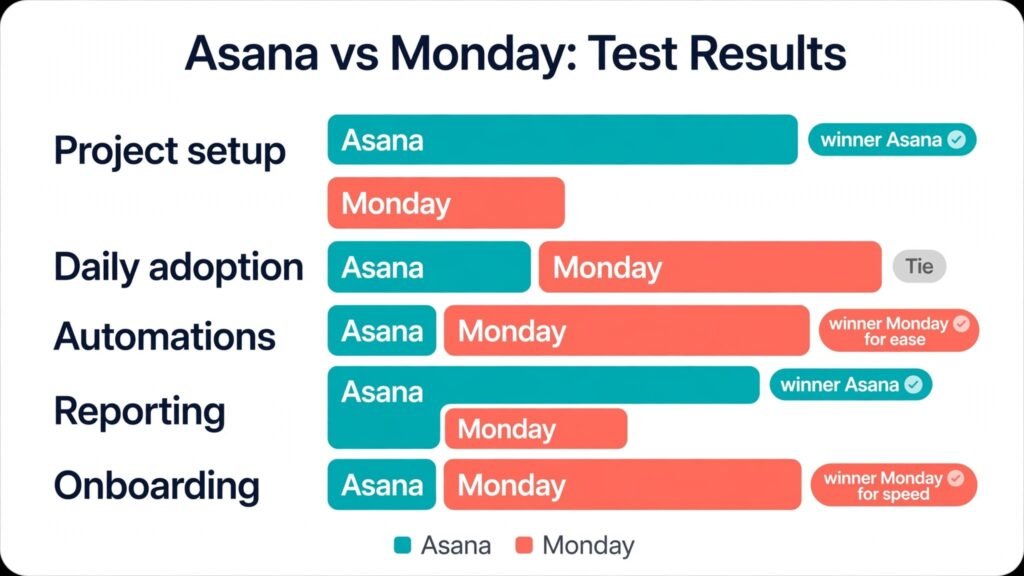
The task was to set up a product launch project with twenty tasks, three owners, dependencies and a deadline, starting from a blank account. Asana was faster for a structured project, because project templates, task dependencies and timeline views are built in and need little custom work. A project manager could set up the launch, assign owners and see the critical path within the hour. Monday was also fast, and its board setup felt more visual, but building dependencies and a timeline view required more column choices and template decisions, which slowed a first time user. Verdict: Asana wins for structured project setup, Monday wins for teams that want to design their own board layout from scratch.
Test 2: Daily Task Management and Adoption
The task was to run a team through a normal week of task updates, comments, file attachments and status changes, and watch which tool people actually opened. Both tools performed well, but for different reasons. Asana inbox and My Tasks views gave each person a clear personal list, which reduced missed work. Monday boards gave the team a shared visual picture, which reduced status meetings, because progress was visible at a glance. Adoption split by role: individual contributors preferred Asana personal task lists, while managers and operations leads preferred Monday boards. Verdict: a tie that splits by role, so trial both with your actual team, not just with the buyer.
Test 3: Automations That Save Real Time
The task was to automate five routine jobs: notify a manager when a task is overdue, move completed work to an archive group, assign a reviewer when a status changes, create a recurring task each month, and sync a status to Slack. Monday automations were easier to build for non technical users, with a visual recipe builder that most team members could understand and edit. Asana rules were also capable, especially on higher plans, and Asana Starter includes a generous approach to automations, but building complex rules required more project management knowledge. The catch is limits: Monday caps automation actions by plan, so a heavy automation team must price Pro or Enterprise, while Asana automation value depends on the plan tier. Verdict: Monday wins for ease of automation building, Asana wins for teams that want automations inside a structured project system without hitting action caps early.

Test 4: Reporting to Leadership
The task was to produce a monthly report showing progress across five projects, workload by person, and tasks at risk. Asana won this test on higher plans, because portfolios, workload views and universal reporting are designed for exactly this question, and a manager could build the report without exporting data. Monday dashboards also produced strong visual reports, and for a single board or a small set of boards they were arguably prettier and easier to share, but combining many boards into a leadership report required more dashboard building and careful column consistency. Verdict: Asana wins for portfolio reporting, Monday wins for single team visual dashboards. Choose by how many projects leadership needs to see at once.

Test 5: Onboarding a New Hire
The task was to onboard a new team member with no prior experience of either tool and give them a real task on day one. Monday was easier to explain in ten minutes, because a board looks like a table and status colours are intuitive. Asana took longer to explain, because portfolios, projects, tasks, subtasks and My Tasks need a short tour before they click, but once the new hire understood the structure, they made fewer errors in task ownership and deadlines. Verdict: Monday wins for speed of first use, Asana wins for correctness after the first week. Teams with high turnover should weight first use heavily, while stable teams should weight long term correctness.
Pricing at Five, Ten and Twenty Five Users
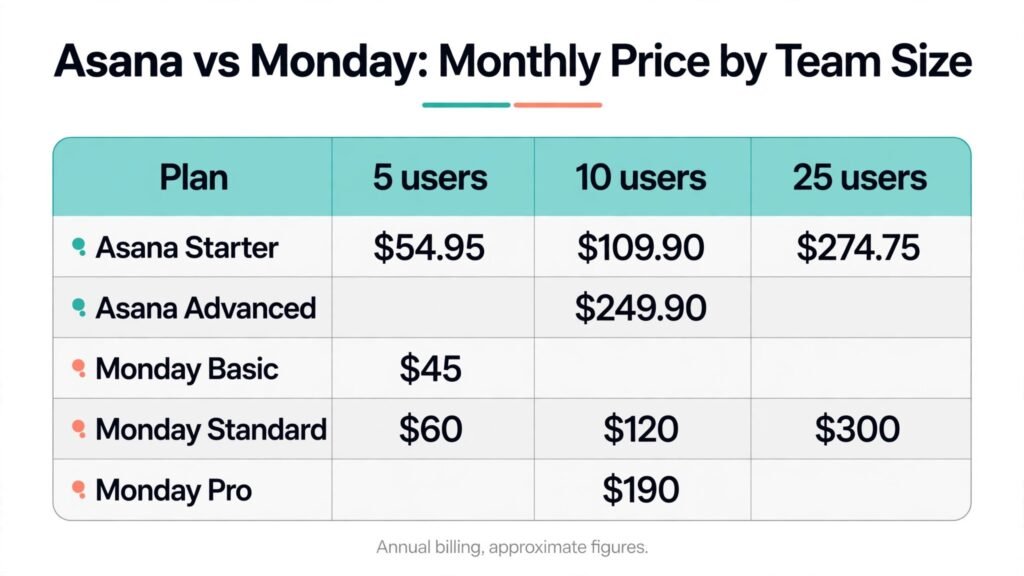
Use annual billing figures and the plan that actually includes the features you need, not just the cheapest plan. At five users, Asana Starter costs about $54.95 a month, while Monday Basic costs about $45 a month for three seats minimum, or more if you buy five seats, and Monday Standard costs about $60 a month for five seats. At ten users, Asana Starter costs about $109.90 a month, Monday Standard costs about $120 a month, and the gap is small. At twenty five users, Asana Starter costs about $274.75 a month, while Monday Standard costs about $300 a month, again close at entry level.
The gap widens when you compare plans with similar power. Asana Advanced at about $24.99 a user a month costs about $249.90 a month for ten users, while Monday Pro at about $19 a seat a month costs about $190 a month for ten users, so Monday is cheaper at that tier, even though the plans buy different things. Asana Advanced adds portfolios, goals and resource management, while Monday Pro mainly raises automation, integration and view limits. A team that needs portfolios should not buy Monday Pro expecting them, and a team that needs high automation limits should not buy Asana Starter expecting them. Price the feature, not just the seat, and check checkout for seat increments and minimums that can push the real bill above the simple multiplication.
| Area | Asana | Monday |
|---|---|---|
| Best for | Structured projects, portfolios, dependencies | Visual workflows, operations, CRM style tracking |
| Free plan | Core features for small teams | Up to two seats, limited boards |
| Entry paid price | Starter about $10.99 per user a month annual | Basic about $9 per seat a month annual |
| Mid tier price | Advanced about $24.99 per user a month annual | Standard about $12, Pro about $19 per seat a month annual |
| Seat minimum | No three seat minimum on paid plans in common listings | Three seats minimum on paid plans |
| Dependencies and timelines | Strong, built in | Available, needs board building |
| Automations | Strong on higher plans | Visual recipes, capped by plan |
| Reporting | Portfolios and workload on Advanced | Dashboards, strong for single teams |
| Learning curve | Medium | Low to medium, governance needed |
| Best team shape | Project led teams, agencies, product teams | Operations led teams, startups, mixed work |
A Month in Each Tool: What Actually Changes
In the first week, Monday usually feels more exciting. Boards fill with colour, automations fire, dashboards look impressive in a team meeting, and non technical users feel ownership because they built the board themselves. Asana first week feels quieter: tasks are assigned, timelines are set, and the value is less visible until the first deadline slips and the dependency view shows the impact. That difference in early excitement explains why many teams choose Monday after a short trial and then discover governance problems in month two.
By month two, the pattern often flips for structured teams. Asana projects stay consistent because the structure is built in, while Monday boards start to drift unless an admin steps in to clean status labels, archive old items and fix automations. Teams that appoint a Monday admin early avoid most of that drift, and teams that do not will spend month three rebuilding boards they built in week one. The lesson is not that one tool is messy and the other is tidy. It is that Monday needs an owner for board design, and Asana needs an owner for project discipline, and the team that appoints neither owner will struggle in either tool.
By month six, the deciding factor is usually reporting and scale. Asana teams can show leadership a portfolio view with little extra work, while Monday teams can show a dashboard for each department but may struggle to combine them into one leadership view without careful planning. Conversely, Monday teams can add a new workflow, such as a hiring pipeline or a vendor tracker, in an afternoon, while Asana teams may need to create a new project structure and train users on it. The tool that wins at month six is the one whose strength matches the work that grew most: portfolio scale points to Asana, workflow variety points to Monday.
Mistakes to Avoid When Choosing a Project Tool
The first mistake is buying the cheapest plan and discovering that the feature you need, such as portfolios, timeline, time tracking or high automation limits, lives on a higher tier. Always map your must have features to a specific plan before you compare prices. The second mistake is letting every user build their own board or project structure, which creates inconsistency that no tool can fix later. Appoint an admin, agree on templates, and protect status labels. The third mistake is migrating all old work at once. Migrate one active project, learn the tool with real work, and then migrate the rest, because a big bang migration hides adoption problems until it is too late.
The fourth mistake is measuring success by how many tasks are created, rather than by how many deadlines are met and how few status meetings are needed. A tool full of tasks that nobody trusts is worse than a simple system that people actually update. The fifth mistake is ignoring seat minimums and increments, which can add hundreds of dollars a year for a small team. The sixth mistake is skipping integrations testing: connect Slack, email, calendar and file storage during the trial, because a project tool that does not fit your existing stack will be bypassed, no matter how good its boards look.
Who Should Buy Which Tool
Buy Asana if you run projects with dependencies, you report across a portfolio, you manage resources and workload, or you work in an agency or product team where deadlines and handoffs matter. Buy Monday if you run operations across many workflow types, you want non technical users to build and own boards, you need visual dashboards for a single team, or you want one workspace for projects, pipelines and tracking. Buy neither on price alone: run a two week trial with a real project, a real deadline and a real report, and choose the tool your team updates without being chased.
For related reading, best AI tools for project managers covers the wider project tool field, and best AI tools for virtual assistants may help if your team relies on support staff to keep work organised. If your work includes client projects, hubspot alternatives is useful for comparing CRM style tracking alongside project tools.
One more practical check matters before you sign a yearly contract: export your data during the trial and look at what you get. A clean export of tasks, owners, dates, comments and attachments gives you freedom to move later if your team outgrows the tool, while a messy export is a warning sign about long term lock in. Also confirm who owns billing, who can invite new seats, and how guest access works for clients, because those admin details decide whether a tool stays tidy or slowly becomes a shared account that nobody controls. A ten minute admin review now can save a painful cleanup later.
Frequently Asked Questions
Is Asana or Monday better for small teams?
For a very small team, Asana Starter can be cheaper because Monday paid plans carry a three seat minimum, but Monday free and Basic plans are easy for non technical teams to adopt. Trial both with a real project and price your actual seat count, not just the headline rate.
Which tool is easier to learn?
Monday is easier to explain in a first session, because boards look like tables with colour coded status. Asana takes a little longer to learn, because projects, portfolios and My Tasks need a short tour, but it rewards that learning with stronger structure for larger work.
Can Monday replace Asana for project management?
Yes, for many teams, especially operations and marketing teams that value visual boards and flexible workflows. For teams that need strong dependencies, portfolio reporting and resource management out of the box, Asana remains the stronger project management choice.
Can Asana replace Monday for operations and CRM tracking?
Asana can track operations work, but it is less flexible than Monday for CRM style pipelines, custom workflows and visual dashboards across many work types. Teams that need one workspace for many different workflows usually prefer Monday.
Which has better automations?
Monday automations are easier for non technical users to build, but they are capped by plan, so heavy automation teams must price higher tiers. Asana rules are powerful inside structured projects, and the right plan depends on how many automations your team will actually run each month.
Which is better for reporting to executives?
Asana Advanced portfolio and workload reporting is stronger for executives who need a view across many projects. Monday dashboards are strong for single team and department reporting, and they are often easier to present in a meeting.
Should we migrate all projects at once?
No. Migrate one active project first, test integrations, reporting and adoption, and then migrate the rest. A staged migration reveals problems early, when they are cheap to fix, and it gives the team time to learn the new structure.
The Final Call: Asana vs Monday
If your work is project shaped, with deadlines, dependencies and a portfolio to report, Asana is the safer and stronger buy. If your work is workflow shaped, with many different boards, visual tracking and non technical builders, Monday is the more flexible and more adopted buy. The wrong choice is not a disaster if you catch it early, but the right choice saves a year of admin, rework and status meetings. Choose by the shape of your work, trial with a real project, price the plan that includes your must have features, and appoint an owner on day one. That discipline matters more than the logo on the tool, and it is what turns either platform from a colourful board into a system your team actually trusts.