

LearnWorlds is the best pick for most trainers, because it starts at 29 dollars a month, builds the course site, the quizzes and the certificates in one place, and charges only 5 dollars per paid enrolment on its Starter plan, which keeps the cost honest while the audience grows. The best ai course creators for trainers are not the ones with the most features. They are the ones that turn an outline into a course a student can buy, finish and recommend, without a developer and without a fee that eats the margin.
A trainer sells knowledge, and the platform is the shop. It must host the videos, run the quizzes, take the payment, issue the certificate, and keep the student list in the trainer hands. This guide compares ten platforms on the things that decide whether a trainer earns from a course.
Prices were checked against live pricing pages in November 2026. Where a vendor does not publish a price, this guide says so instead of guessing, and where a fee applies per sale, the guide states it next to the monthly price so the real cost is visible.
Course Structure, Quizzes and the Learning Experience
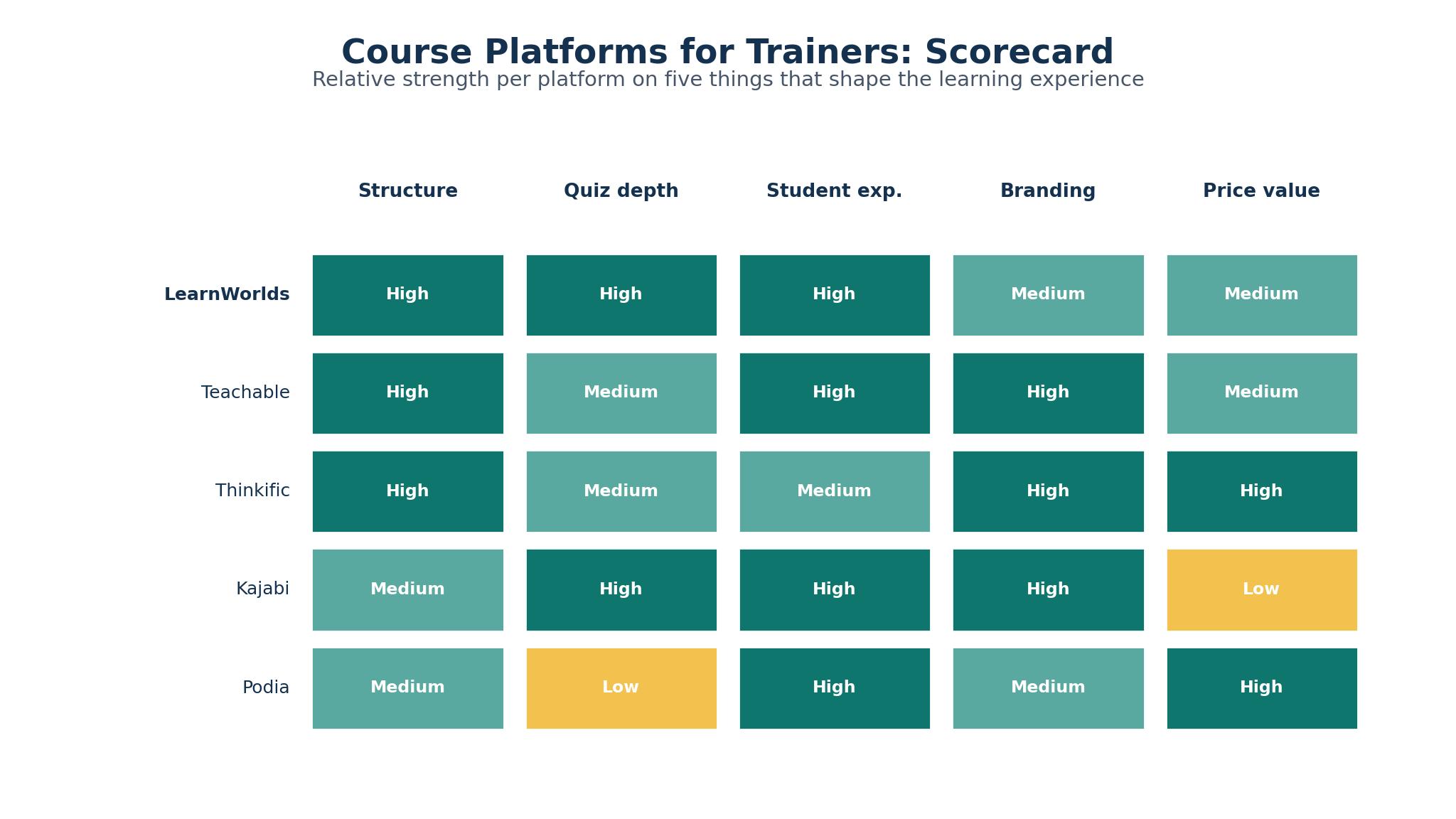
Course structure is the first test. A trainer needs modules, lessons, drip schedules and prerequisites, so a student moves through the material in the right order. LearnWorlds, Thinkific and Teachable all offer that structure, while Podia and 360Learning offer a simpler path that suits a short course. The best ai course creators for trainers let the trainer build the structure once and reuse it for the next course, because a platform that needs rebuilding every time costs hours.
Quizzes are the second test. A course without quizzes is a video library, and a student who never answers a question will not remember the material. LearnWorlds offers the strongest quiz engine here, with question banks, timed exams and certificates tied to a pass mark. Thinkific and Teachable offer solid quizzes, while TalentLMS and iSpring Learn offer the assessment depth that corporate training needs. A trainer who sells a certification course should check the quiz features before the price, because the certificate is the product.
The learning experience is the third test, and it is the one students feel. A course that plays well on a phone, resumes where the student stopped, and looks professional will get finished, while a course that buffers, loses progress, or looks dated will get abandoned. Kajabi leads on polish, with a clean student app and a branded site, while LearnWorlds and Thinkific are close behind. A trainer should watch a student complete a lesson on a phone before choosing, because the phone is where most students learn.
Transaction Fees and the Real Cost Per Sale
Transaction fees are where the cheap plan turns expensive. Teachable Starter costs 39 dollars a month, or 29 dollars a month on annual billing, but it takes a 7.5 percent fee on every sale, which means a 100 dollar course earns the trainer 92.50 dollars before payment processing. Podia Mover costs 49 dollars a month, or 42 dollars a month on annual billing, and takes a 5 percent fee. LearnWorlds Starter costs 29 dollars a month, or 24 dollars a month on annual billing, and charges 5 dollars per paid enrolment, which is a flat fee rather than a percentage.
The no-fee plans cost more per month but keep more per sale. Thinkific Basic costs 54 dollars a month, or 40 dollars a month on annual billing, with no transaction fee, while Kajabi Basic costs 179 dollars a month, or 143 dollars a month on annual billing, also with no transaction fee. A trainer who sells ten courses a month at 100 dollars each pays 75 dollars in fees on Teachable Starter, which is more than the difference to Thinkific Basic, so the cheaper plan is not always the cheaper choice.
The maths changes with volume. A trainer selling five courses a month should pick the low monthly price and accept the fee, while a trainer selling fifty courses a month should pick the no-fee plan and keep the margin. TalentLMS costs 69 dollars a month with no per-sale fee, iSpring Learn starts at 2.99 dollars per user a month, and LearnDash costs 199 dollars a year with no platform fee, because the trainer hosts it. Absorb LMS and 360Learning price by custom quote, with 360Learning listing 8 dollars per user a month as a starting point.
Branding, Domains and Owning Your Student List
Branding is the test most trainers skip until it is too late. A course on a platform domain, with the platform logo in the corner, tells the student they bought from the platform, not from the trainer. LearnWorlds, Thinkific, Teachable, Kajabi and Podia all let the trainer use a custom domain and remove the platform branding on paid plans, while the free and Starter plans usually keep the branding visible.
Owning the student list is the test that matters most. A platform that holds the student emails and will not export them is a trap, because the day the trainer moves platforms, the audience stays behind. Among the best ai course creators for trainers, LearnWorlds, Thinkific, Teachable and Kajabi all export the student list, and a trainer should test the export before the first sale, not after the hundredth. A tool that exports cleanly is the only safe home for an audience.
The third test is the site itself. A trainer who wants a full website with a blog, a sales page and a course catalogue needs Kajabi or LearnWorlds, which build the site as well as the course. A trainer who already has a website needs only the course engine, which makes Thinkific, Teachable or LearnDash the better fit.
The 10 Tools at a Glance
| Tool | Main job | Best for | Starting price |
|---|---|---|---|
| LearnWorlds | Courses, quizzes and certificates | Trainers who want the full course engine | $29/mo |
| Teachable | Courses and coaching | Trainers starting with a low monthly price | $39/mo |
| Thinkific | Courses and communities | Trainers who want no transaction fee | $54/mo |
| Kajabi | Courses, sites and marketing | Trainers who want the whole business | $179/mo |
| Podia | Courses and digital products | Trainers who sell courses and downloads | $49/mo |
| TalentLMS | Corporate training and courses | Trainers who serve company clients | $69/mo |
| iSpring Learn | Corporate training with authoring | Trainers who need SCORM and quizzes | $2.99/user/mo |
| LearnDash | Courses on WordPress | Trainers who already run WordPress | $199/yr |
| Absorb LMS | Enterprise learning platform | Trainers who serve large clients | Custom quote |
| 360Learning | Collaborative learning platform | Trainers who teach in teams | $8/user/mo |
Best Pick by Job
| Job type | First pick | Second tool | Why this pair works |
|---|---|---|---|
| Independent trainer, first course | LearnWorlds | Teachable | LearnWorlds covers quizzes and certificates; Teachable is cheaper to start |
| High-volume course sales | Thinkific | Kajabi | Thinkific has no fee; Kajabi adds marketing |
| Corporate training clients | TalentLMS | iSpring Learn | TalentLMS manages teams; iSpring adds authoring |
| WordPress site already running | LearnDash | LearnWorlds | LearnDash lives on WordPress; LearnWorlds is the hosted backup |
| Selling courses and downloads | Podia | Teachable | Podia handles both; Teachable adds coaching |
| Large enterprise client | Absorb LMS | 360Learning | Absorb scales to enterprise; 360Learning adds collaboration |
How to Shortlist the Best AI Course Creators for Trainers in a Weekend
Start on Friday with the course you already teach. Write the outline, count the lessons, and list the quizzes and the certificate rules. Then open three platforms and build the first module in each. LearnWorlds, Teachable and Thinkific all offer a free trial, and the first module will show which interface your hands prefer. A platform that feels slow in the first hour will feel slower in the tenth.
Then test the student side on Saturday. Enrol a friend as a student, ask them to complete a lesson on a phone, take a quiz, and download the certificate. If they finish without asking a question, the student experience is sound. If they get stuck, the platform is costing you sales, and no feature list will fix that. The best ai course creators for trainers are the ones a student can use without instructions, because the student will not read them.
Then price the month on Sunday. Add the subscription, the transaction fee on your expected sales, and the payment processing, then divide by the number of courses you expect to sell. A platform that looks cheap at 29 dollars a month and takes 7.5 percent on every sale can cost more than a 54 dollar a month platform with no fee, once the sales start. Pick the platform among the best ai course creators for trainers whose total cost fits your volume, not the one with the lowest headline price.
Finish by checking the export. Export the student list, the course content, and the quiz results, and confirm the files are usable. A platform that locks the student list is not a home for your business, and the weekend test is the time to find that out.
The 10 Tools in Detail
1. LearnWorlds
LearnWorlds builds the course site, the quizzes, the certificates and the student community in one place, with an interactive video player, a question bank, and a site builder that lets the trainer brand every page. Starter costs 29 dollars a month, or 24 dollars a month on annual billing, plus 5 dollars per paid enrolment. Pro Trainer and Learning Center plans remove the per-enrolment fee and add more features.
The per-enrolment fee on Starter is the catch. At 5 dollars per paid enrolment, a trainer who sells a hundred courses a month pays 500 dollars in fees, which is more than the subscription itself. The higher plans remove the fee, but they cost more per month, so a growing trainer must upgrade or pay the fee.
It suits independent trainers who want the strongest course engine at a low entry price. If your course needs quizzes, certificates and a branded site, and you are starting with a small audience, LearnWorlds gives the most capability for 29 dollars a month.
Test it by building your first module, enrolling a friend, and asking them to complete a lesson and a quiz on a phone. If they finish without help and the certificate arrives, the platform is doing its job. If the quiz setup takes an hour, the interface is costing you time.
2. Teachable
Teachable is the simplest course platform in this list, with a clean builder, coaching products, and a straightforward way to sell a course and take payment. Starter costs 39 dollars a month, or 29 dollars a month on annual billing, and it takes a 7.5 percent transaction fee on every sale. Higher plans reduce or remove the fee.
The fee eats the margin. At 7.5 percent, a 100 dollar course earns the trainer 92.50 dollars before payment processing, and the fee grows with every sale. Teachable also offers less quiz depth than LearnWorlds, so a trainer who sells a certification course will find the assessment tools thinner.
It suits trainers starting out who want the lowest monthly price and a simple setup. If you are selling your first course and your volume is low, the 29 dollar a month annual price is the cheapest way in, and the fee is small while the sales are few.
Test it by pricing a month at your expected sales volume, then comparing the total with Thinkific Basic. If the fee is under 15 dollars a month, Teachable wins on simplicity. If the fee is over 25 dollars, the no-fee plan is cheaper.
3. Thinkific
Thinkific builds courses and communities with no transaction fee on any plan, which makes its pricing the most honest in this list. Basic costs 54 dollars a month, or 40 dollars a month on annual billing, and it covers unlimited courses and students, with quizzes, certificates and a community space. Higher plans add more features and remove branding.
The monthly price is the hurdle. At 54 dollars a month, Thinkific costs more than Teachable Starter and LearnWorlds Starter, and a trainer with no sales yet will pay that price before the first course sells. The site builder is also simpler than Kajabi, so a trainer who wants a full marketing site will need another tool.
It suits trainers who sell regularly and want to keep every dollar of each sale. If your course sells ten times a month at 100 dollars, the 75 dollars of Teachable fees you avoid pays for the higher subscription, and the no-fee model only gets better as volume grows.
Test it by building a course and a community space, then asking three students whether the community adds value. If they use it, the community is a real feature. If they ignore it, the course alone is the product, and a simpler platform may do.
4. Kajabi
Kajabi is a full business platform that builds the website, the courses, the email marketing and the sales pages in one place, with a polished student app and a branded site. Basic costs 179 dollars a month, or 143 dollars a month on annual billing, with no transaction fee, and it covers three websites and three products.
The price is steep for a course-only tool. At 179 dollars a month, Kajabi costs more than three times LearnWorlds Starter, and a trainer who only needs a course engine will pay for marketing features they never use. The platform is also heavier to learn, with more settings than a simple course tool.
It suits trainers who run the whole business on one platform. If you need a website, email marketing, sales pages and courses in one place, Kajabi replaces four subscriptions, and the 179 dollar price is cheaper than the stack. For a trainer who only needs courses, it is more tool than the job needs.
Test it by listing every tool you currently pay for, adding the monthly costs, and comparing the total with Kajabi Basic. If the stack costs more than 179 dollars, Kajabi saves money. If the stack costs less, the course-only platform wins.
5. Podia
Podia sells courses, digital downloads, webinars and memberships from one storefront, which suits trainers who sell more than a course. Mover costs 49 dollars a month, or 42 dollars a month on annual billing, and takes a 5 percent transaction fee. Shaker removes the fee and adds more features.
Course depth is thinner than the leaders. Podia quizzes and certificates are simpler than LearnWorlds, and a trainer who sells a certification course will find the assessment tools thin. The platform is built for selling, not for teaching, and the learning experience reflects that.
It suits trainers who sell a mix of courses, downloads and memberships. If your business is a course plus a workbook plus a monthly membership, Podia handles all three in one storefront, and the 5 percent fee is fair while the volume is low.
Test it by building a course and a download product, then checking whether a student can buy both in one checkout. If the checkout is smooth, the storefront is doing its job. If the student must buy twice, the platform is adding friction.
6. TalentLMS
TalentLMS is a learning platform built for companies, with user groups, reporting, and course assignments that suit a trainer serving corporate clients. It offers branches for different clients, gamification, and integrations with common HR tools. Plans start at 69 dollars a month, with no per-sale fee, and the price scales with the number of users.
Independent trainers are not its best fit. TalentLMS is built for a company training its staff, not for a trainer selling a course to the public, so the storefront and payment features are thinner than LearnWorlds or Teachable. A trainer who sells to individuals will find the platform awkward.
It suits trainers who sell training to companies. If your clients are HR teams who need to assign courses, track completion, and report on results, TalentLMS is built for that workflow. For a trainer selling to individuals, the corporate features are extra weight.
Test it by setting up a client branch, assigning a course to ten users, and checking the completion report. If the report shows who finished and who did not, the platform is doing the corporate job. If the report is hard to read, the client will not renew.
7. iSpring Learn
iSpring Learn is a corporate learning platform with strong authoring, SCORM support, and quiz depth that suits trainers who build detailed courses. It offers course assignments, reporting, and a mobile app, with integrations for common HR systems. Plans start at 2.99 dollars per user a month, which makes it cheap for a small team.
Per-user pricing gets expensive at scale. At 2.99 dollars per user a month, a course with a hundred students costs 299 dollars a month, which is more than LearnWorlds or Thinkific. The platform is also built for corporate training, so the public storefront is thinner than a course marketplace.
It suits trainers who build SCORM courses for company clients. If your client needs SCORM compliance and detailed quiz reporting, iSpring Learn is the strongest pick here. For a trainer selling to the public, the per-user model is the wrong shape.
Test it by building a SCORM course and assigning it to a test group, then checking the quiz reports. If the reports show per-question results, the authoring depth is real. If the reports are basic, a simpler platform will do.
8. LearnDash
LearnDash is a course plugin for WordPress, which means the trainer owns the site, the course, and the student data, with no platform fee on sales. It offers quizzes, certificates, drip content, and memberships, with a large add-on ecosystem. Plans cost 199 dollars a year, with no per-sale fee beyond payment processing.
Setup is the real cost. LearnDash needs WordPress, hosting, and a payment plugin, which means the trainer manages the site, the updates, and the security. A trainer without a WordPress site will spend a week setting it up, while a hosted platform takes an afternoon.
It suits trainers who already run WordPress and want to own everything. If your site is WordPress and you want the course on the same domain, with no platform fee and full control, LearnDash is the cheapest long-term option. For a trainer starting from scratch, the setup is a real cost.
Test it by building a course on your WordPress site and timing the setup, then comparing the total cost with a hosted platform. If the setup takes under a day and the yearly cost is 199 dollars, LearnDash wins on price. If the setup takes a week, the hosted platform is worth the monthly fee.
9. Absorb LMS
Absorb LMS is an enterprise learning platform built for large organisations, with deep reporting, automation, and integrations that suit a trainer serving big clients. It offers AI-assisted course creation, a clean learner interface, and support for complex training programmes. Absorb prices by custom quote and publishes no starting number.
Opacity and enterprise scale both work against it. Without a published price, a small trainer cannot budget for Absorb without a sales call, and the platform is built for enterprise clients, not for an independent trainer selling a single course. The implementation is also heavier than a self-serve tool.
It suits trainers who serve large enterprise clients. If your client is a company with thousands of employees and needs deep reporting and automation, Absorb is built for that scale. For an independent trainer, it is the wrong size at the wrong price.
Test it by asking the vendor for a price and a setup timeline for your client size, then comparing both with TalentLMS. If the price is within reach and the setup is under a month, the enterprise depth may be worth it. If the price is enterprise-level, the trial should stop there.
10. 360Learning
360Learning is a collaborative learning platform where teams create courses together, with peer learning, authoring tools, and a focus on internal training. It offers course creation by subject experts, feedback loops, and analytics that show which courses work. Plans start at 8 dollars per user a month, with pricing by custom quote for larger teams.
A solo trainer will find it a poor fit. 360Learning is built for teams that create courses together, not for a single trainer selling a course to the public, so the storefront and payment features are thin. A solo trainer will pay for collaboration features they never use.
It suits trainers who teach inside a company with a team of experts. If your client wants its own staff to create courses, with peer review and shared authorship, 360Learning is the strongest pick here. For a solo trainer, the collaboration is extra weight.
Test it by inviting two colleagues to co-author a course, then checking whether the review workflow saves time. If the peer review catches errors and the course improves, the collaboration is real. If the workflow adds steps, a solo platform is faster.
From Outline to First Paying Student in 30 Days
Week one is the outline and the first module. Write the course outline, record the first three lessons, and build the quiz for module one. Do not build the whole course before the first student enrols, because the first students will tell you what to fix.
Week two is the sales page and the price. Write the sales page around the outcome, not the features, and set the price by the value the student gets, not by the hours of video. A course that saves a student ten hours is worth more than a course with ten hours of video. Set the price, publish the page, and tell your existing audience the course is coming.
Week three is the first students. Offer the course to ten people at an early price, and ask each one to complete module one and tell you what confused them. Fix the confusion, not the platform, because the platform is rarely the problem. A student who finishes module one and asks for module two is the signal the course works.
Week four is the launch. Publish the full course, send it to your list, and watch the first sales. If the first ten students finish the course and recommend it, the course is ready to scale. If they stop at module two, the course needs work before the marketing starts.

Hosted Platform or Self-Hosted: The Trade-Off for Trainers
A hosted platform is the fast route. LearnWorlds, Teachable, Thinkific, Kajabi and Podia handle hosting, updates, payments and security, so the trainer only builds the course. The cost is the monthly fee and the transaction fee, plus the risk that the platform changes its terms. A trainer who wants to teach, not manage software, should pick hosted.
A self-hosted platform is the control route. LearnDash on WordPress gives the trainer full ownership of the site, the data and the sales, with no platform fee beyond payment processing. The cost is the setup, the hosting, and the maintenance, which is real work every month. A trainer who already runs WordPress and wants to own everything should pick self-hosted.
The middle route is a hosted platform with export. LearnWorlds, Thinkific and Teachable all export the student list and the course content, which means the trainer can move if the platform changes. The best ai course creators for trainers are the ones that let the trainer leave, because a platform that locks the audience is a risk, not a home. Test the export before the first sale, and the choice between hosted and self-hosted becomes a question of time, not of fear.
Frequently Asked Questions
How much does it cost to start selling a course?
A trainer can start for 29 dollars a month on LearnWorlds Starter or Teachable Starter, plus the transaction fee on each sale. A course that sells ten times a month at 100 dollars earns 925 dollars on Teachable after the 7.5 percent fee, which covers the subscription many times over.
Do I need a website to sell a course?
A hosted platform builds the sales page and the course site, so a trainer does not need a separate website. Kajabi and LearnWorlds build a full site, while Teachable and Thinkific build a course site. A trainer who already has a website can use LearnDash on WordPress instead.
Which platform takes the lowest fees?
Thinkific, Kajabi, TalentLMS and LearnDash take no transaction fee, so the trainer keeps the full sale price minus payment processing. LearnWorlds Starter charges 5 dollars per paid enrolment, Podia Mover takes 5 percent, and Teachable Starter takes 7.5 percent, which is the highest fee in this list.
Can I move my students to another platform later?
Most platforms in this list export the student list, including LearnWorlds, Thinkific, Teachable and Kajabi, but a trainer should test the export before the first sale. A platform that will not export the student list is a trap, and the export test is the time to find that out.
How long does it take to build a first course?
A first course takes two to four weeks to build, with the outline and the first module in week one, the sales page in week two, and the first students in week three. A trainer who builds the whole course before the first student enrols will spend longer and learn less than one who launches early.
Do I need quizzes and certificates?
Quizzes and certificates matter when the course promises a skill or a credential, because the student needs proof of learning. LearnWorlds offers the strongest quiz engine here, while Podia and Teachable offer simpler quizzes that suit a course without a certificate.
The Verdict for Trainers
LearnWorlds is the pick for most trainers, because it starts at 29 dollars a month, builds the quizzes, the certificates and the branded site in one place, and the 5 dollar per-enrolment fee only applies on Starter. A trainer who wants the strongest course engine without a large monthly bill will be selling in a week, and the weekend test will show whether the student experience holds up.
Thinkific is the pick when the trainer sells regularly and wants no transaction fee, because the 54 dollar a month Basic plan keeps every dollar of each sale. Teachable is the pick when the budget is tight and the volume is low, because the 29 dollar a month annual price is the cheapest way to start.
Start with the course you already teach, build the first module in three platforms, and pick the one your test student finishes without asking a question. The best ai course creators for trainers are the ones that turn an outline into a finished course a student recommends, and the weekend test will show which platform that is.