
A t-shirt design has one job. It must sell from a small thumbnail on a marketplace, print cleanly on fabric, and survive a wash without looking like a mistake. Most AI image tools fail at least one of those jobs, which is why the best ai image generators for t-shirt designs are a different list from the best image generators in general. Text must be spelled right, backgrounds must go transparent, and the file must print at 300 DPI without falling apart.
This guide compares eight tools that print-on-demand sellers actually use for shirts in 2026, judged on text rendering, transparent backgrounds, vector output, print resolution, commercial rights, and price. Prices here come from vendor pages and comparisons checked in late 2026, so check the vendor pricing page before committing, because AI image pricing changes often. Two rules decide survival in this market. Always export at 300 DPI with transparent backgrounds, and never list a design with misspelled or garbled text, because marketplaces bury those listings and buyers screenshot them.
The eight tools differ in one decisive way. Ideogram and Recraft sell print ready output, with readable text and clean vectors. Midjourney and Leonardo sell raw artistic quality that needs finishing elsewhere. Kittl and Canva sell the finish itself, with editing, mockups, and print preparation built in. Your choice should follow which of those jobs you actually do every day.
Why T-Shirt Design Is a Different Job
A t-shirt graphic is not a poster. It prints on fabric, usually in a limited area, and the file must work on a black shirt as well as a white one. A design on a white background prints as a white box on a black shirt, which is the single most common beginner mistake in print on demand. Transparent PNGs are not optional. They are the difference between a design that sells and a design that gets returned.
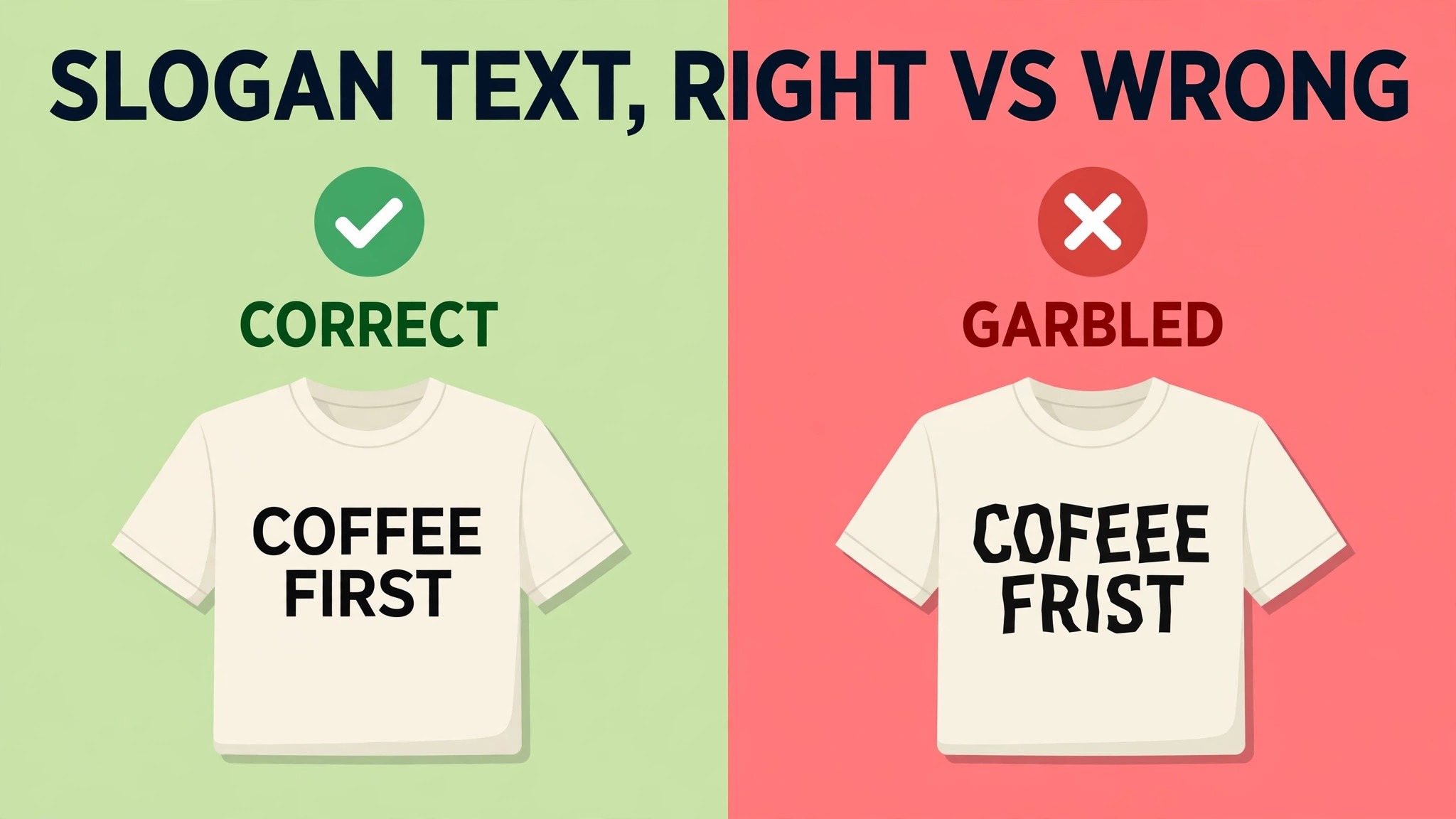
Text is the second difference. A pun shirt is nothing without the punchline readable, and most image models still garble multi-word slogans. A tool that renders text correctly is worth more to a shirt seller than a tool that makes prettier art, because the best selling shirt niches are slogan shirts, quote shirts, and typographic designs. Test text rendering on your real slogans before you buy, not on the demo examples.
Resolution is the third difference. A design that looks sharp on screen at 1024 pixels falls apart when printed at 12 inches wide, because print needs about 300 dots per inch. A 12 inch print needs roughly 3600 pixels across, and most generators output 1024 or 2048. That gap means upscaling is part of the workflow, not an afterthought, and a tool with built-in upscaling saves a step on every design.
The 8 Tools at a Glance
| Tool | Main job | Best for | Starting paid price |
|---|---|---|---|
| Ideogram | Text accurate images | Slogan and quote shirts | 7 dollars a month |
| Midjourney | Artistic illustrations | Illustration heavy designs | 10 dollars a month |
| Leonardo AI | Style consistent catalogues | Niche shops with a house style | 12 dollars a month |
| DALL-E 3 | Easy prompt to print | Beginners and fast concepts | 20 dollars a month |
| Kittl | Design plus print finish | End to end shirt workflow | 19 dollars a month |
| Recraft | Vector output | Clean scalable graphics | 12 dollars a month |
| Adobe Firefly | Commercially safe images | Brands and licensed work | 10 dollars a month |
| Canva | Design and mockups | Sellers who need mockups fast | 13 dollars a month |
The best ai image generators for t-shirt designs cannot be picked from this table alone, because the right answer for most sellers is two tools, not one. Midjourney makes the art, Ideogram makes the text, and Kittl or Canva finishes the file. A seller who buys one tool and expects it to do every job will be disappointed, while a seller who pairs an art tool with a text tool and a finishing tool will ship designs every day.
Free tiers help with testing. Ideogram, Leonardo, DALL-E through Bing, Kittl, Recraft, Firefly, and Canva all offer free tiers, enough to test a niche before paying. Midjourney has no free tier, so the 10 dollar Basic plan is the cost of testing it. Paid plans grant commercial rights on most tools, but the details differ, so read the licence for the plan you buy before listing a design for sale.
Best Pick by Job
| Job type | First pick | Second tool | Why this pair works |
|---|---|---|---|
| Slogan and quote shirts | Ideogram | Kittl | Readable text plus print finish |
| Illustration shirts | Midjourney | Recraft | Best art plus vector cleanup |
| Niche catalogue shop | Leonardo AI | Ideogram | Consistent style plus text accuracy |
| Beginner seller | DALL-E 3 | Canva | Easiest start plus mockups |
| Vector and sticker shirts | Recraft | Kittl | True SVG plus editing and mockups |
| Brand safe commercial work | Adobe Firefly | Leonardo AI | Licensed training data plus style control |
A slogan seller using the best ai image generators for t-shirt designs needs readable text first, and Ideogram is the only tool in this guide built for that job, with editable text layers that let you fix wording without re-rolling the image. Kittl adds the print finish, with editing, background removal, and mockups in one place. Together they cover the two jobs that decide whether a slogan shirt sells.
An illustration seller needs Midjourney art quality first, with Recraft for the vector version that screen printers and cut files need. A niche catalogue shop needs Leonardo custom training to keep one aesthetic across hundreds of designs, with Ideogram for the text heavy listings. A beginner should start with DALL-E inside ChatGPT for concepts and Canva for mockups, because that pair is the fastest path from an idea to a listing.
How to Judge the Best AI Image Generators for T-Shirt Designs
Start with your best selling design type, not with a demo image. Generate five designs in your niche on three tools, and judge them on three tests. Is the text spelled right. Does the background go transparent cleanly. And does the file upscale to 300 DPI at print size without visible artefacts. A tool that passes all three on your niche is the right tool, even if it loses on a general image quality ranking.
Next, check the file you actually get. Raster only tools, such as Midjourney and Ideogram, output pixels, which is fine for direct to garment printing but not for screen printing or cut files. Recraft outputs true SVG vectors, which scale to any size and work as cut files, and that single feature decides the choice for many apparel sellers. Check whether your printer needs vector or raster before you buy, because the wrong format costs a redesign.
Then model the monthly cost at your real design volume. Print on demand is a volume business, and the seller with 200 designs beats the seller with 20. Ideogram Plus at 20 dollars a month gives about 1,000 priority credits. Midjourney Basic at 10 dollars gives about 200 fast generations a month. Leonardo Essential at 12 dollars gives 8,500 tokens. Work out how many designs each plan buys you, and buy the plan that covers your weekly listing target with a small margin.
Finally, test the commercial licence. Paid plans on most tools grant full ownership and commercial rights, but free plans often do not. Recraft free outputs are public and owned by Recraft, so selling requires a paid tier. Ideogram free images are public and JPG only, and its terms disclaim liability for commercial use of free tier images rather than banning it outright, so a paid plan is the safer bet. Check the licence for the plan you buy, and keep a record of which plan made each design.
The 8 Tools in Detail
1. Ideogram
Ideogram is the text specialist, and for t-shirt sellers that makes it the most important tool in this guide. It renders readable, correctly spelled text inside images, which most models still botch, and that single trait decides the huge Etsy niches of quote prints, typographic mugs, and slogan shirts. Ideogram 4.5 adds editable text layers, so you can fix wording without re-rolling the image, plus a background remover and an ad resizer.
Pricing starts with a free tier of about 30 credits a week, with public images and JPG only downloads. Plus costs about 20 dollars a month, or 15 dollars billed yearly, for about 2,400 priority credits and private generation. Pro costs about 60 dollars a month for more credits and faster generation. Some comparisons list a Basic tier at 7 or 8 dollars a month with 400 fast credits, so check the vendor pricing page for the current tiers.
Ideogram fits slogan shirts, quote designs, retro badges, club merchandise, and any design where the words have to be spelled right. The trade off is raster only output, with no vector for apparel cut files, and free images that cannot be deleted. For text heavy shirt designs, Ideogram is the default pick, and most serious sellers pair it with a vector or finishing tool.
2. Midjourney
Midjourney is the artistic benchmark, and its strength is illustration quality. It makes the most striking, detailed, gallery look imagery in this guide, with V8.2 as the current house model and Niji 7 for anime and illustration styles. For illustration style shirt designs, such as cute animals, retro graphics, minimal line art, fantasy, gothic, botanical, and surreal art, Midjourney is the best starting point.
Pricing is Basic at 10 dollars a month, or 8 dollars billed yearly, for about 200 fast generations a month, with Standard at 30 dollars, Pro at 60, and Mega at 120. There is no free plan or trial, and images are public unless you pay for Pro or Mega. Companies earning more than 1 million dollars a year need Pro or Mega for commercial use. Paid plans grant commercial use rights, so a Basic seller is clear to sell the output.
Midjourney fits artistic, illustration heavy designs, wall art, and posters, and it is the best raw artistic quality at print scale. The trade off is weak text rendering on multi-word slogans, no native transparency, no vector output, and 2K output that is short of what a large print needs at 300 DPI. Expect to run outputs through a dedicated upscaler and add text in a second tool. For art first shirts, Midjourney is the pick.
3. Leonardo AI
Leonardo AI is the all round workhorse for print on demand, with more than 80 models, custom training, and a free tier. Its strength for shirt sellers is style consistency. Train a model on your niche aesthetic, and every design in the catalogue keeps the same look, which matters when a shop sells 200 designs in one style. It also offers transparent backgrounds and upscaling built in.
Pricing starts with a free tier of 150 fast tokens a day, with commercial use allowed even on free according to its FAQ. Essential costs 12 dollars a month, or 10 dollars billed yearly, for 8,500 tokens and private creations. Premium costs 30 dollars a month, and Ultimate costs 60 dollars. The token model takes time to learn, but the free tier is generous enough to test a niche properly.
Leonardo fits style consistent shop catalogues, niche sellers, and creators who want one tool for images, video, and editing. The trade off is text rendering that is decent rather than best in class, and a token economy that needs a week to understand. For a seller building a catalogue in one style, Leonardo is the workhorse pick.
4. DALL-E 3
DALL-E 3, inside ChatGPT, is the easiest entry point in this guide. You describe the design in plain English, and it returns a usable concept in seconds, with strong natural language understanding that handles complex scenes well. It is the best tool for fast concept iteration, when you need ten ideas for a niche before committing to one.
Pricing is free inside Bing Image Creator with limits, or 20 dollars a month for ChatGPT Plus, which includes DALL-E 3 plus the full ChatGPT toolset. There is no native transparency, no vector output, and text rendering is better than Midjourney but worse than Ideogram. The output is raster only, and print resolution needs upscaling in a second tool.
DALL-E fits beginners, concept work, and sellers who want the fastest path from an idea to a test listing. The trade off is that it is a general tool, not a print tool, so the finishing work happens elsewhere. For a seller testing a new niche, DALL-E is the fastest way to find out if the idea sells.
5. Kittl
Kittl is the only tool in this guide designed end to end for finished print on demand output rather than raw image generation. It combines AI artwork generation with practical editing tools, including text effects, background removal, mockups, and print preparation, so a seller can create and refine a design in one place. That end to end design is its strength.
Pricing starts with a free plan, Pro costs 19 dollars a month, and Expert costs 45 dollars a month. Some comparisons list Pro at 15 to 24 dollars a month, so check the vendor pricing page. The free tier is enough to test the workflow, and Pro adds the features a serious seller needs, including higher resolution exports and more AI generations.
Kittl fits sellers who want one tool from idea to listing, especially slogan shirts, vintage designs, and typography heavy work. The trade off is image generation quality that trails Midjourney for pure illustration, and a library that is smaller than the biggest generators. For a seller who values the finish more than the raw art, Kittl is the best overall pick.
6. Recraft
Recraft is the vector specialist, and for apparel sellers that makes it uniquely valuable. It is the rare generator that outputs true SVG vectors, which is exactly what t-shirt, sticker, and apparel print on demand needs. A vector design scales to any print size without losing quality, works as a cut file, and keeps brand style controls consistent across a product line. Every paid plan grants full ownership and commercial rights.
Pricing starts with a free plan with daily credits, though free outputs are public and owned by Recraft, with no commercial rights. Basic starts at about 12 dollars a month, or 10 dollars billed yearly, for 1,000 credits, commercial rights, and private generations. Pro starts at about 20 dollars a month with a larger credit allowance. Vector generations cost more credits than raster, so a seller should model the credit cost per design before subscribing.
Recraft fits t-shirt, sticker, and apparel sellers who need clean scalable vectors, flat illustrations, logos, and badges. The trade off is a smaller model library than the general tools, and image generation that suits flat and graphic styles better than photoreal work. For vector shirts and cut files, Recraft is the only tool in this guide that does the job natively.
7. Adobe Firefly
Adobe Firefly is the commercially safe pick, and its strength is the training data. Firefly models are trained on licensed Adobe Stock content and public domain material, which gives brands and agencies peace of mind about commercial use that other tools cannot match. It integrates with Photoshop, Illustrator, and Express, so a designer already in the Adobe workflow can generate, edit, and finish in one place.
Pricing is Standard at about 10 dollars a month, Pro at about 20 dollars, and higher tiers for heavy users, with prices varying by region and currency. The free tier gives a limited number of generations for testing. Firefly text rendering is decent, and it offers transparent backgrounds on some outputs, though it is not a print specific tool and needs a finishing step for print on demand.
Firefly fits brands, agencies, and sellers who need licensed training data and Adobe integration. The trade off is image generation that is solid rather than leading, and a credit model that needs checking against your monthly design count. For commercial work where licensing safety matters more than raw art quality, Firefly is the safe pick.
8. Canva
Canva is the mockup and finishing tool that most shirt sellers already use, and its AI image generation is the bonus rather than the main event. Its strength is the workflow after generation. Mockups, listings, social posts, and print preparation all happen in one place, with templates for every marketplace and social platform. A seller can generate a design, mock it up on ten shirt colours, and list it in one session.
Pricing starts with a free tier, and Pro costs about 13 dollars a month, with team plans above that. The free tier is generous for testing, and Pro adds the background remover, higher resolution exports, and the full template library. Canva image generation is good for simple designs and concepts, but it trails the specialist generators for detailed illustration and text accuracy.
Canva fits sellers who need mockups fast, beginners who want one tool for everything, and shops that publish the same design across many products. The trade off is generation quality that is not leading, and a tool that is really a design platform with AI added, rather than an AI generator with design added. For mockups and listings, Canva is the fastest tool in this guide.
The Print Ready Workflow
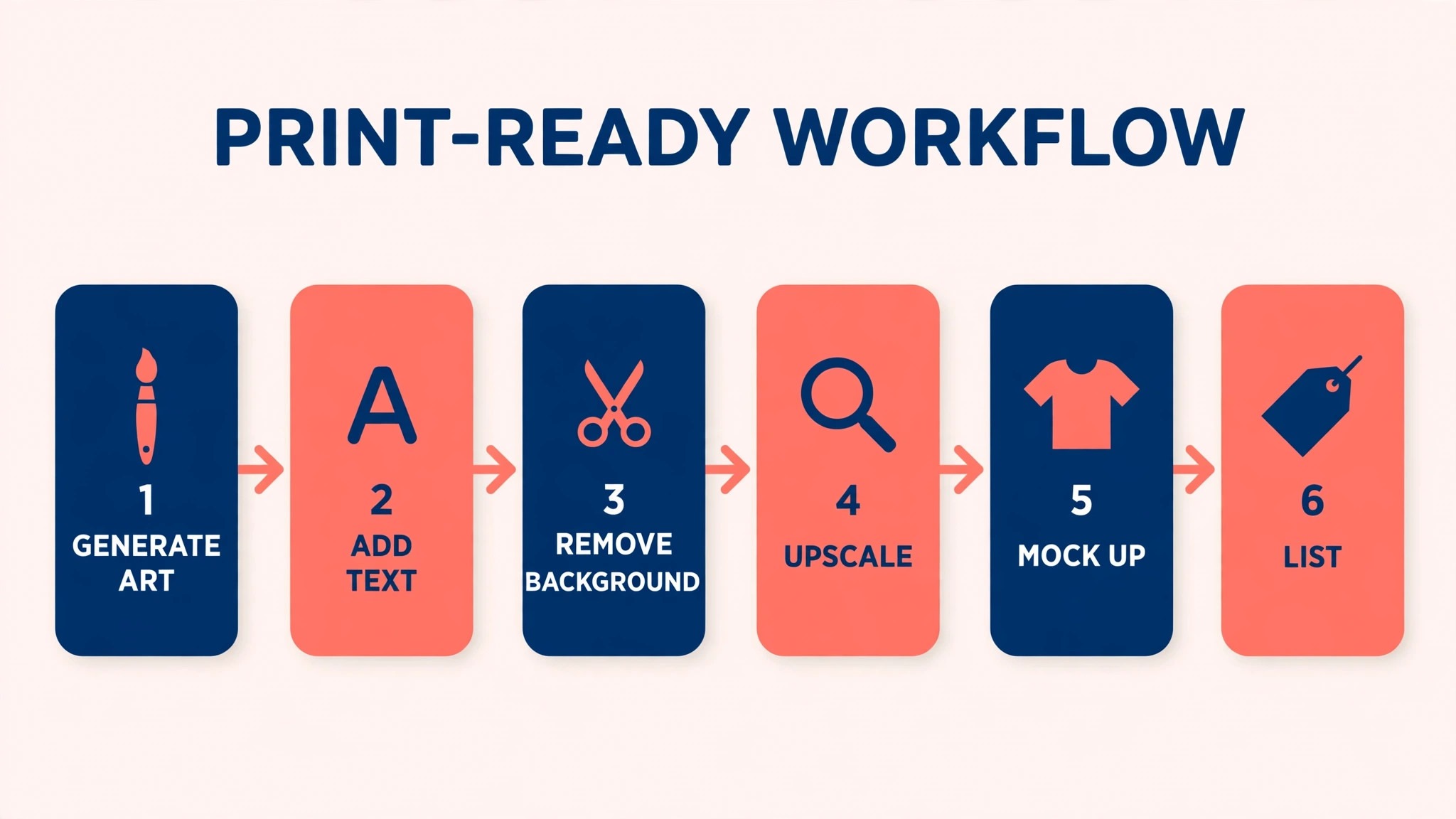
| Step | Job | Best tool | What good looks like |
|---|---|---|---|
| 1 | Generate the art | Midjourney or Leonardo | Clean art, no text errors |
| 2 | Generate the text | Ideogram | Every word spelled right |
| 3 | Vector where needed | Recraft | True SVG, scalable |
| 4 | Remove background | Kittl, Canva, or Ideogram | Transparent PNG, clean edges |
| 5 | Upscale to print size | Leonardo, Kittl, or Topaz | 300 DPI at 12 inches wide |
| 6 | Mock up and list | Canva or Kittl | Ten colours, clean listing |
The workflow matters more than any single tool, because no one tool does all six steps well. A seller who runs this workflow ships designs that print cleanly, list well, and survive a wash. A seller who skips steps ships designs with white boxes, garbled text, and blurry prints, and those listings do not sell twice.
Test the workflow on five designs before you scale it. Generate the art, add the text, remove the background, upscale, mock up, and list, and time each step. The workflow that takes twenty minutes per design ships ten designs a day. The workflow that takes two hours ships two. Speed is a competitive advantage in print on demand, because volume decides who gets found.
The Total Monthly Cost, Worked Honestly
| Seller type | Designs a month | Tool stack | Monthly cost |
|---|---|---|---|
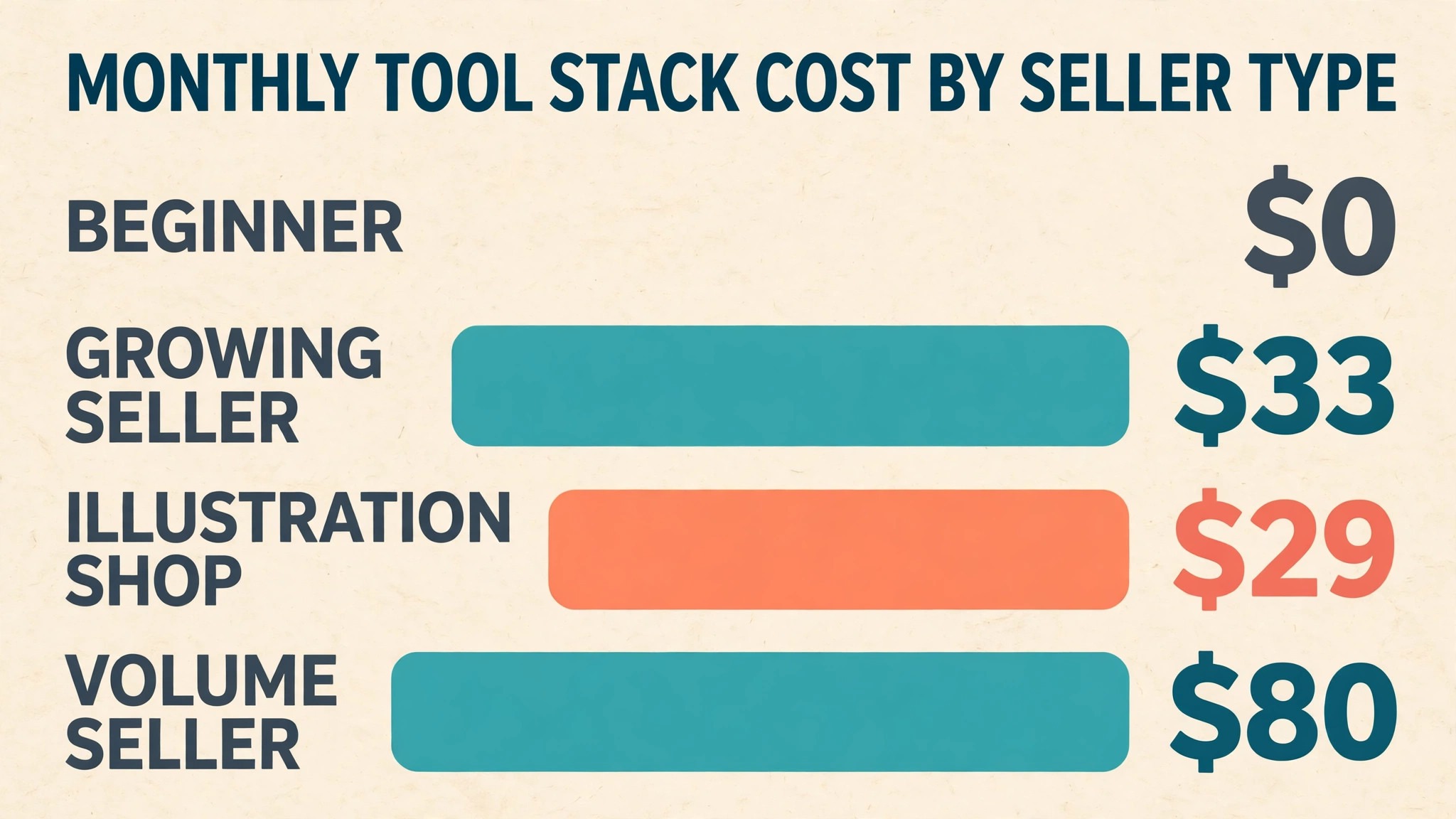
| Beginner, testing a niche | 20 | Ideogram free plus Canva free | 0 dollars |
| Growing seller, 50 designs | 50 | Ideogram Plus plus Canva Pro | 33 dollars |
| Illustration shop, 50 designs | 50 | Midjourney Basic plus Kittl Pro | 29 dollars |
| Volume seller, 200 designs | 200 | PlayHT style stack, Ideogram Pro plus Recraft Pro | 80 dollars |
| Brand safe shop, 50 designs | 50 | Firefly Pro plus Leonardo Essential | 32 dollars |
A beginner can test a niche for nothing, using free tiers across Ideogram and Canva, and that is the right way to start. A growing seller publishing 50 designs a month pays about 33 dollars for Ideogram Plus and Canva Pro, which covers text, mockups, and listings. An illustration shop pays about 29 dollars for Midjourney Basic and Kittl Pro, which covers art and finishing.
A volume seller publishing 200 designs a month needs Ideogram Pro at 60 dollars plus Recraft Pro at 20 dollars, or about 80 dollars, and that stack covers text, vectors, and scale. A brand safe shop pays about 32 dollars for Firefly Pro and Leonardo Essential. The best ai image generators for t-shirt designs are the ones whose stack fits your design volume, not the ones with the lowest single subscription, because the stack is what you actually pay for.
Mistakes Sellers Make With AI Shirt Designs
The first mistake is listing a design with a white background on a dark shirt. Always export a transparent PNG, and check the mockup on a black shirt before you list. A white box on a black shirt is the most visible beginner error in print on demand, and buyers will not forgive it twice. Test every design on dark and light colours before it goes live.
The second mistake is trusting AI text without reading it. Generate the design, zoom in, and read every word letter by letter. AI models still garble slogans, swap letters, and invent words, and a misspelled shirt is a returned shirt. Ideogram reduces the risk, but no tool removes it entirely. A human read of every design is the cheapest quality control in the business.
The third mistake is printing at screen resolution. A 1024 pixel image printed at 12 inches wide is about 85 DPI, which looks blurry on fabric. Upscale to at least 3000 pixels across for a 10 inch print, and 4500 for a 15 inch print, before you list. The best ai image generators for t-shirt designs are the ones that help you reach print resolution, whether through built-in upscaling or a clean handoff to an upscaler.
Setup Checklist
Use this checklist when you set up AI design for a t-shirt shop, and keep a copy with your listing notes.
- Pick your niche and your design type before buying any tool.
- Test text rendering on five real slogans across three tools.
- Check transparent background output on a black shirt mockup.
- Confirm vector or raster needs with your printer before choosing a tool.
- Check the commercial licence for the plan you will buy, not the free plan.
- Build your six step print workflow and time it on five designs.
- Upscale every design to 300 DPI at print size before listing.
- Review sales, returns, and reviews monthly, and cut the designs that do not sell.
Related Guides
Keep exploring with these guides on Stratilyze:
- Best AI Image Generators for Comic Books (6 Tools)
- DALL-E Alternatives: 12 Best AI Image Generators in 2026
- Leonardo Alternatives: 12 Best AI Image Generators in 2026
Frequently Asked Questions
What is the best AI image generator for t-shirt designs?
Ideogram is the best pick for slogan and text heavy shirts, because it renders text correctly. Midjourney is the best pick for illustration shirts, because it makes the most striking art. Most serious sellers use two tools, Ideogram for text and Midjourney for art, with Kittl or Canva for the finish. The best ai image generators for t-shirt designs depend on your design type, so test your niche on three tools before deciding.
Can I sell AI generated t-shirt designs?
Yes, on a paid plan that grants commercial rights. Most tools in this guide grant full ownership and commercial rights on paid plans, but free plans often do not. Recraft free outputs are owned by Recraft, and Ideogram free images are public. Move to a paid plan before you list a design for sale, and keep a record of which plan made each design.
How do I make the background transparent?
Use a tool with native transparency, such as Ideogram v3, Leonardo, or Recraft, or remove the background in Kittl or Canva after generation. Always check the result on a black shirt mockup, because a background that looks clean on white can hide a faint box on black. Export as a transparent PNG, never as a JPG, since JPG cannot carry transparency.
What resolution do I need for t-shirt printing?
Print needs about 300 DPI. A 10 inch wide print needs about 3000 pixels across, and a 12 inch print needs about 3600. Most generators output 1024 or 2048 pixels, so upscale before you list. A design that looks sharp on screen at 1024 pixels will look blurry on fabric at 12 inches wide.
Is Midjourney good for t-shirt designs?
Yes, for illustration heavy designs, and it is the best art quality in this guide. It is weak for slogan shirts, because text rendering is poor, and it has no native transparency or vector output. Use Midjourney for the art, add text in Ideogram or Kittl, and upscale before printing. For art first shirts, Midjourney is the pick.
Which tool gives vector output for shirts?
Recraft is the only tool in this guide that outputs true SVG vectors natively. Vector output scales to any print size, works as a cut file, and suits screen printing, stickers, and flat illustrations. Raster tools such as Midjourney and Ideogram output pixels, which suit direct to garment printing but not cut files. Check what your printer needs before you buy.
A Final Word Before You Choose
There is no universal winner among these eight, because the right tool follows what you actually design. A slogan seller should start with Ideogram. An illustration seller should start with Midjourney. A catalogue seller should start with Leonardo. A vector seller should start with Recraft. A seller who wants one tool for the whole workflow should start with Kittl.
Whichever you choose, test your real slogans on three tools, check the transparent background on a black shirt, and upscale every design to 300 DPI before you list. A design tool earns its fee in listings that sell, prints that survive a wash, and hours saved per design. Choose the tool that does those three jobs on your busiest listing week, and the rest of the feature list will take care of itself. The best ai image generators for t-shirt designs are the ones that fit your niche, your volume, and your printer, not the ones with the longest feature list.