

Public libraries now answer questions that once took a full afternoon of shelf work and phone calls. A patron wants sources behind a health claim, a student needs a grade matched reading list, a local history group wants decades of meeting notes made searchable, and a children’s librarian needs a flyer, a story time plan and a social post before Friday. That pressure is why this guide to the best AI tools for librarians focuses on practical work. The tools below help with reference interviews, research support, programs, outreach and accessibility, and a small team can run them without a large IT department.
The honest starting point is that no single tool replaces a librarian. AI is good at drafting, summarising, searching and reformatting, and weak at judging local relevance, checking a citation and deciding what belongs in a collection. Use AI for the first draft and the heavy sorting, then apply professional judgment before anything reaches a patron.
The best AI tools for librarians at a glance
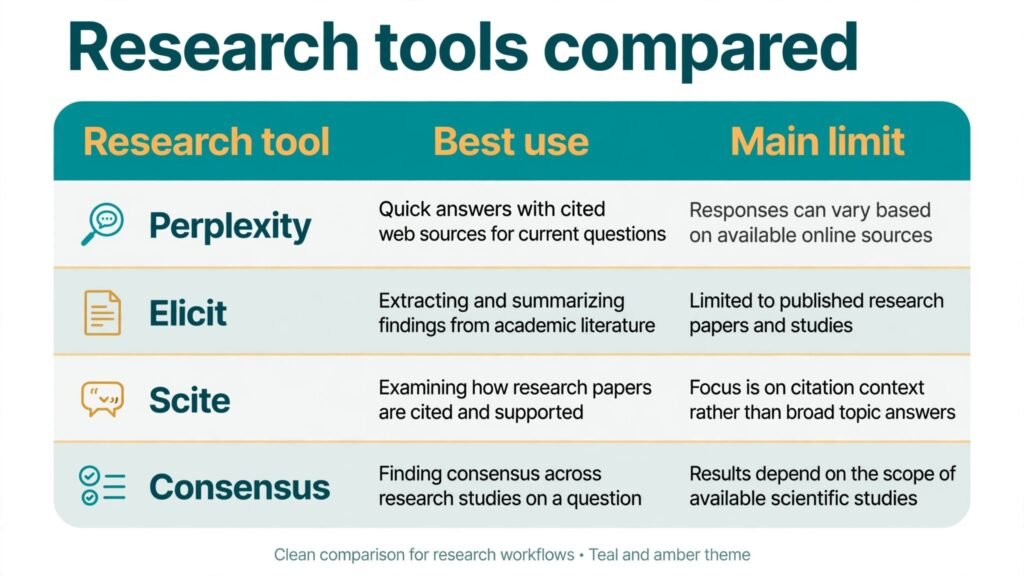
The table gives the short version. Read the full profiles before you buy, because the right choice often depends on one limit, such as a citation habit, rather than the headline feature.
| Tool | Best for | Watch out for |
|---|---|---|
| ChatGPT | Drafting, reference triage, program ideas | Citations need checking, every time |
| Claude | Long documents, summaries, careful rewrites | Output can sound confident on thin evidence |
| Perplexity | Sourced quick answers | Sources vary in quality |
| Elicit | Academic literature discovery | Coverage is strongest in published research |
| Scite | Checking how a paper was cited | Citation context needs human reading |
| Consensus | Evidence style research questions | Best on questions research can answer |
| SciSpace | Reading dense papers faster | Summaries can miss methods detail |
| ResearchRabbit | Finding related papers visually | Needs a good seed paper to start |
| Notion AI | Internal notes, guides and workflows | Needs tidying or notes sprawl |
| Canva | Flyers, displays and social graphics | Templates can start to look alike |
| Gamma | Slide decks and program handouts | Design freedom is limited |
| Otter.ai | Transcription for oral history and meetings | Speaker labels need review |
| Descript | Library podcasts and video clips | Editing audio still takes practice |
| ElevenLabs | Accessible audio versions and narration | Voice use needs clear consent |
| Grammarly | Newsletters, guides and plain language edits | Style suggestions can flatten voice |
Research and reference help
This is where AI earns its keep fastest, and where mistakes cost the most. Use these tools to widen a search and draft a starting answer, then verify the final answer against the source itself.
1. ChatGPT
ChatGPT works well as a reference desk assistant for drafting. A librarian can ask it to turn a vague patron request into a set of search terms, draft a plain language explanation of a topic, outline a book display, or write five versions of a program description for different audiences. It is also useful for staff training, because it can produce practice reference questions, quiz items and role play scripts for new hires. The strength is flexibility. One tool can move from a children’s reading list to a grant outline to a social media caption in the same session, which matters when one person covers several desks in a day.
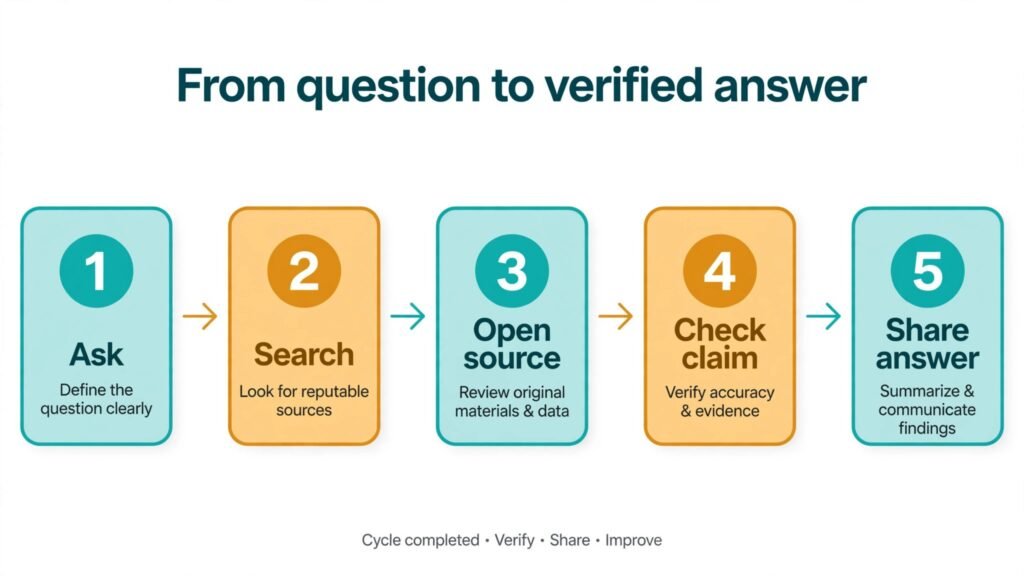
The limit is well known and still catches people out. ChatGPT can produce references that look perfect and do not exist, and it can summarise a topic smoothly while missing the exact detail a researcher needs. Treat every citation, date, statistic and quotation as unverified until you find it in the original source. A practical rule is to ask for sources, then open at least two of them yourself before you repeat a claim. For library work, keep patron questions anonymised, avoid pasting copyrighted text in bulk, and save the verified final answer in your own guide rather than the raw chat output.
Watch out for: invented citations, confident summaries built on thin sources, and the temptation to copy an answer straight into a patron reply without checking it.
2. Claude
Claude is best when the document is long. Upload a council report, a grant guideline, a long policy document or a set of meeting minutes, and ask for a summary by section, a list of action items, or a plain language version for the public. Librarians report that it handles long, structured documents with fewer dropped threads than shorter context tools, which helps when you need to compare what a report says on page four with what it says on page forty. It also rewrites well. A dense academic abstract can become a readable display card, and a formal policy can become a friendly FAQ without losing the key conditions.
The trade off is tone and trust. Claude writes so cleanly that a summary can feel finished when it is only a first pass. Numbers, names and conditions still need checking, especially in grant rules, opening hours, eligibility criteria and local history claims. It also works best when you give it a clear job. Vague prompts produce vague summaries, while a prompt that names the audience, the length and the questions to answer produces something you can actually use. Keep a copy of the original document beside the summary, and mark any figure you have not verified.
Watch out for: smooth summaries that hide a missed condition, and long outputs that nobody on staff has time to proofread in full.
3. Perplexity
Perplexity answers a question and shows its sources in the same view, which fits reference work better than a bare answer. A librarian can test a claim, follow the source links, and judge whether the source is a primary document, a reputable news outlet or a low quality blog. It is useful for quick factual checks, for finding the original report behind a viral statistic, and for building a short source list that a patron can follow up on their own. For staff, it is also a fast way to check what the current guidance says on a topic before you update a guide.
Source quality is the catch. A linked source is not automatically a good source, and Perplexity can lean on whatever ranks well rather than whatever is most authoritative for a library audience. Teach staff to open the source, check the publisher, check the date, and prefer primary sources, government pages and peer reviewed work where the question demands it. If the sources disagree, say so in your answer instead of picking the tidiest one. That honesty is exactly what patrons value in a library, and it is where a librarian adds value that a search tool cannot.
Watch out for: weak or dated sources presented neatly, and answers that blend several sources into one confident claim.
4. Elicit
Elicit is built for academic literature search. Give it a research question and it returns papers, extracts key findings, and helps you compare studies side by side. For a university library, a research help desk or a librarian supporting a thesis student, this saves the first hour of searching, when a student often does not yet know the right terms. It can surface papers a keyword search would miss, because it matches meaning as well as exact words, and it can organise results into a table of methods, populations and findings that a student can then read critically.
Its coverage reflects published research, so it is less useful for local history, grey literature, community reports and very new topics that have not yet been published in journals. It also cannot judge quality for you. A paper with a small sample, a weak method or a contested conclusion can still appear in a results table, and a student who copies the table without reading the papers has not done research. Use Elicit to build a reading list, then teach the next step, which is reading abstracts, checking methods and noting disagreements between studies.
Watch out for: a tidy comparison table that hides weak methods, and over reliance on published papers when local or unpublished sources matter more.
5. Scite
Scite answers a different question from most search tools. It does not only tell you that a paper exists, it shows how later papers cited it, whether they supported it, mentioned it neutrally or disputed it. For a librarian helping a researcher, a journalist or a student, that context is gold. A famous paper can look authoritative until you see that later work qualified its findings, and a quiet paper can turn out to be widely supported. Scite helps a reference interview move from “here is a paper” to “here is how the field has treated this paper since it appeared.”
The tool still needs human reading. A citation label is a shortcut, not a verdict, and a paper can be cited in support of one claim while being disputed on another. Librarians should open the citing papers for any claim that will go into coursework, a display or a public answer. Scite also works best where citation data exists, so very new papers, books and non journal sources may show thin results. Use it as a quality check inside a wider search, not as a single score that decides whether a source is good.
Watch out for: treating a citation label as proof, and thin coverage for books, reports and very recent work.
6. Consensus
Consensus is designed for questions that research can answer, such as whether a particular intervention shows evidence of benefit, or what studies say about a health or education topic. It returns a short synthesis drawn from papers, with sources attached, which helps a librarian give a patron a starting point without pretending to give medical, legal or personal advice. For public library health and science questions, that boundary matters. You can show what research says, point to reputable sources, and refer the patron to a professional for a personal decision, all in one careful answer.
The limit is scope. Consensus works best when a question has a research base. Questions about local services, personal circumstances, opinion or very new events will produce weaker or misleading syntheses. Librarians should also watch for the way a synthesis can smooth over disagreement. If studies conflict, the answer should say that studies conflict, give the range of findings, and avoid a single number that hides the uncertainty. Keep the synthesis as a bridge to the papers, not as the final answer.
Watch out for: neat syntheses on questions with thin or conflicting evidence, and any use that crosses into personal advice.
7. SciSpace
SciSpace helps readers get through dense papers faster. It can explain a section in plain language, define a term in context, summarise a paper, and answer questions about what the paper actually says. For a librarian supporting students, researchers and curious readers, that lowers the barrier to hard material. A patron who would give up on a twenty page paper can read a clear summary, then decide which sections deserve a full read. Staff can also use it to prepare reading guides, glossaries and display notes for complex topics.
Methods detail is where summaries most often go thin. A summary may report a finding clearly while skipping the sample size, the setting or the limits the authors themselves noted, and those details change what the finding means. Encourage readers to check the methods and limitations sections themselves, especially before they cite a paper. SciSpace also depends on access to the full text, so paywalled papers may only yield an abstract level summary. Treat the tool as a reading aid, not a replacement for reading.
Watch out for: summaries that drop sample, setting and limits, and abstract only coverage for paywalled papers.
8. ResearchRabbit
ResearchRabbit takes a seed paper and maps related work visually, showing papers that cite it, papers it cites, and papers that share authors or themes. For a researcher who has one good paper and needs ten more, this is faster and more revealing than a long keyword list. Librarians can use it in a research consultation to show a student how a field connects, which authors recur, and where the gaps sit. The visual map also helps a student who thinks in connections rather than lists, and it makes a good teaching aid for a workshop on literature searching.
The map is only as good as the starting point. A weak or off topic seed paper produces a weak map, and a very broad seed produces a map too large to use. Start with a paper you have already judged to be relevant and strong, add a second seed if the map drifts, and prune aggressively. ResearchRabbit also rewards exploration, which can eat time. Set a limit for a consultation, such as twenty minutes of mapping followed by reading, or the tool becomes a pleasant distraction from the actual writing.
Watch out for: drift from a weak seed paper, and open ended exploring that replaces reading and writing.
Programs, outreach and accessible formats
A library is also a program venue and a community noticeboard. These tools help a small team produce professional materials, reach people who cannot attend in person, and serve patrons who learn by listening.

9. Notion AI
Notion AI sits inside a workspace many teams already use for notes, and it helps turn scattered notes into usable guides. A librarian can draft a program plan from rough notes, summarise a meeting into action items, rewrite a staff procedure in plain language, or build a checklist for opening a new display. It is most valuable for internal work, where the audience is staff and the goal is clarity, not publication polish. A shared workspace also means a new hire can find the procedure for story time, the supplier list and the room booking steps in one place instead of asking three people.
The risk is sprawl. Without a simple structure, a workspace fills with half finished pages, duplicate guides and outdated procedures, and AI summaries can make old pages look fresh when the facts have changed. Appoint one owner per section, date your procedures, and review the most used pages each term. Notion AI also works best on notes you already have. It cannot invent a good program on its own, and it will happily tidy a weak plan into a neat looking weak plan. Use it to clarify thinking you have already done, then test the plan with real patrons.
Watch out for: outdated pages that look current, and neat formatting that hides a weak plan.
10. Canva
Canva is the workhorse for library graphics. Flyers, bookmarks, display signs, social posts and slides can come from one tool, with templates that keep a brand consistent across branches. Staff without design training can produce a clean poster in an afternoon, and Canva helps with accessibility basics, such as larger text and high contrast colours, if staff are trained to use them.
The downside is sameness. When every library in a region uses the same popular templates, posters start to blend together, and patrons stop noticing them. Build a small set of house templates with your own colours, fonts and photo style, and vary the layout for major programs. Check spelling and dates twice, because a beautiful poster with the wrong date is worse than a plain poster with the right one. Also check image licences and photo permissions before you print a poster with a community photo on it.
Watch out for: template sameness across libraries, and small date or spelling errors that survive a pretty design.
11. Gamma
Gamma turns an outline into a slide deck or a handout quickly, which helps for author talks, research workshops and staff training. A librarian can paste an outline, choose a simple theme, and get a deck that is clean enough to present, then edit the slides to add local examples, photos and discussion questions. For handouts, Gamma can produce a one page summary that a workshop attendee can take home, which is often more useful than a long slide file nobody reopens.
Design freedom is limited. Gamma decks look tidy but similar, and a deck needing a custom chart or complex diagram will need another tool. Gamma can also fill a deck with generic points that miss local detail, such as which databases your library subscribes to. Add those specifics before you present.
Watch out for: generic decks that miss local specifics, and limited control over complex visuals.
12. Otter.ai
Otter.ai transcribes speech into searchable text, which is valuable for oral history projects, author events, board meetings and staff training. A recorded interview becomes a transcript a researcher can search, quote and cite, instead of an audio file nobody has time to listen to in full. For meetings, a transcript plus a short summary gives absent staff a reliable record, and for accessibility, a transcript beside a recording helps patrons who prefer reading. The search function matters most. Once transcripts exist, a local history question can be answered by searching words across dozens of interviews.
Transcripts are not perfect, and speaker labels, names and place names need review, especially with accents, older recordings and overlapping speech. Always get consent before recording, explain how the transcript will be stored and shared, and correct the transcript before you publish or archive it. An uncorrected transcript in an archive can misquote a community member for years. Otter.ai also needs a clear audio source. A phone on a table in a noisy hall will produce a transcript that takes longer to fix than to type from a good recording.
Watch out for: misheard names and places, missing consent, and poor audio that makes correction slow.
13. Descript
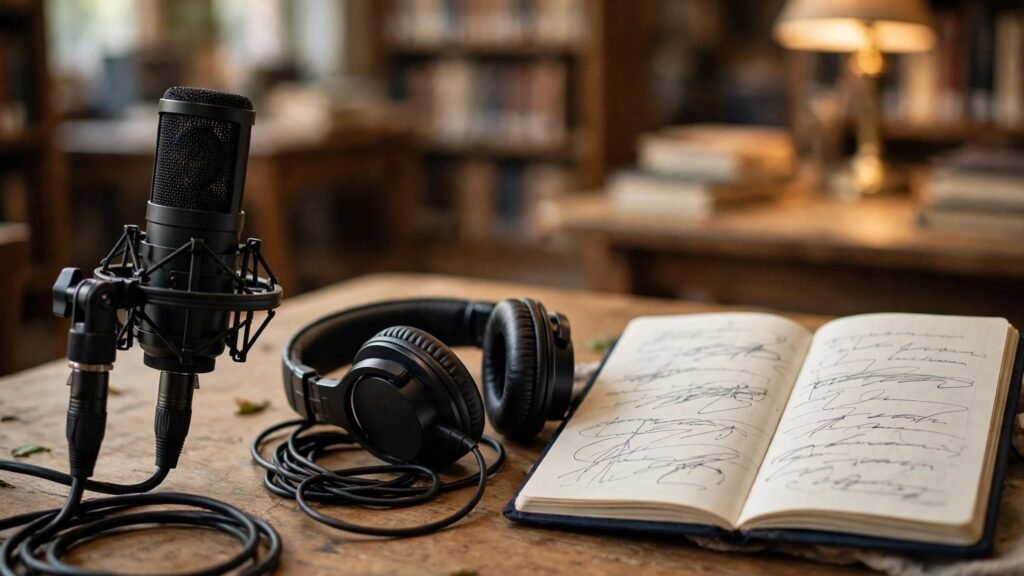
Descript edits audio and video by editing text, which makes library podcasts, author interviews and short program clips far easier to produce. Delete a sentence in the transcript and the audio follows, which means a staff member who is not an audio editor can still clean up an interview. Descript also helps with captions, short clips for social media, and removing filler words and long pauses that make a recording feel slow. For a library that wants to share events with people who could not attend, this is a practical route to a small, regular media output.
Good audio still needs a quiet room, a decent microphone and an edit pass for pacing, and a badly recorded event will not become a good podcast by editing alone. Plan the recording before the event, test levels, keep episodes short, and check speaker consent for clips and social reuse.
Watch out for: poor source audio, over long episodes, and clip reuse without speaker consent.
14. ElevenLabs
ElevenLabs creates spoken audio from text, which helps libraries offer accessible versions of guides, newsletters and program information. A patron who finds reading hard, or who prefers listening while travelling, can hear a guide read clearly instead of struggling with dense text. It can also narrate short local history pieces, welcome messages and children’s stories for listening stations, giving a small library an audio output without booking studio time for every item. Voice choice and pacing controls help match the tone to the material, from a calm guide to a lively story.
Voice use needs care. Never clone a real person’s voice without clear, written consent, and be transparent when audio is synthetic. A listener should know they are hearing a generated voice, especially for news, health or official information. Check pronunciation of local place names and personal names, because a synthetic voice can misread them in ways that distract or offend. ElevenLabs is a supplement to human narration, not a replacement for it, and for major or sensitive material a human narrator is still the better choice.
Watch out for: voice cloning without consent, mispronounced local names, and synthetic audio presented as human.
15. Grammarly
Grammarly catches spelling, grammar and clarity problems in newsletters, guides, grant drafts and social posts, which matters when a small team writes a lot of public text under time pressure. It flags awkward sentences, inconsistent tone and overly complex phrasing, and it can help staff turn a formal draft into plain language that patrons actually read. For libraries, plain language is an access issue. A guide that is technically correct but hard to read fails the patron who needs it most.
Style suggestions need judgment. Grammarly can flatten a distinctive voice, push every sentence toward the same safe shape, and suggest changes that alter meaning in a policy or eligibility note. Accept the clear errors, question the style changes, and always do a final read for meaning, dates and conditions. Grammarly also sees your text, so avoid pasting sensitive patron data, unpublished donor information or personal details into it. Use it for public facing drafts and staff procedures, not for private records.
Watch out for: flattened voice, meaning changes in policy text, and sensitive text pasted into a writing tool.
Best pick by job
| Job | First pick | Why it wins for most libraries |
|---|---|---|
| Quick reference answer with sources | Perplexity | Sources are visible and followable |
| Long document summary | Claude | Handles long, structured text well |
| Academic literature search | Elicit | Builds a comparable paper list fast |
| Checking a paper’s reception | Scite | Shows support, mention and dispute |
| Internal guides and procedures | Notion AI | Turns notes into usable checklists |
| Posters and social graphics | Canva | Fast, consistent, staff friendly |
| Workshop decks and handouts | Gamma | Outline to deck in one pass |
| Oral history and meetings | Otter.ai | Searchable transcripts from audio |
| Podcasts and event clips | Descript | Text based editing lowers the barrier |
| Accessible audio versions | ElevenLabs | Clear narration without studio time |
| Public writing and plain language | Grammarly | Catches errors and complex phrasing |
How to choose the right tools for your library
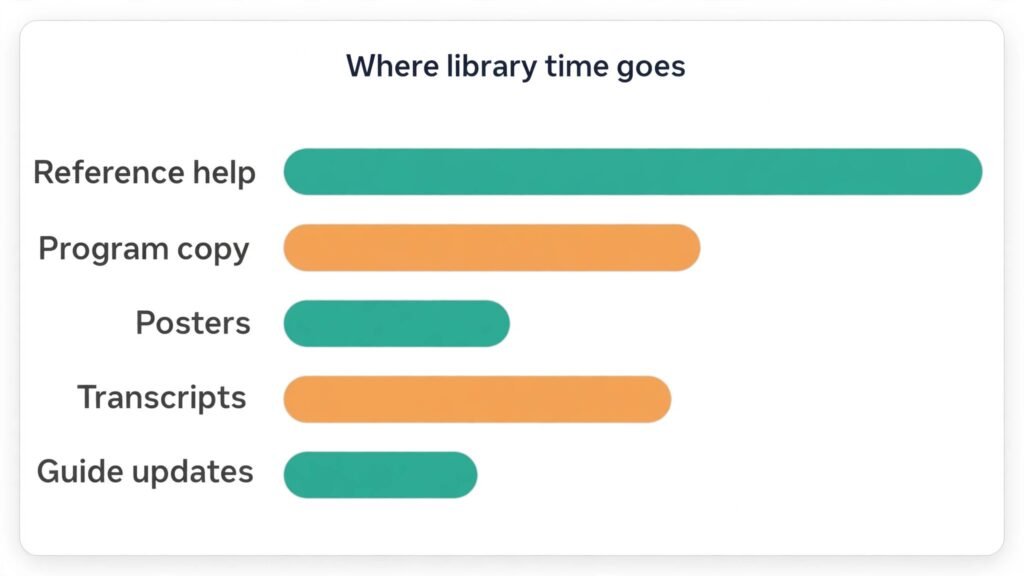
Start with the work, not the tool list. Write down the five tasks that eat the most staff time in a normal month, such as research questions, program copy, posters, transcripts and guide updates, and choose tools that cover those first. A tool built for a university research library may be excess for a small branch, and a marketing tool may miss the privacy and accessibility needs of a public service.
Next, test with real material. Run the same reference question, program outline and meeting recording through your shortlist, and score accuracy, time saved, training ease and output quality. Involve front desk and part time staff too, because a tool only one expert can run will fail when that person is on leave.
Then check pricing at checkout, data retention, deletion options and accessibility of the output, from captions to colour contrast. Finally, write a one page policy naming the approved tools, the tasks each one covers, what staff must never paste in, and who checks output before publication.
Mistakes to avoid
The most common mistake is publishing unchecked AI output. A poster with a wrong date or a reading list with a fake citation does real damage, because patrons trust library material. Assign the check step to a named person. A second mistake is pasting sensitive material into a public tool. Patron queries, student work and unpublished interviews should stay out of unapproved tools, even when pasting feels faster.
A third mistake is buying too many tools at once. Start small, prove value on one task, then expand. A fourth mistake is letting templates replace local knowledge. Add local authors, history, services and voices before you publish. A fifth mistake is forgetting accessibility. Check alt text, captions and transcripts on every output.
Finally, do not let AI replace the reference interview. Ask what the patron will use the answer for and what they have already tried. Those questions often reveal a different need entirely, and no tool can ask them for you.
Frequently asked questions
Do libraries need AI tools at all?
No library needs AI to be good, but when staff time is fixed and requests grow, AI can handle drafting and reformatting so librarians can spend more time on judgment and community work. If a tool does not give time back without lowering accuracy, drop it.
Which tool should a small library try first?
Start with a sourced search tool for reference help and a design tool for outreach, because those cover daily work and public output. Add transcription only when you have recordings worth archiving. That order gives visible value fast, without a large bill or a complex policy.
How do librarians check AI citations?
Open the source, check the publisher and date, and confirm the claim in the original text, including methods and limits for academic work. Never repeat a citation you have not opened.
Can AI help with cataloguing?
AI can draft descriptions, suggest subject terms and tidy metadata, but cataloguing rules, local practice and authority control still need a cataloguer. Use AI for first drafts and consistency checks, then apply your cataloguing standards before anything enters the public catalogue.
Is patron data safe in AI tools?
It depends on the tool, plan and settings, so do not assume safety. Avoid pasting personal data into public tools, check retention and deletion options, and anonymise examples when in doubt.
How should libraries handle AI and copyright?
Use AI on material you own, material you have permission to use, or short extracts for a lawful purpose, and check your local rules before you publish. Do not paste large copyrighted texts into a tool, do not publish AI output that reproduces a copyrighted work, and credit human authors and sources clearly.
Conclusion
The best approach is narrow, careful and local. Pick tools for your busiest tasks, test them on real work, check every output before it reaches a patron, and keep the judgment that makes a library trustworthy. Add tools one at a time, train the whole team, and review the list each term. What survives that review is your real toolkit. Kept to that discipline, AI becomes a quiet helper behind a trusted public service, freeing librarians to spend more time with people and less time on repetitive drafting.
For a related audience, see our guide to best AI tools for tutors and our guide to best AI tools for course creators. Libraries that run community programs may also find our guide to best AI tools for nonprofits useful for outreach planning.