
The best AI video dubbing tools in 2026 are the ones that keep a translated voice believable for a full video, not just for a thirty second demo clip. A tool can sound impressive on a short sample and still fail on a ten minute tutorial, because voices drift, timing slips, and background sound gets flattened. This guide tests the category against that longer standard. It looks at voice quality over time, lip movement, subtitle accuracy, and how much manual repair each tool leaves behind.
Dubbing used to mean booking a studio, hiring voice actors in each language, and waiting weeks for a finished version. AI dubbing compresses that work into hours, and for many creators that change is the whole point. A YouTube channel can reach viewers in Spanish, Hindi, Portuguese, and French without re-recording every video four times. A small business can localise a product demo for a new market before it spends money on ads in that market.
The catch is that bad dubbing is worse than no dubbing. A voice that mispronounces a product name, a mouth that moves out of step with the words, or a translation that drops a safety warning will cost trust fast. So the right question is not which tool has the longest language list. It is which tool holds up on your kind of video, with your kind of speaker, in the languages your audience actually speaks.
This guide covers nine tools, grouped by the job they do best: voice cloning dubbing, lip sync, subtitling and localisation, and studio workflow. Prices are October 2026 US dollar figures. Where a vendor does not publish a single headline price, this guide says check checkout rather than guessing a number.
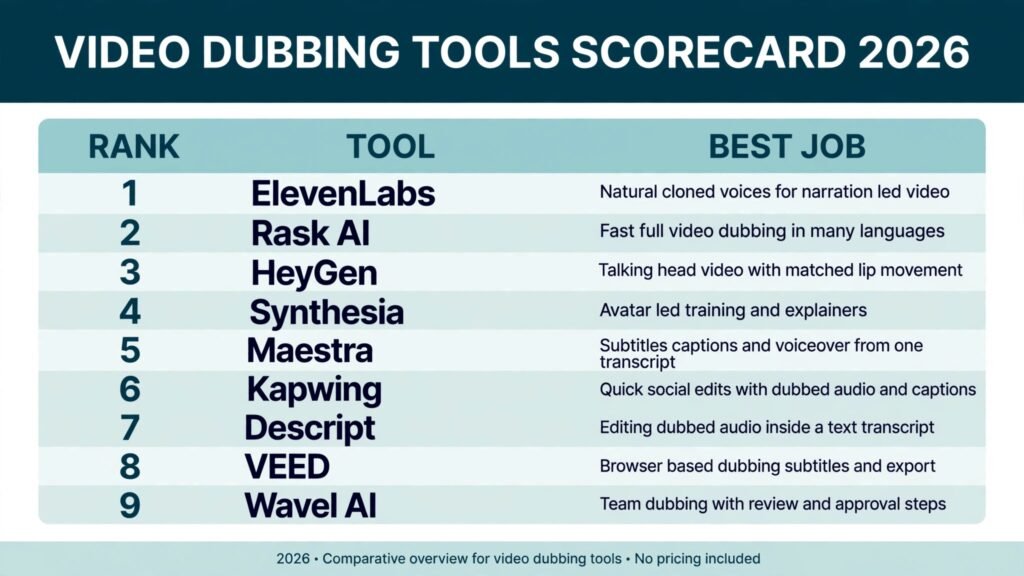
The 9 best AI video dubbing tools at a glance
| Tool | Best job | Free option | Best for |
|---|---|---|---|
| ElevenLabs | Voice cloning dubbing | Free tier | Natural cloned voices for narration led video |
| Rask AI | Voice cloning dubbing | Free trial | Fast full video dubbing in many languages |
| HeyGen | Lip sync | Free tier | Talking head video with matched lip movement |
| Synthesia | Lip sync | Free trial | Avatar led training and explainers |
| Maestra | Subtitling and localisation | Free trial | Subtitles, captions, and voiceover from one transcript |
| Kapwing | Subtitling and localisation | Free tier | Quick social edits with dubbed audio and captions |
| Descript | Studio workflow | Free tier | Editing dubbed audio inside a text transcript |
| VEED | Studio workflow | Free tier | Browser based dubbing, subtitles, and export |
| Wavel AI | Studio workflow | Free trial | Team dubbing with review and approval steps |
Best pick by job
| Your job | Start with | Why it fits |
|---|---|---|
| YouTube videos in several languages | Rask AI | Full video dubbing in one pass, with speaker handling |
| A single narrator voice you want to reuse | ElevenLabs | Cloned voice stays consistent across videos |
| Talking head videos where lips must match | HeyGen | Lip sync is the core feature, not an add on |
| Training videos with avatars | Synthesia | Script to avatar video without filming |
| Subtitles first, dubbing second | Maestra | Transcript, subtitles, and voiceover share one workflow |
| Fixing dubbed audio by editing text | Descript | Delete a word in text and the audio follows |
| Short social clips with captions | Kapwing | Fast edits, captions, and dubbed audio in one editor |
| A team that must approve every version | Wavel AI | Review steps suit client and compliance work |
Voice cloning dubbing
1. ElevenLabs
ElevenLabs is the strongest choice when one voice has to carry a whole channel. Its cloning captures tone, pacing, and small pauses better than most rivals, so a dubbed version sounds like the same person speaking another language rather than a generic reader. It works well for narration led videos, documentaries, explainers, and courses where the voice is the main presence on screen.
The dubbing workflow keeps timing close to the original, which matters for tutorial videos where the voice must land on the same step as the picture.
Pricing: Free tier with limited credits. Paid plans are monthly subscriptions, check checkout for current pricing.
Best for: Creators and educators who want one recognisable voice across languages.
Watch out for: Cloning needs a clean sample. Noisy audio, overlapping speakers, or heavy accents in the sample will show up in every dubbed version, so record a quiet sample first.
Try it at: https://elevenlabs.io
2. Rask AI
Rask AI is built for the full dubbing job in one pass. Upload a video, pick target languages, and it returns dubbed audio with speaker separation for multi speaker content. For a YouTube creator with a back catalogue, that matters more than any single voice feature, because the bottleneck is volume, not one perfect clip.
It supports a wide language list and keeps the original background sound separate from the voice track, which helps music and room tone survive the translation.
Pricing: Free trial with limited minutes. Paid plans are monthly subscriptions by minutes, check checkout for current pricing.
Best for: Channels and course sellers dubbing many videos into several languages.
Watch out for: Long videos need a review pass. Names, brand terms, and jokes often need manual correction, and the first draft will miss some of them.
Try it at: https://www.rask.ai
Lip sync
3. HeyGen
HeyGen is the lip sync leader for talking head video. When a presenter speaks to camera, mismatched lips break the illusion at once, and HeyGen keeps mouth movement close to the dubbed words in the languages it supports well. That makes it a strong choice for founders, coaches, and educators who appear on camera and want their videos to work in new markets.
Pricing: Free tier with limited credits. Paid plans are monthly subscriptions by credits, check checkout for current pricing.
Best for: Talking head creators who need lips to match the dubbed voice.
Watch out for: Lip sync quality varies by language and by how much the speaker moves. Fast head turns and side angles reduce accuracy, so front facing recordings work best.
Try it at: https://www.heygen.com
4. Synthesia
Synthesia takes a different route. Instead of dubbing a real person, it generates an avatar that speaks your script in the target language, with lip movement built in. For training videos, product explainers, and internal updates, that removes filming entirely. You write a script, pick an avatar, and get a finished video in each language from the same source.
Every language version uses the same presenter, the same pacing, and the same visuals, which suits compliance training and onboarding where variation is a problem. The weakness is also consistency: an avatar will never carry the warmth of a real presenter, so it suits instruction better than persuasion.
Pricing: Free trial. Paid plans are monthly subscriptions, check checkout for current pricing.
Best for: Training teams and companies producing standard explainers in many languages.
Watch out for: Avatar videos can feel formal. For sales videos, testimonials, and personal brand content, a real dubbed presenter usually connects better.
Try it at: https://www.synthesia.io
Subtitling and localisation
5. Maestra
Maestra combines transcription, subtitling, and voiceover in one transcript based workflow, which is a practical advantage. Many dubbing projects fail at the transcript stage, because a bad transcript produces bad subtitles and a bad voiceover from the same source. Maestra lets you fix the transcript once and then generate subtitles and dubbed audio from the corrected text.
It supports many languages and exports subtitle files in standard formats, so the same project can feed YouTube, a course platform, and a website embed.
Pricing: Free trial with limited minutes. Paid plans are monthly subscriptions by minutes, check checkout for current pricing.
Best for: Teams that need subtitles and dubbing from one corrected transcript.
Watch out for: Voice quality is solid but not the most expressive in this guide. If voice character is the priority, pair Maestra subtitles with a dedicated voice tool.
Try it at: https://maestra.ai

6. Kapwing
Kapwing is the fast option for social video. It dubs audio, adds subtitles, and exports vertical and square formats in a browser editor that most creators already know. For a short clip that needs to work on Instagram, TikTok, and YouTube Shorts, that speed matters more than studio grade voice cloning.
For YouTubers testing whether a dubbed short performs before dubbing a full video, Kapwing is a sensible first step, and the caption styling options are strong for social feeds.
Pricing: Free tier with watermark and limits. Paid plans are monthly subscriptions, check checkout for current pricing.
Best for: Short form creators who need dubbed clips with captions fast.
Watch out for: Long form dubbing is not its strength. Voice quality and speaker handling fall behind dedicated dubbing tools on videos over a few minutes.
Try it at: https://www.kapwing.com
Studio workflow
7. Descript
Descript changes how dubbed audio gets fixed. Instead of cutting waveforms, you edit a text transcript: delete a sentence and the audio follows, replace a word and the voice fills the gap with a cloned overdub. For a creator who already scripts and edits in Descript, dubbed versions become another edit pass rather than a separate project.
The overdub feature needs a voice sample and works best for small corrections, not for generating a whole dubbed track from scratch, so pair it with a dubbing tool for full translations.
Pricing: Free tier with limited transcription. Paid plans are monthly subscriptions, check checkout for current pricing.
Best for: Podcasters, YouTubers, and course creators who edit by transcript.
Watch out for: Overdub quality depends on the sample and on how much text you replace. Large replacements sound less natural than short fixes, so keep overdub edits small.
Try it at: https://www.descript.com
8. VEED
VEED is a browser based studio that covers dubbing, subtitles, translation, and export in one tab. That matters for small teams and freelancers who do not want desktop software, licence keys, and large file transfers. You upload, dub, caption, and export, and the project stays shareable with a link.
Its subtitle tools are strong, with styling, translation, and burn in options, and the dubbing quality suits clear narration and marketing videos.
Pricing: Free tier with watermark and limits. Paid plans are monthly subscriptions, check checkout for current pricing.
Best for: Small teams and freelancers who want dubbing and editing in the browser.
Watch out for: Browser editing on very long videos can feel slow, and advanced audio repair still needs a desktop editor for the hardest cases.
Try it at: https://www.veed.io
9. Wavel AI
Wavel AI is built for team dubbing with review steps. Multiple people can work on the same project, leave comments, and approve versions before export, which suits agencies, localisation vendors, and companies with compliance checks. The voice library is broad, and it supports dubbing, subtitling, and voiceover from one project.
For a solo creator, that structure may feel heavy. For a team handling client videos in five languages, it prevents the usual chaos of scattered files, conflicting versions, and unapproved drafts going live.
Pricing: Free trial. Paid plans are monthly subscriptions by minutes, check checkout for current pricing.
Best for: Agencies and teams dubbing client videos with approval steps.
Watch out for: Setup takes longer than a single creator tool. If you only dub one video a month, a simpler tool will waste less of your time.
Try it at: https://wavel.ai
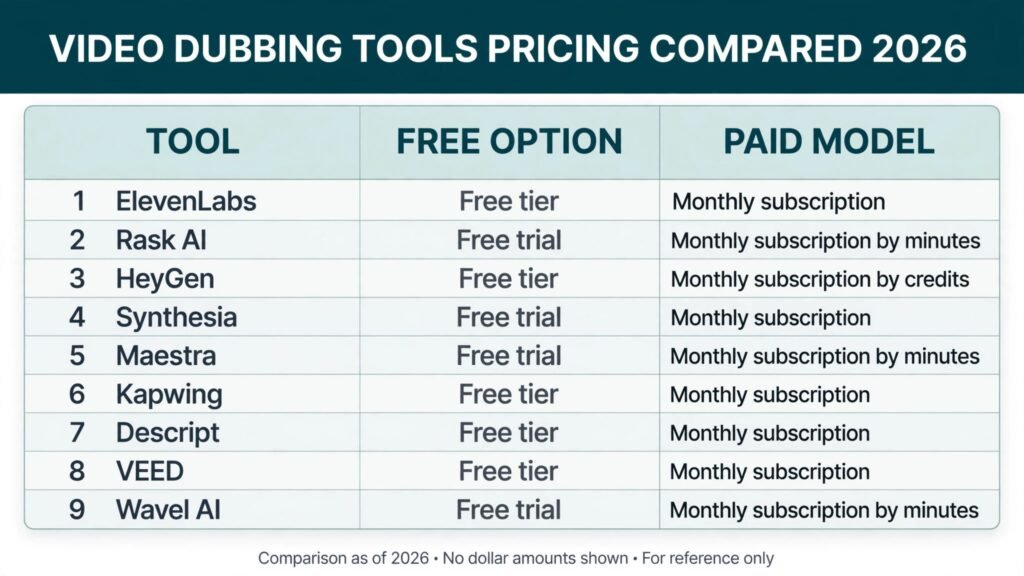
Pricing compared
| Tool | Free option | Paid model | Notes |
|---|---|---|---|
| ElevenLabs | Free tier | Monthly subscription | Credit based, check checkout |
| Rask AI | Free trial | Monthly subscription by minutes | Volume pricing for catalogues |
| HeyGen | Free tier | Monthly subscription by credits | Avatar and lip sync included |
| Synthesia | Free trial | Monthly subscription | Per video minute model |
| Maestra | Free trial | Monthly subscription by minutes | Subtitles and voiceover bundled |
| Kapwing | Free tier | Monthly subscription | Watermark removed on paid plans |
| Descript | Free tier | Monthly subscription | Transcription limits on free tier |
| VEED | Free tier | Monthly subscription | Watermark removed on paid plans |
| Wavel AI | Free trial | Monthly subscription by minutes | Team seats on higher plans |
The cheapest honest stack for a solo creator is often a free tier tool for testing, then one paid dubbing tool for the main language, not five subscriptions at once. Add a second tool only when a specific job, such as lip sync or transcript accuracy, clearly fails in the first one.
How to Choose
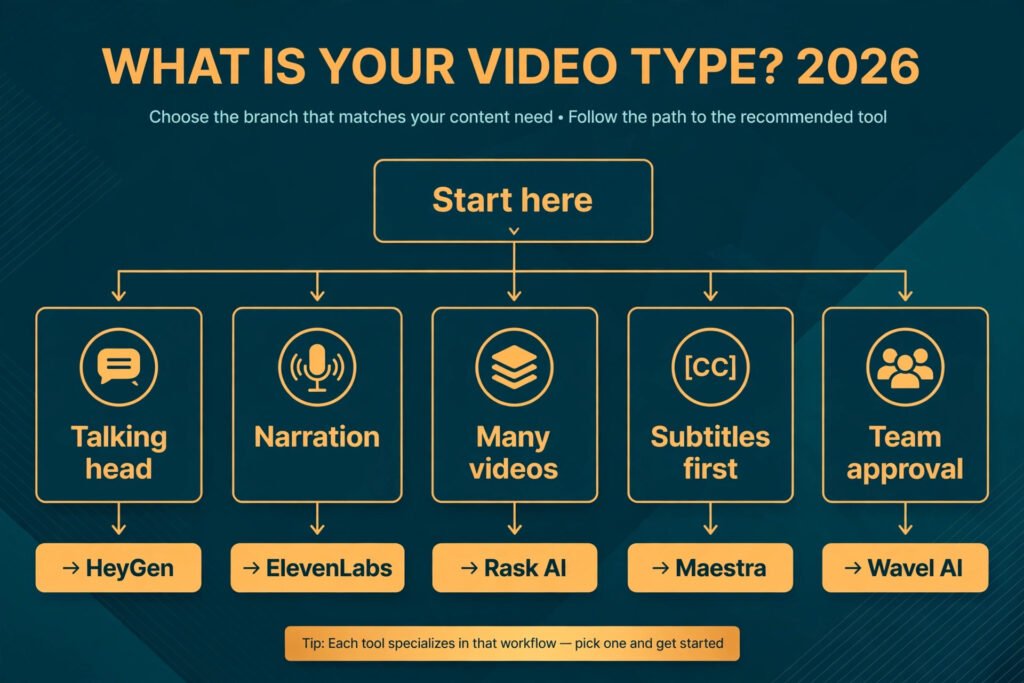
Start with the video type, not the tool list. A talking head video needs lip sync, so HeyGen should lead your test. A narration led tutorial needs voice consistency, so ElevenLabs or Rask AI should lead. A training series needs identical versions in many languages, so Synthesia or Wavel AI should lead. A social clip needs speed and captions, so Kapwing or VEED should lead. Choosing by video type prevents the common mistake of buying a voice tool for a lip sync problem.
Next, test with a real video, not a demo. Pick a two minute segment from your own catalogue that includes your hardest case: a fast speaker, a product name, a number, and a pause. Run it through two tools in your top language and listen on headphones with the picture on. Check four things: does the voice stay steady to the end, do the lips match, are names pronounced right, and does the background sound survive. The tool that passes all four on your hardest clip is the right one, even if another tool wins on a demo.
Then check the language list for your audience, not the total count. A tool that lists one hundred languages may still be weak in the three you need. Test each target language separately, because quality varies sharply by language, and a tool that sounds great in Spanish can sound flat in Hindi or Bengali. Ask a native speaker to review the test clip before you commit to a series, because only a native listener will catch unnatural phrasing and wrong emphasis.
Finally, count the repair time. Note how many segments you had to fix in your test, and multiply that by your real catalogue size. If a tool saves ten dollars a month but adds an hour of repair per video, it is the expensive choice.
Mistakes to avoid
Publishing without a native speaker review is the biggest mistake in dubbing. Automatic translation can produce grammar that looks right and sounds wrong, and only a native listener will catch it. For client work, paid courses, and public videos, budget for a review pass in each language, even if it is a short check by a fluent colleague.
Dubbing a bad original is the second mistake. If the source audio has echo, overlapping voices, or mumbling, the dubbed version will inherit every flaw and add translation errors on top. Clean the source first: record in a quiet room, separate speakers where possible, and script numbers and names clearly.
Ignoring lip sync on talking head video is the third mistake. Viewers notice mismatched lips within seconds, and they judge the whole video by that mismatch. If your video shows a face speaking, use a lip sync tool or cut to B roll during dubbed passages so the mismatch is less visible.
Trusting the first draft on names and terms is the fourth mistake. Brand names, product names, place names, and technical terms are the most likely errors in any dubbing tool. Build a short term list for each project and check every term in every language version before export.
Forgetting subtitles is the fifth mistake. Many viewers watch with sound off, and many more watch in a second language with subtitles on. A dubbed video with accurate subtitles reaches both groups, and subtitles also help search and accessibility. Generate subtitles from the corrected transcript, not from the raw automatic draft.
Choosing on language count alone is the sixth mistake. A long language list is marketing, not quality. Test your three real languages, check voice naturalness and lip sync in each, and ignore the rest of the list until you actually need it.
Frequently asked questions
Can AI dubbing replace human voice actors completely?
For many standard videos, yes, with a review pass. Training, explainers, tutorials, and marketing videos work well with AI dubbing when a native speaker checks the result.
How many languages should I dub into first?
Start with one or two languages where you already have audience demand, such as a top viewer country or a market you plan to enter. Measure watch time and subscriber growth in those languages before adding more. Dubbing into ten languages at once spreads review time thin and raises the chance of an unreviewed error going live.
Does dubbed video help YouTube growth?
It can, when the dubbing quality is high and the titles, descriptions, and thumbnails are also translated. Viewers in a new language need to find the video first, so translate metadata as well as audio.
What is the difference between dubbing and subtitling?
Dubbing replaces the spoken audio with a translated voice, while subtitling adds translated text and keeps the original voice. Dubbing suits viewers who prefer listening, and subtitling suits viewers who prefer reading or watching with sound off.
How do I keep a cloned voice consistent across videos?
Use the same clean voice sample, the same voice settings, and the same tool for the whole series.
Do I need permission to clone a voice?
Yes, you need consent from the voice owner, and for your own voice that means keeping a record of your own consent and sample. Never clone another person without written permission, because voice cloning without consent raises legal and platform policy risks.
Conclusion
The best AI video dubbing tools in 2026 reward a simple habit: test on your own hardest video, in your real languages, with a native speaker listening. ElevenLabs leads for a consistent cloned voice, Rask AI leads for volume dubbing, HeyGen leads for lip sync, and Maestra leads when subtitles and dubbing must share one transcript. Descript and VEED suit creators who want editing and dubbing in one place, while Wavel AI suits teams that need review steps.
Dubbing is a growth lever only when the result sounds like a person your audience trusts, in their language, with lips and subtitles that match. Pick the tool that passes that test on your video, and the extra audience will follow.