

The best AI pitch deck generators in 2026 are the ones that save a founder real days without hiding a weak story behind pretty slides. Investors decide in the first ninety seconds whether a deck earns a meeting, and a tool that only changes fonts cannot fix a missing market size, a vague business model, or a traction slide with no numbers. The tools below were judged on a harder test: can a founder go from a rough outline to a deck that survives a partner meeting, with charts that match the spreadsheet, a narrative that holds together, and a file that exports cleanly to PowerPoint or PDF?
That test matters because pitch decks fail in predictable ways. Some generators produce ten slides that all say the same thing in different words. Others lock a founder into a template that cannot hold a pricing table or a cohort chart. A few produce beautiful slides that fall apart the moment an investor asks for the source data. The ten tools in this guide cover the full job: drafting the story, designing the layout, turning numbers into charts, and rehearsing the pitch itself. Pick by the bottleneck in your own process, not by the demo that looks best on a landing page.
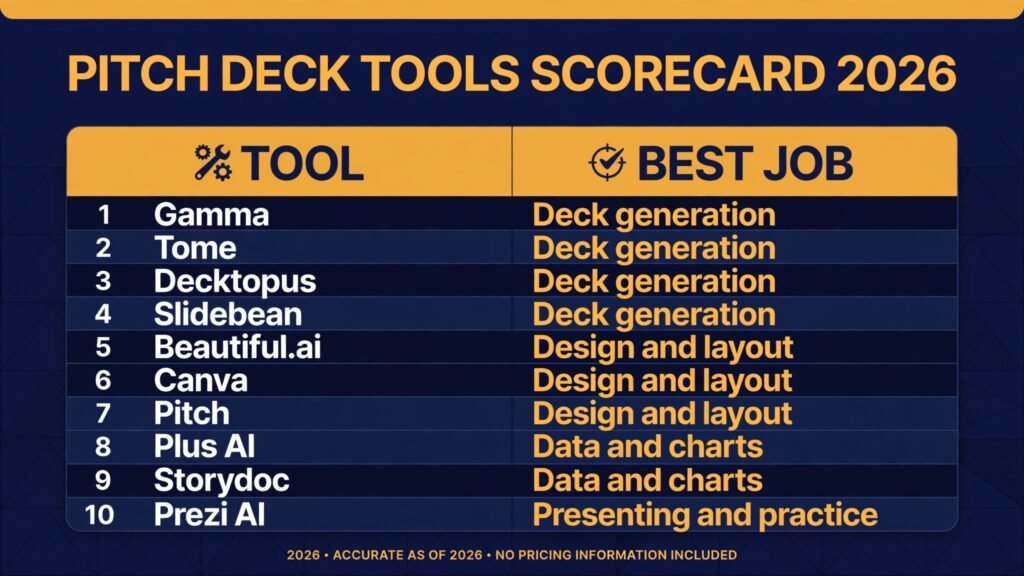
The 10 best AI pitch deck generators at a glance
| Tool | Best job | Free option | Best for |
|---|---|---|---|
| Gamma | Deck generation | Free tier, check checkout | Founders who need a full first draft fast |
| Tome | Deck generation | Free tier, check checkout | Narrative first decks with strong visuals |
| Decktopus | Deck generation | Free tier, check checkout | Non designers who want structure fast |
| Slidebean | Deck generation | Free tier, check checkout | Fundraising decks with investor structure |
| Beautiful.ai | Design and layout | Free trial, check checkout | Teams that need consistent, clean design |
| Canva | Design and layout | Free tier, check checkout | Founders who want full design control |
| Pitch | Design and layout | Free tier, check checkout | Teams building decks together |
| Plus AI | Data and charts | Free trial, check checkout | Turning spreadsheets into slides |
| Storydoc | Data and charts | Free trial, check checkout | Interactive decks with live data |
| Prezi AI | Presenting and practice | Free trial, check checkout | Presenters who want movement and flow |
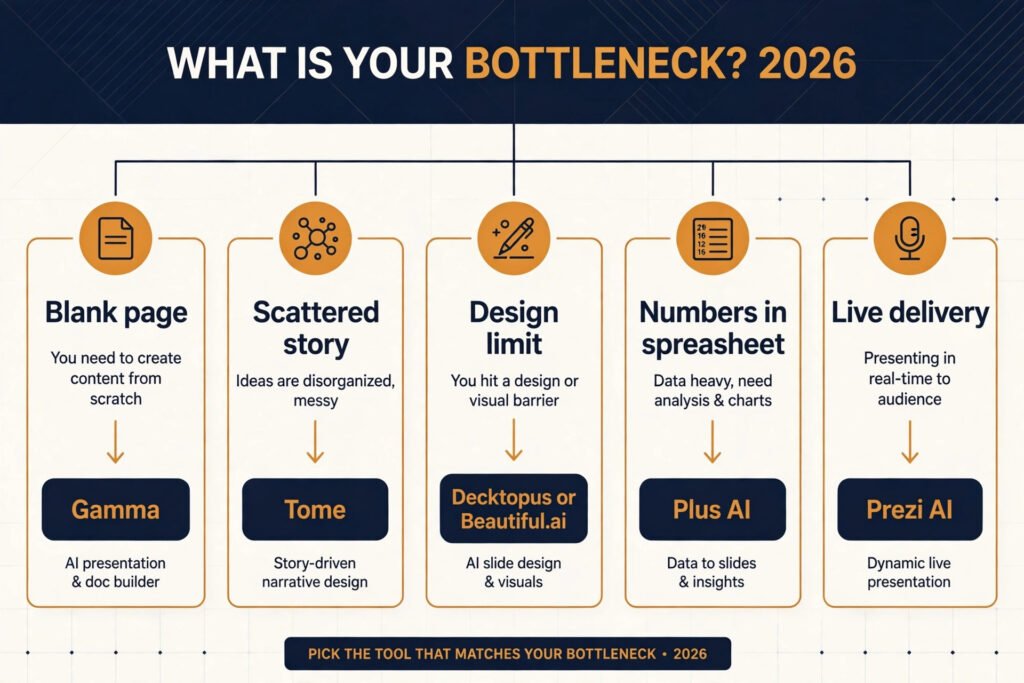
Start here: pick by your bottleneck
| Your bottleneck | Start with | Why it fits |
|---|---|---|
| Blank page, no draft yet | Gamma | Turns an outline or prompt into a full deck in minutes |
| Story feels scattered | Tome | Forces a narrative arc before design takes over |
| Design skills are the limit | Decktopus or Beautiful.ai | Structure and layout are handled for you |
| Investor ready structure missing | Slidebean | Built around the slides investors expect |
| Numbers live in a spreadsheet | Plus AI | Pulls data into charts without manual rebuilds |
| Deck must stay live and interactive | Storydoc | Links, video and live data stay inside the deck |
| Delivery needs work | Prezi AI | Rehearsal and flow tools support the pitch itself |
Deck generation
1. Gamma
Gamma is the fastest route from an idea to a complete deck. Paste an outline, upload notes, or type a prompt, and Gamma returns a structured deck with sections, headlines and supporting points already in place. The strength is speed and structure: a founder can have ten slides to react to within minutes, then spend the saved time on the numbers and the story rather than on blank slides.
Pricing: free tier available, paid plans by subscription, check checkout for current rates.
Best for: founders who need a credible first draft today and will refine it themselves.
Watch out for: first drafts can be generic. If you accept every suggested line, the deck reads like every other AI deck. Rewrite the problem, traction and ask slides in your own words before sending it anywhere.
Try it at: https://gamma.app

2. Tome
Tome builds decks around narrative first. Instead of starting with a template grid, it asks what story you are telling and shapes slides to carry that arc, with strong image and layout support along the way. The result tends to read more like a presentation and less like a document pasted onto slides, which helps in live pitches where the founder talks over the deck.
Pricing: free tier available, paid plans by subscription, check checkout for current rates.
Best for: founders pitching live, where flow and story matter more than dense detail.
Watch out for: decks that look great on screen can be thin when read alone. Investors often review decks without the founder present, so add a readable appendix with market data, unit economics and sources.
Try it at: https://tome.app
3. Decktopus
Decktopus is built for people who do not design decks for a living. Answer a short set of questions about your company, audience and goal, and it generates a structured deck with sensible slide order and clean layouts. The question flow is the real feature: it stops founders from skipping the slides investors actually ask about, such as competition, business model and funding ask.
Pricing: free tier available, paid plans by subscription, check checkout for current rates.
Best for: first time founders and non designers who want a sound structure without learning design tools.
Watch out for: the structure is only as good as your answers. Vague answers produce vague slides. Write your traction numbers and market size down before you start, not during.
Try it at: https://www.decktopus.com
4. Slidebean
Slidebean is the most fundraising focused tool in this list. Its templates and AI follow the slide order investors expect, from problem and solution through market, product, traction, team and ask, and its paid service adds human design review for founders who want a second pair of eyes. That investor lens is valuable: it keeps decks from drifting into product tours that never reach the funding question.
Pricing: free tier available, paid plans by subscription, check checkout for current rates.
Best for: founders preparing a seed or pre seed round who want investor standard structure.
Watch out for: the standard structure can make decks feel similar. Your differentiation must live in the content, especially traction, defensibility and team proof, not in the template.
Try it at: https://slidebean.com
Design and layout
5. Beautiful.ai
Beautiful.ai solves the design consistency problem. Its smart templates adjust layout automatically as you add or remove content, so slides stay aligned, spaced and readable without manual nudging. Teams that share decks across members benefit most, because no single person has to police fonts, colours and margins before every send.
Pricing: free trial available, paid plans by subscription, check checkout for current rates.
Best for: teams that need every deck to look polished and consistent.
Watch out for: automatic layout can fight unusual content. A complex pricing table or a wide chart may need a manual slide outside the template, and that is fine. Do not force every idea into one layout system.
Try it at: https://www.beautiful.ai

6. Canva
Canva is the most flexible design tool here, and its AI features now cover text generation, layout suggestions and image creation inside the same editor. Founders who already use Canva for social posts or marketing material can keep their brand kit, fonts and colours in one place and reuse them across the deck. The trade off is freedom: Canva gives you every option, which means the founder must still decide the story and the slide order.
Pricing: free tier available, paid plans by subscription, check checkout for current rates.
Best for: founders who want full control over design and already work in Canva.
Watch out for: flexibility invites overdesign. A deck with ten different slide styles and heavy imagery distracts from the numbers. Set a simple rule before you start: one font family, two colours, and charts only where a number needs proof.
Try it at: https://www.canva.com
7. Pitch
Pitch is built for teams that build decks together. Real time collaboration, shared workspaces, comments and version control mean a founder, a designer and an advisor can work on the same deck without emailing files back and forth. Its AI features help with drafting and layout, but the collaboration layer is the reason teams choose it over a solo generator.
Pricing: free tier available, paid plans by subscription, check checkout for current rates.
Best for: startup teams and agencies where several people touch the same deck.
Watch out for: collaboration without an owner produces decks by committee. Assign one person to own the narrative and the final edit, and let others comment rather than rewrite core slides.
Try it at: https://pitch.com
Data and charts
8. Plus AI
Plus AI turns existing content into slides, and its strongest use is data. Connect a document or spreadsheet and it generates slides with charts that reflect the source numbers, which removes the most error prone step in deck building: retyping figures into a chart tool. For founders whose traction story lives in a spreadsheet, that link between data and slide is worth more than any template.
Pricing: free trial available, paid plans by subscription, check checkout for current rates.
Best for: founders with real traction data in Google Slides or spreadsheets.
Watch out for: a chart is only honest if the source is clean. Check every generated chart against the original data before presenting, and label the period and the metric on the slide itself so investors do not have to guess.
Try it at: https://www.plusdocs.com

9. Storydoc
Storydoc makes interactive decks. Slides can carry embedded video, live data, links and trackable engagement, so a founder can see which slides an investor actually opened and how long they spent there. That feedback is genuinely useful after a send: if every investor stops at the pricing slide, the pricing story needs work, and Storydoc shows you that instead of leaving you to guess.
Pricing: free trial available, paid plans by subscription, check checkout for current rates.
Best for: founders sending decks asynchronously who want engagement data.
Watch out for: interactivity can break in a boardroom. Always keep a clean PDF export ready for meetings where the projector, the wifi or the file format does not cooperate. A deck that only works online is a risk on pitch day.
Try it at: https://www.storydoc.com
Presenting and practice
10. Prezi AI
Prezi AI builds presentations around movement and spatial flow rather than a linear slide stack. The presenter zooms between topics, which can make a pitch feel like a guided tour instead of a document read aloud. For founders who present live and want the audience to follow a journey, from market to product to traction, that flow can hold attention better than static slides.
Pricing: free trial available, paid plans by subscription, check checkout for current rates.
Best for: live presenters who want a memorable, visual delivery.
Watch out for: movement can distract if overused. Keep zooms purposeful, one per major section, and make sure the deck still reads sensibly as a PDF for investors who review it alone.
Try it at: https://prezi.com

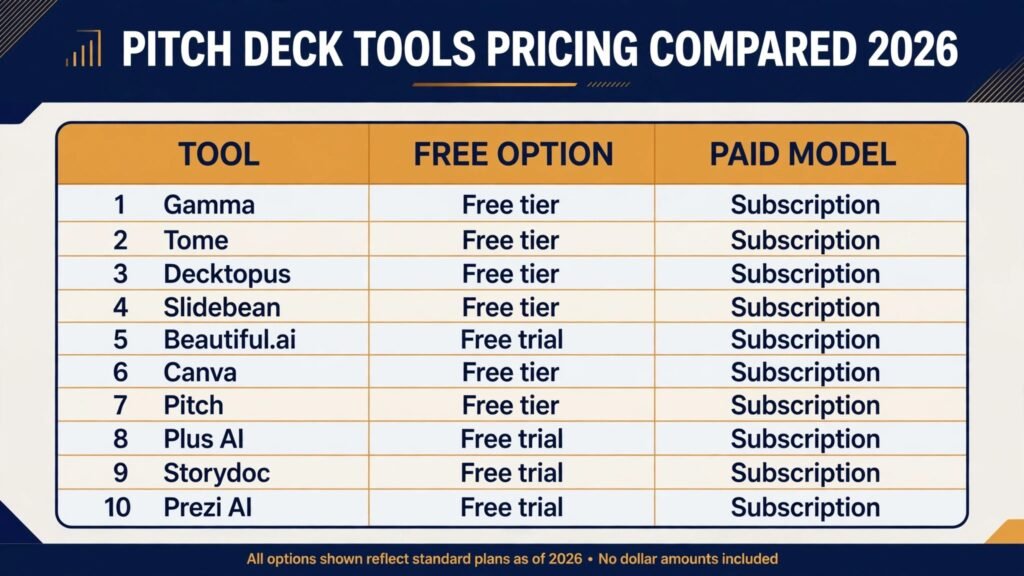
Pricing compared
| Tool | Free option | Paid model | Notes |
|---|---|---|---|
| Gamma | Free tier | Subscription, check checkout | Generous free tier for first drafts |
| Tome | Free tier | Subscription, check checkout | Free tier covers basic decks |
| Decktopus | Free tier | Subscription, check checkout | Pay for exports and advanced features |
| Slidebean | Free tier | Subscription, check checkout | Human design review costs extra |
| Beautiful.ai | Free trial | Subscription, check checkout | Team plans for shared workspaces |
| Canva | Free tier | Subscription, check checkout | Brand kit on paid plans |
| Pitch | Free tier | Subscription, check checkout | Team pricing by seat |
| Plus AI | Free trial | Subscription, check checkout | Google Slides focused |
| Storydoc | Free trial | Subscription, check checkout | Analytics on paid plans |
| Prezi AI | Free trial | Subscription, check checkout | Education plans available |
The honest total cost of a pitch deck is rarely the subscription alone. Count the hours spent rewriting AI drafts, checking charts, and redesigning slides that did not survive review. A free tool that produces a deck you must rebuild twice costs more than a paid tool that gets you to a final draft in one pass. Start free, upgrade only when a tool has already proven it saves you a full working day.
How to Choose
Start with the job, not the tool. If you have no draft, pick a generator such as Gamma or Decktopus and get ten slides on screen today. If you have a draft but it looks inconsistent, move it into Beautiful.ai or Pitch and fix the design system. If your numbers are the story, use Plus AI to keep charts tied to source data. If you present live, rehearse in Prezi AI or Tome and watch where the audience loses the thread.
Then run a five minute investor test before you send anything. Read the deck without speaking, as an investor would. Can you state the problem in one sentence after slide two? Do you know the market size, the business model and the ask by the final slide? Is every number labelled with its period and source? If any answer is no, the tool is not the problem. Fix the content, then let the tool dress it.
Finally, check the export path early. A deck that exports cleanly to PowerPoint and PDF, with fonts and charts intact, will survive boardrooms, email forwards and investor portals. Test the export on the first day, not the night before the pitch, and keep a PDF version frozen once the deck is final so later edits cannot silently change a number.
Mistakes to avoid
The most common mistake is sending the first AI draft. First drafts are starting points, not finished decks. They contain generic claims, invented phrasing and sometimes numbers that sound plausible but have no source. Rewrite the problem, traction and ask slides yourself, and delete any sentence you cannot defend in a meeting.
The second mistake is hiding weak traction behind design. A beautiful chart of a flat line is still a flat line. Investors respect honest numbers with a clear plan more than polished slides that dodge the question. If traction is early, say so, show what you have learned, and explain what the next milestone proves.
The third mistake is building one deck for every audience. An investor deck, a sales deck and a hiring deck are different documents, even when they share slides. Keep a master deck, then cut a focused version for each audience, and never let the funding ask appear in a customer facing deck by accident.
The fourth mistake is ignoring the appendix. The main deck should stay tight, ideally ten to twelve slides, but the appendix carries the proof: market sources, unit economics, cohort data, team backgrounds and product detail. Investors who want depth will look there, and its absence reads as a gap rather than as brevity.
The fifth mistake is letting AI write claims about competitors. AI tools routinely overstate competitor weaknesses and understate their strengths. Check every competitor claim against a primary source, and frame comparisons around your own differentiation rather than around a rival’s supposed flaws.
The sixth mistake is skipping rehearsal. A deck is a prop for a pitch, not a replacement for one. Practice the full talk at least three times, time it, and rehearse answers to the obvious questions about market, pricing, competition and hiring. Tools in the presenting group help here, but no tool replaces a founder who knows the numbers cold.
Frequently asked questions
Can AI generate a full investor ready pitch deck?
AI can generate a strong first draft, including structure, headlines and layout, but no tool in this list produces an investor ready deck without human editing. The founder must verify every number, rewrite the core story in their own voice, and add the appendix proof that investors expect.
Which AI pitch deck generator is best for fundraising?
Slidebean and Gamma are the strongest starting points for fundraising. Slidebean follows investor standard structure, while Gamma produces a complete draft fastest. Whichever you choose, the deciding factor is the quality of your traction, market and team content, not the template.
Do investors mind AI generated decks?
Investors mind generic decks, not the tool used to build them. A deck with specific numbers, a clear story and honest limits reads as professional whatever built the first draft. A deck full of vague claims reads as lazy, whether a human or a machine wrote it.
Should I use one tool or several?
Use one tool for the draft and one for the final design if needed, but avoid chaining four generators together. Each transfer loses formatting and introduces errors. Pick a generator, refine inside it or in PowerPoint or Google Slides, and stop when the deck passes the five minute investor test.
How long should a pitch deck be?
Ten to twelve slides for the main deck, plus an appendix. Cover problem, solution, market, product, business model, traction, competition, team, financials and ask. Anything longer belongs in the appendix or in the meeting conversation, not in the main flow.
Is a free pitch deck generator enough?
For a first draft or an internal review, yes. Free tiers from Gamma, Canva and Decktopus are enough to learn whether a tool fits your workflow. Upgrade when you need clean exports, brand control, collaboration or analytics, and only after the free tier has already saved you real time.
Conclusion
The best AI pitch deck generators in 2026 do one job well: they remove the blank page so a founder can spend time on the story, the numbers and the rehearsal that actually win meetings. Gamma and Decktopus are the fastest starting points, Beautiful.ai and Pitch fix design and collaboration, Plus AI and Storydoc handle data and interactivity, and Prezi AI supports live delivery. None of them replaces the founder’s judgment. Start with your bottleneck, draft fast, verify every number, rehearse the talk, and send a deck that reads clearly even when you are not in the room. That combination, not any single tool, is what turns a generated deck into a funded one.