
For most taprooms, Arryved is the right starting point for the best POS system for brewery taprooms, because it was built for craft beverage service rather than adapted from a general restaurant template. Mobile tabs, QR ordering, loyalty, and keg tracking sit together in one workflow, so staff spend service time pouring and hosting instead of returning to a fixed terminal to move a tab.
Taproom service is different from restaurant service. Guests open tabs, try flights, move between the bar and the patio, order merch, and fill crowlers to take home, often in one visit. A POS that treats every sale as a single counter transaction will slow that flow, create tab errors, and lose keg visibility. This guide compares fifteen tools on taproom work, from brewery native systems to general restaurant platforms, and shows which one fits a single taproom, a taproom with a kitchen, and a multi location brewery.
How the Best POS system for brewery taprooms Compares at a Glance
Use this table to narrow the field before reading the full reviews of the best POS system for brewery taprooms. Pricing notes are a starting point only, since vendors change plans often, so check the vendor’s current pricing page before you budget.
| Tool | Best for | Pricing note | Standout strength |
|---|---|---|---|
| Arryved | Most taprooms | From 99.99 dollars per month for 1 to 9 devices reported | Brewery native mobile tabs and keg tracking |
| Toast | High volume plus kitchen | Starter kit from zero dollars reported | Handheld ordering and tab controls |
| Square for Restaurants | Small taprooms | Free plan plus card fees | Fast setup and low fixed cost |
| Lightspeed Restaurant | Restaurant bars, multi location | From 69 dollars per month reported | Ingredient and multi location inventory |
| SpotOn | High volume taprooms | From 25 dollars per month reported | Fast preauthorisation and tabs |
| Clover | Customisable setups | From 14.95 dollars per month reported | Large app marketplace |
| Epos Now | Customisable bar workflows | From 39 dollars per month plus hardware reported | Moderate price and control |
| Lavu | Cash heavy taprooms | Custom quote | Dual cash drawers and tab controls |
| Revel Systems | Multi location groups | Custom quote | Central menu and consolidated reporting |
| TouchBistro | Table service brewpubs | Custom quote | iPad table and menu management |
| Heartland Restaurant | Back office integration | Custom quote | Payments plus payroll links |
| GoTab | QR ordering venues | Custom quote | Guest self service ordering |
| Tabski | Multi vendor venues | From 69 dollars per month per terminal reported | Automated vendor payouts |
| CrumblePOS | Food trucks and seasonal bars | From 89 dollars per month per device reported | Portable POS with seasonal pause |
| KORONA POS | Merch heavy taprooms | Flat monthly reported | Retail plus events in one system |

The Tools in Detail
Arryved
Best for most taprooms that want a brewery native POS with mobile tabs and keg tracking.
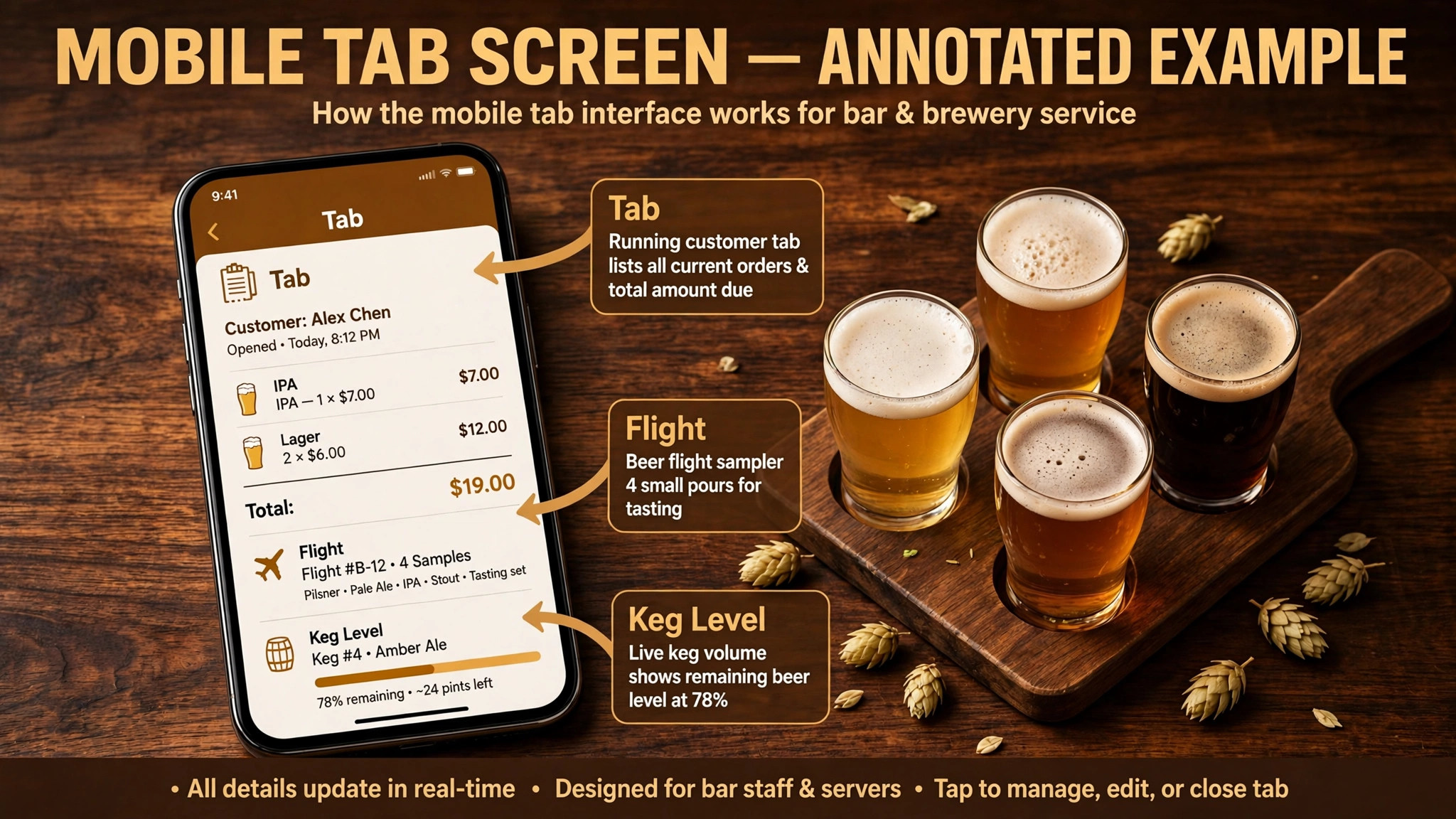
Arryved was built for craft beverage businesses, including breweries, taprooms, cideries, and distilleries, and its mobile tab workflow shows that origin. Staff can open, move, split, and close tabs from a handheld device, guests can order and pay by QR code, and loyalty is built for repeat taproom visitors. Keg inventory tracking connects what is poured to what remains, which matters when a popular beer can run out mid service.
Third party listings put Arryved Core POS from 99.99 dollars per month for one to nine devices, with larger operations quoted directly, so check the vendor’s current pricing page. Arryved uses approved Android hardware, which limits device choice but keeps the mobile workflow consistent. For a taproom where tabs and mobility drive service, that trade off is usually worth it.
Toast
Best for high volume taprooms with a kitchen that need handheld ordering and strong tab controls.
Toast is a full restaurant POS with card preauthorisation, handheld ordering, offline payments, cash controls, and tip management, and third party evaluations rate it highly for high volume bar service. For a taproom with a kitchen, Toast routes food orders to the kitchen while drinks stay on tabs, and online ordering can sit in the same system. Third party listings put a starter kit from zero dollars per month, with higher plans and Toast Payments required, so check the current plan details carefully.
The trade off is lock in. Toast requires its own payments and approved hardware, and the full system can be more than a drinks only taproom needs. For a busy taproom with food, events, and a large team, that depth pays off. For a small drinks only taproom, the monthly and hardware commitment may outweigh the extra restaurant features.
Square for Restaurants
Best for small taprooms that want a fast, low cost start with familiar tools.
Square for Restaurants offers a free POS plan, simple setup, month to month terms, and basic tab management that works on iPad or iPhone. For a new taproom, a seasonal patio, or a small neighbourhood bar, that low barrier matters, since fixed costs stay low while the business finds its rhythm. Online ordering, gift cards, and loyalty can be added as the taproom grows, without rebuilding the whole system.
Square is a general restaurant POS, not a brewery native one, so keg tracking, flight handling, and merch workflows need manual processes or apps. At high volume, per transaction fees also add up, so model fees on real taproom volume before assuming the free plan stays cheapest. Square fits best as a starting point, or as a permanent home for a small, simple taproom.
Lightspeed Restaurant
Best for restaurant bars and taprooms with complex inventory and multi location needs.
Lightspeed Restaurant offers advanced inventory, ingredient level tracking, multi location management, and a built in assistant in third party listings. For a taproom group or a brewpub with a full kitchen, that inventory depth helps track ingredients, food costs, and drink costs together. Third party listings put Lightspeed Restaurant from 69 dollars per month, so check the vendor’s current pricing page for plan details and payment requirements.
The trade off is complexity. Setup and staff training take longer than with a simpler POS, and a small single taproom may not need ingredient level tracking for every pour. Lightspeed fits when inventory control and multi location reporting are the main problems. When tab speed and mobility are the main problems, a brewery native tool may serve the floor better.
SpotOn
Best for high volume taprooms that need fast preauthorisation and strong tab handling.
SpotOn is built for high volume hospitality, with preauthorisation that lets staff open tabs quickly, fast checkout, and labour tools that build schedules from sales data. Third party listings put SpotOn from 25 dollars per month, with card processing reported at 1.99 percent plus 25 cents in some listings, so check the vendor’s current pricing page and get processing terms in writing. Waitlist and reservation tools also help on packed weekend evenings.
SpotOn pricing is typically custom quoted for the full setup, so compare the total including hardware and processing rather than the starting monthly figure alone. It is a general hospitality POS, not brewery specific, so keg and flight workflows need configuration. For a crowded taproom where tab speed decides service quality, SpotOn is a strong shortlist candidate.
Clover
Best for taprooms that want a customisable POS with a large app marketplace.
Clover offers a highly customisable POS through hardware options and an app marketplace with hundreds of apps, which suits taprooms with unusual setups such as multiple tap walls, specialty programs, or merch heavy retail. Third party listings put Clover from 14.95 dollars per month, with hardware and app costs extra, so check the vendor’s current pricing page. Tab management, tip handling, and split checks are covered, with extra features added through apps.
The marketplace model is both strength and risk. Apps can fill gaps for draft inventory or loyalty, but each app adds cost, support, and a point of failure. A taproom that wants one brewery native system may prefer Arryved, while a taproom that wants to assemble its own setup around Clover should budget app costs honestly and test the full stack on a busy night before committing.
Epos Now
Best for taprooms that want customisable bar workflows at a lower starting price.
Epos Now offers customisable bar workflows, tab management, and reporting, with third party listings putting software from 39 dollars per month plus required hardware, and complete bundles from 349 dollars. That price point suits a taproom that wants more control than a free plan offers without moving to a full enterprise restaurant system. Support options vary by plan, so confirm phone and chat support terms before signing.
Payment processing is custom quoted, so get processing rates in writing and compare them on real volume rather than on the software fee alone. Epos Now is a general bar POS, not brewery native, so keg tracking and flight handling need manual processes. It fits a mid size taproom that values custom workflows and a moderate price over brewery specific depth.
Lavu
Best for cash heavy taprooms that want dual cash drawers and strong tab controls.
Lavu is a restaurant and bar POS with dual pricing options, dual cash drawers, and tab management that suits cash heavy operations. For a taproom where a large share of sales are cash, or where happy hour and event pricing change often, those controls reduce end of day reconciliation pain. Lavu pricing is typically custom quoted, so request a full written proposal covering software, hardware, and processing.
The trade off is ease of use. Third party evaluations rate Lavu lower on ease of use than Toast or Square, and the system can feel feature heavy for a small taproom. Test the tab flow, cash reconciliation, and happy hour pricing changes in a demo with your own menu, since those daily tasks decide whether staff adopt the system or work around it.
Revel Systems
Best for multi location taprooms that need a cloud POS with strong reporting.
Revel Systems is a cloud based POS for restaurants and bars, with multi location management, reporting, and integrations for larger operations. For a brewery with several taprooms, central menu management, consolidated reporting, and consistent pricing across locations matter more than single taproom mobility. Revel suits groups that need head office control without losing counter speed at each site.
Revel is an enterprise leaning system, so pricing and implementation need a direct proposal, and a single small taproom may find it heavier than necessary. Test multi location menu changes, gift card handling across sites, and consolidated reporting in the demo, since those are the jobs that justify the system. For a single taproom, a brewery native or simpler bar POS usually fits better.
TouchBistro
Best for taprooms with table service that want an iPad based restaurant POS.
TouchBistro is an iPad based restaurant POS with table management, menu management, and staff tools that suit taprooms with table service and food. For a brewpub where guests sit, order food and flights, and stay for an evening, table tracking and course handling matter alongside tabs. TouchBistro also offers online ordering and reservations through add ons, so the system can grow with the venue.
TouchBistro is a general restaurant POS, so brewery specific workflows such as keg tracking and flight pricing need configuration. Pricing is typically quote based by location and feature, so ask for a total that includes hardware, payments, and add ons. It fits table service brewpubs better than counter only taprooms, where a mobile tab system may be faster.
Heartland Restaurant
Best for taprooms that want a restaurant POS with strong payment and payroll links.
Heartland Restaurant, part of the Heartland payment ecosystem, offers restaurant POS features with integrated payments and payroll tools for larger hospitality teams. For a taproom that already uses Heartland payments, or that wants payroll and POS data together, that integration can simplify back office work. Menu, tab, and reporting features cover the standard brewpub job well.
Heartland pricing is typically quote based, so compare the full proposal, including processing, hardware, and payroll features, against a simpler POS plus separate payroll. Brewery specific depth is limited, so keg and flight workflows need manual handling. Heartland fits a growing brewpub that values back office integration over brewery native features.
GoTab
Best for taprooms that want QR ordering and a low contact guest experience.
GoTab is a hospitality platform focused on QR code ordering and payment, which lets guests order from their table or from the patio without waiting for a server. For a large taproom, a beer garden, or an event space, that self service flow cuts queue time and lets staff focus on pouring and hosting. GoTab also supports tabs, tips, and kitchen routing, so it can run alongside or instead of a traditional POS at the counter.
GoTab is not a full brewery management system, so keg tracking, inventory depth, and multi location reporting need a separate POS or integration. Pricing is typically quote based, so ask how fees scale with order volume. It fits taprooms where guest ordering speed is the bottleneck, especially on patios and at events, rather than taprooms where staff led table service is the core experience.
Tabski
Best for food hall style campuses and taprooms that host external food vendors.
Tabski is a POS platform for multi vendor venues, with automated payouts to external vendors and QR ordering for large patios and campuses. For a brewery taproom that hosts food trucks or independent food vendors, Tabski routes each order to the right vendor and splits payouts automatically, which removes a painful manual reconciliation job. Third party listings put Tabski from 69 dollars per month per terminal, so check the vendor’s current pricing page.
For a single vendor taproom without external food partners, Tabski is overkill, and setup fees for complex routing can add cost. It also needs a clear vendor payout agreement before launch, since automated payouts only work when vendor terms are set correctly. Choose Tabski when multi vendor operations are core to the venue, not as a general taproom POS.
CrumblePOS
Best for brewery food trucks and small taprooms that want a portable POS with seasonal billing.
CrumblePOS is a POS for food trucks and small hospitality venues, with kitchen display, online ordering, and seasonal pause billing options in third party listings. For a brewery food truck, a seasonal taproom, or a small outdoor bar, the ability to pause billing out of season is a practical saving. Third party listings put CrumblePOS from 89 dollars per month per device, so check the vendor’s current pricing page.
CrumblePOS is not designed for massive indoor taprooms with many taps and complex tab handling, so a large taproom should test tab volume carefully before choosing it. Its smaller integration marketplace also means fewer add ons for keg tracking or loyalty. It fits best where portability and seasonality matter more than scale.
KORONA POS
Best for taprooms with a strong merch and retail side that want ticketing and retail in one system.
KORONA POS is a cloud POS for retail, ticketing, and attraction businesses, with a flat monthly subscription model and no per ticket fees in third party listings. For a taproom with a busy merch shop, event tickets, and a gift shop alongside drinks, KORONA can run retail and events in one system rather than splitting them across tools. Inventory management for merch is stronger than in most bar POS tools.
KORONA is not brewery native, so tab mobility, keg tracking, and flight handling need configuration or a separate bar workflow. It fits best as a retail and events complement, or as a primary POS for a merch heavy taproom that values retail depth over brewery specific tabs. Test the bar tab flow on a busy night before making it the sole POS.
Best Pick by Job
When you compare the best POS system for brewery taprooms, match the pick to the venue, not to the largest feature list. A single taproom needs mobile tabs and keg visibility. A taproom with a kitchen needs food routing alongside tabs. A multi location brewery needs central menus and consolidated reporting.
| Your situation | Best pick | Why it fits |
|---|---|---|
| Single taproom | Arryved | Brewery native tabs, QR ordering, and keg tracking fit a drinks led venue |
| Taproom with kitchen | Toast | Kitchen routing plus handheld tabs handle food and drinks together |
| Multi location brewery | Revel Systems | Central menus and consolidated reporting across taprooms |

How to Choose
Start with the busiest hour, not the average hour. Walk through a packed Friday evening, with tabs opening, flights being built, a keg running out, a merch sale, and a large patio order arriving together, and test each tool against that hour. Score the tool on tab speed, flight building, keg visibility, offline fallback, and end of day reconciliation. Drop any tool that fails a job you face weekly, even if its price looks attractive.
Next, model total cost on real volume. Include subscription, hardware, processing, apps, and per device or per location fees, and ask for the total first year figure in writing. A free plan that charges high processing fees can cost more than a paid plan at taproom volume, while a paid plan with low processing can win at scale. That comparison is central to choosing the best POS system for brewery taprooms. Finally, test hardware in your own space, since spill resistant terminals, patio connectivity, and scanner reliability in low light all matter more in a taproom than in a demo room.
Mistakes to Avoid
Choosing on monthly fee alone is the most common error, because processing and tab errors cost more than any subscription saving. Skipping a flight and keg test in the demo is another costly mistake, since those workflows look simple in a slide deck and fail on a busy night. A third mistake is ignoring offline mode, since a network drop during peak service can halt sales if the system cannot queue payments. Finally, do not buy a full restaurant system for a drinks only taproom, or a drinks only tool for a full brewpub, since either mismatch creates daily workarounds for staff. Avoiding those workarounds is what a good choice of the best POS system for brewery taprooms actually buys.
Flights, Merch, and To Go Beer in One System
Flights, merch, and to go beer are often treated as side sales, but in many taprooms they are a large share of revenue and a large share of complexity. A flight needs a set price, a configurable set of pours, and correct keg deduction for each small pour, or inventory will drift and margins will be guessed rather than known. Merch needs size and colour variants, tax handling, and stock counts that differ from draft pours, while crowler and growler fills need fill pricing, deposit handling where applicable, and age verification at sale.
The POS should report draft, packaged, and merch separately, so managers can see which side grows and which side needs attention. A taproom that only sees total sales cannot tell whether a slow week was a draft problem, a merch problem, or an events problem, and that blindness leads to wrong decisions. Test all three sale types in a demo, with real products and real prices, and check that reporting separates them cleanly without manual spreadsheet work.
Finally, consider the guest journey across all three. A guest who tries a flight, buys a shirt, and fills a crowler should be able to pay once, or at least without three separate queues, and loyalty should recognise the whole visit rather than only the draft tab. A system that fragments that journey will feel slow to guests even when each individual sale is fast, so judge the combined flow, not just the single sale.
Checklist Before You Buy
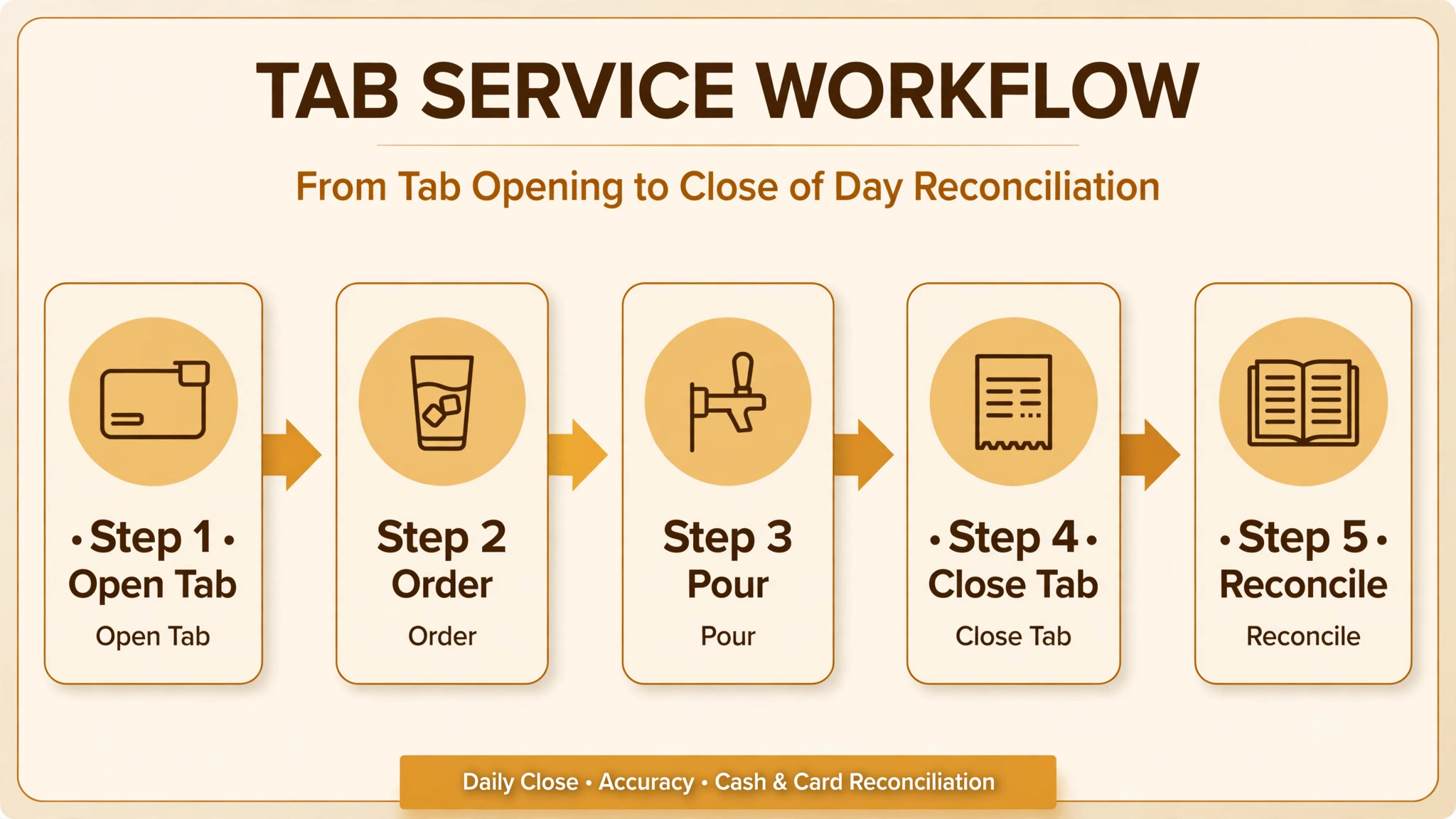
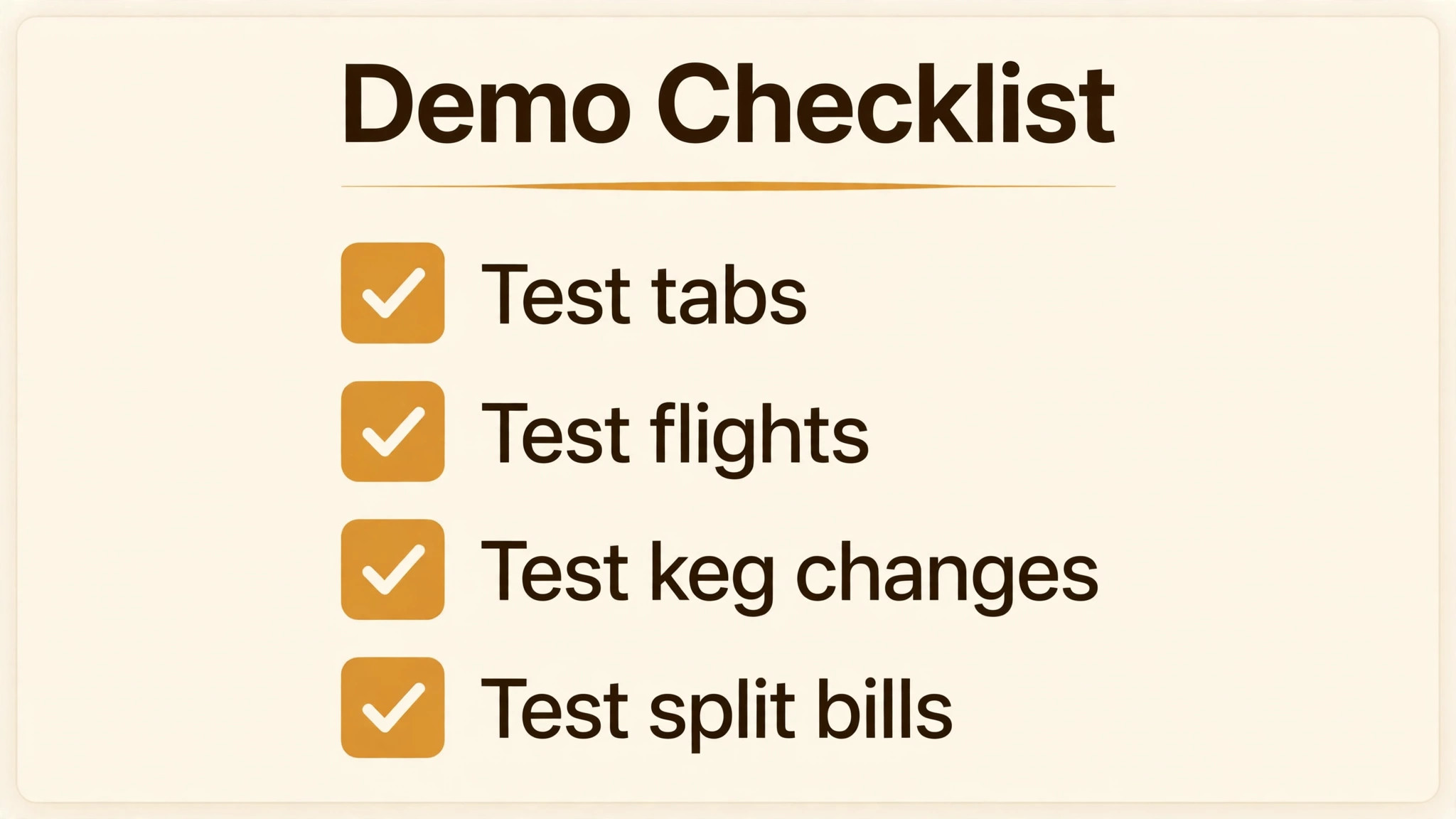
Before you sign, run one real service through the system. Open a tab with preauthorisation, build a flight, move the tab to another server, and split it fairly. Sell merch and a crowler fill alongside draft pours. Record a keg change and confirm remaining volume updates. Process a happy hour price change on schedule. Close the day and reconcile cash, cards, and tips. If any step needs a separate spreadsheet or a paper note, that gap is part of the system you are buying.
– Open a tab with preauthorisation and move it between servers – Build a flight with configurable pours and confirm keg volume updates – Sell merch and a crowler fill alongside draft pours – Process a scheduled happy hour price change without manual edits – Test offline payments during a simulated network drop – Split a tab fairly and close it from a handheld device – Reconcile cash, cards, and tips at close of day – Get the total first year cost in writing, including hardware and processing
Frequently Asked Questions
What makes a brewery POS different from a general bar POS?
A brewery POS handles tabs as the core workflow, with mobile ordering, flight pricing, keg tracking, and merch in the same system. General bar tools cover tabs and tips well, but keg levels, flight builds, and crowler or growler fills often need manual tracking. If your team tracks kegs on a whiteboard, a brewery native tool will save more time than a general tool with a lower monthly fee.
How should flights be priced and rung up?
Flights are usually priced as a set, with a fixed number of small pours, rather than as separate full pours. The POS should support a flight product with configurable pours, so staff can build a flight quickly and the system can deduct the correct keg volume. Test flight building in a demo with your own beers, since a slow flight flow creates a queue at the bar on busy nights.
What is keg tracking, and do I need it?
Keg tracking records how much beer remains in each keg based on pours, so staff know when a keg will run out and managers can spot shrinkage or over pouring. It matters most for taprooms with many taps and high volume, where a surprise empty keg loses sales and disappoints guests. Smaller taprooms can track kegs manually, but the habit breaks down quickly above about twelve taps.
Tabs are usually opened with a card preauthorisation, which holds funds and deters walkouts. Staff should be able to move a tab between servers, split it fairly, and close it from a handheld device without returning to a fixed terminal. Ask how walkouts are handled, what happens when a preauthorisation expires, and how the system flags tabs left open at close.
Should guests order by QR code, or should staff take every order?
QR ordering suits large patios, beer gardens, and events where queues form, while staff ordering suits smaller taprooms where hospitality and recommendations drive sales. Many taprooms use both, with QR for reorders and staff for first orders and flights. Test QR ordering with real guests, since a confusing QR flow creates more work for staff than it saves.
How do I handle merch and to go beer in the same POS?
Merch, crowlers, growlers, and packaged beer need inventory tracking, tax handling, and age verification rules that differ from draft pours. The POS should separate draft, packaged, and merch sales in reporting, so you can see which side of the business grows. If merch is a large share of revenue, a POS with strong retail inventory will serve you better than a drinks only tool.
What should I budget beyond the monthly fee?
Budget hardware, payment processing, add on apps, training, and any per device or per location fees. Processing often exceeds the subscription for a busy taproom, so model it on real volume and average ticket. Ask each vendor for a total first year figure in writing, including hardware replacement costs, before comparing plans.
How do I switch POS without disrupting service?
Switch during a quiet period, train staff on real menus and real tabs, and run the new system alongside the old one for at least one busy weekend if possible. Import menu items, prices, and loyalty data before launch, and keep the old system readable for reporting. A rushed cutover before a holiday weekend is the most common cause of a failed POS switch.
Verdict
Arryved leads for most single taprooms because brewery native tabs, QR ordering, and keg tracking fit the core job. Toast leads for taprooms with a kitchen and high volume, where food routing and handheld service matter most. Square leads for small taprooms that want a low cost start, while SpotOn, Lightspeed, Clover, and Epos Now each fit a specific mix of volume, customisation, and price. Revel Systems leads for multi location groups, GoTab for QR led venues, Tabski for multi vendor campuses, and CrumblePOS for food trucks and seasonal bars. That range is the honest answer for the best POS system for brewery taprooms.
Book two demos for the same busy Friday night and judge them side by side. Run the checklist jobs in both, compare total first year cost on your real volume, and pick the tool your staff actually enjoy using when the bar is full. The system that keeps tabs, flights, kegs, and merch in one trustworthy flow is the system that lets a taproom serve more guests without longer queues or lost sales.

More Reading on Stratilyze
These related guides cover nearby buying decisions and may help you compare costs and workflows before you commit.
– Best Online Ordering Software for Restaurants – Best HR Software for Restaurants – Best POS System for Gift Shops – Best Booking Software for Outdoor Rental Businesses – Best Donation Software for Schools