

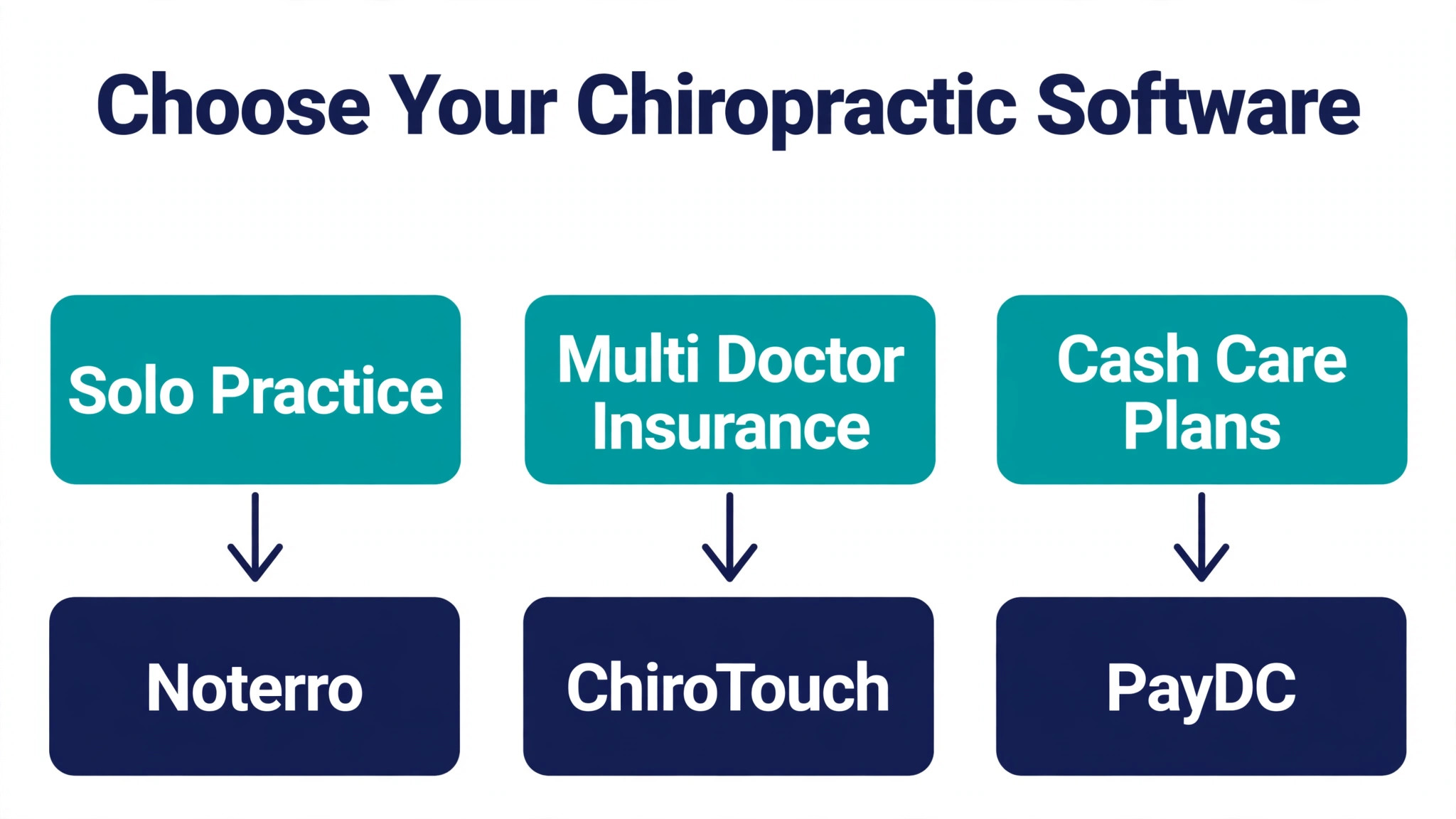
The verdict first, because most chiropractors do not need fourteen tools, they need the right one for how they get paid. A solo doctor who runs a lean cash practice should start with Noterro or Jane. A multi doctor clinic that bills insurance all day should start with ChiroTouch. A cash pay practice that lives on care plans and compliant documentation should start with PayDC or ChiroSpring. Everything else in this guide to the best practice management software for chiropractors exists to test that verdict against your real mix of patients, payers and providers.
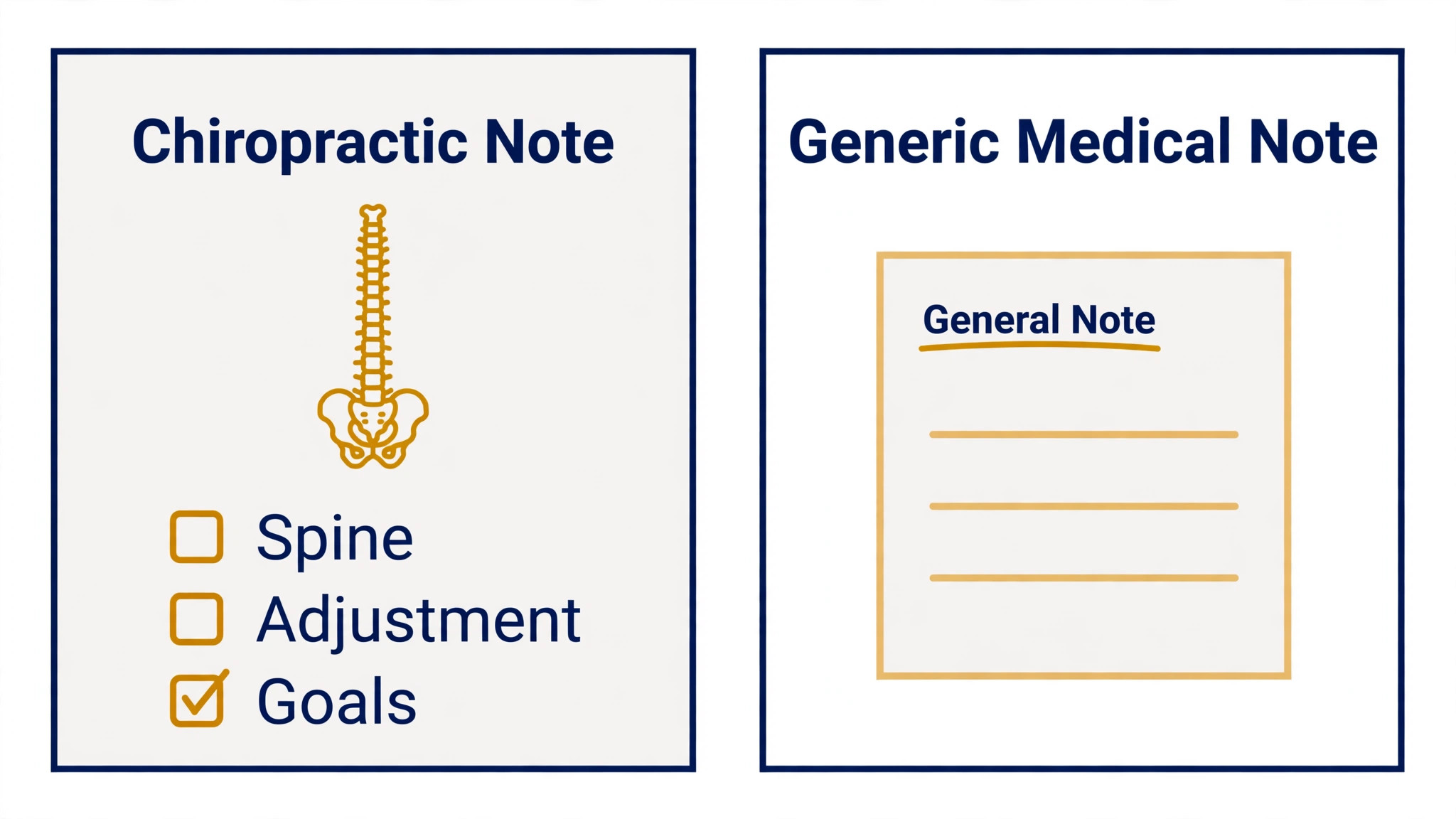
Chiropractic software fails in a specific way. It looks fine for scheduling, then it falls apart at the note, because chiropractic notes are not generic medical notes. They need spinal regions, segmental findings, treatment techniques, plan of care tracking and outcome measures, all in a format that survives an insurance audit. A general practice tool can store a note, but it cannot prove medical necessity the way a chiropractic note must, and that gap only appears when a claim is denied or an auditor asks for the record.
The fourteen tools below were judged on the same five questions. Does charting match how chiropractors actually document an adjustment visit. Does billing handle insurance claims, patient responsibility and care plan packages without manual rework. Does scheduling fit recurring visit plans and multi provider calendars. Does the patient experience, from intake to reminders to payments, run without front desk heroics. And does the price at your real provider count match the value the clinic gets back.
The Best Practice Management Software for Chiropractors Starts With the Note
A chiropractic visit produces a short, structured record, and the software should make that record faster, not longer. The best tools offer chiropractic templates with body diagrams, technique lists and goal tracking, so a doctor can complete a defensible SOAP note in minutes rather than reconstructing the visit at the end of the day. Tools that force free text for every finding slow the doctor down and produce inconsistent notes, which is a compliance risk disguised as flexibility. Speed and structure are not opposites here, and the tools that win combine both.
The second test is the claim. Insurance heavy clinics live on clean claims, electronic remittance posting and denial follow up, and a tool that treats billing as an afterthought will cost more in rejected claims than it saves in subscription fees. Ask how the tool handles CMS 1500 claims, ERA posting, eligibility checks and patient balances, and ask for the clearinghouse arrangement in writing. A cash pay clinic can ignore most of that, but an insurance clinic cannot, and the difference should drive the shortlist more than any feature list does.
The third test is the care plan. Chiropractors sell plans of care, not single visits, and the software should track visits used, visits remaining, progress against goals and re examinations due. When that tracking lives in a spreadsheet, patients run past their plan without anyone noticing, or they are billed for visits the plan already covered. A tool that shows plan status on the patient record at every visit prevents both errors, and it gives the doctor a natural moment to discuss progress with the patient.
Cash, Insurance, or Both
Payment model splits this market more cleanly than practice size does. A cash pay clinic needs packages, memberships, superbills and simple card payments, and it does not need a clearinghouse, ERA posting or payer rule engines. Paying for those insurance features is wasted money, and the setup time they demand is wasted time. Cash clinics should therefore weight scheduling, documentation, packages and patient communication above billing depth, and they should be suspicious of any quote that bundles a full revenue cycle service they will never use.
An insurance heavy clinic needs the opposite. Its software must handle eligibility, claims, denials, patient responsibility and audit ready notes as core features, not add ons. The cheapest subscription in this guide can become the most expensive system for such a clinic if its claims workflow needs manual workarounds, because every denied claim costs staff time and delays payment by weeks. For these clinics, the billing module deserves a full trial with real payer mixes, not a demo with clean test data.
Hybrid clinics need both, and they need them without paying twice. The practical test is whether one patient record can hold an insurance episode and a cash package at the same time, and whether reporting separates the two revenue streams cleanly. Tools built for one model often handle the other awkwardly, so a hybrid clinic should run its trial with one real insurance patient and one real cash patient from intake to payment. That single test exposes more than a week of feature demos, and it belongs in every search for the best practice management software for chiropractors run by a mixed practice.
Fourteen Systems, One by One
The fourteen systems below range from the market leader to lean budget tools. Each section names the practice it fits, the price where one is published, and the reason to skip it, so the shortlist can shrink fast.
1. ChiroTouch
ChiroTouch is the market leader for a reason, and its scale is the product. The vendor counts more than 12,500 practices and 36,000 providers, which means its clearinghouse relationships, payer knowledge and integrations have been tested across more payer mixes than any rival here. It covers chiropractic charting, scheduling, claims management, payment processing and AI assisted documentation, and new hires often arrive already trained on it, which shortens onboarding in a multi doctor clinic.

ChiroTouch publishes no standard price, so expect a quote based on provider count and modules, and get that quote in writing with add ons listed. Choose ChiroTouch if the clinic bills insurance heavily, runs several doctors and wants the deepest chiropractic feature set available. Skip it if the clinic is a solo cash practice, because the price and setup weight will exceed what that practice needs.

2. ChiroFusion
ChiroFusion is the value pick for clinics that want full chiropractic features at a published price. Its vendor FAQ lists a starting price of $129 a month, covering scheduling, reporting, billing and claims, payment processing and patient check in, with updates, backups and storage included. Free unlimited electronic claims through an integrated clearinghouse are genuinely rare at this price, and they matter most to a clinic that submits claims every day.
The trade off is scale and polish. ChiroFusion does not carry the same integration depth as the market leader, and a large multi location group may outgrow its reporting. Choose ChiroFusion if the clinic wants honest published pricing and complete insurance billing without a sales negotiation. Skip it if the practice needs enterprise reporting across many sites or a very large integration library.
3. ChiroUp
ChiroUp is built for evidence based solo practitioners and new graduates who want research driven protocols inside the note. Its Advanced SOAP Wizard guides documentation around current evidence, which helps a newer doctor produce consistent, defensible notes without years of template building. That guidance is the differentiator, because most tools leave the clinical reasoning entirely to the doctor, while ChiroUp structures it.
Pricing is quoted, with a $299 a month NCMIC member rate reported in published comparisons, so non members should check the vendor pricing page for the standard rate. Choose ChiroUp if evidence based documentation and protocol guidance matter more than the lowest price. Skip it if the clinic is a high volume insurance practice that needs the deepest billing automation available.
4. ChiroSpring
ChiroSpring is the modern cloud option for clinics that value speed and a clean workflow over a long feature list. It runs in a browser, covers scheduling, notes, billing and patient intake, and it is frequently praised for how quickly a doctor can move from booking to completed note. That speed matters in a busy adjustment practice, where the gap between patients is measured in minutes and a slow system backs up the whole day.
Pricing is quote based, so bring a must have list to the demo and ask what is included versus what is an add on. Choose ChiroSpring if the clinic wants a fast, modern cloud system and is willing to pay a quote based price for it. Skip it if the practice needs published pricing to get budget approval, or if it needs the deepest insurance billing engine in this guide.
5. Jane
Jane suits multi discipline clinics that combine chiropractic with physiotherapy, massage or acupuncture, because it was built for allied health teams rather than for one discipline alone. It covers scheduling, charting, intake, payments and reminders in a polished system that staff learn quickly, and its large practitioner community means templates and workflow advice are easy to find. A clinic that shares rooms across disciplines will value the single calendar and single patient record.
Jane is listed from $54 a month, with extra full time practitioners adding to the bill, so price it at the real practitioner count. Choose Jane if the clinic mixes disciplines or runs a cash leaning practice that values simplicity. Skip it if the clinic needs deep chiropractic specific billing, because Jane is a strong general allied health tool rather than a chiropractic billing specialist.
6. Noterro
Noterro is the budget leader for small chiropractic and rehab clinics that want solid software without a large monthly bill. It covers SOAP charting, billing and invoicing, appointment scheduling and intake at a price that undercuts most of this guide, and its interface is simple enough that a solo doctor can run it without office staff. That simplicity is deliberate, and it keeps the daily workflow short.
Noterro lists a Core plan from $33 a month, with higher plans adding capacity and features per practitioner. Choose Noterro if the clinic is small, cash leaning or just starting, and if the budget matters more than enterprise billing depth. Skip it if the clinic is a high volume insurance practice, because its billing workflow is lighter than the specialists in this guide.
7. PayDC
PayDC is the compliance first choice for practices that bill almost entirely through insurance. It offers one click CMS 1500 claims and audit ready notes, with documentation built around the requirements that auditors actually check. For a clinic whose revenue depends on surviving payer reviews, that documentation discipline is worth more than a prettier calendar, and it is the reason PayDC keeps a loyal insurance heavy user base despite a smaller marketing presence.
Pricing is quote based, so ask for the full package in writing, including clearinghouse and support terms. Choose PayDC if insurance billing and audit ready documentation are the top priorities. Skip it if the clinic is cash pay, because the insurance depth that justifies PayDC will sit unused while the team pays for it.
8. Genesis
Genesis, from Billing Precision, pairs cloud practice management with an optional billing service, which appeals to owners who would rather outsource the revenue cycle entirely. The software covers scheduling, notes and billing, and the service option means the same company can chase denials and post payments on the clinic behalf. That combination suits an owner who wants to practise rather than manage a billing team, and who is willing to pay for that freedom.
Pricing is quote based for both the software and the service, so compare the combined cost against hiring or outsourcing billing separately. Choose Genesis if the clinic wants practice management plus a billing service from one vendor. Skip it if the clinic already has a billing team it trusts, because the service bundle will duplicate that cost.
9. ChiroHD
ChiroHD sells simplicity, with a cloud EHR designed to run in a single browser tab across scheduling, notes, billing and patient engagement. The appeal is a clean workflow that a small team can learn in days, without the training burden that comes with the largest platforms. For a clinic that has been burned by a heavy system, that lightness feels like a feature, not a compromise, and it shows in daily use.
Pricing is quote based, so the total depends on provider count and modules. Choose ChiroHD if the clinic wants a simple, modern cloud workflow and values ease of use above maximum depth. Skip it if the practice needs the deepest payer specific billing or a large library of third party integrations.
10. EZBIS
EZBIS is the longevity pick, a long established chiropractic system with modular pricing that lets a clinic buy the pieces it needs. Its modules cover scheduling, documentation, billing and reporting, and the modular approach suits a clinic that knows exactly which functions it wants and does not want to pay for the rest. Longevity also means its billing workflows have survived many payer rule changes, which is a quiet form of reliability.
Pricing is quote based and modular, so the final number depends on the chosen modules and provider count. Choose EZBIS if the clinic values a proven, modular system and wants to control the package. Skip it if the team wants a modern cloud first interface with self serve signup, because EZBIS follows a more traditional sales and setup path.
11. WonderDoc
WonderDoc is a straightforward chiropractic system for small clinics that want a dashboard, tracking, charts and graphs without enterprise complexity. It covers the daily workflow of scheduling, notes and billing in a compact package, and its low entry price makes it accessible to a new practice that cannot yet justify a premium subscription. The dashboard view helps a solo doctor see the day, the plan status and the billing position at a glance.
WonderDoc is listed from $59 a month in published comparisons, so check the vendor pricing page for current plan details. Choose WonderDoc if the clinic is small and wants a simple, affordable system with clear reporting. Skip it if the practice needs deep insurance automation or multi location control, because those are not its strengths.
12. Carepatron
Carepatron is the low cost general health practice tool that small chiropractic clinics sometimes choose for its scheduling, notes, billing and client management at a very low entry price. It covers the basics well, with a clean interface and a patient portal, and it suits a clinic that mixes chiropractic with other health services or that is testing whether practice software earns its keep. The low price removes the risk of trying it.
Carepatron is listed from $29 a month in published comparisons. Choose Carepatron if the budget is the binding constraint and the clinic needs a capable general system quickly. Skip it if the clinic needs chiropractic specific charting depth or insurance billing automation, because a general tool will need workarounds for both.
13. BackChart
BackChart is an EHR and practice management platform for chiropractic offices that handles scheduling, billing and clinical documentation in one system. Its strength is a focused chiropractic workflow without the sprawl of a general medical platform, which keeps the daily screens relevant to adjustment practice. Clinics that want a dedicated chiropractic record, rather than a general record adapted to chiropractic, will find that focus reassuring.
BackChart is listed from $89 per user a month in published comparisons, so price it at the real user count before comparing. Choose BackChart if the clinic wants a dedicated chiropractic EHR at a mid range price. Skip it if the team needs the largest integration library or the lowest possible entry price, because other tools in this guide beat it on both.
14. Pabau
Pabau is the all in one alternative for chiropractic practices where marketing and patient engagement matter as much as clinical notes. It pairs SOAP notes and electronic records with booking, billing, scheduling and patient marketing in a single platform, which suits a clinic that wins patients through campaigns and needs follow up to run automatically. A practice that relies on reactivation and review generation will use that breadth daily.
Pabau is listed from $62 a month in its chiropractic comparison, with the total rising by practitioner and by messaging volume. Choose Pabau if the clinic wants one platform for clinical work and growth, and if marketing is a real revenue driver. Skip it if the clinic is insurance heavy and needs the deepest chiropractic billing engine, because the specialists in this guide go further on claims.
Reading the Price Quotes Honestly
Quote based pricing dominates this market, and it rewards clinics that ask better questions. A quote that omits the clearinghouse fee, the messaging bundle, the training fee or the per provider charge for a part time doctor is not a complete quote, and comparing it against a published price is meaningless. Ask every vendor for the same written breakdown, with provider count, locations, clearinghouse, messaging and support listed as separate lines, and keep those breakdowns side by side until the decision is made.
Published prices deserve the same scepticism in the other direction. A low starting price often covers one user and a limited feature set, while the plan the clinic actually needs sits two tiers higher.
Noterro at $33 a month and Carepatron at $29 a month are genuinely cheap entry points, but a clinic that needs advanced billing, multi provider calendars and full reporting should price the higher tier, not the headline. Any shortlist for the best practice management software for chiropractors should be compared on the price of the plan that does the job, not the price of the plan that gets the click. The honest comparison is the price of the plan that does the job, and that discipline keeps a bargain from becoming a regret.

What Each Practice Type Should Buy
| Practice type | Best pick | Why it wins for that practice |
|---|---|---|
| Solo practices | Noterro | Lowest real cost with solid SOAP charting |
| Multi-doctor clinics | ChiroTouch | Deepest billing and charting at scale |
| Cash-pay practices | PayDC | Audit ready notes and care plan discipline |
Solo practices should buy the cheapest tool that documents well, because every dollar of overhead falls on one doctor. Noterro earns the pick here for its $33 a month starting price and its clean SOAP workflow, with Jane as the step up if the practice mixes disciplines.
Multi doctor clinics should buy for billing depth and consistency, because five doctors documenting five different ways creates an audit and reporting mess, and ChiroTouch earns its pick for standardising that workflow at scale. Cash pay practices should buy for care plan discipline and documentation quality, because their revenue depends on patients completing plans and on notes that justify the care, and PayDC earns its pick for that discipline, with ChiroSpring as the faster, more modern alternative. That payment first logic is the backbone of this best practice management software for chiropractors ranking, and it matters more than any single feature comparison.
Owners exploring adjacent ideas may also find the companion guide to AI tools for chiropractors useful, and the scheduling focused AI for chiropractic clinic patient scheduling roundup covers the automation side in more depth.
Rollout Plan in Six Steps
1. List every payer, package type and care plan the clinic runs today, and map each one to the new system. 2. Build chiropractic note templates with spinal regions, techniques and goals before importing patients. 3. Import patients in small batches, checking plan balances and visit histories after each batch. 4. Connect claims, eligibility and card payments, then test one real claim end to end. 5. Train doctors on the note workflow first, because adoption lives or dies on charting speed. 6. Run the old and new systems in parallel for two weeks, then reconcile billing before cancelling.

Cost Traps to Watch
The first trap is the per user bill at real headcount. A tool priced at $33 or $54 a month looks trivial until every doctor, front desk member and part time provider needs a seat, and the monthly total doubles. Count every seat before signing, including staff who only need to view the calendar, because some vendors charge for viewers while others do not. The second trap is the clearinghouse and messaging bundle, which can add a meaningful monthly charge on top of the subscription, especially for a clinic that sends reminders to every patient.
The third trap is the contract term. A discounted annual price looks attractive, but a clinic that discovers a billing gap in month two is then locked into a year of workarounds. Prefer a monthly start or a short initial term, even at a higher monthly price, until the trial has proven the note workflow and the claims workflow with real patients. That caution applies to every finalist for the best practice management software for chiropractors, because a cheap annual lock in is the most expensive mistake in this guide. The fourth trap is migration cost, whether charged as a fee or paid in staff time, and it should be quoted in writing before the decision, not discovered after it.

Frequently Asked Questions
How much does chiropractic practice management software cost each month
Published starting prices in this guide run from $29 a month for Carepatron and $33 a month for Noterro up to $129 a month for ChiroFusion, while the largest platforms, including ChiroTouch, price by quote. A realistic budget for a small clinic is the published plan that covers its real provider count plus messaging and clearinghouse fees, and a realistic budget for a multi doctor insurance clinic is a written quote, not a website headline. Always compare the total monthly cost at your size, not the entry price.
Do I need chiropractic specific software, or will a general practice tool work
A general tool works for scheduling, billing basics and patient messaging, but it struggles with chiropractic charting, plan of care tracking and audit ready notes. If the clinic bills insurance, the gap matters, because a note that does not prove medical necessity in chiropractic terms invites denials. That documentation gap is why a dedicated entry on any best practice management software for chiropractors shortlist usually beats a general tool for an insurance clinic, even when the general tool costs less. If the clinic is small and cash pay, a general tool can work, but the doctor will spend more time shaping notes that a chiropractic tool produces natively.
What is the best software for a solo chiropractor starting out
Noterro is the strongest starting point on price and simplicity, with Jane as the step up for a doctor who mixes disciplines or wants a more polished patient experience. Both let a solo doctor run scheduling, notes, billing and reminders without office staff, and both keep the monthly cost low while the patient base grows. A solo doctor should avoid the enterprise platforms until patient volume and insurance complexity justify their price and setup weight.
How does cash pay software differ from insurance billing software
Cash pay software centres on packages, memberships, card payments and superbills, with simple patient balances and no clearinghouse. Insurance software centres on eligibility, claims, electronic remittance, denials and audit ready documentation, with patient responsibility calculated after the payer responds. A tool built for one model can handle the other, but usually with workarounds, so a clinic should buy for the model that produces most of its revenue and test the secondary model in the trial.
How long does it take to switch chiropractic software
A solo clinic with a clean patient list can switch in two to three weeks, while a multi doctor insurance clinic should allow four to eight weeks for templates, payer setup, migration checks and training. The slow steps are note template building and claims testing, not the software installation itself. Running both systems in parallel for two weeks catches plan balance errors and billing gaps before they affect patients or revenue.
Can chiropractic software handle multi location clinics
Yes, but the tools differ on how well they do it. ChiroTouch and Genesis handle multi location reporting and standardised workflows most completely, while smaller tools handle multiple calendars but offer thinner consolidated reporting. A group should test consolidated reporting, provider permission controls and location level billing during the trial, because those are the features that separate a true multi location system from a single location tool with extra calendars.
The Bottom Line for Your Practice
Buy for how the clinic gets paid, then for how the doctor documents, and only then for price. A solo doctor who buys ChiroTouch pays for scale that does not exist yet, while a multi doctor insurance clinic that buys the cheapest tool pays for its saving in denied claims and manual billing work. The picks in this guide reflect that order, and they survive it, because Noterro wins on lean cost, ChiroTouch wins on insurance depth at scale, and PayDC wins on documentation discipline for cash care plans.
Run the trial the way the clinic actually works, with real payers, real care plans and real re examinations, and let the note workflow decide. The best practice management software for chiropractors is the one doctors complete notes in without dread, front desk staff bill from without workarounds, and patients experience as smooth from booking to payment. Choose that tool, even if it is not the cheapest on the list, and the clinic will repay the difference in time saved and claims paid.