
About 4 in 10 small brokerages still run their pipeline on spreadsheets and memory, and that habit costs them deals every month, which is why the best real estate crm for small brokerages matters more than any single marketing trick. A lead that waits two days for a callback usually signs with the agent who called back in two hours, and no spreadsheet can tell you which lead that was.
This guide compares ten CRMs that small brokerages actually use in 2026, judged on lead capture, follow-up automation, transaction tracking, team visibility, and price per agent. Prices come from vendor pages checked in late 2026, so confirm the current plan on the vendor site before you buy, because pricing and plan names change often.
The ten tools split into two camps. Real estate CRMs like Follow Up Boss and kvCORE speak the language of listings, showings, and closings out of the box. General CRMs like Zoho and HubSpot cost less and flex further, but they need setup before they feel like a real estate tool. Your pick should follow how much setup your team will actually do.
Why a Small Brokerage Needs Its Own CRM
A brokerage with five agents and no shared CRM has five separate pipelines, and the broker cannot see any of them. One agent keeps notes in a phone, another in email, and a third in a notebook that never leaves the car. When an agent goes on holiday, their leads go dark, and the brokerage loses deals it never knew existed.
That visibility gap is exactly what the best real estate crm for small brokerages is built to close. A shared CRM shows every lead, every call, and every showing in one place, so the broker can see which agents need help and which leads need a call today. It also keeps the client history when an agent leaves, which protects the brokerage from losing its book of business overnight.
The second problem is follow-up speed. Most buyers contact three agents before choosing one, and the first agent to respond usually wins the client. A CRM with text and email automation answers in minutes, even at 9 pm on a Sunday, and it keeps following up for months while the agent works new leads. A brokerage that answers first wins more than a brokerage that advertises more.
The 10 Tools at a Glance
| Tool | Main job | Best for | Starting paid price |
|---|---|---|---|
| Follow Up Boss | Lead follow-up CRM | Fast lead response | about $69 a month |
| kvCORE | All-in-one brokerage platform | Growing teams | about $499 a month |
| Sierra Interactive | Websites plus CRM | Lead conversion | pricing on the vendor site |
| Real Geeks | Lead generation plus CRM | Lead volume | about $299 a month |
| Zoho CRM | General CRM | Low cost | about $14 a user a month |
| HubSpot CRM | Free CRM plus marketing | Starting free | free tier, paid from about $20 a month |
| Wise Agent | Transactions plus CRM | Deal checklists | about $49 a month |
| LionDesk | CRM with calls and texts | Agent outreach | about $25 a month |
| IXACT Contact | Agent contact CRM | Simple agent CRM | about $40 a month |
| Propertybase | Salesforce-based real estate CRM | Enterprise teams | pricing on the vendor site |
No single row in this table settles the choice, because the best real estate crm for small brokerages for a five-agent team looks different from the right pick for a twenty-agent team. A small team needs low cost and fast setup, while a growing team needs transaction tracking and team reporting. Use the table to shortlist on price, then let the detail section show you the daily workflow.
Best Pick by Job
| Job type | First pick | Second tool | Why this pair works |
|---|---|---|---|
| New brokerage, 2 to 5 agents | Follow Up Boss | Zoho CRM | Fast lead follow-up plus a cheap general CRM as backup |
| Growing team, 10 plus agents | kvCORE | Follow Up Boss | Full brokerage platform plus proven lead follow-up |
| Lead generation heavy team | Real Geeks | Sierra Interactive | Built-in lead capture plus websites that convert |
| Budget first brokerage | Zoho CRM | HubSpot CRM | Low per-user cost plus a free tier to start |
| Transaction focused team | Wise Agent | LionDesk | Checklists and paperwork plus calls and texts |
| Agent retention matters most | Propertybase | IXACT Contact | A Salesforce base plus simple agent contact tools |
A new brokerage with a handful of agents should start with the best real estate crm for small brokerages that its agents will actually open every day, and Follow Up Boss wins that job with lead routing and smart lists that need almost no training. Zoho sits behind it as the cheap second system for anything Follow Up Boss does not cover.
A growing team needs more structure than a small one, so kvCORE takes the lead with websites, lead generation, and team reporting in one platform, while Follow Up Boss stays on as the follow-up engine. A lead-heavy team should pair Real Geeks with Sierra Interactive instead, because the first captures the lead and the second turns the website into a conversion tool.
How to Judge the Best Real Estate Crm For Small Brokerages
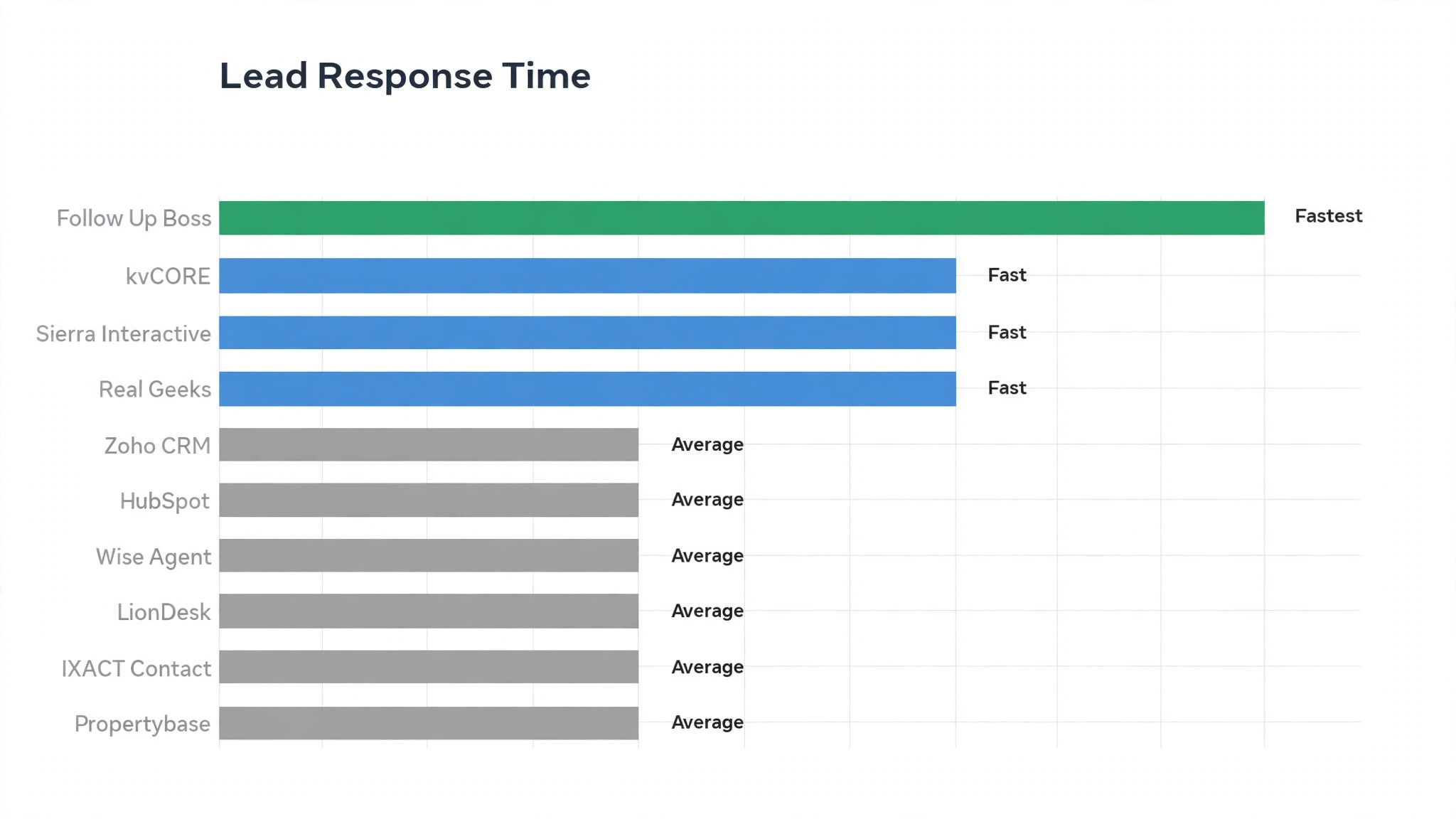
Start with lead response time, not with the feature list. Send a test lead into each tool on your shortlist and time how long it takes for an agent to get a text, a call task, and an email. A CRM that routes a lead in seconds is worth more than one with fifty features your team never opens, because speed is the metric that turns leads into closings.
Next, test the workflow your agents will repeat every day, because the best real estate crm for small brokerages is the one that fits a Tuesday, not a demo. Add a lead, assign it, call it, log the call, set the next follow-up, and move it to a showing. If any step takes more than a minute, your agents will skip it, and the CRM will slowly empty out.
Then model the cost per agent at your real headcount, including the add-ons. A tool that costs 69 dollars per user sounds cheap until you add five agents and a dialer, while a platform priced per brokerage can look expensive at two agents and cheap at fifteen. Work out the monthly bill at your headcount today and at your headcount in a year, and buy the tool that stays affordable at both numbers.
The 10 Tools in Detail
Each tool below gets a close look at what it does best, what it costs, and where it falls short for a small brokerage. Read the pick that fits your team size first, then check the runner-up, because the second choice often fits better than the first.
1. Follow Up Boss
Follow Up Boss is the lead follow-up specialist for small brokerages, and its strength is speed. New leads get routed to the right agent in seconds, with smart lists that show exactly who needs a call today. Pricing starts at about 69 dollars a month per user, and the core plan covers lead routing, texting, and email automation without add-ons. The interface is simple enough that a new agent can learn it in an afternoon.
It fits brokerages that live on internet leads and need every one answered fast. The trade-off is weaker transaction management, so teams that need deep checklists pair it with a second tool. Best for Fast lead response. Paid plans start at about $69 a month.
A team moving from kvCORE should run both tools for two weeks, so no contacts is lost in the switch. Keep kvCORE running until the first full month closes cleanly in the new tool, then cancel the old plan only after every contacts record is confirmed in place, and keep a backup export on file for a month after the switch.
2. kvCORE
kvCORE is the full brokerage platform in this guide, combining websites, lead generation, CRM, and team reporting in one system. It is built for brokerages that want one vendor instead of five separate tools. Pricing is about 499 dollars a month for a brokerage platform, with costs rising as agents and lead volume grow. The setup takes longer than a simple CRM, so plan for a week of configuration before the team goes live.
It fits teams of ten or more agents that need structure and reporting. The trade-off is weight, so a two-agent shop will find it heavier than a simple follow-up tool. Best for Growing teams. The entry paid price is about $499 a month.
Before you leave Sierra Interactive, download your contacts and confirm the history comes with them. A trial that covers one full billing cycle shows the true cost of leaving Sierra Interactive, because the first month always looks cheaper than the second month does, so keep a backup export on file for a month after the switch.
3. Sierra Interactive
Sierra Interactive pairs high-converting brokerage websites with a CRM that tracks every visitor and lead. Its strength is turning website traffic into named leads with behavior data attached. Pricing is on the vendor site, quoted per brokerage, and the platform includes IDX websites, lead capture, and CRM in one subscription. The website quality is the reason most brokerages choose it.
It fits brokerages that invest in their website as a lead source. The trade-off is price, since the website and CRM bundle costs more than a CRM alone. Best for Lead conversion. Pricing is on the vendor site.
If you switch from Real Geeks, export your contacts first and check every record survives the move. Run Real Geeks and the new tool side by side for two full weeks, so the team can compare real contacts in daily work before the old subscription ends for good, and keep a backup export on file for a month after the switch.
4. Real Geeks
Real Geeks is the lead generation engine of this list, pairing PPC landing pages and IDX websites with a CRM that organizes the flood. It is built for teams that buy leads and need them worked fast. Pricing starts at about 299 dollars a month, with lead generation spend on top of the subscription. The CRM is simpler than Follow Up Boss, but it handles the lead-to-call workflow well.
It fits teams that spend real money on lead generation every month. The trade-off is depth, so teams that want advanced automation add a second tool. Best for Lead volume. Paid plans start at about $299 a month.
A team moving from Zoho CRM should run both tools for two weeks, so no contacts is lost in the switch. Keep Zoho CRM running until the first full month closes cleanly in the new tool, then cancel the old plan only after every contacts record is confirmed in place, and keep a backup export on file for a month after the switch.
5. Zoho CRM
Zoho CRM is the budget generalist in this guide, and its strength is price. For about 14 dollars a user a month on the Standard plan, a small brokerage gets contacts, deals, email, and automation that cover most daily jobs. The free tier handles three users, which lets a tiny brokerage start at zero cost. The catch is setup, because Zoho needs custom fields and pipelines before it feels like a real estate tool.
It fits brokerages that want the lowest bill and have someone to configure it. The trade-off is real estate features, which must be built rather than switched on. Best for Low cost. The entry paid price is about $14 a user a month.
Before you leave HubSpot CRM, download your contacts and confirm the history comes with them. A trial that covers one full billing cycle shows the true cost of leaving HubSpot CRM, because the first month always looks cheaper than the second month does, so keep a backup export on file for a month after the switch.
6. HubSpot CRM
HubSpot CRM is the easiest free start in this guide, with contacts, deals, and email tracking free for unlimited users. Its strength is the free tier, which lets a brokerage organize leads before spending anything. Paid plans start at about 20 dollars a month for Starter, and costs climb as marketing automation and seats are added. The free tier is genuinely useful, not a demo, and it covers the basics for a new brokerage.
It fits new brokerages that want to start free and grow into paid plans. The trade-off is real estate depth, since HubSpot needs custom setup for listings and showings. Best for Starting free. Starting paid price free tier, paid from about $20 a month.
If you switch from Wise Agent, export your contacts first and check every record survives the move. Run Wise Agent and the new tool side by side for two full weeks, so the team can compare real contacts in daily work before the old subscription ends for good, and keep a backup export on file for a month after the switch.
7. Wise Agent
Wise Agent is the transaction specialist here, and its strength is the deal checklist. Every closing gets a step-by-step list with documents, deadlines, and reminders, so nothing gets missed in the paperwork. Pricing is about 49 dollars a month, which makes it one of the cheaper paid tools in this guide. The CRM side is solid but simpler than Follow Up Boss, so many teams use it for transactions and a second tool for leads.
It fits teams that lose time to paperwork and missed deadlines. The trade-off is lead follow-up, which is basic compared with the dedicated lead tools. Best for Deal checklists. Paid plans start at about $49 a month.
A team moving from LionDesk should run both tools for two weeks, so no contacts is lost in the switch. Keep LionDesk running until the first full month closes cleanly in the new tool, then cancel the old plan only after every contacts record is confirmed in place, and keep a backup export on file for a month after the switch.
8. LionDesk
LionDesk is the outreach workhorse of this list, built around calls, texts, and video messages that keep agents in front of leads. Its strength is the daily call list, which tells each agent exactly who to contact. Pricing starts at about 25 dollars a month, which makes it the cheapest paid CRM in this guide. The interface is older than the newer tools, but the calling and texting workflow is proven.
It fits agents who work the phone all day and need a simple list to follow. The trade-off is reporting, which is lighter than the bigger platforms. Best for Agent outreach. The entry paid price is about $25 a month.
Before you leave IXACT Contact, download your contacts and confirm the history comes with them. A trial that covers one full billing cycle shows the true cost of leaving IXACT Contact, because the first month always looks cheaper than the second month does, so keep a backup export on file for a month after the switch.
9. IXACT Contact
IXACT Contact is the simple agent CRM in this guide, built for agents who want contacts, follow-up, and a website without learning a platform. Its strength is simplicity, with everything in one calm interface. Pricing is about 40 dollars a month, and the plan includes a website and email marketing alongside the CRM. It is one of the easiest tools here for a solo agent or a very small team.
It fits agents who want one tool that just works. The trade-off is team features, since IXACT is built for agents rather than brokerages with reporting needs. Best for Simple agent CRM. Starting paid price about $40 a month.
If you switch from Propertybase, export your contacts first and check every record survives the move. Run Propertybase and the new tool side by side for two full weeks, so the team can compare real contacts in daily work before the old subscription ends for good, and keep a backup export on file for a month after the switch.
10. Propertybase
Propertybase is the Salesforce-based platform in this guide, and its strength is depth. It runs on Salesforce, so a brokerage gets enterprise reporting, customization, and integrations that smaller tools cannot match. Pricing is on the vendor site, quoted per brokerage, and the platform needs setup help to get the most from it. The Salesforce base means almost anything can be customized, but customization takes time and skill.
It fits larger brokerages that already use Salesforce or need enterprise reporting. The trade-off is cost and complexity, which rule it out for most small teams. Best for Enterprise teams. Pricing is on the vendor site.
A team moving from Follow Up Boss should run both tools for two weeks, so no contacts is lost in the switch. Keep Follow Up Boss running until the first full month closes cleanly in the new tool, then cancel the old plan only after every contacts record is confirmed in place, and keep a backup export on file for a month after the switch.
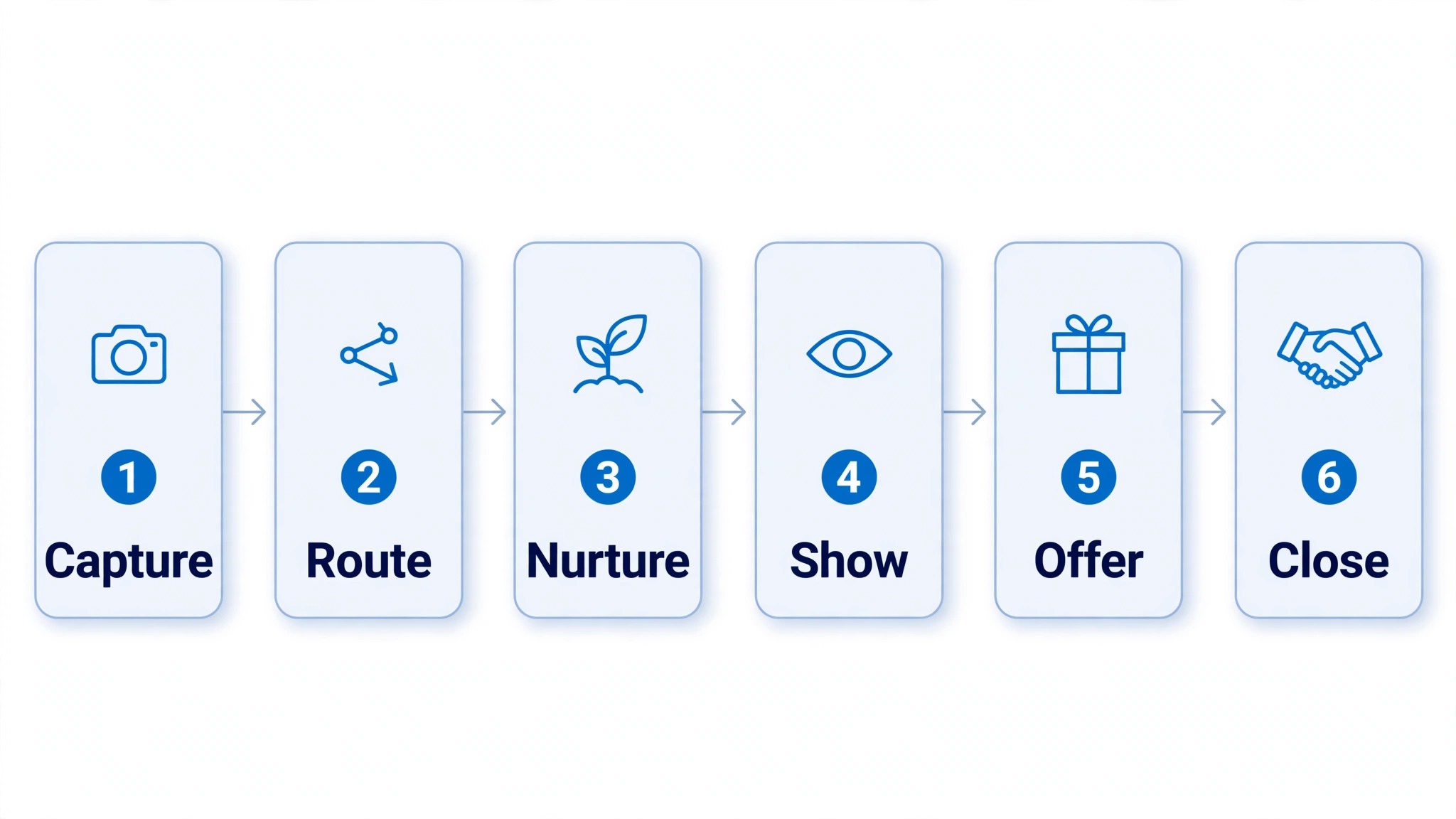
From First Call to Closing in Six Moves
| Step | Job | Best tool | What good looks like |
|---|---|---|---|
| 1 | Capture the lead | Real Geeks | Lead lands in the CRM with source and time |
| 2 | Route and respond | Follow Up Boss | Agent gets a text and a call task in seconds |
| 3 | Nurture the lead | LionDesk | Drips and texts keep the lead warm for months |
| 4 | Book the showing | kvCORE | Calendar and showing notes in one place |
| 5 | Make the offer | Wise Agent | Checklist tracks every document and deadline |
| 6 | Close and review | Propertybase | Closed deal, commission, and follow-up logged |
The workflow above is the real test of the best real estate crm for small brokerages, because a tool that handles all six moves in one place saves your agents from copying data between systems. A brokerage that runs this workflow every day closes more deals with the same number of leads, simply because fewer leads fall through the cracks between steps.
Test the workflow on ten real leads before you roll it out to the whole team. Capture them, route them, nurture them, book showings, and track the offers, then ask your agents which step felt slow. The step they complain about is the step your CRM choice must fix, and no feature list can tell you which step that is.
What the Monthly Bill Looks Like With a Growing Team
| Business type | Volume | Tool stack | Monthly cost |
|---|---|---|---|
| Two agent team | 20 leads a month | Zoho CRM plus HubSpot free | About 30 dollars |
| Five agent team | 80 leads a month | Follow Up Boss plus LionDesk | About 400 dollars |
| Ten agent team | 200 leads a month | kvCORE plus Follow Up Boss | About 900 dollars |
| Fifteen agent team | 350 leads a month | Sierra Interactive plus Real Geeks | About 1,100 dollars |
| Twenty agent team | 500 leads a month | Propertybase plus kvCORE | Pricing on the vendor site |
A two-agent brokerage can run on the best real estate crm for small brokerages for about 30 dollars a month, using Zoho for contacts and HubSpot free tier for email, and that is the right way to start. A five-agent team that wants real lead follow-up pays about 400 dollars a month for Follow Up Boss and LionDesk, which buys speed and persistence that a spreadsheet cannot match.
A ten-agent team pays about 900 dollars a month for kvCORE and Follow Up Boss, and a fifteen-agent team pays about 1,100 dollars for Sierra Interactive and Real Geeks. The bill grows with headcount, so model it at your headcount in a year, not just today, and remember that one extra closing a month pays for the whole stack.
Where Small Brokerages Waste Money on a CRM
The first mistake is buying a platform built for a hundred-agent brokerage when you have four agents. A big platform needs an admin to run it, and a small brokerage has no admin, so the tool sits half-configured while the team keeps using text messages. Buy the tool that fits your team today, and upgrade when the team outgrows it.
The second mistake is letting each agent pick their own tool, because the best real estate crm for small brokerages only works when every lead lives in one system. Five agents on five tools means the broker sees nothing, leads get called twice, and the brokerage cannot prove which marketing actually works. One system, used by everyone, beats five clever systems used alone.
The third mistake is paying for features nobody opens. Dialers, AI scoring, and predictive analytics sound impressive in a demo, but a team that never logs a call will never use them. Turn off the add-ons for a month and see what your agents miss. The features they ask back for are the ones worth paying for.
Migration is where most CRM switches fail, so plan it like a move, not a purchase. Export every contact with notes, tags, and last contact dates, then import in small batches and check that nothing was lost. A brokerage that rushes migration loses the history that makes its leads valuable, and the new CRM starts empty.
Training decides whether the CRM survives its first month. Book one hour a week for the first month, and make each session about one job, like logging a call or setting a follow-up. Agents who learn one job at a time keep using the tool, while agents who get a three-hour tour forget everything by Monday.
Reporting is the broker’s payoff for running one system. A weekly report that shows leads, calls, showings, and offers per agent tells you who needs coaching and which lead source pays. Without that report, the CRM is just an address book, and the brokerage is guessing about its own pipeline.
How Brokers Coach With CRM Data
A broker who opens the CRM on Monday morning sees the truth about the team in five minutes. The report shows leads per agent, calls made, showings booked, and offers written, and the gaps are obvious. One agent has twenty leads and three calls, which means the leads are dying quietly, while another has five leads and twelve calls, which means the follow-up is strong but the lead flow is thin. The coaching conversation writes itself from those two numbers.
Your First-Month CRM Rollout Plan
Use this plan when you roll out a CRM to a small brokerage, and keep a copy with your office notes.
- Pick one broker or senior agent to own the CRM and answer questions
- Import contacts in small batches and check notes and tags survived
- Set up lead routing so every new lead reaches an agent in minutes
- Build three follow-up plans for buyers, sellers, and past clients
- Connect your website forms and lead sources to the CRM
- Train the team on one job per week, starting with logging calls
- Set up a weekly report for leads, calls, showings, and offers
- Review the first month with the team and fix the slowest step
Related Guides
Keep exploring with these guides on Stratilyze:
- Best AI Real Estate Tools for Small Brokerages (15 Tools)
- Top 10 Real Estate CRM for Solo Agents (10 Tools)
- Best AI CRM Tools for Real Estate Teams (8 Tools)
Frequently Asked Questions
Which CRM is best for a brokerage with only three agents?
Follow Up Boss is the strongest pick for a three-agent brokerage, because lead routing and follow-up automation work from day one with almost no setup. Zoho CRM is the cheaper second choice if the budget is tight, and it handles contacts and email well. A three-agent team should avoid big platforms like kvCORE until the team grows, because the setup time outweighs the extra features.
Does a small brokerage need a real estate CRM or will a general CRM work?
A general CRM works if your team is willing to set it up, because tools like Zoho and HubSpot handle contacts, email, and tasks well at a low price. A real estate CRM works better out of the box, with lead routing, showing tracking, and transaction checklists built in. The deciding factor is setup time, so a team with no admin should buy the real estate tool.
How much should a small brokerage pay for a CRM each month?
A two-agent brokerage can start at about 30 dollars a month with Zoho and a free HubSpot tier. A five-agent team should budget about 400 dollars a month for Follow Up Boss and a calling tool, and a ten-agent team should budget about 900 dollars for a full platform. One extra closing a month pays for the whole stack, so judge the bill against closings, not against zero.
Can Follow Up Boss handle transactions as well as leads?
Follow Up Boss is strongest at leads and follow-up, and it tracks transactions through integrations rather than a deep built-in checklist. Teams that need heavy transaction management pair it with Wise Agent or use kvCORE, which covers more of the deal pipeline. If transactions are your main pain, start with Wise Agent and add Follow Up Boss for leads.
Is kvCORE too big for a small brokerage?
kvCORE is built for teams and brokerages that want websites, lead generation, and reporting in one platform, so it can feel heavy for a two-agent shop. A team of ten or more agents gets real value from it, because the platform replaces several separate tools. A small team should start with Follow Up Boss and move to kvCORE when headcount and lead volume justify the switch.
What happens to our leads if an agent leaves the brokerage?
In a shared CRM, the leads stay with the brokerage, because the contacts, notes, and history belong to the office account, not the agent’s phone. In a spreadsheet or a personal phone, the leads leave with the agent. That single fact is the strongest reason for a small brokerage to run one shared CRM from the start.
Our Verdict for Small Brokerages
Follow Up Boss is our pick for most small brokerages, because the best real estate crm for small brokerages is the one that answers leads fastest, and Follow Up Boss routes and follows up with almost no setup. A team that wants a full platform should buy kvCORE, and a team on a tight budget should start with Zoho and upgrade later.
Whichever tool you choose, roll it out to the whole team at once, train one job at a time, and review the pipeline every week. A CRM earns its fee in leads that get called back in minutes, agents who never lose a follow-up, and a broker who can finally see the whole pipeline. Choose the tool your agents will open every morning, and the rest of the feature list will take care of itself.