
WooCommerce powers more than 7 million live websites and holds about 36 percent of the global ecommerce platform market, which makes it the most widely installed WordPress ecommerce plugin by a wide margin. That scale is real, but it is not a recommendation on its own, because the right plugin depends on what you sell. Physical products with real complexity go to WooCommerce. Digital files and licences go to Easy Digital Downloads. Recurring access and courses go to MemberPress. A marketplace with several sellers goes elsewhere again. The best wordpress ecommerce plugins are the ones that fit what you sell, not the ones with the biggest install count.
This guide compares 9 plugins, from WooCommerce free core to MemberPress at 349.50 dollars a year and SureCart Pro at 199 dollars. The cost is the messy part, because the number in most roundups disagrees with the number on the vendor own page. Four of the five plugins in one recent check take a percentage cut on the cheapest way in, between 2.9 and 4.9 percent, while WooCommerce is the exception at zero percent. Renewal prices also double on several plugins, since the advertised price is a first-year price.
The plugins split into three groups. Full stores such as WooCommerce, SureCart, FluentCart and WP EasyCart sell anything. Specialist plugins such as Easy Digital Downloads, MemberPress and GiveWP sell one thing well. Payment tools such as WP Simple Pay and multi-channel tools such as Ecwid cover narrow jobs. Most stores need the first group. Buy the second only when the specialism is the whole business.
Why the Plugin Must Match What You Sell
The most expensive mistake in this category is choosing a plugin for its popularity instead of its fit. A digital seller who installs WooCommerce pays for shipping zones, inventory and tax rules they will never use, and then buys a subscriptions extension for 279 dollars a year to do what SureCart includes free. A membership seller who installs WooCommerce buys a memberships extension for 199 dollars a year to do what MemberPress does natively. The plugin that fits costs less and does more, because it was built for the job.
The second mistake is ignoring the transaction fee on the free plan. Four of the five plugins in one recent check take a percentage on the cheapest way in. Easy Digital Downloads and WP Simple Pay charge 3 percent, MemberPress Launch charges 4.9 percent, and SureCart free plan charges 2.9 percent. WooCommerce is the exception, taking nothing. A store doing 10,000 dollars a month in sales pays 290 to 490 dollars a month in fees on those free plans, which dwarfs the subscription saving.
The third mistake is trusting a recommendation without checking the plugin itself. One 2026 check found that Shopify is not a WordPress plugin at all, and BigCommerce for WordPress had not been updated since December 2024, with about 200 active installs. Neither belongs on a 2026 recommendation list. Check the last-updated date and the install count on wordpress.org before you trust any recommendation, including this one. A plugin three major WordPress versions behind is a security decision, not just an old one.
The 9 Plugins at a Glance
| Tool | Main job | Best for | Watch out for |
|---|---|---|---|
| WooCommerce | Full store | Complex physical stores | Extensions cost 600 to 900 dollars a year |
| SureCart | Modern store | Digital and subscriptions | SaaS-hosted checkout |
| Easy Digital Downloads | Digital products | Files and licences | No physical products |
| MemberPress | Memberships | Courses and gated content | First-year price doubles |
| FluentCart | Lightweight store | Fluent users | Small ecosystem |
| WP EasyCart | Budget all-in-one | Simple stores | Free plan caps at 5 products |
| Ecwid | Multi-channel | Social sellers | Monthly pricing, no free plan |
| WP Simple Pay | Payment forms | One-off payments | Not a full store |
| GiveWP | Donations | Nonprofits | Not for product sales |
The table shows the real choice. WooCommerce is free and runs on 7 million stores, with the deepest extension ecosystem. SureCart is free with a 2.9 percent fee and Pro at 199 dollars a year. Easy Digital Downloads is free with a 3 percent fee and Personal at 99.50 dollars a year. MemberPress starts at 199.50 dollars first year. FluentCart is free with zero fees and Pro at 199 dollars a year. WP EasyCart is free with a 2 percent fee and Pro from 69 dollars a year. Pick the row that matches what you sell, and check the fee on the plan you would actually buy.

Best Pick by Job
| Job type | First pick | Second tool | Why this pair works |
|---|---|---|---|
| Physical store | WooCommerce | FluentCart | Full control plus zero fees |
| Digital products | Easy Digital Downloads | SureCart | Licences plus modern checkout |
| Subscriptions | SureCart | WooCommerce | Included subscriptions plus ecosystem depth |
| Memberships and courses | MemberPress | Kartra | Gated content plus all-in-one |
| Simple budget store | WP EasyCart | WooCommerce | Low price plus full control |
| Multi-channel selling | Ecwid | WooCommerce | Social sync plus extension depth |
| One-off payments | WP Simple Pay | WooCommerce | No cart plus full store |
| Nonprofit donations | GiveWP | WP Simple Pay | Donor tools plus simple payments |
A physical store choosing the best wordpress ecommerce plugins should start with WooCommerce, free core with no transaction fee and the deepest extension ecosystem. A digital seller should start with Easy Digital Downloads, since licence management is its core job. A subscription seller should start with SureCart, since subscriptions are included free. A membership seller should start with MemberPress. A simple store on a tight budget should start with WP EasyCart at 69 dollars a year.
How to Judge the Best WordPress Ecommerce Plugins
Start with what you sell, not with the install count. Write down every product type, physical, digital, subscription, membership, donation, and how many of each you will sell in the first year. A store with 500 physical SKUs needs WooCommerce. A store with 20 digital files needs Easy Digital Downloads. A store with one membership needs MemberPress. The product list decides the plugin, and the plugin list follows it.
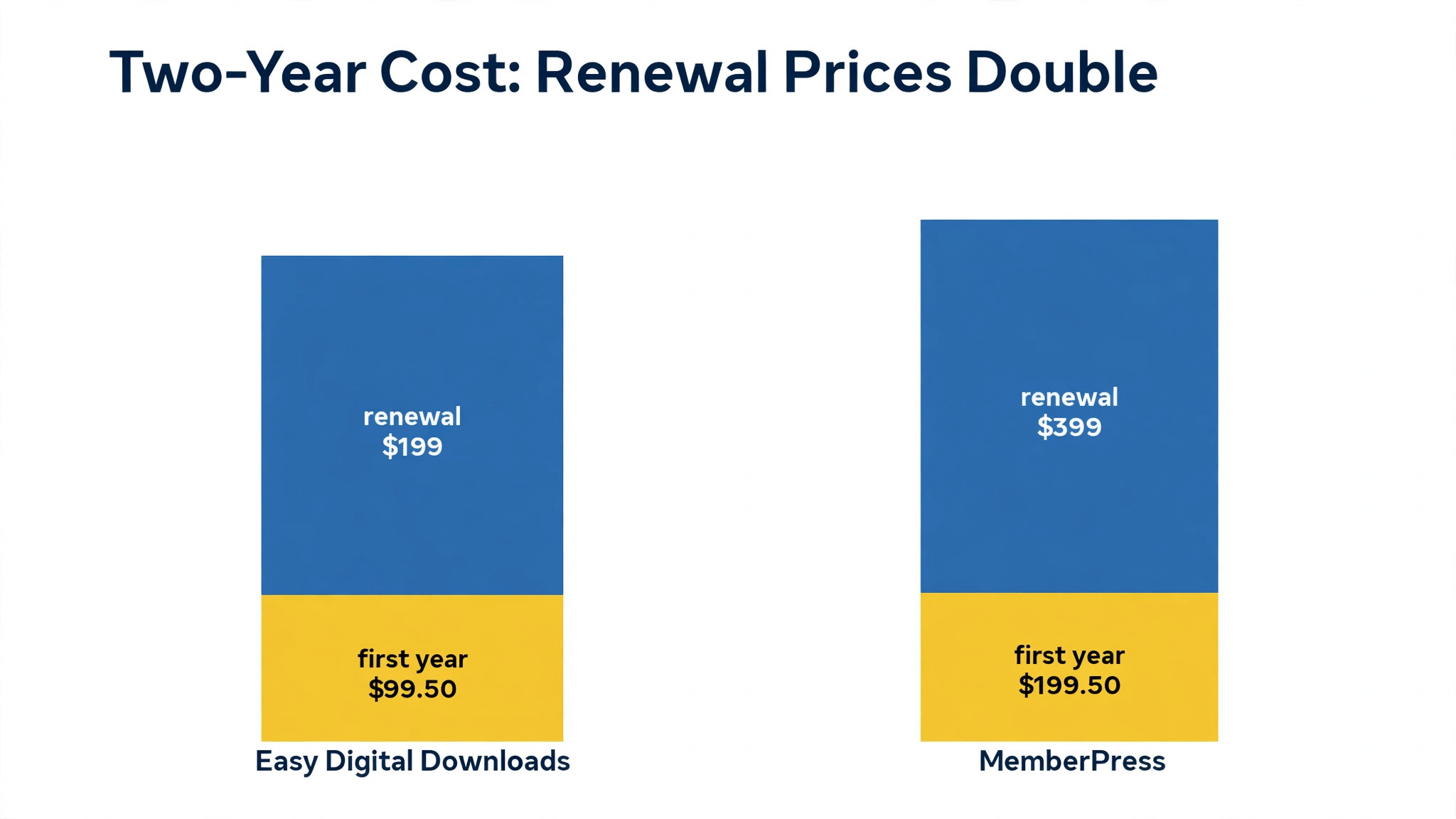
Next, work out the real two-year cost, not the first-year price. Easy Digital Downloads, MemberPress and WP Simple Pay all carry the same footnote, renewals are charged at full price, which is double the first-year price. SureCart Pro at 179 dollars a year as an intro renews at 199 dollars. WooCommerce extensions at 600 to 900 dollars a year recur every year. Add the transaction fee on the free plan, because a 2.9 percent fee on 10,000 dollars a month is 290 dollars a month, which is more than any subscription here.
Then check the plugin health on wordpress.org. Look at the last-updated date, the active install count, and the WordPress version it is tested to. WooCommerce was updated days ago and runs on about 7 million sites. A plugin that has not shipped an update since December 2024 and sits on around 200 installs is a security risk, not a bargain. The best wordpress ecommerce plugins are the ones that are maintained, installed widely, and honest about their fees.
The 9 Plugins in Detail

1. WooCommerce
WooCommerce is the free ecommerce plugin that powers more than 7 million WordPress stores and about 36 percent of the global ecommerce platform market, with full product, cart, checkout and order management.. It suits any store selling physical products, mixed catalogues or high SKU counts, where control over checkout, tax, shipping and data matters more than simplicity. The core plugin is free with zero platform transaction fees. Paid extensions run about 29 to 299 dollars a year each, and a store with subscriptions, advanced shipping and marketing automation typically runs 600 to 900 dollars a year in extensions. Its extension ecosystem of more than 800 add-ons is unmatched, which is why it is the default for serious stores.
The trade off is extension costs add up fast, and a production-ready store can cost 600 to 900 dollars a year in extensions alone, before hosting. The default for most stores. Start here unless you sell only digital products or only memberships.
2. SureCart
SureCart does one job well. a modern ecommerce plugin with a clean embedded checkout, subscriptions, licensing, order bumps, cart recovery and affiliate management, with more than 100 features on the free plan. It suits digital product sellers, subscription businesses and SaaS vendors that want a modern checkout without the weight of WooCommerce. The free Launch plan includes all features with a 2.9 percent per-transaction fee. Pro costs about 179 dollars a year as an intro, renewing at 199 dollars, with no transaction fee. Its free plan is unusually complete, covering subscriptions and licensing that WooCommerce charges hundreds a year for.
Watch out for its checkout is SaaS-hosted, so part of the store runs outside WordPress, and it has about 90,000 installs against WooCommerce 7 million. A strong modern alternative for digital and subscription sellers. Physical stores with complex needs should stay with WooCommerce.
3. Easy Digital Downloads
Start with what Easy Digital Downloads actually does. the plugin for selling digital products, files and software licences, with clean digital delivery, licence key management, discount codes and a simple checkout. It suits anyone selling ebooks, software, music, templates or courses, where physical shipping is irrelevant and licence control matters. The core plugin is free, with a 3 percent fee on its built-in Stripe gateway. Personal Pass costs 99.50 dollars a year as a first-year price, renewing at full price, and the full pass is about 199.50 dollars. Its licence management is the reason software sellers choose it, since few plugins handle keys, activations and renewals as cleanly.
Where it falls short: it does not support physical products at all, so a mixed catalogue needs a second plugin. The pick for digital-only sellers. Physical or mixed stores should use WooCommerce instead.
4. MemberPress
MemberPress earns its place here because it gates content and manages members better than any store plugin. a membership and course plugin that gates content, sells subscriptions, manages members and drip-feeds lessons, with built-in reporting and coupon tools. It suits anyone selling memberships, paid courses or gated content, where recurring access is the product. Launch costs 199.50 dollars as a first-year price, with a 4.9 percent fee per payment, and the no-fee plan is 349.50 dollars. Renewals are charged at full price, which is double the first year.
The honest limit is the first-year price doubles on renewal, and the cheapest plan takes a 4.9 percent cut of every payment. The pick for memberships and courses. A store that also sells products should pair it with WooCommerce.
5. FluentCart
For teams that need a fast store with no per-sale cut, FluentCart is the shortlist entry to test first. a performance-first ecommerce plugin from the Fluent team, with zero transaction fees on every plan, basic subscriptions and digital downloads natively, and a lightweight codebase. It suits stores in the Fluent ecosystem, and anyone who wants a WooCommerce alternative without transaction fees or extension bloat. The free plan charges zero transaction fees. Pro costs 199 dollars a year for one site, or 249 dollars as a lifetime deal, with digital licensing, order bumps and instalments. Zero fees on the free plan is rare among the plugins here.
It is not perfect. it has about 8,000 installs, far fewer than WooCommerce, so the ecosystem and peer support are thinner A genuine lightweight alternative for Fluent users. Larger stores should weigh the smaller ecosystem before switching.
6. WP EasyCart
WP EasyCart sits in a different lane from most tools here. a budget-friendly all-in-one ecommerce plugin with a free plan, more than 30 payment gateways natively, tax and shipping included, and no separate extension purchases for the basics. It suits simple stores with physical and digital products that want one plugin with everything included, at a low annual price. The free plan takes a 2 percent transaction fee. Professional starts from 69 dollars a year, with tax and shipping included. Its long track record and included tax and shipping make it the budget pick with the fewest surprises.
Before you buy, check the free plan caps at 5 products, and it has about 3,000 installs, so the community is small. A good budget option for simple stores. Complex stores will outgrow it and should start with WooCommerce.
7. Ecwid
Ecwid is a multi-channel ecommerce plugin with a built-in mobile app, social selling and marketplace sync, letting a store sell on a website, Facebook, Instagram and marketplaces from one dashboard.. It suits multi-channel sellers and quick-launch stores that want to sell everywhere without building a full WooCommerce setup. The free plan is gone, and paid tiers start at 25 dollars a month for Venture, with monthly pricing rather than annual. Its multi-channel sync and mobile app are the strongest in this list for sellers who live on social commerce.
The trade off is monthly pricing costs more over a year than the annual plugins here, and the free plan no longer exists. The pick for social and multi-channel sellers. A single WordPress store should compare WooCommerce first.
8. WP Simple Pay
WP Simple Pay does one job well. a Stripe payment form plugin that takes one-off payments without a cart, with buy-now buttons, donation forms and subscription forms that embed anywhere on a WordPress site. It suits anyone who needs to take a payment without building a store, such as a single product, a deposit, a donation or a service fee. The free Lite version takes a 3 percent fee per transaction. Personal costs 49.50 dollars a year as a first-year price, renewing at full price, with no fee. It sets up in minutes, with no cart, no product pages and no store to manage, which is the whole point.
Watch out for it is not a full store solution, so a business that grows into a catalogue will need to migrate. The pick for simple payments. A real store needs WooCommerce or SureCart instead.
9. GiveWP
Start with what GiveWP actually does. a donation plugin for nonprofits, with donor management, peer-to-peer fundraising, recurring donations and detailed donor reporting, built for fundraising rather than product sales. It suits nonprofits and donation-driven organisations that need to raise funds, track donors and run campaigns on WordPress. The free version covers basic donations. GiveWP Plus costs 149 dollars a year as a first-year price, renewing at full price. Its donor management and peer-to-peer fundraising are purpose-built, which generic store plugins cannot match.
Where it falls short: it is designed for donations, not product sales, so a shop should not use it as a store. The pick for nonprofits. A store selling products should use WooCommerce instead.
The Real Two-Year Cost, Worked Honestly
The advertised price is a first-year price on several plugins here, and the renewal is where the bill doubles. Easy Digital Downloads Personal at 99.50 dollars a year renews at full price. MemberPress Launch at 199.50 dollars renews at full price. WP Simple Pay Personal at 49.50 dollars renews at full price. A buyer who budgets the first-year price for two years will be short by the full amount in year two, and the shortfall arrives as a surprise renewal.
The transaction fee is the larger cost, and it is the one most buyers miss. A store doing 10,000 dollars a month in sales pays 290 dollars a month on SureCart free plan, 300 dollars on Easy Digital Downloads free gateway, 200 dollars on WP EasyCart free plan, and 490 dollars on MemberPress Launch. WooCommerce and FluentCart charge nothing on their free versions. The cheapest way in is not the cheapest way to run, and the fee should be the first number you check.
Work the two-year maths with your own sales volume. A store doing 5,000 dollars a month pays 1,740 dollars a year in fees on SureCart free plan, against 199 dollars a year for Pro with no fee. The Pro plan pays for itself in six weeks at that volume. A store doing 1,000 dollars a month pays 348 dollars a year in fees, and the free plan is still cheaper. The crossover point depends on your volume, and the template below finds it.
Fee Crossover Template
Copy this template and fill one row per plugin. It shows the monthly sales volume at which the paid plan becomes cheaper than the free plan fee.
| Plugin | Free plan fee | Paid plan cost | Monthly sales where paid wins |
|---|---|---|---|
| SureCart | 2.9 percent | 199 dollars a year | About 572 dollars a month |
| Easy Digital Downloads | 3 percent | 199.50 dollars a year | About 554 dollars a month |
| WP EasyCart | 2 percent | 69 dollars a year | About 288 dollars a month |
| MemberPress | 4.9 percent | 349.50 dollars a year | About 594 dollars a month |
| WP Simple Pay | 3 percent | 49.50 dollars a year | About 138 dollars a month |
Work the example through. SureCart Pro at 199 dollars a year costs 16.58 dollars a month, and the free plan fee is 2.9 percent, so the paid plan wins when monthly sales pass about 572 dollars. WP Simple Pay Personal at 49.50 dollars a year wins at just 138 dollars a month, because the fee is 3 percent and the plan is cheap. Fill your own sales volume in, and the template tells you whether to pay for the plan or stay on the free tier.
Hosting and Speed: The Hidden Cost
The plugin is only half the store, because hosting decides whether it loads fast enough to sell. WooCommerce is the heaviest plugin here, and a cheap shared host will make a WooCommerce store slow, especially with twenty extensions active. A managed WordPress host with caching, a content delivery network and PHP 8 will cost more than shared hosting, but a store that loads in six seconds loses sales that a fast store keeps. Speed is a conversion cost, not a hosting cost, and it should be budgeted with the plugin.
Lightweight plugins change the hosting maths. FluentCart is built to run light, with a smaller codebase and fewer database queries, which is why it suits smaller hosts and lower budgets. SureCart offloads part of the checkout to its own servers, which reduces the load on your host. A store on WP EasyCart or WP Simple Pay needs far less hosting than a WooCommerce store with the same traffic, because there is less code to run on every page.
The practical test is simple. Install the plugin on a staging site, load the homepage and a product page, and time them on a phone over a mobile connection. A product page that loads in under three seconds is ready. One that takes six seconds needs better hosting, fewer extensions, or a lighter plugin. The best wordpress ecommerce plugins are the ones your hosting can actually run fast, and the test takes an afternoon.
Mistakes Store Owners Make Choosing a Plugin
The first mistake is choosing on install count alone. WooCommerce 7 million installs is a real signal, but it is a signal about physical stores, not about digital files or memberships. A digital seller who installs WooCommerce pays for shipping and inventory they will never use, while Easy Digital Downloads would have done the job free. Match the plugin to the product, not to the popularity, because the best wordpress ecommerce plugins are the ones that fit what you sell.
The second mistake is budgeting the first-year price for two years. Easy Digital Downloads, MemberPress and WP Simple Pay all double on renewal, and the surprise arrives as a charge, not as a warning. Budget the renewal price from day one, and the first-year discount becomes a bonus instead of a trap.
The third mistake is ignoring the transaction fee. A free plan with a 2.9 percent fee costs more than a 199 dollar annual plan once monthly sales pass about 572 dollars, and most stores pass that in the first month. Check the fee before the subscription, because the fee is the larger number for any store doing real volume. The best wordpress ecommerce plugins are the ones whose total cost, fee plus subscription plus extensions, is lowest at your volume.
Rollout Checklist
Use this checklist when you launch your WordPress store, and keep a copy where the whole team can see it.
1. List every product type and pick the plugin that fits what you sell. 2. Work out the two-year cost, including renewal prices and transaction fees. 3. Check the last-updated date and install count on wordpress.org. 4. Install the plugin on a staging site and test the full checkout on a phone. 5. Set up the payment gateway and test a real payment and a real refund. 6. Configure tax, shipping and email receipts before the first sale. 7. Test the store with ten real orders before announcing the launch. 8. Review fees, extensions and renewal dates quarterly, before they renew.
Related Guides
Keep exploring with these guides on Stratilyze:
- Best WordPress Page Builder Plugins (10 Tools)
- Top 10 Ecommerce Platforms for Bookstores (10 Tools)
- Best AI Slogan Generators for Ecommerce Sellers (12 Tools)
Frequently Asked Questions
What is the best WordPress ecommerce plugin in 2026?
WooCommerce is the best pick for most stores, free core with no transaction fee, running on about 7 million sites, with the deepest extension ecosystem. Easy Digital Downloads is the best pick for digital products, MemberPress for memberships and courses, and SureCart for modern subscription selling. Pick the plugin that fits what you sell.
How much does it cost to run a WordPress store?
WooCommerce core is free, but a production-ready store with subscriptions, advanced shipping and marketing automation typically runs 600 to 900 dollars a year in extensions, plus hosting. SureCart Pro costs 199 dollars a year, FluentCart Pro 199 dollars, Easy Digital Downloads Personal 99.50 dollars first year, and MemberPress Launch 199.50 dollars first year. Add the transaction fee, which can exceed the subscription.
Is WooCommerce really free?
The core plugin is free and takes no percentage of your sales, which makes it the exception in this list. The cost comes from extensions, which run about 29 to 299 dollars a year each, and a store with subscriptions at 279 dollars a year and memberships at 199 dollars a year can reach 600 to 900 dollars a year in extensions alone, before hosting.
What is the cheapest WordPress ecommerce plugin?
WooCommerce and FluentCart are the cheapest to run, since both charge zero transaction fees on their free versions. WP EasyCart Pro starts from 69 dollars a year, WP Simple Pay Personal from 49.50 dollars first year, and Easy Digital Downloads Personal from 99.50 dollars first year. The cheapest plan depends on your sales volume, because the free-plan fees can exceed the subscription.
Do WordPress ecommerce plugins charge transaction fees?
Most do on their free plans. SureCart free plan charges 2.9 percent, Easy Digital Downloads free gateway 3 percent, WP EasyCart free plan 2 percent, MemberPress Launch 4.9 percent, and WP Simple Pay free version 3 percent. WooCommerce and FluentCart charge nothing on their free versions. Check the fee before the subscription, because it is often the larger cost.
Can I sell subscriptions on WordPress?
Yes. SureCart includes subscriptions on its free plan, WooCommerce Subscriptions costs 279 dollars a year, FluentCart includes basic subscriptions natively, and MemberPress handles recurring memberships. SureCart is the cheapest way to start selling subscriptions, since it includes them free with a 2.9 percent fee, or 199 dollars a year with no fee.
A Final Word Before You Choose
There is no universal winner among these 9 plugins, because a physical store and a digital seller buy different products. A physical store should start with WooCommerce, free core with no transaction fee and 7 million installs behind it. A digital seller should start with Easy Digital Downloads. A subscription seller should start with SureCart. A membership seller should start with MemberPress. A simple store on a tight budget should start with WP EasyCart at 69 dollars a year.
Whichever you choose, work out the two-year cost including renewal prices and transaction fees, check the plugin health on wordpress.org, and test the full checkout on a phone before launch. The best wordpress ecommerce plugins are the ones that fit what you sell and cost least at your volume.