
If you want a straight answer before the detail, here it is. The best overall ChatGPT alternative is Claude, for long documents, careful writing, and code review. The cheapest paid switch is Gemini, with a full free tier and paid plans from $4.99 a month. The best completely free option is DeepSeek, whose chat app has no paid subscription at all. Everything below explains how those three won, and which of the other twelve tools fits your specific job better.
ChatGPT is still the default for most people, and for good reason. It is fast, it covers almost every task, and its free tier is generous. But defaults are not always the best fit. Some people want longer, more careful writing. Some want answers with sources they can check. Some want an assistant inside Gmail, Docs, or Microsoft 365. Some just want to stop paying $20 a month. This guide compares 15 real alternatives, with honest pricing and the limits that matter, so you can pick one and move on.
Quick Answer: The 15 Tools at a Glance
| Tool | Free plan | Paid from | Best for |
|---|---|---|---|
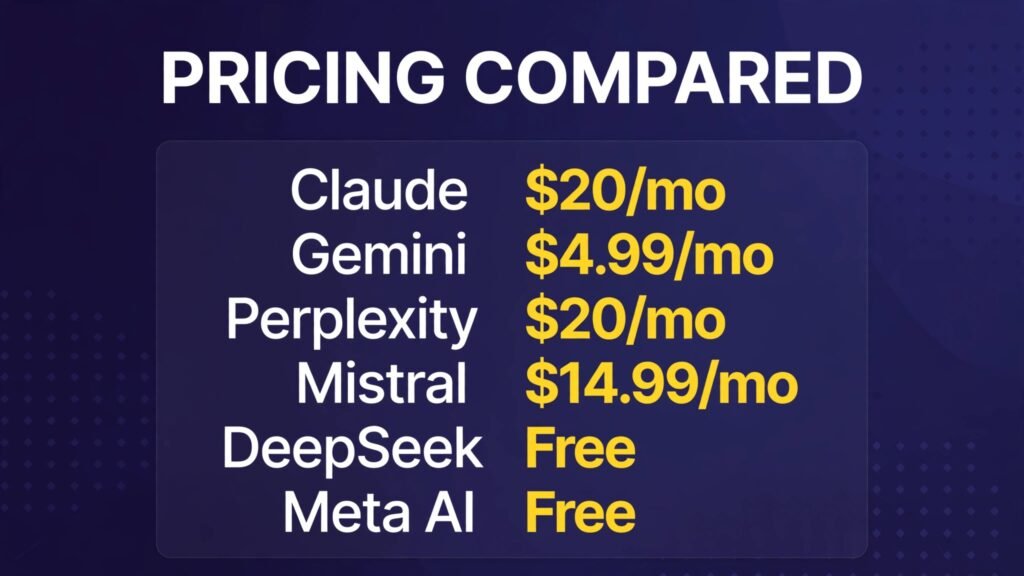
| Claude | Yes | $20/mo ($17/mo annual) | Writing, long documents, code review |
| Gemini | Yes | $4.99/mo | Google users, cheapest paid switch |
| Perplexity | Yes | $20/mo | Research with sources |
| Microsoft Copilot | Yes | $19.99/mo (M365 Premium) | Microsoft 365 users |
| DeepSeek | Yes, no paid tier | Free | Best completely free |
| Grok | Yes | $8/mo | X users, real time news |
| Mistral (Vibe) | Yes | $14.99/mo | European option, fast chat |
| Meta AI | Yes | Free only | Casual chat, social apps |
| Poe | Yes | $4.99/mo | Trying many models in one app |
| You.com | Yes | $20/mo ($15/mo annual) | Multi model chat, research |
| Qwen | Yes | Free chat | Long documents, open models |
| Kimi | Yes | Check checkout | Long context, research reports |
| Jasper (specialist) | Trial only | $69/mo per seat | Marketing copy, brand voice |
| NotebookLM (specialist) | Yes | Via Google AI Pro | Research on your own documents |
| Character.ai (specialist) | Yes | Check checkout | Roleplay, companions, practice |
Prices are US list prices as found in October 2026 roundups. They change often, so check the vendor page before you pay.
Where sources disagreed, this guide says so instead of picking one number and hoping.

1. Claude: The Best Overall Alternative
Claude, from Anthropic, is the closest thing to a straight upgrade over ChatGPT for writing. Its answers read more carefully. It holds the thread of a long document without losing track halfway through, and it is unusually good at editing: give it a rough draft and ask what is weak, and it will find real problems instead of praising everything.
It also handles code well. Claude Code, included from the Pro plan up, is a serious coding tool, and if you want a deeper comparison of coding assistants, our chatgpt-agent-mode-vs-claude guide covers the agent side in more detail.

Pricing: Free tier for everyday chat. Pro is $20 a month billed monthly, or $17 a month billed annually ($200 upfront). That is the tier most daily users land on, and it includes at least five times the free tier usage per session.
Best for: Writers, editors, analysts, and anyone who works with long documents. Watch out for: The free tier runs out faster than you expect on heavy days, and Claude has no image generation of its own to match ChatGPT.
Try it at: claude.ai
2. Gemini: The Cheapest Paid Switch
Gemini is Google’s assistant, and it is the pick if you live in Google’s world. It reads your Gmail, Docs, and Drive with your permission, it summarises meetings and documents in place, and its video generation is strong. The free tier is genuinely useful for everyday questions, and the paid entry point is the lowest of any major assistant.
Pricing: Free tier at $0. Google AI Plus is listed at $4.99 a month in most 2026 roundups, though one source reports $9.99 on the US plan page, so check the checkout figure before you subscribe. Google AI Pro is $19.99 a month, and Ultra runs $99.99 to $199.99. Note that since October 2026, free accounts get the lighter Flash-Lite model, not the full Flash or Pro models.
Best for: Google Workspace users, students, and anyone who wants a capable paid assistant for under $5 a month. Watch out for: The free tier model changed recently, so a review from early 2026 will overstate what free users get today.
Try it at: gemini.google.com
3. Perplexity: The Best for Research With Sources
Perplexity is not really a ChatGPT clone. It is an answer engine. Ask a question and it searches the live web, then answers with citations you can click and check. For research, news, and anything where “says who?” matters, that habit of citing sources makes it more useful than a general chatbot.
It also lets Pro users pick between several underlying models, including Claude and Gemini models, which makes one subscription do double duty. If research engines are your main interest, our perplexity-alternatives post covers more of them.

Pricing: Free tier for basic searches with a small number of Pro searches per day. Pro is $20 a month, or $200 a year, which works out to about $16.67 a month.
Best for: Researchers, students, journalists, and anyone who checks sources before repeating a claim. Watch out for: It is weaker than Claude or ChatGPT for long creative writing, and the gap between Pro and Max ($200 a month) is large, with nothing in between.
Try it at: perplexity.ai
4. Microsoft Copilot: The Best for Microsoft 365 Users
Copilot is the assistant already sitting inside Windows, Edge, and the Microsoft 365 apps. If your workday runs through Outlook, Word, Excel, and Teams, Copilot’s value is not better chat. It is context. It can summarise an email thread, draft a reply in your tone, and pull numbers from a spreadsheet without you copying anything anywhere.
Pricing: Free tier at $0 for basic chat. The old standalone Copilot Pro plan ($20 a month) has been retired for new subscribers according to October 2026 reports, and Microsoft now points individuals to Microsoft 365 Premium at $19.99 a month, which bundles the Office apps. Business Copilot plans sit around $18 to $30 per user a month depending on the tier, on top of a qualifying Microsoft 365 licence.
Best for: People and teams already paying for Microsoft 365. Watch out for: Outside the Microsoft apps, Copilot is an ordinary chatbot, and its naming is confusing, with several products sharing the name.
Try it at: copilot.microsoft.com
5. DeepSeek: The Best Completely Free Option
DeepSeek is the answer to the question “what if I just do not want to pay?” Its chat app is free, with no subscription tier, no Plus plan, and no paywall on the app itself. The models are strong on reasoning and coding, and the app includes web search, file uploads, and a reasoning mode that shows its working.
The catch is the extras. There is no built-in image generation to match ChatGPT, voice is basic, and the company is based in China, which matters to some users for data reasons. The developer API is separate and billed per token, but ordinary chat users never touch it.
Pricing: Chat app free, no subscription. API billed per token for developers.
Best for: Anyone on a zero budget who still wants a strong reasoning model. Watch out for: Fewer extras than the big three, and slower responses at busy times.
Try it at: chat.deepseek.com
6. Grok: The Best for X Users and Real Time News
Grok, from xAI, lives on X and in its own app, and its edge is real time information. It reads the live conversation on X, so for breaking news, sport, and fast moving stories it often knows things before other chatbots do. Its tone is also looser and funnier than the corporate polish of its rivals, which some people prefer and some do not.
Pricing: Free tier at $0 with limits. In October 2026 xAI replaced the old SuperGrok lineup with The X Subscription for new signups: Plus at $8 a month, Premium at $30, Super at $100, and Ultra at $200. Older SuperGrok plans ($30 and up) still exist for existing subscribers but are closed to new signups, so check the current checkout page rather than an older review.
Best for: Heavy X users and news followers. Watch out for: Quality is less consistent than Claude or ChatGPT on careful work, and the pricing reshuffle means old articles quote tiers you can no longer buy.
Try it at: grok.com
7. Mistral (Vibe): The Best European Option
Mistral, the French lab behind the Vibe chat app (formerly Le Chat), is the pick if you want a capable assistant outside the US giants, or if European data hosting matters to you. It is fast, genuinely fast, with answers that arrive noticeably quicker than most rivals, and it handles many languages well, including French, German, and Spanish.
It also has a coding mode, Vibe for Code, and a deep research mode, so it covers more ground than its small profile suggests.
Pricing: Free tier at $0 with a soft daily message cap. Pro is $14.99 a month, which makes it the cheapest full paid plan among the major labs. Students pay $5.99 with verification.
Best for: European users, multilingual work, and fast everyday chat. Watch out for: The mobile app is thinner than the big three, and the ecosystem of integrations is younger.
Try it at: mistral.ai
8. Meta AI: The Best Free Casual Assistant
Meta AI is the assistant inside WhatsApp, Instagram, Facebook, and Messenger, which means most people already have it without installing anything. It is free, it answers everyday questions well, and it generates images. For casual use, that zero friction is hard to beat.
It is not a work tool in the same way Claude or Copilot are. It has no deep document workspace, and its answers are shorter and lighter. But for quick questions, recommendations, and image fun, it does the job without a subscription or a new app.
Pricing: Free. No paid tier was listed at the time of writing, though reports suggest a paid tier has been tested, so this could change.
Best for: Casual chat and anyone who lives in Meta’s apps. Watch out for: Not built for long professional work, and privacy conscious users should check what data Meta uses from these chats.
Try it at: meta.ai
9. Poe: The Best Way to Try Many Models in One App
Poe, from Quora, is not one model. It is a shop window for many of them. One subscription gives you access to models from OpenAI, Anthropic, Google, xAI, Meta, DeepSeek, and Mistral, plus thousands of user made bots, all in one chat app. If you are still deciding which model you like, Poe lets you compare them side by side without paying for five subscriptions.
The tradeoff is the points system. Instead of simple message limits, each model costs a number of compute points per message, and frontier models cost far more than small ones. That makes budgeting less predictable than a flat $20 plan.
Pricing: Free tier with a daily points allowance. Paid plans start at $4.99 a month for a starter tier, with the main plan at $19.99 a month. Higher tiers run to $49.99 and beyond, and point budgets vary by tier and region, so check the live plan page before subscribing.
Best for: Model comparison, enthusiasts, and people who use different models for different tasks. Watch out for: The points system can surprise you, and the native apps are less polished than the official ones.
Try it at: poe.com
10. You.com: The Best Multi Model Chat for Research
You.com started as a privacy focused search engine and has grown into a full assistant that gives you access to many leading models in one place, with live web access and citations. Its agent builder is a genuine plus: you can build small agents that watch specific sources, like a set of blogs or an API changelog, and send you summaries in a format you choose.
Pricing: Free tier for basic use. YouPro is $20 a month, or $15 a month billed annually. Older articles quote $9.99, which appears to be outdated, so trust the current checkout page.
Best for: Research with model choice, and people who want custom agents without building infrastructure. Watch out for: Citation accuracy has been criticised in practitioner reviews, so verify anything you plan to publish.
Try it at: you.com
11. Qwen: The Best Open Model Chat
Qwen, from Alibaba, is the open model pick. Its chat app is free, its models are strong on long documents and multilingual work, and the model weights are openly available, which matters to developers and to anyone who wants to run a model on their own hardware.
For everyday chat it is solid rather than spectacular. Where it stands out is value: a capable assistant with a long context window, free, from a lab that keeps releasing its weights openly.
Pricing: Chat app free. Developer API billed per token.
Best for: Long documents, developers, and open model fans. Watch out for: The app is less polished than the big three, and support and documentation are thinner in English.
Try it at: chat.qwen.ai
12. Kimi: The Best for Very Long Documents
Kimi, from Moonshot AI, is built for long context work. It handles very long documents, and its agent can build slide decks, documents, spreadsheets, and deep research reports from a brief. Its current flagship model is open weight, and its free plan includes that model, which makes it one of the strongest free options for research heavy work.
Pricing: Free plan with a credit pool that covers ordinary chat and a share of deeper work. Paid tiers exist for heavier use and larger context, but pricing varies by region and plan, so check the checkout page rather than trusting a roundup figure.
Best for: Researchers and students working with long papers and reports. Watch out for: The credit system means heavy research days cost more than a flat subscription would, and availability varies by region.
Try it at: kimi.ai
Specialist Picks: Not General Assistants, but Better at One Job
The three tools below are not ChatGPT replacements. They do one job better than any general assistant, and they belong in this list because that job is the reason many people go looking for an alternative in the first place.
13. Jasper (Specialist): The Best for Marketing Copy and Brand Voice
Jasper is a marketing content platform, not a chatbot. It trains on your brand voice, holds your product facts and positioning, and produces on brand copy across channels: emails, ads, landing pages, and product descriptions. Teams use it because every writer produces copy that sounds like the same company.
It is expensive, and that is the honest headline. If you just want AI words, a $20 general assistant does the job. Jasper earns its price only when brand consistency across a team is the actual problem.
Pricing: No free plan, only a 7 day trial. Pro is $69 per seat a month billed monthly, or $59 per seat a month billed annually. Older articles quote a $49 Creator tier, which has been retired.
Best for: Marketing teams and content operations. Watch out for: Per seat pricing adds up fast, and solo writers get little that Claude cannot do.
Try it at: jasper.ai
14. NotebookLM (Specialist): The Best for Research on Your Own Documents
NotebookLM, from Google, answers questions about documents you upload, not about the whole internet. Give it your PDFs, notes, and reports, and it answers with citations pointing back to your own material. It can also turn a set of sources into an audio overview, which is a genuinely useful way to review a long report.
This is the tool to reach for when the question is “what does my own material say?” rather than “what does the internet say?” For bloggers, our best-ai-writing-tools-for-bloggers guide covers the wider writing workflow around it.
Pricing: Free tier with limits. Full access comes with Google AI Pro at $19.99 a month.
Best for: Students, researchers, and anyone working from a fixed set of sources. Watch out for: It is useless without your own documents, and it is not a general chatbot.
Try it at: notebooklm.google.com
15. Character.ai (Specialist): The Best for Roleplay and Practice
Character.ai is where you talk to characters, not assistants. People use it for roleplay, for practising conversations, for language practice, and for company. It is not a work tool, and judging it as one misses the point. Within its own job, it is the most popular option by a wide margin, with a huge library of user created characters.
Pricing: Free tier for everyday use. Paid tiers exist for faster responses and priority access, but prices vary, so check the current checkout page.
Best for: Roleplay, conversation practice, and entertainment. Watch out for: It is not for factual work, and its answers should never be treated as research.
Try it at: character.ai
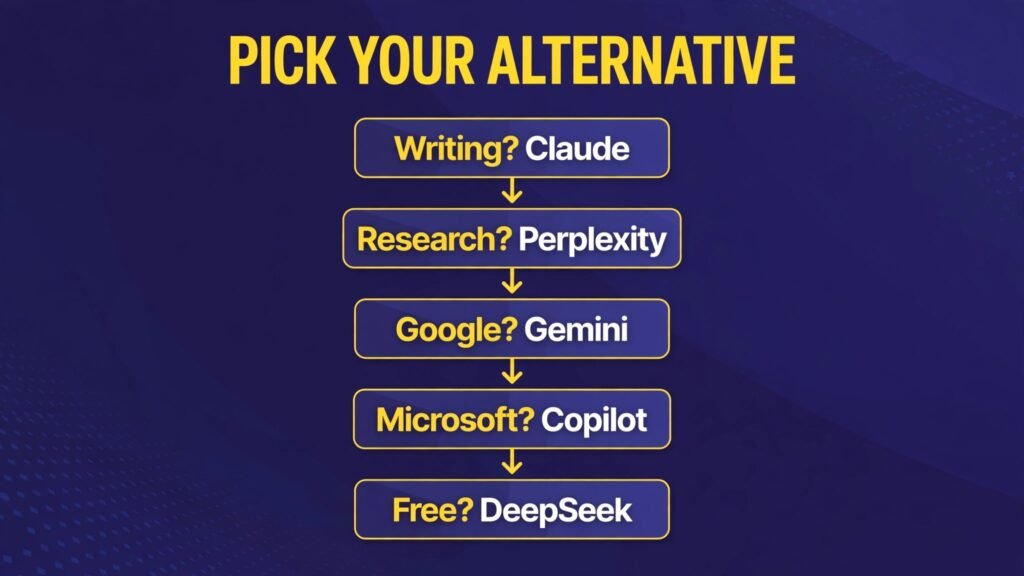
How to Choose: Match the Tool to the Job
The fastest way to pick is to start from the job, not the brand.
- Writing and editing all day: Claude first, ChatGPT second. Claude’s editing and long document handling are the difference.
- Research you need to defend: Perplexity first, NotebookLM if the sources are your own documents.
- Google household: Gemini. The Docs, Gmail, and Drive integration is worth more than a slightly better chat model elsewhere.
- Microsoft household: Copilot. Same logic, applied to Word, Outlook, and Teams.
- Zero budget: DeepSeek for reasoning, Meta AI for casual chat, Kimi for long documents.
- Still deciding: Poe or You.com for a month, so you can compare models before committing.
- Small business websites: If the chatbot is for your customers rather than for you, read our best-ai-chatbots-small-business guide instead, because that is a different buying decision.
- Coding: For code, the general assistants above are only half the story. Our best-ai-coding-assistants guide and the github-copilot-vs-cursor-vs-claude-code comparison cover the specialist coding tools properly.
One more practical point. Most people do not need two paid assistants. Pick one paid plan for your main job and use free tiers for everything else. The exception is research: pairing a writing assistant (Claude) with a research engine (Perplexity) is a combination many professionals keep, because neither does the other’s job well.
Before you pay: Prices in this guide are October 2026 roundup figures. Gemini’s Plus tier, Grok’s new plan names, Copilot’s retired Pro plan, and Poe’s point budgets all changed during 2026, and they will change again. Open the vendor’s pricing page and confirm the figure on the checkout screen before subscribing. A two minute check beats a surprise on the first bill.
Frequently Asked Questions
What is the best ChatGPT alternative overall?
Claude, for most people. It is the strongest for writing, editing, and long documents, and its Pro plan costs the same $20 a month as ChatGPT Plus. If your main job is research rather than writing, Perplexity is the better first pick.
Is there a completely free ChatGPT alternative?
Yes. DeepSeek’s chat app is free with no subscription tier. Meta AI is also free inside WhatsApp, Instagram, and Messenger. Both are genuinely usable every day, though neither matches ChatGPT on extras like image generation and voice.
Which ChatGPT alternative is cheapest?
Gemini has the cheapest paid entry point among the major assistants, with Google AI Plus listed at $4.99 a month in most 2026 roundups. If you want to pay nothing at all, DeepSeek is the pick.
Can I use more than one AI assistant?
Yes, and many people do. A common setup is one paid assistant for your main job plus free tiers for the rest. Poe and You.com are built for exactly this: one app, many models, so you can compare before you commit.
Are ChatGPT alternatives safe for work documents?
It depends on the tool and your employer’s rules. Paid and business plans usually offer stronger data controls than free tiers. Never paste customer personal data, passwords, contracts, or unreleased financial figures into a tool your organisation has not approved for that kind of data. When in doubt, anonymise names and figures first.
Do these alternatives work in other languages?
Most of them do, and Mistral and Qwen are notably strong outside English. Quality varies by language, so test your main language with a real task before committing to a paid plan.
Should I switch away from ChatGPT entirely?
Only if something specific is not working for you. If ChatGPT does everything you need, switching costs time for little gain. Switch when you have a clear reason: better writing, cited research, a lower price, or an assistant that lives inside the apps you already use.
Conclusion
There is no single best ChatGPT alternative, because there is no single job. Claude wins on writing. Gemini wins on price and Google integration. DeepSeek wins on being free. Perplexity wins on research you can check. Copilot wins inside Microsoft 365. The rest win on narrower jobs that might be exactly yours.
Start with the verdict at the top of this guide, try the free tier of your pick for a week of real work, and only pay when the free tier actually runs out on you. That one habit, free first and pay on evidence, will save you more money than any comparison table.
If you want the wider picture, our chatgpt-vs-claude-vs-gemini three way comparison puts the top three head to head, and the chatgpt-agent-mode-vs-claude guide covers the agent side for power users.