
Everyone knows the trick by now: ask a chatbot to “write a blog post about X” and it will. Everyone also knows the result — a readable, forgettable 800 words that says nothing Google’s AI Overviews won’t say better. That’s why the question isn’t really how to write a blog post with AI. It’s how to write one that survives contact with a human editor, a search engine, and an actual reader.
We publish with this workflow at stratilyze.com, where AI does the heavy lifting and humans own every judgment call. Below is the full process — brief → outline → draft → human edit → SEO check → final QA — with a copy-paste prompt template for each stage, an editing checklist, and a worked example: a real post we outline here, “7 Best AI Budgeting Apps for Freelancers (2026)”, so you can watch the workflow think.
Total time for a 2,500-word post: roughly 3–4 hours with this workflow, versus 6–8 fully manual. The time saved goes into the two steps AI can’t do — original examples and final judgment.
The Workflow in Brief
| Stage | AI does | You do | Tool |
|---|---|---|---|
| 1. Brief | Expands your angle into a content brief | Sets topic, reader, stance | ChatGPT Plus ($20/mo) or Claude Pro ($20/mo) |
| 2. Outline | Drafts structure with headings | Reorders, cuts filler | Same as above |
| 3. Draft | Writes section-by-section drafts | Fact-checks every claim | Same + source research |
| 4. Human edit | — | Adds voice, examples, cuts AI-isms | Grammarly Pro ($12/mo annual) |
| 5. SEO check | Scores headings, meta, gaps | Rewrites meta description | Surfer SEO (from $49/mo annual) |
| 6. Final QA | — | Runs the 10-point checklist | You |
Bottom line: Use AI for scaffolding and first drafts, never for facts, opinions, or final prose. The workflow that ranks is one where the AI’s draft gets worse before it gets published — cut, corrected, and rebuilt by a human with something to say.
Step 1: Write a Real Brief (10 Minutes)
Most AI-assisted posts fail in the first prompt. “Write a blog post about budgeting apps” gives the AI nothing to be good at — so it produces the average of the internet. Give it a brief instead: who the reader is, what they already know, what you believe that competitors don’t, and what must be true in the final post.
Copy-paste prompt template — the brief:
I need a content brief for a 2,500-word blog post.
Topic: 7 best AI budgeting apps for freelancers in 2026
Reader: Self-employed freelancers earning $50K–$150K/year, already using a basic spreadsheet or a free banking app, frustrated by irregular income.
My angle: Freelancers with irregular income need tools that smooth cash flow between paychecks — most roundups ignore this and review employee-focused budgeting apps.
What the post must include: hands-on notes on at least 5 apps’ free tiers, a comparison table with entry prices, a section on tax-prep features, and a verdict for solo freelancers vs. those with a team.
What it must NOT include: generic “budgeting is important” filler, stock descriptions copied from app websites, affiliate-first rankings.
Ask me up to 5 clarifying questions before writing the brief.
The “ask me questions” line is the single most useful sentence in this workflow. It turns the AI from a drafter into a collaborator and stops it from inventing details to fill the gaps you left.
Example output (our test run): The AI asked whether our freelancers were US-based (tax features differ by country), whether we’d accept a sponsored slot (we wouldn’t), and what “irregular income” range we meant — three questions that genuinely improved the brief before a word of the post existed.
Step 2: Build the Outline (15 Minutes)
A good AI outline is a skeleton you can reject sections of; a bad one is a table of contents the AI will later pad with fluff. Generate two versions — a “safe” outline and a “contrarian” one — then merge the best of both.
Copy-paste prompt template — the outline:
Based on the brief we agreed on, draft a detailed outline for the post “7 Best AI Budgeting Apps for Freelancers (2026)”.
Rules: every H2 must answer a question the reader actually searches for; every H3 must be specific enough that I can tell what will go in it from the heading alone; mark each section with [opinion], [hands-on test], or [research] so I know what evidence it needs. Then draft a second, more opinionated outline that takes my angle (irregular income cash-flow smoothing) harder. No filler sections.
Example output (merged result we kept): The merged outline had 7 H2s — Why employee budgeting apps fail freelancers (opinion), How we tested (hands-on), five tool H2s plus For solo vs. teams (verdict), Tax-prep features compared (table), and FAQ. We deleted the AI’s History of budgeting apps H2 in seconds — exactly the kind of filler an undisciplined draft would have kept.
Edit the outline like it costs you money to keep a heading, because in reader attention it does.
Step 3: Draft Section by Section (60–90 Minutes)
Never ask for the whole post at once. Full-post generations produce coherent seams and lazy transitions, and — more importantly — you can’t fact-check 2,500 words you didn’t watch being written. Draft one section at a time, feeding the AI the sections you’ve already approved so tone and claims stay consistent.
Copy-paste prompt template — per section:
You are drafting one section of my blog post. My approved voice sample is below, followed by the outline and the sections already finalized.
Voice sample: [paste 200 words of your own published writing — this is the single biggest quality lever in the workflow]
Outline section to draft: [paste the one H2/H3 block]
Previously approved sections: [paste them]
Rules: write 300–450 words in my voice sample’s style. Include at least one specific detail (a price, a limit, a menu path, a stat with source) per 150 words — if you don’t know a specific detail, write [VERIFY] instead of inventing one. End with the claim or gap a human should check in brackets. No “in today’s fast-paced world” openings, no concluding paragraph summarizing the section.
The [VERIFY] instruction is the entire secret to trustworthy AI drafting. It trades the AI’s smoothness for honesty — and when you later fill in those markers yourself, the post quietly becomes researched, which is what separates it from the 40 other AI-assisted posts on the topic.
Example (our run): The AI drafted the Why employee budgeting apps fail freelancers section in 340 words, including two [VERIFY] markers on app price claims — both of which we then verified against official pricing pages. Drafting time for the full post: about 75 minutes across seven sections.
Step 4: The Human Edit Pass (60–90 Minutes)
This is the step that decides whether the post ranks or rots. AI drafts have a texture — readers and search quality raters both notice it. Run every section through the edit checklist below, and delete ruthlessly: an AI paragraph you keep verbatim is a paragraph you didn’t earn.
Editing checklist — the 10-point pass:
| # | Check | What to do |
|---|---|---|
| 1 | Voice | Read one section aloud. If it doesn’t sound like you, rewrite the transitions in your own words. |
| 2 | [VERIFY] markers | Fill or cut every marker with a verified source; never delete a marker by inventing the answer. |
| 3 | Facts | Every price, date, limit, and stat gets checked against the primary source today. |
| 4 | AI-isms | Delete: “delve,” “landscape,” “game-changer,” “in today’s fast-paced world,” “it’s worth noting that,” em-dash overuse. |
| 5 | Filler intros | Every section’s first sentence must contain information. If it’s throat-clearing, delete it. |
| 6 | Specifics | Add one concrete detail per 200 words the AI couldn’t know: your test result, your screenshot, your number. |
| 7 | Structure | Cut any section that doesn’t answer a search query or advance your angle. |
| 8 | Examples | Every “you should” gets an example; every example gets a number or a name. |
| 9 | Readability | Sentences over 25 words get shortened; paragraphs over 5 lines get split. |
| 10 | Originality | Ask: what does this post know that ChatGPT doesn’t? Add or rewrite until there’s an answer. |
Example (our run): The AI’s draft said one app had “excellent cash-flow forecasting.” The edit pass turned that into: “Its forecasting module shows a 90-day income gap projection; in our test it flagged a $2,400 shortfall two weeks before it hit, using invoice due dates — the exact irregular-income problem our angle targets.” Same section, now with a test detail no competitor post has. That’s the whole game.

Step 5: The SEO Check (30 Minutes)
Your draft is now a good article; this step makes it a findable one. You don’t need an SEO tool to do the basics, but a SERP-based scorer tells you what the top results cover that you don’t.
Copy-paste prompt template — the SEO pass:
Here is my nearly-final blog post draft: [paste full draft]. The target keyword is “best AI budgeting apps for freelancers”. List: (1) the 5 most likely Google “People Also Ask” questions this keyword triggers that my post doesn’t answer; (2) any section in my post that drifts off-keyword; (3) a 150–160 character meta description containing the keyword; (4) three internal-link anchor opportunities (phrases in my draft that could link to my related posts); (5) one E-E-A-T weakness a quality rater would flag — missing author expertise, missing dates, or unverifiable claims.
Then, if you use one: run the draft through an SEO scorer (Surfer SEO’s Discovery plan starts at $49/month billed annually), accept the structural suggestions (keyword in H1, keyword in first 100 words, word count vs. the top 10), and ignore any suggestion that would make the writing worse. Keyword stuffing a good paragraph is how decent posts become bad ones.
Example (our run): The SEO pass caught that our H1 said “freelancers” but three H2s said “solopreneurs” — a keyword split Google would read as two half-topics. Fifteen seconds to fix, and the kind of catch a tool notices faster than a human.

Step 6: Final QA and Publish Checklist (15 Minutes)
Run this checklist the day you publish, not the day you draft — stale checks are how $49 price claims and “in 2024” references ship.
Pre-publish checklist:
- Title under 60 characters, keyword near the front
- Meta description 150–160 characters, keyword included, reads as a promise
- H1 and SEO title differ slightly (H1 for humans, title for the SERP)
- One image per ~500 words, all with descriptive alt text, filenames keyword-based
- Featured image under 200 KB, dimensions correct
- All prices and facts re-verified this week
- Every external claim links to its primary source
- Internal links to 3–5 related posts, natural anchors
- No [VERIFY] markers or placeholder text remain (search the draft!)
- Read the intro and conclusion back-to-back — they must promise and deliver the same thing
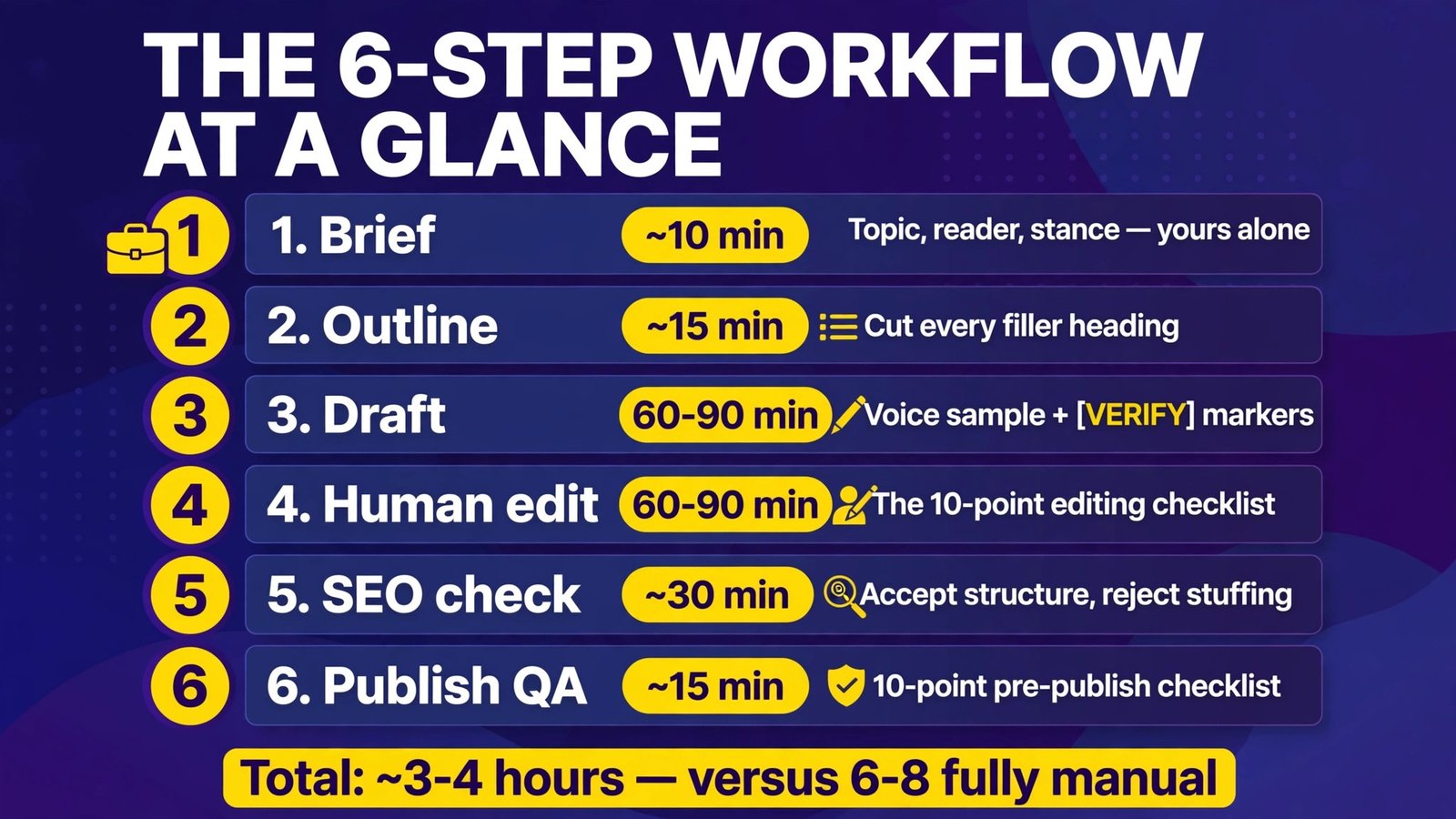
Workflow Summary: The Full Pipeline at a Glance
| Step | Time | Prompt needed? | Human judgment |
|---|---|---|---|
| 1. Brief | ~10 min | Yes (brief template) | Topic, reader, stance — yours alone |
| 2. Outline | ~15 min | Yes (dual-outline template) | Cut every filler heading |
| 3. Draft | 60–90 min | Yes (per-section template) | Voice sample + [VERIFY] markers |
| 4. Human edit | 60–90 min | No | The 10-point editing checklist |
| 5. SEO check | ~30 min | Yes (SEO pass template) | Accept structure, reject stuffing |
| 6. Publish QA | ~15 min | No | 10-point pre-publish checklist |
| Total | ~3–4 hours | 4 templates | You own facts, voice, verdict |

The Tool Stack We Recommend
| Tool | Cost (Oct 2026) | Role in this workflow |
|---|---|---|
| ChatGPT Plus or Claude Pro | $20/mo each (Claude: ~$17/mo billed annually) | Briefing, outlining, section drafts |
| Grammarly Pro | $12/mo billed annually ($144/yr) | Human edit pass: grammar, tone, clarity |
| Surfer SEO | From $49/mo billed annually (Discovery) | SEO scoring against the live SERP |
| Google Docs | Free | Versioning drafts and edit history |
You can run the whole workflow on the free tiers — ChatGPT and Claude both offer free plans, Grammarly’s free tier covers basic edits — but the paid tiers buy you longer context windows and faster iteration, which is where the real time savings live.

How to Get Started (Your First Post This Week)
- Pick a topic you can test or measure. AI can’t try the budgeting app, call the vendor, or run the experiment. Your first post should involve a small hands-on element — free-tier tests of 3 tools, one measured comparison — because that’s the original content the workflow is built to protect.
- Write the brief before anything else. Ten minutes with the brief template saves an hour of directionless drafting. If you can’t fill in “what I believe that competitors don’t,” you don’t have a post yet — you have a topic.
- Run one full cycle on the free tiers. ChatGPT or Claude free, Grammarly free, and a manual SEO pass will carry the whole workflow; upgrade only when limits slow you down.
- Time-box the draft. Set 90 minutes for Step 3. If you’re still drafting, you’re editing mid-draft — finish the sections, then let Step 4 be brutal.
- Publish the first one, then review the workflow. After your first post, note which steps took longest and which templates underperformed. The workflow is a system; tune it like one.
Frequently Asked Questions
Will Google penalize AI-written content?
No — Google penalizes unhelpful content, not AI-assisted content. Its guidance rewards E-E-A-T (experience, expertise, authoritativeness, trustworthiness) regardless of how the draft was produced. A workflow like this one, with verified facts, hands-on tests, and human judgment, is exactly what Google’s systems are tuned to reward. A one-shot chatbot dump with no edits is exactly what they’re tuned to ignore.
Can AI write a blog post that ranks in 2026?
Yes, with a human in the loop. AI-generated drafts can rank when they carry original information — test results, verified prices, real examples — and a clear editorial angle. What doesn’t rank: generic, unverified, one-shot drafts competing against 40 identical ones. The six steps above are the difference between the two.
How long should an AI-assisted blog post be?
As long as the topic requires. Our posts target 2,500–3,500 words because in-depth comparison and how-to content earns more engagement and ranks for more long-tail queries — but length is a byproduct of coverage, not a goal. A tight 1,500-word post that answers its query beats a padded 4,000-word one every time.
Should I disclose that I used AI to write the post?
Best practice is transparency without overthinking it: disclose AI assistance in your methodology or process notes when it shaped the work (like the “how we tested” sections on this site). Few readers care about the tool; they care whether the facts are right and the opinion is yours.
Which AI model writes the best blog drafts — ChatGPT, Claude, or Gemini?
For long-form structure and instruction-following, Claude and ChatGPT are both strong in 2026 (both $20/month for their paid plans; Claude offers ~$17/month billed annually). Claude tends to produce cleaner first-draft prose; ChatGPT’s tool ecosystem helps with research. Honestly, the voice sample you feed it in Step 3 matters more than the model choice.
How do I stop AI drafts from sounding generic?
Three moves: (1) paste a 200-word sample of your writing in every draft prompt; (2) forbid AI-isms explicitly (“no ‘delve,’ no ‘in today’s fast-paced world’”); (3) the edit checklist’s rule 6 — one concrete detail per 200 words that the AI couldn’t know. Generic drafts are a briefing failure, not a model failure.
Conclusion
Writing a blog post with AI in 2026 isn’t about the prompt — it’s about the pipeline. The six-step workflow (brief → outline → section drafts → human edit → SEO check → publish QA) puts AI where it’s strong (structure, speed, scaffolding) and keeps humans where they’re strong (facts, opinions, taste, accountability). The [VERIFY] marker habit alone will put your posts ahead of most AI-assisted content, because it turns the model’s weakest trait — confabulation — into your research checklist.
Do the workflow once, time it, and tune it. Your second post will be faster, your fifth will be noticeably better than your first, and somewhere around the tenth you’ll stop thinking of it as “AI writing” and start thinking of it as your writing, assisted.
Next step: pick one post topic this week, run Step 1’s brief template on it in your chatbot of choice, and make it answer the 5 clarifying questions before you draft a word. That ten-minute investment is where every good AI-assisted post starts.