
Two gyms can sign the same number of members in January and end March in very different places. One hands a new member a paper waiver, a tour and a vague instruction to book a class when ready, then hears nothing until the card payment fails. The other sends a short digital form before the first visit, turns the answers into a starter plan for the first two weeks, books the first three sessions before the member leaves the building and checks in after the first and third visits. The difference is rarely enthusiasm or equipment. It is how well each gym can use AI for gym member onboarding to plan the first month instead of improvising it.
It is whether onboarding is treated as a system with owners, dates and follow-up, or as a single admin task that ends at the signature. When you use AI for gym member onboarding, you are buying back the follow-up work that small teams usually drop when the front desk gets busy, and you are making the first month feel planned rather than improvised.
This guide gives you that system in full. You will see what a good intake form should ask and what it should leave out, how to turn form answers into a starter plan a coach can actually deliver, how to run a 30 day follow-up sequence that notices a quiet member before that member cancels, and how to choose a platform stack without paying for features your gym will never open. The aim throughout is practical. AI should reduce typing, drafting and chasing, while coaches keep the conversations that build trust.
What Good Onboarding Actually Has to Do
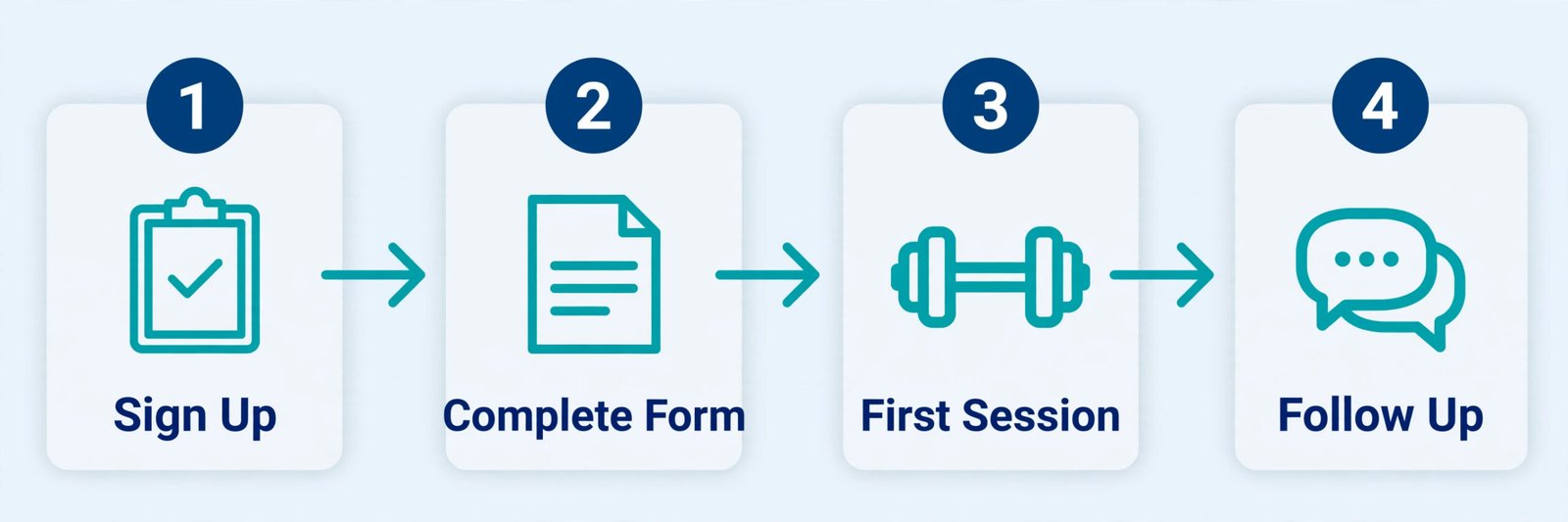
Onboarding has four jobs and most gyms only do the first one well. First, it must collect accurate information and legal consent without making a new member feel interrogated. Second, it must turn that information into a first visit that feels safe, especially for someone who has not trained in years or who is walking into a class format for the first time. Third, it must create a habit in the first two weeks, because a member who has not booked a second and third session is already drifting, even if the membership is paid up.
Fourth, it must surface problems early, from a schedule clash to a class level that felt too hard, while there is still time to fix them.
Industry writing on retention keeps returning to the same window. The first 30 days are repeatedly described as the period when a new member decides whether the gym becomes part of a routine or remains a monthly charge to cancel later. One retention summary cites members who visit at least four times in their first month as far more likely to stay active at 12 months, and another puts members who complete a structured early sequence at three to four times the likelihood of still being a member at month 12 compared with members left to find their own rhythm. Early visits, early guidance and early contact matter more than any later win-back offer.
That is why a useful onboarding system is measured in visits and replies, not in forms completed. A completed waiver is not onboarding. A member who has booked three sessions, met a coach by name, knows where to change, where to wait and how to scale a movement, and has received one personal message after the first session, has been onboarded. When you use AI for gym member onboarding, judge every tool against that test. If it does not help a member reach a second visit with less friction, it does not belong in the first month, however impressive it looks in a demo.
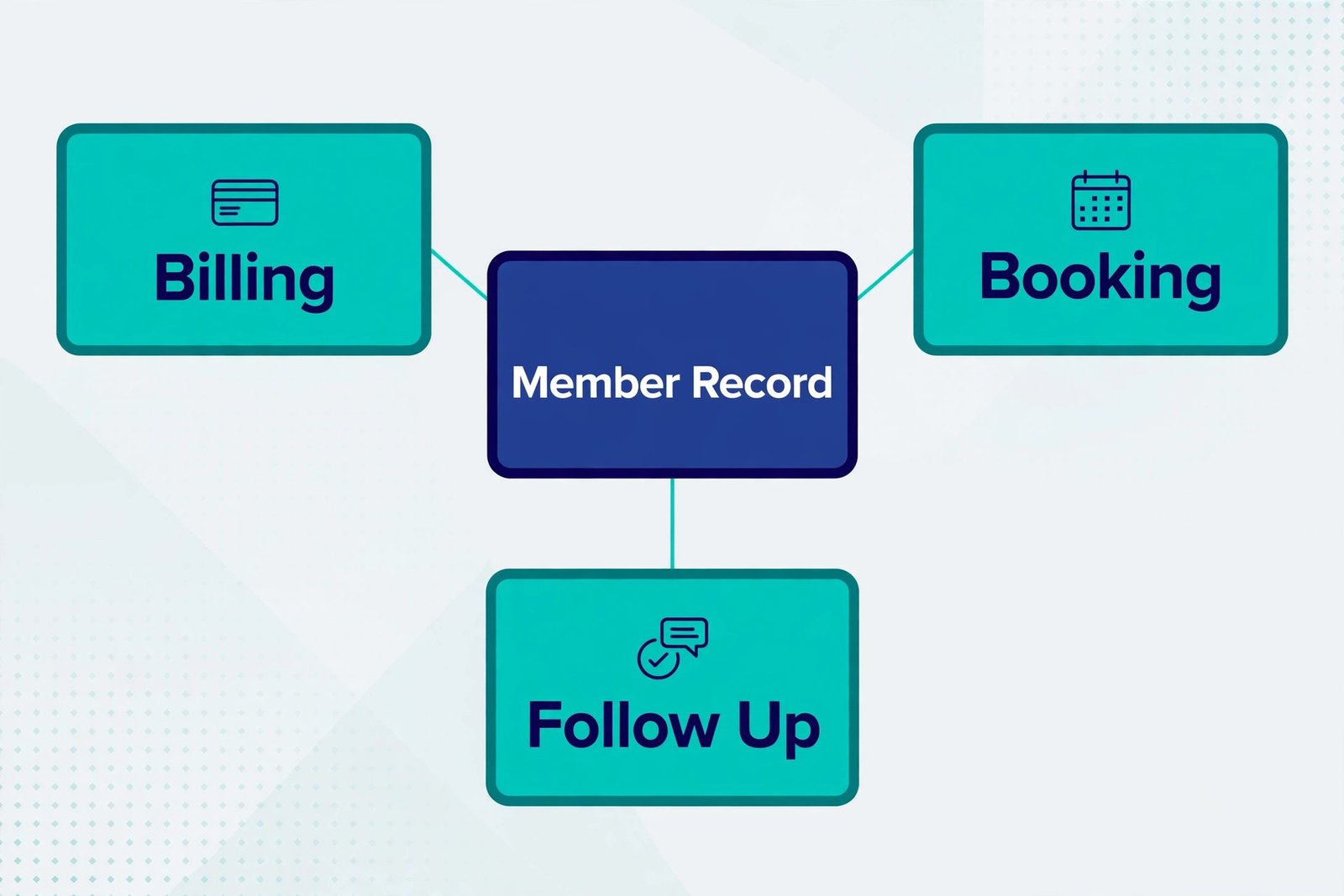
A small gym needs a system that survives staff absence: one member record, one form, one follow-up sequence and one owner for each step.
How to Use AI for Gym Member Onboarding Without Losing the Human Welcome
The safest way to use AI for gym member onboarding is to divide the work into two lanes and keep them separate. AI drafts, sorts and reminds. Staff decide, coach and reply personally when it matters. Members always know whether they are talking to a person or reading an automated message. That division protects the welcome, because the member never feels tricked by a message that pretends to be personal, and it protects staff, because nobody has to pretend that a generic broadcast was written just for one person.
Start with drafting. An AI assistant can turn gym rules into a clear welcome email, a first visit guide and three versions of a check-in message for different member types, such as a returning exerciser, a complete beginner and a class only member. Ask it to keep sentences short, remove jargon and give one action per message. Then edit every draft yourself before it goes live. Replace generic advice with your class names, your booking link, your parking note and your actual first week schedule. A message that says “book a beginner friendly class” is forgettable.
A message that says “book the Tuesday 6.30 pm foundations class and arrive ten minutes early so a coach can walk you through the room” is useful.
The second lane is reminders and timing. Onboarding fails most often because nobody follows up on day three or day ten. An automated sequence can send the welcome message at sign-up, a booking prompt after the first visit, a short check-in at day seven and a progress review prompt at day 30. The automation should trigger from behaviour where possible, not only from calendar dates, because members do not all start attending on the same day. A first visit message should fire after the first check-in. A rebooking prompt should fire when a member has been inactive for seven days.
When the system flags a member who has not visited, a person should make the next contact, because a second automated message to someone who is already drifting rarely changes anything.
Forms That Collect the Right Information the First Time
A good onboarding form is short enough to finish on a phone in under five minutes and complete enough that a coach does not need to ask the same questions again at the front desk. The most common failure is length. Gyms add every question they might ever need, from referral source to t-shirt size, and completion drops. The fix is to split the form into two stages. Stage one collects what is needed to start safely and legally. Stage two, sent after the first visit, collects preferences, goals in more detail and referral information when the member already has a reason to answer.
Form tool choice depends on whether you already have a gym platform. If you do, use its built-in form and waiver flow first, because answers land directly on the member record and you avoid a second system to reconcile. If you run onboarding outside a gym platform, a dedicated form builder gives you better logic, branching and e-signature options.
Jotform offers a free Starter plan with 5 forms and 100 monthly submissions, Bronze at 34 dollars a month on annual billing or 39 dollars a month on monthly billing with 25 forms and 1,000 submissions, Silver at 39 dollars a month on annual billing or 49 dollars a month on monthly billing with 50 forms and 2,500 submissions, and Gold at 99 dollars a month on annual billing or 129 dollars a month on monthly billing with 100 forms and 10,000 submissions. Typeform is stronger on conversational design but costs more per response at higher volumes, with monthly billing figures commonly listed at 39 dollars for Basic, 79 dollars for Plus and 129 dollars for Business.
Check pricing at checkout, because annual and monthly figures differ and several form tools count submissions, views and storage separately.
The Onboarding Form Template You Can Copy
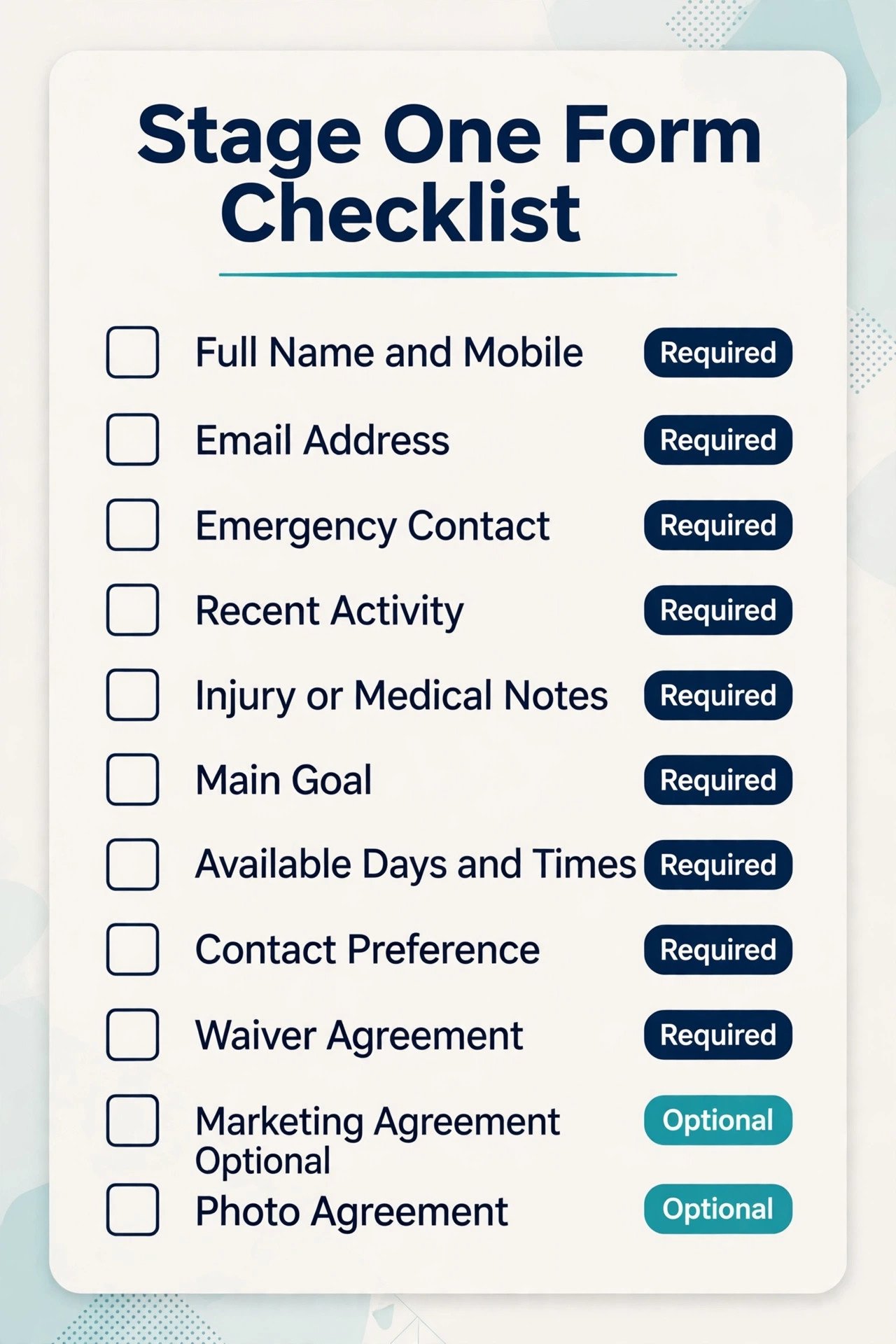
Use the template below as your stage one form. Keep the order, because it moves from identity to safety to goal to schedule, which is the order a new member can answer without stopping to think. Do not add a question unless you can name the staff action it triggers. If no action follows from an answer, the question belongs in stage two or nowhere.
| Field | Why it matters | Required or optional |
|---|---|---|
| Full name and mobile number | Booking, check-in and follow-up all depend on this record | Required |
| Email address | Welcome pack, receipts and plan updates | Required |
| Emergency contact name and number | Safety on the gym floor | Required |
| Activity in the last six months | Sets the starting level without a long fitness history | Required |
| Injury, medical condition or medication a coach must know | Safety and scaling decisions for the first sessions | Required, with a prefer not to say option and a coach follow-up |
| Main goal in your own words | Lets the coach reply to the real goal, not a category | Required |
| Goal category choice | Helps class suggestions group members sensibly | Optional |
| Days and times you can usually train | Drives the first three bookings, not a generic timetable | Required |
| How you prefer to be contacted | Stops messages going to a channel the member never checks | Required |
| Waiver and terms agreement | Legal consent before the first session | Required |
| Marketing messages agreement | Separate consent for offers and newsletters | Optional |
| Photo and video agreement | Separate consent for social content | Optional |
Plans That Fit Real Weeks, Not Ideal Weeks
A starter plan fails when it describes an ideal week the member does not have. Three perfect sessions, a morning routine and a meal plan may look impressive in a PDF, but a shift worker, a parent with school runs or a commuter with a long journey cannot follow it. The first plan should therefore be built from the member’s stated availability, not from the gym timetable. Start with two sessions in week one, three if the member explicitly asks for more, and anchor them to days and times the member already named on the form.
A plan with two booked sessions beats a plan with five suggested sessions every time, because booked sessions create attendance and suggested sessions create guilt.
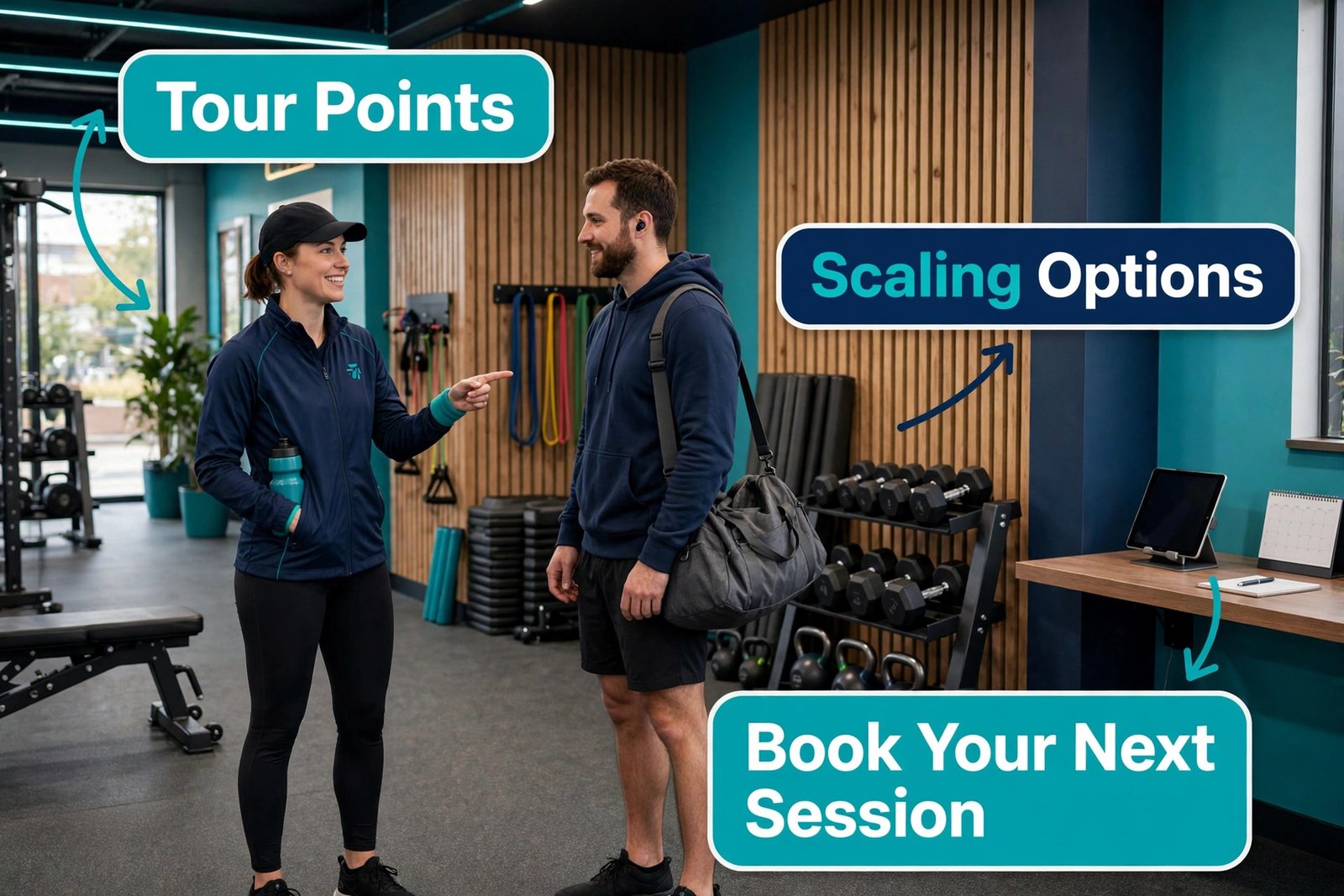
When you use AI for gym member onboarding to draft a starter plan, give the assistant the member summary, the available days, the class timetable and the coach’s scaling rules, then ask for a two week plan with one clear focus per session, a beginner option for every movement or class segment, and a note on what to do if the member misses a session. The output should be short enough to read on a phone. A member does not need a 12 week programme on day one. They need to know what happens on visit one, visit two and visit three, what to bring, where to meet the coach and how hard the first session should feel.
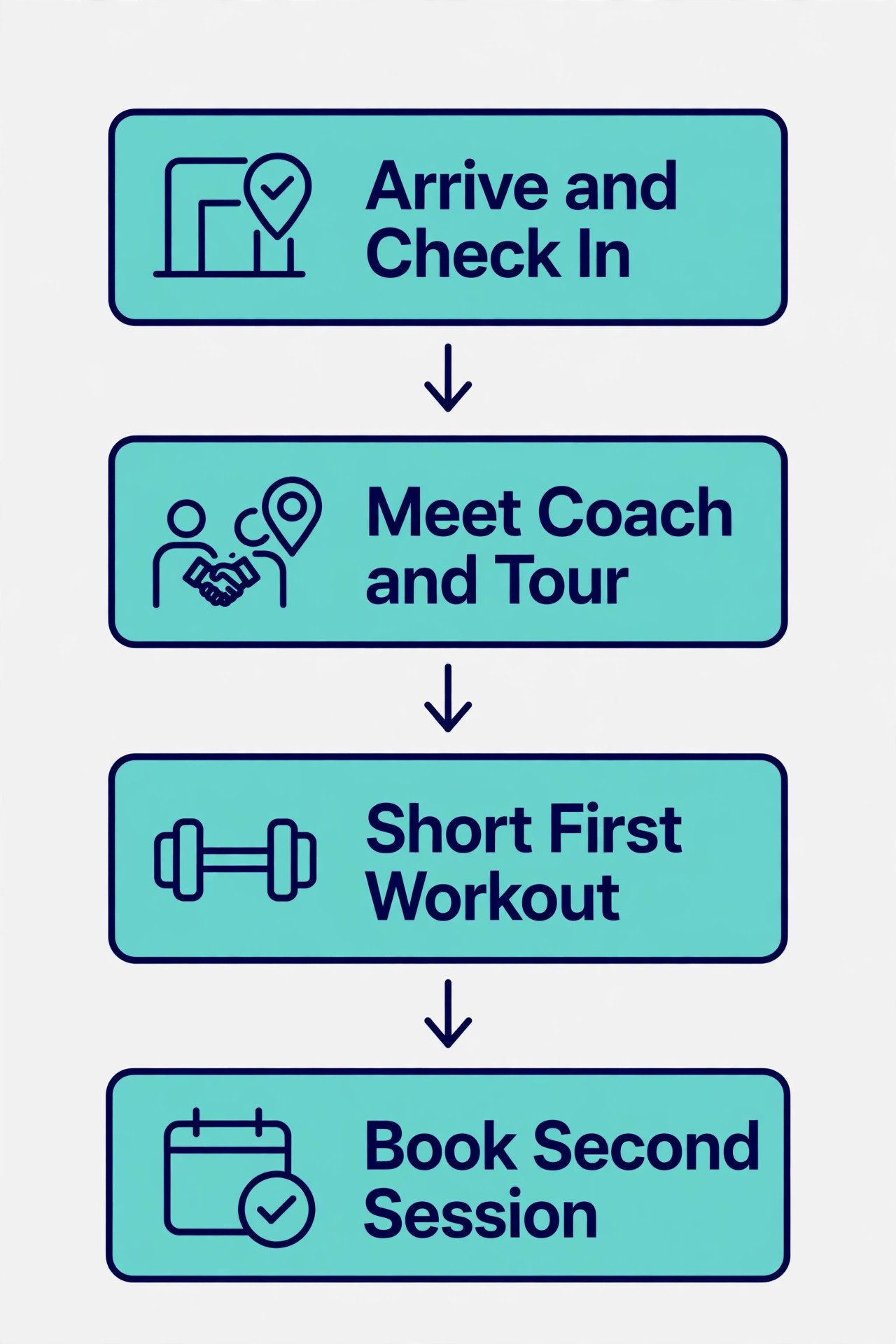
Structure the first three visits deliberately. Visit one is orientation plus a short, successful workout. The coach shows the changing area, the water point, the booking app and the scaling options, then runs a session that leaves the member tired but not wrecked. Visit two repeats familiar movements with one new element, so the member feels progress without feeling lost. Visit three introduces the class or training format the member will actually continue with, plus a short conversation about what felt good and what felt hard. That conversation is the data for the next plan. If a member says a class felt too fast, the next plan should name a slower class.
If a member says evenings are hard after a long day, the next plan should try a morning or lunchtime slot. Plans that ignore that feedback teach the member that feedback is pointless.
The First 30 Days, Mapped as a Follow-Up System
Follow-up is where most onboarding systems quietly fail, because it depends on memory. The fix is a written sequence with triggers, owners and message types, so a busy week does not erase the second check-in. When you use AI for gym member onboarding follow-up, automation sends the prompt and a person owns the conversation that follows. Each step below has a trigger based on behaviour where possible, a channel, and a human owner for the replies.
Day zero starts at sign-up. The member receives a welcome message with the first session details, what to bring, where to park or enter, and how to contact the gym. The message should be short and should contain one booking link, not three. If the first session is not yet booked, the message should promise a contact time and keep it. Day one, after the first check-in, the member receives a short thank you and a prompt to book the second session, plus a link to the beginner guide or class notes.
This message can be automated, but it should use the member’s name, the class or coach name, and the actual next available session, not a generic hope that they enjoyed the workout.
Day seven is a friction check, not a sales message. Ask one question and make replying easy. A useful version reads “How did your first week feel, and is there anything getting in the way of your next visit”. If the member has not visited since day one, the message should be warmer and more practical, offering a different time or a coach check-in rather than a reminder that they paid. Day fourteen is a progress note. Name something specific if you have data, such as sessions attended or a movement the member learned, and ask about the goal set on the form. Day thirty is a review, not a renewal pitch.
Compare the starting goal with actual attendance, celebrate what was completed, and agree the next four weeks. That review can be a ten minute chat in person, a short video call or a structured message exchange, but it should end with a booked next session and a written next plan.
Members who go quiet need a different track, not a louder version of the same track. If a member has no visit for seven days after the first session, send one helpful message and flag the record for a personal contact within two working days. If there is still no visit by day fourteen, a coach should call or send a personal voice note, not another broadcast. The conversation should start with curiosity, not guilt. Schedule, injury, cost worry, class level and embarrassment about being new are all common reasons, and each needs a different response. A member who is injured needs a pause or a scaled option. A member who cannot make evenings needs a different slot.
A member who felt lost in class needs a foundations session. The system only works if staff can record the reason and change the plan, rather than sending the same reminder again.
Choosing the Platform Stack and What It Costs
Platform choice for onboarding is really a choice about where the member record lives and what triggers follow-up. A gym platform gives you billing, booking, attendance and member notes in one record, which makes behaviour triggered follow-up possible. When you compare platforms, compare the onboarding workflow end to end, not the feature list. Can a form submission create a member record, trigger a welcome message, book a first session and flag a coach task without manual copying.
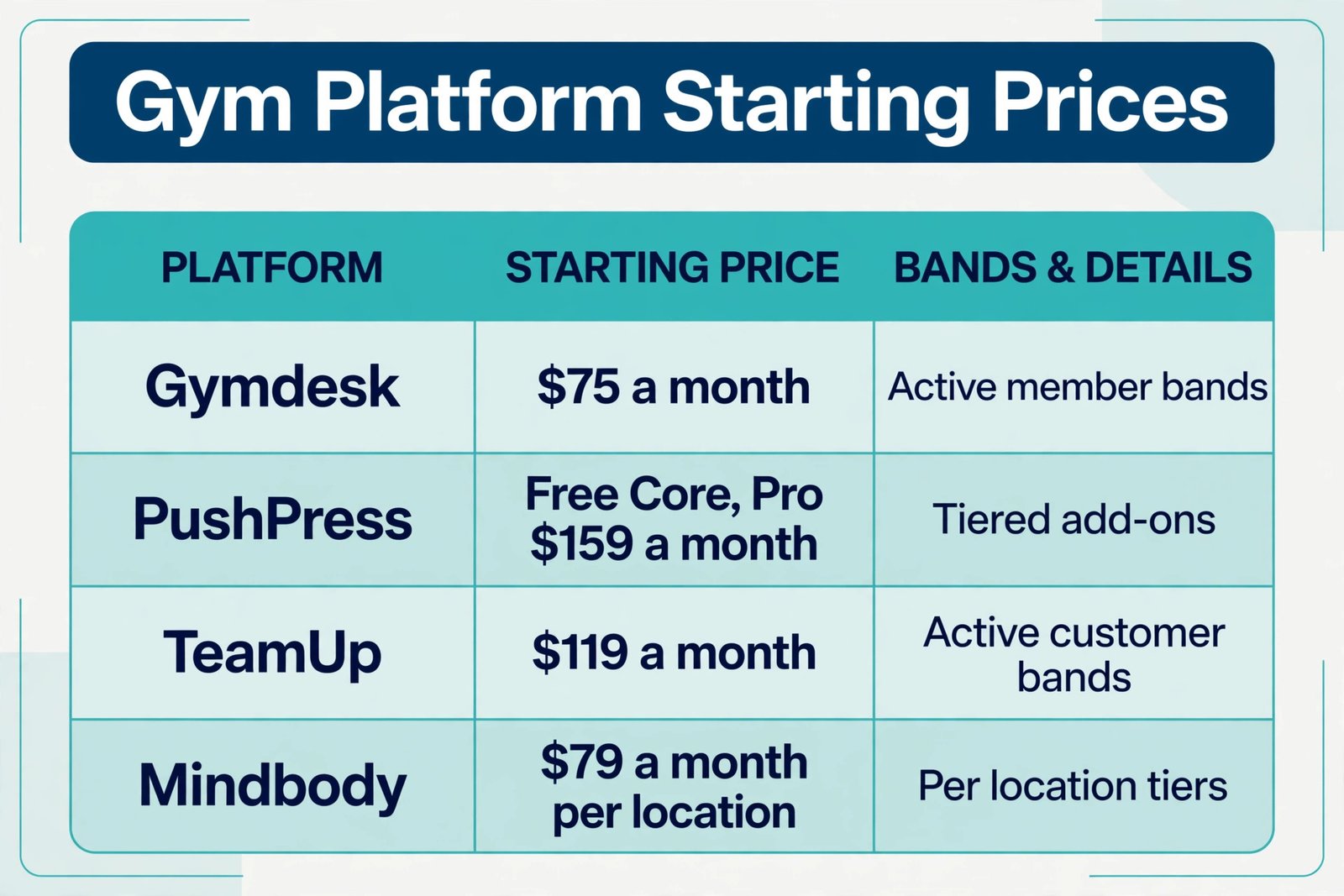
The October 2026 comparison figures below show why headline prices mislead. Gymdesk prices by active member count with all core features included, at 75 dollars a month for up to 50 active members, 100 dollars for 51 to 100, 150 dollars for 101 to 150 and 200 dollars for 151 to 250 when using Gymdesk Payments, with 25 dollars a month more for your own processor, or 40 dollars more on the Large tier, and a branded app at 100 dollars a month as an add-on.
PushPress offers a free Core tier with card processing at 4.99 percent plus 30 cents, Pro at 159 dollars a month, Max at 229 dollars a month, Train at 79 dollars a month for workout tracking, Grow at 329 dollars a month for CRM and marketing, and a branded app at 97 dollars a month. A full PushPress stack can therefore reach around 559 dollars a month, which is a very different decision from the free tier alone. TeamUp is listed in the same October comparison at 119 dollars a month starting and 379 dollars a month for 501 or more customers, with all features included at each tier.
Mindbody is listed from 79 dollars a month per location, with higher tiers priced only on request, and marketplace and marketing add-ons that can lift the real bill well above the entry figure. Check every figure at checkout.
| Platform | Starting point in October 2026 comparisons | Pricing model to watch | Onboarding strength |
|---|---|---|---|
| Gymdesk | 75 dollars a month | Active member bands, all features included | Simple intake, billing and attendance in one record |
| PushPress | Free Core tier, Pro at 159 dollars a month | Tiered add-ons for CRM, training and branded app | Strong class gym workflow, CRM only in Grow |
| TeamUp | 119 dollars a month | Active customer bands, same features at each tier | Clean scheduling and predictable billing |
| Mindbody | 79 dollars a month per location | Per location tiers, higher tiers on request | Marketplace discovery and class booking depth |
| WellnessLiving | 69 dollars a month | Tiered features above entry plan | Multi-service studios with classes and appointments |
| Zen Planner | 99 dollars a month | Member bands plus add-ons | Established gym and martial arts workflows |
How to Choose Between an All-in-One Platform and Separate Tools
The choice comes down to team size, member count and who owns admin. An all-in-one platform suits a gym with one or two people handling admin, because the member record, billing, booking and follow-up live together and a single login covers most daily work. The trade-off is that you accept the platform’s form design, message templates and reporting limits. A separate tools stack suits a gym that already uses a strong form builder, a strong email tool and a coach who enjoys building workflows, because each tool can be best in its class. The trade-off is maintenance. Every integration needs checking when a password changes, a plan limit is hit or a form field is renamed.
Ask five questions before you decide. First, who will own the system when the owner is away. Second, how many manual steps happen between form submission and first session booking. Third, what happens when a payment fails during onboarding, and who contacts the member. Fourth, can you export the full member list with attendance and notes in one file. Fifth, what does the bill look like at twice your current member count. A platform that is cheap at 40 members and expensive at 120 members may still be right, but you should choose it knowing the step, not discovering it in a busy month. When you use AI for gym member onboarding, the same test applies to the AI tool.
If it cannot read the member record or write back a clean note, it will create a second source of truth and staff will stop trusting either one.
Mistakes That Quietly Undo Good Onboarding
The first mistake is asking for too much, too soon. A 40 question form, a full medical history, a nutrition questionnaire and a goal setting worksheet on day one will lose members who would have happily answered those questions after a good first session. Keep stage one short and move the rest to stage two. The second mistake is sending the same welcome to everyone. A 19 year old athlete, a 58 year old returning to exercise and a new parent with two sessions a week available do not need the same starter plan, the same class suggestions or the same tone. Group members by goal and availability, then personalise the details, even if the structure stays the same.
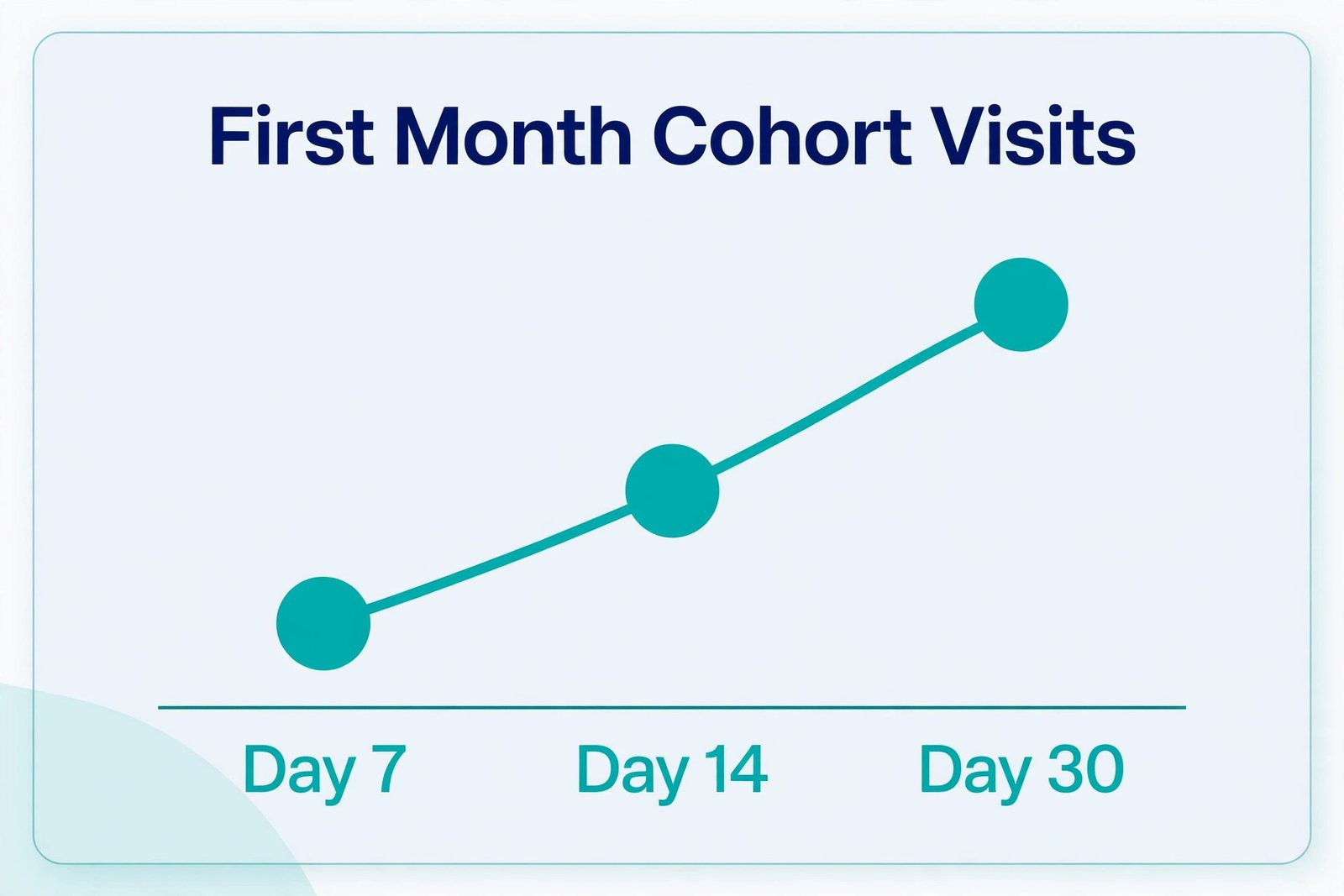
The third mistake is measuring sign-ups instead of second visits. A marketing campaign that brings 50 sign-ups with a 20 percent second visit rate is worse than a campaign that brings 25 sign-ups with a 70 percent second visit rate, because the second group builds a stable membership base and the first group builds churn, refunds and bad reviews. Report onboarding by cohort, meaning all members who joined in the same month, and track their visits at day 7, day 14 and day 30. That cohort view stops a good sign-up month from hiding a bad onboarding month. The fourth mistake is storing health notes where everyone can see them.
Keep medical and injury notes in the member record with role based access, keep AI summaries free of unnecessary detail, and delete draft notes that contain health information once the clean record is saved. Privacy is part of the welcome, especially for members who are nervous about sharing a health history with a new gym.
Measuring Whether Onboarding Is Working
You need only five numbers to judge onboarding, and you should review them monthly by cohort. Form completion rate shows whether stage one is too long or confusing. Time from sign-up to first visit shows whether booking friction or slow contact is losing members before they start. Second visit rate within 14 days shows whether the first session and the follow-up created a habit. Visit count at day 30 shows whether the plan fitted the member’s real week. Reply rate to check-in messages shows whether your messages sound human and useful, or whether members have learned to ignore them.
If you track only one number, track second visit rate within 14 days, because it predicts later retention better than sign-ups, likes or app downloads. When you use AI for gym member onboarding reporting, use it to group reasons for non attendance, then let coaches confirm the fix.
For related reading, this site’s guide to best AI tools for gyms covers the wider gym tool field, best AI tools for fitness coaches helps with coaching and plan delivery, best AI form builders compares intake options in more depth, and automate small business with AI shows how the same drafting and reminder patterns work beyond the gym floor. If scheduling is your bottleneck, best scheduling apps is a useful next check.
Frequently Asked Questions
How long should gym member onboarding last?
Onboarding should run for 30 days as a structured sequence, with the most intensive contact in the first two weeks. After day 30, the member moves into normal membership management, with a written next plan and a booked next session. A single welcome email or a single tour is not onboarding, even if it feels complete on day one.
What should an AI tool do during onboarding, and what should it never do?
An AI tool should draft messages, summarise form answers for coaches, suggest starter plan structures and remind staff of follow-up tasks. It should never set training loads alone, diagnose pain, clear someone for exercise, auto cancel a membership or send a message that pretends to be a personal note from a named coach. Coaches approve plans and handle injury, payment and cancellation conversations personally.
Do I need a gym platform, or can I run onboarding with a form tool and email?
You can start with a form tool and email if you have very few new members and one person owns follow-up. A gym platform becomes worth the cost when manual copying between form, billing and booking starts causing missed follow-ups, or when behaviour triggered messages, such as a prompt after the first check-in, would save real staff time. Trial the platform workflow with real members before committing.
How many questions should the first onboarding form ask?
Aim for a form a member can finish on a phone in under five minutes, covering identity, emergency contact, activity level, injury or medical flags a coach must know, goal, availability, contact preference and separate consent for waiver, marketing and photos. Move preferences, detailed goals and referral questions to a second stage after the first visit, when the member has a reason to answer them.
What is the best follow-up timing for a new gym member?
Send a welcome message at sign-up, a thank you and second booking prompt after the first check-in, a friction check at day seven, a progress note at day fourteen and a review at day thirty. Trigger messages from behaviour where possible, such as first check-in or seven days without a visit, rather than only from calendar dates, because members do not all start attending on the same day.
How do I handle a member who stops attending during onboarding?
Send one helpful message, then make a personal contact within two working days. Ask what got in the way, using schedule, injury, cost worry, class level and confidence as prompts, and change the plan to fit the answer. Do not send repeated generic reminders. Record the reason on the member record so the next coach does not repeat the same message, and offer a pause, a different time or a foundations session where that fits the reason.
Is AI onboarding suitable for a small gym with only one coach?
Yes, and it may help a solo coach more than a large team, because drafting and reminders are the work that gets dropped first. Keep the system small, with one form, one follow-up sequence and one member record, and use AI only for drafting and summarising. A solo coach should still make personal contact after the first session and at day thirty, because those two conversations carry most of the trust in a small gym.
The Welcome That Turns a Signup Into a Regular
A good onboarding system does not need to be large, and it does not need to feel automated to the member. It needs a short form that respects the member’s time, a first session that leaves the member confident rather than confused, a starter plan built around real availability, and a follow-up sequence that notices silence before silence becomes cancellation. When you use AI for gym member onboarding in that supporting role, drafting the welcome, summarising the form and reminding the team, coaches gain time for the work only people can do. They can learn a name, scale a movement, fix a schedule clash and ask a better question at day thirty.
Start this week with one change, not a full platform migration. Shorten stage one of your form to the template in this guide, write the five follow-up messages for day zero, day one, day seven, day fourteen and day thirty, and assign an owner to replies for each step. Run that sequence for the next ten new members and track second visit rate within 14 days. That is the whole method. Make the first month planned, personal and measurable, and the membership that follows will be far easier to keep.