

A hand-built itinerary used to take a full afternoon of tab switching, supplier PDFs and copy pasted hotel descriptions. When you use AI for travel agency itinerary building, that same first draft can exist in under an hour, which leaves the agent free to do the work a machine cannot do, which is to check the facts, judge the pacing and protect the client from a bad day on the road. The comparison is not between a human and a machine. It is between an agency that spends its hours typing and an agency that spends its hours deciding.
This guide is written for a small travel agency, an independent advisor or a two to five person team that builds multi-day trips for paying clients. It covers a practical workflow for day planning, a disciplined method for stay selection, a revision process that stops endless change requests from eating your margin, and a pricing presentation clients can actually understand. Prices quoted here come from vendor pages checked at draft time, so confirm any figure before you buy or quote it.
Hand-Built Itineraries Versus AI-Assisted Ones
A hand-built itinerary has one clear strength, which is judgment. An experienced agent knows that a client who lands at 6 pm should not be booked into a three hour evening walking tour, that a hill town market is closed on Mondays, and that a hotel two streets from the station beats a prettier hotel that needs a 40 minute taxi ride in traffic. That knowledge is the product. The weakness of hand building is speed and consistency. Every day plan is typed from scratch, every hotel description is rewritten, and every revision means hunting through a long document for the one line that changed.
An AI-assisted itinerary flips the time split. The tool produces a structured first draft with days, themes, transfer notes and activity ideas, and the agent then edits, verifies and prices it. That draft is useful only when it is treated as a draft. AI tools invent opening hours, misjudge driving times and recommend hotels that closed two years ago. A good agency therefore keeps a firm rule. Nothing generated goes to a client until a human has checked the date, the place, the price and the practicality of every day.
The business case is straightforward. If an agent builds four itineraries a week and AI assistance saves 90 minutes on each first draft, that is six hours a week returned to selling, supplier calls and client conversations. At a modest agency, those six hours are worth far more than the monthly cost of most itinerary tools. The saving disappears, however, if revisions multiply. A draft that looks polished but contains three wrong facts will generate more client messages than a plain draft that is right. Accuracy, not speed alone, is what makes this approach profitable.
How to Use AI for Travel Agency Itinerary Building
Start every trip with a brief, not a prompt. The brief is a short internal document, and it should record the travellers, the dates, the budget band, the pace the client wants, mobility needs, food needs, must-see places, places to avoid, and the decision deadline. A vague brief produces a vague itinerary, and no tool fixes that. Get the brief in writing, even if it starts as a WhatsApp message, and paste the confirmed version into your trip file before any generation begins.

Step 1. Generate a skeleton, not a finished trip
Ask the AI tool for a day-by-day skeleton with one theme per day, one anchor activity per day and realistic travel blocks between stops. Ask for placeholders wherever a price, hour or hotel name is uncertain, rather than letting the tool fill gaps with invented detail. A skeleton with honest gaps is far easier to verify than a polished document full of confident errors. Save this skeleton as version 0.1 in your trip file, so later changes can be traced.
Step 2. Verify before you beautify
Check every day against three sources. First, the supplier or official attraction page for hours and closure days. Second, a maps check for the driving or train time between stops, with a buffer added for traffic, check in and meals. Third, your own supplier notes for hotels and guides you trust. Any item that fails a check gets corrected or cut at this stage. Do not design a beautiful PDF around an unverified day, because you will have to redesign it after the client spots the error.
Step 3. Add stays, transfers and prices as a separate pass
Once the days are sound, add the commercial layer. This means the chosen hotel for each night, the transfer method between cities, the guide or driver bookings, and the per person price build-up. Keeping this as a separate pass matters, because a day plan change should not silently break a price, and a price change should not silently rewrite a day. One person, or one checklist, should own the link between the two layers on every trip.
Step 4. Send a version the client can react to
Send version 1.0 with a short cover note that names the choices you made and the questions you need answered. A good cover note says which hotel you picked and why, which day is the busiest and why it is placed mid-trip rather than on arrival day, and what is still held as a placeholder pending supplier confirmation. Clients revise faster when they understand the reasoning, and they revise less when they can see that trade-offs were already considered.
Step 5. Log every revision in one place
Every change request, whether it arrives by email, phone or message, goes into a revision log with the date, the requested change, the effect on price and days, and the new version number. This log is your protection against the common dispute in which a client remembers a different version of the trip from the one they paid for. It also shows you which kinds of changes recur, so you can fix your brief template and stop the same revision from happening on the next ten trips.
Day Planning That Clients Can Actually Enjoy
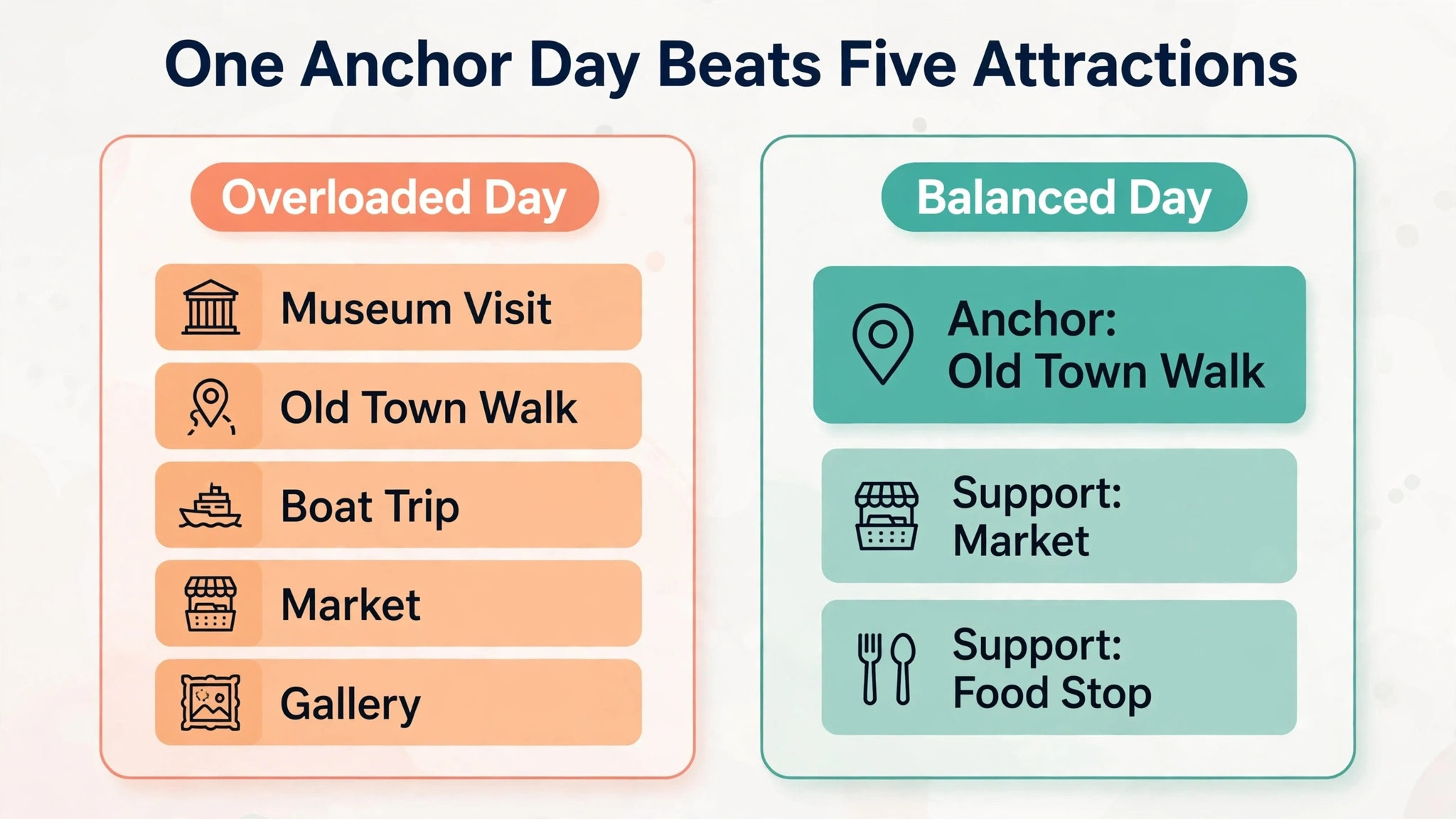
Day planning fails in predictable ways. The most common is overload, where a first draft packs five attractions into a day that has room for two plus a proper lunch. The second is dead time, where a client sits in a hotel from 3 pm because the draft forgot that check in is at 3 pm and the next activity is 20 kilometres away. The third is the arrival day trap, where a long flight is followed by a demanding evening programme that leaves the client exhausted for the rest of the trip. A disciplined day plan avoids all three by treating energy as a budget, not an afterthought.
Build each day around one anchor and two supports. The anchor is the single experience the day is remembered for, such as a guided old town walk, a boat trip or a museum visit. The supports are a secondary sight or activity and a food or rest stop that fits the route naturally. Anything beyond that is optional, and it should be labelled optional in the client document, so the client can drop it without feeling they have broken the plan.
Pacing across the trip matters as much as pacing within a day. Place the most demanding day in the middle of the trip, after the client has recovered from travel and before fatigue builds at the end. Alternate a heavy sightseeing day with a lighter day that includes a market, a neighbourhood walk or free time. For family trips, add a daily rest block after lunch for younger children, and state it in the itinerary rather than leaving it implied. For older travellers, limit the number of hotel changes, because each change costs packing time, transfer time and orientation time that never appears in a tool-generated distance estimate.
Transfer days deserve their own treatment. A transfer day is not a free day and it is not a sightseeing day. It is a day whose success is measured by arriving rested, with bags intact and enough evening time to settle in. Your itinerary should show the departure time, the transfer method, the expected arrival time, a buffer for delays, and one low effort evening option near the new hotel. Clients judge agencies most harshly on transfer days, because a missed connection or a long unexplained wait feels like a failure of care, even when the cause was traffic.
Stay Selection Without Guesswork
Stay selection is where AI drafts go wrong most often, because a tool can describe a hotel beautifully without knowing whether its rooms suit a family of four, whether its location works for the next day route, or whether its cancellation terms fit the client payment schedule. Your selection method should therefore be a scored comparison, not a single recommendation. Shortlist three stays per key stop, score them on location, room fit, cancellation terms, breakfast value and total cost including taxes and fees, and keep the scoring note in the trip file even though the client only sees the winner.
Location should be scored first, before price. A hotel that saves 30 dollars a night but adds a 25 dollar taxi ride each way and an hour of lost time is not cheaper. Map the hotel against the next two days of activities, not only against the arrival point. A central stay that serves two days of sightseeing is worth more than a cheaper stay that forces a daily cross-town trip. For multi-night stays, check whether the hotel allows a room to be kept while the client takes a day trip, and whether luggage storage is free, because those small facts change the feel of a trip more than a lobby photo does.
Room fit is the second filter, and it needs a direct supplier check. AI descriptions routinely blur the difference between a room that sleeps three on a sofa bed and a room with three proper beds, and between a sea view room and a room with a partial sea view from one corner. Confirm bed setup, maximum guests, extra bed charges and whether breakfast is included for every guest or only for two. Record the name of the person who confirmed it, or the confirmation reference, in the trip file. That record turns a later dispute into a quick check rather than an argument.
Cancellation terms and payment timing are the third filter, and they connect directly to your pricing presentation. A non-refundable rate that looks attractive in a draft can become a problem when the client payment schedule is a deposit now and a balance later. Match the hotel cancellation deadline to the client payment milestones, and flag any mismatch in the cover note before the client pays.

Tools and Costs for a Small Agency
The tool market splits into three groups, and a small agency should understand which group it is buying before it compares prices. The first group is general AI assistants, which draft itineraries quickly but do not manage bookings, supplier payments or client documents. The second group is itinerary builders made for travel professionals, which add branded client documents, supplier imports and revision handling. The third group is full agency platforms, which add customer records, invoicing, payments and financial tracking, at a much higher monthly cost. Most small agencies do best starting in the second group and adding a general assistant for drafting, rather than paying for a full platform before volume justifies it.
The table below uses prices found in vendor and comparison research at draft time. Treat them as a starting point for a trial, not as a quote, and check the vendor pricing page before you commit, because plans and per user charges change.
| Tool | Best for | Starting price found | Watch out for |
|---|---|---|---|
| Travefy | Branded itineraries with supplier links | 39 dollars per month for the Core plan | No free plan, so trial terms matter |
| TravelJoy | Forms, invoices and bookable supplier offers | 19 dollars per month for the Starter plan | Fewer itinerary templates than rivals |
| WeTravel | Trips with payments and reporting | Free plan available, Pro plan at 79 dollars per month | Free plan limits full itinerary publishing |
| DocHipo | Proposal documents and templates | Free plan available, Pro plan at 12 dollars per user per month | No supplier booking marketplace |
| Wetu | Polished content and co-branded itineraries | 75 dollars per user per month for the Lite plan | Limited themes and no quotation builder |
| Safari Portal | Full agency workflow with itineraries | 299 dollars per month for the Essentials plan | Priced for established teams, not solo starters |
| Tourwriter | Bespoke multi-day itineraries with automatic pricing | 99 dollars per month starting price | Built for custom trips, less suited to day tours |
A sensible starter stack is a general assistant for drafting, one itinerary builder from the table for client documents, and a simple spreadsheet or customer record for the revision log until volume demands more. That stack keeps monthly software cost under about 100 dollars for a solo advisor, which is easy to recover from a single booked trip. Add a full platform only when you can point to a specific pain it removes, such as chasing payments or managing a team pipeline, rather than buying features you hope to use one day.
For agencies that want a broader view of AI tools for their whole business, the related reading section at the end of this guide points to Stratilyze coverage of tools for travel agents and for small business automation. Those guides help you place itinerary software inside a wider stack, rather than treating it as an isolated purchase.

Client Revisions Without Losing the Trip or the Margin
Revisions are not a nuisance to be tolerated. They are the moment the client decides whether to trust you, and they are also the moment an unpriced agency loses money. The difference between a good revision process and a bad one is rarely the number of changes. It is whether each change is scoped, priced and recorded before it is made. When you use AI for travel agency itinerary building, revisions become technically easy, which is exactly why they need a commercial boundary. A tool that regenerates a whole trip in seconds makes it tempting to accept a fifth rewrite for free, and that fifth rewrite is where the profit on the booking disappears.

Set the revision terms before the first draft is sent. A clear, fair structure is two included revision rounds on the draft itinerary, with further rounds charged at a stated fee or deducted from a planning fee already paid. State what counts as a round, so a client who sends ten separate messages in one day does not accidentally consume three rounds. A round is one consolidated list of changes sent by an agreed deadline, answered with a new version number. Changes after booking, such as a hotel swap that triggers cancellation charges, are priced separately, because the supplier cost is real even when the edit itself takes two minutes.

Keep version discipline visible to the client. Every sent document carries a version number and a date in its header, and the cover note for a new version lists only what changed since the last version. Clients who can see a short change list trust the process, while clients who receive a full new document with no change note must re-read everything and often re-raise points already settled. When a client approves a version, ask for approval in writing, even if it is a short message saying the version is approved, and file that message with the trip record.
The revision checklist to use on every trip
Use this checklist before any revised version goes back to the client. It takes about ten minutes, and it prevents the errors that generate a further round.
- Check that every requested change appears in the new version, and that no unrequested change slipped in during regeneration.
- Check that day numbers, dates and weekdays still line up after any added or removed day.
- Check that hotel nights match the days, with no gap night and no double-booked night.
- Check that transfer times were recalculated after any route or hotel change.
- Check that the price build-up was updated, including taxes, fees and any supplier cancellation charge.
- Check that fixed bookings, such as timed entries and trains, were not moved by a general edit.
- Check that the cover note lists the changes, the price effect and anything still awaiting supplier confirmation.
- Check that the version number and date in the header match the version in your trip file.
- Check that the approved version is saved separately from the working draft, so a later edit cannot overwrite it.
When you use AI for travel agency itinerary building in this disciplined way, the tool becomes an asset rather than a source of drift. The AI regenerates quickly, and the checklist makes sure that speed does not quietly change a hotel night, a price or a fixed booking. Over time, the checklist also teaches you which revision types to prevent at the brief stage. If clients repeatedly ask to slow the pace, your brief needs a better pace question. If they repeatedly swap hotels, your stay shortlist needs a clearer location note. Fix the brief, and the revisions fall.
Pricing Presentation Clients Can Read and Trust
A pricing presentation fails when it shows a single total with no breakdown, or a breakdown so detailed that the client cannot find the total. The right structure is three layers. The top layer is the total per person and the total for the party, with the deposit due now and the balance due date. The middle layer is the build-up by category, covering stays, transport, guides and activities, and fees. The bottom layer, available on request or as an appendix, is the line-by-line supplier detail. Most clients decide from the top two layers, and the third layer exists so a careful client can audit the quote without a phone call.
Show what is included and what is excluded in plain language, on the same page as the price, not buried in terms at the end. Included items typically cover the named hotels, the named transfers, the named guided activities and the stated meals. Excluded items typically cover international flights unless stated, lunches and dinners unless stated, personal spending, tips where customary, and travel insurance. A client who discovers an exclusion after paying will feel misled even when the exclusion was technically stated somewhere, so put it where the price is.
Present options as a small, honest comparison rather than a single take-it-or-leave-it price. A good options table shows a comfort option, a premium option and a value option, with the same days and activities but different stays or transfer classes, so the client can see exactly what extra money buys. Keep the number of options to three at most. More options do not help a client decide, they delay the decision while the client compares ten similar hotels. When you use AI for travel agency itinerary building to draft these options, verify that the price difference between options comes from a real stay or transfer difference, not from a tool inventing a cheaper rate for the same room.
Handle price validity with the same care. Supplier rates move, and a quote that is open ended invites a dispute when a hotel rate rises before booking. State the valid until date, state that the quote is subject to supplier availability at booking, and state which parts are fixed once a deposit is paid. For trips booked far ahead, consider a price band rather than a single figure for the parts most likely to move, such as flights, and explain the band in one sentence. Clients accept a moving flight price far more readily when the movement was explained before they paid than when it appears as a surprise supplement.
A worked example makes the structure concrete. Consider a five day trip for two travellers with a total quote of 2,400 dollars per person. The build-up might show stays at 1,100 dollars, transfers at 300 dollars, guided activities at 500 dollars, and agency service and fees at 500 dollars. The deposit might be 30 percent, which is 720 dollars per person, with the balance due 45 days before departure. Those figures are illustrative, not a market rate, and your real quote must come from your suppliers for the actual dates. The point of the example is the shape.
A client who can see the shape can ask a useful question, such as whether a different stay would cut 200 dollars, instead of asking the unanswerable question of why the trip costs what it costs.
When you use AI for travel agency itinerary building to prepare the pricing page, keep the pricing pass separate from the day plan pass, as described earlier in the workflow. A day change that is not repriced, or a price change that is not reflected in the days, is the fastest way to lose trust after a client has already decided to travel with you. One final check before sending, comparing the total in the document, the total in the cover note and the total in your booking system, catches most of these errors.
For a wider view of how small agencies organise their tools and automation, read the Stratilyze guide to AI tools for travel agents and the guide on how to automate a small business with AI. For proposal and client document ideas beyond itineraries, the guide to AI proposal software is a useful next read, and agencies building a client record alongside itineraries should also look at the guide to CRM software for small business. Each of those guides sits in the same small business workflow family as this one, and together they help you build a stack where itineraries, proposals, client records and follow-up all point to the same trip file.

Frequently Asked Questions
How long should a first itinerary draft take with AI help
For a five to seven day trip with a clear brief, a first skeleton usually takes 30 to 60 minutes of tool time plus verification, compared with several hours for a fully hand-typed draft. Verification is the variable part. A familiar destination with trusted suppliers verifies quickly, while a new destination with uncertain hours and transport can take as long as hand building. Budget verification time explicitly, and do not promise a client a same-day polished itinerary for a complex new destination until you have checked the key facts.
Can AI replace the travel agent in itinerary building
No, and agencies that act as if it can will lose the part clients pay for. AI drafts days, suggests activities and formats documents well, but it does not hold supplier relationships, negotiate a room change, judge whether a pace suits an older traveller, or take responsibility when a transfer fails. When you use AI for travel agency itinerary building, the agent role shifts from typing to verifying, advising and owning the trip, which is a stronger position, not a weaker one.
What should I do when the AI suggests a hotel that does not exist or is closed
Remove it, note the error in your trip file, and do not let the tool reintroduce it in a later revision. Check the property on the supplier site or by phone, and if it is closed, replace it with a verified alternative and tell the client the change was a correction, not a preference. Repeated errors for one destination are a signal to build a verified stay library for that destination, so future drafts start from your own shortlist rather than a fresh generated list.
How many revision rounds should a small agency include
Two included rounds on the draft itinerary is a fair and common structure, with further rounds charged or covered by a planning fee. The key is to define a round as one consolidated change list, to state the rule before the first draft is sent, and to apply it consistently. When you use AI for travel agency itinerary building with this rule in place, clients tend to consolidate their feedback, which improves the quality of each round and shortens the path to approval.
How do I price an itinerary service fairly
Price from your time and your supplier costs, not from what a free planner charges, because a free planner does not verify, book or support the trip. Common models are a planning fee charged upfront and credited against a booking, a service fee added to the trip price, or a commission plus fee model where the fee covers the work commission does not. Whichever model you choose, state it before the draft stage, show the deposit and balance dates clearly, and keep the fee separate from supplier costs in the breakdown so the client can see what pays for your work.
Should a small agency buy a full platform or start with one itinerary tool
Start with one itinerary builder and a general assistant, and add a platform only when a specific pain justifies the monthly cost. A solo advisor or a two person team rarely needs a 299 dollar per month platform in the first months, while a growing team that chases payments, manages a pipeline and coordinates several agents may recover that cost quickly. Trial with a real trip, test revisions and mobile viewing, and compare the total cost at your actual trip volume before you commit to an annual plan.
Your Next Ten Trips Will Show Whether the System Works
The test of this guide is not a single beautiful itinerary. It is the tenth trip built with the same workflow, when the brief is tighter, the stay library is richer, revisions arrive as consolidated lists, and pricing pages go out without a last-minute correction. That is the point at which an agency stops selling hours of typing and starts selling judgment, verified days and a person who answers when plans change. Build the workflow once, use the checklist on every trip, keep the version discipline even when a client is in a hurry, and let the tools do the drafting while you do the deciding.
The agencies that win the next few years will not be the ones with the fastest generator. They will be the ones whose itineraries are right, whose prices are clear, and whose clients arrive rested on day one because someone thought about the transfer, the hotel location and the pace before anyone paid.