
The best AI book writing software in 2026 does not write your book for you. That is the first thing to get straight, because the marketing for these tools often suggests otherwise. What the best tools actually do is remove the parts of book writing that stall authors: keeping a plot consistent across 80,000 words, turning a rough scene into readable prose, catching the errors a tired eye misses, and turning a finished manuscript into files a store will accept. Software earns its place when it protects that agreement.
This guide groups 13 tools by the job each one does best: plotting and outlining, drafting long manuscripts, editing and revision, and publishing and formatting. It covers fiction and non-fiction, and separates tools that include AI from tools that simply organise your work well. Prices are October 2026 figures in US dollars. Where sources disagreed, the guide says so. Check your checkout before you pay.
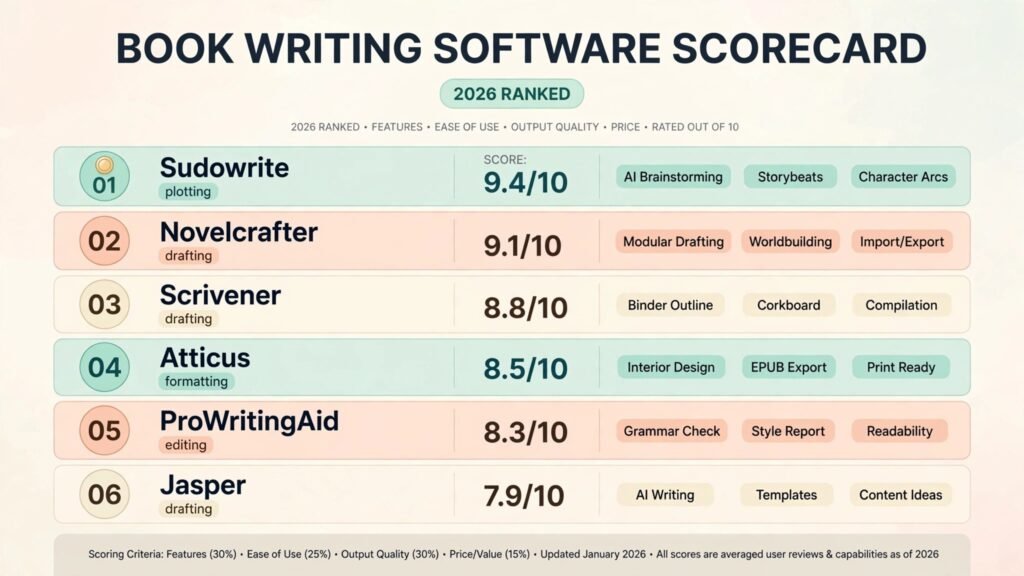
The 13 best AI book writing software tools at a glance
| Tool | Best job | AI included | Free option | Paid from |
|---|---|---|---|---|
| Plottr | Visual plotting and timelines | No | 30 day trial | $60 a year or $150 lifetime |
| Campfire | Worldbuilding and series bibles | No | Free modules | Modular, check checkout |
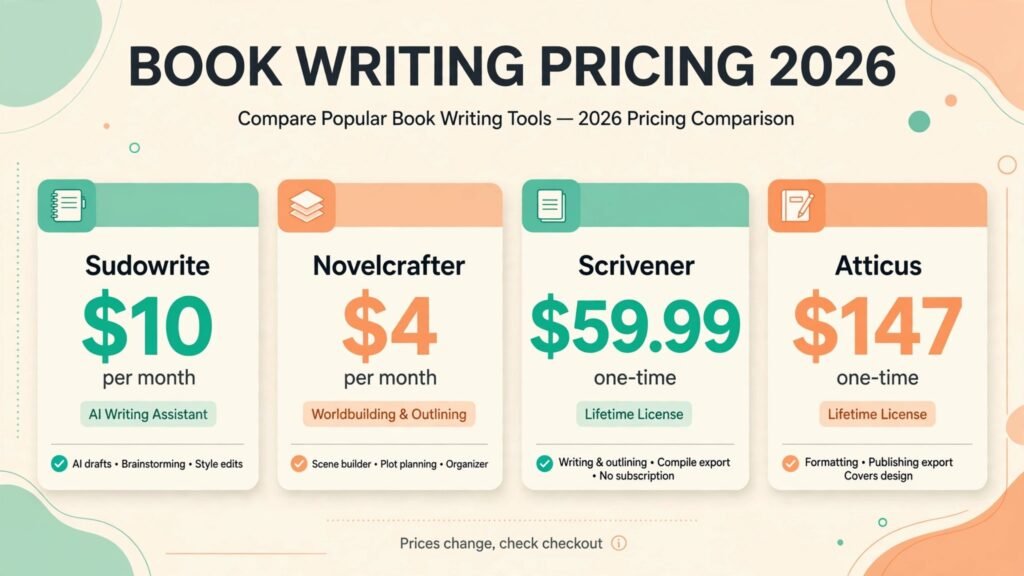
| Sudowrite | Fiction drafting and prose | Yes, credits | Free trial | $10 a month (annual) |
| Novelcrafter | AI drafting with a story bible | Yes, own API key | 21 day trial | $4 a month |
| Dabble | Drafting with a plot grid | No | Trial | $19 a month reported |
| Scrivener | Organising long manuscripts | No | 30 day trial | $59.99 one-time |
| ChatGPT | Brainstorming and research help | Yes | Yes | $20 a month (Plus) |
| Claude | Long drafting and deep editing | Yes | Yes | $20 a month (Pro) |
| ProWritingAid | Self-editing a finished draft | Yes, limited | Yes | About $120 a year |
| Grammarly | Grammar and clarity checks | Yes | Yes | $12 a month (annual) |
| Atticus | Writing plus ebook and print formatting | No | No | $147 one-time |
| Vellum | Professional ebook and print formatting | No | Free until export | $199.99 one-time |
| Reedsy Studio | Free drafting and formatting | No | Yes, core free | Free, paid add-ons |
Best pick by job
| Your job | Start with | If that fails, try |
|---|---|---|
| Plot a novel before drafting | Plottr | Campfire |
| Build a fantasy or sci-fi world | Campfire | Novelcrafter |
| Draft fiction scenes faster | Sudowrite | Novelcrafter |
| Keep a series consistent | Novelcrafter | Scrivener |
| Draft and track subplots in one app | Dabble | Scrivener |
| Organise a big, messy manuscript | Scrivener | Dabble |
| Brainstorm and research | ChatGPT | Claude |
| Rewrite and edit long passages | Claude | ProWritingAid |
| Self-edit a finished draft | ProWritingAid | Grammarly |
| Format for Kindle and print | Atticus | Vellum |
| Format on a Mac, beautifully | Vellum | Atticus |
| Spend nothing to start | Reedsy Studio | Scrivener trial |
Plotting and outlining: get the story straight first
Most abandoned novels do not fail on prose. They fail on structure: a middle that sags, a character who knows something they should not know yet, or a subplot that vanishes for 200 pages.
1. Plottr
Plottr is a visual timeline. Time runs left to right, plotlines stack top to bottom, and you fill scene cards on a grid. It ships with story structure templates, including Save the Cat and the Hero’s Journey, plus character and place notes that work as a light series bible.
Pricing: $60 a year or $150 lifetime for the base plan. Plottr Pro costs $99 a year or $599 lifetime. A 30 day free trial is available. Older roundups quote different figures, so confirm the current tiers at checkout.
Best for: Plotters and series writers who want structure templates rather than a blank grid.
Watch out for: You cannot draft in Plottr. You outline, export to Word or Scrivener, and write somewhere else. It replaces only half of the job, so budget for a drafting tool as well.
Try it at: plottr.com

2. Campfire
Campfire is a worldbuilding system built from modules: characters, locations, magic systems, timelines, maps, and more. For fantasy and science fiction, where a book can fail on a single inconsistent detail about how magic works, that database matters more than a pretty timeline.
Pricing: Modular and partly free. Individual modules are bought one at a time, with bundles reported from free up to $50 and beyond. Because the price depends on which modules you pick, check the Campfire store before budgeting.
Best for: Fantasy and science fiction writers, and anyone running a series with a deep world.
Watch out for: Campfire is not the strongest pure editor. Many authors plot and track the world in Campfire, then draft in Scrivener, Dabble, or Novelcrafter. It is a companion tool, not a complete pipeline.
Try it at: campfirewriting.com
Drafting long manuscripts: tools that hold 80,000 words together
Drafting a book is different from drafting an article. The tool must keep chapters in order, remember what happened in chapter three when you are writing chapter thirty, and let you move scenes without breaking the manuscript.
3. Sudowrite
Sudowrite is the most fiction focused drafting tool on this list. Its Story Engine takes you from an idea to an outline to chapter beats to full drafts, while Describe adds sensory detail to a flat scene, Expand lengthens a short passage, and Rewrite reworks prose for voice or pacing. It runs its own fiction tuned models alongside major industry models.
Pricing: Hobby and Student costs $10 a month billed annually or $19 month to month, with 225,000 credits. Professional costs $22 a month billed annually or $29 month to month, with 1,000,000 credits. Max costs $44 a month billed annually or $59 month to month, with 2,000,000 credits and rollover for up to 12 months. All plans include the same features. Only the credit volume differs. A free trial is available with no card required.
Best for: Fiction writers who want scene level AI help and a guided path from outline to draft.
Watch out for: Credits on the two cheaper plans do not roll over, so a slow month wastes them. Sudowrite is a fiction tool, a poor choice for non-fiction or business writing. Its output still needs heavy editing. AI handles individual scenes well. It does not carry the emotional weight of a whole novel on its own.
Try it at: sudowrite.com
For a wider look at fiction drafting tools, see our AI story generators guide, which covers 13 tools for fiction writers.
4. Novelcrafter
Novelcrafter pairs a manuscript editor built for novels and series with a Codex, a story bible for characters, locations, lore, and objects that tracks mentions as you write. When you generate or edit a scene, Novelcrafter feeds the relevant Codex entries to the model, so the AI stays consistent with your world instead of inventing details that contradict chapter two.
Pricing: Plans run $4, $8, $14, and $20 a month, with two months free on annual billing and a 21 day free trial. AI runs on your own API key from the $8 Hobbyist tier upward, so your API spend sits on top of the subscription. One comparison source quotes a higher Scribe figure, so treat the $4 to $20 range as the working picture and check checkout. Novelcrafter states that it runs no sales, so do not wait for a discount that is not coming.
Best for: Series writers and worldbuilders who want AI drafting with full control over which model does the work.
Watch out for: Bring your own key AI means a second bill and some technical setup. The interface is denser than Dabble’s, and heavy generation with frontier models can make the API bill larger than the subscription itself. Light users usually come out ahead. Heavy users should track API spend from week one.
Try it at: novelcrafter.com

5. Dabble
Dabble is a friendly all in one writing app: manuscript drafting, a Plot Grid for tracking subplots, goal tracking, and cloud sync across devices. Its Plot Grid is the standout. It shows every subplot against every chapter, so a thread that disappears for ten chapters is visible at a glance.
Pricing: Reported at $19 to $49 a month depending on tier, with a $699 lifetime Author plan reported by one 2026 roundup. Those figures have moved before, so check checkout before committing, especially for the lifetime option.
Best for: Writers who want drafting, plotting, and progress tracking in one uncomplicated app.
Watch out for: Dabble has no built in AI drafting. If you want AI inside the editor, pair it with Sudowrite, Novelcrafter, or a chatbot subscription. Its formatting and export are also weaker than Atticus or Vellum, so it is a drafting tool, not a publishing pipeline.
Try it at: dabblewriter.com
6. Scrivener
Scrivener is the standard long manuscript organiser, and it has held that position for a reason. A binder holds chapters, scenes, research, and notes in one project. The corkboard shows scenes as index cards. Scrivenings mode lets you read and edit a stretch of chapters as one continuous document.
Pricing: $59.99 one-time for desktop (Mac or Windows, per platform). The iOS version costs $23.99. A 30 day free trial is available. One older source quotes $49, so the $59.99 figure is the one to verify at checkout.
Best for: Novelists, memoirists, and non-fiction writers with big, messy, research heavy projects.
Watch out for: The learning curve is real. New users should budget a weekend with the tutorial before judging it. Scrivener has no AI features, and its compile step for formatting a finished book is powerful but fiddly. Most authors who use Scrivener still format in Atticus or Vellum.
Try it at: literatureandlatte.com
7. ChatGPT
ChatGPT is the most flexible brainstorming tool here, and the most misused. Ask it for a book idea and you will get a generic idea. Give it your premise, your three main characters, and the exact chapter you are stuck on, and it will give you options worth considering. Use it for outlining help, research summaries, character interviews, and breaking a block.
Pricing: Free tier with limits. Plus costs $20 a month. Higher Pro tiers exist for heavy users.
Best for: Brainstorming, research, outlining help, and getting unstuck mid draft.
Watch out for: ChatGPT forgets your book between sessions unless you paste context back in. It has no story bible, no chapter tracking, and no manuscript structure. It is a helper you visit, not a home for your book.
Try it at: chatgpt.com
For the wider field of assistants, see our ChatGPT alternatives guide. Freelance writers will also find relevant workflow advice in our AI tools for freelance writers guide.
8. Claude
Claude is the strongest general assistant for long form book work. Long documents hold together better in Claude than in most chatbots, tone stays consistent across a long passage, and its editing notes read like they came from an editor rather than a checklist. Pasting a full chapter and asking for a rewrite is a normal task, not a struggle.
Pricing: Free tier with daily message caps. Pro costs $20 a month, or about $17 a month billed annually.
Best for: Long drafting, careful rewrites, and editing feedback on full chapters.
Watch out for: Claude has no manuscript organisation, no story bible, and no formatting. Limits run on a rolling five hour window, so heavy drafting days hit a wall sooner than expected. And like ChatGPT, it needs context pasted in each time.
Try it at: claude.com
Editing and revision: the draft is not the book
A first draft is raw material. Editing is where a book becomes readable, and the tools in this section are judged on how well they catch what a tired author misses: repeated words, tangled sentences, pacing problems,
9. ProWritingAid
ProWritingAid is the most thorough self-editing tool on this list. It checks grammar and spelling, then goes further: style, overused words, sentence length variety, pacing, dialogue tags, and repeated phrases. Its reports are the point. Instead of fixing one sentence, you see patterns across a whole chapter, like a reliance on passive constructions or a habit of starting sentences the same way.
Pricing: A free tier covers basic checks with limits. Paid plans are reported at $30 a month billed monthly or about $120 a year, with another roundup quoting from around $15 a month on annual billing. The annual figure is the safer guide, but check checkout, because ProWritingAid has run several pricing versions.
Best for: Self-editing a finished draft before it goes to a human editor or beta readers.
Watch out for: ProWritingAid will flag things that are not errors, especially in fiction. Dialogue, dialect, and deliberate style choices get questioned. Accepting every suggestion flattens a voice. Use the reports to see patterns, then decide yourself.
Try it at: prowritingaid.com

10. Grammarly
Grammarly is the lighter, faster check. It catches grammar, spelling, punctuation, and clarity problems in real time, inside almost any app you write in. For authors, its value is as a safety net during drafting and revision, not as a deep editor.
Pricing: Free tier covers basic grammar and spelling. Premium costs $12 a month billed annually, or $30 a month billed monthly. Business tiers exist for teams.
Best for: Everyday grammar and clarity checks while drafting, and a final pass before sending a manuscript anywhere.
Watch out for: Grammarly’s tone and clarity suggestions lean toward business writing. Fiction writers should ignore a large share of them. It also works best on shorter documents. A full novel pasted into a browser extension is not its natural habitat. Run it chapter by chapter.
Try it at: grammarly.com
Bloggers who want the same kind of help for shorter work should see our AI writing tools for bloggers guide, and the free options are covered in our free AI writing tools guide.
Publishing and formatting: turning a manuscript into a book
A finished manuscript is not yet a book. It needs ebook and print files with proper chapters, front matter, page numbers, and typography that does not embarrass you. The tools in this section do that job,
11. Atticus
Atticus combines a drafting editor with ebook and print formatting in one cross-platform app. You write or import the manuscript, pick from more than 30 themes, customise headings, drop caps, and chapter ornaments, and export clean EPUB and print-ready PDF files for Kindle, IngramSpark, and other distributors.
Pricing: $147 one-time, with future updates included and unlimited books. No subscription. That single price is consistently reported across 2026 sources.
Best for: Indie authors on Windows, Mac, or Linux who want drafting plus formatting in one purchase, and authors who publish more than one book.
Watch out for: Atticus has no plotting tools, no AI features, and a basic editor compared with Scrivener. Its formatting is strong but not quite as polished out of the box as Vellum. If you are on a Mac and only care about the final look, Vellum still wins on polish.
Try it at: atticus.io

12. Vellum
Vellum is the prettiest formatter on this list, and the most limited by platform. Import a Word document, pick a book style from its gallery, preview the book on virtual devices, and generate finished EPUB files plus a print-ready PDF in one pass. Widow control, drop caps, ornamental breaks, and store specific files are handled automatically.
Pricing: Vellum Ebooks costs $199.99 one-time for unlimited ebooks. Vellum Press costs $249.99 one-time and adds paperbacks. You can download Vellum free and build and preview a whole book before paying. You only pay when you generate the files you will upload.
Best for: Mac authors who publish more than one book and want the best looking output with the least effort.
Watch out for: Vellum is Mac only, with no Windows version. Windows authors must use Atticus, Reedsy Studio, or a cloud Mac. Vellum also offers less typography control than professional layout software, and it does nothing for the actual writing. It is the last step, not the workflow.
Try it at: vellum.pub
13. Reedsy Studio
Reedsy Studio is the free starting point. It is a browser based editor with goals, revision history, and collaboration, plus professional formatting and EPUB and PDF export built in. For a first-time author who is not sure this book will earn anything, free formatting that looks respectable is a genuine gift.
Pricing: Core writing and formatting features are free, including EPUB and PDF export. Optional add-ons cost $4.99 a month for Craft and $7.99 a month for Outlining, per Reedsy’s own comparison page. Check the current add-on list, because it has changed before.
Best for: First-time authors, authors on a zero budget, and anyone who wants to test a full pipeline before paying for one.
Watch out for: Reedsy Studio’s templates are fewer and less customisable than Atticus or Vellum, and it is web only, so offline work is limited. It is also a simpler editor than Scrivener. Treat it as a complete starter kit, not as a lifetime tool for a career author.
Try it at: reedsy.com
For the wider creator toolkit around a finished book, including cover and marketing help, see our AI tools for content creators guide.
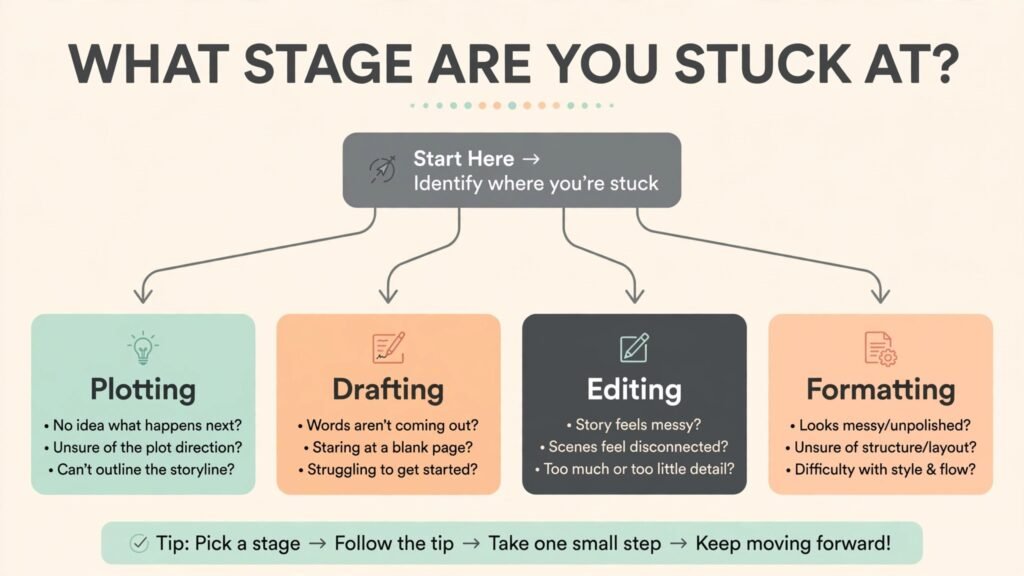
How to choose: start from the stage you are stuck at
Forget the idea of one best tool. Book writing has stages, and the right purchase depends on which stage is currently stopping you.
If you have an idea but no structure, start with Plottr for the timeline and Campfire for the world. If you have an outline but no draft, Sudowrite is the fastest fiction path and Novelcrafter is the best choice for a series you plan to continue. If you have a draft that feels disorganised, move it into Scrivener or Dabble before you write another word.
If the draft exists but reads rough, run ProWritingAid across it chapter by chapter, then use Claude for the passages that still do not work. Grammarly runs underneath all of this as a daily safety net. If the manuscript is finished and edited, the formatting choice is simple: Atticus on any platform, Vellum on a Mac, Reedsy Studio if the budget is zero.
One practical rule before you buy anything. Test with a real chapter, not a sample project. Import chapter one of your actual book into the trial, run the tool on it, and judge the result against your own standard.
A note on cost. Most authors end up with two or three tools, not thirteen. That runs roughly $30 to $60 a month while drafting, plus a one-time formatting purchase at the end. A free stack is also real: Reedsy Studio for drafting and formatting, ChatGPT free for brainstorming, and Grammarly free for basic checks. It costs nothing until a specific job earns a paid tool.
Frequently Asked Questions
Can AI write a whole book for me?
No, not to a publishable standard. AI can draft scenes, expand outlines, and suggest prose, but a full book written by AI alone drifts in voice, repeats itself, and loses plot threads. The tools in this guide work best when the author stays in charge of the story and uses AI for speed, not for authorship.
Which tool is best for fiction writers?
Sudowrite, for scene level fiction drafting. Novelcrafter, for series writers who need a story bible that keeps the AI consistent. Plottr and Campfire cover the planning side. Most fiction writers end up with one drafting tool plus one planning tool, not a single app for everything.
Which tool is best for non-fiction?
Scrivener, for organising research and long chapters. Claude, for drafting and editing help on long passages. ProWritingAid, for the self-editing pass.
Do I need Scrivener if I use Sudowrite or Novelcrafter?
Not necessarily. Sudowrite and Novelcrafter both hold manuscripts. Scrivener earns its place when a project is research heavy, has many parts, or needs the binder and corkboard view to stay understandable.
Is free book writing software good enough?
For a first book, yes. Reedsy Studio covers drafting and formatting for free, and the free tiers of ChatGPT, Claude, and Grammarly cover brainstorming and basic checks. Paid tools earn their price on volume, polish, and time saved.
That depends on how you use it. Using AI to brainstorm, outline, and revise is widely accepted in indie publishing. Presenting unedited AI output as your own writing is not, and readers can usually tell. The honest standard is simple: if you would be embarrassed for a reader to know how a passage was produced, rewrite it yourself.
Atticus or Vellum: which formatter should I buy?
Atticus if you are on Windows or Linux, or if you want drafting and formatting in one purchase for $147. Vellum if you are on a Mac and want the most polished output with the least effort, at $199.99 for ebooks or $249.99 for ebooks plus print. If the budget is zero, Reedsy Studio formats a respectable book for free.
Conclusion
A book is finished by a system, not by a single app. Plot the story before it sprawls. Draft in a tool that holds the whole manuscript. Edit with software that shows you patterns, not just typos. Format with a tool that produces files a store will accept without a fight. Pick the tool that fixes the stage you are stuck at, test it on a real chapter, and let the rest go.
Start with the bottleneck. If plotting is the problem, Plottr or Campfire will pay for themselves in a week. If drafting is the problem, Sudowrite or Novelcrafter will move the manuscript faster than any new notebook. If formatting is the problem, Atticus or Vellum will end the most frustrating week of the whole project.