
Missed appointments cost a clinic twice, once in empty slots that could have helped another patient, and once in staff time spent rescheduling and chasing. When you use WhatsApp for appointment reminders clinic, reminders reach patients on the app they already check daily, with a clear time, location, and a simple way to confirm or reschedule. That direct, familiar channel is why WhatsApp reminders often outperform email and phone calls for routine appointments, provided consent and message quality are handled properly.
This guide builds a clinic reminder system that respects patients and protects the clinic. You will collect consent, choose the right WhatsApp setup, write approved templates, set timing, handle replies, and measure no show rates. WhatsApp Business app broadcast lists are limited to 256 contacts per list, while the WhatsApp Business Platform starts new portfolios at 250 unique recipients per 24 hours, rising with verification and quality, so choose the setup that fits clinic size and confirm current limits in official documentation.
Why This Approach Works
Patients miss appointments for ordinary reasons, they forget, they confuse dates, they cannot find the clinic, or a work clash appears and rescheduling feels like effort. A good reminder solves each of those problems in one short message, by restating date, time, doctor or service, location, and what to bring, with a reply option to confirm or to ask for a new time. WhatsApp suits this because messages are short, read quickly, and allow a simple reply, while email reminders are often buried and phone calls interrupt patients at inconvenient times. The result is fewer empty slots, less staff chasing, and a calmer front desk.
Reminders also protect patient relationships when they are done with care. A reminder that arrives at a sensible hour, uses the patient’s name and appointment details correctly, and offers an easy reschedule option feels like service, not spam. A reminder that arrives late at night, contains wrong details, or offers no reply option feels careless and creates complaints. The difference is not the channel, it is the discipline behind it, including consent, accurate data, template approval, and a human owner for replies. Clinics that treat reminders as patient service, not as bulk messaging, see the best results.

How to use WhatsApp for appointment reminders clinic Step by Step
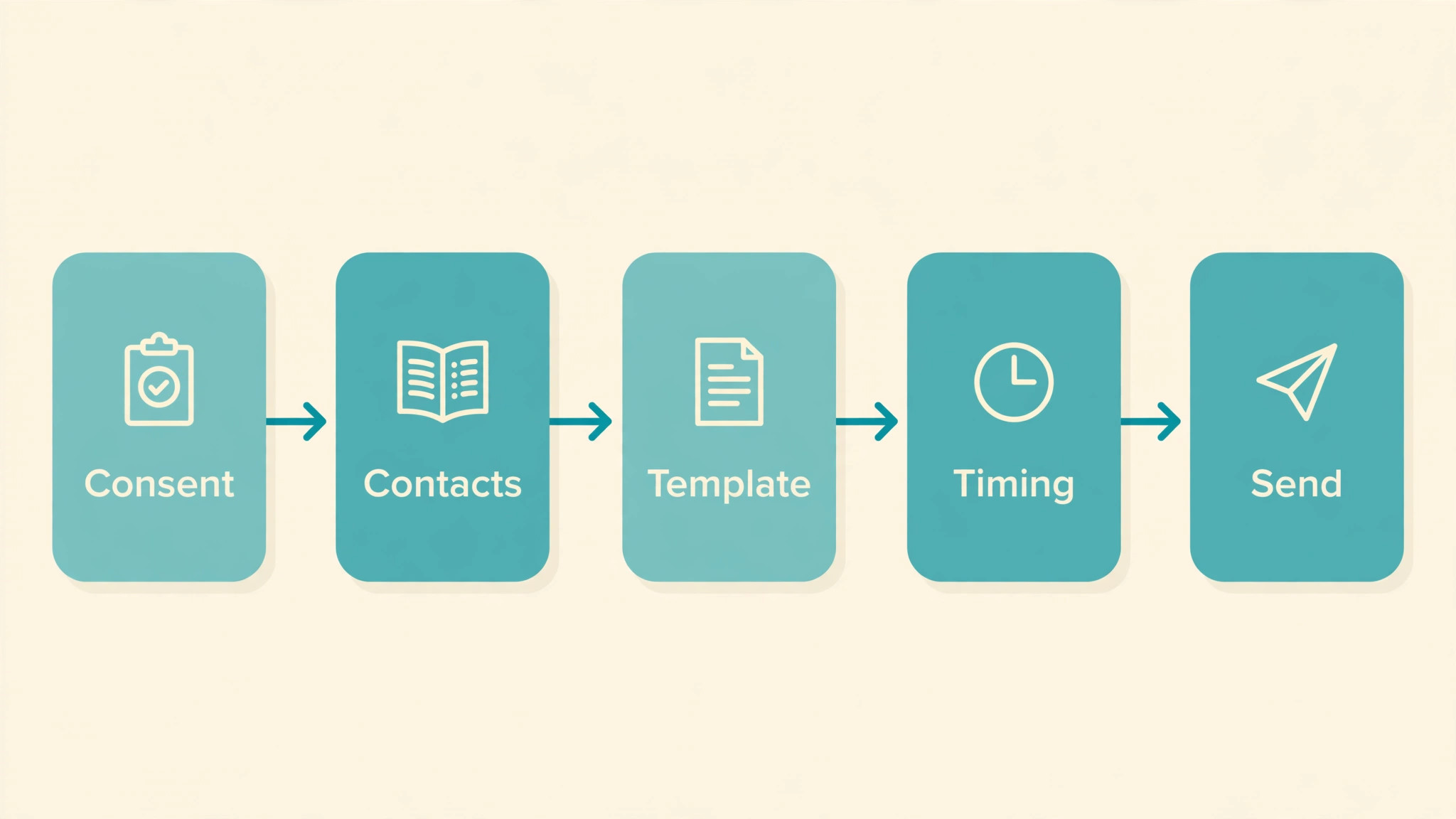
Build the reminder system in the order below, starting with consent and data, not with message design. When you use WhatsApp for appointment reminders clinic, accurate patient data and clear consent are the foundation, because a beautifully written reminder sent to the wrong number, or to a patient who never agreed, creates risk instead of reducing no shows.
- **Collect and record consent properly.** Ask patients at booking or registration whether they agree to appointment reminders on WhatsApp, and record the answer with date and method. Keep consent separate from marketing consent, so a patient can agree to reminders while declining promotions. A clear consent record protects the clinic and respects patients, and it is the first thing to check if a complaint arises.
- **Choose the right WhatsApp setup for clinic size.** Use the WhatsApp Business app for a small clinic with a modest patient list, where staff reply from a phone and broadcast lists stay within the 256 contact limit. Use the WhatsApp Business Platform through a provider for larger clinics that need scheduled templates, automation, and higher sending limits, starting at 250 unique recipients per 24 hours for new portfolios. Choose based on volume, not on features that look impressive but add complexity.
- **Clean patient data before any send.** Check that phone numbers include correct country codes, that names are spelled correctly, and that appointment details match the booking system. Remove duplicate numbers, outdated numbers, and patients who opted out, before the first reminder run. Clean data prevents the wrong patient receiving another patient’s appointment details, which is a serious privacy failure.
- **Write and approve message templates.** Write short templates for booking confirmation, reminder, reschedule, and cancellation, each with patient name, date, time, service or doctor, location, and a reply prompt. For Platform sends outside a 24 hour service window, templates need Meta approval, so submit them early and keep wording stable once approved. Avoid medical detail beyond what the appointment needs, and never include test results or diagnoses in a reminder.
- **Set reminder timing that patients welcome.** Send a confirmation at booking, a reminder two days before, and a final reminder on the morning of the appointment or the day before, depending on clinic type. Avoid late night sends, and keep the total to two or three reminders per appointment, because more messages feel like pressure. Test timing with a small group first, and adjust based on confirmation and no show rates.
- **Handle replies and reschedules promptly.** Assign a staff owner for WhatsApp replies during working hours, with a target response time and a simple process for rescheduling, cancelling, and answering common questions. When a patient replies to reschedule, offer two or three alternative times promptly, rather than asking them to call back. Fast, helpful replies turn a reminder channel into a service channel that patients value.
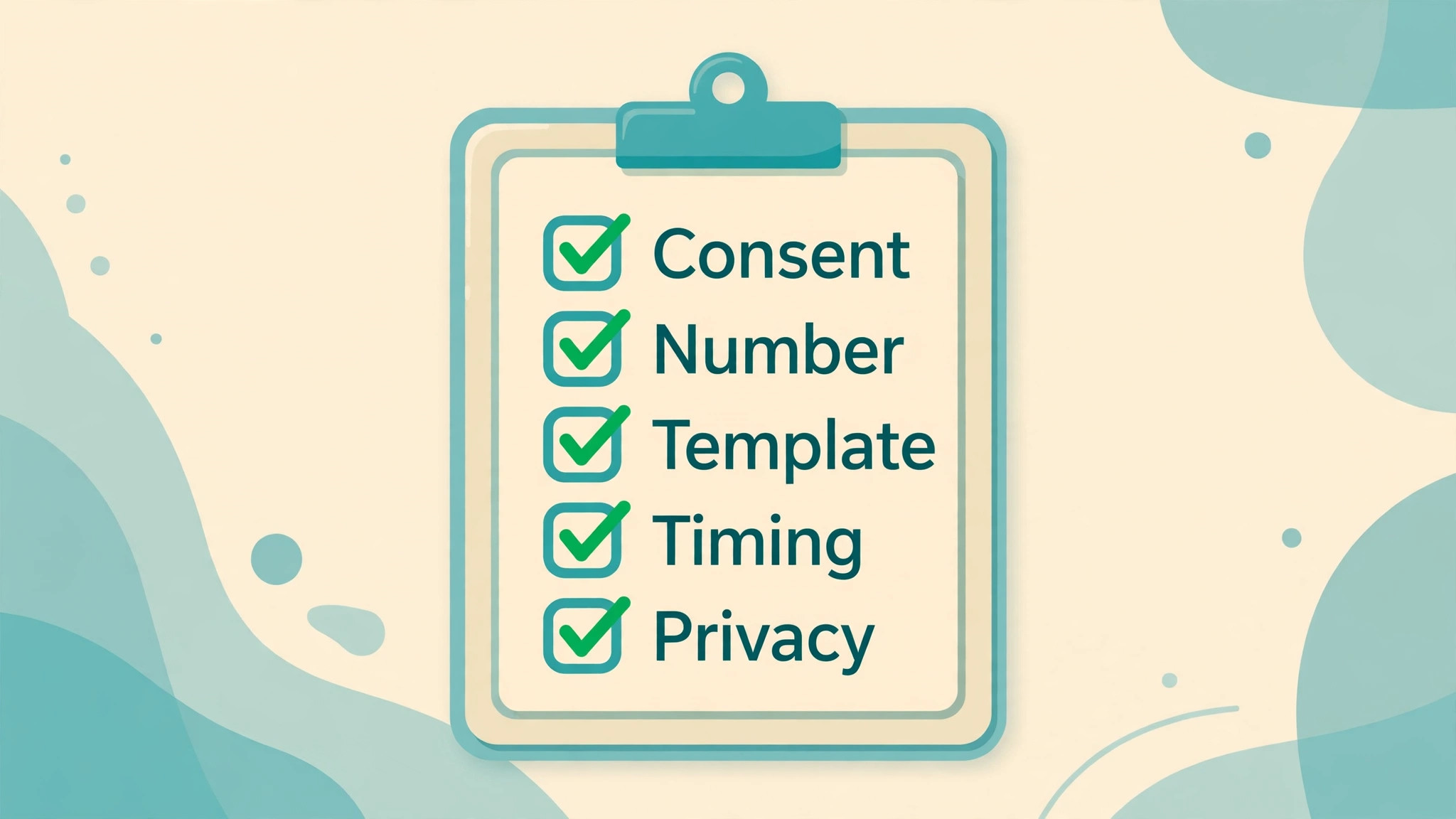
- **Protect privacy in every message.** Never send sensitive medical information by WhatsApp reminder, keep messages to appointment logistics only, and verify identity before discussing any clinical detail in a reply thread. Train staff on what can and cannot be shared, and log any privacy concern immediately. Privacy discipline is what allows a clinic to use a convenient channel without creating clinical risk.
- **Review no show rates and message quality monthly.** Track confirmation rate, no show rate, reschedule rate, and reply time each month, and review message quality ratings where the Platform reports them. If no shows fall but complaints rise, check message frequency and timing, because a system that fills slots by annoying patients will not last. Adjust one element at a time, such as timing or wording, so improvements can be traced.
After the first month, share results with the whole clinic team, including front desk, clinicians, and management, so everyone understands how reminders affect their day. A team that sees fewer empty slots and calmer mornings will support the system, while a team that only hears about complaints will resist it. Celebrate the improvement honestly, and fix the complaints openly, because both are part of running a patient service well.
Options Compared
Clinics can send reminders in several ways, and the right choice depends on patient volume, staff capacity, and privacy needs. When you use WhatsApp for appointment reminders clinic, the table below compares the main approaches, so a small clinic does not buy a platform it does not need, and a large clinic does not rely on a phone app that cannot scale.
| Reminder approach | Best for | Watch out for |
|---|---|---|
| WhatsApp Business app | Small clinics, manual replies | 256 contact broadcast limit |
| WhatsApp Platform via provider | Larger clinics, automation | Template approval and per message cost |
| SMS reminders | Patients without WhatsApp | Shorter messages, higher cost per send |
| Phone calls | High risk or complex appointments | Time heavy, interrupts patients |
| Email reminders | Detailed instructions and forms | Often buried, slower to read |
Most clinics benefit from a mix, with WhatsApp as the main channel, SMS as a backup for patients without WhatsApp, and phone calls for high risk appointments where a conversation matters. Record each patient’s preferred channel at registration, and respect it, because a reminder sent on a channel the patient does not use is no reminder at all. Channel choice should follow patient preference, not staff convenience alone.

Costs and Tools to Budget For
Budget for clinic reminders in tool cost, provider fees, and staff time. The WhatsApp Business app is free to use, while Platform sends incur Meta per message charges that vary by template category and country, plus provider platform fees where a provider is used. Obtain a clear pricing sheet and a sample invoice from any provider before committing, because bundled pricing can hide per message costs. For a small clinic, app based reminders may cost nothing beyond staff time, while a larger clinic should budget per message costs against the value of filled slots.
Staff time is the larger ongoing cost, especially for reply handling. Budget daily reply time during working hours, with cover for absences, and train at least two staff members on the reminder process so the system does not depend on one person. Compare that time with the time previously spent on phone chasing and empty slot management, because reminders usually save more staff time than they consume, once the system is running smoothly.
Template and Checklist
Run this checklist before the first reminder send, and again after any change to templates, timing, or data sources. When you use WhatsApp for appointment reminders clinic, the checklist is the safety gate that protects patient privacy and prevents wrong or unwanted messages.
- Consent for WhatsApp reminders is recorded for each patient, with date and method.
- Marketing consent is kept separate from reminder consent.
- Phone numbers, names, and appointment details are checked against bookings.
- Duplicate, outdated, and opted out numbers are removed before sending.
- Templates are short, accurate, and approved where Platform approval is required.
- No sensitive medical detail appears in any reminder template.
- Reminder timing is set to sensible hours, with two or three reminders per appointment.
- A staff owner handles replies during working hours, with reschedule options ready.
- Privacy training is complete for all staff who handle WhatsApp replies.
- An opt out reply is honoured immediately and recorded.
- Message quality and sending limits are monitored where the Platform reports them.
- A monthly review of no show, confirmation, and reply times is scheduled.
Keep the completed checklist with consent records and template approvals, so the clinic can demonstrate its process if a patient or regulator asks. Documentation written at setup is far easier to produce than documentation reconstructed after a complaint, and it shows that reminders were designed as a careful patient service, not as an afterthought.
Mistakes to Avoid
Clinic reminder mistakes usually come from rushing setup or from treating reminders as marketing. When you use WhatsApp for appointment reminders clinic, watch for these five mistakes, because each one risks patient trust, privacy, or the messaging account itself.
- **Messaging without consent.** Sending reminders to patients who never agreed, or using reminder consent for marketing, creates complaints and regulatory risk. Record consent separately for reminders and marketing, and honour opt outs immediately. Consent is not paperwork, it is the permission that makes the whole channel legitimate.
- **Including medical detail in reminders.** Reminders should carry logistics only, such as date, time, service, and location, not diagnoses, results, or treatment details. Sensitive detail in a message that could be seen by others, or sent to a wrong number, creates serious privacy harm. Keep clinical discussion to secure, verified channels, not to reminder threads.
- **Sending too many reminders.** Four or five reminders per appointment feel like pressure, and patients respond by blocking the number, which then stops all future reminders. Limit reminders to two or three per appointment, at sensible hours, and let confirmation stop further reminders. Fewer, well timed messages fill more slots than frequent messages that get blocked.
- **Ignoring replies.** A reminder channel that never answers replies frustrates patients who try to reschedule, and those patients then no show or call in anger. Assign a reply owner, set a response target, and offer alternative times promptly. Replies are the point of a two way channel, and ignoring them wastes its main advantage.
- **Using reminder lists for promotions.** Sending offers to a reminder list, even to patients who consented to reminders, breaks trust and increases blocks and reports. Keep promotional messages on a separate, explicitly opted in list, with its own templates and frequency. Mixing service and marketing in one channel harms both, because patients stop trusting service messages.
If complaints rise after launch, pause and check consent, frequency, and accuracy before blaming patients for being difficult. Most complaint spikes trace to one of those three causes, and fixing the cause restores trust faster than defending the system. A reminder system that listens to complaints and adjusts will last, while a system that dismisses them will lose its audience.

A Worked Example
A clinic receptionist who had spent Monday mornings phoning patients about missed appointments agreed to trial reminders with one small group of patients for a single week, before the clinic changed anything for everyone. She started with consent, checking each patient record for a recorded agreement to reminders on WhatsApp, with date and method noted, and she set aside every patient whose consent covered marketing but not reminders, because the clinic kept those two permissions separate. She then cleaned the numbers for the trial group, confirming country codes, spelling of names, and appointment details against the booking system, and she removed one duplicate number and one outdated number that would otherwise have sent appointment details to the wrong person.
Templates for the trial were short and limited to logistics, with patient name, date, time, service or doctor, location, what to bring, and a reply prompt to confirm or reschedule, and no medical detail beyond what the appointment itself required. A confirmation went out at booking, a reminder followed two days before the appointment, and a final reminder arrived on the morning of the appointment day, all within sensible hours and never late at night.
One patient replied to the two day reminder asking for a new time, and the receptionist offered three alternative times the same working day rather than asking the patient to call back, which turned a likely missed slot into a filled slot on a different day. Another patient confirmed at the two day stage, and confirmation stopped further reminders for that patient, so a confirmed patient did not receive a morning message as well.
By Friday, the receptionist could show the clinic team a simple picture of the week, covering how many patients confirmed, how many rescheduled through replies, how many still missed their appointments, and how quickly replies had been answered during working hours. The team also discussed the one complaint of the week, from a patient who had received a reminder after opting out, and traced it to a number that had not been removed from the send list in time.
That error, found in a small trial, taught the clinic more than a flawless week would have, because it proved that the opt out step needed a same day check, and it gave the team a concrete fix to make before any wider rollout.

Advanced Tips Worth Trying
Once routine reminders run cleanly, the most valuable refinement is to vary timing by appointment type instead of sending every patient the same pattern. A routine checkup may need only a confirmation at booking and a reminder two days before, while a procedure that requires preparation, fasting, or documents to bring may need an extra message that lists exactly what to prepare, sent early enough for the patient to act. That extra message should still count inside the limit of two or three reminders per appointment, so adding preparation detail means removing a later nudge, not adding a fourth message on top of the existing set.
Patients who receive preparation help they actually need will confirm more readily, while patients who receive extra messages they do not need will block the number.
A second refinement is to keep a backup channel ready for patients who do not use WhatsApp, rather than discovering the gap on appointment day. Record each patient preferred channel at registration, and send SMS to patients without WhatsApp, with the same appointment details in a shorter form, while reserving phone calls for high risk appointments where a conversation matters. The backup should be tested with a small group first, because an SMS template that looks clear on a clinic screen may lose its location line or its reply instruction on a small phone screen.
When the backup works, the clinic no longer depends on a single channel, and a patient who changes phones or apps will still receive a reminder.
Finally, protect the messaging account itself by watching message quality ratings where the Platform reports them, and by acting on a falling rating before limits tighten. A falling rating usually traces to frequency, wrong details, or ignored opt outs, and each cause has a different fix, so check the recent sends before changing templates. Train a second staff member on reply handling and privacy rules, so cover exists during holidays and sickness, and so the reminder service never depends on one person memory of who opted out or which templates are approved.
How to Measure Success
Start with the no show rate, calculated by dividing the number of appointments where the patient did not attend and did not cancel in advance by the total number of appointments booked in the same period. Use the booking system as the source, because only it knows which slots stayed empty and which were refilled. Calculate the rate separately for each service or doctor, since a routine appointment and a procedure with preparation steps will behave differently, and compare the result with the rate from the period before reminders began.
A falling overall rate that hides a rising rate for one service will mislead the clinic, while a service level view will point to the timing or preparation message that needs attention.
Next, measure confirmation and reply handling, because those figures explain why the no show rate moved. Divide confirmed appointments by total appointments to find the confirmation rate, divide rescheduled appointments by total appointments to find the reschedule rate, and record the average time taken to answer patient replies during working hours, from the message timestamp to the staff reply timestamp. A high confirmation rate with a slow reply time still leaves rescheduling patients frustrated. If replies cluster outside working hours, the clinic should set clearer expectations about reply times in the template itself, rather than expecting staff to monitor messages around the clock.
Finally, count complaints, blocks, and opt outs alongside the clinical figures, using the messaging account and the front desk log as sources. Divide opt outs by total patients messaged to find the opt out share, and review every complaint for its cause, whether consent, frequency, wrong details, or timing. Review all figures together once a month, on the same day, and change only one element before the next review, such as timing, wording, or the reply rota. A reminder service that fills slots while complaints rise will not last, because blocked patients receive no future reminders at all.
Review and Next Steps
Review reminders monthly with the booking system and the messaging log open together, and answer four questions in writing before changing any template or timing. How many patients confirmed, how many did not attend, how many rescheduled through replies, and how quickly were replies answered during working hours. Write the answers down beside the same figures from the month before reminders began, and then break the figures down by service or doctor, because overall averages hide the service where timing or preparation information still fails.
If no shows fall for routine appointments but not for one particular service, check whether that service needs different timing, a preparation message, or a phone call instead of a text reminder, rather than increasing message frequency for everyone.
A clinic that decides to use WhatsApp for appointment reminders clinic work month after month will spot consent problems earlier than a clinic that reviews only when complaints arrive. Keep a monthly note with the four figures, one change made, and any privacy or quality issue raised, and share it with front desk staff, clinicians, and management together. Clinicians need to see the note because appointment preparation and reminder content affect each other, and front desk staff need to see it because they handle the replies that the figures summarise. A note shared only with management will not change how reminders are written, while a note shared with the whole team will.
Once a quarter, read the templates, the consent records, and the last three monthly notes together, and ask whether each template still earns its place and whether consent records are complete for every patient messaged. Templates tend to accumulate, with a new version added for every special case, until staff send the wrong version by mistake. Prune versions that are no longer approved or no longer used, confirm that marketing consent remains separate from reminder consent in every record, and check that opted out numbers are removed from every send list, not only from the main one. A quarterly check of that kind is dull work, and it is exactly the work that prevents a privacy complaint.
Handover should be written while the system runs well, in a note that a new receptionist could follow without a long explanation. That note should record how consent is collected, where it is stored, how numbers are cleaned, which templates are approved, what timing applies to each appointment type, who owns replies during working hours, and how opt outs are honoured and recorded. Test the note by asking a colleague who has never sent reminders to prepare a small send list, and fill every gap their questions reveal.
Looking ahead, expand to a new service or a larger patient group only after a clean month with no wrong number sends, no ignored opt outs, and no reply left unanswered beyond the agreed target, because a wider rollout will multiply any flaw that a small trial merely hinted at.
For related reading on Stratilyze, the guide to WhatsApp Business orders for small shops shows business messaging in a retail context, the guide to WhatsApp customer support for small business covers reply handling, and the guide to fixing WhatsApp photo sending helps when media fails. Read the customer support guide first if reply volume grows, because reply discipline there transfers directly, and the method here for use WhatsApp for appointment reminders clinic shares the same consent and quality principles.
Frequently Asked Questions
Do patients prefer WhatsApp reminders to phone calls?
Many patients prefer WhatsApp for routine reminders, because messages are short, can be read at a convenient time, and allow a simple reply to confirm or reschedule. Phone calls still suit complex or high risk appointments where a conversation matters. Offer WhatsApp as the default where consent exists, and keep calls for cases that need discussion.
How many WhatsApp reminders should a clinic send per appointment?
Two or three reminders per appointment usually work well, such as confirmation at booking, a reminder two days before, and a final reminder on the morning or day before. More reminders increase blocks and complaints, while one reminder alone may be forgotten. Let confirmation stop further reminders, so confirmed patients are not messaged again.
What should a clinic WhatsApp reminder include?
Include patient name, date, time, service or doctor, location, what to bring, and a reply prompt to confirm or reschedule. Keep messages short and free of medical detail beyond appointment logistics. A reminder that can be acted on by replying once will be confirmed more often than a reminder that asks the patient to call back.
Can a small clinic use the WhatsApp Business app for reminders?
Yes, a small clinic can use the free Business app, with manual replies and broadcast lists limited to 256 contacts per list. Larger clinics with higher volume, automation needs, or scheduled templates should consider the Platform through a provider, with template approval and per message charges. Choose based on patient volume and staff capacity.
How do I handle a patient who replies STOP?
Honour the opt out immediately, record it, and stop all WhatsApp reminders for that patient, offering another channel such as SMS or phone if they still want reminders. Ignoring an opt out increases blocks and reports, which can lower messaging limits or restrict the account. A prompt, polite opt out process protects both the patient and the clinic.
Verify the patient identity in the message by using full name and appointment details, and avoid sending reminders for multiple patients to a shared number without careful checking. Where sharing creates confusion or privacy risk, ask each patient for an individual contact method at registration. Shared numbers need extra care, because a message for one patient may be read by another.
Fewer Missed Appointments From Next Week
A clinic reminder system succeeds when patients receive short, accurate, well timed messages on a channel they already use, with an easy way to confirm or reschedule. Collect consent, clean data, approve templates, limit reminders to two or three per appointment, and answer replies promptly. When you use WhatsApp for appointment reminders clinic in that careful way, empty slots fall, front desk pressure eases, and patients experience reminders as service rather than spam, which is the outcome that lasts.