
WordPress alternatives are worth comparing for one uncomfortable reason. WordPress itself costs nothing to download, but a WordPress website rarely costs nothing to run. Hosting, a theme, paid plugins, security checks and update testing add up in money and in hours, and that bill arrives whether or not you enjoy maintaining a site.
That is why the question is not which platform looks best in a demo. It is who will fix the site at 10 pm when a plugin update breaks a form, how much a store loses during a checkout outage, and whether a writer can publish without waiting for a developer. Answer those three questions first, and most of the 12 platforms below eliminate themselves, which is exactly what a useful buying guide should do.
Prices below are in US dollars from plans published around October 2026. Check checkout before you buy, because vendors change plan names and renewal rates. Where a price depends on hosting, seats or transaction volume, this guide says check checkout rather than inventing a tidy number that would mislead a real buyer.
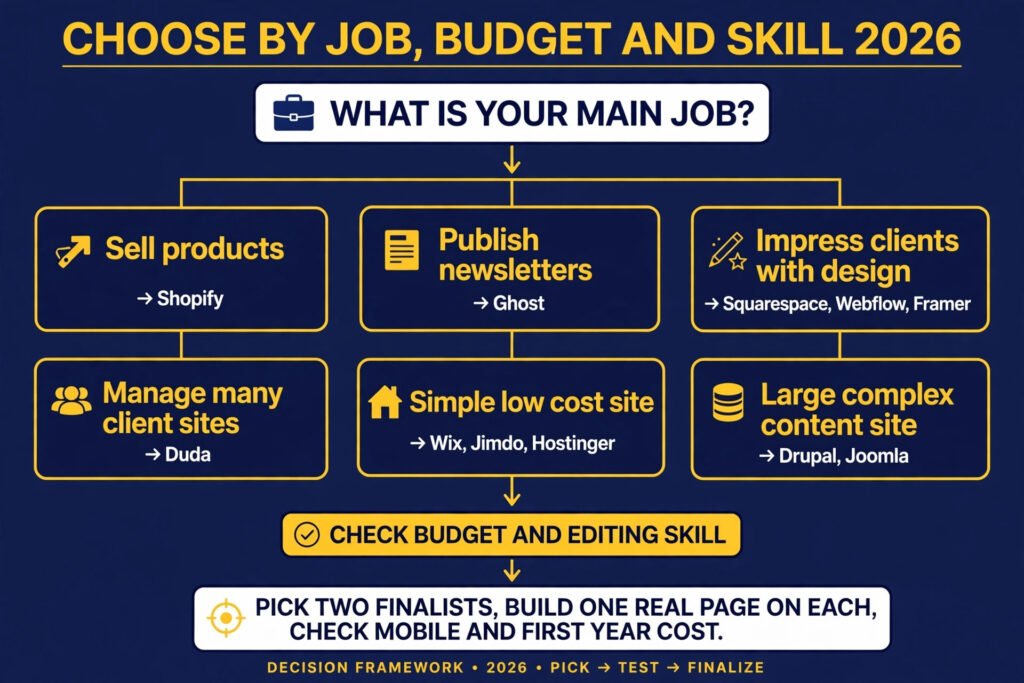
If you only have two minutes: the shortlist by job
| Job | Best pick | Why it wins for that job |
|---|---|---|
| Fastest small business launch | Wix | Templates, apps and editing tools cover most needs in one place |
| Cleanest portfolio or service site | Squarespace | Strong design defaults and simple page structure |
| Publishing and paid newsletters | Ghost | Memberships and email are built in, not added through plugins |
| Selling products at scale | Shopify | Checkout, inventory and app ecosystem are built for commerce |
| Custom design with visual control | Webflow | Layout, animation and content structure stay under your control |
| Lowest cost starter site | Hostinger Website Builder | Hosting and builder are bundled at a low entry price |
| Agency work for many clients | Duda | Client management, templates and team workflow are central |
The 12 WordPress alternatives at a glance
| Tool | Best job | Free option | Paid from |
|---|---|---|---|
| Wix | Small business sites and quick launches | Yes, with Wix branding | Check checkout for current paid plans |
| Squarespace | Polished portfolios and service sites | No free plan, trial available | Check checkout for current paid plans |
| Hostinger Website Builder | Low cost starter sites | No free plan | Low cost hosting plans, check checkout |
| Jimdo | Simple sites for local businesses | Yes, basic plan | Check checkout for current paid plans |
| Ghost | Newsletters and membership publishing | Self hosted version free | Paid hosted plans from around 9 dollars per month |
| Joomla | Flexible community and content sites | Open source software free | Hosting cost only, check checkout |
| Drupal | Large and complex content sites | Open source software free | Hosting and development cost only |
| Shopify | Online stores | No free plan, trial available | Paid plans from around 39 dollars per month |
| Weebly | Simple stores and starter sites | Yes, basic plan | Check checkout for current paid plans |
| Webflow | Custom design without heavy coding | Yes, starter plan | Check checkout for current paid plans |
| Framer | Modern marketing sites and landing pages | Yes, starter plan | Paid plans from around 5 dollars per month |
| Duda | Agency and client site production | No free plan, trial available | Paid plans from around 19 dollars per month |

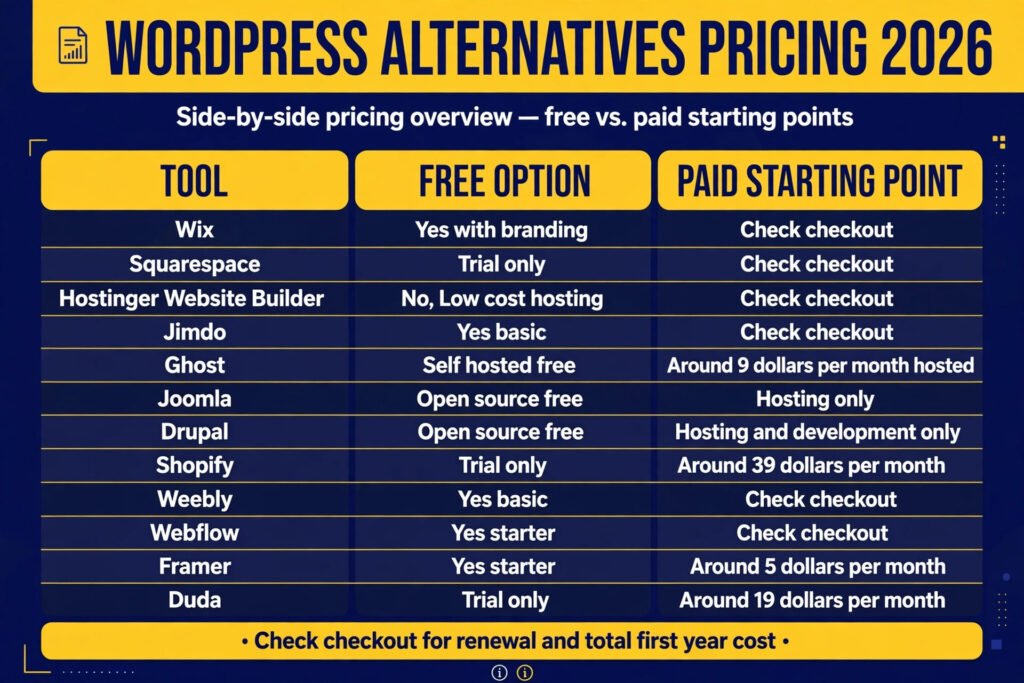
What you will actually pay in year one
| Tool | Free option | Paid starting point | Main extra costs to watch |
|---|---|---|---|
| Wix | Yes | Check checkout | Apps, ecommerce tiers, domain renewal |
| Squarespace | Trial only | Check checkout | Commerce tiers, email campaigns, domains |
| Hostinger Website Builder | No | Low cost hosting plan, check checkout | Renewal price, ecommerce tier, domain |
| Jimdo | Yes | Check checkout | Ecommerce tier, storage, domain |
| Ghost | Self hosted free | Around 9 dollars per month hosted | Staff seats, audience size, theme work |
| Joomla | Open source free | Hosting only | Template, extensions, maintenance time |
| Drupal | Open source free | Hosting and development only | Developer time, hosting, security updates |
| Shopify | Trial only | Around 39 dollars per month | Apps, themes, transaction fees |
| Weebly | Yes | Check checkout | Ecommerce tiers, domain, Square fees |
| Webflow | Yes | Check checkout | Site plan plus workspace plan, CMS limits |
| Framer | Yes | Around 5 dollars per month | Higher tiers for pages, bandwidth, seats |
| Duda | Trial only | Around 19 dollars per month | Per site pricing, agency tiers, add ons |
The cheapest headline price is rarely the cheapest total price. A free plan with branding or limits can cost more in lost credibility than a paid plan, and a low hosting price can hide a high renewal price. Before you commit, add domain, email, apps and transaction costs for the first year, and compare that total across two or three finalists.
For owners who want to edit visually, without code

Wix
Wix is the most complete drag and drop option in this list. You start from a template or an AI assisted setup, then move blocks, change text and images, and add features such as booking, forms, blogging and a store through its app market.
Pricing: Wix offers a free plan with Wix branding and limits. Paid plans are sold in tiers for websites and for business and ecommerce. Check checkout for current prices, because Wix revises plan names and prices by region. Best for: small businesses, freelancers and service providers who want a fast launch and do not want to manage hosting. Watch out for: template switching is limited once you have built a site, so that convenience becomes lock in, and costs rise as you add apps and ecommerce features. Try it at https://www.wix.com/
Squarespace
Squarespace is built around polished design. Its templates use generous spacing, strong type and consistent image treatment, so a portfolio, restaurant site or consultancy site tends to look finished with less design work. Editing is section based, which limits some layouts but keeps results tidy.
Pricing: Squarespace does not offer a permanent free plan, but it offers a trial. Paid plans are billed monthly or annually, with higher tiers adding commerce and marketing features. Check checkout for current prices. Best for: designers, photographers, consultants and small service businesses where visual quality matters. Watch out for: deep customisation needs code, its app ecosystem is smaller than Wix or Shopify, and complex shipping rules will hit its commerce limits sooner than Shopify. Try it at https://www.squarespace.com/
Hostinger Website Builder
Hostinger Website Builder bundles hosting and a simple builder, which keeps the entry cost low and the setup short. You pick a template, edit text and images, and publish through the same account that hosts the site. For a first site that must be live this week, that trade is often acceptable.
Pricing: There is no permanent free plan. Builder access is tied to Hostinger hosting plans, which are priced at a low monthly rate on longer terms. Check checkout for the current term price and renewal price, because renewal rates are usually higher. Best for: new businesses, personal sites and side projects on a tight budget. Watch out for: advanced design and commerce features are limited, migrating away later takes planning, and a low first term can hide a much higher renewal price. Try it at https://www.hostinger.com/
Jimdo
Jimdo targets owners who want a simple site without a learning curve. Its editor offers guided setup, ready made sections and a clean dashboard, and its Dolphin style setup can generate a starting site from a few answers about your business. It covers pages, forms, blogging and a small store on paid plans.
Pricing: Jimdo offers a free basic plan with limits. Paid plans add a custom domain, more storage, ecommerce and support options. Check checkout for current prices. Best for: local businesses, tradespeople and solo owners who need a credible site with minimal maintenance. Watch out for: design flexibility and third party integrations are limited, so Jimdo fits a site that will stay small, not one that may later add a large store. Try it at https://www.jimdo.com/
Ghost
Ghost is a publishing platform first and a general website builder second. Its editor is clean and fast for long form writing, and memberships, paid subscriptions and email newsletters are built into the core product. That means no plugin stack is needed to charge readers or send posts by email.
Pricing: The open source software is free if you self host it. Ghost hosted plans start at around 9 dollars per month on annual billing for the smallest tier, with higher tiers for larger audiences and staff users. Check checkout for current limits. Best for: newsletters, paid publications, blogs and membership sites. Watch out for: booking or complex ecommerce need extra tools, because Ghost trades general website features for publishing focus, and theme work rewards some comfort with code. Try it at https://ghost.org/
For writers who want to compare writing focused tools in more depth, see the guide to best AI tools for freelance writers.

Joomla
Joomla sits between a simple builder and a developer platform. It is open source, free to download, and offers strong content structure, user groups, multilingual support and a large extension library. A community site, directory or multilingual business site can be built in Joomla without paying for the software itself. The cost is hosting, a template, paid extensions and learning time.
Pricing: Joomla software is free. You pay for hosting, a domain and any premium template or extension you choose. Check checkout with your host for the total cost. Best for: community sites, directories, associations and content heavy sites that need user roles. Watch out for: the learning curve is steeper than drag and drop builders, extension quality varies, and that large library is also its risk, so test updates on a staging copy first. Try it at https://www.joomla.org/
Drupal
Drupal is the most powerful content platform in this list, and also the most demanding. It handles complex content types, permissions, workflows, multilingual content and large structured sites with a level of control that builders cannot match. For a simple five page site, that power is overkill.
Pricing: Drupal software is free and open source. Costs come from hosting, development and maintenance, which can be substantial for a custom build. Check checkout with your host or agency for a project estimate. Best for: large, complex or high traffic content sites with technical support. Watch out for: you will need developer help for setup and major updates, and Drupal pays off only when content structure is complex enough to justify that developer time. Try it at https://www.drupal.org/
When selling is the main job, not a side feature
Shopify
Shopify is the clearest choice in this list when selling is the main job. Product management, inventory, shipping, taxes and checkout are built around commerce, and its app store covers reviews, subscriptions and marketing tools. It can also run a blog and pages, but its strength is the store.
Pricing: Shopify offers a short trial and then paid plans. The entry paid plan starts at around 39 dollars per month, with higher tiers for larger stores and lower transaction fees. Check checkout for current trial terms and transaction fees. Best for: product businesses, dropshipping, subscriptions and stores that expect to grow. Watch out for: monthly cost plus app costs add up, heavy design customisation may need a theme developer, and you trade design freedom for checkout reliability. Try it at https://www.shopify.com/

Weebly
Weebly, now part of Square, is a simpler route into selling online. Its editor is straightforward, its store tools cover products, inventory, coupons and Square payments, and its free plan lets you test the editor before paying. It suits a small catalogue or a local shop adding online orders.
Pricing: Weebly offers a free plan with branding and limits. Paid plans add a custom domain, more ecommerce features and lower transaction costs in some tiers. Check checkout for current prices. Best for: small stores, local shops and starter sellers who value simplicity over scale. Watch out for: design options and third party integrations are limited, and Weebly is a bridge, not a destination, so plan the migration point before your catalogue outgrows it. Try it at https://www.weebly.com/
When design control or client workflow matters more than simplicity
Webflow
Webflow gives visual design control that is close to hand coding, without requiring you to write every layout by hand. You control spacing, typography and responsive behaviour visually, and you can build content collections for blogs and portfolios. Designers, agencies and startups use Webflow when they want a custom site that does not look like a template. Hosting, forms and basic ecommerce are included.
Pricing: Webflow offers a free starter plan for design and staging. Paid site plans and workspace plans are sold separately, with higher tiers for CMS items, bandwidth and collaboration. Check checkout for the combination that fits your site, because site and workspace pricing are easy to confuse. Best for: designers, agencies and startups that need custom marketing sites. Watch out for: the learning curve is real, ecommerce is not as deep as Shopify, and a team that edits daily may find its design precision slows simple text changes. Try it at https://webflow.com/
If you are learning the technical side of site building, the guide to best AI tools for learning to code covers tools that pair well with a platform like Webflow.

Framer
Framer started as a design tool and now works as a fast way to publish modern marketing sites. Its templates favour bold type and clean landing pages, and publishing is quick once a design is set. For a startup launch page or portfolio, Framer can produce a sharp result with less setup than a full CMS. It is not built for large catalogues or complex membership systems.
Pricing: Framer offers a free starter plan. Paid plans start at around 5 dollars per month for a small personal site, with higher tiers for larger sites, more pages and collaboration. Check checkout for current page and bandwidth limits. Best for: startups, product launches, portfolios and landing pages where speed and visual impact matter. Watch out for: CMS depth, ecommerce and plugin options are limited, because Framer trades CMS depth for launch speed, so a growing resource library will strain it. Try it at https://www.framer.com/
Duda
Duda is built for people who make websites for clients. It combines a visual editor with client management, team roles, template libraries, widget building and white label options, so an agency can produce many similar sites efficiently and hand each client a simple editing area. Ecommerce, bookings and blogging are included, with hosting and support. For a single personal site, that machinery is unnecessary. For many client sites, it saves real time.
Pricing: Duda offers a trial and then paid plans by site count and features. Entry paid plans start at around 19 dollars per month, with team, agency and white label tiers above that. Check checkout for current per site limits. Best for: agencies, freelancers with many clients, and teams that standardise on one platform. Watch out for: pricing is per site in most plans, so costs scale with your client list, design freedom is narrower than Webflow, and a solo owner pays for client tools they will never open. Try it at https://www.duda.co/
A decision test you can run this afternoon
Start with the editor test. Build one real page on each finalist, add your headline, images, contact form and call to action, then view it on a phone. You will learn more in thirty minutes of real editing than in hours of feature lists. If editing feels slow on day one, it will feel worse when you are busy.
Next, check the job that will dominate your site. If most visits should end in a purchase, choose a commerce first platform such as Shopify. If most visits should end in a subscription or a long read, choose a publishing first platform such as Ghost. If most visits should impress a client, choose a design first platform such as Squarespace, Webflow or Framer. If you manage many client sites, choose an agency platform such as Duda.
Then check ownership and exit options. Ask how you export content, what happens to your domain if you cancel, and whether you can move without rebuilding every page by hand. Open source tools such as WordPress, Joomla, Drupal and self hosted Ghost give you more control here. Hosted builders trade some freedom for simplicity, which is fair, but you should make it knowingly.
Finally, count maintenance honestly. A builder with automatic updates, hosting and security included will need less of your time than an open source site that needs plugin updates, backups and security checks. If you are the only person who will touch the site, a hosted platform with fewer moving parts is usually safer, even if it costs a little more per month. For a step by step view of the build process itself, see the guide on how to build a website with AI.
Six traps that make a good platform feel wrong
The first mistake is choosing on templates alone. Templates look good in a gallery because they use professional photos and short copy. Your site will use your photos and longer text, and the result can look very different. Test a template with your own content before you pay for a year.
The second mistake is ignoring the mobile result. Most visitors will arrive on a phone, yet many owners edit only on a desktop and never check spacing or button size on a small screen. Publish a test page, open it on your phone and submit the form yourself before you launch.
The third mistake is buying a year of the wrong tier. Annual billing saves money only if the plan fits. Start monthly where possible, confirm domain, storage and ecommerce limits, and switch to annual billing once you know the tier is right. Watch renewal prices, because a low first year price can rise in year two.
The fourth mistake is adding too many apps and plugins at launch. Each extra tool adds cost and slows pages. Launch with pages, contact, analytics, and either commerce or publishing tools. Add extras only when a real visitor need proves they are worth the cost.
The fifth mistake is forgetting content ownership. Keep original images and copy outside the platform, and keep your domain registration separate where allowed. That habit protects you if you later switch platforms or hand the site to a new team.
The sixth mistake is treating SEO as an afterthought. A platform can help with titles, descriptions, headings and clean URLs, but it cannot write useful content for you. Check that you can edit titles and descriptions and publish a sitemap, then publish content that answers real visitor questions.
Questions owners ask before switching
Is WordPress still worth using in 2026?
Yes, for many sites. WordPress remains strong when you need deep customisation, a huge plugin library, or full control over hosting and code. The alternatives here win when you want less maintenance, a faster launch, or a platform built for one job such as commerce or newsletters.
What is the easiest WordPress alternative for a beginner?
Wix and Jimdo are the easiest starting points for most beginners, because setup is guided, hosting is included and editing is visual. Hostinger Website Builder is also simple and low cost. Squarespace is a good beginner option when design quality matters most.
Which WordPress alternative is best for blogging?
Ghost is the strongest blogging and newsletter choice here, because memberships and email are built in and the editor stays focused on writing. Squarespace and Wix also handle blogs well for occasional publishing. Joomla and Drupal suit larger editorial sites, but they need more setup.
Which WordPress alternative is best for an online store?
Shopify is the strongest store choice for most sellers, because checkout, inventory and shipping are built for commerce. Weebly suits a small store. Wix and Squarespace can run a store too, and they make sense when the store is one part of a wider business site.
Can I move my WordPress content to another platform?
In most cases you can export posts, pages and images, but the move is rarely one click. Themes, layouts and forms usually need rebuilding, and URLs need redirects to protect search traffic. Keep your old site live until redirects are tested.
Do free plans work for a real business site?
A free plan works for testing and for a very early personal project, but it is a poor choice for a real business. Free plans usually add branding, limit storage, block a custom domain, or limit ecommerce. A paid entry plan removes branding and unlocks the features visitors expect.
The bottom line: pick for the job, not the brand
There is no single winner among WordPress alternatives, because the best platform is the one that fits the job, the editor and the maintenance budget of the person who will run the site. Wix and Squarespace suit owners who want a polished site with little technical work. Ghost suits publishers who want memberships and newsletters. Shopify suits sellers who need commerce depth. Webflow, Framer and Duda suit designers and agencies. Joomla and Drupal suit larger content sites, and Hostinger, Jimdo and Weebly suit low cost starts.
Pick two finalists, build one real page on each, check mobile results, total first year cost and export options, then commit. That short test will save you from paying for a year on a platform that frustrates you in daily use.