

More than half of guests now expect an invitation to arrive by link or text rather than by post, and hosts who still rely on a single paper mailing often chase replies for weeks. The best invitation makers solve the chasing problem as much as the design problem, because RSVP tracking, reminders, and guest messaging decide whether you actually know who is coming.
This guide compares fourteen tools, from formal wedding platforms to free party pages, with real pricing and the limits that matter on the day. Whether the event is a wedding, a kids birthday, a fundraiser, or a team offsite, the right tool should make the invitation beautiful and the guest list manageable at the same time.
What Guests Actually Respond To
Guests respond to invitations that are easy to open, easy to answer, and easy to find again. A link that opens without an app download gets more replies than a beautiful design hidden behind a signup wall. A clear date, time, venue, and reply button near the top beats a long scroll of decorative pages. Hosts sometimes spend hours on design and minutes on the reply flow, and the reply rate shows it.

That is why best invitation makers should be judged on the guest journey first. Send yourself a test invitation, open it on a phone, and time how long it takes to reach the RSVP button. If it takes more than a few taps, guests will delay answering, and delayed answers become forgotten answers. The strongest tools in this guide keep that journey short, and best invitation makers that hide the reply behind accounts or ads lose replies even when their templates look better.
Best Pick by Job
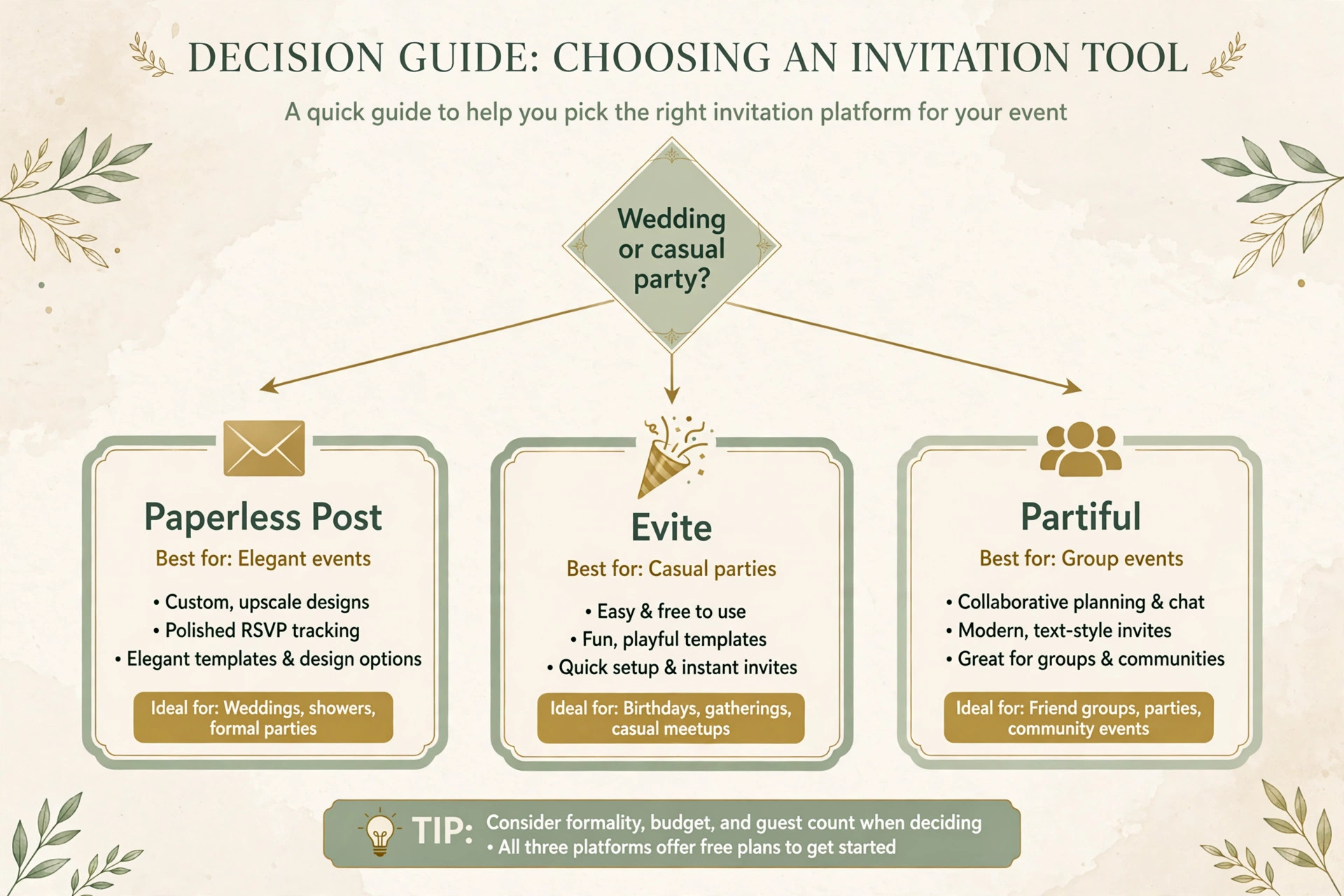
The table below gives the short answer for each common job, then the reviews explain the trade-offs behind each pick. Use it to narrow the list to two or three options before you start a free trial.
| Tool | Best for | Free tier |
|---|---|---|
| Paperless Post | weddings and formal events | Yes |
| Evite | casual parties on a budget | Yes |
| Partiful | birthday parties and group-chat invites | Yes |
| Punchbowl | kids birthday parties | Yes |
| Greenvelope | hosts who want ad-free elegant mailings | Paid only |
| RSVPify | corporate and nonprofit events | Yes |
| Canva | hosts who want to design the art themselves | Yes |
| Adobe Express | design-led hosts in the Adobe world | Yes |
| Greetings Island | free DIY invites and cards | Yes |
| PosterMyWall | event promotion plus invitations | Yes |
| VistaCreate | hosts who want animated invites | Yes |
| Postable | hosts who want mailed paper cards | Paid only |
| Luma | meetups and ticketed community events | Yes |
| Who’s In | group and community events | Yes |
How to Choose Among the best invitation makers
Start with guest count and formality. A wedding with 150 guests and meal choices needs guest management, plus-one rules, and seating help. A birthday with 20 friends needs a link, a date, and a reply button. Buying a corporate tool for a birthday wastes money, and using a party tool for a wedding creates manual work when the guest list grows.
Next, check the cost model. Some tools charge per mailing, some per month, and some per guest through credits. A per-mailing price suits a one-off event, while a monthly plan suits a host or business that runs events all year. Finally, check the reminder system, because best invitation makers differ sharply on reminders. Automatic reminders to guests who have not replied are the single most valuable feature for a busy host, because they replace awkward follow-up messages with a polite automatic nudge.
The Tools in Detail
The reviews below follow the same order as the table. Each one covers what the tool does, who it suits, pricing, and the honest limits, so you can compare like with like.

1. Paperless Post
Paperless Post is built for weddings and formal events. It offers designer invitations with envelopes, liners, and guest tracking. Paperless Post treats the invitation as part of the occasion. Envelope animations, backdrops, and wedding pages with travel and accommodation details give a formal event a finished feel. Pricing is Free basic sends, premium designs paid per send.
In practice, the test that matters is whether a finished file still looks right where it will be used. Check it at real size, on a phone, and in print if print matters, before you commit to the tool for a whole series. A tool that looks good in a demo but fails that real-world check will cost you redesign time later, so run the check early and keep notes on what passed.
Strength to note. The most polished formal designs and strong guest messaging. Limit to weigh. Costs rise with guest count, and the free tier only covers a limited number of sends.
2. Evite
Evite is built for casual parties on a budget. It offers the largest free invitation library, with RSVP tracking and reminders. Evite is the default for birthdays and casual gatherings because it is free to start and guests already know it. Potluck lists, gift registry links, and photo sharing cover the usual party needs. Pricing is Free plan, Premium from about 17.99 dollars per event, Pro from 249.99 dollars per year.
In practice, the test that matters is whether a finished file still looks right where it will be used. Check it at real size, on a phone, and in print if print matters, before you commit to the tool for a whole series. A tool that looks good in a demo but fails that real-world check will cost you redesign time later, so run the check early and keep notes on what passed.
Strength to note. Huge free library and familiar guest experience. Limit to weigh. Free invitations carry ads, and designs are less elegant than the premium formal tools.
3. Partiful
Partiful is built for birthday parties and group-chat invites. It offers playful event pages shared by link or text. Partiful wins on friction. You send a link, friends answer without an app, and the host sees answers in one place. It is thinner on guest-list management than the corporate tools, but for a casual party that rarely matters. Pricing is Free, with ticket fees on paid events.
In practice, the test that matters is whether a finished file still looks right where it will be used. Check it at real size, on a phone, and in print if print matters, before you commit to the tool for a whole series. A tool that looks good in a demo but fails that real-world check will cost you redesign time later, so run the check early and keep notes on what passed.
Strength to note. The easiest free sharing flow for casual events. Limit to weigh. Guest management and formal design options are limited.
4. Punchbowl
Punchbowl is built for kids birthday parties. It offers licensed character designs with RSVP tracking and reminders. Character designs are the reason to choose Punchbowl. Disney, Bluey, PAW Patrol, and similar licensed art make a kids party invitation feel special in a way generic templates cannot. Pricing is Free trial, paid plans from 2.99 dollars per month billed annually.
In practice, the test that matters is whether a finished file still looks right where it will be used. Check it at real size, on a phone, and in print if print matters, before you commit to the tool for a whole series. A tool that looks good in a demo but fails that real-world check will cost you redesign time later, so run the check early and keep notes on what passed.
Strength to note. Licensed characters kids recognise, plus reminders. Limit to weigh. The appeal narrows sharply outside family parties.
5. Greenvelope
Greenvelope is built for hosts who want ad-free elegant mailings. It offers animated envelope openings and ad-free delivery. Greenvelope charges per mailing rather than per month, which suits a one-off wedding or gala. Guests see no ads, and the envelope opening animation gives a digital invite a paper-like moment. Pricing is From 19 dollars per mailing.
In practice, the test that matters is whether a finished file still looks right where it will be used. Check it at real size, on a phone, and in print if print matters, before you commit to the tool for a whole series. A tool that looks good in a demo but fails that real-world check will cost you redesign time later, so run the check early and keep notes on what passed.
Strength to note. Ad-free experience with a flat per-mailing price. Limit to weigh. There is no free tier for a full mailing, so casual hosts may prefer a free tool.
6. RSVPify
RSVPify is built for corporate and nonprofit events. It offers guest management, custom questions, ticketing, and check-in. RSVPify is the pick when an event looks like a function rather than a party. Meal choices, dietary questions, plus-one rules, and on-the-day check-in are built in. Pricing is Free plan for up to 100 guests, paid plans from 39 dollars per month.
In practice, the test that matters is whether a finished file still looks right where it will be used. Check it at real size, on a phone, and in print if print matters, before you commit to the tool for a whole series. A tool that looks good in a demo but fails that real-world check will cost you redesign time later, so run the check early and keep notes on what passed.
Strength to note. The strongest guest management and check-in tools here. Limit to weigh. The price is higher than casual tools, and design flair is secondary to function.
7. Canva
Canva is built for hosts who want to design the art themselves. It offers a design editor with invitation templates for print and digital use. Canva is for the host who cares most about how the invitation looks and will handle delivery separately. You design, export, and then send by email, text, or print. Pricing is Free plan, Pro from about 12.99 dollars per month in some regions.
In practice, the test that matters is whether a finished file still looks right where it will be used. Check it at real size, on a phone, and in print if print matters, before you commit to the tool for a whole series. A tool that looks good in a demo but fails that real-world check will cost you redesign time later, so run the check early and keep notes on what passed.
Strength to note. The widest design control and template choice. Limit to weigh. It is not an invitation platform, so RSVP tracking and reminders need another tool.
8. Adobe Express
Adobe Express is built for design-led hosts in the Adobe world. It offers templates, Adobe Fonts, and stock photos for invitations. Adobe Express gives invitation art a professional finish, with strong typography and stock imagery. Brand colours can be saved for a business event series. Pricing is Free plan, Premium from 9.99 dollars per month.
In practice, the test that matters is whether a finished file still looks right where it will be used. Check it at real size, on a phone, and in print if print matters, before you commit to the tool for a whole series. A tool that looks good in a demo but fails that real-world check will cost you redesign time later, so run the check early and keep notes on what passed.
Strength to note. High-quality type and stock in a simple editor. Limit to weigh. RSVP and guest management are not included.
9. Greetings Island
Greetings Island is built for free DIY invites and cards. It offers a large free card and invitation library for many occasions. Greetings Island is the budget DIY choice. You can make a solid invitation without paying, and the premium tier is cheap for hosts who send cards often. Pricing is Free plan, Premium membership from about 2.25 dollars per month billed annually.
In practice, the test that matters is whether a finished file still looks right where it will be used. Check it at real size, on a phone, and in print if print matters, before you commit to the tool for a whole series. A tool that looks good in a demo but fails that real-world check will cost you redesign time later, so run the check early and keep notes on what passed.
Strength to note. A strong free library at a very low paid price. Limit to weigh. RSVP tracking is lighter than the dedicated platforms.
10. PosterMyWall
PosterMyWall is built for event promotion plus invitations. It offers flyer-style invitations and event promotion graphics. PosterMyWall suits a host who also needs posters and social posts for the same event. One design system covers the invitation, the flyer, and the announcement post. Pricing is Free plan, Premium from 9.95 dollars per month.
In practice, the test that matters is whether a finished file still looks right where it will be used. Check it at real size, on a phone, and in print if print matters, before you commit to the tool for a whole series. A tool that looks good in a demo but fails that real-world check will cost you redesign time later, so run the check early and keep notes on what passed.
Strength to note. Invitation plus promotion assets in one plan. Limit to weigh. Guest tracking is not its strength.
11. VistaCreate
VistaCreate is built for hosts who want animated invites. It offers animated templates and stock for invitations and event graphics. Animated invitations stand out in a crowded inbox or feed. VistaCreate makes motion simple, which helps a party or launch invitation get opened rather than skimmed. Pricing is Free Starter plan, Pro from 10 dollars per month billed annually.
In practice, the test that matters is whether a finished file still looks right where it will be used. Check it at real size, on a phone, and in print if print matters, before you commit to the tool for a whole series. A tool that looks good in a demo but fails that real-world check will cost you redesign time later, so run the check early and keep notes on what passed.
Strength to note. Animated designs with a strong free plan. Limit to weigh. Invitation-specific guidance such as paper sizes is less detailed than print-first tools.
12. Postable
Postable is built for hosts who want mailed paper cards. It offers printed cards mailed for you, with address collection. Postable is for hosts who still want paper. It collects guest addresses, prints the card, and mails it, which removes the most tedious part of a paper invitation. Pricing is Pricing varies by card and mailing.
In practice, the test that matters is whether a finished file still looks right where it will be used. Check it at real size, on a phone, and in print if print matters, before you commit to the tool for a whole series. A tool that looks good in a demo but fails that real-world check will cost you redesign time later, so run the check early and keep notes on what passed.
Strength to note. Paper invitations without the addressing work. Limit to weigh. It is not a digital RSVP platform, so tracking needs a separate step.
13. Luma
Luma is built for meetups and ticketed community events. It offers event pages with registration and ticketing. Luma is an event page and registration tool more than a decorative invitation. Unlimited events and guests on the free plan make it practical for recurring meetups. Pricing is Free plan, Plus from 59 dollars per month billed annually.
In practice, the test that matters is whether a finished file still looks right where it will be used. Check it at real size, on a phone, and in print if print matters, before you commit to the tool for a whole series. A tool that looks good in a demo but fails that real-world check will cost you redesign time later, so run the check early and keep notes on what passed.
Strength to note. Strong free event pages with ticketing. Limit to weigh. Design customisation is lighter than the invitation-first tools.
14. Who’s In
Who’s In is built for group and community events. It offers event pages with wallet passes, waitlists, and plus-one management. Guests RSVP without creating an account, and wallet passes remind them of the event. Sharing by link, WhatsApp, or QR code fits community groups well. Pricing is Free.
In practice, the test that matters is whether a finished file still looks right where it will be used. Check it at real size, on a phone, and in print if print matters, before you commit to the tool for a whole series. A tool that looks good in a demo but fails that real-world check will cost you redesign time later, so run the check early and keep notes on what passed.
Strength to note. No guest signup and genuinely free event pages. Limit to weigh. It is a newer platform with less brand recognition than the established names.
Paper, Digital, or Both, and How to Decide
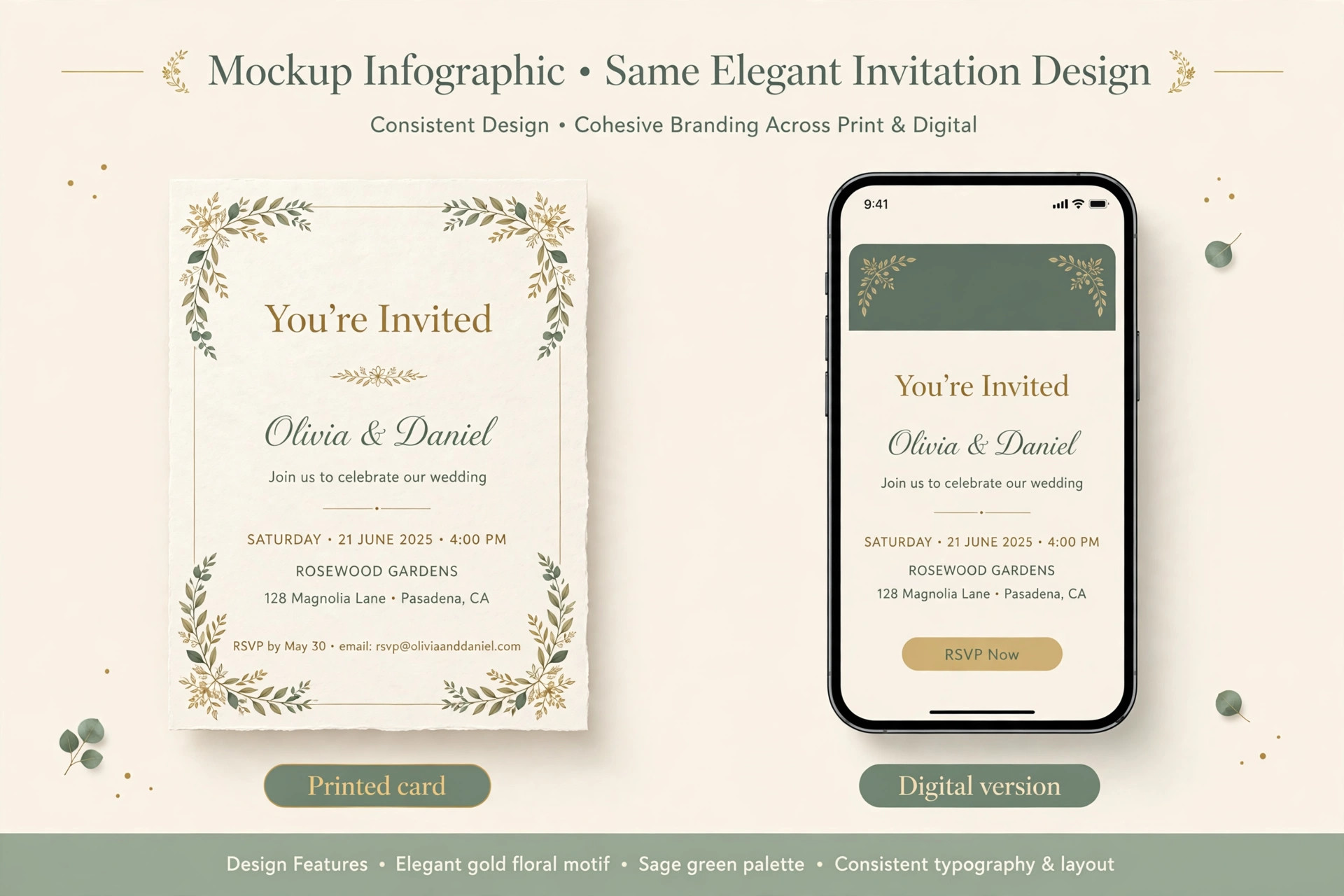
Paper invitations still suit formal weddings, milestone birthdays, and events where older guests may not use digital tools comfortably. A printed card feels like an occasion in itself, and it works as a keepsake. The cost is higher, the timeline is longer, and address collection takes real effort, which is why paper-first hosts should start at least eight weeks before the event.
Digital invitations suit almost everything else, because they are fast, cheap, and easy to update when a venue or time changes. A hybrid approach works well for mixed guest lists. Send paper to guests who prefer it and digital to everyone else, but keep one master guest list so replies do not split across two systems. The tools in this guide that cover best invitation makers include both digital platforms and paper services, so a hybrid plan is possible without managing two separate lists by hand, and best invitation makers with address collection built in make the paper side far less painful.
Timeline and Checklist for a Stress-Free Send
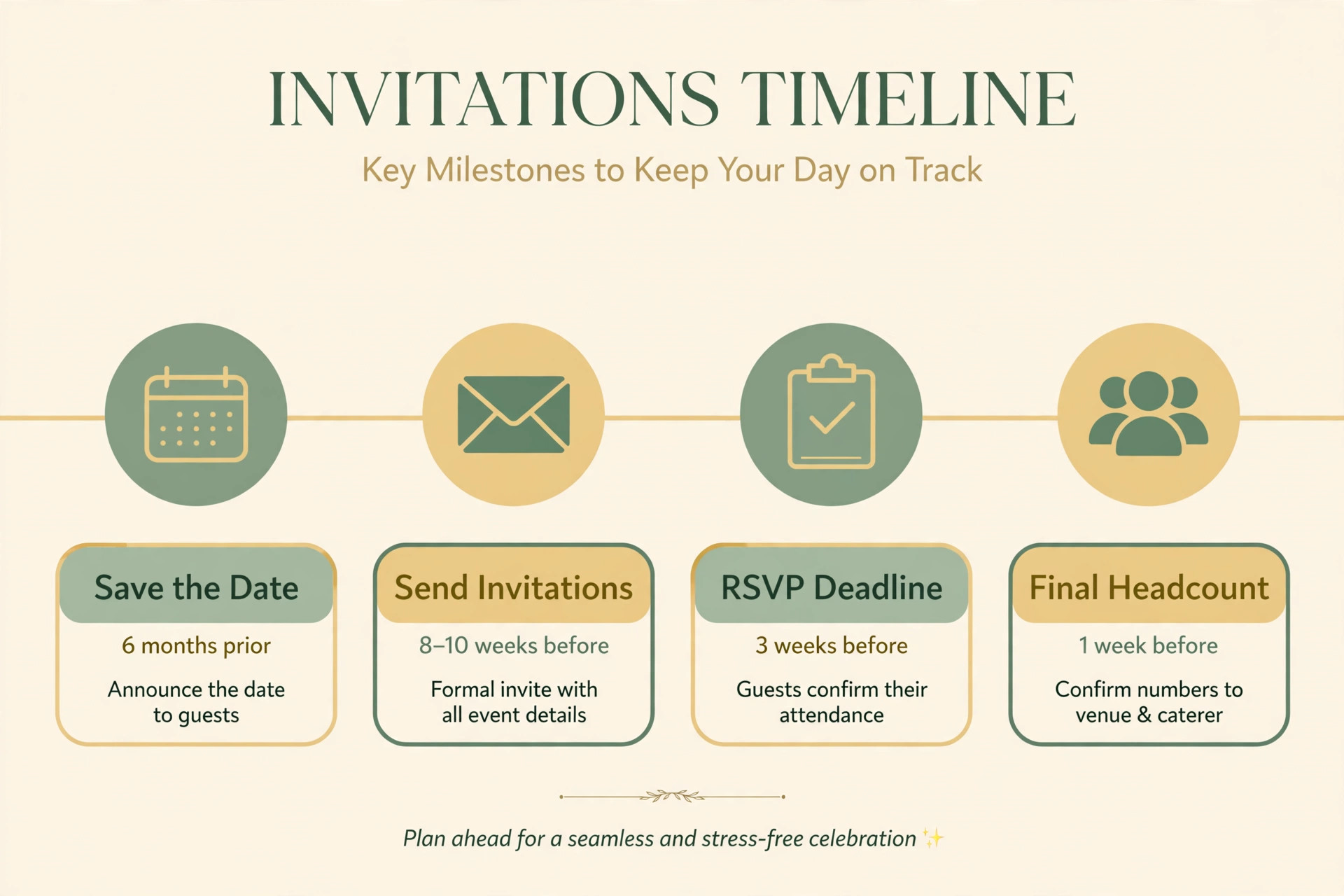
Eight weeks before the event, finalise the guest list and choose the tool. Six weeks before, design the invitation and test it on a phone and a computer. Four weeks before, send the invitations and confirm that the RSVP link works for a guest who is not logged in. Two weeks before, send the first reminder to guests who have not replied. One week before, close or confirm the final numbers with the venue or caterer, and send final details such as parking, dress code, and timings.
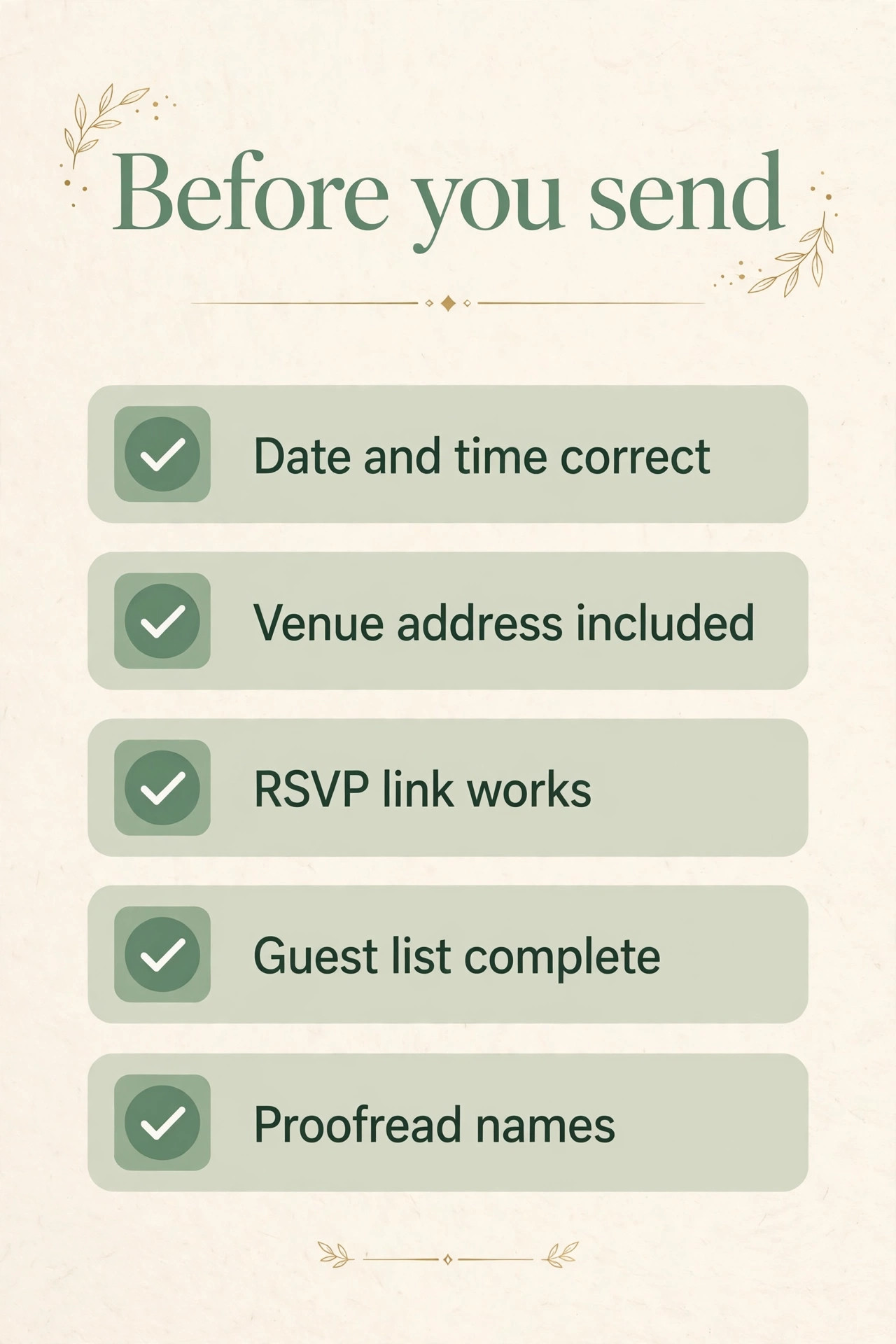
Common failures are easy to prevent, and best invitation makers help most when you use their test-send feature before the real send. A wrong date in the headline, a venue link that points to the wrong place, or a reply deadline that passes unnoticed can each spoil an otherwise good event. Proofread the invitation out loud, click every link as a guest would, and set the reply deadline a few days before you actually need the numbers, so late replies still arrive in time.
Handling Tricky Guest Situations Without Awkward Messages
Plus-ones are the most common source of invitation stress. Decide the rule before you send anything, such as plus-ones for married couples and long-term partners only, or plus-ones for everyone, and set that rule in the tool rather than explaining it case by case. A tool that lets you set plus-one limits per guest group saves a dozen awkward conversations, because the form simply does not offer an extra seat where the rule says no.
Children, dietary needs, and accessibility questions deserve the same advance planning. Add custom questions for meal choices and dietary restrictions at the invitation stage, not as a separate message later, because guests answer once and forget follow-up forms. Ask about accessibility needs in a kind, optional question, and share venue details such as parking, step-free access, and timings early, so guests who need to plan travel or childcare can do so. For events with a dress code, state it plainly in the invitation rather than assuming guests will guess, and give an example if the code is unusual.
Finally, plan for late replies and changes. Some guests will reply late, some will change their minds, and a few will bring someone unannounced. Build a small buffer into catering numbers, confirm the final count a few days after the reply deadline, and keep the invitation page as the single source of truth for updates. When a detail changes, update the page and send one clear message pointing guests to it, rather than sending scattered updates across several channels.
More Reading on Stratilyze
An invitation is the start of an event, not the whole plan. Seating, catering numbers, and day-of details all depend on the guest list that the invitation produces, so the tool you choose should make that handoff easy. Export the guest list early, share it with the venue and caterer, and keep the invitation page updated with final timings so guests check one place for the latest information.
Read our guide to best ai tools for event planners for the next step after you finish this design.
Read our guide to best ai tools for wedding planners for the next step after you finish this design.
Read our guide to use excel for wedding budget planner for the next step after you finish this design.
Read our guide to how to use ai for wedding planning for the next step after you finish this design.
Read our guide to best ai tools for graphic designers for the next step after you finish this design.
Read our guide to best ai logo makers for the next step after you finish this design.
Frequently Asked Questions
Are digital invitations acceptable for a wedding?
Yes, digital invitations are now widely accepted for weddings, especially when the design is polished and the guest experience is smooth. Paperless Post and Greenvelope offer formal digital designs that suit weddings, and many couples send digital invitations with a printed keepsake for close family.
What is the cheapest way to send invitations?
Free tools such as Partiful, Who’s In, and Evite cover casual events at no cost, and Greetings Island offers a large free library. For formal events, a per-mailing tool may be cheaper than a monthly subscription when you only run one event.
How do I track RSVPs without chasing guests?
Choose a tool with built-in RSVP tracking and automatic reminders, such as Paperless Post, Evite, Punchbowl, or RSVPify. Automatic reminders to guests who have not replied replace manual follow-ups and give you a live guest count.
Can guests RSVP without creating an account?
Some tools allow it and some do not. Partiful and Who’s In are built around link sharing without guest signup, which tends to raise reply rates. Always test the guest flow yourself before sending to a full list.
Should I send paper invitations as well as digital ones?
A hybrid approach suits mixed guest lists, with paper for guests who prefer it and digital for everyone else. Keep one master guest list so replies do not split across systems, and use a tool with address collection if you send paper.
When should I send invitations?
For most events, send invitations four to six weeks before the date, and earlier for weddings or destination events. Set the RSVP deadline a few days before you need final numbers, so late replies still arrive in time for the venue or caterer.
Which Invitation Tool Should You Actually Pick
Paperless Post is the best all-round pick for weddings and formal events, because the design quality and guest tools justify the per-send cost. Evite remains the best free pick for casual parties, and Partiful is the best pick when you want the fastest possible sharing by link. For corporate or nonprofit events, RSVPify is worth its higher price for guest management and check-in alone. Choose by event type, test the guest flow, and judge best invitation makers by reply rate rather than by template beauty alone. on your own phone, and send early enough that reminders have time to work. The invitation that gets answered is the one that wins, not the one that merely looks best in the editor.
