

For most small shops, Canva is the fastest route to a gift certificate that looks professional enough to sell, and it wins on template choice, free exports, and print quality rather than on any single feature. If you need to track redemptions, sell online, or stop the same certificate being used twice, a design tool alone will not carry that job, and you should pair it with a point of sale gift card system or pick a platform built for selling. The best gift certificate makers split cleanly along that line, between tools that design a beautiful certificate and tools that run a gift program, and this guide reviews both kinds honestly.
That split matters because a certificate is a promise to deliver a service later, and a pretty file that cannot be tracked becomes a bookkeeping problem at the till. A salon that sells fifty certificates at Christmas needs serial numbers, expiry rules, and a redemption log. A friend making one birthday certificate needs none of that, just a clean layout and a print button. Read the reviews with your own volume in mind, and do not pay for selling features you will never use, or rely on a design tool for controls it was never built to provide.
Design Tools and Selling Tools Are Different Jobs
A design tool gives you templates, fonts, colors, and export files. You print the result, hand it over, and record the sale yourself in a notebook, a spreadsheet, or your till system. That workflow suits low volume sellers, seasonal promotions, and personal gifts, because it costs little and keeps full creative control. Its weakness appears at scale, when staff must remember which certificates are still valid, which have been partly used, and which were sold at a discount that should not combine with another offer.

A selling tool adds the missing controls. It issues unique codes, records balances, tracks partial redemptions, and reports outstanding liability, which is the total value of certificates sold but not yet redeemed. Square Gift Cards and similar point of sale systems sit in this second group, while Canva, Adobe Express, VistaCreate, Design.com, PosterMyWall, and Fotor sit in the first. Some businesses use both, designing a beautiful certificate in a design tool and recording its code in a selling system, and that hybrid works well when the design tool export includes a space for a serial number or QR code.

Decide which group you need before you compare templates. The best gift certificate makers for design will always tempt you with beautiful layouts, but a layout cannot tell you how much unredeemed value your business owes, and that blind spot grows with every certificate sold.
A hybrid setup deserves a closer look, because it suits many growing shops better than either extreme. Design the certificate in Canva or Adobe Express, print a serial number and a QR code that links to your booking page, and record the code in your till or a shared spreadsheet on the day of sale. Staff check the code at redemption, mark it used, and note any balance left for a return visit. That routine takes under a minute per certificate and gives you most of the control of a selling system without its monthly fee, until volume makes a dedicated platform cheaper than staff time.
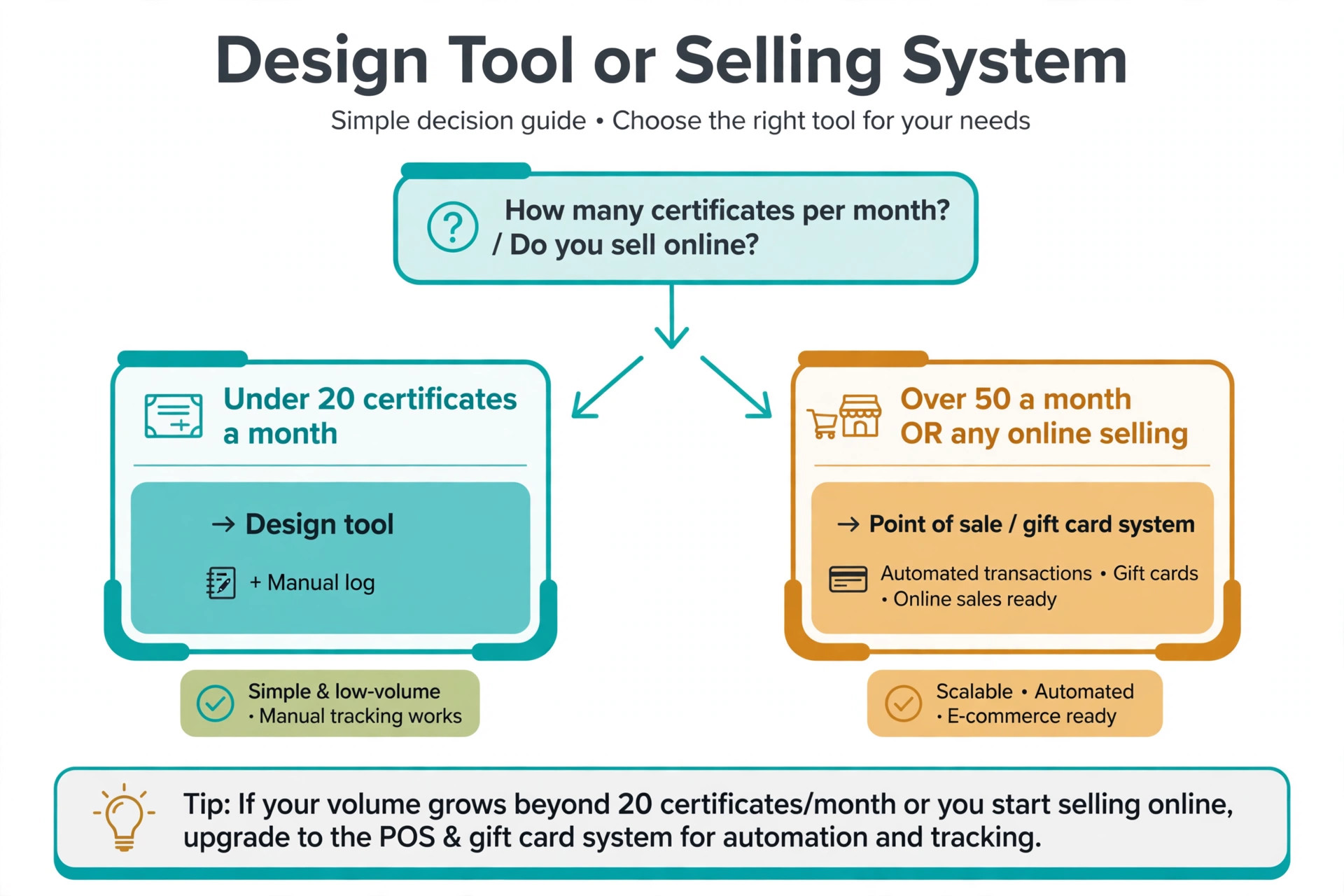
Watch for the point where the hybrid breaks. When certificates sell faster than staff can log them, when online orders arrive overnight, or when two locations must share one redemption record, manual logs start to miss entries. That is the signal to move to a point of sale gift card system, even if you keep designing the physical certificate in your preferred design tool. Moving at that point protects revenue and customer trust, while moving too early wastes money on features a small shop does not yet need. If you sell fewer than twenty certificates a month and know most buyers by name, a design tool is enough.
If you sell gift cards at a counter daily, take online orders, or run multi location promotions, start with a selling system and treat design as a secondary requirement.
The Shortlist
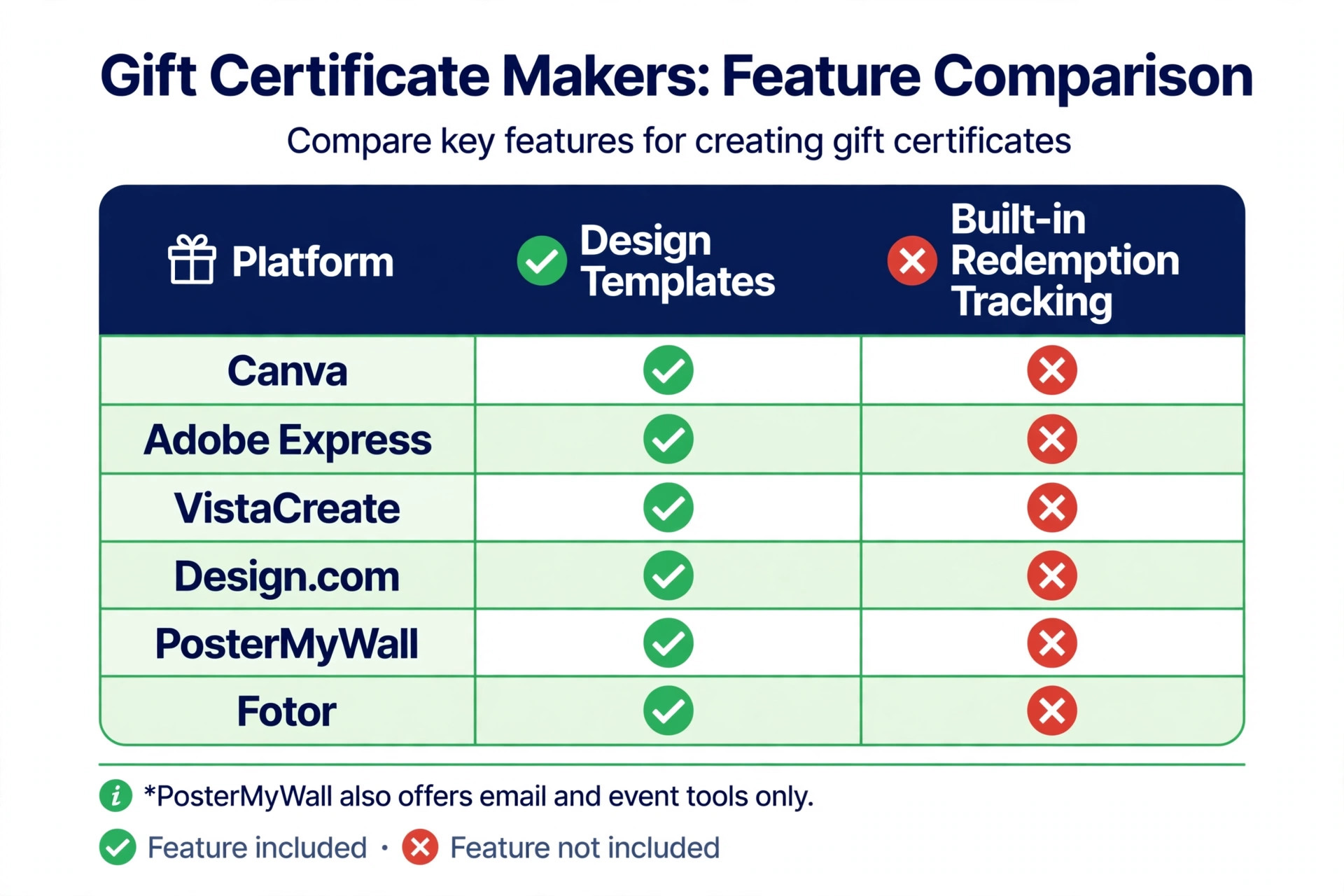
| Tool | Best for | Free tier | Selling controls |
|---|---|---|---|
| Canva | Most shops and personal gifts | Yes | None built in |
| Adobe Express | Polished typography | Yes | None built in |
| VistaCreate | Social and animated promos | Yes | None built in |
| Design.com | Brand matched certificates | Browse and edit free | None built in |
| PosterMyWall | Print sizes and local promos | Yes, with limits | Email and event tools only |
| Fotor | Simple low cost designs | Yes | None built in |
The table makes the trade clear. The best gift certificate makers for pure design all share the same limit, which is that redemption tracking stays manual, so your choice among them should turn on template taste, brand tools, and print quality rather than on selling features none of them claim to offer.
The 6 Tools Reviewed
1. Canva
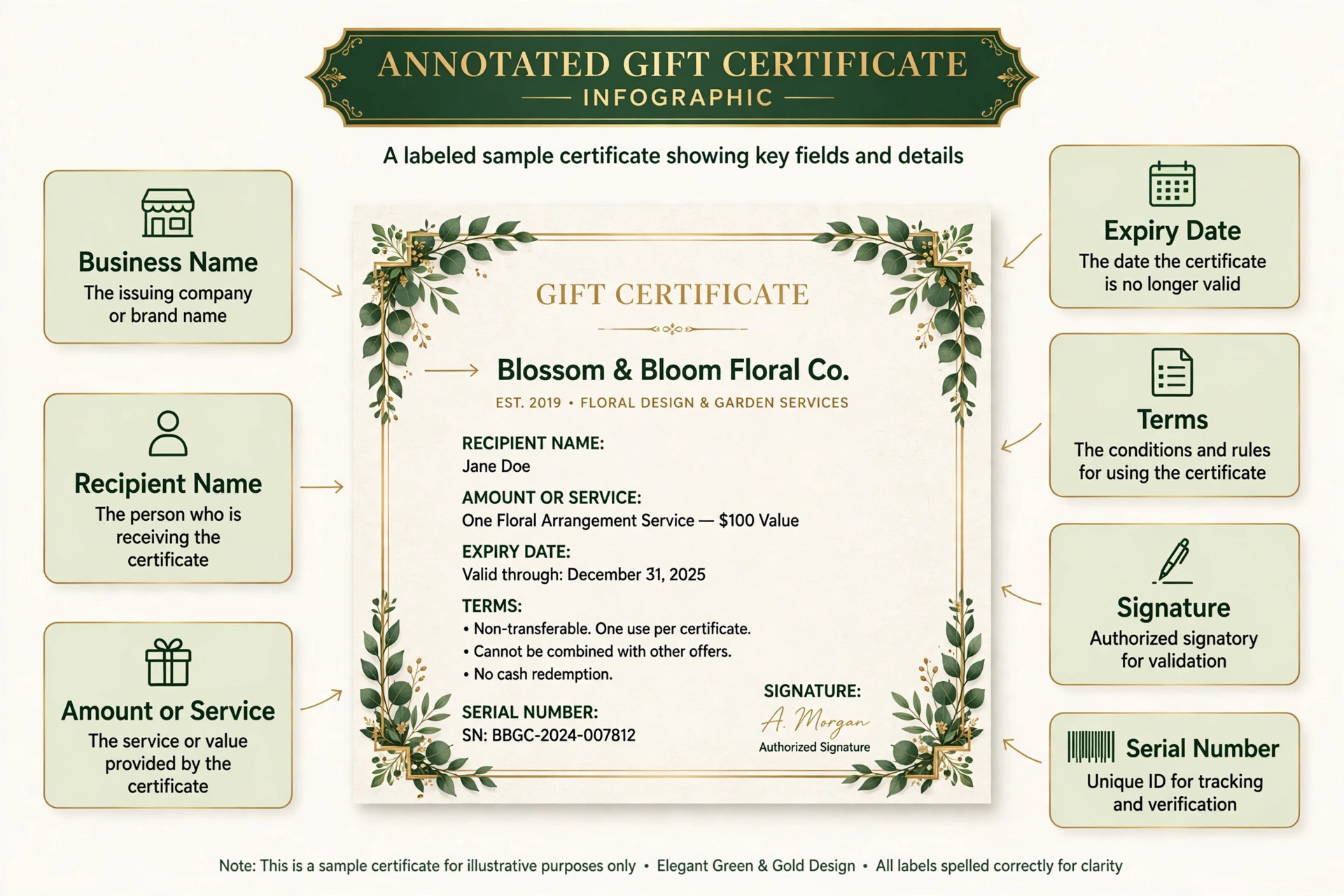
Canva leads this guide because it covers the whole design job with the least friction. The template library includes certificates for salons, spas, restaurants, retail, and seasonal events, with editable fields for recipient name, amount or service, expiry date, terms, and business details. You can add your logo, match brand colors and fonts, and export a print ready PDF or a shareable image, and collaboration tools let a manager approve a design before it goes to print. Print services through Canva also let you order finished certificates without finding a local printer.
Pricing is friendly for small businesses. Canva Free covers a large template library and basic editing with no watermark on most exports, while Pro costs about 12 dollars per month on annual billing and adds premium templates, brand kits, background removal, and larger storage. Schools and nonprofits may qualify for free premium access through Canva programs, which further lowers the cost for community organizations that give certificates as prizes or thank you gifts.
The limits are the ones shared by every design tool in this list. Canva does not issue unique redemption codes, track balances, or block double use, so a busy shop must add its own serial numbers and a redemption log. Template popularity is another small drawback, since well used layouts can look familiar to customers who have seen them elsewhere. Customize colors, imagery, and wording enough to make the certificate yours, and keep a simple log book at the till for every certificate you sell.
2. Adobe Express
Adobe Express is the pick for buyers who care most about typography and print polish. Certificate templates feel refined, with strong font pairings, generous white space, and Adobe Stock imagery that lifts a simple layout into something a premium salon or boutique would be happy to hand over. Firefly image generation can create backgrounds and decorative elements, and the mobile app lets you edit a certificate on the go, which helps when a customer asks for a last minute gift at the counter.
The free plan covers thousands of templates, basic editing, and photo effects, while Premium costs 9 dollars and 99 cents per month and adds brand kits, premium templates, 100 GB of storage, and a larger generative credit allowance. Premium is included with most Creative Cloud plans, so designers and agencies already paying for Adobe tools may not need a separate subscription. Free exports are clean, without the watermark problems that weaken some free design tools.
Adobe Express shares the core limit of Canva, which is no built in redemption tracking, and it adds two smaller drawbacks. Bulk creation for many recipients is awkward, since each certificate needs manual editing rather than a mail merge from a list, and the free AI credit allowance runs out quickly if you generate many backgrounds. Choose Adobe Express when a single certificate must look exceptional, and pair it with a manual log or a selling system when volume grows.
3. VistaCreate
VistaCreate suits businesses that promote gift certificates on social media as well as in store. The gift certificate builder offers hundreds of templates, a large library of design objects, and millions of royalty free photos, videos, and vectors, plus animation tools that turn a static certificate offer into a short social promo. Brand Kit tools save logo, colors, and fonts, and resize tools adapt a design to social posts, stories, and print formats without rebuilding it each time.
Pricing is competitive, with a free plan for basic designs and Pro at about 10 dollars per month on annual billing. Pro adds premium assets, multiple brand kits, team accounts, and unlimited storage in some bundles, which suits a small marketing team better than a solo owner. The free tier is usable for a simple certificate, though premium templates and some assets require the paid plan, so test a full design before you assume the free tier covers your preferred layout.
The drawbacks are familiar. VistaCreate does not track redemptions or balances, and its template library, while large, feels less curated for formal certificates than Canva or Adobe Express. Animation is also a bonus rather than a core need for a printed certificate, so do not choose VistaCreate for motion features alone. Pick it when social promotion drives most of your gift sales and you want one tool for the certificate and the campaign around it.
4. Design.com
Design.com earns a place here as a brand first certificate maker with a genuinely large template collection. Its gift certificate pages cover professional, seasonal, and occasion based designs, with customization for text, colors, fonts, images, and uploaded logos, plus print ordering in various paper sizes, stocks, and finishes. For a business that already uses Design.com for its logo, the certificate can match the rest of the brand without rebuilding colors and fonts in another tool, which saves time during a busy promotion.
Pricing follows the platform subscription model, with plans reported from about 5 dollars per month on annual billing for Starter and higher tiers adding a website and extra features. Browsing and editing are free, while premium downloads and full brand assets require a paid plan. That structure is good value for a business using the wider platform, and weaker value for a buyer who only needs one certificate, since Canva and Adobe Express offer stronger free exports for that single job.
Be clear about the limits before you choose it. Design.com designs and prints certificates, but it does not run a gift card program, so it offers no redemption tracking, balance management, or point of sale integration comparable to Square. Template quality also varies more than in Canva or Adobe Express, so shortlist three designs and print a test copy before ordering a batch. Ranked fourth here, it is a solid brand matched option, not a selling system, and it should not be bought as one.
5. PosterMyWall
PosterMyWall is the practical pick for local businesses that need many print sizes and fast social sharing. The template library runs into the millions across all design types, with gift certificate templates in print sizes such as US Legal as well as social formats for Facebook, Instagram, and WhatsApp. Downloads cover JPG, PNG, and PDF, and the platform adds email tools, event pages, and auto publishing for promotions, which helps a shop announce a gift offer and sell it in the same week.
Pricing uses a free tier with limits plus premium plans, with some listings reporting premium from about 13 dollars per month, though you should confirm the current plan page for your region. Free designs carry limits on downloads and premium assets, and some templates require a paid plan for full resolution exports. For a shop that already uses PosterMyWall for flyers and social posts, adding gift certificates keeps all promotion in one account and one brand folder.
The limits are about depth rather than breadth. PosterMyWall templates vary in quality because many come from community designers, so you must curate carefully, and brand kit controls are thinner than Canva Pro or Adobe Express Premium. It also offers no redemption tracking beyond its email and event tools. Choose PosterMyWall when print size variety and local promotion matter most, and keep a manual redemption log alongside it.
6. Fotor
Fotor closes the list as a simple, low cost option for buyers who want a clean certificate without learning a large platform. The gift certificate maker offers templates for business use, with customization for text, colors, and images, plus photo editing tools for shops that want to feature their own product or interior photos. The editor loads quickly, stays uncluttered, and suits a solo owner who designs one certificate at a time rather than running campaigns.
Pricing is modest, with a free tier for basic designs and Pro reported near 8 dollars and 99 cents per month in several listings. Confirm the current page before budgeting, since Fotor pricing has varied by region. Pro adds premium templates and advanced editing, which matters if your certificate uses detailed photography or fine print terms that must stay legible at small sizes.
Fotor trails the leaders on template variety, brand controls, and collaboration, and it offers no selling or tracking features. It also lacks the social publishing depth of PosterMyWall and VistaCreate. Those gaps matter less for a personal gift or a small batch of certificates, where simplicity and price win. Use Fotor when you need a decent certificate fast and cheap, and move to Canva or Adobe Express when brand consistency becomes a regular requirement.
How to Pick From the Best Gift Certificate Makers
Start with volume, then design, then tracking. Count how many certificates you expect to sell in a busy month, and be honest about the busiest week, not the average. Under twenty a month, pick on design quality and price, and keep a paper or spreadsheet log. Over fifty a month, or any online selling, add a selling system to the plan even if you design in Canva, because manual tracking breaks exactly when the shop is busiest.
Next, check the details that customers actually read. Amount or service, recipient name, expiry date, terms, and business contact details must all fit without shrinking text to unreadable sizes. Print a test copy at real size and read it under shop lighting, not just on screen, and confirm that fine print terms stay legible. Finally, confirm print quality and file format. A PDF with proper margins prints cleanly at a local shop, while a low resolution image file can blur borders and logos. The best gift certificate makers make all three checks easy, and any tool that fails the print test should be dropped regardless of template beauty.
A Workflow for Selling Without Headaches
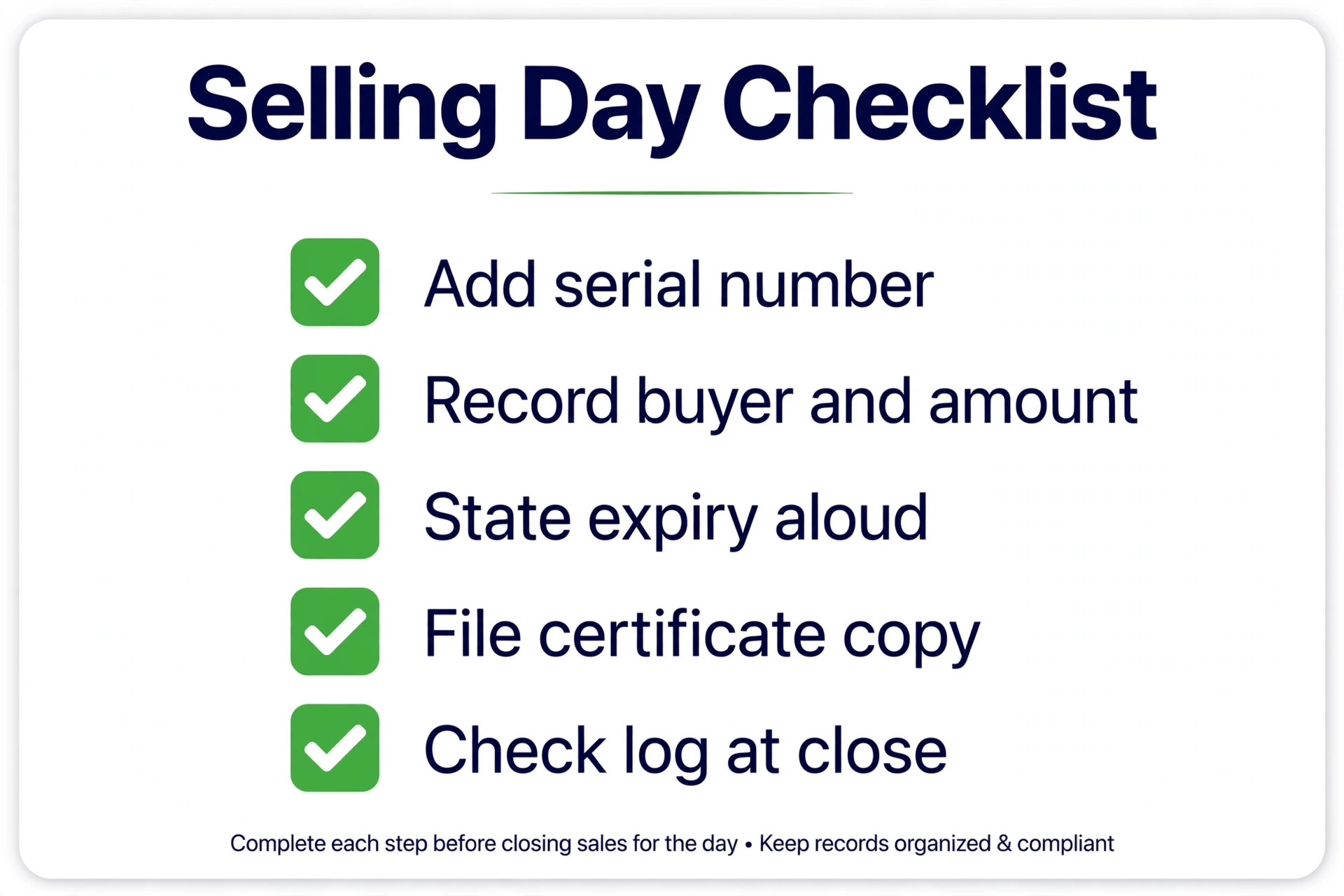
Design the certificate with a blank field for a serial number, even if you fill it in by hand. Number every certificate sequentially, record the number, buyer name, recipient, amount, date sold, and expiry in a log, and keep that log where till staff can reach it during a shift. When a certificate is redeemed, mark it used, note any remaining balance, and file the physical copy or a photo of it for the month end count.
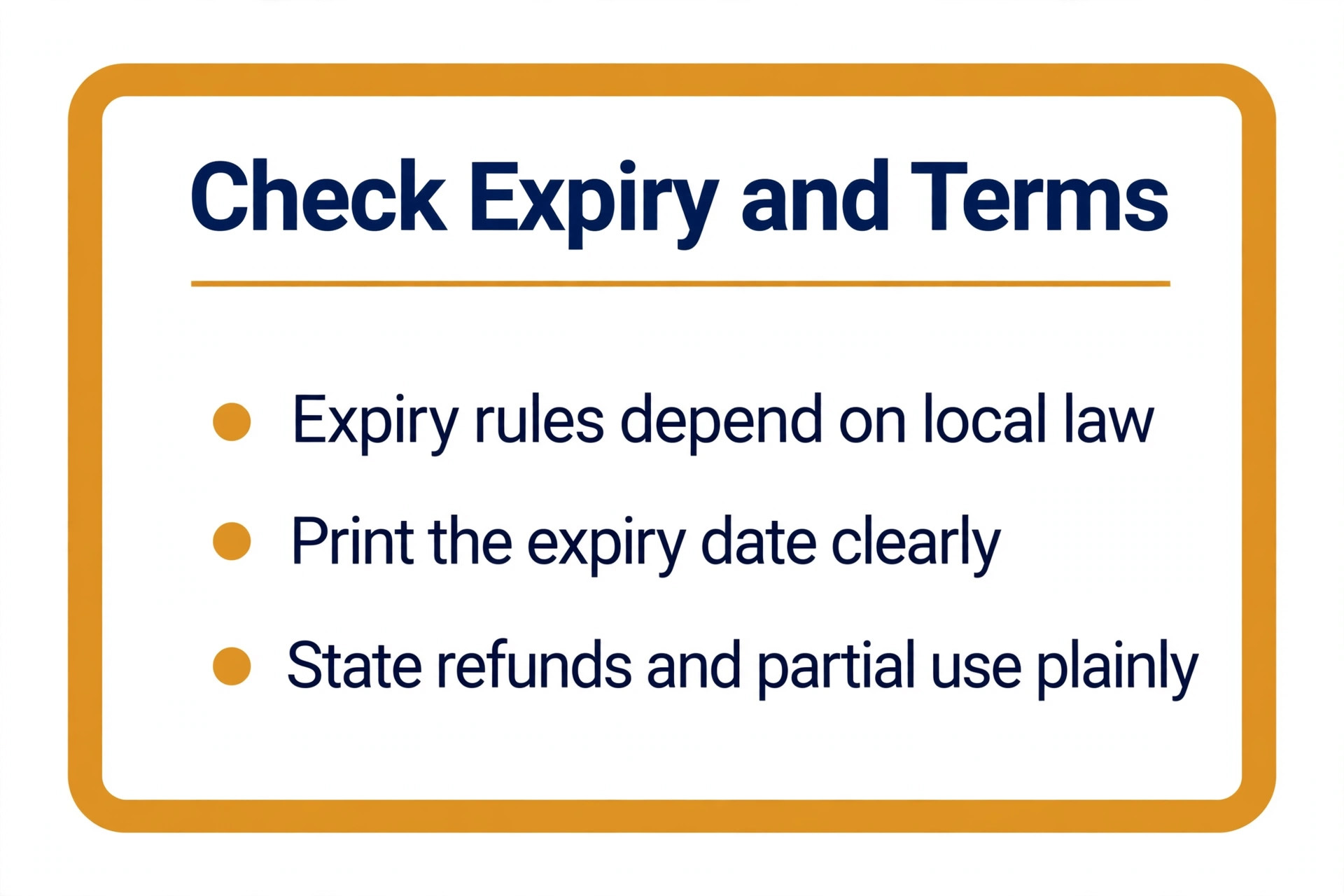
Set clear terms before the first sale, and print them on the certificate itself. State the expiry period where local law allows it, whether the certificate covers services only or products too, and whether change is given or a balance carries forward. Train staff on those three points, because most disputes come from a term that was never explained at sale time. A short script at the till, such as confirming the expiry date aloud when handing over the certificate, prevents most complaints later.
Train every new starter on the redemption routine in their first shift, because a certificate redeemed incorrectly is hard to unwind once the service has been delivered. Show them where the log lives, how to check a serial number, what to do when a certificate is partly used, and who to call when a number cannot be found. A one page crib sheet at the till, with three example entries filled in, teaches the routine faster than a long manual, and it gives cover staff confidence on a busy Saturday when the manager is off site.
Review the crib sheet each season, since terms and prices change and an old sheet can mislead a new starter into accepting an expired certificate.
For online sales, add a delivery step to the workflow. Send a PDF or a printed certificate by post, record the delivery method in the log, and confirm receipt for high value certificates. If you sell through a point of sale gift card system, use its codes instead of hand written numbers, and reconcile outstanding balances monthly so the business knows what it still owes in services. That monthly check turns gift certificates from a guess into a known liability you can plan around.
Pricing the Certificate Right
Price a certificate around a real experience, not around a round number that leaves the recipient short. The best gift certificate makers give you the design freedom to present that experience well, but the amount itself is a business decision that deserves the same care as the layout. Start from your most popular service bundle, add any product the recipient will need with it, and set the certificate at that total. A recipient who can redeem the full experience without paying extra feels treated, while a recipient who must top up a small shortfall feels sold to, even when the gift itself was generous.
Offer a small ladder of amounts rather than a single price. Three tiers work well for most shops, such as a trial or taster amount, a signature service amount, and a premium amount for special occasions, plus a custom amount for buyers who ask. Keep the middle tier as the promoted option in your window display and social posts, because most buyers choose the middle when they are unsure. Avoid too many tiers, since a long price list slows a counter sale and confuses a buyer who is already deciding between services.
Discounts need the same discipline. A ten percent bonus value, such as paying 90 for 100 of value, can lift holiday sales without training customers to wait for sales, while a deep discount that stacks with other offers can erase margin on redemption day. State clearly whether a certificate combines with other promotions, and record any bonus value separately in your log so month end accounts show true liability. Presentation also affects perceived value, so budget for decent paper or a clean envelope rather than printing on the thinnest stock available.
A certificate printed on sturdy card, slipped into a branded envelope with a short handwritten note, feels worth its face value in a way that a flimsy printout does not, even when the design file is identical. That small upgrade costs little per unit and lifts the chance that the recipient actually books, because the gift feels considered rather than improvised. Keep a small stock of envelopes and card at the counter so staff never hand over a bare printout during a rush.
Finally, review redemption data each quarter. If most certificates sit unredeemed for a year, your amounts or terms may not match what recipients want, and a small change to the featured bundle can lift redemption without any new design work.
Frequently Asked Questions
Do gift certificates expire?
It depends on local law and on the terms you print. Some regions restrict or ban expiry dates on gift cards, while others allow them after a minimum period, so check the rules for your area before you set a date. Where expiry is allowed, print the date clearly on the certificate and mention it at sale time, because a hidden expiry term creates disputes that cost more than the sale was worth.
Should I use a design tool or a point of sale gift card system?
Use a design tool when volume is low and you sell in person to known customers, and use a point of sale system when you sell daily, online, or across locations. Design tools give better creative control and lower cost, while selling systems give unique codes, balance tracking, and redemption reports. Many growing shops use both, designing in Canva or Adobe Express and recording codes in their till system.
What details must a gift certificate include?
Include the business name and contact details, recipient name or a blank line for it, the amount or service covered, the date sold, the expiry date where allowed, and short terms covering refunds, partial use, and lost certificates. Leave space for a serial number, and add a signature line or stamp area if your shop uses one. Every missing detail becomes a question at redemption time, so completeness saves staff time later.
Can I sell gift certificates online with these tools?
Design tools alone do not process payments or deliver codes automatically, so you must pair them with an online store, payment link, or point of sale system to sell online. Send the finished PDF by email or post the printed certificate, and record each sale in your log with the delivery method. If online gift sales become regular, move to a dedicated gift card platform that handles payment, delivery, and balance tracking in one place.
How do I stop the same certificate being used twice?
Use unique serial numbers, record each redemption in a log that all staff can see, and mark used certificates immediately at the till. For higher volumes, switch to a point of sale gift card system that checks a code balance before accepting it, because a paper log depends on staff remembering to check it during a rush. Photocopies and phone photos of a certificate should never be accepted without checking the serial number first.
What is a good amount for a gift certificate?
Match the amount to a real service or product bundle rather than picking a round number at random. A salon might price certificates at the cost of a cut and color, a cafe at a brunch for two, and a shop at a popular gift set, so the recipient can redeem it without topping up or feeling short changed. Offer two or three set amounts plus a custom amount option, and keep the most popular amount visible in your promotion.
Final Call for Shops and Gift Givers
Personal gift givers should pick Canva and stop there, because its free templates, clean exports, and easy editing cover a one off certificate with no learning curve. Small shops should pick Canva or Adobe Express on design quality, add serial numbers and a redemption log from day one, and review the system after the first busy season. The best gift certificate makers in this guide all design well, so revisit your choice only when volume, online selling, or multi location needs change the job, not when a new template catches your eye. A certificate program that staff trust and customers understand will sell more than a prettier design with a messy redemption process behind it.
Start simple, track every sale, and let real redemption data guide your next design and pricing choices. That discipline turns a one off promotion into a reliable revenue stream that keeps bringing new customers through the door, season after season, without extra advertising spend. The best gift certificate makers in this guide all design well, so the winner for your business is the one whose templates fit your brand, whose print output reads clearly, and whose limits you have planned around before the first certificate leaves the till.
Further Reading
More Reading on Stratilyze. If gift certificates are part of a wider small business push, see Best Software for Small Business and Best AI Tools for Small Business, plus niche guides such as Best AI Tools for Florists, Best AI Tools for Restaurants, Best AI Tools for Etsy Sellers, and Best AI Logo Makers for the brand behind the certificate.