

The problem is blunt. The firms that use AI for moving company crew scheduling well treat it as a planning system, not a magic fix. A moving company books three jobs on a Saturday, two crew members call off, one truck is too small for the largest load, and the dispatcher spends the morning rebuilding the whole day by phone. The crews that do show up are either too small and run hours late, or too large and burn payroll on a job that needed fewer hands. That chaos is not a people problem first. It is a scheduling problem, because the crew, the truck, the inventory, and the access details were never tied together in one plan.
Moving work is harder to schedule than most field service work. A job is not a fixed appointment. It is a home size, an inventory list, a set of heavy items, a floor and elevator question, a parking and carry distance question, and a travel window, and every one of those details changes the crew size, the truck, and the hours. A system that books a generic two mover slot will send two people to a three bedroom house with a piano and a third floor walk up, and the day will collapse before lunch.
This guide builds a crew scheduling workflow that sizes the crew from the inventory, assigns the right truck, protects the day against call offs, and still leaves room for human judgment where it matters. It covers the intake questions that prevent crew mistakes, the tools that handle moving dispatch well, the overtime and standby rules that protect the margin, and the measures that show whether the system is earning its keep. Prices quoted here come from vendor pricing pages and reputable comparison guides checked at writing time, so confirm the current price on the vendor page before buying.
Why Moving Crews End Up Wrong Sized
Most moving companies lose money in three quiet places, and none of them shows up as a single large bill. The first is the guessed crew. An estimate built from bedroom count alone misses the piano, the safe, the garage full of boxes, and the long carry from a loading dock. In recent guides, a one bedroom move typically takes three to five hours with two movers, a two bedroom move takes four to six hours with two movers, and a three bedroom home usually needs three or four movers with a 20 to 26 foot truck. A crew sized from bedrooms alone will be wrong on a large share of jobs.
The second leak is the Saturday pile up. Demand clusters at month end and on weekends, so the dispatcher faces more jobs than crews on the same few days. Without a system that shows crew availability, truck availability, and job length together, the office overbooks the best crews, double books a truck, or promises an arrival window it cannot keep. Customers forgive a late truck far less readily than they forgive a higher quote, because a late truck ruins their elevator booking and their whole day.
The third leak is the call off with no backup. A mover who calls in sick at 7 am leaves a crew short, and a dispatcher without a qualified standby list spends an hour calling people who are already booked or unqualified for heavy work. The job starts late, the crew works tired, and damage risk rises. An automated system does not remove call offs, but it does keep a live standby list and a clear reassignment path, which is what turns a call off into a delay rather than a disaster.
How to Use AI for Moving Company Crew Scheduling Without Losing Control
The best way to use AI for moving company crew scheduling is to let software handle the routine matching and keep people in charge of the judgment calls. Software should read the inventory, suggest a crew size and a truck, check availability, send confirmations, and flag conflicts. A person should approve the crew for a complex job, decide on overtime, handle a damage complaint, and judge whether a home needs a survey before a firm crew plan. When that split is clear, dispatchers get fast answers and the company keeps its reputation for care.
Start by defining what the system may schedule on its own. Standard homes with a complete inventory, standard access, and no specialty items are safe to auto schedule, because the crew size and truck are predictable. Anything outside that list, such as pianos, safes, pool tables, multi stop jobs, storage moves, or buildings with strict elevator windows, should go to a dispatcher for review before the crew is confirmed. Customers accept a confirmation delay when the system tells them exactly when it will happen and keeps that promise.
The Crew Scheduling Workflow, Step by Step
A strong crew scheduling workflow moves a job from first enquiry to a confirmed, well staffed moving day in eight steps. Each step has one job, and skipping a step is what creates the crew mistakes that ruin a Saturday. The steps below work for a small fleet and for a larger operation, and they work whether the first contact is a phone call, a website form, or a video survey.
1. Capture the enquiry the moment it arrives. An AI phone answer service or a website booking form takes the name, phone number, move date window, and both addresses before anything else, so no enquiry is lost to a missed call or an unanswered message. 2. Build the inventory. Use a guided list or a video survey to record rooms, large furniture, appliances, boxes, and specialty items. Offer simple choices rather than open text, so customers can answer quickly on a phone. 3. Size the crew and the truck from the inventory. Apply crew rules by home size and heavy items, for example two movers for a studio or one bedroom, three movers for a two bedroom, and three or four movers for a three bedroom, then match the truck length to the load. 4. Check access at both ends. Ask about floors, elevators, stairs, parking, loading dock rules, and carry distance at the old home and the new home, because access changes hours more than any other single factor. 5. Assign the crew lead first, then the crew. Pick the lead by experience and by the job type, then fill the crew from available staff with the right skills, and name a standby mover for every Saturday crew. 6. Confirm with a deposit or card hold where the company uses one. A deposit cuts cancellations sharply, and it also filters out customers who were never serious, which protects the crew schedule. 7. Send preparation instructions and reminders. Tell the customer what to pack, what to disconnect, what to reserve with the building, and what time the crew arrives, then remind them the day before and the morning of the move. 8. Close the loop after the move. Send a final invoice with the actual hours, a request for a review, and a note about storage or repeat moves, so one move becomes a repeat customer rather than a one off job.

The Moving Day Crew Checklist
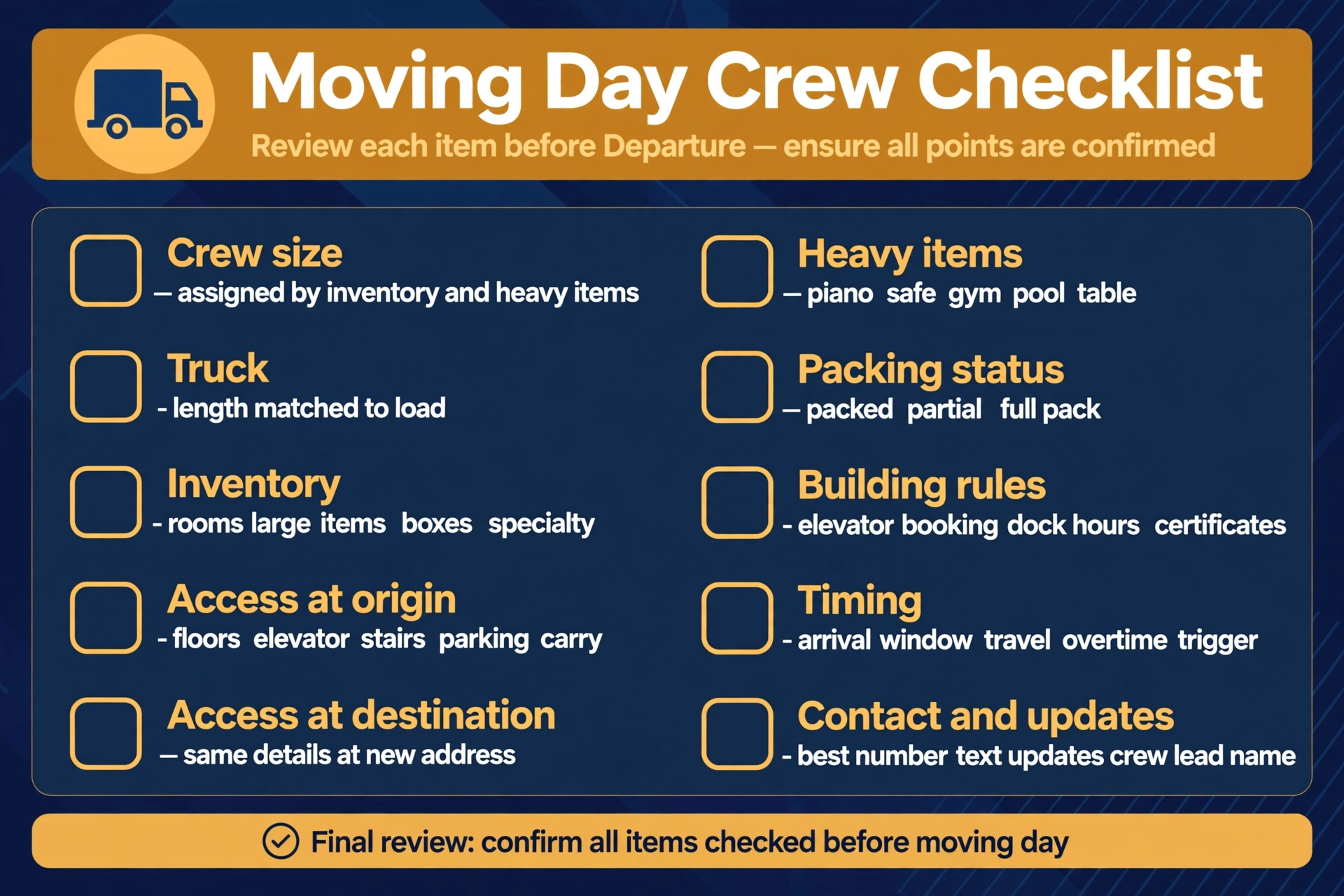
The moving day checklist below is the heart of the system, because every item on it prevents a problem on the day. Use it as a dispatch form, as a crew briefing sheet, and as a checklist the crew lead checks before leaving the depot. If an item is missing, the job is not ready to confirm, and the system should chase it rather than leave it blank.
| Checklist item | What to confirm | Why it changes the day |
|---|---|---|
| Crew size | Movers assigned by inventory and heavy items | Decides hours, cost, and damage risk |
| Truck | Truck length and capacity matched to the load | Decides trips and total time |
| Inventory | Rooms, large items, boxes, specialty pieces | Decides crew size and equipment |
| Access at origin | Floors, elevator, stairs, parking, carry distance | Decides hours and crew fatigue |
| Access at destination | Same details at the new address | Decides unloading time and surprises |
| Heavy items | Piano, safe, gym equipment, pool table | Decides extra hands and equipment |
| Packing status | Packed, partial pack, full pack service | Decides start time and materials |
| Building rules | Elevator booking, dock hours, certificates | Decides whether the crew can work at all |
| Timing | Arrival window, travel time, overtime trigger | Decides the next job and payroll |
| Contact and updates | Best number, text updates, crew lead name | Decides how delays are communicated |
Crew Sizes, Trucks and Hours That Change the Quote
Crew sizing follows patterns that recent guides repeat with useful consistency. A studio or one bedroom apartment usually works with two movers and a 10 to 16 foot truck, taking roughly three to five hours. A two bedroom home usually works with two or three movers and a 15 to 20 foot truck, taking roughly four to six hours with two movers or four to five hours with three. A three bedroom home usually needs three or four movers and a 20 to 26 foot truck, and a four bedroom home usually needs four movers and a 26 foot truck plus a second trip or a second truck.
Those patterns are starting points, not promises. Stairs, elevators, long carries, heavy items, and partial packing all add hours, and a crew rule that ignores them will underprice the job. The scheduling system should apply adders for each factor in plain language, so the customer sees why a third floor walk up costs more than a ground floor move. In recent guides, a two mover crew for two hours is reported at roughly $200 to $250, and a three mover crew for two hours at roughly $300 to $400, before travel fees and tips, which shows why crew size is also a price decision, not only a staffing decision.
Truck choice deserves the same care as crew choice. A truck that is too small forces a second trip, which doubles travel time and breaks the next job. A truck that is too large for a narrow street cannot reach the door at all. The system should check truck length against the load and street access together, and flag any job where the truck and the street do not fit. That single check prevents the most expensive scheduling error in moving, which is a crew standing beside a load it cannot carry in one trip.

Tools Compared for Moving Company Crew Scheduling
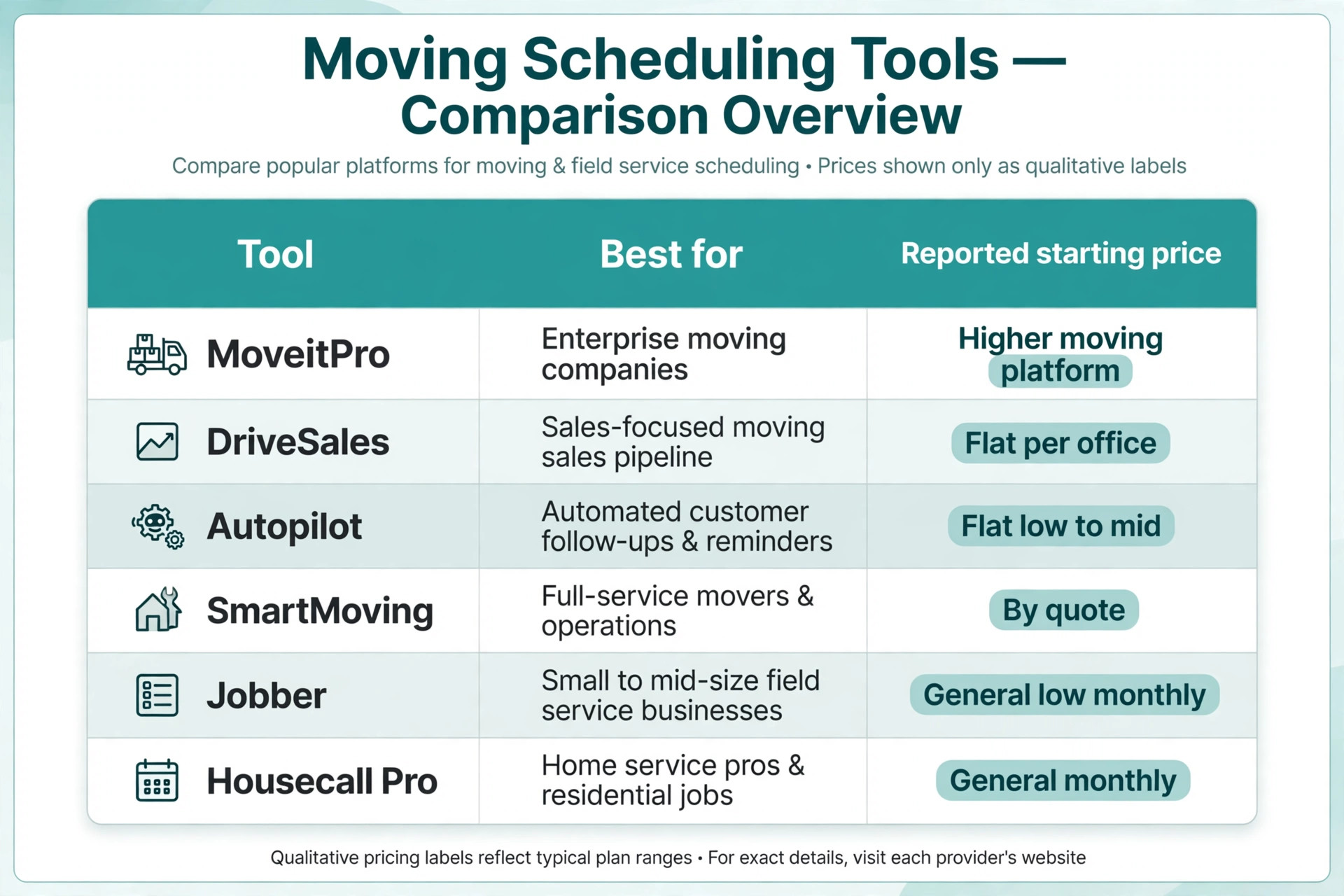
The tools below cover the main ways a moving company can run crew scheduling, from moving specific platforms to general field service systems. Prices are reported from vendor pages and comparison guides, and they change, so confirm the current price on the vendor page before choosing. The right choice depends less on the feature list and more on whether the business needs estimating, video surveys, dispatch, and crew apps in the same tool or only needs a schedule board.
| Tool | Best for | Reported starting price | Trade off |
|---|---|---|---|
| MoveitPro | Small to mid size movers wanting the full platform | About $310 to $449 a month reported, Lite from about $200 a month | Full moving depth, but higher price and longer terms |
| DriveSales | Movers wanting flat per office pricing with unlimited users | Core about $99 a month, Ops about $299 a month reported | No per seat charges, but full dispatch sits on higher tiers |
| Autopilot | Smaller fleets wanting flat pricing for estimates and crew scheduling | About $49 to $299 a month flat reported | Simple flat price, but less moving specific depth |
| SmartMoving | Owner operated and regional movers replacing spreadsheets | Pricing by quote, not published in recent guides | Strong moving workflow, but no public price to compare |
| Jobber | Multi trade firms that also run moving work | About $29 to $49 a month for one user on annual billing in recent guides | Strong all rounder, but no native moving estimates |
| Housecall Pro | Mobile first teams wanting booking plus payments | About $59 a month for one user on annual billing in recent guides | Easy field use, but moving specific logic needs setup |
MoveitPro
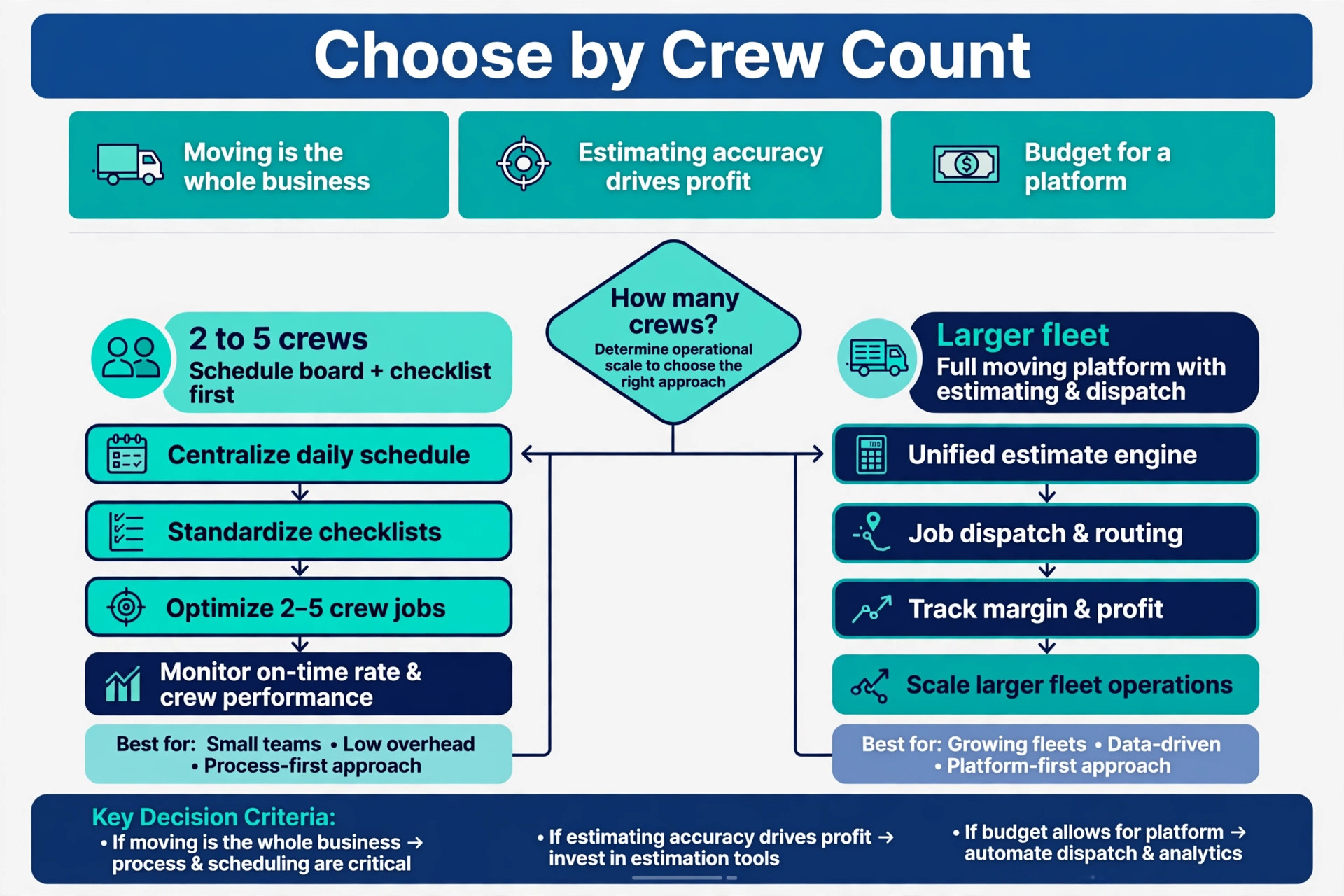
MoveitPro suits a moving company that wants estimating, dispatch, a built in phone system, storage management, and a crew app in one platform, with online booking and an AI inventory build from a customer video. Published pricing in recent guides runs about $310 to $449 a month on longer agreements, with MoveitPro Lite from about $200 a month and crew app seats at about $20 per user. Choose it if moving is the whole business and estimating accuracy drives profit. Skip it if the fleet is tiny, because the price buys depth a two crew company may not use yet.
DriveSales
DriveSales suits a mover that hates per seat pricing, because its plans are flat per office with unlimited users in recent guides, starting at about $99 a month for Core and about $299 a month for Ops with move management and dispatch. The full set, including a crew app and warehouse management, is reported at about $599 a month. Choose it if the team is growing and per seat bills would climb fast. Skip it if the business only needs scheduling, because the lower tier leaves dispatch behind a paywall.
Autopilot
Autopilot suits a smaller fleet that wants estimates, crew scheduling, confirmation texts, payments, and review requests for a flat monthly price reported at about $49 to $299 a month, with the phone system and AI receptionist on the higher Scale tier. Choose it if simple flat pricing matters more than deep moving features. Skip it if the business needs tariff handling, storage, or complex interstate work, because a moving specialist covers those better.
SmartMoving
SmartMoving suits an owner operated or regional mover replacing spreadsheets and phone dispatch, because it combines lead management, estimates, crew scheduling and dispatch, digital documents, and invoicing in one system. Pricing is not published in recent guides, so a demo quote is needed before budgeting. Choose it if the workflow fit matters more than a public price. Skip it if the business needs to compare prices quickly without a sales call, because quote based pricing slows that comparison.
Jobber
Jobber suits a business that runs moving work alongside other services and wants one system for quoting, scheduling, invoicing, and payments. The trade off is that moving estimates, inventory, and crew sizing must be adapted rather than used natively, so a pure moving company should test whether the workaround holds up on a peak Saturday. Choose Jobber if moving sits beside other trades. Skip it if moving estimates drive the business, because a specialist tool sizes crews from inventory better.
Housecall Pro
Housecall Pro suits a team that works mostly from phones and wants customers to book, pay, and receive updates from the same flow. The trade off is that advanced features sit on higher tiers, so the entry price does not buy the full dispatch and automation set. Choose it if mobile field use and payments matter most. Skip it if the business needs moving specific inventory and crew logic, because that depth lives in specialist tools.
Pricing, Deposits and Overtime Rules
A business that decides to use AI for moving company crew scheduling still needs pricing rules that customers can understand in one reading. Publish an hourly rate by crew size, a travel fee rule, a minimum hours rule, and a list of add ons for stairs, long carries, packing, and specialty items, with a note that unusual homes need a survey quote. Customers who can work out their own approximate price before booking are more likely to complete the booking, and less likely to argue about the final bill, because the price logic was visible from the start.
Deposits are the single most effective cancellation control for moving. A deposit taken at booking makes the date real for the customer and gives the business something to hold if the customer cancels after crews have been assigned. State the deposit rule, the cancellation window, and the refund rule on the booking page itself, not buried in terms that nobody reads. A cancellation window tied to the move date, with a deposit kept or moved to a new date, is a fair balance for most local work.
Handling Call Offs, Access Surprises and Peak Days
Call offs change a moving day more than any other single factor, and a business that decides to use AI for moving company crew scheduling must treat them as a normal part of the week rather than a surprise. Keep a standby list ranked by skill, location, and recent hours, and let the system notify standbys in order the moment a gap appears. Some movers worry that standby duty is unfair, so explain the standby pay rule clearly and rotate the list, because a standby system that feels unfair will empty itself within a month.
Access surprises are the second most common cause of a ruined day. A crew that cannot park, cannot book an elevator, or cannot fit a sofa through a stairwell will lose hours and annoy the next customer. The booking form should ask about parking, building entry, elevator windows, and stair turns, and the reminder message should ask the customer to confirm that building bookings are still in place. For elevator buildings, use a clear written process that the customer agrees to at booking, including the reserved window and who holds the certificate, rather than improvising on arrival.
Peak days need a dispatcher decision before the week starts. Month end Saturdays, holiday weekends, and the first days of a month should carry a crew cap, a truck cap, and a rule for which jobs get priority when demand exceeds crews. The system should show peak demand early, so the office can hire temporary help, split jobs across days, or quote a later date honestly instead of overbooking. That planning costs an hour a week, but it prevents a Saturday where three jobs wait for two crews.

Measuring What Crew Scheduling Earns
A crew scheduling system should pay for itself in recovered hours and protected jobs, and the only way to know is to measure a small set of numbers every month. Start with the on time start rate, meaning the share of jobs that start within the promised window, because that is the number that decides how many customers recommend the company. Then measure the crew accuracy rate, meaning the share of jobs where the planned crew size matched the actual need, and the call off coverage rate, meaning the share of call offs filled before the start time.
Add two money numbers to those three service numbers. The first is revenue per crew day, which shows whether crews are filling with real work or with short jobs that leave gaps. The second is repeat and referral rate, meaning the share of jobs that come from past customers or referrals, because referred customers cost far less to win than new ones. If the on time rate rises but crew accuracy does not, the problem is inventory quality, not dispatch speed. If crew accuracy rises but revenue per crew day does not, the problem is pricing or job length, not scheduling.

Mistakes That Undo a Good Moving Setup
The most common mistake is launching the schedule board before the crew sizing rules are finished. Dispatchers assign crews from habit, the board looks tidy, and the crews still arrive wrong sized, because the inventory questions were never standardised. Finish the crew rules by home size and heavy items, test them with five real past jobs, and only then trust the board to suggest crews. A week spent on crew rules saves a month of late jobs.
The second mistake is letting the system schedule every job type without limits. A business that allows auto scheduling for pianos, multi stop moves, and storage jobs will receive jobs it cannot safely staff at the quoted crew size, and the reassignments that follow damage trust. Limit auto scheduling to standard homes with complete inventories, and route everything else to a dispatcher with a clear time promise. When owners choose to use AI for moving company crew scheduling in this limited way, the system feels helpful rather than reckless, because it knows its own limits.
The third mistake is ignoring the crew leads. If the crew leads do not trust the dispatch sheet, they will start calling the office to double check every job, and the office will have two scheduling systems instead of one. Involve the crew leads in designing the inventory questions, show them how access details now arrive before dispatch, and fix the first three dispatch errors they report. A system the crew leads trust is a system that actually gets used, and a system they work around is just an extra cost.
Verdict, Is It Worth It for a Small Moving Company
For a small moving company with two to five crews, the case is strong, provided the setup is done in the right order. Fix the crew sizing rules, build the moving day checklist, set the deposit and overtime rules, and only then add automated answering and crew suggestions. Done in that order, the system recovers missed enquiries, prevents wrong sized crews, and sends crews out with the information they need to finish the job on time. The monthly software cost is usually smaller than the value of one saved Saturday, and most companies lose more than one Saturday a season to crew chaos alone.
The case weakens when the business wants software to replace dispatcher judgment entirely. No automated system can judge a narrow stair turn from a form, price a piano move from a photo alone, or calm an upset customer as well as a person can. The businesses that get the best return from this approach are the ones that use AI for moving company crew scheduling for speed and coverage, while keeping people in charge of complex jobs, overtime, and final crew decisions. That split is not a compromise. It is the whole point, because speed wins the booking and judgment keeps the customer.
Start small if the budget is tight. A schedule board with the crew checklist and automated reminders will already recover a large share of the losses, and an AI answering add on can wait until the crew rules are proven. Measure the five numbers from the earlier section for a month, compare them with the month before, and let the results decide the next spend. If the numbers move, expand. If they do not, fix the inventory form or the crew rules before buying more software, because another tool will not fix a broken crew rule.
More Reading on Stratilyze
For a related field service system, read best CRM for cleaning companies and best route scheduling software for pool service companies. For a booking guide in a different trade, see use AI for carpet cleaning booking.
Frequently Asked Questions
How much does moving company scheduling software cost
A small mover can start at a low monthly cost with a general field service system, while a moving specific platform typically starts around $99 to $310 a month in recent guides, before crew app seats and add ons. Pricing varies widely by plan and by whether users are charged per seat or per office, so model the bill at the real crew count. Confirm the current price on the vendor page before buying, because plans and add on prices change often.
How many movers do I need for a three bedroom house
A three bedroom home usually needs three or four movers with a 20 to 26 foot truck in recent guides, depending on packing status, stairs, and heavy items. A fully packed home with ground floor access sits at the lower end, while a home with stairs, a piano, or a long carry sits at the higher end. A video survey or a detailed inventory gives a firmer crew size than bedroom count alone.
What happens when a crew member calls off on moving day
The dispatcher should fill the gap from a ranked standby list, notify the customer of any revised arrival time early, and adjust the crew plan before the job starts. When owners choose to use AI for moving company crew scheduling, the system should notify standbys in order and update the customer automatically once cover is confirmed. A call off becomes a disaster only when there is no standby list and no early customer update.
Should a moving company take deposits at booking
A deposit is usually worth it, because it cuts cancellations and confirms that the customer is serious about the date. The deposit rule, the cancellation window, and the refund rule should all appear on the booking page before payment, so there is no surprise later. Companies that worry about losing price sensitive customers can offer deposit free booking for repeat customers while requiring deposits from first time bookings.
How do I handle elevator and parking rules at a building
Ask about elevator bookings, dock hours, parking, and certificate requirements at both addresses during the estimate, not on moving day. The customer should confirm the elevator window and the parking plan in writing, and the reminder message should ask them to confirm those details are still in place. If a building rule blocks the crew, the job needs a dispatcher decision before the truck leaves, not improvisation on arrival.
Can automated scheduling work for a two crew moving company
Yes, and it often helps a small company more than a larger one, because a small dispatcher juggles sales, dispatch, and customer calls at once. A schedule board plus reminders can prevent double bookings and missed enquiries without hiring office staff, and the crew checklist means crews arrive prepared instead of guessing. Start with scheduling and reminders, add video surveys when the volume justifies it, and keep complex jobs on a dispatcher review list.