

Compare the three ways to feed ten guests. A restaurant means booking weeks ahead and paying for a room you do not control. Catering means trays and food that has waited too long. A personal chef means someone cooks in your kitchen, serves at your table, and cleans up after, with a menu built for your guests. The comparison only works if the booking is as good as the cooking, and that is where many chefs lose work. Clients who decide to use AI for personal chef booking usually do so after a week of lost messages, unclear menus, and a diary that cannot answer the simplest question, which is whether the chef is free on the date that matters.
Personal chef booking is harder than ordinary appointment booking, because a booking is not one service of a fixed length. It is a menu, a headcount, a set of dietary needs, a kitchen check, a shopping list, a service style, and a cleanup plan, and every one of those details changes the price, the time, and the chef the client needs. A system that books a flat two hour slot and asks nothing else will send a chef to a kitchen without the right equipment, for a party size the menu was never planned for, with an allergy the chef first hears about at the door. That is not a booking system. It is a recipe for a difficult evening.
This guide builds a booking workflow that captures the menu, the dietary needs, and the kitchen details before the chef shops, matches the right chef to the right evening, and closes the booking with a clear total price and a plan for the night. It covers the booking questions that prevent surprises, the tools and platforms that handle chef booking well, the pricing and cancellation rules that protect both sides, and the measures that show whether the system is earning its keep. Prices quoted here come from vendor pages and comparison guides checked at writing time, so confirm the current price on the vendor page before buying.
Why Personal Chef Bookings Go Wrong
Most personal chefs lose money in three quiet places, and none of them appears as one large bill. The first is the slow reply. A client planning a birthday, an anniversary, or a business dinner often contacts three chefs at once, and the chef who replies first with a clear menu and price usually wins the booking. A chef who is cooking, shopping, or driving cannot reply instantly, and a message left unanswered overnight is often a booking lost to a rival by morning, even when the slower chef is the better cook.
The second leak is the vague booking. A client who books online and writes only “dinner for ten” leaves the chef guessing about allergies, dietary needs, courses, service style, kitchen equipment, and whether groceries are included. The chef shops for the wrong menu, arrives to find a kitchen without an oven large enough for the plan, or discovers a severe allergy during service. The evening can still be saved, but it costs stress, extra shopping, and a client who feels the chef was unprepared, even when the information was never given.
The third leak is the price surprise. Personal chef pricing varies widely by model, with some chefs charging per guest, some by the hour, and some by the week for meal prep, and with groceries sometimes included and sometimes billed separately. A booking that does not state the model, the inclusions, and the extras in writing will produce a bill the client did not expect, and a client who feels overcharged rarely books again, however good the food was. A clear booking system prevents that outcome by putting the total, the inclusions, and the extras in front of the client before confirmation.
How to use AI for personal chef booking without losing the human touch
The best way to use AI for personal chef booking is to let software handle the routine parts and keep people in charge of the judgment calls. Software should answer enquiries, collect the booking details, check the diary, send menu proposals, and remind the client. A person should design the menu, judge a complex dietary need, approve a price for a premium menu, and handle a nervous client planning a once in a lifetime evening. When that split is clear, clients get fast answers and the chef keeps the personal reputation that wins repeat bookings.
Start by defining what the system may book on its own. Standard menus with published per guest prices, standard headcounts, and standard service styles are safe to automate, because the menu, the time, and the price are known in advance. Anything outside that list, such as a large party, a complex allergy, a multi day event, a kitchen with major limits, or a menu built around a rare cuisine, should go to the chef for a menu call within a stated time. Clients accept a menu call when the system tells them exactly when it will happen and keeps that promise.
Tone matters as much as speed, because the client is trusting a stranger with their home, their guests, and their food. Booking messages should sound like the chef, with the chef’s name, the service area, and real turnaround times, and they should never promise a menu outcome, such as guaranteeing a dish for a severe allergy, before the chef has checked it. Test the system with awkward questions, including nut allergies, vegan and halal needs, children at the table, and kitchens in rented homes, and listen to how it answers before it goes live. A fast answer that sounds careless will cost more trust than a slow answer ever could.
The Chef Booking Workflow, Step by Step
A strong booking workflow moves a client from first contact to a served, cleaned up evening in nine steps. Each step has one job, and skipping a step is what creates the surprises that ruin a dinner. The steps below work for a solo chef and for a small chef team, and they work whether the first contact is a phone call, a website form, or a platform message.
1. Capture the enquiry the moment it arrives. An AI phone answer service or a website booking form takes the name, phone number, date, location, and occasion before anything else, so no enquiry is lost to a missed call or an unanswered message. 2. Collect the party and dietary details. Ask for headcount, ages where relevant, allergies, dietary needs, and food dislikes, using tap choices where possible so clients can answer quickly on a phone. 3. Agree the menu shape. Ask for courses, service style, cuisine preference, and any must have or must avoid dishes, so the chef can propose a menu that fits the evening rather than a generic list. 4. Check the kitchen and the shopping plan. Ask about oven, hob, fridge space, equipment, and whether groceries are included or billed separately, so the chef shops correctly and arrives prepared. 5. Give a total price, not a partial price dressed as a quote. State the per guest or event price, grocery treatment, travel, service staff, and extras, so the client sees the full cost before confirming. 6. Confirm with a deposit where the chef uses one. A deposit for a date that blocks the chef’s evening cuts cancellations and protects the chef when a client cancels after shopping has started. 7. Send preparation instructions and reminders. Tell the client what to clear, what equipment to leave out, when the chef will arrive, and who will be home to let the chef in, then remind them the week before and the day before. 8. Cook, serve, and clean up on the night. Arrive in good time, cook to the agreed menu, serve at the agreed pace, and leave the kitchen clean, with leftovers stored and labelled as agreed. 9. Close the loop after the evening. Send a thank you, the menu record, storage notes for leftovers, and a request for a review, so one dinner becomes a repeat booking rather than a one off event.

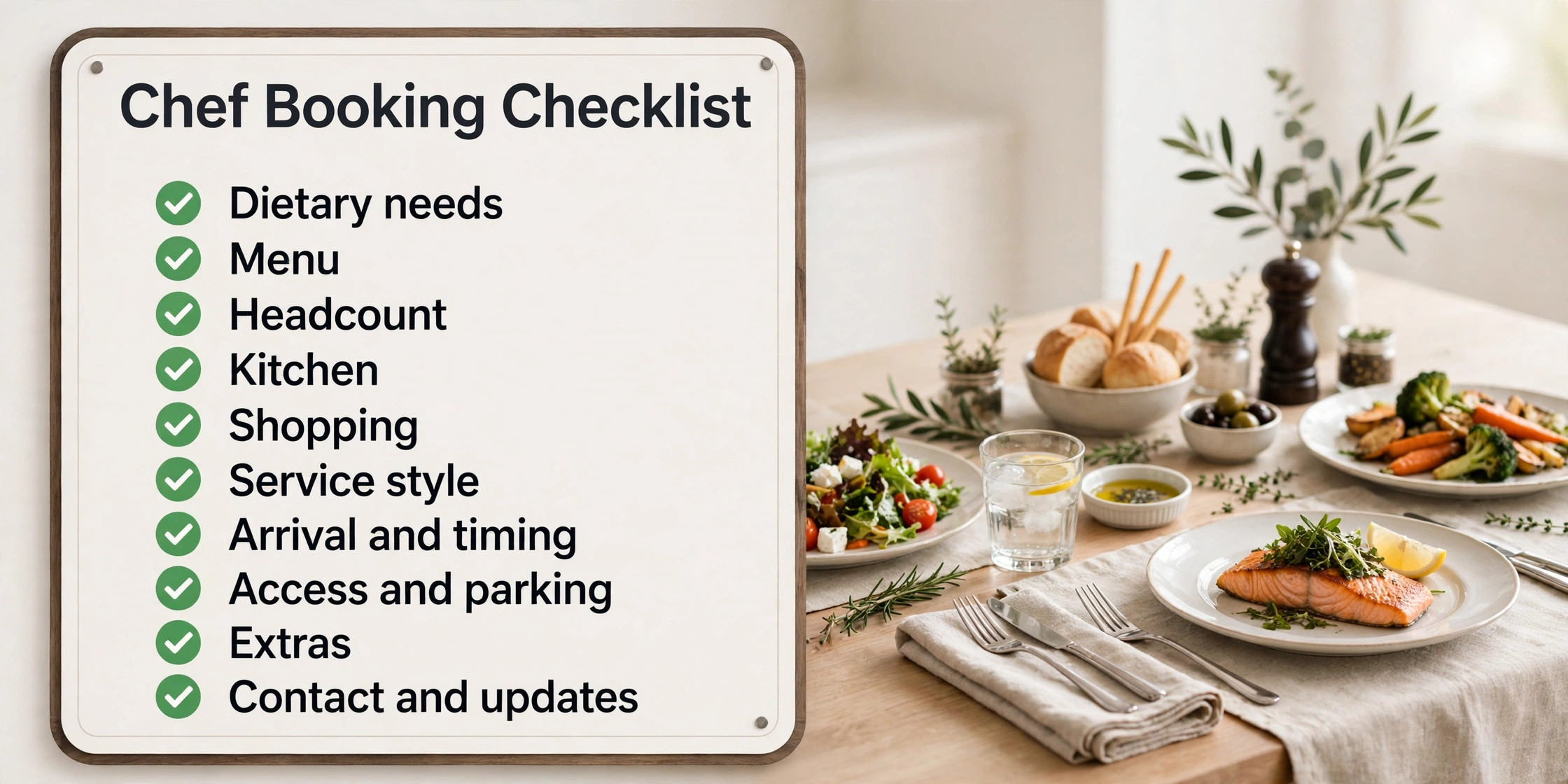
The Chef Booking Checklist
The chef booking checklist below is the heart of the system, because every question on it prevents a problem on the night. Use it as a booking form, as a menu call script, and as a checklist the chef checks before shopping and again before leaving for the client’s home. If an answer is missing, the booking is not ready to confirm, and the system should chase it rather than leave it blank.
| Checklist item | What to ask | Why it changes the evening |
|---|---|---|
| Dietary needs | Allergies, vegan, vegetarian, halal, kosher, gluten free | Decides menu safety and dish design |
| Menu | Courses, cuisine, must have and must avoid dishes | Decides shopping and cooking time |
| Headcount | Confirmed guests, children, final count deadline | Decides quantities and price |
| Kitchen | Oven, hob, fridge space, equipment, counter space | Decides what can actually be cooked |
| Shopping | Groceries included or billed separately, receipts, budget | Decides total price and transparency |
| Service style | Plated, family style, buffet, canapes, meal prep | Decides staff, timing, and equipment |
| Arrival and timing | Arrival time, serving time, event end time | Decides cooking schedule and pace |
| Access and parking | Entry, parking, who lets the chef in | Decides arrival and setup time |
| Extras | Service staff, bartender, rentals, wine pairing | Decides total price and staffing |
| Contact and updates | Best number, text or email preference, final count contact | Decides how updates and changes arrive |
Keep the form short enough to finish on a phone in under four minutes, using tap choices for dietary needs, service style, and course count, with only one open text box for anything unusual. Review completed forms weekly for the first month, and remove any question that clients keep skipping or answering wrongly, because a question that produces bad data is worse than no question at all. The chef should also confirm the final headcount by a stated deadline, because a menu shopped for eight cannot stretch to twelve without a new shopping trip and a new price.
Not all chef bookings cost the same. A flat event price will either overcharge a small dinner or lose money on a large party. A dinner for two, a dinner for ten, and a weekly meal prep visit differ in shopping, cooking, and service time, and the system must show those differences. In recent chef pricing guides, an in home dinner is often reported at $65 to $150 per guest including menu, groceries, cooking, service, and cleanup, with a dinner for around ten reported at $900 to $1,600 in total, while weekly meal prep is often reported at $200 to $350 per week, and the chef should publish their own version with clear inclusions, rather than copying another chef’s prices.
Headcount changes the price in a way that clients often underestimate. A menu for four can be cooked on a standard hob with standard pans, while a menu for twenty may need extra staff, rented equipment, and a longer service, and the per guest price may fall as headcount rises because fixed costs spread further, or rise if extra staff are needed. The booking system should show how the price moves with headcount, and it should lock the final price at the final headcount deadline, so neither side is surprised when two extra guests are added the day before.
Kitchen limits change the menu more than any other single factor, and a booking system that ignores the kitchen will produce a menu that cannot be cooked. A small oven, a single hob ring, a fridge with no space, or a kitchen with no counter space all limit what a chef can do, and the honest answer is sometimes a simpler menu, a different service style, or rented equipment. The survey should ask about oven, hob, fridge, and equipment in plain words, with photos where helpful, and the chef should confirm the menu against that kitchen before shopping, not after arriving with groceries for a menu the kitchen cannot support.

Tools Compared for Personal Chef Booking
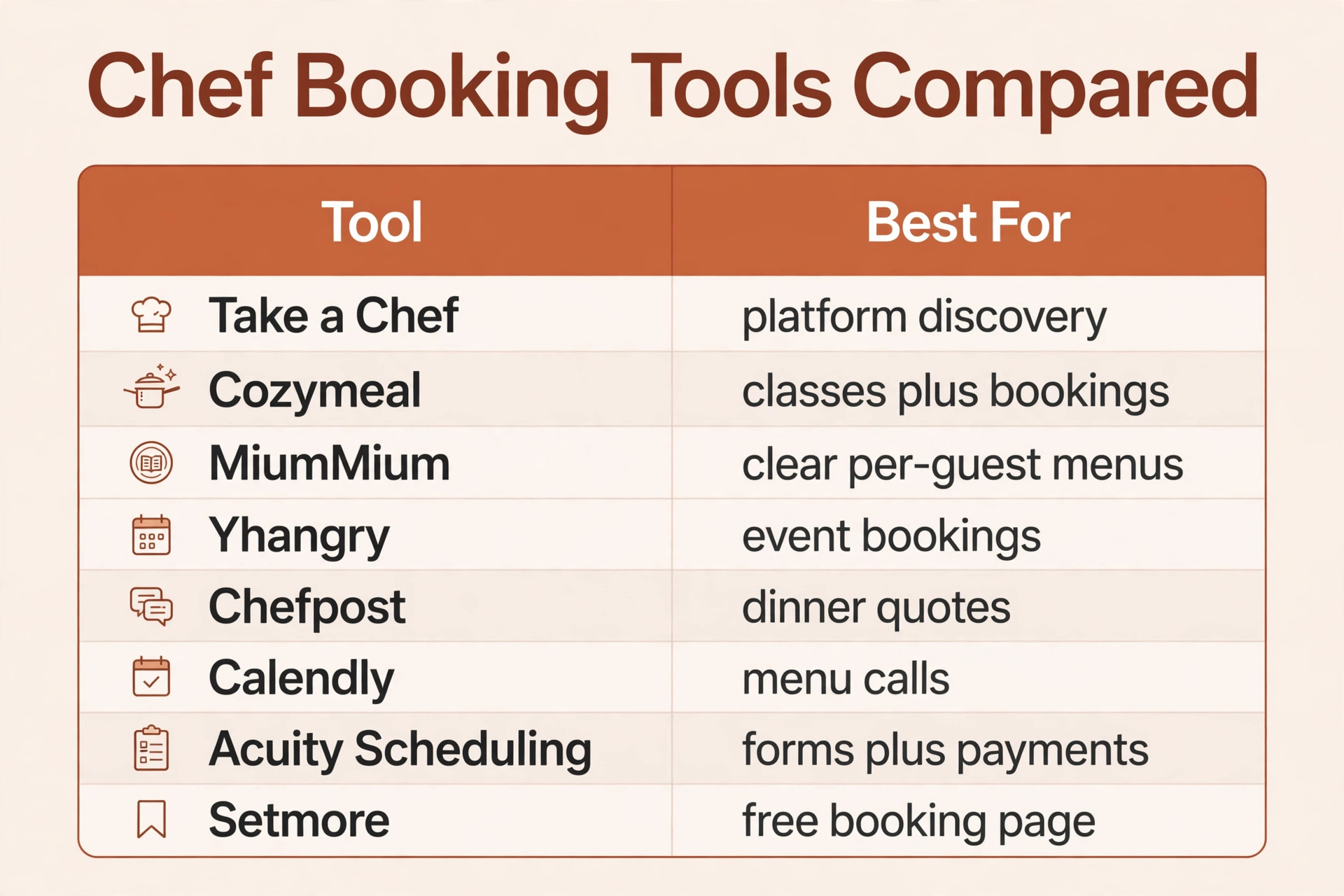
The tools below cover the main ways a personal chef can run bookings, from chef platforms to general booking and payment tools. Prices are reported from vendor pages and comparison guides, and they change, so confirm the current price on the vendor page before choosing. The right choice depends less on the feature list and more on whether the chef needs client discovery, menu proposals, payments, and messaging in the same tool or only needs a booking page.
| Tool | Best for | Reported starting price | Trade off |
|---|---|---|---|
| Take a Chef | Chefs wanting platform discovery and managed bookings | Commission per confirmed booking in recent guides | Brings clients, but takes a commission |
| Cozymeal | Chefs wanting bookings plus classes and team events | Commission per booking in recent guides | Broad demand, but less control over pricing |
| MiumMium | Chefs wanting transparent per guest menus and local discovery | Commission and pricing per platform terms in recent guides | Clear menus, but availability varies by city |
| Yhangry | Chefs wanting event bookings with clear hourly and event rates | Platform terms per booking in recent guides | Clear event pricing, but availability varies by city |
| Chefpost | Chefs wanting per guest dinner pricing and quote matching | Platform terms per booking in recent guides | Strong dinner focus, but less meal prep depth |
| Calendly | Solo chefs booking menu calls and tastings | Free for one event type, paid from about $10 a seat a month in recent guides | Simple and familiar, but no menu or payment depth |
| Acuity Scheduling | Solo chefs wanting booking with intake forms and payments | Paid plans reported from about $16 a month in recent guides | Good forms and payments, but not chef specific |
| Setmore | Solo chefs wanting a free or cheap booking page | Free for up to four users, Pro about $5 a user a month in recent guides | Great booking page, but no menu workflow |
Take a Chef
Take a Chef suits a chef who wants platform discovery, with clients browsing chefs, menus, and reviews, and bookings managed through the platform rather than through endless messages. Its strength is demand, though the business should check the commission and the payment timing carefully, because a platform booking is only profitable when the net price after commission still covers shopping, cooking, and travel.
Cozymeal
Cozymeal suits a chef who wants bookings plus cooking classes and team building packages, which raise the average booking value and give a second income line beyond straight meal preparation. Its breadth is attractive, though the chef has less control over the client relationship than with a direct booking system, and the platform rules must be read before listing.
MiumMium
MiumMium suits a chef who wants transparent per guest pricing, with real menus shown to clients in the area, so the client can budget before contacting the chef. Its clarity helps conversion, though availability and demand vary by city, and the chef should still confirm dietary needs and kitchen details directly before shopping.
Yhangry
Yhangry suits a chef who wants event bookings with a clear structure, including shopping by the chef, arrival before serving time, and the client’s own equipment for service. Its event focus helps dinner parties, though the chef should confirm what equipment the client must provide, because that detail is easy to miss and hard to fix on the night.
Chefpost
Chefpost suits a chef who wants per guest dinner pricing, with clients matched to vetted chefs and real quotes for their city, date, and menu. Its dinner focus is strong, though a chef whose main work is weekly meal prep should check how well that service type is supported before relying on the platform alone.
Calendly
Calendly suits a solo chef who mainly needs to book menu calls, tastings, and consultations without a full platform. It is simple and familiar, but it cannot hold a menu, track dietary needs, or manage grocery billing, so it works best as a front door that feeds into a proper booking and menu system behind it.
Acuity Scheduling
Acuity Scheduling suits a solo chef who wants booking with intake forms, deposits, and payments in one tool, with clients able to choose a service, answer dietary questions, and pay a deposit at booking. Its forms are the attraction, though it is not chef specific, so menu, kitchen, and shopping questions must be built deliberately into the form.
Setmore
Setmore suits a solo chef who wants a free or cheap booking page with staff calendars and reminders, and is willing to run menus separately. The low cost is attractive at the start, but the chef should plan the moment when booking volume makes a dedicated chef platform or a fuller scheduling system worth paying for, rather than letting messages take over.
Pricing, Deposits and Cancellation Rules
A business that decides to use AI for personal chef booking still needs pricing rules that clients can understand in one reading. Publish the pricing model, whether per guest, per event, hourly, or weekly for meal prep, state whether groceries are included or billed separately, and list the extras for service staff, bartender, rentals, and travel. Clients who can work out their own approximate total before booking are more likely to complete the booking, and less likely to argue about the final bill, because the price logic was visible from the start.
Deposits are the most effective cancellation control for a personal chef. A deposit taken by card at booking, sized to cover shopping and the blocked evening, makes the date real for the client and gives the chef cover if the client cancels after shopping has started. State the deposit rule, the cancellation window, and the refund rule on the booking page itself, not buried in terms that nobody reads. A clear window, with the deposit kept or moved to a new date when cancellation is late, is a fair balance for most private dining work, and it should also state the final headcount deadline, after which the price is locked.
Handling Allergies, Large Parties and Difficult Kitchens
Allergies change a chef booking more than any other single factor, and a business that decides to use AI for personal chef booking must treat them as a safety issue, not as a preference note. Ask about allergies separately from dietary preferences, ask about severity where shared, and whether it has ever caused a serious reaction. The chef should confirm in writing which dishes are safe, which are adapted, and what cross contact steps will be taken, and the client should confirm that before shopping. A booking system should hold an allergy booking as provisional until the chef has reviewed it, because a menu promised by software for a severe allergy is a risk no booking fee can cover.
Difficult kitchens need a human decision before a menu is promised. A kitchen with a small oven, limited hob space, no fridge room, or no counter space may still work, but only with a simpler menu, a different service style, or rented equipment. The system should flag kitchen limits automatically from the survey answers and hold the menu as provisional until the chef reviews it. That pause costs a few hours, but it prevents a chef arriving with groceries for a menu the kitchen cannot support, which is the fastest way to ruin an otherwise good evening.

Measuring What Chef Booking Earns
A booking system should pay for itself in recovered enquiries and filled evenings, and the only way to know is to measure a small set of numbers every month. Start with the answer rate, meaning the share of enquiries that receive a reply within five minutes, because that number decides how many enquiries become menu calls. Then measure the menu call to booking conversion rate, meaning the share of menu calls that become confirmed bookings, and the cancellation rate, meaning the share of confirmed bookings that cancel before the night.
Add two money numbers to those three service numbers. The first is revenue per booked evening, which shows whether the diary is filling with real dinners or with low value enquiries that never convert. The second is repeat booking rate, meaning the share of clients who book again within twelve months, because repeat clients cost far less to win than new ones. If the answer rate rises but conversion does not, the problem is menu or price friction, not the phone. If conversion rises but cancellations rise too, the problem is deposits or the booking form, not demand.

Mistakes That Undo a Good Chef Booking Setup
The most common mistake is launching the booking page before the menu and price model are finished. Clients book at the wrong price, the chef shops for the wrong menu, and the evening starts with a price conversation that should have happened days earlier. Finish the per guest prices, the grocery rule, and the extras list first, test them with five real past bookings, and only then open the page to clients. A week spent on pricing saves a month of bill arguments.
The second mistake is letting the system book every party size and allergy without limits. A business that allows online booking for a party of forty, or for a severe allergy menu, without a chef review will receive bookings it cannot safely fulfil at the quoted price, and the cancellations that follow damage trust. Limit automated booking to standard dinners and standard dietary needs, and route everything else to a menu call with a clear time promise. When owners choose to use AI for personal chef booking in this limited way, the system feels helpful rather than reckless, because it knows its own limits.
Verdict, Is It Worth It for a Small Chef Business
For a solo chef or a small chef team, the case is strong, provided the setup is done in the right order. Fix the menu and price model, build the chef booking checklist, set the deposit and cancellation rules, and only then add automated answering and online booking. Done in that order, the system recovers missed enquiries, books realistic evenings, and sends chefs out with the menu, the dietary record, and the kitchen information they need to cook well the first time. The monthly software cost is usually smaller than the value of one recovered dinner a month, and most chefs lose more than one enquiry a month to slow replies alone.
The case weakens when the business wants software to replace judgment entirely. No automated system can design a menu for a complex allergy from a form, judge a kitchen from a checklist alone, or calm a nervous client as well as a person can. The businesses that get the best return from this approach are the ones that use AI for personal chef booking for speed and coverage, while keeping people in charge of menus, allergies, and final prices. That split is not a compromise. It is the whole point, because speed wins the booking and judgment keeps the evening.

More Reading on Stratilyze
For a related hospitality business system, read best event management software for catering businesses and best scheduling software for home care agencies. For a different appointment workflow, see use AI for tailor fitting appointments.
Frequently Asked Questions
How much does personal chef booking software cost
A solo chef can start free or at a low monthly cost with a simple booking page, while a fuller scheduling system is reported from about $10 to $16 a month in recent guides for basic paid plans, before add ons, and chef platforms take a commission per confirmed booking instead of a flat fee in many cases.
Do clients accept booking a chef with an automated system
Most clients accept it readily when the system answers fast, asks sensible menu and dietary questions, and confirms the booking clearly, especially when a menu call is offered for complex needs. Problems arise when the system asks too many questions, gives a price that later changes sharply, or leaves the client unsure whether the chef will ever call back.
The chef should call promptly, explain the issue honestly, and offer the right next step, such as an adapted menu, a different service style, or a revised price. Do not simply cancel without contact, because that feels like rejection and often produces a bad review.
Should a personal chef take deposits at booking
A deposit is usually worth it, because it cuts cancellations and covers shopping and a blocked evening if the client cancels late. The deposit rule, the cancellation window, the final headcount deadline, and the refund rule should all appear on the booking page before payment, so there is no surprise later.
How do I handle allergies in the booking process
Ask about allergies separately from dietary preferences, confirm severity where the client shares it, and confirm in writing which dishes are safe and what cross contact steps will be taken. When owners choose to use AI for personal chef booking, the booking form should hold allergy bookings as provisional until the chef reviews them, so no menu is promised for a severe allergy before the chef has checked it.
Can automated booking work for a one person chef business
Yes, and it often helps a solo chef more than a larger team, because a solo chef misses the most enquiries while cooking, shopping, or driving. A booking page plus reminders can recover those enquiries without hiring office staff, and the checklist means the solo chef shops with real information instead of guessing.