
Home service research reports that a large share of callers who reach voicemail never call back, and security work is hit harder than most trades, because a homeowner who has just had a break in nearby, or who is moving house next week, wants a date now, not a callback tomorrow. Installers who decide to use AI for security system installer scheduling usually do so after a painful month of missed calls, double booked engineers, and vans arriving without the right panel, camera, or cable. The phone rings while an engineer is on a ladder, the diary lives in one person’s head, and the customer is left guessing whether anyone is coming.
Security scheduling is harder than ordinary booking, and generic booking pages fail installers for that reason. A security job is not one visit. It is a survey, an install day that can run from two hours to two days, a Wi-Fi and signal test, a customer handover, and often a follow up visit to adjust a camera angle or a sensor that keeps giving false alarms. Property type, door and window count, internet connection, wall material, and monitoring choice all change the time, the parts, and the skill the job needs. A system that books a flat one hour slot will send an engineer to a four bedroom house with eight cameras and expect a result the diary never allowed.
This guide builds a scheduling workflow that captures the right survey details before the van leaves, answers enquiries at any hour, books install days by real job length, and closes each job with a tested system and a customer who knows how to use it. It covers the survey questions that prevent return visits, the tools that handle security field service well, the pricing and deposit rules that protect the diary, and the measures that show whether the system is earning its keep. Prices quoted here come from vendor pages and comparison guides checked at writing time, so confirm the current price on the vendor page before buying.
Why Security Installer Diaries Break
Most security installers lose money in three quiet places, and none of them appears as one large bill. The first is the unanswered enquiry. An installer on a roof, in a loft, or under a floor cannot answer the phone, and a small team has no office staff to cover those hours. The caller, often worried about safety, moves to the next installer in the search results within minutes. That lost enquiry is not only one install, it is the monitoring contract, the maintenance visits, and the referrals that would have followed it for years.
The second leak is the under scoped job. A customer who books online and writes only “alarm and cameras” leaves the office guessing about the panel type, the camera count, the cable runs, and the Wi-Fi strength at the far end of the house. The engineer arrives, finds a solid brick wall where a simple fix was assumed, or a router too far from the camera positions, and the job runs over into the next customer’s slot. The second customer waits, the first customer watches an unfinished install, and the engineer ends the day tired and behind, which is when mistakes with sensors and wiring are most likely.
The third leak is the job that is installed but never properly handed over. The panel works, the cameras record, but the customer does not know how to arm the system, add a family member, silence a false alarm, or check a clip on a phone. False alarms follow, support calls follow, and the customer tells neighbours the system is more trouble than it is worth. A scheduling system that books a handover slot, sends a short guide before the visit, and checks understanding on the day prevents most of that damage, and it costs far less than a week of support calls.
How to use AI for security system installer scheduling without losing the human touch
The best way to use AI for security system installer scheduling is to let software handle the routine parts and keep people in charge of the judgment calls. Software should answer the phone, collect the survey details, check the diary, send the confirmation, and remind the customer. A person should decide whether a property needs a site survey, approve a price for an unusual cable run, judge a monitoring plan, and handle a worried customer after a break in. When that split is clear, customers get fast answers and the business keeps its reputation for careful, trustworthy work.
Start by defining what the system may book on its own. Standard alarm panels, standard camera kits, and doorbell cameras with published prices and known install times are safe to automate, because the parts and the time are predictable. Anything outside that list, such as a listed building, a large commercial site, a property with no reliable broadband, or a system that must integrate with existing gates, intercoms, or smart home hubs, should go to a human for a survey call within a stated time. Customers accept a survey call when the system tells them exactly when it will happen and keeps that promise.
Tone matters as much as speed in security work, because the customer is buying safety, not just hardware. Booking messages should sound like the business, with the business name, the service area, and real turnaround times, and they should never promise a security outcome the installer cannot guarantee, such as claiming a property will be fully protected by a given date before a survey. Test the system with awkward questions, including pets triggering sensors, Wi-Fi dead spots, rented properties, and landlords who need permission, and listen to how it answers before it goes live. A fast answer that sounds careless will cost more trust than a slow answer ever could.
The Scheduling Workflow, Step by Step
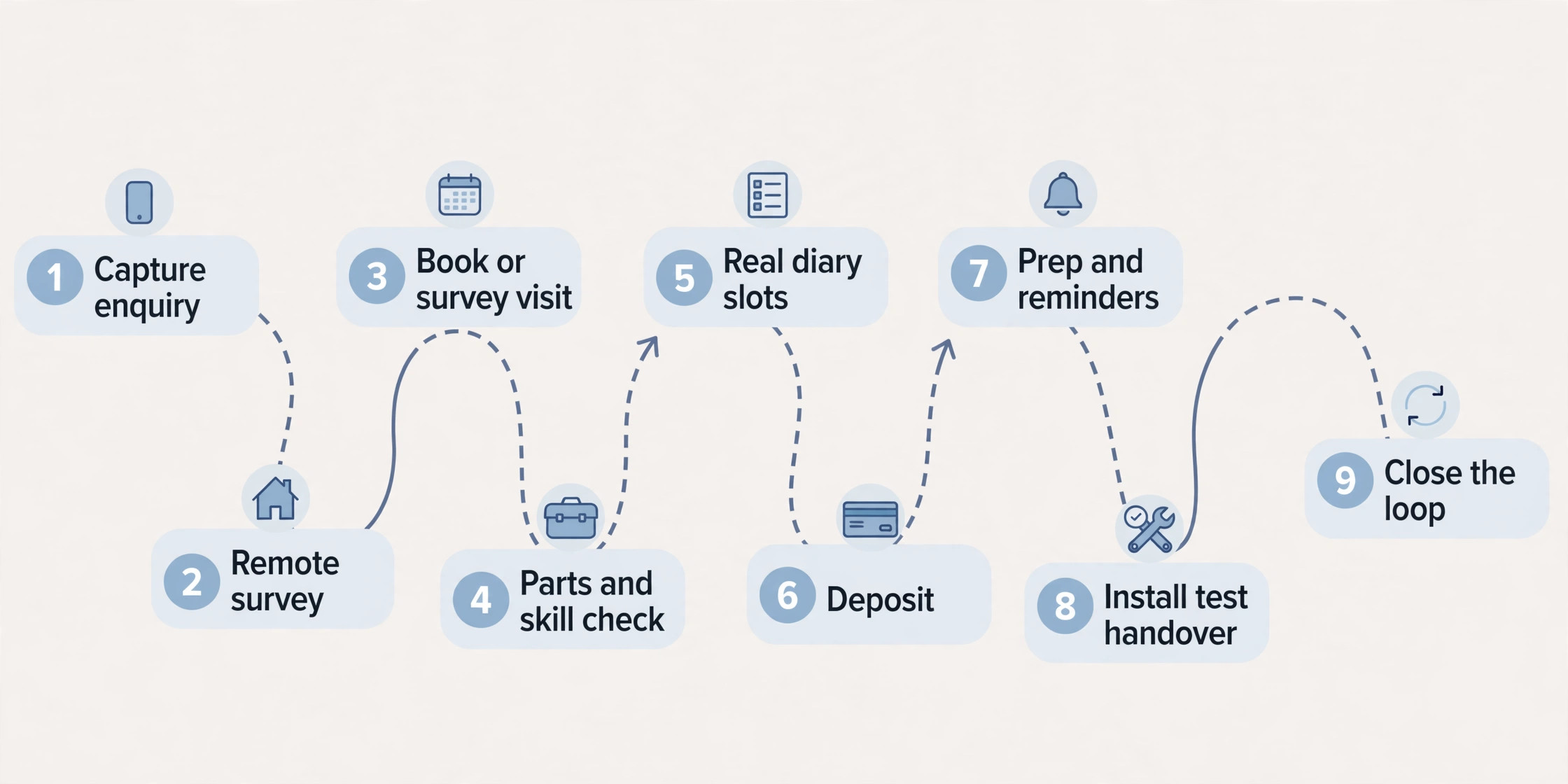
A strong scheduling workflow moves a customer from first contact to a tested, handed over system in nine steps. Each step has one job, and skipping a step is what creates the return visits that eat profit. The steps below work for a solo installer and for a small team, and they work whether the first contact is a phone call, a website form, or a message.
1. Capture the enquiry the moment it arrives. An AI phone answer service or a website booking form takes the name, phone number, property type, address area, and preferred dates before anything else, so no enquiry is lost to a missed call or an unanswered message. 2. Run a short remote survey. Ask about property size, number of doors and windows, existing alarm or cameras, broadband type and router location, and whether the customer wants monitoring, so the office can judge job size before offering a slot. 3. Decide between a direct booking and a site survey. Standard homes with clear answers can book an install day, while complex properties, weak broadband, or integration requests get a survey visit first, with the install day booked provisionally after it. 4. Confirm parts and engineer skill. Match the job to an engineer with the right experience, check panel, sensor, camera, cable, and bracket stock, and order anything missing before the install day, not on the morning of it. 5. Offer real diary slots that fit the job length. A doorbell camera and a full eight camera system need very different blocks, so the system must block time by job size, travel time, and testing time, rather than by a fixed hour for every booking. 6. Confirm with a deposit where the business uses one. A deposit for hardware ordered for a specific property cuts no shows and protects the business when a customer cancels after parts have been bought. 7. Send preparation instructions and reminders. Tell the customer what to clear, where the engineer will need access, what Wi-Fi details will be needed, and who must be home for the handover, then remind them the day before and the morning of the job. 8. Install, test, and hand over on the day. Test every sensor, every camera view, every alert, and the app on the customer’s own phone, then walk the customer through arming, disarming, adding users, and handling a false alarm. 9. Close the loop after the job. Send the handover guide, the warranty and monitoring details, a request for a review, and a maintenance reminder at the right interval, so one install becomes a long term customer rather than a one off sale.
The Install Day Checklist
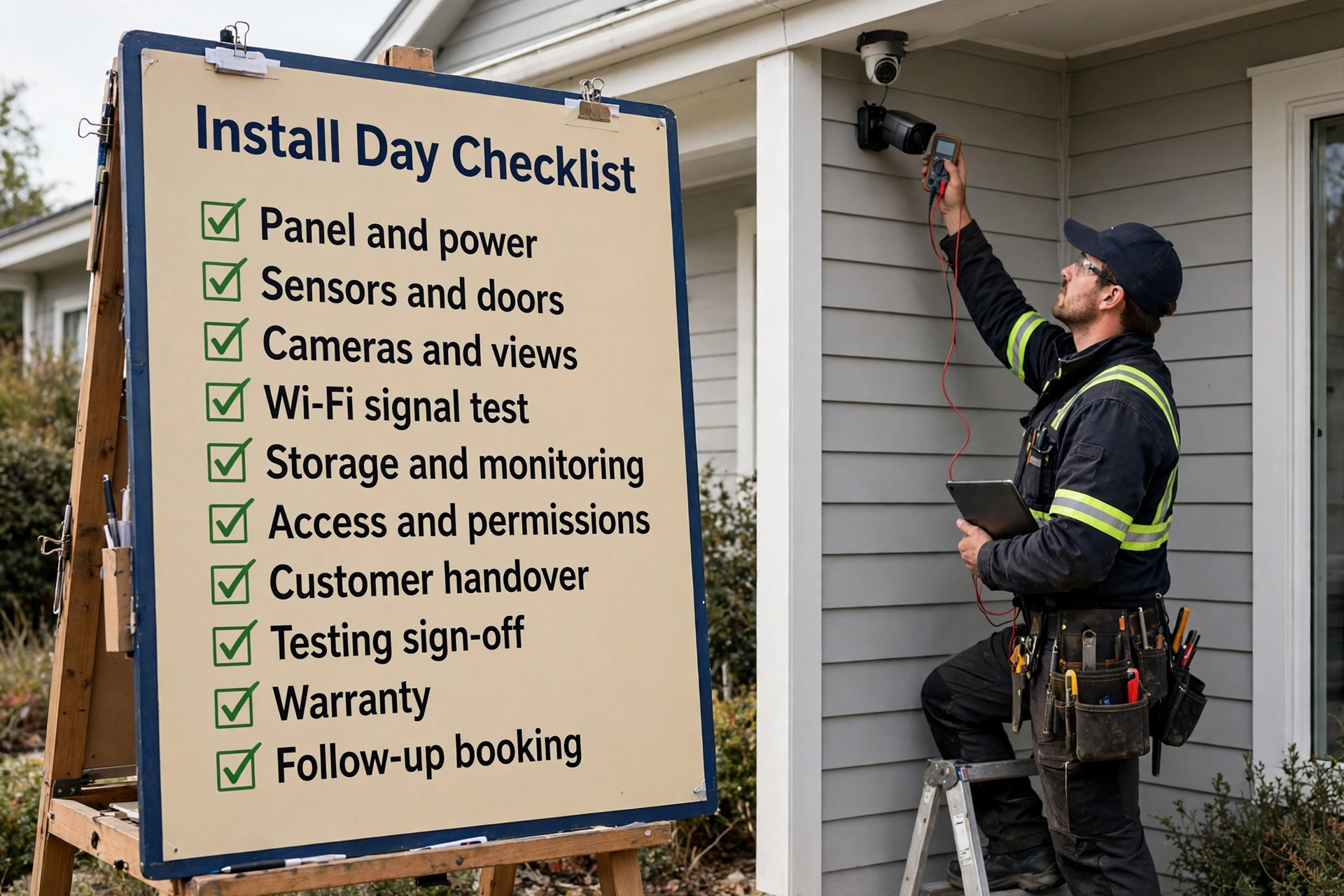
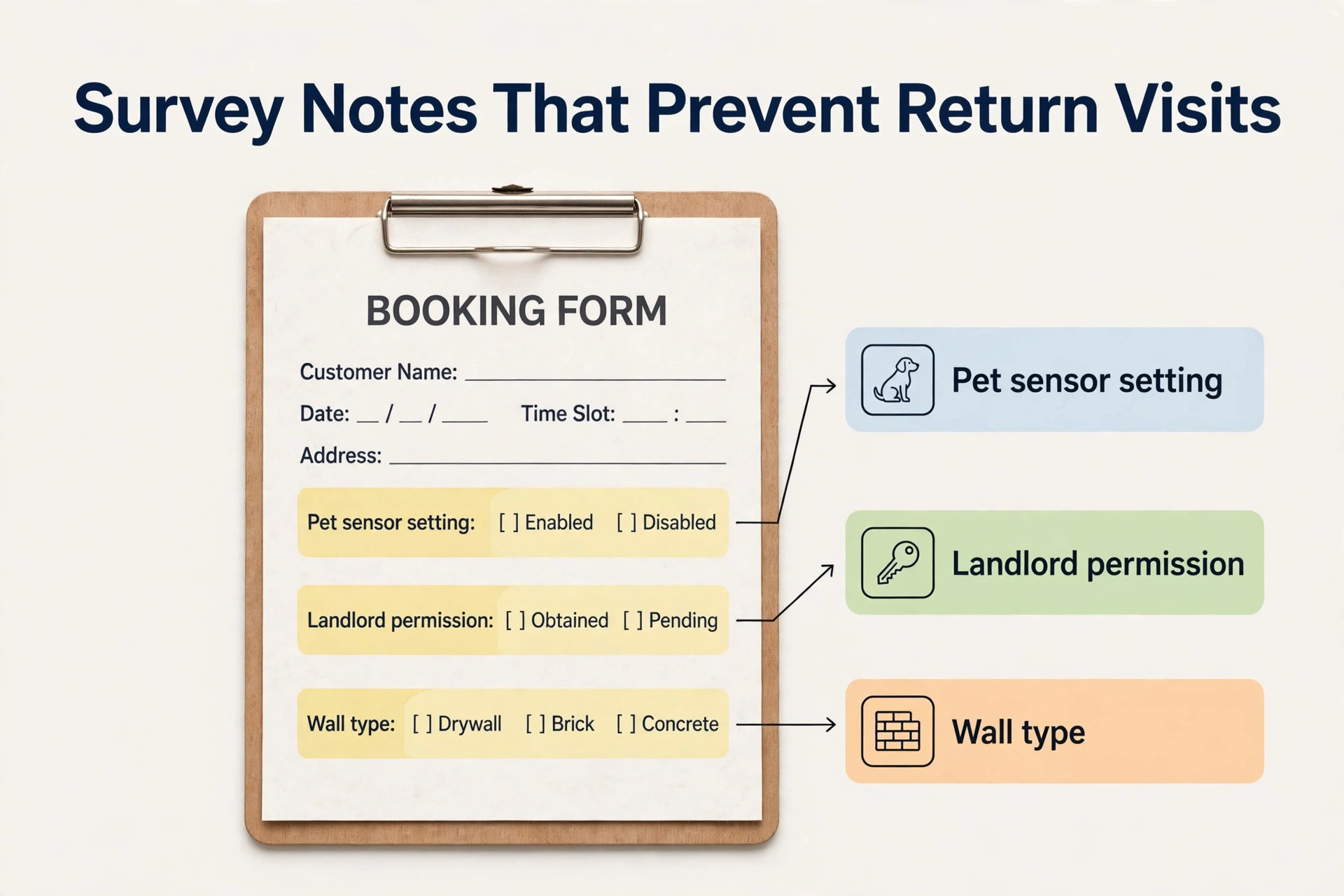
The install day checklist below is the heart of the system, because every item on it prevents a return visit. Use it as a booking form, as a survey script, and as a checklist the engineer checks before leaving the depot and again before leaving the property. If an item is missing, the job is not ready to start, and the office should chase it rather than send an engineer to improvise on site.
| Checklist item | What to check | Why it matters |
|---|---|---|
| Panel location and power | Panel position, nearby power, cable route | Decides install time and neatness |
| Sensors and doors | Door and window count, sensor types, pet settings | Decides parts and false alarm risk |
| Cameras and views | Camera positions, views, night vision needs, privacy limits | Decides brackets, cable, and storage |
| Wi-Fi and signal test | Router location, signal at each camera, broadband speed | Decides whether Wi-Fi cameras will work reliably |
| Storage and monitoring | Local storage, cloud plan, monitoring choice, contract terms | Decides monthly cost and customer expectations |
| Access and permissions | Parking, gate codes, loft access, landlord permission | Decides arrival time and legal cover |
| Customer handover | App setup, user accounts, arming routine, false alarm steps | Decides whether the customer can actually use the system |
| Testing sign off | Every sensor triggered, every camera viewed, alerts received | Proves the system works before the engineer leaves |
| Warranty and maintenance | Warranty terms, maintenance plan, support contact | Prevents support confusion after the install |
| Follow up booking | Camera angle check, sensor review, maintenance date | Catches small issues before they become complaints |
Keep the survey form short enough to finish on a phone in under four minutes, using tap choices for property type, camera count, and monitoring preference, with only one open text box for anything unusual. Review completed forms weekly for the first month, and remove any question that customers keep skipping or answering wrongly, because a question that produces bad data is worse than no question at all. The engineer should also update the form on site, so the next visit starts from real information rather than from the original guess.
Property Types, Wi-Fi and Camera Counts That Change the Job
Not all properties cost the same to secure, and a scheduling system that charges one flat install price will either overcharge a small flat or lose money on a large house. A flat with one door and a doorbell camera, a semi detached house with a panel and four cameras, and a large detached house with gates, outbuildings, and eight cameras are different jobs in time, parts, and testing. Build the price list around property types and camera counts, with clear add ons for long cable runs, outbuildings, and monitoring, so the customer sees a fair price and the engineer sees a realistic time allowance.
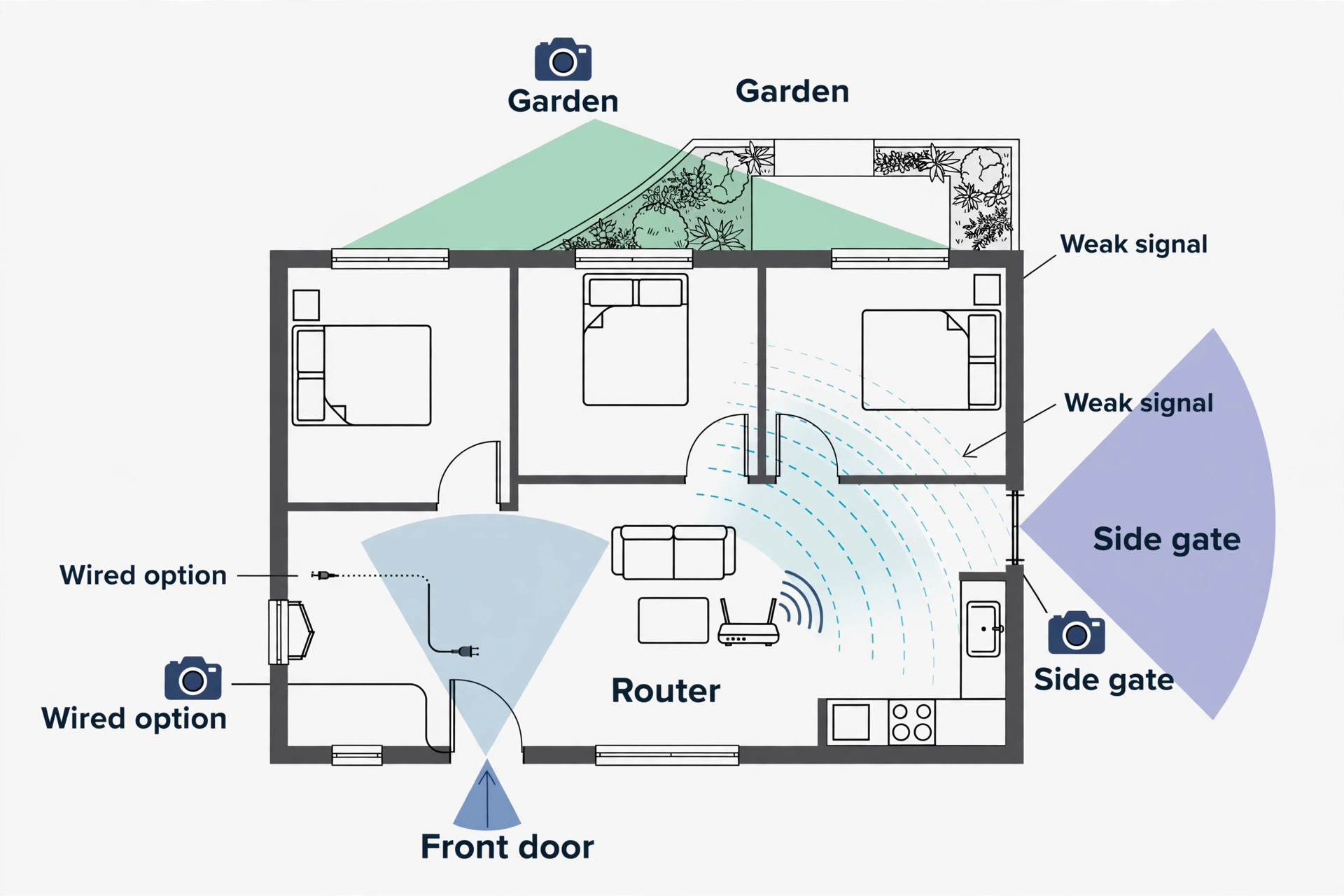
Wi-Fi deserves a separate decision at booking time, because it is the most common cause of a camera system that disappoints after install. A camera that shows a perfect picture in the shop may stutter at the far end of a house with thick walls or a router in a cupboard. The survey should ask where the router sits, whether the customer already has dead spots, and whether wired cameras are possible, and the engineer should test signal at each camera position before fixing brackets. Where Wi-Fi is weak, the honest answer is a wired run, a network extender, or a different camera position, and that answer must come before the install day, not after the customer has paid.
Camera count also changes testing time in a way that diaries often forget. Each camera needs a view check, a night check where possible, a motion setting check, and an alert check on the customer’s phone, and each sensor needs a trigger test. A job with eight cameras and twelve sensors can easily need an extra hour of testing alone, and a diary that blocks only install time will push that testing into the next customer’s slot or skip it entirely. Block testing as its own diary item, name it on the booking, and treat a job without a testing sign off as unfinished, however good the wiring looks.
Tools Compared for Security Installer Scheduling
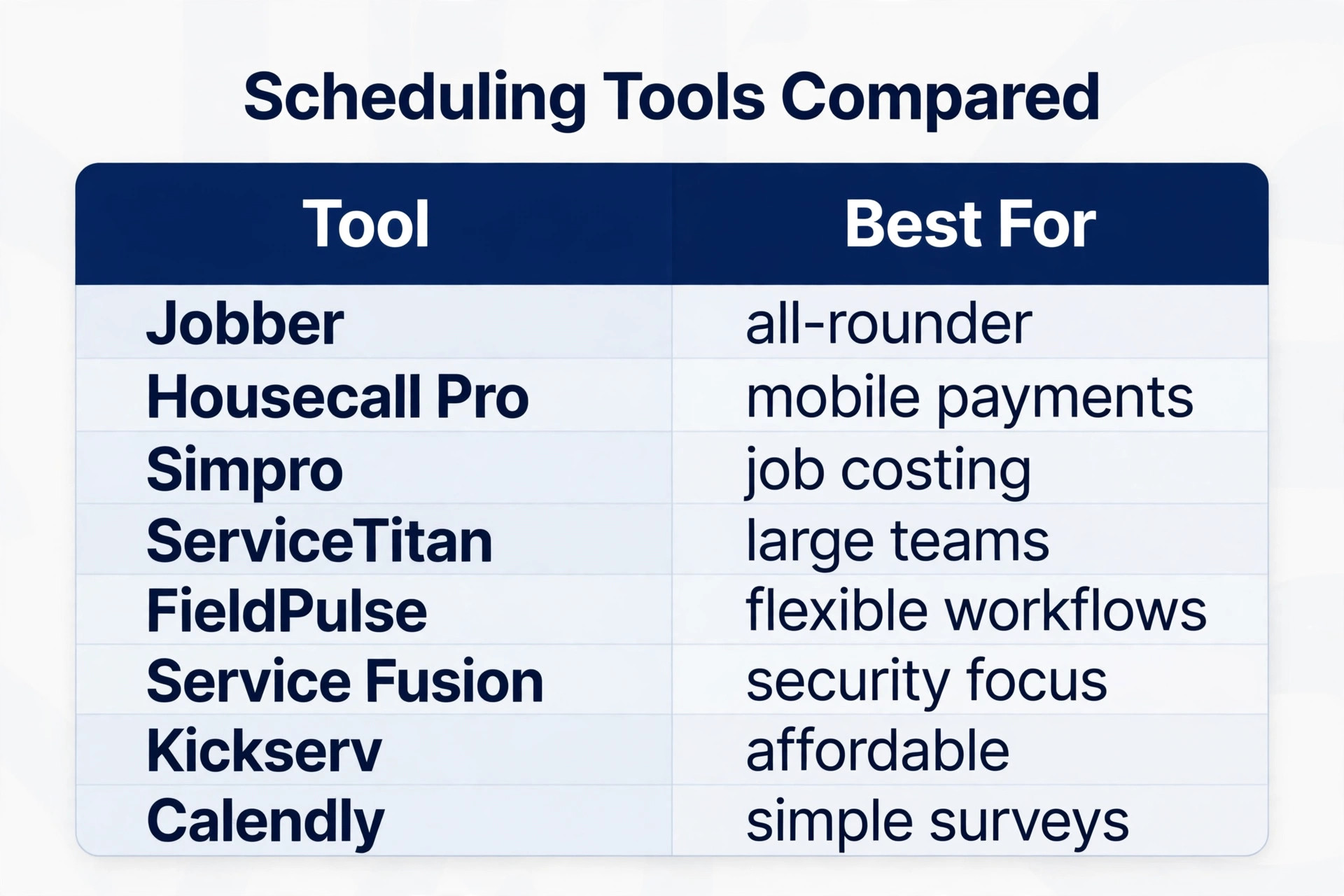
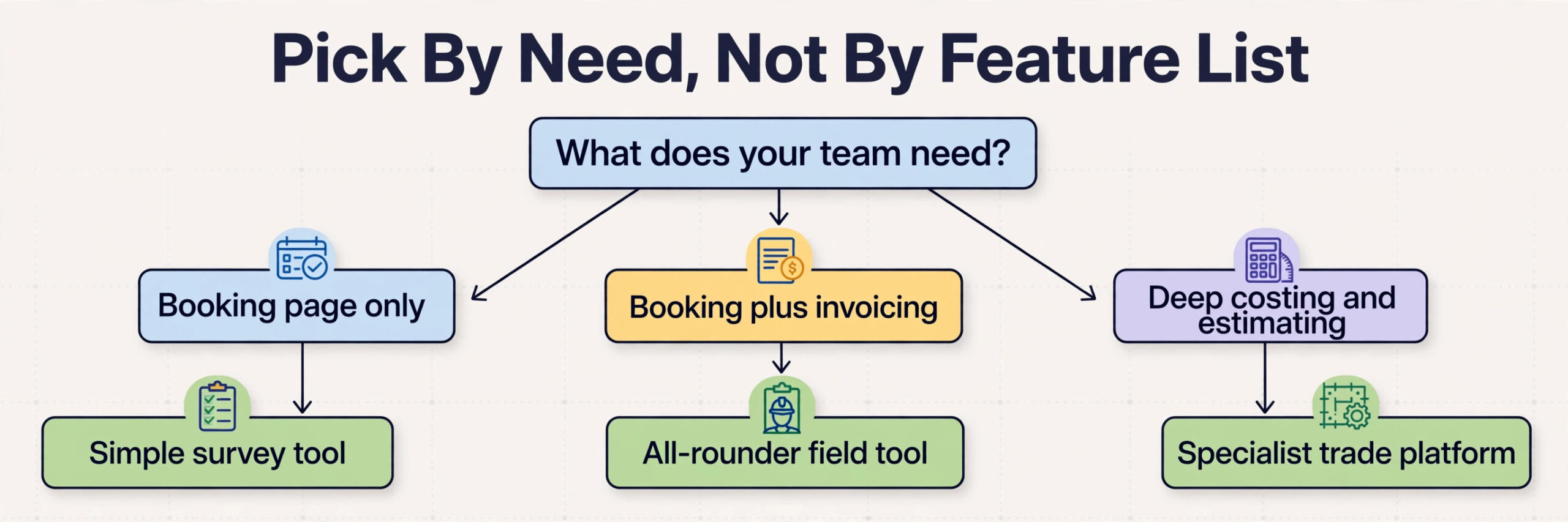
The tools below cover the main ways a security installer can run scheduling, from field service platforms built for trades to general booking pages. Prices are reported from vendor pages and comparison guides, and they change, so confirm the current price on the vendor page before choosing. The right choice depends less on the feature list and more on whether the business needs dispatch, stock, invoicing, and payments in the same tool or only needs a booking page.
| Tool | Best for | Reported starting price | Trade off |
|---|---|---|---|
| Jobber | Small teams needing booking, quotes, invoicing and dispatch together | About $29 to $49 a month for one user on annual billing in recent guides | Strong all rounder, but security intake needs setup |
| Housecall Pro | Mobile first teams wanting booking plus payments | About $59 a month for one user on annual billing in recent guides | Easy field use, but advanced features sit on higher tiers |
| Simpro | Security and trade teams needing job costing and estimating depth | Quoted per business in recent guides | Deep on costing, but heavier to set up |
| ServiceTitan | Larger trade teams wanting a full operating system | Quoted per business in recent guides | Very complete, but costly and complex for a solo installer |
| FieldPulse | Growing teams wanting customisable field service workflows | Quoted per business in recent guides | Flexible, but setup takes care |
| Service Fusion | Security installers wanting scheduling and invoicing without per user fees | Quoted per business in recent guides | Simple to learn, but less deep on estimating |
| Kickserv | Small service firms wanting scheduling, estimates and invoicing | Plans reported from about $47 a month in recent guides | Affordable and proven, but less security specific |
| Calendly | Solo installers booking surveys and consultations | Free for one event type, paid from about $10 a seat a month in recent guides | Simple and familiar, but no dispatch or stock depth |
Jobber
Jobber suits a business that wants one system for the whole job, from quote to invoice, and is willing to spend time setting up property based services, camera counts, and survey questions. Its dispatch view helps a small team see who is where, and its invoicing keeps parts and labour on the same job record, which matters when a customer later asks what was fitted and why.
Housecall Pro
Housecall Pro suits a team that works mostly from phones and wants customers to pay from the same flow as the booking. Its mobile experience is a real advantage on site, though the monthly cost climbs once add ons such as an AI receptionist are included, so a small installer should price the full stack, not only the headline plan, before committing.
Simpro
Simpro suits security businesses that need serious estimating and job costing, because security jobs mix hardware, labour, cable, and monitoring in a way that simple booking tools handle badly. The trade off is setup time, and a solo installer with simple jobs may find the depth more than the business needs in its first year.
ServiceTitan
ServiceTitan suits larger trade teams that want dispatch, marketing, payments, and reporting in one operating system, with AI features across the workflow. For a solo installer it is usually too much system and too much cost, and the business should only consider it when team size and job volume already justify a full platform.
FieldPulse
FieldPulse suits a growing team that wants to shape workflows around its own process, including recurring maintenance and multi engineer jobs. Its flexibility is the attraction, and also the work, because a flexible system still needs someone to design the survey, the job stages, and the handover steps properly.
Service Fusion
Service Fusion is worth a close look for security installers specifically, because its marketing and feature set speak directly to security installation scheduling, dispatch, and invoicing, and it charges no per user fees, which helps a team grow without the software bill growing with every hire. Check its estimating depth against a real past job before switching.
Kickserv
Kickserv suits small service firms that want scheduling, estimates, jobs, and invoices in one proven system at a modest reported starting price. It is less security specific than some rivals, so the installer must still build the survey questions, the camera count pricing, and the testing checklist into the job templates.
Calendly
Calendly suits a solo installer who mainly needs to book surveys and consultations without a full field service system. It is simple, familiar to customers, and cheap to start, but it cannot dispatch engineers, track stock, or manage a multi day install, so it works best as a front door that feeds into a proper job system behind it.
Pricing, Deposits and Cancellation Rules
A business that decides to use AI for security system installer scheduling still needs pricing rules that customers can understand in one reading. Publish a panel price, a per camera price, a sensor price, and a short list of add ons for long cable runs, outbuildings, and monitoring, with a note that unusual properties and integration work need a survey quote. Customers who can work out their own approximate price before booking are more likely to complete the booking, and less likely to argue about the final bill, because the price logic was visible from the start.
Deposits matter more in security work than in many trades, because hardware is often ordered for a specific property. A deposit taken by card at booking, sized to cover the ordered panel and cameras, makes the appointment real for the customer and gives the business cover if the customer cancels after parts arrive. State the deposit rule, the cancellation window, and the refund rule on the booking page itself, not buried in terms that nobody reads. A clear window, with the deposit kept or moved to a new date when cancellation is late, is a fair balance for most residential work.
Handling Pets, Rented Homes and Difficult Properties
Pets change a security job more than any other single factor, and a business that decides to use AI for security system installer scheduling must treat them as a normal part of the survey rather than a surprise on install day. Ask about pets at booking, including size, movement patterns, and rooms they use at night, because a sensor set for a home without pets will false alarm in a home with a large dog. Explain that pet tolerant sensors exist, that they cost a little more, and that declaring pets early means the engineer brings the right sensors and sets the right sensitivity.
Rented properties need a permission check before any drilling or wiring is booked. The survey should ask whether the customer owns the property, and if not, whether the landlord has agreed in writing to the install, including camera positions that film shared areas. A booking system should hold a rented property job as provisional until that permission is confirmed, because an engineer who drills into a rented wall without permission creates a dispute that no install fee can cover. The same hold applies to properties in conservation areas or listed buildings where external cameras may need approval.
Measuring What Installer Scheduling Earns
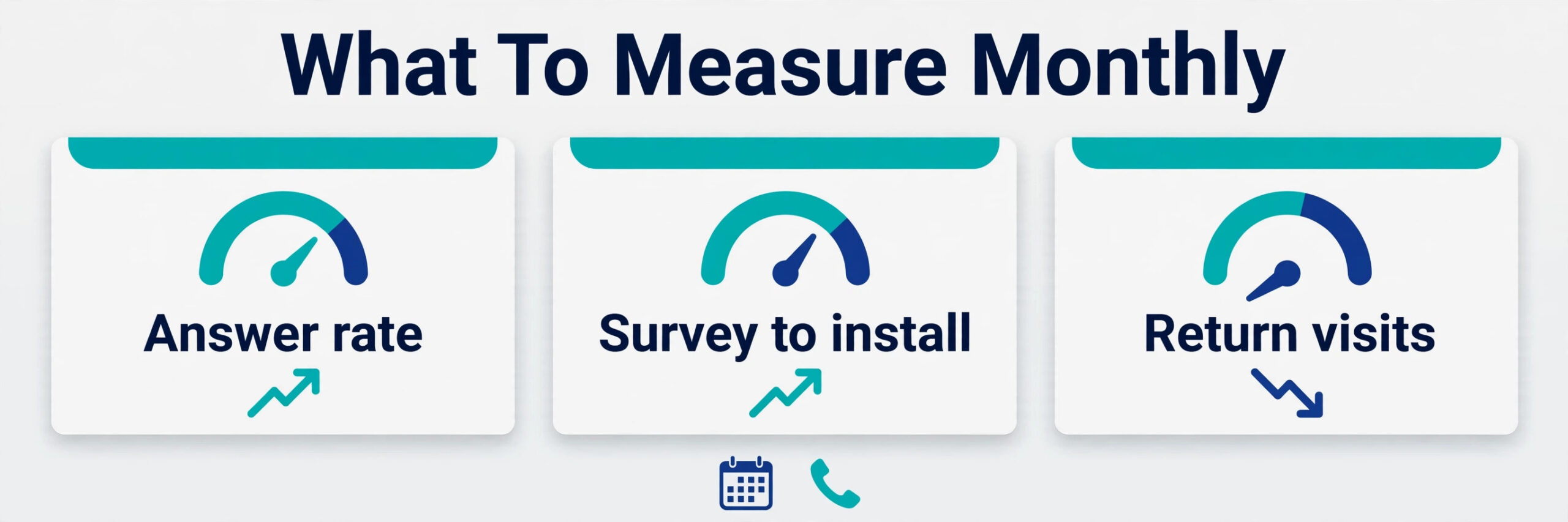
A scheduling system should pay for itself in recovered enquiries and finished installs, and the only way to know is to measure a small set of numbers every month. Start with the answer rate, meaning the share of enquiries that receive a reply within five minutes, because that number decides how many enquiries become surveys. Then measure the survey to install conversion rate, meaning the share of surveys that become confirmed installs, and the first time fix rate, meaning the share of installs finished without a return visit.
Add two money numbers to those three service numbers. The first is revenue per diary day, which shows whether the diary is filling with real install work or with short survey visits that leave gaps. The second is return visit rate, meaning the share of installs that need a second visit within thirty days, because return visits cost labour, fuel, and trust at the same time. If the answer rate rises but conversion does not, the problem is price or survey friction, not the phone. If conversion rises but return visits rise too, the problem is scoping or testing, not demand.
Mistakes That Undo a Good Installer Setup
The most common mistake is launching the booking page before the survey and price list are finished. Customers book at the wrong scope, the engineer arrives expecting a different job, and the office spends the week apologising for a system that was supposed to save time. Finish the property types, the camera pricing, and the Wi-Fi questions first, test them with five real past jobs, and only then open the page to customers. A week spent on the survey saves a month of return visits.
The second mistake is letting the system book every job type without limits. A business that allows online booking for large commercial sites, listed buildings, and complex integrations will receive bookings it cannot safely fulfil at the quoted price, and the cancellations that follow damage trust. Limit automated booking to standard residential work, and route everything else to a survey with a clear time promise. When owners choose to use AI for security system installer scheduling in this limited way, the system feels helpful rather than reckless, because it knows its own limits.
Verdict, Is It Worth It for a Small Security Business
For a solo installer or a small team, the case is strong, provided the setup is done in the right order. Fix the survey, build the install day checklist, set the deposit and cancellation rules, and only then add automated answering and online booking. Done in that order, the system recovers missed enquiries, books realistic install days, and sends engineers out with the parts, the skill, and the testing time they need to finish the job properly the first time. The monthly software cost is usually smaller than the value of one recovered install a month, and most installers lose more than one enquiry a month to missed calls alone.
The case weakens when the business wants software to replace judgment entirely. No automated system can judge a stone wall from a form, test Wi-Fi at a far camera from a distance, or calm a worried customer as well as a person can. The businesses that get the best return from this approach are the ones that use AI for security system installer scheduling for speed and coverage, while keeping people in charge of surveys, unusual properties, and final prices. That split is not a compromise. It is the whole point, because speed wins the enquiry and judgment keeps the customer safe and satisfied.
More Reading on Stratilyze
For a related trade dispatch system, read best dispatch software for locksmiths and best scheduling software for home care agencies. For a different field job workflow, see use AI for mold remediation job scheduling.
Frequently Asked Questions
How much does scheduling software cost for a security installer
A solo installer can start free or at a low monthly cost with a simple booking page, while a full field service system typically starts around $29 to $59 a month for one user in recent guides, before add ons, and larger platforms are quoted per business. An AI answering add on can add further monthly cost depending on the vendor and plan.
Do customers accept booking a security install with an automated system
Most customers accept it readily when the system answers fast, asks sensible survey questions, and confirms the booking clearly, especially when a survey call is offered for complex properties. Problems arise when the system asks too many questions, gives a price that later changes sharply, or leaves the customer unsure whether a person will ever call back.
What happens when a customer books a job the system should not have accepted
The office should call promptly, explain the issue honestly, and offer the right next step, such as a site survey or a revised price. Do not simply cancel without contact, because that feels like rejection and damages trust in a safety business.
Should a security business take deposits at booking
A deposit is usually worth it when hardware is ordered for a specific property, because it cuts no shows and covers ordered parts if the customer cancels. The deposit rule, the cancellation window, and the refund rule should all appear on the booking page before payment, so there is no surprise later.
How do I handle pets and false alarms in the booking process
Ask about pets in the survey form, including size and rooms they use, and price pet tolerant sensors as a clear option rather than a hidden surcharge. When owners choose to use AI for security system installer scheduling, the survey should also ask about previous false alarms and who will be home for the handover, so the engineer can set sensitivity correctly and teach the household how to respond.
Can automated scheduling work for a one person security business
Yes, and it often helps a solo installer more than a larger team, because a solo installer misses the most calls while on a ladder or in a loft. A booking page plus reminders can recover those calls without hiring office staff, and the survey checklist means the solo installer arrives prepared instead of guessing.