
GitHub Copilot set the standard for AI code completion, but it is no longer the only serious option, and for many teams it is no longer the best fit. Some developers want a full AI native IDE, some want a chat assistant that can plan a whole feature, some need code review that catches bugs before merge, and some cannot send code to a third party cloud at all. The best GitHub Copilot alternatives in 2026 cover all four needs, and the right choice depends on how you actually write code day to day, not on which tool has the longest feature list.
This guide compares 12 tools grouped by the job each one does best: IDE assistants that complete code as you type, chat based coding help for planning and debugging, code review and security tools that check work before it ships, and self hosted or privacy focused options for teams with strict data rules. Prices are October 2026 figures in US dollars; where a vendor does not publish pricing, the guide says check checkout rather than guessing. One rule runs through the whole guide: AI code is a draft, not a verdict. Every suggestion should be read, tested and understood before it is committed, because a plausible looking function with a subtle bug costs more time than writing the function by hand.
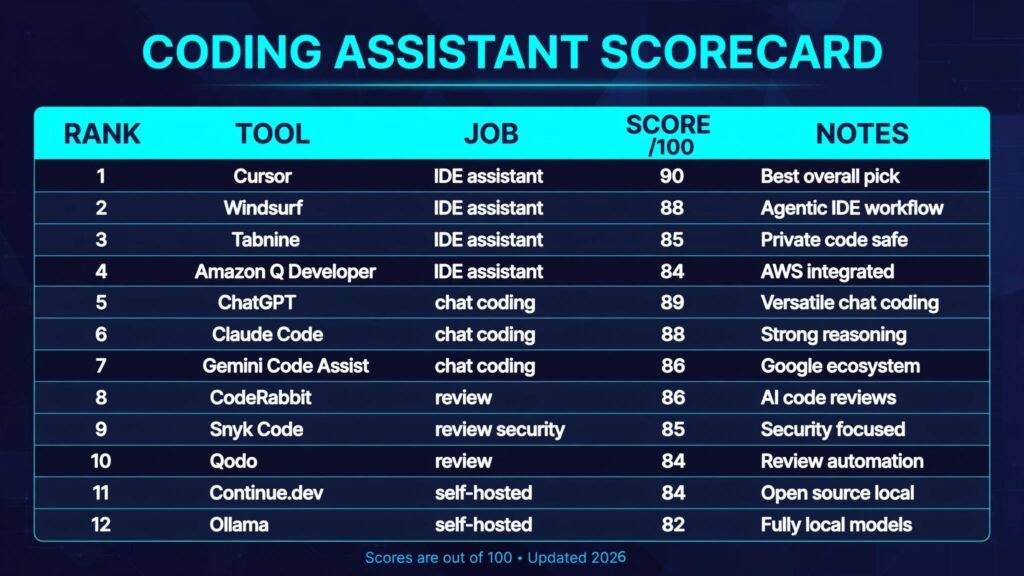
The 12 best GitHub Copilot alternatives at a glance
| Tool | Best job | Free option | Paid from |
|---|---|---|---|
| Cursor | AI native IDE | Free tier | Pro $20 per user per month |
| Windsurf | AI native IDE with agents | Free tier | Pro $15 per user per month |
| Tabnine | Private code completion | Free tier | Pro $12 per user per month |
| Amazon Q Developer | Enterprise IDE assistant | Free tier | Pro $19 per user per month |
| ChatGPT | Chat coding help | Free tier | Plus $20 per month |
| Claude Code | Agentic terminal coding | Free tier | Pro $20 per month |
| Gemini Code Assist | Google Cloud coding help | Free tier | Standard $19 per user per month |
| CodeRabbit | AI code review | Free tier | Pro $24 per user per month |
| Snyk Code | AI security scanning | Free tier | Check checkout |
| Qodo | AI review and test generation | Free tier | Check checkout |
| Continue.dev | Open source IDE assistant | Free | Free |
| Ollama | Local models on your machine | Free | Free |
Best pick by job
| Your job | Start with | If that fails, try |
|---|---|---|
| Replace Copilot inside your IDE | Cursor | Windsurf |
| An AI agent that edits whole files | Windsurf | Claude Code |
| Code completion with strict privacy | Tabnine | Continue.dev |
| Coding help inside AWS projects | Amazon Q Developer | Gemini Code Assist |
| Debug and explain code by chat | ChatGPT | Claude Code |
| Build a feature from the terminal | Claude Code | Windsurf |
| Coding help inside Google Cloud | Gemini Code Assist | Amazon Q Developer |
| Review pull requests automatically | CodeRabbit | Qodo |
| Catch security flaws before merge | Snyk Code | CodeRabbit |
| Generate tests for new code | Qodo | CodeRabbit |
| A free open source assistant | Continue.dev | Ollama |
| Keep all code on your own machine | Ollama | Continue.dev |
IDE assistants: code completion where you type
These four tools live inside the editor. They complete lines, suggest whole functions, refactor selections and, increasingly, run multi step edits across files. They are the closest direct replacements for Copilot, and the choice usually comes down to how much autonomy you want from the assistant.
1. Cursor

Cursor is the leading AI native IDE, built as a fork of VS Code with AI woven through the whole editor rather than bolted on as a plugin. It completes code, answers questions about your codebase with indexed context, and runs an agent mode that can read files, make edits across a project and run terminal commands. Composer mode turns a prompt into a multi file change that you review before accepting. For most developers switching from Copilot, Cursor is the most complete single replacement.
Pricing: A free tier is offered with limited requests. Pro is reported at $20 per user per month, with Business at $40. Check checkout for the current request limits, since Cursor prices partly by usage.
Best for: Developers willing to switch IDEs for the deepest AI integration.
Watch out for: Agent mode can make large changes fast, which is a risk as much as a benefit. Review every diff, keep commits small, and do not let the agent refactor code you do not understand.
Try it at: cursor.com
2. Windsurf
Windsurf, from Codeium, is the other major AI native IDE, and its standout feature is Cascade, an agent that combines chat, code search and edits with awareness of your whole codebase. Cascade can plan a task, implement it across files, run the result and fix its own errors. Windsurf also offers strong autocomplete and a plugin for developers who prefer to stay in VS Code or JetBrains.
Pricing: A free tier is offered. Pro is reported at $15 per user per month, with Teams higher. Check checkout for the current credit system, since Windsurf has changed its usage model before.
Best for: Developers who want agent driven development, where the assistant plans and executes multi step tasks rather than only completing the current line.
Watch out for: Agent autonomy needs guardrails: Cascade works best on well tested codebases, where a failing test catches a bad edit.
Try it at: windsurf.com
3. Tabnine
Tabnine is the veteran of AI completion and the privacy conscious choice among cloud tools. It offers whole line and whole function completions, a chat assistant, and code review, with a strong emphasis on keeping your code out of training data. Tabnine can be deployed on private infrastructure, and its enterprise tier runs entirely inside a customer’s cloud, which matters for regulated teams that cannot use consumer AI tools.
Pricing: A free tier is offered for basic completion. Pro is reported at $12 per user per month, with Enterprise custom. Check checkout for the current private deployment pricing.
Best for: Teams with data rules that block other AI tools, and developers who want reliable completion without switching to a new IDE.
Watch out for: Tabnine is more conservative than Cursor or Windsurf. Its suggestions are often safer and shorter, which suits production code but can feel less ambitious when you want the assistant to scaffold a whole feature.
Try it at: tabnine.com
4. Amazon Q Developer
Amazon Q Developer is the enterprise assistant for teams already building on AWS. It completes code in VS Code, JetBrains and the AWS console, answers questions about AWS services, and can transform code, including upgrading Java versions and migrating .NET Framework applications. Its agent features can implement a feature from a description and help debug AWS specific problems with service context other tools lack.
Pricing: A free tier is offered. Pro is reported at $19 per user per month. Check checkout for the current Builder ID and subscription terms, since Amazon has changed its free tier scope before.
Best for: Enterprise teams and AWS heavy shops that need an assistant fluent in AWS services, infrastructure code and enterprise compliance requirements.
Watch out for: Outside AWS, Q Developer is less compelling than Cursor or Windsurf. Its general coding help is solid but not standout, so teams not invested in AWS get less value from it.
Try it at: aws.amazon.com
Chat based coding help: plan, explain and debug
Completion tools guess the next line. Chat tools help you think through a problem: design a feature, explain unfamiliar code, debug an error, or rewrite a messy module. These three are the strongest general chat assistants for code in 2026.
5. ChatGPT
ChatGPT remains the most versatile chat coding assistant, and its coding models are genuinely strong at explaining code, writing tests, debugging stack traces and drafting boilerplate. It can iterate on a script, run it, and fix errors in the same session. It is also the tool most developers already know, which removes any setup friction. Teams comparing the wider assistant market should also see our best AI chatbots guide for the general chatbot side of the comparison, since ChatGPT sits in both worlds.
Pricing: A free tier is offered. Plus is $20 per month, with Pro and Team plans higher. Check checkout for the current rate limits on coding models, since limits differ by plan.
Best for: Debugging, explaining and learning, and for developers who want one chat tool for code, writing and research rather than a dedicated coding product.
Watch out for: ChatGPT cannot see your codebase unless you paste it in, and pasted code can be long, stale or incomplete. It is best for focused problems, not for editing a large project, where an IDE assistant or terminal agent works better.
Try it at: chatgpt.com
6. Claude Code

Claude Code is Anthropic’s agentic coding tool, and it is the strongest option for developers comfortable in the terminal. It runs as a command line agent that reads your project, plans a task, edits files, runs tests and iterates until the task passes or it asks for help. It handles large refactors and multi file features better than most chat tools because it works directly on the repository with full context, and its explanations of trade offs are unusually clear.
Pricing: Claude Code is included with Claude Pro, reported at $20 per month, and with higher plans for heavy use. Check checkout for the current usage limits, since agentic sessions consume far more than chat messages.
Best for: Experienced developers who work in the terminal and want an agent that can carry a feature from description to passing tests with minimal hand holding.
Watch out for: Long agent sessions can burn through usage limits quickly. Give it narrow tasks, check its diffs, and keep a clean git state so any bad run is easy to revert.
Try it at: claude.com
7. Gemini Code Assist
Gemini Code Assist is Google’s coding assistant, built for VS Code, JetBrains, Android Studio and Google Cloud. It completes code, generates functions from comments, explains and debugs code, and answers questions with context from Google Cloud documentation and your project. Its large context window lets it reason across big codebases, and its integration with Firebase and Google Cloud makes it the natural choice for teams already on that stack.
Pricing: A free tier is offered for individuals. Standard is reported at $19 per user per month, with Enterprise custom. Check checkout for the current free tier limits, since Google has changed them before.
Best for: Teams building on Google Cloud, Firebase or Android, and developers who want a capable assistant without leaving the Google ecosystem.
Watch out for: Outside Google Cloud, Gemini Code Assist is a good but not leading assistant. Its completion quality trails Cursor in many head to head tests, so cloud teams gain the most from it.
Try it at: cloud.google.com
Code review and security: catch problems before merge
Writing code faster is only half the job. These three tools check code before it ships: reviewing pull requests for bugs and style, scanning for security flaws, and generating tests that prove the new code works. They pair well with any completion tool above.
8. CodeRabbit

CodeRabbit is the leading AI code reviewer. It reviews every pull request automatically, summarises changes in plain language, flags bugs, security issues and style problems inline, and answers follow up questions about the diff. It learns from a team’s review history and can be tuned with custom instructions, so its comments get more relevant over time instead of repeating generic advice.
Pricing: A free tier is offered for open source projects. Pro is reported at $24 per user per month, with Enterprise custom. Check checkout for the current per seat pricing, since CodeRabbit has changed its tiers before.
Best for: Teams drowning in review backlog, and open source maintainers who want every pull request reviewed promptly and consistently.
Watch out for: Out of the box, CodeRabbit can comment on minor style points that waste reviewer time. Spend an hour tuning its instructions and its signal improves sharply.
Try it at: coderabbit.ai
9. Snyk Code
Snyk Code is the security focused scanner in this list. It uses AI assisted static analysis to find vulnerabilities in code, open source dependencies, containers and infrastructure as code, then suggests fixes with explanations. It plugs into IDEs, pull requests and CI pipelines, so a developer sees a vulnerability and its fix in the same place they wrote the code.
Pricing: A free tier is offered for limited tests. Paid plans are not consistently published for every tier, so check checkout for the current team pricing.
Best for: Teams shipping software where a security flaw is expensive: fintech, health, SaaS with customer data, and any team that must pass security audits.
Watch out for: False positives. Snyk flags possible issues aggressively, and triaging them takes time. Treat high severity findings as mandatory, or the team will start ignoring the scanner.
Try it at: snyk.io
10. Qodo
Qodo, formerly CodiumAI, focuses on the two review tasks developers skip most: writing tests and reviewing their own pull requests. Its tools generate unit tests for new code, suggest improvements to existing tests, and review pull requests with context aware comments. Qodo Merge can summarise a pull request, suggest a description, and flag behaviour changes that need a human look.
Pricing: A free tier is offered. Paid plans are not consistently published, so check checkout for the current price for your team size.
Best for: Teams with thin test coverage that want AI generated tests as a starting point, and developers who want a second pair of eyes on every pull request without waiting on a colleague.
Watch out for: Generated tests need the same scrutiny as generated code. Qodo tests can assert the current behaviour, including bugs, rather than the intended behaviour. Review the test logic, not just the green checkmark.
Try it at: qodo.ai
Self hosted and privacy options: code stays with you
Some teams cannot send code to a vendor cloud: defence, finance, health, or companies with strict intellectual property rules. These two tools keep code local, at the cost of more setup and, usually, weaker suggestions than the best cloud models.
11. Continue.dev

Continue.dev is the leading open source AI coding assistant. It runs as an extension for VS Code and JetBrains, supports a wide range of models from OpenAI, Anthropic, Google and local providers, and offers autocomplete, chat, code editing and codebase aware answers. Because it is open source and model agnostic, a team can point it at a private model endpoint and keep every request inside its own network.
Pricing: Free and open source. Costs come only from the model provider you connect, which can be a paid API or a free local model.
Best for: Teams that want a Copilot style assistant without vendor lock in, and privacy conscious developers who want to choose their own model provider.
Watch out for: Continue.dev is a framework, not a finished product, so expect configuration work: choosing models, tuning context, and maintaining the setup as models change. Developers who want zero setup will be happier with Cursor or Windsurf. Beginners should also see our best AI tools for learning to code guide.
Try it at: continue.dev
12. Ollama
Ollama is the simplest way to run open models locally on your own machine. It downloads and serves models such as Llama, Qwen and DeepSeek Coder behind a simple command line, and it plugs into Continue.dev and other editors as a local model provider. With a capable machine, it gives private, offline code completion and chat with no subscription and no data leaving the building.
Pricing: Free and open source. The only cost is hardware, since larger models need a strong GPU and plenty of memory.
Best for: Individual developers and security sensitive teams who need fully offline AI coding help, and anyone experimenting with open models before committing to a paid tool.
Watch out for: Model quality and speed. Local models on consumer hardware are noticeably weaker than frontier cloud models, and large models run slowly without a good GPU. Ollama is best for completion and simple questions, not for agentic multi file work.
Try it at: ollama.com
Pricing compared: what coding help really costs
| Tool | Free option | Paid from | Pricing note |
|---|---|---|---|
| Cursor | Free tier | $20 per user per month | Usage based limits on Pro |
| Windsurf | Free tier | $15 per user per month | Credit system, check checkout |
| Tabnine | Free tier | $12 per user per month | Enterprise custom |
| Amazon Q Developer | Free tier | $19 per user per month | AWS focused |
| ChatGPT | Free tier | $20 per month | Plus plan, coding limits vary |
| Claude Code | Free tier | $20 per month | Usage limits on agent sessions |
| Gemini Code Assist | Free tier | $19 per user per month | Enterprise custom |
| CodeRabbit | Free tier | $24 per user per month | Open source free |
| Snyk Code | Free tier | Check checkout | Team pricing varies |
| Qodo | Free tier | Check checkout | Team pricing varies |
| Continue.dev | Free | Free | Model costs only |
| Ollama | Free | Free | Hardware costs only |
A realistic solo developer stack costs $0 to $20 a month: a free tier of Cursor or Windsurf, plus ChatGPT free for debugging. A professional stack lands around $20 to $45 a month by adding a Pro IDE assistant and CodeRabbit for reviews. An enterprise stack with Tabnine private deployment, Snyk and CodeRabbit runs into custom contracts, so price setup and review tuning time too. Teams weighing the wider AI subscription budget should also see our best AI subscriptions worth paying for guide.

How to Choose the right coding assistant
Start with where you write code, not with the tool list. If you live in VS Code and want the deepest AI help, start with Cursor or Windsurf. If you work in the terminal and want an agent to carry features, start with Claude Code. If your code cannot leave your network, start with Tabnine, Continue.dev or Ollama.
Next, decide whether the bottleneck is writing, reviewing or security. A developer who writes all day gains most from an IDE assistant. A team whose pull requests wait days for review gains most from CodeRabbit. A team shipping customer facing software gains most from Snyk Code. Buying completion when the real problem is review wastes money.
Then test on real work before you commit. Give each candidate the same task: complete a function, explain a module, fix a failing test, and review a pull request. Check the output against your standards, not the vendor demo, and measure how much editing the suggestions need.
Finally, set the human rule in writing: no AI generated code reaches production without a human reading it, a test passing, and a review. Treat the assistant as a fast junior developer: useful, quick, and always supervised.

Frequently Asked Questions
Will AI coding assistants replace developers?
No. They remove repetitive work: boilerplate, test scaffolding, and first drafts of standard functions. They do not decide what to build, understand business trade offs, or take responsibility for a system in production. Developers who use them well spend more time on design and debugging, not less time working.
Is it safe to put company code into AI coding tools?
Enterprise tiers of Tabnine, Amazon Q Developer and others offer no training on customer code and private deployment options, while consumer free tiers may retain inputs. Check the vendor’s data terms before pasting proprietary code, and use Continue.dev or Ollama when the answer must be fully private.
How accurate is AI generated code?
Good on standard patterns, unreliable on novel logic. AI assistants excel at common functions, API usage and test scaffolding, and they regularly produce subtle bugs in edge cases, concurrency and security sensitive code. Treat every suggestion as unreviewed code: read it, test it, and understand it before merging.
Do AI coding assistants work with my IDE?
Most do. Cursor and Windsurf are full IDEs, while Tabnine, Amazon Q Developer, Gemini Code Assist and Continue.dev work as extensions for VS Code and JetBrains. Check the vendor’s supported IDE list before buying, especially for JetBrains, Android Studio or less common editors.
How much should a small team pay for AI coding help?
Between $0 and $45 per user per month covers a working stack: a free tier for completion, a Pro IDE assistant at $15 to $20, and CodeRabbit for reviews. Add Snyk or a private deployment only when security or compliance requirements justify the extra cost.
Which single tool should a developer start with?
Cursor, for most developers, because it replaces Copilot most completely and its agent mode grows with you from completion to multi file edits. Developers who cannot send code to the cloud should start with Tabnine or Continue.dev, and terminal users should start with Claude Code.
Conclusion
The best GitHub Copilot alternatives in 2026 are not one tool but a set of tools for different jobs. Cursor and Windsurf lead the IDE race, Claude Code leads terminal agents, ChatGPT and Gemini Code Assist cover chat help, CodeRabbit, Snyk Code and Qodo cover review and security, and Continue.dev and Ollama cover the private end of the market.
Start with the bottleneck. Pick one tool for it, use it on real work for two weeks, and measure how much time it saves after review and testing. Then add a second tool only if a different bottleneck appears. The developers who gain most are the ones whose assistant fits their workflow and whose code is still reviewed and tested.