

More than 10 million songs have been generated with AI music tools in the past two years, and Suno is the name most people know. But Suno is not the best choice for every job. Its strength is full songs with vocals from a text prompt. If you need background music you can license safely, a film score with exact timing, or a track you can edit stem by stem, another tool will serve you better. The best Suno alternatives are picked here by the job each one does best, not by how famous the brand is.
This guide compares 12 tools grouped by job: full songs with vocals, film and game scoring, background and royalty free music, and open and experimental generation. Prices are October 2026 figures in US dollars. Where a vendor does not publish pricing, or where sources disagreed, the guide says check checkout rather than guessing. One rule runs through the whole guide: judge a music tool by whether you can use the output in public without a legal worry, because a great sounding track you cannot publish is worthless.
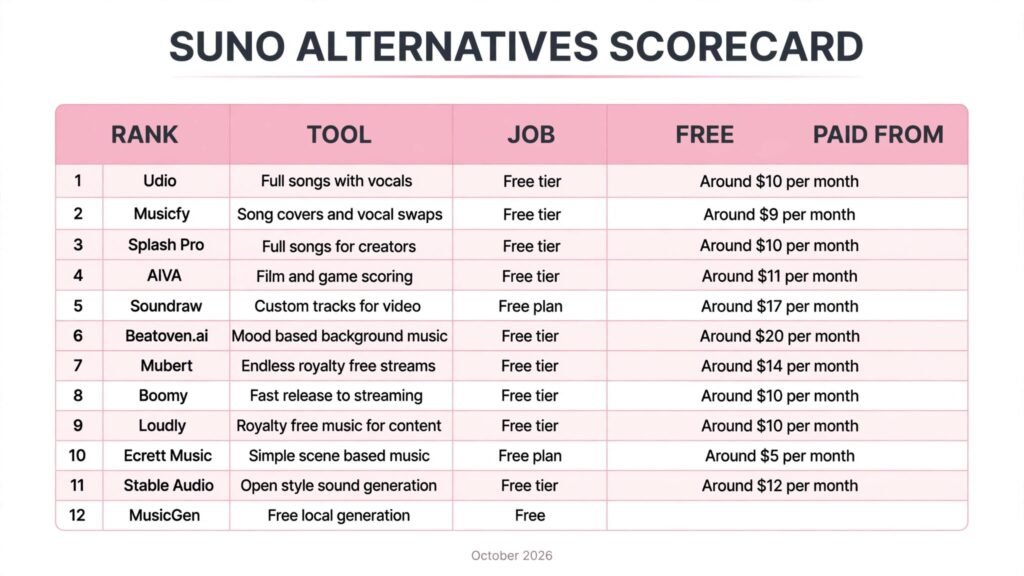
The 12 best Suno alternatives at a glance
| Tool | Best job | Free option | Paid from |
|---|---|---|---|
| Udio | Full songs with vocals | Free tier | Around $10 per month |
| Musicfy | Song covers and vocal swaps | Free tier | Around $9 per month |
| Splash Pro | Full songs for creators | Free tier | Around $10 per month |
| AIVA | Film and game scoring | Free tier | Around $11 per month |
| Soundraw | Custom tracks for video | Free plan | Around $17 per month |
| Beatoven.ai | Mood based background music | Free tier | Around $20 per month |
| Mubert | Endless royalty free streams | Free tier | Around $14 per month |
| Boomy | Fast release to streaming | Free tier | Around $10 per month |
| Loudly | Royalty free music for content | Free tier | Around $10 per month |
| Ecrett Music | Simple scene based music | Free plan | Around $5 per month |
| Stable Audio | Open style sound generation | Free tier | Around $12 per month |
| MusicGen | Free local generation | Free | Free |
Best pick by job
| Your job | Start with | If that fails, try |
|---|---|---|
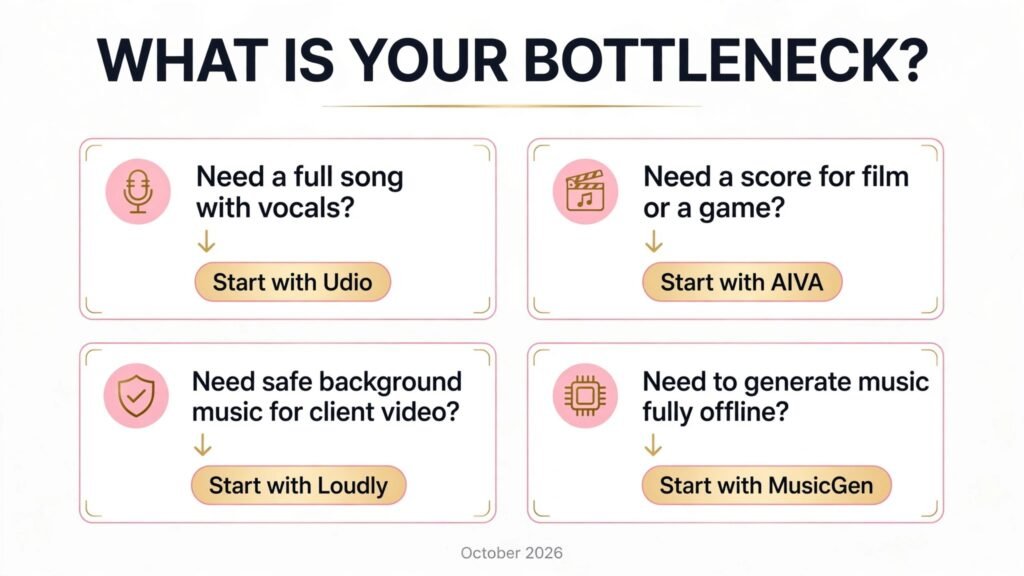
| A full song with AI vocals | Udio | Splash Pro |
| Change a vocal or make a cover | Musicfy | Udio |
| Songs for a creator channel | Splash Pro | Boomy |
| A score for a film or game | AIVA | Soundraw |
| Music timed to a video edit | Soundraw | Beatoven.ai |
| Background music by mood | Beatoven.ai | Mubert |
| Endless music for a stream | Mubert | Loudly |
| Release music to Spotify fast | Boomy | Splash Pro |
| Safe music for client videos | Loudly | Soundraw |
| Music for a simple scene | Ecrett Music | Beatoven.ai |
| Experimental sound design | Stable Audio | MusicGen |
| Generate music fully offline | MusicGen | Stable Audio |
Full songs with vocals: closest to Suno
These three are the closest direct replacements for Suno. They turn a prompt into a complete song with vocals, and they differ mainly in vocal quality, editing control and release options.
1. Udio
Udio is the strongest direct Suno rival for full songs. Type a prompt with genre, mood and lyrics or let the tool write them, and it returns a complete track with vocals, chorus and arrangement. Its vocal quality is among the best in this group, and its editing tools let you extend sections and reshape a song rather than regenerating from scratch.
Pricing: A free tier covers limited generations. Paid plans start at around $10 per month, with higher tiers for heavy use. Check checkout for current credit limits, since generation credits change often.
Best for: Songwriters, content creators and hobbyists who want a finished song with vocals from a single prompt.
Watch out for: Udio output still needs a human ear for mixing and lyric sense, and commercial use terms vary by plan, so read the license before publishing a track as your own release.
Try it at: udio.com
2. Musicfy
Musicfy stands out for vocal manipulation. It generates songs, but its real strength is voice: create an AI voice, swap vocals on an existing track, or make a cover in a different voice. For creators who already have a melody and need a vocal, it is more useful than a plain song generator.
Pricing: A free tier is offered. Paid plans start at around $9 per month. Check checkout for current voice and generation limits.
Best for: Creators making covers, parodies and vocal demos, and musicians who want to test a song in different voices.
Watch out for: Voice cloning raises consent questions. Only clone voices you own or have permission to use, and check the platform rules before publishing a cover of a real artist.
Try it at: musicfy.lol
3. Splash Pro
Splash Pro is built for creators who publish constantly. It generates full songs quickly, with simple controls for genre, tempo and energy, and it is designed to feed short form video, streams and social posts. It trades some depth for speed, which suits a daily posting schedule.
Best for: TikTok and YouTube creators who need a new track for every video without a long production process. For the wider short form toolkit, see our AI tools for TikTok guide.
Pricing: A free tier covers basic generation. Paid plans start at around $10 per month. Check checkout for current commercial use terms.
Watch out for: Splash tracks can sound similar across generations, so vary prompts and mix in other sources if your channel needs a distinct sound.
Try it at: splashmusic.com
Film and game scoring: music that fits a scene
Suno makes songs, but a film or game needs music that fits a scene, loops cleanly and stops on cue. These three tools are built for that job.
4. AIVA
AIVA is the most serious composition tool on this list. It generates original scores in classical, cinematic and game styles, with control over instrumentation, key and structure. Composers use it as a starting point for soundtracks, then refine the result in a digital audio workstation.
Pricing: A free tier covers basic generation with attribution. Paid plans start at around $11 per month, with a full ownership tier higher. Check checkout for the current license terms, since ownership depends on the plan.
Best for: Filmmakers, game developers and composers who need structured, editable scores rather than one off songs.
Watch out for: AIVA output sounds best when a human arranges and mixes it. Expect to export MIDI and finish the track in your own tools.
Try it at: aiva.ai

5. Soundraw
Soundraw lets you shape a track by length, tempo, mood and instruments, then generates music that fits a video edit exactly. Its video sync features make it a favourite for editors who need a track that ends when the scene ends, not thirty seconds later.
Pricing: A free plan covers browsing and limited generation. Paid plans start at around $17 per month. Check checkout for current licensing, since video and broadcast use differ.
Best for: Video editors, agencies and YouTubers who need custom music timed to an edit, with a clear commercial license.
Watch out for: Soundraw tracks are instrumental by design, so it will not replace Suno for vocal songs. For the wider video toolkit, see our free AI video generators guide.
Try it at: soundraw.io

6. Beatoven.ai
Beatoven.ai generates mood based background music from a simple brief: pick a mood, a genre and a length, and it composes a track that stays out of the way of dialogue. Its strength is subtlety, which is exactly what narration and podcasts need.
Pricing: A free tier covers limited tracks. Paid plans start at around $20 per month. Check checkout for current per track pricing, since Beatoven has changed its model before.
Best for: Podcasters, course creators and documentary makers who need background music that supports speech instead of competing with it.
Watch out for: Beatoven is not a songwriting tool. If you need vocals or a memorable hook, start with Udio instead.
Try it at: beatoven.ai
Background and royalty free music: publish without worry
For creators who publish daily, the license matters more than the melody. These four tools focus on music you can use in public content without a takedown risk.
7. Mubert
Mubert generates endless adaptive music streams by mood, genre and activity. It is less about one perfect track and more about a continuous feed: lo-fi for studying, electronic for workouts, ambient for streams. Its API also powers music inside apps and games.
Pricing: A free tier covers basic listening and generation. Paid plans start at around $14 per month. Check checkout for current commercial and API pricing.
Best for: Streamers, app developers and creators who need hours of background music without repeating the same track.
Watch out for: Mubert tracks are designed to be unobtrusive, so they rarely produce a standout song. Use it for atmosphere, not for a single.
Try it at: mubert.com
8. Boomy
Boomy turns a few taps into a releasable song and, crucially, helps you distribute it to streaming services. It is the fastest path from idea to a track on Spotify, which makes it popular with new artists testing an audience.
Pricing: A free tier covers basic songs. Paid plans start at around $10 per month, with a release focused tier higher. Check checkout for current revenue share terms.
Best for: New artists and hobbyists who want to release music to streaming platforms with minimal production skill.
Watch out for: Streaming platforms have tightened rules on AI generated uploads, so read the distributor terms and expect to prove human involvement for commercial releases.
Try it at: boomy.com

9. Loudly
Loudly is a royalty free music library with AI generation on top. You can search a large catalogue of licensed tracks or generate a new one to fit a brief, then use it in client work with a clear license. For agencies, that paper trail is the selling point.
Pricing: A free tier covers browsing and limited downloads. Paid plans start at around $10 per month. Check checkout for current commercial license scope.
Best for: Agencies, freelancers and brands that need licensed music for client videos, ads and social campaigns.
Watch out for: Loudly tracks are polished but generic by design. For a signature sound, combine library tracks with a custom tool like Soundraw.
Try it at: loudly.com
10. Ecrett Music
Ecrett Music is the simplest tool on this list. Pick a scene, a mood and an instrument, and it generates a royalty free track in seconds. It has fewer controls than its rivals, but for a quick video or presentation it is often all you need.
Pricing: A free plan covers basic generation. Paid plans start at around $5 per month, which makes it the cheapest paid option here. Check checkout for current license terms.
Best for: Teachers, small businesses and casual creators who need decent background music fast and cheap.
Watch out for: The simplicity cuts both ways. If you need precise control over structure or instruments, AIVA or Soundraw will serve you better.
Try it at: ecrettmusic.com
Open and experimental: generation you control
These two tools suit developers and experimenters who want to run generation themselves or push sound design further than a consumer app allows.
11. Stable Audio
Stable Audio, from Stability AI, generates music and sound effects from text prompts, with longer generations and stereo output on paid plans. Its sound design range, from music to effects and textures, makes it useful beyond songs.
Pricing: A free tier covers limited generations. Paid plans start at around $12 per month. Check checkout for current generation length limits.
Best for: Sound designers, game developers and creators who need effects and textures as well as music.
Watch out for: Stable Audio is weaker than Udio on vocals and song structure. Treat it as a sound tool first and a song tool second.
Try it at: stableaudio.com
12. MusicGen
MusicGen is Meta’s open model for music generation. It runs locally or on your own server, costs nothing beyond hardware, and can be fine tuned by developers. For tinkerers and researchers, that openness is worth more than any polished app.
Pricing: Free and open source. The only cost is your own hardware, and larger models need a capable machine with plenty of memory.
Best for: Developers, researchers and privacy focused creators who want full control over generation with no subscription.
Watch out for: Local models are weaker than paid cloud tools on song structure and vocals, and setup needs technical comfort. This is a control trade, not a quality upgrade.
Try it at: github.com
Pricing compared: what AI music really costs
| Tool | Free option | Paid from | Pricing note |
|---|---|---|---|
| Udio | Free tier | Around $10 per month | Credit limits apply |
| Musicfy | Free tier | Around $9 per month | Voice limits apply |
| Splash Pro | Free tier | Around $10 per month | Check commercial terms |
| AIVA | Free tier | Around $11 per month | Ownership tier higher |
| Soundraw | Free plan | Around $17 per month | Video and broadcast differ |
| Beatoven.ai | Free tier | Around $20 per month | Model has changed before |
| Mubert | Free tier | Around $14 per month | API pricing separate |
| Boomy | Free tier | Around $10 per month | Revenue share terms apply |
| Loudly | Free tier | Around $10 per month | License scope varies |
| Ecrett Music | Free plan | Around $5 per month | Cheapest paid option |
| Stable Audio | Free tier | Around $12 per month | Length limits apply |
| MusicGen | Free | Free | Hardware is the only cost |
A realistic starter setup costs $0 to $10 a month: a free tier for testing, then one paid plan for the job you do most. A professional setup lands around $20 to $35 a month by adding a scoring tool and a licensed library on top. Pay more only when a specific job, such as client video or game scoring, justifies it. In every case, check checkout for renewal terms and license scope, because both change often.

How to Choose the right Suno alternative
Start with the job, not the brand. If the job is a full song with vocals, start with Udio and test it against Splash Pro on the same prompt. If the job is music for video, start with Soundraw or Beatoven.ai and check whether the track fits your edit without cutting. If the job is safe background music, start with Loudly or Mubert and read the license first.
Next, test the license before you commit. Generate a track, then check whether your plan allows commercial use, streaming release or client work. A tool that sounds great but limits you to personal use will waste your time. For creators comparing ongoing costs, see our AI subscriptions worth paying for guide.
Then check the edit step. The best tools let you extend, restyle or split a track into stems. A tool that only regenerates from scratch will frustrate you the moment a client asks for a small change.
Finally, test the ear step. Play each finalist’s output on the speakers or headphones your audience uses, not just studio monitors. The tool whose tracks sound good on a phone speaker is usually the right one for published content.
Mistakes to avoid with AI music tools
The first mistake is publishing without reading the license. A track generated on a free tier may require attribution, may be limited to personal use, or may not be yours to sell. Check the license for your exact plan before a track goes public, and keep a screenshot of the terms for client work. A takedown or a dispute costs far more than the few minutes that check takes.
The second mistake is trusting the first generation. AI music tools produce a plausible track quickly, and that speed tempts creators to publish immediately. Listen to the full track, not just the first ten seconds, and check the ending, the transitions and any vocal lines for nonsense words or odd timing. Generate three versions of the same brief and pick the best, rather than accepting the first result.
The third mistake is ignoring the mix. A generated track is rarely finished. Levels, EQ and loudness differ between tools, and a track that sounds fine on studio monitors may sound muddy on a phone speaker. Run the track through a basic mastering pass or a tool like a loudness normaliser before publishing, and test it on the device your audience actually uses.
The fourth mistake is cloning a voice without permission. Voice tools make it easy to imitate a real singer, and that ease creates legal and reputational risk. Only clone voices you own or have written permission to use, and be transparent with your audience when a vocal is synthetic. The creators who get into trouble are rarely the ones with the best tools; they are the ones who skipped consent.
The fifth mistake is releasing to streaming without a plan. Distributors and platforms have tightened rules on AI generated uploads, and some require proof of human involvement. Keep your prompts, edits and session files, and read the distributor terms before release. A track that is rejected or removed after release wastes the promotion effort around it, so treat release as a step that needs paperwork, not just an upload button.
Frequently Asked Questions
Is there a free Suno alternative?
Yes. Udio, Musicfy, Splash Pro, AIVA, Mubert, Boomy, Loudly and Stable Audio all offer free tiers, and MusicGen is free outright. Free tiers limit generations or commercial use, so heavy users will still want a paid plan, but testing costs nothing.
Which Suno alternative is best for full songs?
Udio, for most people, because its vocal quality and song structure are closest to Suno. Splash Pro is faster for creator content, and Musicfy is better when the job is vocal swaps or covers.
Can I release AI generated music on Spotify?
Yes, through distributors like Boomy, but platforms have tightened rules on AI uploads. Keep records of your prompts and edits, and read the distributor terms before release, since policies change.
Which Suno alternative is best for video background music?
Soundraw for music timed to an edit, Beatoven.ai for mood based background under narration, and Loudly for licensed tracks with a clear paper trail for client work.
Which tool should a small business start with?
Loudly or Ecrett Music, because both are cheap, licensed and simple. If the business also needs vocal songs for ads, add Udio as a second tool rather than forcing one tool to do both jobs.
Do I own the music these tools generate?
It depends on the plan. Some tools grant full ownership only on paid tiers, and some require attribution on free tiers. Always check the license for your specific plan before publishing or selling a track.
Conclusion
The best Suno alternatives do not try to beat Suno at everything. They win one job: Udio and Splash Pro win full songs, Musicfy wins vocal work, AIVA and Soundraw win scoring and video timing, Mubert and Loudly win safe background music, and MusicGen wins full control.
Start with the job you do most. Test the free tier on real work, read the license before you publish, and only then pay. The right alternative is the one whose tracks you can actually use in public, not the one with the flashiest demo.