
Cursor is the editor most developers name first when they talk about AI assisted coding, but it is not the right editor for every developer. Its pricing, its model choices, its lock in to a single product, and its fit for large codebases all give teams a reason to look elsewhere. The best Cursor alternatives solve the same problem in different ways: some are full editors built around AI from the start, some are plugins that add AI to the editor you already use, some live in the terminal, and some are built for enterprise security and scale.
This guide compares 12 tools grouped by the job each one does best: AI native editors, editor plugins, terminal and cloud coding, and team and enterprise options. Prices are October 2026 figures in US dollars. Where a vendor does not publish pricing, or where sources disagreed, the guide says check checkout rather than guessing. One rule runs through the whole guide: an AI coding tool is only as good as its understanding of your codebase. A tool that writes fast code in the wrong file, or invents an API that does not exist, costs more time than it saves, so every tool here is judged on context handling first and generation speed second.
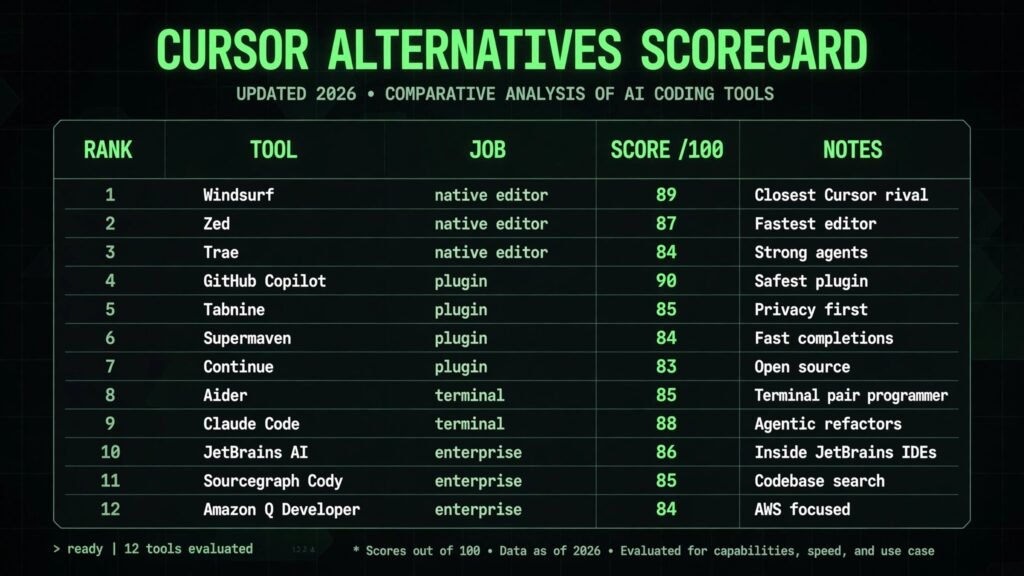
The 12 Cursor alternatives at a glance
| Tool | Best job | Free option | Paid from |
|---|---|---|---|
| Windsurf | AI native editor, closest Cursor rival | Free tier | Around $15 per month |
| Zed | Fast AI native editor | Free | Pro around $20 per month, check checkout |
| Trae | AI native editor with strong agents | Free tier | Check checkout |
| GitHub Copilot | Plugin for VS Code and JetBrains | Free tier | Pro $10 per month |
| Tabnine | Private, enterprise friendly plugin | Free tier | Pro around $12 per month, check checkout |
| Supermaven | Fast inline completions | Free tier | Pro $10 per month |
| Continue | Open source AI plugin | Free | Self hosted model costs only |
| Aider | Terminal pair programmer | Free | Model API costs only |
| Claude Code | Agentic terminal coding | Free tier | Via Claude Pro $20 per month, check checkout |
| JetBrains AI | AI inside IntelliJ and PyCharm | Free tier | Pro around $10 per month, check checkout |
| Sourcegraph Cody | Codebase aware enterprise assistant | Free tier | Pro around $9 per month, check checkout |
| Amazon Q Developer | AWS focused enterprise assistant | Free tier | Pro $19 per user per month |
Best pick by job
| Your job | Start with | If that fails, try |
|---|---|---|
| Closest drop in Cursor replacement | Windsurf | Trae |
| Fastest editor on modest hardware | Zed | Supermaven |
| Keep your current editor, add AI | GitHub Copilot | Continue |
| Privacy first or air gapped code | Tabnine | Continue |
| Cheapest useful inline completions | Supermaven | GitHub Copilot |
| Full control, open source stack | Continue | Aider |
| Terminal first workflow | Aider | Claude Code |
| Agentic multi file refactors | Claude Code | Windsurf |
| Already on JetBrains IDEs | JetBrains AI | Sourcegraph Cody |
| Large codebase, enterprise search | Sourcegraph Cody | Amazon Q Developer |
| Heavy AWS development | Amazon Q Developer | GitHub Copilot |
| Small team, low budget | Continue | Zed |
AI native editors: a full editor built around AI
These editors do not bolt AI onto an old product. Chat, agents, inline edits and codebase search are part of the editor itself, which is why they feel closest to Cursor.
1. Windsurf
Windsurf, from Codeium, is the closest direct rival to Cursor. It combines an editor forked from VS Code with Cascade, an agent that reads your whole codebase, plans multi file changes, and runs terminal commands to verify its own work. It supports a wide model roster, including models from OpenAI, Anthropic and Google, so you are not tied to one provider’s pricing or behaviour.
Pricing: A free tier is offered with limited credits. Paid plans are reported from around $15 per month on annual billing. Check checkout for the current credit allowances, since agentic work burns credits faster than simple completions.
Best for: Developers who want the Cursor experience with more model choice, and teams that want agent driven refactors across many files.
Watch out for: Agent runs need supervision. Cascade can make broad changes quickly, so review its diffs file by file before accepting, and keep a clean git state so a bad run is easy to revert.
Try it at: windsurf.com

2. Zed
Zed is the speed pick. Written in Rust, it opens instantly, handles large files without stuttering, and adds AI through a built in assistant panel and inline edits. Its multiplayer editing is a genuine differentiator: two developers can share a session and see each other’s cursors and edits in real time, which suits pair programming better than screen sharing.
Pricing: Zed itself is free and open source. A Pro plan with expanded AI usage is reported at around $20 per month. Check checkout for the current AI limits, since Zed has changed its AI packaging before.
Best for: Developers who value speed above all, macOS and Linux users, and pairs who want real collaborative editing.
Watch out for: The extension ecosystem is smaller than VS Code’s, and Windows support has lagged behind macOS and Linux. If your workflow depends on a niche VS Code extension, check it exists for Zed first.
Try it at: zed.dev
3. Trae
Trae is the emerging AI native editor, backed by ByteDance, and it leans hard into agents. Its Builder mode takes a prompt and produces a working project scaffold, while its chat agent handles edits, debugging and explanations inside the editor. It feels modern and fast, and its free tier is generous enough to evaluate properly.
Pricing: A free tier is offered. Paid plans are not consistently published, so check checkout for the current price and limits.
Best for: Solo developers and small teams who want agent driven building at low cost, and anyone curious about the newest generation of AI editors.
Watch out for: Trae is newer, so its ecosystem, documentation and long term roadmap are less proven than Windsurf or Zed. Treat it as a strong second editor to evaluate, not yet a default team standard.
Try it at: trae.ai
Editor plugins: keep your editor, add AI
Switching editors is disruptive. These plugins add completions, chat and edits to VS Code, JetBrains, Neovim or Visual Studio, so your keybindings, extensions and muscle memory stay intact.
4. GitHub Copilot
GitHub Copilot is the most widely used AI coding assistant, and the safest plugin choice. It offers inline completions, a chat panel, agent mode for multi file tasks, and code review, inside VS Code, JetBrains IDEs, Neovim and Visual Studio. Its model roster now includes models beyond OpenAI, and its deep GitHub integration means pull request summaries and reviews work where your code already lives.
Pricing: A free tier is offered with limited completions and chat. Pro is $10 per month, and Pro Plus is reported at $39 per month. Check checkout for the current agent mode limits.
Best for: Almost any developer who wants proven AI assistance without changing editors, and teams already standardised on GitHub.
Watch out for: Copilot is strongest on common patterns and public APIs. On a private, unusual codebase it still needs good prompts and context, and its suggestions should be tested like any other code, not trusted on sight. Developers comparing the wider AI tool stack should also see our best AI tools for learning to code guide.
Try it at: github.com
5. Tabnine
Tabnine is the privacy pick. It offers whole line and full function completions, chat, and code review, with a strong focus on keeping code private: it can run models locally or in a private deployment, and it states that it does not train on your code. That makes it the easiest AI assistant to approve in regulated or security conscious companies.
Pricing: A free tier is offered. Pro is reported at around $12 per user per month, with enterprise pricing custom. Check checkout for the current plan, since Tabnine has changed its tiers before.
Best for: Enterprise teams, regulated industries, and any company whose security review blocks tools that send code to a public cloud.
Watch out for: Local and private models are less capable than the largest frontier models, so Tabnine trades some raw generation quality for privacy. Test it on your own codebase before committing a whole team.
Try it at: tabnine.com
6. Supermaven
Supermaven is the speed pick among plugins. Its claim is simple: completions that arrive fast enough to feel instant, with a large context window that keeps suggestions relevant across a long file. It works in VS Code, JetBrains and Neovim, and its free tier covers a useful amount of daily use.
Pricing: A free tier is offered. Pro is $10 per month, with team pricing available. Check checkout for the current free tier limits.
Best for: Developers who mainly want fast, accurate inline completions rather than a chat agent, and anyone frustrated by laggy suggestions.
Watch out for: Supermaven is narrower than Copilot or Windsurf: it does not offer the same depth of agent mode, multi file planning or code review. Buy it for completions, not as a full agent platform.
Try it at: supermaven.com
7. Continue
Continue is the open source option, and the most flexible plugin on this list. It adds chat, inline edits, autocomplete and agent mode to VS Code and JetBrains, and it lets you choose any model provider, including local models through Ollama, or your own API keys. That control matters for cost, privacy and experimentation.
Pricing: Continue itself is free and open source. You pay only for the model you connect, whether that is a provider API or a local model running on your own hardware.
Best for: Developers who want full control over models and data, teams with existing API spend, and anyone who wants to avoid vendor lock in.
Watch out for: Flexibility has a setup cost. Choosing models, configuring context providers and tuning prompts takes time, and the out of the box experience is less polished than Copilot. It rewards tinkerers and punishes anyone who wants zero configuration.
Try it at: continue.dev
Terminal and cloud coding: code without leaving the shell
Some developers live in the terminal. These tools bring AI to that workflow, running agents that read files, make edits and run tests from the command line.
8. Aider
Aider is the terminal pair programmer. It runs in your shell, pairs with Git, and lets you ask for features, fixes and refactors in plain language while it edits real files and commits each change. Because it works with your existing editor and your own API keys, it fits any language and any project layout.
Pricing: Aider is free and open source. You pay only for the model API calls it makes, so a light month can cost a few dollars and a heavy agent month can cost far more. Check your provider’s rates before running large refactors.
Best for: Terminal native developers, and anyone who wants AI help inside an existing Git workflow without switching editors.
Watch out for: Aider is a command line tool with a learning curve, and its output quality depends heavily on the model you choose. It is not a good first AI tool for a developer who has never used the terminal confidently.
Try it at: aider.chat
9. Claude Code
Claude Code is Anthropic’s agentic coding tool for the terminal. It plans, edits, tests and debugs across a whole codebase, reads project context from files you point it at, and handles long, multi step tasks that simple completion tools cannot. Its strength is sustained reasoning: it stays on task through a large refactor where other tools drift.
Pricing: Claude Code is available through a Claude subscription, with Pro reported at $20 per month, and through API usage based pricing. Check checkout for the current rate limits, since heavy agentic sessions can hit them.
Best for: Experienced developers tackling large refactors, migrations and debugging sessions, and teams already using Claude models elsewhere. Writers comparing AI assistants more broadly should also see our chatgpt-alternatives guide.
Try it at: claude.com

Team and enterprise options: governance, search and scale
Individual tools win on feel. Enterprise tools win on security reviews, codebase search, permissions and audit trails. These three are built for teams where those questions come first.
10. JetBrains AI
JetBrains AI brings AI to the IDEs many professional developers already use: IntelliJ IDEA, PyCharm, WebStorm, GoLand and the rest of the JetBrains family. It offers inline completions, chat, code explanation, refactoring and test generation, with context drawn from the project’s indexed code, which JetBrains IDEs already understand deeply.
Pricing: A free tier is offered with limited AI usage. Pro is reported at around $10 per user per month, with enterprise pricing custom. Check checkout for the current AI credit limits.
Best for: Teams already standardised on JetBrains IDEs, especially Java, Kotlin, Python and PHP shops that want AI without leaving their IDE.
Watch out for: JetBrains AI is tied to JetBrains IDEs, so VS Code or Neovim teams get no value from it. Its agent capabilities also trail the newest AI native editors on very large multi file tasks.
Try it at: jetbrains.com
11. Sourcegraph Cody
Sourcegraph Cody is the codebase search specialist. It builds an index of your entire codebase, including private repositories, and answers questions, writes code and reviews changes with that full context. Where most assistants see the open files, Cody sees the whole repository graph, which makes it unusually good at large, unfamiliar codebases.
Pricing: A free tier is offered. Pro is reported at around $9 per user per month, with enterprise pricing custom. Check checkout for the current self hosted pricing.
Best for: Large companies, monorepos, and teams onboarding developers onto codebases nobody fully understands.
Watch out for: Cody’s value depends on good indexing. A poorly configured instance, or a codebase with broken build metadata, gives weaker answers, so budget setup time and check its search quality on your own repositories first.
Try it at: sourcegraph.com

12. Amazon Q Developer
Amazon Q Developer is the AWS focused assistant. It lives in VS Code, JetBrains and the AWS console, writes and explains code, reviews pull requests, and, distinctively, automates AWS work: upgrading Java versions, migrating .NET frameworks, and transforming code for new runtimes. For teams deep in AWS, that automation is worth more than generic completions.
Pricing: A free tier is offered for individuals. Pro is $19 per user per month. Check checkout for the current agent and transformation limits.
Best for: AWS heavy teams, Java and .NET shops planning upgrades, and enterprises already buying through AWS.
Watch out for: Outside AWS, Q Developer is a competent but unremarkable assistant, and its transformation features assume standard project layouts. Teams not running on AWS will get better value from Copilot or Cody.
Try it at: aws.amazon.com
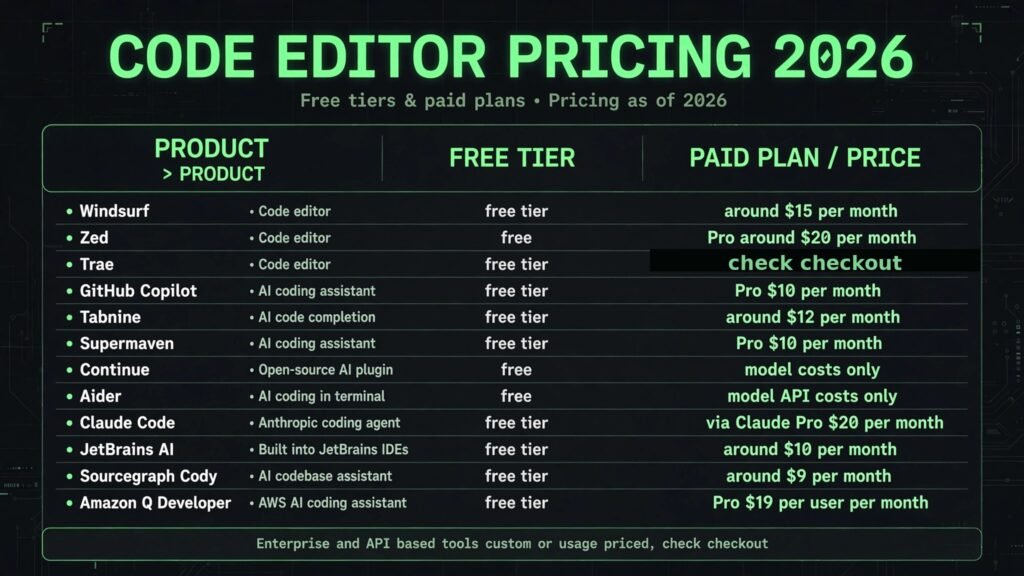
Pricing compared: what AI coding really costs
| Tool | Free option | Paid from | Pricing note |
|---|---|---|---|
| Windsurf | Free tier | Around $15 per month | Credit based, agents burn credits faster |
| Zed | Free | Pro around $20 per month | Check checkout for AI limits |
| Trae | Free tier | Check checkout | Pricing not consistently published |
| GitHub Copilot | Free tier | $10 per month | Pro Plus reported at $39 |
| Tabnine | Free tier | Around $12 per month | Enterprise custom |
| Supermaven | Free tier | $10 per month | Team pricing available |
| Continue | Free | Model costs only | API or local model spend |
| Aider | Free | Model API costs only | Cost scales with usage |
| Claude Code | Free tier | Via Claude Pro $20 per month | API pricing also available |
| JetBrains AI | Free tier | Around $10 per month | Enterprise custom |
| Sourcegraph Cody | Free tier | Around $9 per month | Enterprise custom |
| Amazon Q Developer | Free tier | $19 per user per month | Agent limits apply |
A realistic solo budget is $0 to $20 a month: a free tier plus one paid plan, usually Copilot Pro or Windsurf. A professional budget lands around $20 to $40 a month when agent mode and larger context become daily habits. An enterprise budget is custom, and the real cost is not the licence but the rollout: security review, indexing, training and prompt standards. In every case, price the usage model, not just the monthly fee, because credit based and API based tools can cost far more in a heavy month than a flat subscription. Teams weighing the subscription stack should also see our best AI subscriptions worth paying for guide.
How to Choose the right Cursor alternative
Start with the editor you already use. If you live in VS Code, a plugin like Copilot or Continue gives you AI this afternoon with zero migration. If you live in JetBrains, JetBrains AI is the obvious first step. Only switch editors if a plugin cannot do the job, because editor migration costs weeks of lost fluency.
Next, decide whether you need completions or agents. Completions suit most daily work and cost the least: Supermaven, Copilot and Tabnine all excel here. Agents suit refactors, migrations and new features, and they cost more in credits, review time and risk: Windsurf, Claude Code and Trae are the agent first choices.
Then test context on your own codebase before committing. Give each shortlisted tool the same real task: explain a module, fix a real bug, and refactor a real function. The tool that understands your imports, your conventions and your private APIs wins, regardless of benchmark scores.
Finally, check the exit and the security story before you enter. Open source tools like Continue and Aider let you change models at any time. Enterprise tools like Tabnine, Cody and Q Developer pass security reviews that consumer tools fail. Pick the tool your security team will approve, not just the one your developers like in week one.

Frequently Asked Questions
Is there a free Cursor alternative?
Yes. Zed, Continue and Aider are free, and Copilot, Windsurf, Trae, Tabnine, Supermaven, Cody and Q Developer all offer free tiers. The free tier is enough to evaluate, but heavy agent use usually needs a paid plan.
Which Cursor alternative is closest to Cursor itself?
Windsurf is the closest direct replacement: a full AI native editor with an agent that plans and executes multi file changes. Trae is the emerging challenger in the same category.
Can I use AI coding tools without sending code to the cloud?
Yes, with limits. Tabnine offers private and local deployments, and Continue and Aider work with local models through tools like Ollama. Local models are less capable than frontier cloud models, so expect a quality trade off.
Will AI coding tools replace developers?
No. They remove boilerplate, speed up familiar patterns, and draft first versions of features, but they do not design systems, judge trade offs, or take responsibility for production code. The developer’s job shifts toward review, architecture and verification.
How much should a small team pay for AI coding tools?
Between $10 and $20 per developer per month covers a solid setup: one paid plan per developer, usually Copilot Pro, Windsurf or Supermaven, plus free tiers for evaluation. Add agent heavy tools only for developers who use them daily.
Which single tool should a new developer start with?
GitHub Copilot, for most new developers, because it works in the editor they already use, its completions teach idiomatic patterns, and its free tier lets them learn before paying. Developers building websites with AI help should also see our how to build a website with AI guide.
Conclusion
The best Cursor alternatives do not try to beat Cursor at its own game. They win by fitting a different workflow: Windsurf and Trae as AI native editors, Zed as the fastest editor, Copilot and Tabnine as plugins that respect your existing setup, Supermaven for instant completions, Continue and Aider for open source control, Claude Code for agentic terminal work, and JetBrains AI, Cody and Q Developer for teams where governance and scale matter.
Start with the editor you already use and the job you actually do. Test two tools on real code from your own codebase, check the numbers they produce, and pick the one whose answers you trust. The right Cursor alternative is not the one with the longest feature list. It is the one that understands your code, respects your budget, and still feels fast on a Monday morning.