
A mobile massage therapist does not lose bookings because clients dislike the massage. Bookings are lost in the gaps between jobs, in the drive across town that nobody priced in, and in the intake form that never came back before the session. A therapist who drives to a client without a completed intake form, a confirmed address, and a paid deposit has already spent the most expensive part of the day before the session starts. That is why the best scheduling software for mobile massage therapists has to do more than hold a calendar. It has to protect travel time, collect intake details early, and make payment feel routine.
The best scheduling software for mobile massage therapists treats the road as part of the appointment. A session that runs 60 minutes at the client home can easily take 100 minutes once setup, packing, and driving are counted. Software that books back to back sessions with no travel buffer will quietly create late arrivals, rushed sessions, and tired therapists. Software that blocks travel time, groups nearby bookings, and lets clients book only in the therapist service area keeps the day realistic.
This guide compares 11 tools, from massage specific platforms built around intake and treatment notes to general booking tools that mobile therapists adapt. Prices are starting prices where published, and several tools quote by staff count or feature tier. Check the vendor pricing page before you budget, since text reminders, payment processing, and marketplace fees change the monthly total fast.
Why a Mobile Diary Breaks Without Travel Time
A clinic diary and a mobile diary look similar on screen and behave very differently in practice. In a clinic, a late client waits in a waiting room. On the road, a late finish means a late arrival at the next home, a client waiting at their own front door, and a therapist who starts the next session already behind. Travel buffers are not a luxury for mobile work. They are the difference between a calm day and a day of apologies.
Intake is the second reason a plain calendar fails mobile therapists. A clinic can hand a client a paper form at reception. A mobile therapist needs that form before leaving home, because health details, pressure preferences, and problem areas shape what equipment to bring and how long to allow. Booking software that sends an intake form at booking, chases an incomplete form, and stores the answers in the client record saves a phone call and a wasted trip.
Payment is the third reason. A mobile no-show costs more than a clinic no-show, because the therapist has already travelled or turned down another booking to hold the slot. A deposit or card on file changes that calculation, and it gives the therapist a clear cancellation policy to point to. A tool that handles deposits, payments, and reminders in one place protects income without awkward money conversations at the door.

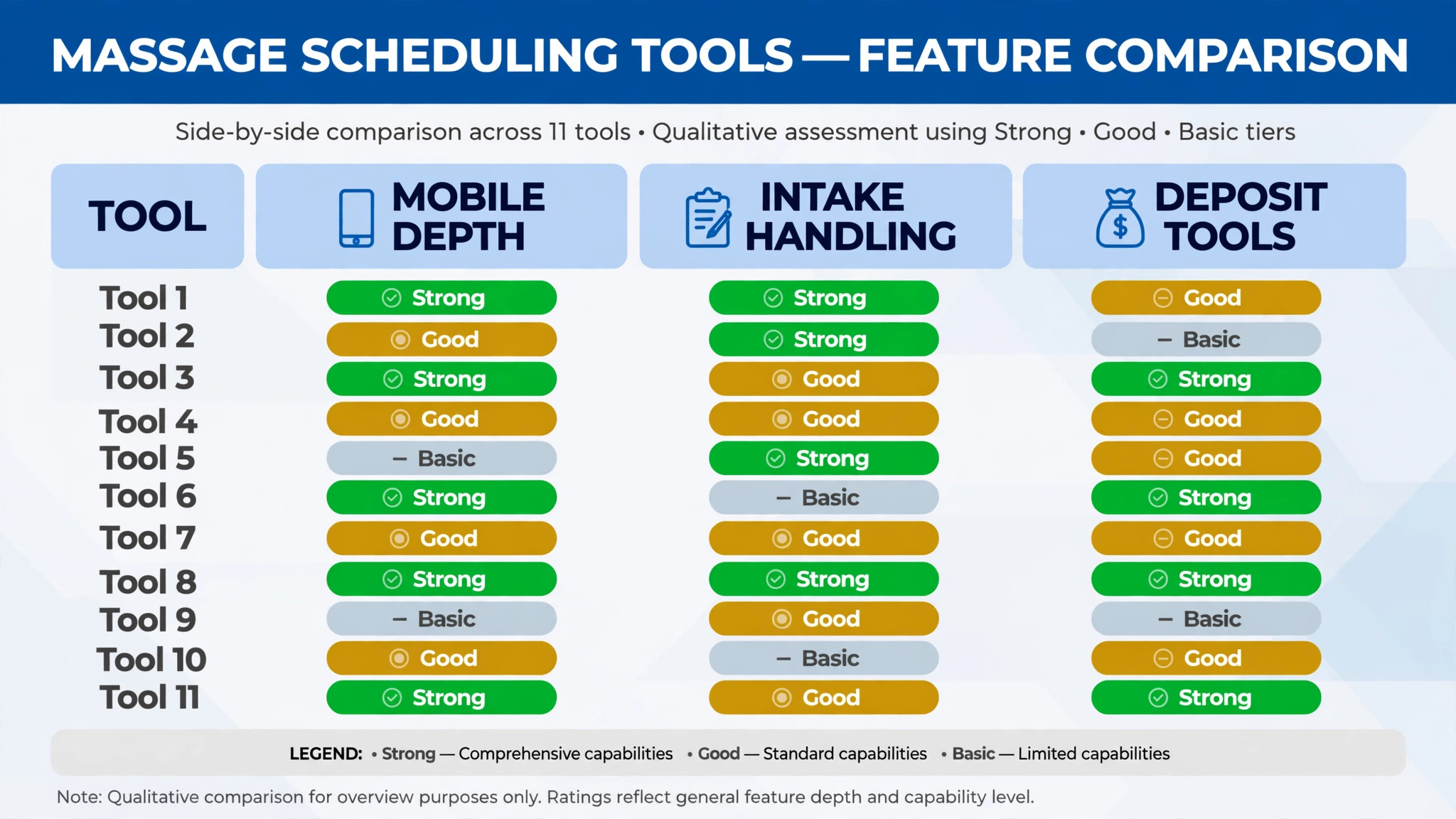
The 11 Tools at a Glance
| Tool | Starting price | Best for | Mobile depth |
|---|---|---|---|
| MassageBook | Check the vendor pricing page | Massage therapists wanting intake and notes | Strong |
| Fresha | Check the vendor pricing page | Commission based booking with no subscription | Good |
| Vagaro | Check the vendor pricing page | Booking plus point of sale and client records | Good |
| Square Appointments | Check the vendor pricing page | Therapists already using Square payments | Good |
| Booksy | Check the vendor pricing page | Marketplace discovery plus booking | Good |
| Acuity Scheduling | Check the vendor pricing page | Flexible booking forms and intake questions | Good |
| Calendly | Check the vendor pricing page | Simple scheduling links for solo therapists | Fair |
| SimplyBook.me | Check the vendor pricing page | Custom booking pages with buffer controls | Good |
| Setmore | Check the vendor pricing page | Low cost booking with reminders | Fair |
| PocketSuite | Check the vendor pricing page | Solo therapists wanting booking plus payments | Good |
| GlossGenius | Check the vendor pricing page | Polished booking page for solo therapists | Good |
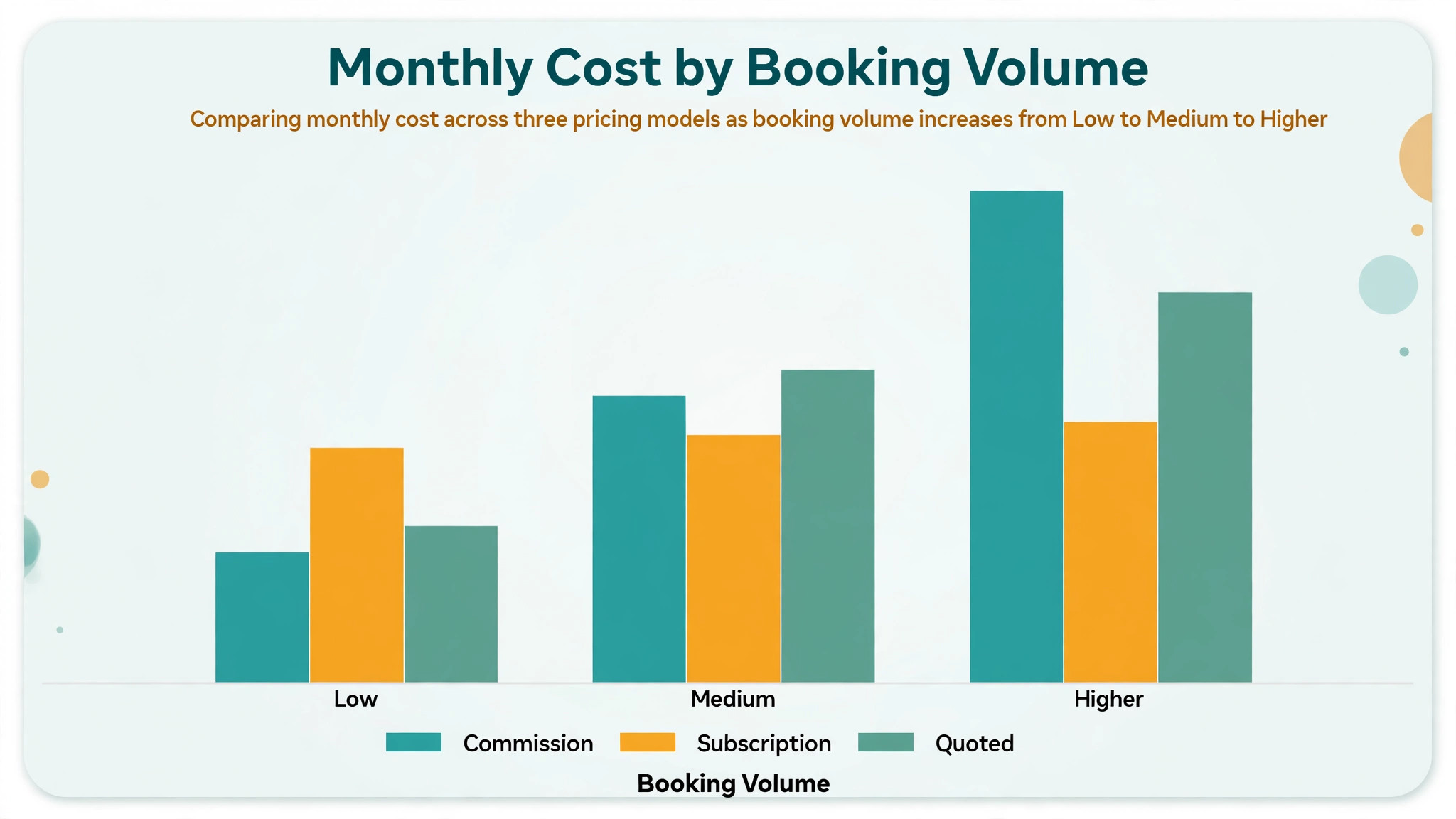
Pricing in this market is rarely a single number, since several tools charge by staff count, location, or add-on bundle. That is why a comparison of the best scheduling software for mobile massage therapists should start with a written quote for your real therapist count and monthly booking volume, not with a directory starting price alone. Confirm whether text reminders, online booking fees, and payment processing sit inside the subscription or on top of it.
Best Pick by Job
| Job type | First pick | Why it fits | Watch out for |
|---|---|---|---|
| Solo therapist | MassageBook | Intake, notes, and booking built for massage | Fewer general business tools |
| Small mobile team | Vagaro | Booking plus payments and team schedules | Add-on costs as features grow |
| Spa with a mobile arm | Fresha | Marketplace reach plus commission booking | Commission maths at high volume |
The job type that matches most of your sessions should decide the shortlist for the best scheduling software for mobile massage therapists. A solo therapist who buys a multi-location platform will pay for controls that a simple booking page already covers. A small team that buys a solo tool will struggle with therapist assignment, service area rules, and a shared view of who is driving where.
Travel and Intake Checklist
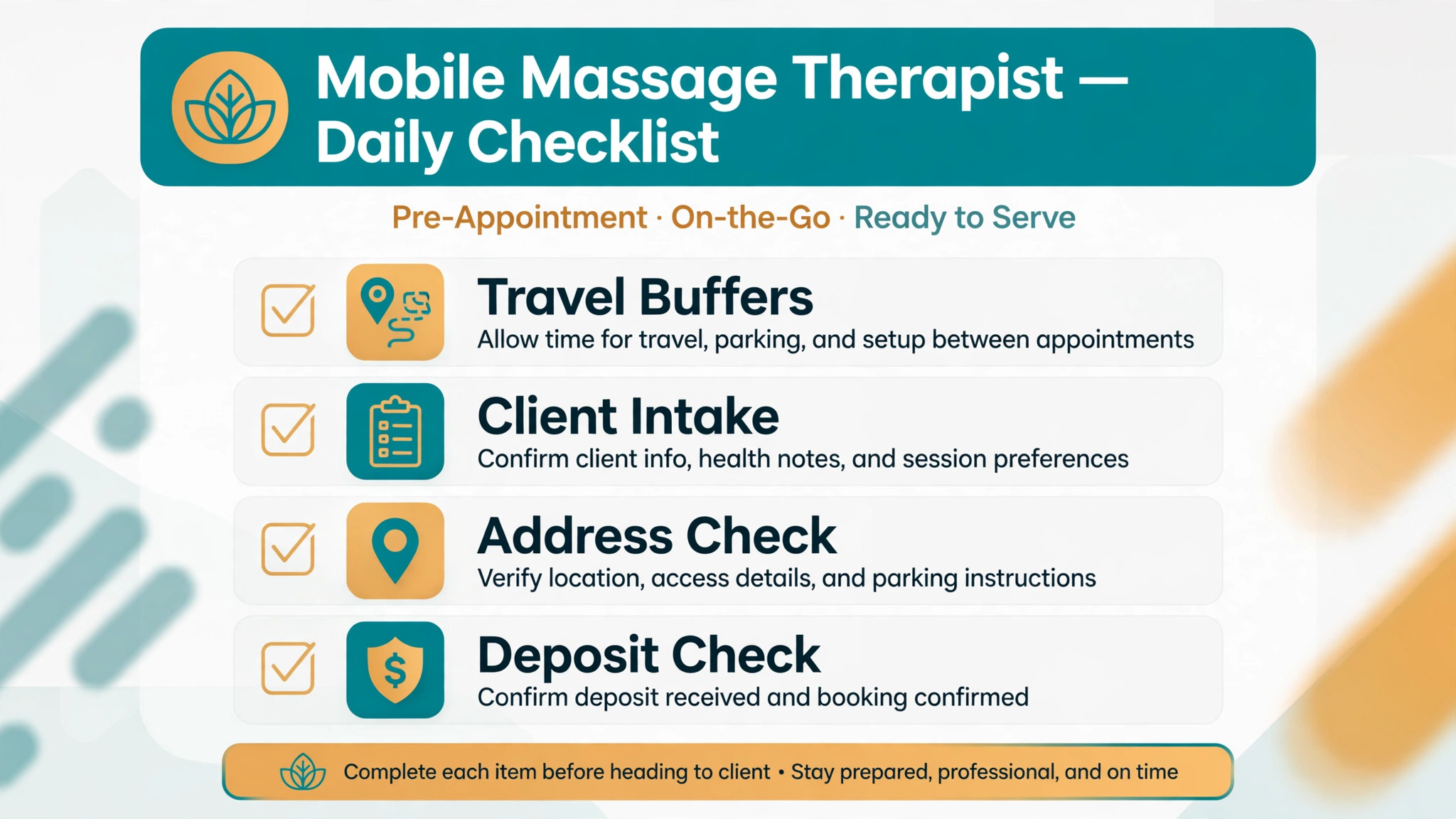
Use this checklist every week to keep mobile days realistic and no-shows low. It turns booking data into smoother travel days, rather than leaving travel planning to memory.
– Set a travel buffer after every mobile session, and a longer buffer for cross-town bookings. – Send the intake form at booking, and chase any form still incomplete the day before the session. – Confirm the full address, parking notes, and entry instructions before the therapist leaves. – Take a deposit or card on file for first-time clients and for sessions over 90 minutes. – Group bookings by area where possible, and keep a waitlist for gaps in the same neighbourhood. – Record equipment notes, pressure preferences, and problem areas after every session. – Send a reminder two days before the session and again on the day, with a link to reschedule. – Review late arrivals every Monday, and check whether buffers, booking gaps, or intake delays explain them.
Software helps this checklist only if booking, intake, buffers, and client notes live in one client record. If those details live in four separate places, the checklist becomes a manual reconciliation exercise on the busiest day of the week.
The 11 Tools in Detail
1. MassageBook
MassageBook is a platform built for massage therapists, with online booking, intake forms, treatment notes, and client management in one system. Clients can book online, complete an intake form, and pay, while the therapist keeps session notes and client history beside the booking. That combination fits mobile work well, because intake and notes matter more on the road than in a clinic.

The strength is the massage specific workflow. Intake forms, SOAP style notes, and client preferences sit in the record the therapist actually uses, so the next session starts with real context. The limit is breadth. A therapist who also wants full point of sale, marketing automation, and multi-location reporting may need a second tool or a different platform. Test the intake form on a phone before choosing, since most mobile clients complete it there.

Best for a solo therapist or small mobile team that wants booking, intake, and notes in one massage focused system. Check the vendor pricing page for the tier that includes text reminders and online payments.

2. Fresha
Fresha is a booking platform for beauty and wellness businesses that offers booking, calendar, and client management with a commission based model rather than a monthly subscription for its core booking product. Clients book through the Fresha marketplace or the therapist booking page, and the therapist pays on completed bookings under the published terms.
The strength is the low fixed cost. A new mobile therapist or one with seasonal swings can take online bookings without a subscription hanging over a slow month. The limit is the commission itself. As booking volume grows, commission on completed bookings can overtake a flat subscription, so a busy therapist should model the annual commission at real volume before assuming Fresha stays cheapest.
Best for a new or seasonal mobile therapist who wants online booking without a monthly subscription, provided the commission maths works at booking volume. Check the vendor pricing page for the current commission terms and any paid add-ons.
3. Vagaro
Vagaro is a salon and spa platform that combines online booking, point of sale, client records, and business reports. Clients can book through a therapist page or app, and the therapist can run checkout, product sales, and staff schedules from the same system. That breadth suits a mobile team that also sells oils, gift cards, and treatment packages.
The strength is the all-in-one daily workflow. Booking, checkout, and client history sit together, so the end of day reconciliation is simple. The limit is add-on cost. Features that start as extras can lift the monthly total, so a therapist should price the full bundle actually used, including text reminders and marketing tools, before comparing Vagaro with a cheaper booking-only tool.
Best for a small mobile team that wants booking plus point of sale in one system, with client records the whole team can use. Check the vendor pricing page and confirm which reminder and marketing features sit on the chosen tier.
4. Square Appointments
Square Appointments is the booking side of the Square ecosystem, with online booking, calendar management, payments, and client records that connect to Square point of sale and hardware. A mobile therapist who already takes card payments through Square can add booking without a second payment setup, and clients can book, pay deposits, and check out through one system.
The strength is payment simplicity. Staff already familiar with Square checkout will find booking and payments in one place, and the client record carries payment history beside appointment history. The limit is massage specificity. Square Appointments is a general appointment tool adapted by therapists, so intake forms, treatment notes, and travel buffers need careful setup and testing.
Best for a mobile therapist already using Square for payments who wants booking added with minimal new hardware or payment work. Check the vendor pricing page for the tier that includes team booking and text reminders.
5. Booksy
Booksy is a booking platform and marketplace for beauty and wellness services, where clients can discover therapists, read reviews, and book appointments through the Booksy app. For a mobile therapist, that discovery side is the main draw, since new clients can find the therapist without first finding a website or social page.
The strength is new client flow. A therapist in a busy area can pick up bookings from clients browsing nearby massage services, and the review and profile tools help the therapist stand out in that list. The limit is dependence on a marketplace. The therapist competes on the same screen as nearby rivals, and marketplace fees or commissions can change the economics of a booking. Keep an independent booking link active too.
Best for a mobile therapist who wants new client discovery alongside booking, especially in a competitive local area. Check the vendor pricing page for booking fees and marketplace terms before committing.
6. Acuity Scheduling
Acuity Scheduling, now part of Squarespace Scheduling, is a flexible booking tool with custom intake questions, booking forms, payment collection, and calendar sync. A mobile therapist can build a booking form that asks for address details, health notes, pressure preferences, and session length in one flow, then blocks the right amount of time including a buffer.
The strength is form flexibility. Intake questions can be shaped to the exact information a mobile session needs, rather than squeezed into a generic booking note. The limit is massage depth. Treatment notes and client history are lighter than on MassageBook, so a therapist who relies on detailed session notes may need a separate notes system.
Best for a mobile therapist who wants a highly custom booking and intake form, and who will manage notes elsewhere if needed. Check the vendor pricing page for payment and reminder terms.
7. Calendly
Calendly is a simple scheduling tool built around shareable booking links, calendar sync, and automated reminders. A solo mobile therapist can set session lengths, buffers between events, and a service area note, then share one link on a website, social profile, or message thread. Clients pick a time without a phone call.
The strength is simplicity and speed. Setup takes minutes, the booking link works anywhere, and calendar conflicts are handled automatically. The limit is depth for massage work. Intake forms, deposits, treatment notes, and team scheduling are lighter than on massage specific platforms, so Calendly suits a therapist with a simple offer and a separate system for notes and payments.
Best for a solo therapist who mainly needs a clean booking link with buffers and reminders. Check the vendor pricing page for the plan that includes payment collection if deposits matter.
8. SimplyBook.me
SimplyBook.me is a booking platform with custom booking pages, buffer controls, service categories, and add-on features a business can switch on as needed. A mobile therapist can set travel buffers, define service areas, collect intake answers at booking, and offer packages or memberships through the same page.
The strength is configurability at a modest price. Buffers, booking rules, and client fields can be tuned to mobile work without buying an enterprise platform. The limit is polish. The booking page and admin screens feel more functional than beautiful, so a therapist who sells on visual presentation should test the client journey on a phone carefully before switching.
Best for a mobile therapist who wants detailed booking rules and buffers without a high monthly fee. Check the vendor pricing page for the add-ons included on the chosen plan.
9. Setmore
Setmore is a low cost appointment booking platform with online booking, calendar management, payments, and client reminders. A small mobile practice can set up services, availability, and a booking link quickly, without a long implementation or a large monthly fee.
The strength is price and simplicity for a practice that mainly needs online booking, reminders, and payments. The limit is depth. Intake handling, treatment notes, and multi-therapist scheduling are lighter than on massage specific tools, so a growing team may outgrow it and need to migrate later.
Best for a small mobile practice or solo therapist that wants low cost online booking with reminders. Check the vendor pricing page for payment terms and reminder limits.
10. PocketSuite
PocketSuite is a business app for solo service professionals, with booking, payments, messaging, and client management in one mobile friendly system. A mobile therapist can book sessions, send intake or consent forms, take deposits, and message clients from a phone while travelling between jobs.
The strength is the mobile first daily workflow. The whole practice fits in a pocket, which suits a therapist who manages everything from a phone between sessions. The limit is team depth. Multi-therapist scheduling, service area rules, and detailed reporting are lighter than on team platforms, so a growing mobile team should test those controls before committing.
Best for a solo mobile therapist who wants booking, payments, and messaging in one phone friendly app. Check the vendor pricing page for payment processing terms.
11. GlossGenius
GlossGenius is a booking and payments platform built for independent beauty and wellness professionals, with a booking page, calendar, payments, and client management in one setup. A solo mobile therapist can set service menus, prices, and availability, take bookings online, and get paid through the platform without building a website.
The strength is simplicity and presentation. Setup is fast, the booking page looks polished on a phone, and payments sit beside appointments rather than in a separate system. The limit is mobile and massage depth. Travel buffers, intake forms, and treatment notes need testing, since GlossGenius is built for beauty professionals broadly rather than mobile massage specifically.
Best for a solo mobile therapist who wants a clean booking page, simple payments, and fast setup. Check the vendor pricing page for payment processing terms at real booking volume.
How Travel Buffers Change a Mobile Day
Travel buffers change the mobile day before they change the calendar. When a buffer sits after every session, the therapist stops choosing between arriving late and cutting a session short. That choice, repeated daily, is what wears therapists out and quietly pushes clients away. A diary with honest buffers looks less full on screen and earns more in practice, because fewer sessions are rushed and fewer clients wait at the door.
The second change is area grouping. A booking tool that shows the day on a map, or at least in area order, helps the therapist spot a cross-town zigzag before it happens. A morning booking in the north, a midday booking in the south, and an afternoon booking back in the north is a day spent driving, not treating. Grouping by area, even roughly, protects energy and keeps fuel and time costs down. Judged on that grouping alone, the best scheduling software for mobile massage therapists is the tool that makes an unrealistic day visible before the therapist leaves home.
The third change is intake timing. A form completed at booking gives the therapist time to prepare equipment, check health details, and confirm that the session length fits the client need. A form completed at the door gives none of that. Booking software earns its fee when intake arrives early, automatically, without the therapist chasing it by text.
How to Choose the Best Scheduling Software for Mobile Massage Therapists
Start with the travel test. Take a real week of mobile sessions, including a cross-town booking, a first-time client, and a 90 minute session. Enter that week in the trial and see whether the system blocks travel time, collects intake before the session, and prevents double booking. If that test fails, the tool will fail on a busy week.
Next, test the client journey from first visit to rebooking. Can a client find available times, complete intake, pay a deposit, receive a confirmation, and receive a reminder without therapist help. Count the manual touches required. A tool that still needs a text exchange for every booking has not solved the mobile scheduling problem, even if the calendar looks good.
Then test notes and rebooking together. Book a client, record session notes and preferences, and rebook the next visit before leaving. The system should carry those notes into the next appointment, so the therapist does not start from zero. If notes live in a separate screen the therapist rarely opens, the practice will lose the personal detail that keeps regular clients loyal.
Finally, price the full scheduling stack. Add text reminder costs, payment processing fees, marketplace commissions, and any per staff charges to the subscription. A low subscription with expensive reminders or commissions can cost more than a mid priced subscription once booking volume grows. Get the monthly total for real booking volume in writing before comparing tools.
Common Mistakes When Buying Mobile Massage Scheduling Software
The first mistake is buying a calendar and calling it a scheduling system. A calendar shows availability. A mobile scheduling system protects travel time, collects intake early, handles deposits, and prompts rebooking. Test the full workflow, not only the calendar view.
The second mistake is ignoring travel time. Many mobile scheduling problems are travel problems, not availability problems. A therapist who books back to back sessions across town will run late all day, and waiting clients will not rebook. Travel buffers should be a required part of setup, not an afterthought.
The third mistake is forgetting no-shows. A system without automated reminders, deposits, or a clear cancellation policy will not reduce missed appointments, even if it makes booking easier. Test reminder timing, message content, and the cancellation workflow, and confirm whether text reminders are included in the price.
The fourth mistake is buying for the practice you hope to become, not the practice you run. A team platform with central reporting is valuable for a group, but it adds setup and training burden for a solo therapist. Start with the tool that fits current session volume, and check that it can grow when therapist count and booking volume rise.
The fifth mistake is neglecting data export. Client records, session histories, and payment records are the practice business history. Before signing, confirm that those records can be exported in a usable format, and that the practice is not locked into a platform by its own data.
Frequently Asked Questions
How much does mobile massage scheduling software cost?
Costs for the best scheduling software for mobile massage therapists range from commission based booking on Fresha to tiered subscriptions on massage and salon platforms and quoted pricing on larger systems. The final cost depends on therapist count, booking volume, text reminders, payment processing, and marketplace terms. A therapist with high booking volume should model reminder and commission costs at that volume, since those charges grow with every booking. Get a written quote for real booking volume, including reminder and payment terms, before comparing headline prices.
What is the best scheduling software for a solo mobile massage therapist?
For many solo therapists, MassageBook is a strong starting point, because it combines booking, intake forms, treatment notes, and client management in one massage focused setup. PocketSuite is the alternative for a therapist who manages everything from a phone, and Calendly suits a therapist who mainly needs a simple booking link. The right choice depends on whether intake and notes or simple scheduling matter more.
Can clients book mobile massage sessions online by themselves?
Yes, on most tools in this guide. Clients can view available times, choose a service and session length, complete intake, book, change, or cancel appointments from a booking page or app, and receive confirmations and reminders. The test is whether online booking also handles travel buffers, service area limits, and deposit rules correctly, rather than merely reserving a time slot the therapist must then fix by hand.
Do mobile massage tools handle deposits for first-time clients?
Most booking platforms support deposits, card on file, or full prepayment, but the terms differ by tool and payment provider. A therapist should test the deposit flow for a first-time booking before switching, including what the client sees at booking, how a cancellation refund works, and whether the deposit policy is shown clearly. A deposit that surprises the client at checkout will cause abandoned bookings.
How do reminders reduce no-shows for mobile massage sessions?
Automated email and text reminders confirm the service, time, address, and preparation notes before the session, and give the client a clear way to reschedule if needed. That reduces forgotten appointments and last minute cancellations, and protects travel time that cannot be resold. Confirm whether text reminders are included in the subscription or charged separately, since that cost grows with booking volume.
Should a mobile therapist offer online booking and phone booking together?
Yes, for most practices. Online booking captures clients who search and book outside working hours, while phone booking serves clients who need advice on session choice, health details, or special requirements. The booking system should keep both channels in one calendar, so a phone booking cannot double book an online booking, and the therapist can see the full day in one place.
How long does it take to switch mobile massage scheduling software?
A solo therapist can switch in one to two weeks if services, prices, and client records are prepared in advance. A small team should allow three to four weeks, including staff training and parallel running on live bookings. A team with complex service areas and intake rules should allow four to six weeks, including buffer setup, deposit rules, and client record checks.
A One Week Trial Plan
Do not choose from a feature list. Run a one week trial plan on your two finalists. On day one, enter a real week of mobile sessions, including a cross-town booking and a first-time client. On day two, let clients book online and check how many bookings need manual fixes. On day three, test reminders, deposits, and a cancellation. On day four, check rebooking before leaving and a client note carried into the next visit. On day five, ask whether the calendar, buffers, and intake actually helped on the road, or only helped at the desk.
The tool that passes that week with the fewest fixes, the fewest late arrivals, and the least therapist confusion is the best scheduling software for mobile massage therapists for your practice, and the tool to keep. Price matters, but a cheap tool that creates daily scheduling fixes will cost more in lost sessions and tired therapists than a mid priced tool that runs cleanly. Choose the system that makes travel days calmer, intake arrive early, and clients more likely to rebook before the therapist packs up.
More Reading on Stratilyze
– Best Scheduling Software for Mobile Pet Groomers – Best Booking Software for Nail Salons – Best Booking Software for Indoor Play Centers – Best Management Software for Funeral Homes – Best CRM for Independent Car Dealers