
Two funeral homes can offer the same care and still run very differently behind the scenes. In one, the arrangement details, service plan, merchandise choices, and payment record sit in a single case file that every staff member can find. In the other, those details sit in a paper folder, a spreadsheet, and a separate invoicing tool, and staff spend arrangement week searching for information instead of supporting the family. The best management software for funeral homes closes that gap, so the work behind a service stays organised even when the week is difficult and busy.
A funeral home management system is not a simple calendar. It must hold case records, arrangement details, service planning, merchandise and casket or urn selection, cremation scheduling where relevant, staff assignments, and billing in one place. It must also handle sensitive family information with care, with clear access controls and a reliable record that staff can trust. A generic business tool can record appointments and invoices. It cannot easily hold an arrangement workflow from first call to final paperwork in a form that funeral staff recognise.
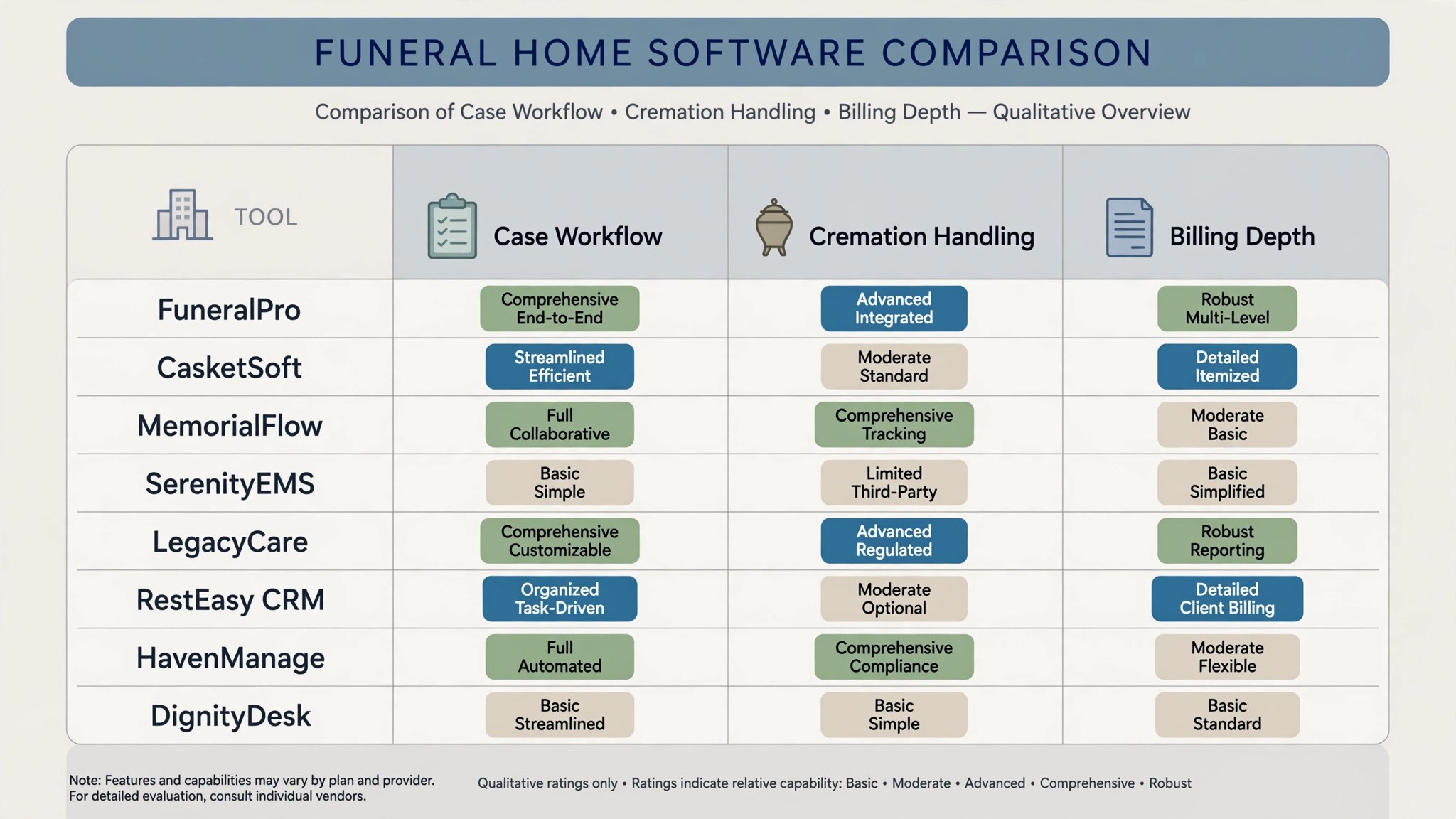
This guide compares eight tools, from funeral specific case management platforms to planning and cremation tools that funeral homes adapt. Prices are starting prices where published, and several funeral tools quote by location, case volume, or feature tier. Check the vendor pricing page before you budget, since case volume pricing and add-on modules change the annual total in ways a headline price will not show.
Why Funeral Home Work Breaks a Generic Business Tool
Case complexity is the first reason a generic tool falls short. A single case can involve many decisions, many family contacts, a service plan, a burial or cremation choice, merchandise, transport, and paperwork that must be completed in a set order. A generic customer record treats that case as one contact with a few notes. A funeral case system treats it as a structured workflow, with arrangement steps, service details, and document status visible at a glance. That structure reduces missed steps at a time when staff are under pressure.
Coordination is the second reason. Arrangements involve directors, embalmers, transport staff, clergy or celebrants, cemeteries or crematories, and suppliers, often within a few days. A management system that assigns tasks, tracks service times, and keeps the case file current will keep that coordination in one place. A system that relies on phone messages and separate calendars will create gaps, and gaps in funeral work are felt by families directly.
Billing and records are the third reason. Funeral billing involves itemised statements, merchandise, third party charges, and payments that may arrive in instalments or from several family members. A system that builds the statement from the arrangement record, rather than retyping it into a separate invoice tool, will reduce errors and save staff time. It will also leave a complete case history that the funeral home can rely on later.

The 8 Tools at a Glance
| Tool | Starting price | Best for | Funeral depth |
|---|---|---|---|
| Passare | Check the vendor pricing page | Case management and collaboration | Strong |
| Halcyon | Check the vendor pricing page | Modern case management | Strong |
| SRS Computing | Check the vendor pricing page | Full funeral home management | Strong |
| FuneralOne | Check the vendor pricing page | Websites plus management tools | Good |
| PlotBox | Check the vendor pricing page | Cemetery and cremation records | Good |
| Gather | Check the vendor pricing page | Arrangement planning with families | Good |
| Tukios | Check the vendor pricing page | Websites, obituaries, and planning | Good |
| FrontRunner | Check the vendor pricing page | Case management and websites | Good |
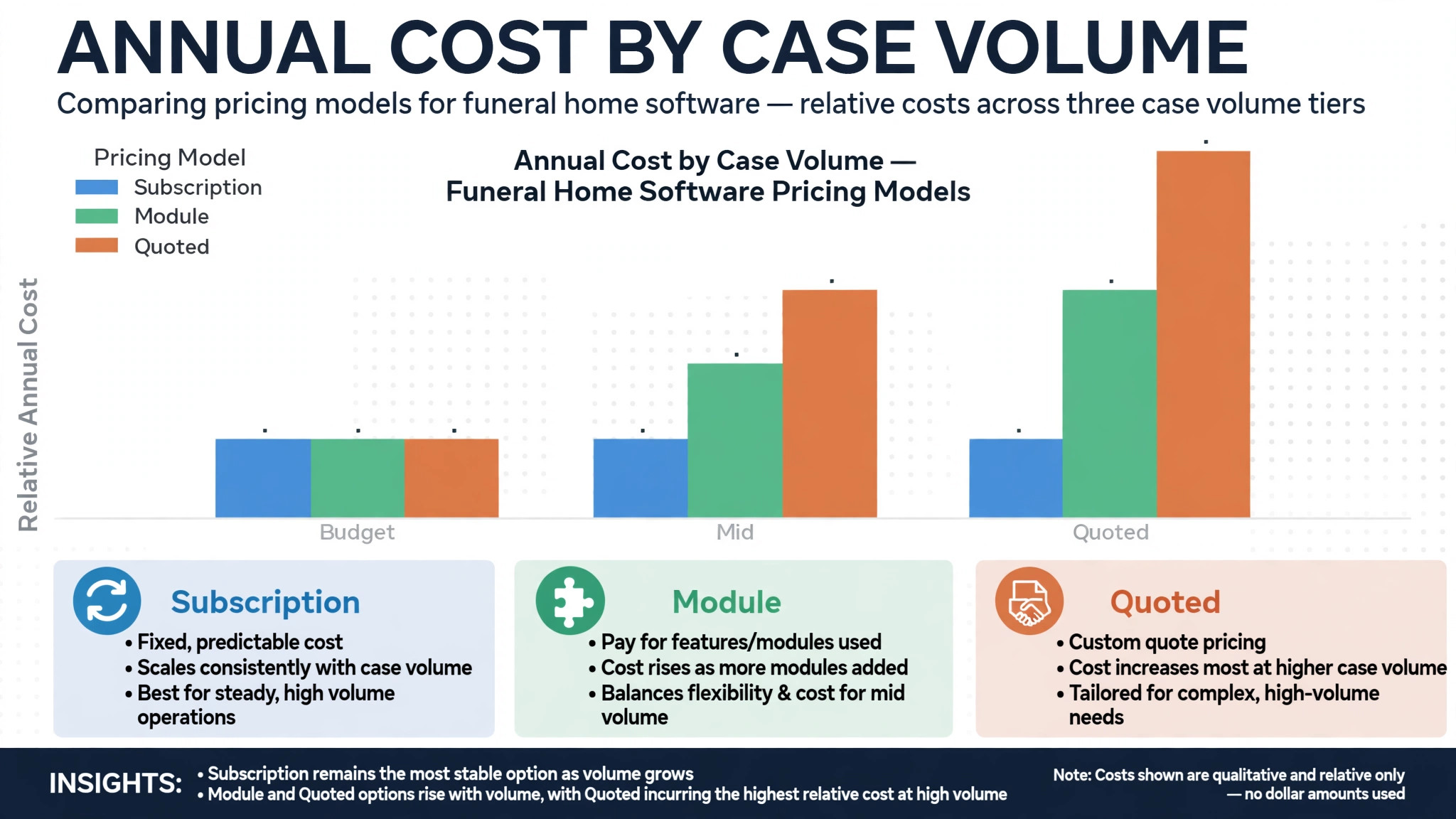
Pricing in this market is rarely a single number, since several tools charge by location, case volume, or module bundle. That is why a comparison of the best management software for funeral homes should start with a written quote for your real location count, annual case volume, and cremation share, not with a directory starting price alone. Confirm whether arrangement planning, cremation scheduling, and website tools sit inside the quote or on top of it.
Best Pick by Job
| Job type | First pick | Why it fits | Watch out for |
|---|---|---|---|
| Single funeral home | Passare | Case management built for funeral workflow | Confirm pricing for your case volume |
| Small group | SRS Computing | Full management across locations | Implementation scope for a group |
| Cremation-focused home | PlotBox | Records and scheduling for cremation work | Check arrangement depth for full services |
The job type that matches most of your cases should decide the shortlist for the best management software for funeral homes. A single funeral home that buys a full group platform will pay for multi-location controls it never uses. A cremation-focused home that buys a general arrangement tool may find cremation scheduling and records lighter than a specialist system provides.
Arrangement Checklist
Use this checklist for every case, from first call to final paperwork. It turns arrangement details into a controlled case file, rather than a set of separate notes.
– Open a single case file at first call, and record family contacts, wishes, and service preferences in that file. – Confirm burial or cremation choice, service type, and venue, and hold the service time before confirming with the family. – Record merchandise choices, third party services, and transport needs in the case file, not in separate messages. – Assign staff tasks for arrangement, preparation, service, and transport, with due times visible to the team. – Build the itemised statement from the arrangement record, and confirm payment terms with the family in writing. – Collect and file required documents, and flag any missing document before service day. – Confirm service details with clergy or celebrant, cemetery or crematory, and suppliers on the day before. – Close the case after the service, with final paperwork, payments, and follow-up notes complete in the file.
Software helps this checklist only if case records, service planning, tasks, and billing live in one case file. If those details live in separate tools, the checklist becomes a manual reconciliation exercise during the busiest and most sensitive week of work.
The 8 Tools in Detail
1. Passare
Passare is a funeral home management platform built around case management and collaboration, with arrangement tools, case records, and team communication in one system. Staff can manage a case from first call through service and final paperwork, with arrangement details, tasks, and documents held in a single case file that the team can access. That case centred design is the main reason Passare leads many funeral home shortlists.

The strength is the arrangement workflow. Case steps, family information, service planning, and documents sit together, so staff do not search across paper folders and spreadsheets during arrangement week. Collaboration tools help directors, arrangers, and support staff stay current on the same case, which matters when several people touch one case in a few days. The limit is pricing transparency and fit for very small operations. A single funeral home should request a quote at its real case volume, and confirm which modules sit on the chosen plan, since add-on modules can lift the annual total.

Best for a single funeral home or a small group that wants case management built for funeral workflow, with collaboration across the team. Check the vendor pricing page and ask for a quote at your annual case volume.

2. Halcyon
Halcyon is a modern funeral home management platform, formerly known under a different name in the funeral market, with case management, arrangement tools, and business reporting in a cloud based system. It is designed for funeral directors who want a current, web based case file, with arrangement details, service planning, and billing accessible from the office or on the move.
The strength is the modern case experience. The interface is built for daily funeral work, with case records, tasks, and documents in one place, and reporting that helps an owner see case volume, service mix, and billing status. The limit is the same implementation question that applies to any case platform. Arrangement workflows, document templates, and billing setups need to be configured properly, and a funeral home should test those workflows on a real case pattern before switching.
Best for a funeral home that wants a modern cloud based case system, with arrangement and reporting in one place. Check the vendor pricing page for module pricing and implementation scope.
3. SRS Computing
SRS Computing provides funeral home management software covering case management, arrangements, accounting, and business operations for single funeral homes and groups. It is a long established funeral system, with depth across the daily work of a funeral home, from arrangement records to financial reporting. That breadth suits a funeral home that wants one system for operations and accounts, rather than a case tool plus a separate accounting tool.
The strength is full management depth. Case records, arrangements, merchandise, billing, and accounting sit in a system built for funeral work, which reduces retyping between tools and keeps the case history consistent. The limit is implementation scope, especially for a group. A multi-location rollout needs careful setup, staff training, and data migration, and a small single home should confirm it will use that depth before paying for a full management platform.
Best for a small group or a larger single funeral home that wants full management plus accounting in one funeral system. Check the vendor pricing page and confirm implementation and training scope in writing.
4. FuneralOne
FuneralOne provides websites, obituary tools, and management products for funeral homes, with a focus on the family facing side of funeral work as well as back office tools. A funeral home can present services online, publish obituaries, and manage planning tools, while keeping case and business tools connected to that online presence. That family facing strength matters, since many families first meet a funeral home online.
The strength is the online presence plus planning combination. Websites, obituaries, and planning tools help families find information and start arrangements, while management tools keep the resulting cases organised. The limit is case depth compared with Passare, Halcyon, or SRS Computing. A funeral home that needs deep case workflow, cremation scheduling, and full accounting should test those areas explicitly, rather than assuming a website led platform covers them to the same depth.
Best for a funeral home that wants a strong online presence plus management tools, especially where obituaries and family planning matter. Check the vendor pricing page for the bundle that matches your case volume.
5. PlotBox
PlotBox is a deathcare management platform for cemeteries, crematories, and funeral businesses, with records management, mapping, scheduling, and business tools. A cremation-focused funeral home or a business that also manages cemetery records can keep plots, cremation records, and scheduling in one system, with a clear record that staff and families can rely on.
The strength is records and scheduling for cremation and cemetery work. Plot and cremation records, scheduling, and mapping sit together, which suits a business where those records are the core daily work. The limit is full arrangement depth for a traditional funeral home. A home that runs full services with complex arrangements should test arrangement workflow, merchandise, and billing on PlotBox before choosing it over a case led platform.
Best for a cremation-focused home or a funeral business with cemetery records that needs strong records and scheduling. Check the vendor pricing page for the modules that match your service mix.
6. Gather
Gather is a funeral arrangement platform that helps funeral homes plan arrangements with families, with online arrangement tools, planning workflows, and case collaboration. Families can work through arrangement choices online, at their own pace, while staff keep the resulting plan in a structured case record. That planning side helps families who want time to consider choices, and helps staff start arrangements with clearer information.
The strength is family led arrangement planning. Online planning reduces repeated phone calls about choices, gives families a clear view of options, and creates a structured record for staff to complete. The limit is full back office depth. Gather is strongest as an arrangement planning tool, so a funeral home that also needs deep case management, cremation scheduling, and accounting should check how Gather fits beside its main management system, rather than assuming it replaces that system alone.
Best for a funeral home that wants to improve arrangement planning with families, especially where online planning will reduce arrangement time. Check the vendor pricing page for planning and collaboration terms.
7. Tukios
Tukios provides websites, obituary tools, and planning products for funeral homes, with a focus on helping funeral homes present services online and support families through planning and memorial tools. A funeral home can publish obituaries, share service information, and offer planning resources, while keeping its online presence current and professional.
The strength is the family facing toolkit. Obituaries, websites, and planning resources help families find the funeral home, learn about services, and stay informed, which supports the reputation of the home in its community. The limit is case management depth compared with Passare or SRS Computing. Tukios is best viewed as a family facing and planning layer, with case management handled by a main funeral system where deep workflow is needed.
Best for a funeral home that wants strong websites, obituaries, and planning tools alongside its main case system. Check the vendor pricing page for the bundle that matches your online needs.
8. FrontRunner
FrontRunner is funeral home software with case management, websites, and business tools, designed to help funeral homes manage cases and present services online from one provider. Staff can manage case records and arrangements, while families can find service information and obituaries through the funeral home website. That combination suits a funeral home that wants case tools and online presence from a single vendor.
The strength is the combined case and website offer. A single vendor for case management and online presence can simplify support and billing, and keeps case information and public information aligned. The limit is depth in specialist areas such as cremation scheduling and full accounting, which should be tested explicitly. A cremation-focused home or a group with complex accounting should compare FrontRunner depth in those areas with PlotBox and SRS Computing before choosing.
Best for a funeral home that wants case management plus websites from one provider. Check the vendor pricing page for case volume pricing and module scope.
How a Single Case File Changes Arrangement Week
A single case file changes arrangement week before it changes any report. When arrangement details, service plans, tasks, and billing sit in one file, staff can answer a family question without searching three places, and a colleague covering a day off can pick up a case without a handover meeting. That continuity matters most when a case moves fast, since families notice quickly when staff give different answers to the same question.
The second change is task visibility. A case file that shows which tasks are done, which are due, and who owns them will prevent the missed document or unconfirmed supplier that otherwise surfaces on service day. That visibility helps a small team most, since one missed task in a small team has no spare person to absorb it. A case system that creates tasks nobody checks will not prevent those misses, no matter how complete the case file looks.
The third change is follow-up after the service. A complete case history lets staff follow up with families, close paperwork correctly, and review how the week ran, rather than reconstructing the case from memory. That after-service discipline is valuable, but only if staff actually close cases properly. A management tool that leaves cases open indefinitely will slowly lose the record quality it was bought to create.
Staff confidence is another quiet benefit. A new arranger who can read a complete case file, see what has been agreed, and see what remains due will work with more certainty than one who must ask colleagues for missing details. That confidence shows in conversations with families, who need clear answers at a difficult time. A system that makes case information easy to find therefore supports both staff and families, not only the office record.
There is also a record benefit that grows over time. A funeral home that keeps clean case histories can review service mix, case volume patterns, and billing timeliness across months, and can plan staffing and supplier needs from real patterns. That longer view is easy to overlook during a busy week, yet it is one of the main returns on a case system. A home that only uses the system as a diary will miss that return, even if daily work feels smoother.
How to Choose the Best Management Software for Funeral Homes
Start with the case test. Take a real case pattern, including arrangement choices, a service plan, merchandise, third party charges, and a payment in instalments. Enter that pattern in the trial and see whether the system holds the full workflow, builds an accurate itemised statement, and shows document status clearly. If that test fails, the tool will fail during a busy arrangement week.
Next, test the family journey from first call to service day. Can staff open a case quickly, record wishes accurately, assign tasks, confirm service details, and share appropriate information with the family without retyping. Count the retyping steps required. A management tool that still needs a separate spreadsheet for arrangements has not solved the case problem, even if the case list looks good.
Then test cremation and service coordination together where relevant. Book a cremation or cemetery slot, confirm transport and supplier times, and check that the case file reflects those confirmations. The system should carry service coordination in the same case file as arrangements and billing. If coordination lives in a separate calendar the team rarely opens, the case file will drift from reality.
Finally, price the full management stack. Add case volume charges, module fees, website costs, and any per location charges to the subscription. A low subscription with expensive modules can cost more than a mid priced full system once case volume grows. Get the annual total for your real case volume in writing before comparing tools, and check that the best management software for funeral homes on your shortlist still looks affordable at peak case volume, not only at average volume.
Common Mistakes When Buying Funeral Home Management Software
The first mistake is buying a customer record tool and calling it a case system. A customer record holds contact details. A funeral case system holds arrangement workflow, service planning, tasks, documents, and billing in one structured file. Test the case workflow, not only the contact view.
The second mistake is ignoring cremation and cemetery coordination. Many case problems are coordination problems, not arrangement problems. A home that books a service without confirming cremation or cemetery times will discover the error late, when families are already involved. Coordination should be a required step in the trial, not an afterthought.
The third mistake is forgetting document status. A case system without clear document tracking will not prevent missing paperwork, even if it makes arrangement entry easier. Test document checklists, missing document flags, and final paperwork closure, and confirm whether document tools are included in the price.
The fourth mistake is buying for the group you hope to become, not the home you run. A full group platform with multi-location reporting is valuable for a group, but it adds setup and training burden for a single home. Start with the tool that fits current case volume, and check that it can grow when location count and case volume rise.
The fifth mistake is neglecting data export and record continuity. Case histories are the funeral home long term record. Before signing, confirm that case records can be exported in a usable format, and that the home is not locked into a platform by its own history.

Frequently Asked Questions
How much does funeral home management software cost?
Costs for the best management software for funeral homes range from tiered subscriptions on case platforms to quoted pricing by case volume, location count, and module bundle. The final cost depends on case volume, location count, cremation share, website tools, and accounting modules. A home with high case volume should model module and volume costs at that volume, since those charges grow with every case. Get a written quote for your real case volume, including module and volume terms, before comparing headline prices.
What is the best management software for a single funeral home?
For many single homes, Passare is a strong starting point, because it is built around funeral case management and team collaboration in one system. Halcyon is the alternative for a home that wants a modern cloud based case experience. The right choice depends on whether case workflow depth or a modern interface matters more, and on the quote at your annual case volume.
Can families take part in arrangement planning online?
Yes, on tools such as Gather and on planning features from other providers. Families can work through arrangement choices online, at their own pace, while staff keep the resulting plan in a structured case record. The test is whether online planning feeds directly into the case file and billing, rather than creating a separate plan that staff must retype.
Do funeral home tools handle cremation scheduling?
Specialist tools such as PlotBox handle cremation and cemetery records and scheduling more directly than general arrangement tools. General case platforms can record cremation choices and service times, but scheduling depth and record handling differ. Test cremation scheduling on a real case pattern, including transport, supplier confirmation, and record closure, before choosing.
How do case files reduce errors during arrangement week?
A single case file gives every staff member the same arrangement details, service plan, task list, and billing record, which reduces conflicting answers, missed tasks, and retyping errors. That shared record helps most when several staff touch one case in a few days, or when a colleague covers a day off. Confirm that access controls protect sensitive family information, and that the case file is easy to read under time pressure.
Should a funeral home offer online planning and in-person arrangements together?
Yes, for most homes. Online planning helps families who want time to consider choices, while in-person arrangements serve families who need direct support and guidance. The management system should keep both routes in one case file, so an online plan and an in-person arrangement cannot diverge into two different records.
How long does it take to switch funeral home management software?
A single funeral home can switch in three to four weeks if case templates, document forms, and billing setups are prepared in advance. A small group should allow six to eight weeks, including staff training and parallel running on live cases. A home with complex cremation or cemetery records should allow extra time for record migration and checks.
A Two Case Trial Plan
Do not choose from a feature list. Run a two case trial plan on your two finalists. On the first case, enter a full arrangement pattern, including merchandise, third party charges, and an instalment payment. On the second case, test cremation or cemetery coordination, document flags, and service day tasks. Check a case balance and a missing document flag for a real pattern. Ask arrangers and directors whether the case file, tasks, and billing actually helped them work, or only helped the office.
The tool that passes those cases with the fewest fixes, the fewest missed tasks, and the least staff confusion is the best management software for funeral homes for your operation, and the tool to keep. Price matters, but a cheap tool that creates daily case fixes will cost more in staff time and family trust than a mid priced tool that runs cleanly. Choose the system that makes arrangement week calmer, cases easier to follow, and families better supported.
More Reading on Stratilyze
– Best Booking Software for Outdoor Rental Businesses – Best Membership Software for Dance Studios – Best Booking Software for Veterinary Clinics – Best Booking Software for RV Rental Businesses – Best Scheduling Software for Home Inspection Companies