

A researcher opens a paper she read in March, remembers one useful paragraph, and cannot find the note she made about it. The PDF is in a folder, the quote is in a chat message, and the idea it sparked lives only in her head. Three months of reading have produced a pile of fragments instead of an argument, and the best ai note-taking tools for researchers exist to stop that slow loss of work.
The problem is not a lack of reading. Researchers read plenty. The problem is that notes taken in a hurry, in five different apps, with no links between them, cannot be searched, quoted, or trusted when the writing starts.
This guide compares twelve tools on what they do for a researcher with a long project, a large library, and a deadline. The prices below are the vendor list prices as published in November 2026. The goal is a system that still works in month nine of a project, not one that feels clever in week one.
Why Research Notes Fail When a Project Runs Long
Most note systems fail slowly, and the failure starts with the capture habit. A researcher highlights a passage, writes a quick line about it, and moves on, telling herself she will organize it later. Later never comes, and by the time the literature review is due, the highlights have no context, no page numbers, and no link to the question they were meant to answer.
The second failure is the split between reading notes and thinking notes. Reading notes record what a paper said. Thinking notes record what the researcher makes of it, how it connects to another paper, and where it disagrees with a third.
The third failure is search that only matches words. A researcher who searches for a term gets every note that contains it, including the irrelevant ones, and misses the note that used a different word for the same idea. AI search across notes, with answers that point back to the source passage, is the feature that changes this, and it is the main thing this guide tests.
What Separates a Research Tool From a Pretty Notebook
A pretty notebook app stores text and makes it look good. A research tool does three harder jobs. First, it keeps the source attached, so a note about a paper carries the author, the year, the page, and a link back to the PDF. When a supervisor asks where a claim came from, the answer is one click away instead of an afternoon of searching.
Second, it connects notes to each other. A link from one note to another, a tag that gathers every note on a method, and a graph that shows which papers cite each other turn a pile into a map. The researcher stops re-reading the same paper because she can see what she already thought about it.
Third, it answers questions across the whole collection. An AI assistant that can read every note and summarize what the literature says about a question, with citations to the notes it used, saves days at the writing stage. The test for any tool here is whether that answer can be checked, because an answer without a source is a guess dressed as a finding.
The 12 Tools at a Glance
The table below gives the short version of the best ai note-taking tools for researchers. Every price is the lowest published monthly price, and the main job column states what each tool is built to do first.
| Tool | Main job | Best for | Starting price |
|---|---|---|---|
| Notion AI | Workspace with databases and AI | Teams and labs sharing a knowledge base | $20 per user per month |
| NotebookLM | AI research assistant over sources | Researchers who want cited answers | Free, Plus from $4.99 per month |
| Obsidian | Local markdown vault with links | Researchers who own their files | Free, Sync from $4 per month |
| Roam Research | Networked outliner | Researchers who think in linked bullets | $15 per month |
| Logseq | Open source outliner | Researchers who want free local-first notes | Free |
| Evernote | Searchable archive with AI | Researchers with a large old archive | $14.99 per month |
| Mem | Self-organizing AI notes | Solo researchers who hate filing | $9 per month |
| Reflect | Fast daily notes with AI | Researchers who write every day | $10 per month |
| RemNote | Notes with spaced repetition | Researchers who must retain methods | $10 per month |
| Heptabase | Visual whiteboard notes | Researchers who map ideas spatially | From $8.99 per month |
| Tana | Outliner with supertags and AI | Power users who query their notes | From $20 per month |
| Capacities | Object-based notes with AI chat | Researchers who like structured objects | $9.99 per month |
Best Pick by Job
The table below matches each research pattern to a first pick and a backup from the best ai note-taking tools for researchers, so a solo PhD student and a shared lab can each see their own answer at once.
| Job type | First pick | Second tool | Why this pair works |
|---|---|---|---|
| Cited answers across many sources | NotebookLM | Notion AI | NotebookLM grounds every answer and Notion AI holds the shared base |
| Full ownership of every file | Obsidian | Logseq | Obsidian is the mature vault and Logseq is the free open alternative |
| Daily writing and fast capture | Reflect | Mem | Reflect is fast for daily notes and Mem files them without effort |
| Learning and retaining methods | RemNote | Heptabase | RemNote drills the method and Heptabase maps how it connects |
| Team knowledge base | Notion AI | Capacities | Notion AI shares easily and Capacities structures objects cleanly |
How to Judge the Best AI Note-Taking Tools for Researchers
Judging starts with a real test, and the test needs real material. Take twenty papers from your current project, ten pages of your own notes, and three questions you actually need to answer this month. Load them into each candidate tool and ask the questions. The best ai note-taking tools for researchers should answer with a citation you can open, not a smooth paragraph you cannot check.
Then check the export. A tool that holds your notes hostage is a risk to a multi-year project, so confirm that notes export as plain markdown or a standard format with links intact. If the export loses the connections between notes, the tool owns your thinking, and that is a bad trade for a researcher.
Finally, test the tool on a bad day, which means a slow connection, a phone instead of a laptop, and a note taken in a hurry between sessions. If capture is slow or the mobile app loses the note, the system will break exactly when the idea matters most. The tool that survives the rushed note is the one that survives the project.

The 12 Tools in Detail
1. Notion AI
Notion AI turns a workspace into a shared research base, with pages, databases, and an assistant that can search across everything the lab has written. A researcher can keep a database of papers with fields for method, sample, and finding, then ask the assistant to summarize what the collection says about one question. The sharing is smooth, so a supervisor can read and comment without a new login dance.
The honest drawback is speed on large collections. Databases with thousands of rows grow slow, and the mobile app lags behind the desktop for heavy editing. The full AI sits on the Business plan at $20 per user per month on annual billing, so a lab of ten pays a real monthly bill, and the free AI allowance is small enough to run out fast.
It suits a lab or a research team that shares notes, papers, and project pages in one place. For a group that writes together, the database views and the shared assistant are worth the price and the occasional wait.
Run a genuine trial by building a small database of twenty papers with method and finding fields, then ask the assistant three questions from your current chapter. Check each answer against the source papers and note whether the citations opened the right page, because a wrong citation costs more time than no answer at all.
2. NotebookLM
NotebookLM, renamed Gemini Notebook in July 2026, is the most focused research tool on this list, because it works only with sources the researcher uploads. It reads PDFs, notes, and web pages, then answers questions with citations to the exact passage, and it can turn a set of sources into an audio overview for listening on a commute. The free tier covers a large library, and Plus starts at $4.99 a month.
The honest drawback is that it is not a general note app. It does not replace a daily notebook, and it has no offline mode, so a researcher without a connection cannot work. The answers are only as good as the sources loaded, and a thin source set produces thin answers, which can look confident while saying little.
It suits any researcher who needs cited answers across a defined set of papers, from a literature review to an exam reading list. For that job, nothing else on this list grounds its answers as carefully.
Test it by uploading the ten papers that matter most to your current chapter and asking the three questions you most need answered. Open every citation it gives, mark any answer that overstates what the source says, and count how many of the ten papers it actually used.
3. Obsidian
Obsidian is a local-first vault of plain markdown files, and that ownership is its core strength. Notes live on the researcher’s own disk, links connect them into a graph, and a large plugin community adds AI search, citation handling, and PDF annotation. The core app is free with no limits, and Sync costs $4 a month on annual billing for those who want their vault on every device.
The weak point is the setup burden. There is no built-in AI, so the researcher must choose and configure plugins, and that assembly takes time and breaks when a plugin stops being maintained. The mobile app is weaker than the desktop, and a new user can spend a week tuning the vault instead of writing notes.
It suits a researcher who values privacy, owns a large archive, and is comfortable setting up tools. For that researcher, the plain files are a guarantee that the notes will still open in ten years, whatever happens to the vendor.
Try it by moving one chapter worth of notes into a vault, linking each note to the papers it discusses, and installing one AI search plugin with your own key. Measure how long the setup took and whether you could find a note from three months ago in under a minute.
4. Roam Research
Roam Research pioneered the networked outliner, and its daily notes page is still a strong way to capture research as it happens. Every bullet can link to another page, backlinks show every mention of a concept, and the outline structure suits researchers who think in nested ideas rather than long documents. The price is $15 a month, with no free tier beyond a trial.
The honest drawback is that development has slowed, and the tool feels dated next to newer rivals. There is no native mobile app of the same quality, large graphs can lag, and the AI features trail the leaders here. A researcher choosing Roam is betting on a workflow, not on a roadmap.
It suits a researcher who already thinks in outlines and backlinks and wants a stable, focused tool for that habit. For a daily-note writer with a large graph, the backlinks alone can justify the price.
Evaluate it by writing your next two weeks of reading notes as daily pages, linking every paper, method, and concept as you go. At the end of the fortnight, open the backlinks for your three main concepts and see whether the linked notes form a usable outline for your next section.
5. Logseq
Logseq is the open source answer to Roam, with the same outliner and backlink ideas in a free, local-first app. Notes are plain markdown on the researcher’s disk, the graph view shows connections, and the whiteboard feature lets a researcher arrange notes spatially. For a researcher on a budget, it offers the networked-note workflow at no cost.
The honest drawback is polish. The interface is rougher than the paid tools, sync costs extra, and the AI features are minimal, so a researcher who wants an assistant answering across notes will need a plugin and a key. The learning curve is real, and the documentation assumes a technical reader.
It suits a researcher who wants free, local, open source notes and is willing to accept a rougher edge in exchange. For a student with no budget, it is the strongest free option on this list.
Put it through its paces by importing a month of notes, building a page for your main research question, and linking every relevant note to it. Note how long the import took and whether the links survived, because a graph that shows real connections is proof the system is working.
6. Evernote
Evernote is the archive tool on this list, and its strength is search across a huge, old collection. A researcher with ten years of clipped articles, scanned pages, and meeting notes can find any of them by text, handwriting, or image content, and the AI search now summarizes across the archive. Starter costs $99 a year, or $14.99 a month.
The catch is the free tier, which is limited to 50 notes, one notebook, and one device, so it is not a real option for a working researcher. The plan names changed in 2026, the price is high for what is now a mature product, and many researchers have moved on, which shows in slower feature development.
It suits a researcher with a large existing Evernote archive who wants to keep it searchable and add AI summaries. For a new user starting from nothing, the newer tools on this list offer more for less.
Test it by searching your archive for three half-remembered ideas, the kind you know you wrote down but cannot place. Time each search and count how many results were irrelevant, because the value of an archive is measured in retrieval time, not storage size.
7. Mem
Mem is built to file notes by itself, which is its whole appeal for a researcher who hates organizing. A note is captured, the AI tags it, links it to related notes, and surfaces it when a similar topic appears. The researcher writes and the system does the filing, which suits a fast capture habit that would otherwise leave notes unsorted.
The downside is the caps. The free tier allows only 25 new notes a month, and the paid tiers have been repriced and renamed, with Plus at $9 a month and Pro at $29, so a heavy writer should confirm the current limits before committing. There is no Android app, and the export is weaker than the vault tools.
It suits a solo researcher who captures fast, writes in short notes, and wants the system to organize without a weekly filing session. For that habit, the self-organizing design saves real time every week.
Try it by capturing every research idea for one week in Mem and nowhere else, then ask it to surface everything related to your main question at the end of the week. Count how many relevant notes it found and how many it missed that you know exist.
8. Reflect
Reflect is the fastest daily note tool on this list, built for a researcher who writes every day and wants the note out of the way in seconds. The networked notes link ideas together, the AI assistant can search across the collection, and the encryption keeps the notes private. The price is around $10 a month, with a 14-day trial and no free tier.
The honest drawback is that the pricing page is hard to verify cleanly, and the tool is narrower than Notion or Obsidian, with fewer database and publishing features. A researcher who wants a shared team base or a complex paper database will outgrow it, and the mobile experience is functional rather than delightful.
It suits a solo researcher with a daily writing habit who wants speed, privacy, and linked notes without a setup project. For that researcher, the few seconds saved on each capture add up across a year.
Judge it by writing your daily research log in Reflect for two weeks, linking each entry to the papers and ideas it mentions. At the end, ask the assistant to summarize the fortnight and check whether the summary reflects what you actually did.
9. RemNote
RemNote combines notes with spaced repetition, which makes it the retention tool on this list. A researcher can turn a method, a definition, or a result into a flashcard inside the note itself, and the system schedules reviews so the knowledge stays available months later. Pro costs $10 a month, or $96 a year, and Pro with AI costs $20 a month.
The honest drawback is that the spaced repetition adds a daily task, and a researcher who skips reviews will see the queue grow into a burden. The interface is denser than the simple note apps, and the AI features are newer and less proven than the leaders here. It is a study tool first and a writing tool second.
It suits a researcher who must retain methods, protocols, or a large body of literature for exams, teaching, or fieldwork. For that researcher, the flashcards inside the notes are worth the extra daily minutes.
Test it by turning the ten methods you use most into flashcards inside your notes and reviewing them daily for two weeks. Measure how many you could recall without looking at the end of the fortnight, and whether the review time felt like a chore or a useful habit.
10. Heptabase
Heptabase is a visual whiteboard for notes, built for researchers who think spatially. Notes become cards on a board, cards group into sections, and the board becomes a map of the argument, with links and tags underneath. The price starts from $8.99 a month, and the visual layout suits a literature review that needs to be seen whole before it is written.
The honest drawback is that the whiteboard is the whole product, and a researcher who prefers linear documents will find it awkward. The AI features are lighter than Notion or NotebookLM, and the export of a board into a written draft takes manual work.
It suits a researcher planning a thesis, a review, or a complex argument who wants to see the structure before writing. For that planning stage, the board beats a folder of documents.
Evaluate it by building a board for your next chapter, with one card per paper and one section per theme, then write the chapter outline from the board alone. If the outline came faster and the argument held together better than your last chapter, the visual map did its job.
11. Tana
Tana is the power tool on this list, with supertags that turn notes into queryable objects and an AI that can work across them. A researcher can tag every paper with method, population, and outcome, then query for all papers with a given method and a given result, which is a literature review done as a search. Pro pricing starts from $20 a month.
The trade-off is the learning curve, which is the steepest on this list. Supertags, fields, and queries take weeks to learn well, and the mobile app is weaker than the desktop. A researcher who wants a simple notebook will drown in features, and the price is high for a solo user.
It suits a researcher who runs a large, structured literature base and wants to query it like a database. For that researcher, the query power repays the learning time many times over.
Try it by tagging twenty papers with method and outcome fields, then running three queries that your current tool cannot answer. Time how long the tagging took and whether the queries returned the right papers, because a tool only a specialist can use is a risk to a team.
12. Capacities
Capacities is an object-based note app, where every note is an object with a type, like a paper, a person, or a concept, and objects link to each other in a web. The AI chat can answer questions across the collection, and the design is clean and modern. Pro costs $9.99 a month, or $11.99 billed monthly, and the free tier covers unlimited notes.
The flaw is the lack of real-time collaboration, which makes it a poor fit for a shared lab, and the mobile app has known bugs. The object model is powerful but takes time to learn, and a researcher who just wants a simple notebook may find the structure gets in the way.
It suits a solo researcher who likes structured data and wants a modern, affordable tool that treats papers and concepts as connected objects. For that researcher, the object web is a genuine improvement on folders.
Test it by creating objects for your ten most important papers and linking each to its authors, methods, and concepts, then ask the AI chat three questions about the set. Check whether the answers used the links you built, and whether the object view helped you see a connection you had missed.
A Research Week That Keeps Notes Usable
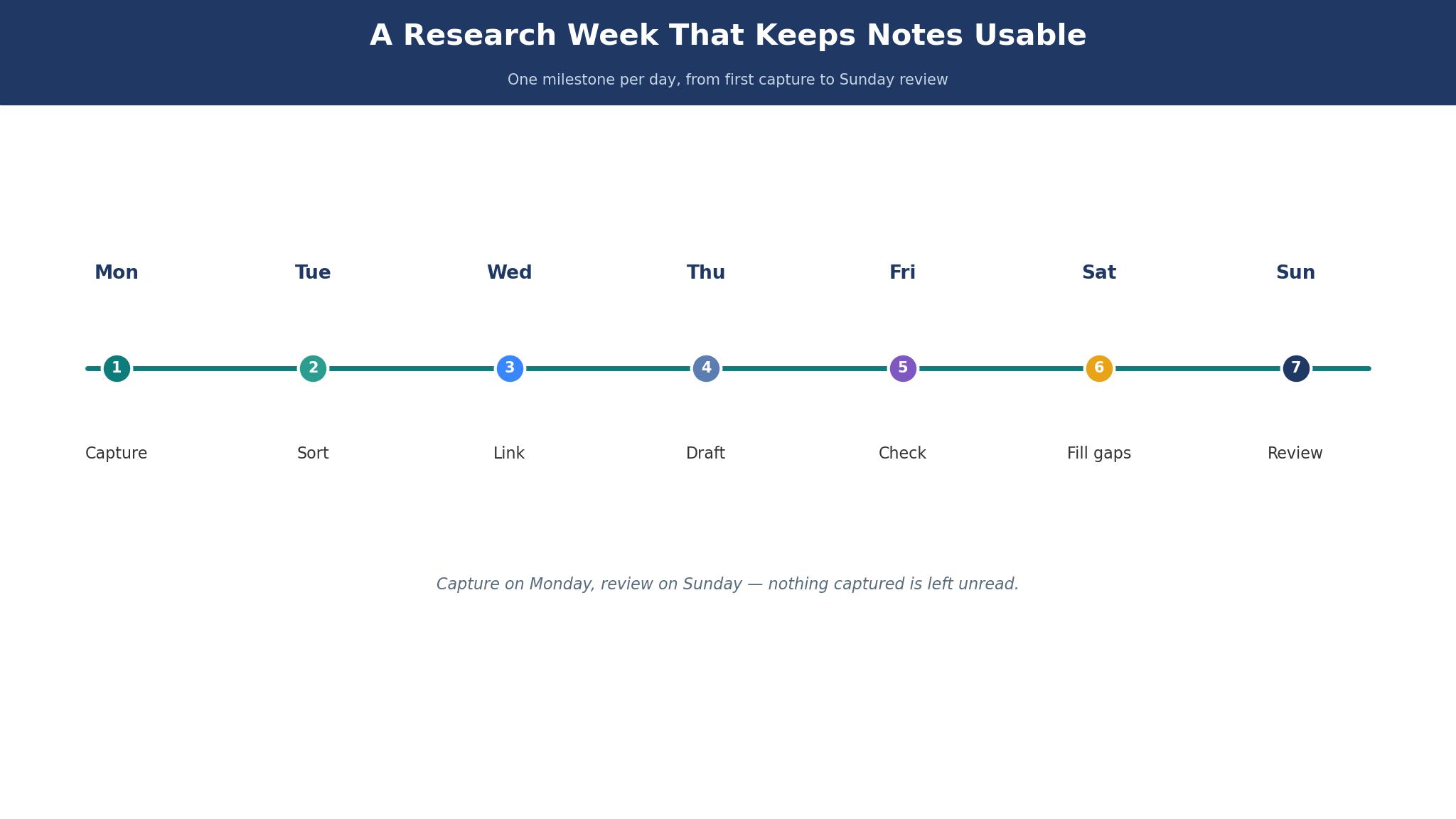
A usable research week has a small daily routine and a short weekly review. Each morning, the researcher captures the reading from the day before in one place, with the source attached and one line on why it matters. Each evening, she links the new notes to the existing ones, so nothing sits orphaned. The routine takes fifteen minutes, and it is the difference between a collection and a pile.
The weekly review is the part most researchers skip. Once a week, open the notes from the last seven days, read them as a group, and write one paragraph on what changed in your thinking. That paragraph is the seed of the next section you will write, and it is also the test of whether the notes are working.
The tools on this list support this rhythm in different ways. NotebookLM answers the weekly questions, Obsidian holds the links, and Reflect makes the daily capture fast. Pick the tool that fits the part of the rhythm you actually struggle with, because the best ai note-taking tools for researchers are the ones that fix your weakest step.
Habits That Quietly Break a Research Archive
The first habit is capturing without a source. A quote with no author, no year, and no page is unusable in a draft, and the researcher will waste hours finding it again. Every note should carry its source at the moment of capture, when it takes seconds, not later, when it takes an afternoon.
The second habit is the single giant note. A note that holds a whole book or a whole month of reading cannot be searched or linked properly. Break notes into one idea each, link them, and the collection becomes navigable.
The fourth habit is trusting an AI answer without opening the citation. An assistant that summarizes across notes can be wrong in a smooth, confident way, and the error will only surface when a supervisor or a reviewer checks the source. Open the citation every time while the tool is new to you, and keep opening it until the tool has earned your trust. The best ai note-taking tools for researchers make that check easy, and the ones that hide the source should not be trusted with a draft.
Frequently Asked Questions
Which tool gives the most trustworthy cited answers?
NotebookLM gives the most careful citations on this list, because it answers only from the sources you upload and points to the exact passage. The best ai note-taking tools for researchers all promise citations, yet the test is whether you can open the citation and find the claim there. NotebookLM passes that test most often, which is why it leads for literature work.
Can I keep my notes if I leave the tool?
With Obsidian, Logseq, and Capacities, yes, because the notes are plain files or export cleanly. With Notion and Tana, export works but links and database structure may not survive the move intact. Before committing to any tool, export a test set of twenty linked notes and check what survives, because a tool that holds your archive hostage is a long-term risk.
Is a free tool enough for a PhD project?
For many students, yes, if the free tool is Obsidian or Logseq with a citation manager alongside. The paid features that matter most are AI search across notes and sync between devices, and both can be added cheaply. A free tool with a good capture habit beats an expensive tool with a bad one, every time.
How do I handle PDFs and papers inside a note tool?
Keep the PDF in a reference manager and link the note to it, rather than stuffing PDFs into the note app. NotebookLM is the exception, because it is built to read the PDFs you upload. For the rest, the note should carry the citation and one line on why the paper matters.
Should a research team share one tool or let everyone choose?
A team should share one tool for the shared knowledge base, even if individuals keep a personal tool for daily capture. The shared base is where the lab memory lives, and a split base means the same paper gets read twice and the same question gets answered twice.
How much should a researcher spend on a note tool?
Most researchers on this list spend between $0 and $20 a month, and that range covers everything from a free vault to a shared workspace. The expensive end only makes sense for a team sharing a base or a researcher who needs heavy AI use. Spend the money on the step you actually struggle with, and keep the rest free.
The Note System That Survives a Long Project
For most researchers, the strongest combination is NotebookLM for cited answers and Obsidian for the long archive, with Reflect or Mem for daily capture if the habit needs speed. A team that shares its work should start with Notion AI instead, because the shared base matters more than any single feature. The best ai note-taking tools for researchers are the ones that keep the source attached, answer with a citation, and still open your notes in five years.
Pick two tools from this list, load them with your real papers and your real questions, and keep the one whose answers you can check and whose notes you can export. The test takes a week, and it will save you months.