

The best AI tools for Facebook in 2026 are not the ones that promise to run your page while you sleep. They are the ones that remove a specific bottleneck: writing the next post, keeping a page active on a schedule you can actually hold, spending ad money without guessing, answering a group before it goes quiet, or turning one idea into a Reel that fits the format. Facebook rewards consistency and clear creative more than volume, so a tool earns its place here only if it helps you publish regularly, learn from what worked, and stay in control of the message. This guide compares 14 tools by the job they do best, with honest pricing notes, limits, and the mistakes that waste money. Prices are October 2026 models; where a vendor prices by seats, spend, or quote, the guide says check checkout rather than inventing a figure.
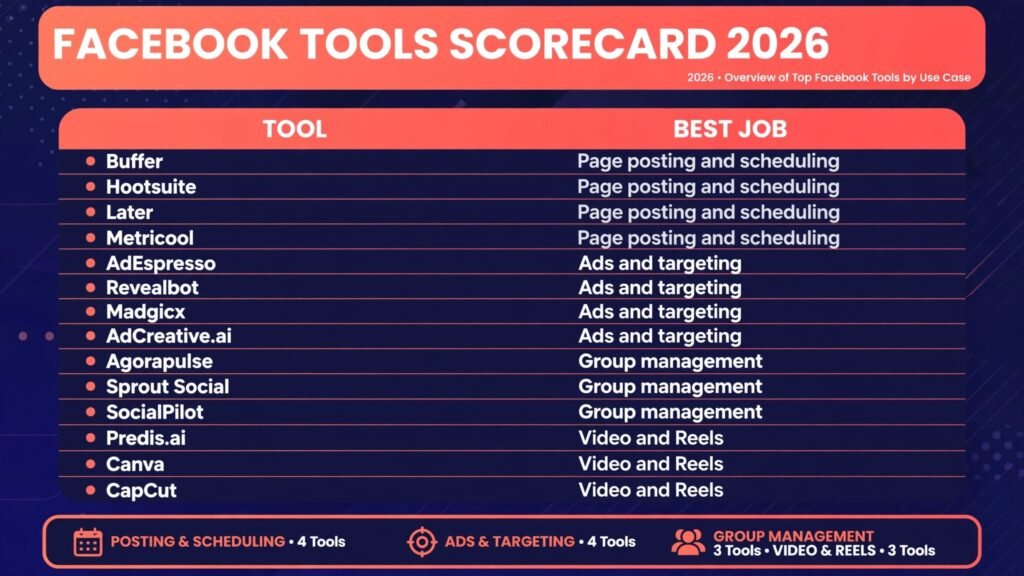
The 14 best AI tools for Facebook at a glance
| Tool | Best job | Free option |
|---|---|---|
| Buffer | Page posting and scheduling | Free tier |
| Hootsuite | Page posting and scheduling | Trial |
| Later | Page posting and scheduling | Free tier |
| Metricool | Page posting and scheduling | Free tier |
| AdEspresso | Ads and targeting | Trial |
| Revealbot | Ads and targeting | Trial |
| Madgicx | Ads and targeting | Trial |
| AdCreative.ai | Ads and targeting | Trial |
| Agorapulse | Group management | Trial |
| Sprout Social | Group management | Trial |
| SocialPilot | Group management | Trial |
| Predis.ai | Video and Reels | Free tier |
| Canva | Video and Reels | Free tier |
| CapCut | Video and Reels | Free tier |
Start here: pick by your bottleneck
| Your situation | Start with |
|---|---|
| You post irregularly and lose momentum | Buffer |
| You run several pages and need one inbox | Hootsuite |
| Your page is visual and Reels drive reach | Later |
| You want scheduling plus analytics in one place | Metricool |
| You boost posts but never learn what worked | AdEspresso |
| You manage ad spend daily and need rules | Revealbot |
| Your creative is stale and testing is slow | Madgicx |
| Your ad creative needs fresh variants every week | AdCreative.ai |
| Your group has comments you never answer | Agorapulse |
| You need reports a client will read | Sprout Social |
| You manage many clients on a budget | SocialPilot |
| You need Reel ideas every week | Predis.ai |
| You need fast branded templates | Canva |
| You edit short video on your phone | CapCut |
Page posting and scheduling
Buffer
Buffer is the simplest serious scheduler on this list. You connect a page, write posts in batches, and set a queue that fills itself. Its AI assistant drafts captions and shortens long text, but the value is the habit: a queue you can see, a calendar you can adjust, and analytics that show which posting times actually earned clicks. Buffer suits a solo owner or a small team that needs reliability more than depth. It does not try to be an ad platform or a community inbox, and that focus keeps it fast.
Pricing: Free tier for a small number of channels; paid plans by channels and features, check checkout.
Best for: Solo owners and small teams who want a dependable posting queue.
Watch out for: Reporting is lighter than enterprise tools, and the free tier limits scheduled posts.
Try it at: https://buffer.com

Hootsuite
Hootsuite is the control room option. It handles scheduling across pages, a unified inbox for comments and messages, team approvals, and reporting that can be scheduled and sent to a client or a manager. Its AI writing help drafts captions and suggests hashtags, but the real strength is scale: many pages, many people, one approval chain. A large team can review a draft, request a change, and publish without passing screenshots around.
Pricing: Trial available; subscription by users and features, check checkout.
Best for: Teams and agencies managing several pages with approval steps.
Watch out for: The price climbs quickly with seats, and small pages may pay for depth they never use.
Try it at: https://hootsuite.com
Later
Later started as a visual planner and still thinks in pictures first. You drag posts onto a calendar, preview how the feed will look, and plan Reels alongside static posts. Its AI caption writer and hashtag suggestions save time, and its link in bio tool turns a page into a small landing page for offers. Later suits creators and shops whose page lives or dies on images and short video.
Pricing: Free tier with limits; paid plans by features, check checkout.
Best for: Visual brands and creators who plan Reels and images together.
Watch out for: Ad management is not its job, and analytics are simpler than Hootsuite or Sprout Social.
Try it at: https://later.com
Metricool
Metricool combines scheduling with analytics in one dashboard, which makes it the best next step when Buffer or Later start to feel thin on numbers. You plan posts on a visual calendar, publish across pages, and read performance, audience growth, and competitor benchmarks without exporting to a spreadsheet. Its AI assistant drafts captions and post ideas, and its reports export cleanly for clients. Metricool suits freelancers and small agencies who need scheduling plus proof that the schedule works.
Pricing: Free tier with limits; paid plans by brands and features, check checkout.
Best for: Freelancers and small teams who want scheduling and analytics in one place.
Watch out for: The free tier caps scheduled posts and history, so heavy publishers will need a paid plan sooner than with Buffer.
Try it at: https://metricool.com
Ads and targeting
AdEspresso
AdEspresso, by Hootsuite, exists for one problem: you boost posts and never learn which version worked. It lets you build several ad variations from one idea, test headlines and images side by side, and read results in plain language instead of a wall of columns. The interface walks a beginner through campaign setup without hiding the settings that matter, such as audience, placement, and budget. It is a teaching tool as much as a buying tool.
Pricing: Trial available; subscription by ad spend tier, check checkout.
Best for: Beginners and small advertisers who want structured ad tests.
Watch out for: It manages Facebook and Instagram ads well but is not a full marketing suite.
Try it at: https://adespresso.com

Revealbot
Revealbot is for advertisers who check campaigns every day and want rules to do the repetitive part. You set conditions such as pause an ad when cost per result passes a threshold, raise budget when results beat a target, or alert a teammate when spend spikes. It also gives clearer bulk editing and reporting than the default ad manager for large accounts. Revealbot rewards advertisers who already know their numbers and want discipline enforced automatically.
Pricing: Trial available; subscription by ad spend tier, check checkout.
Best for: Active advertisers managing meaningful daily spend across many ads.
Watch out for: Rules can pause good ads if thresholds are set badly, so test rules on a small budget first.
Try it at: https://revealbot.com
Madgicx
Madgicx focuses on creative testing and audience insight. It analyses which images, videos, and copy combinations perform, suggests new audiences based on past buyers, and helps you launch fresh variants without rebuilding campaigns from scratch. Its AI angle is practical: fewer guesses about what to test next, and a clearer view of which creative deserves more budget. It suits advertisers whose bottleneck is stale creative rather than targeting knowledge.
Pricing: Trial available; subscription by ad spend tier, check checkout.
Best for: Advertisers whose ads have gone stale and need faster creative tests.
Watch out for: The insight reports take time to learn, and it works best with a healthy volume of past ad data.
Try it at: https://madgicx.com
AdCreative.ai
AdCreative.ai generates ad creatives from a short brief or a product page: images, headlines, and copy sized for Facebook placements, each with a predicted conversion score based on past ad performance data. The point is volume with a filter. Instead of designing one ad and hoping, you generate a batch, keep the highest scoring variants, and test them against each other. It pairs naturally with AdEspresso or Revealbot, which handle the testing and budget rules once the creative exists.
Pricing: Trial available; subscription by credits and features, check checkout.
Best for: Advertisers who need fresh ad creative variants every week.
Watch out for: Scores predict, they do not guarantee. Test generated creative against your own best performer before shifting real budget to it, and edit copy for claims and accuracy.
Try it at: https://adcreative.ai
Group management
Agorapulse
Agorapulse treats a group as a community that needs replies, not just posts. Its unified inbox gathers comments and messages from pages and groups, lets you assign a reply to a teammate, and tracks response time. Scheduling is included, but the inbox is the reason to choose it: a group that gets fast, human replies stays active, while an unanswered group fades. Agorapulse also offers listening and reporting that show which topics spark conversation.
Pricing: Trial available; subscription by profiles and users, check checkout.
Best for: Community managers who answer a lot of comments every day.
Watch out for: It is priced per profile, so many small groups can raise the bill.
Try it at: https://agorapulse.com

Sprout Social is the reporting and workflow choice for teams that must justify social work to a client or a boss. It combines scheduling, a smart inbox that prioritises messages, and reports that read clearly without a spreadsheet degree. Its AI assist drafts replies and summarises long threads, which helps a team handle volume without sounding canned. Sprout Social suits agencies and larger teams where approval, reporting, and accountability matter as much as posting.
Pricing: Trial available; subscription by users and features, check checkout.
Best for: Agencies and teams that need polished reports and clear workflows.
Watch out for: It is one of the pricier tools here, and small pages may not need its depth.
Try it at: https://sproutsocial.com
SocialPilot gives small agencies and freelancers most of the scheduling and inbox basics at a lower price than the enterprise names. You can schedule across pages, manage a shared calendar, invite clients to approve posts, and read simple analytics. Its AI caption assistant helps with first drafts. SocialPilot is a sensible pick when the budget is tight and the work is mostly publishing and client approval rather than deep ad or community analysis.
Pricing: Trial available; subscription by accounts and users, check checkout.
Best for: Freelancers and small agencies managing many client pages on a budget.
Watch out for: Analytics and listening are thinner than Sprout Social or Hootsuite.
Try it at: https://socialpilot.co
Video and Reels
Predis.ai
Predis.ai turns a short brief, a product link, or a single idea into a batch of post and Reel concepts with captions and hashtags. It analyses competitors and suggests formats that fit Facebook, then generates video drafts you can edit before publishing. The point is not to post untouched AI output; it is to break the blank page problem on weeks when ideas run dry. A creator can review ten concepts, keep three, and rewrite them in their own voice.
Pricing: Free tier with limits; paid plans by credits and features, check checkout.
Best for: Creators and small shops that need fresh Reel ideas every week.
Watch out for: Generated drafts need editing, and brand voice will not survive untouched output.
Try it at: https://predis.ai

Canva
Canva is the fastest way to make a Reel cover, a carousel, or a short branded video without hiring a designer. Its templates are sized for Facebook, its stock library covers most needs, and its AI tools resize a design, remove a background, or draft copy in seconds. For a page owner, Canva removes the excuse that a post looks unfinished. It is not an editor for complex video, but for daily branded content it is hard to beat on speed.
Pricing: Free tier; paid plan by seats, check checkout.
Best for: Owners who need clean branded templates fast.
Watch out for: Heavy video editing and fine motion work belong in a dedicated editor.
Try it at: https://canva.com
CapCut
CapCut is the phone editor most Reel creators already know. It cuts clips, adds captions automatically, offers trending transitions and music, and exports in the vertical format Facebook favours. Its AI features suggest cuts, generate captions, and clean up audio, which shortens editing from an evening to a lunch break. CapCut suits creators who shoot on a phone and publish the same day rather than planning weeks ahead.
Pricing: Free tier; paid plan by features, check checkout.
Best for: Creators who shoot and edit short video on a phone.
Watch out for: Some templates and effects need the paid plan, and watermark rules apply on free exports for certain features.
Try it at: https://capcut.com
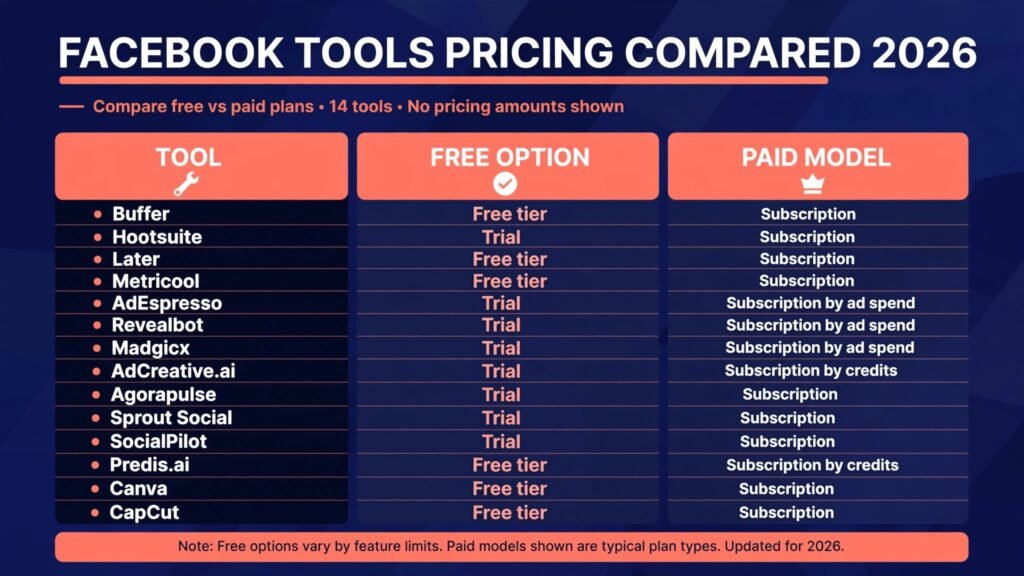
Pricing compared
| Tool | Free option | Paid model |
|---|---|---|
| Buffer | Free tier | Subscription, check checkout |
| Hootsuite | Trial | Subscription, check checkout |
| Later | Free tier | Subscription, check checkout |
| Metricool | Free tier | Subscription, check checkout |
| AdEspresso | Trial | Subscription by ad spend, check checkout |
| Revealbot | Trial | Subscription by ad spend, check checkout |
| Madgicx | Trial | Subscription by ad spend, check checkout |
| AdCreative.ai | Trial | Subscription by credits, check checkout |
| Agorapulse | Trial | Subscription, check checkout |
| Sprout Social | Trial | Subscription, check checkout |
| SocialPilot | Trial | Subscription, check checkout |
| Predis.ai | Free tier | Subscription by credits, check checkout |
| Canva | Free tier | Subscription, check checkout |
| CapCut | Free tier | Subscription, check checkout |
The pattern is worth noting. Scheduling and creative tools usually offer a free tier that covers a single page, while ad and enterprise tools offer trials instead. Start free where you can, and pay only after a tool has survived two real weeks of your actual workload. A trial that ends before you publish anything teaches nothing. Also watch renewal terms: a monthly plan that you can cancel anytime is safer than a yearly plan bought on enthusiasm, and a tool that charges per seat can double in cost the moment a second teammate joins.
How to choose the right tool for your page
Start from the bottleneck, not the feature list. If posting is irregular, fix scheduling first with Buffer or Later and judge the tool after a month of consistent posts. If ads eat money without learning, fix testing first with AdEspresso before buying automation like Revealbot, which only enforces rules you already understand. If a group is quiet, fix replies first with Agorapulse, because no scheduler revives a community that feels ignored.
Run a two week test with a clear measure. For scheduling, count posts published on time and the time spent per week. For ads, pick one metric, such as cost per result, and compare the same offer before and after. For Reels, count finished videos published, not ideas generated. A tool that produces drafts you never publish is a cost, not a gain. Check the exit too: can you export scheduled posts, reports, or creative if you leave? A tool that locks your work in is a risk for a small business.
Finally, match the tool to the person who will use it daily. A powerful dashboard nobody opens loses to a simple queue a busy owner actually fills. If you manage clients, approval and reporting matter more than extra features. If you are the whole team, speed and a phone app matter more than enterprise depth.
Budget matters too, and stacking tools is where costs creep up quietly. Add up every subscription before you buy the next one, and drop any tool whose job another tool on your list already covers. A scheduler with a decent inbox may remove the need for a separate community tool, and a creative tool with templates may remove the need for a second editor. Review the stack every quarter: keep the tools with clear evidence in your own numbers, cancel the ones you open rarely, and resist the bundle that looks cheap per month but duplicates work you already pay for elsewhere. The cheapest stack is the smallest one that keeps you publishing, replying, and learning.

Mistakes to avoid
Buying an enterprise plan before you have a posting habit is the most common waste. A second mistake is automating replies so fully that regulars notice nobody is listening; use AI for drafts and first responses, then let a human finish. A third mistake is testing too many ad variations at once on a small budget, which leaves every variant with too little data to judge. Test two or three changes at a time.
Another mistake is publishing AI captions untouched. Readers can tell, and Facebook reach follows genuine interaction, not output volume. Edit every caption in your own voice and check facts, prices, and dates before posting. A fifth mistake is judging a tool by its demo: polished sample data flatters every dashboard, so test with your own page, your own comments, and your own worst performing post. A sixth mistake is ignoring what Facebook already gives you for free. Meta Business Suite covers basic scheduling, inbox, and insights, so a paid tool should clearly beat that baseline before you pay for it. Finally, never hand a tool full ad account access without checking its permissions and setting a spend cap. Automation should reduce risk, not remove oversight.
Frequently asked questions
Do I need a paid tool to grow a Facebook page?
No. A free tier from Buffer, Later, Canva, or CapCut covers scheduling and creative for a single page. Pay when a clear limit blocks you, such as too few scheduled posts, missing approval steps, or ad rules you need daily. Growth comes from consistent posting and replies, and a paid plan alone will not supply either.
Which tool is best for Facebook ads for a beginner?
AdEspresso is the friendliest start because it structures tests and explains results plainly. Once you know your cost per result and test regularly, Revealbot adds rules that protect budget. Beginners should avoid heavy automation until they can read a campaign report and explain why an ad won or lost.
Can AI write my Facebook posts for me?
AI can draft captions, suggest hashtags, and outline Reel ideas, but untouched drafts read flat and may carry wrong claims. Use AI for the first draft, then edit for voice, facts, and a clear call to action. Pages that keep a human voice in replies and comments perform better than pages that sound generated.
Is it safe to connect a tool to my Facebook page?
Reputable tools use official login and permission screens, and you can review and revoke access in your Facebook settings. Connect only tools you recognise, grant the smallest permissions the tool needs, and set ad spend caps before turning on automation. Remove tools you no longer use.
Should I use one tool or several?
One scheduling tool plus one creative tool covers most pages. Add an ad tool only when ad spend is regular, and a community inbox tool only when comment volume is high. Too many tools split your data and your attention, and each subscription adds a bill that must earn its place monthly.
Do these tools work for Facebook Groups as well as Pages?
Scheduling tools mainly serve Pages, while inbox tools such as Agorapulse and Sprout Social help with group comments and messages. Group growth still depends on moderation, welcome posts, and regular discussion prompts, which no tool replaces. Choose a tool that matches where your audience actually talks.
Conclusion
The best AI tools for Facebook in 2026 earn their place by fixing one job well: a queue that keeps you consistent, a test that teaches you what works, an inbox that keeps a group alive, or an editor that turns an idea into a Reel the same day. Start with your bottleneck, test free where you can, and judge a tool by published posts, answered comments, and ad results you can explain. Pick the simplest tool that survives two real weeks of your workload, edit every AI draft before it goes live, and let consistency do the work that no feature list can promise. Revisit the choice as the page grows: the right tool for a solo page may not be the right tool for an agency, and changing tools is fine once the numbers say so.