Imagine two identical online stores selling the same product at the same price. One checkout feels instant: the buyer stays on the site, pays with a card or wallet, and receives confirmation in seconds. The other checkout redirects the buyer away, asks for a login, and returns them minutes later, sometimes confused about whether payment went through. That small difference, repeated thousands of times, decides conversion, refunds, support tickets and repeat purchases. The Stripe vs PayPal question is really a checkout question, a trust question and a business operations question disguised as a fee comparison.
Both platforms process payments for millions of businesses, from solo sellers to large companies. Both support cards, wallets and international payments with regional variation. Both offer fraud tools, subscriptions, invoicing and integrations. The difference lies in philosophy. Stripe is built as a developer first payments infrastructure: flexible, customisable, and designed to disappear into your checkout. PayPal is built as a consumer trusted wallet and payment brand: recognisable, fast for existing PayPal users, and designed to reassure buyers who already trust the name.
This guide compares both platforms on fees, checkout conversion, payment methods, payouts, fraud and disputes, subscriptions, integrations, international selling and support. Fee structures are described in model terms, because exact percentages, fixed fees, currency conversion charges and plan terms vary by country, volume and product, and they change over time. Check the official pricing page and checkout terms for your country before you commit, and model costs on your real average order value, not on a headline rate.
Stripe vs PayPal at a Glance
| Area | Stripe | PayPal |
|---|---|---|
| Core idea | Payments infrastructure for custom checkouts | Trusted wallet and checkout brand |
| Checkout feel | On site, customisable, brand matched | On site or redirect, instantly recognisable |
| Buyer trust | Trust comes from your brand and site | Trust comes from PayPal brand recognition |
| Developer flexibility | Very high, APIs and custom flows | Good, simpler for standard checkouts |
| Payment methods | Broad cards, wallets and local methods by region | Broad cards, wallet, Pay Later and local methods by region |
| Subscriptions | Strong, with billing and revenue tools | Strong, with subscription and invoicing tools |
| Payout timing | Plan and region dependent, rolling schedules common | Plan and account dependent, holds possible for new sellers |
| Best for | Custom stores, SaaS, platforms and scaling businesses | Small sellers, marketplaces, and buyers who prefer PayPal |
The short verdict: Stripe wins for businesses that want a custom, brand matched checkout and developer control, especially SaaS, subscription and platform businesses. PayPal wins for businesses that want instant buyer trust, a familiar wallet checkout, and the simplest path to accepting payments, especially small sellers and sellers whose customers already use PayPal heavily. Many businesses use both, offering Stripe for cards and PayPal as an additional checkout option, and that dual setup often converts best of all.
Fees Without the Headline Trap
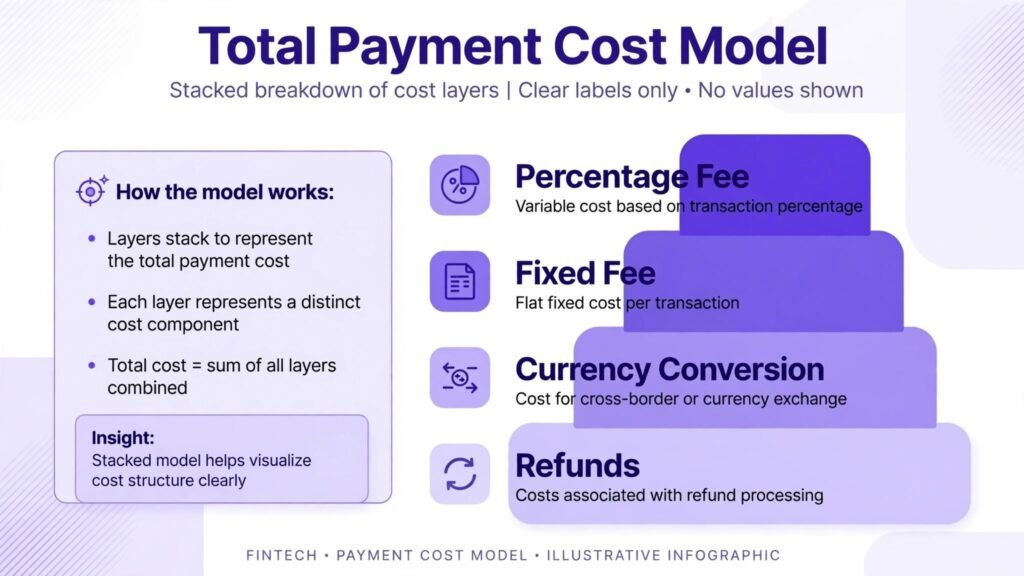
Fee comparisons fail when they compare only a headline percentage. Real payment cost includes the transaction percentage, the fixed fee per transaction, currency conversion charges, international card surcharges, chargeback fees, refund handling, payout costs and, for some setups, monthly platform fees. A headline rate that looks cheapest can become expensive on small orders, international orders or high refund volumes.
Fixed fees matter most on small orders. A fixed fee that is trivial on a 200 dollar order takes a large share of a 5 dollar order. If you sell low priced digital products, test your net revenue per sale on both platforms at your actual average order value. If you sell high priced services, the percentage dominates, and small differences in percentage compound across volume.
Currency conversion matters for international sellers. Selling in one currency and receiving payouts in another can add conversion costs that dwarf small percentage differences. Check whether each platform lets you hold multiple currencies, present prices in local currencies, and settle in the currency you need. Presenting prices in a buyer local currency also lifts conversion, because buyers dislike surprise conversion at checkout.
Refunds and chargebacks need separate attention. Some platforms refund the transaction fee, others keep it, and chargeback fees vary. A business with low refunds can ignore this detail. A business with higher refund rates, such as fashion, digital courses with trial periods, or event tickets, must model refund and dispute costs explicitly. Read the refund and dispute terms for your country and product type before launch, not after your first dispute.
Volume pricing also changes the picture. Larger businesses can often negotiate custom rates, especially with Stripe, while smaller businesses pay standard rates. Do not choose a platform on a negotiated rate you have not yet earned. Choose on standard rates for your current volume, then renegotiate as volume grows.
Stripe in Depth: Infrastructure That Disappears Into Checkout
Stripe core strength is checkout control. With Stripe, your checkout can live on your site, match your brand, support cards, wallets and local payment methods, and handle one time payments, subscriptions, payment plans and marketplace payouts through connected accounts. For SaaS businesses, Stripe Billing handles subscription creation, upgrades, downgrades, proration, failed payment retries and invoicing in a way that feels built for recurring revenue.
Developer tools are a genuine advantage, not just a technical detail. Stripe APIs, documentation, test mode and webhook handling let teams build custom flows: free trials that convert automatically, usage based billing, multi party marketplace splits, and checkout flows tied to your own user accounts. That flexibility matters most when your business model is unusual. A standard store may never need it. A platform, a SaaS product or a membership business with complex billing will use it daily.
Stripe dashboard and reporting support that flexibility. You can track revenue, subscriptions, churn, failed payments and disputes, and connect Stripe to accounting tools for reconciliation. For finance teams, clean reporting and predictable payout schedules simplify bookkeeping. For solo founders, the dashboard can feel dense at first, because it exposes many options that a simpler checkout hides. Start with the standard checkout and billing defaults, then customise only when a business need requires it.
Stripe fraud tools, including Radar, use machine learning and custom rules to block suspicious payments while allowing legitimate ones. You can set rules for high risk countries, velocity, card testing and address mismatches, and review blocked payments manually. No fraud system is perfect. Overly strict rules block good customers. Overly loose rules invite chargebacks. Review fraud settings monthly, especially after a marketing campaign that changes traffic patterns.
Stripe weaknesses are also clear. There is no consumer wallet brand that reassures a first time buyer in the same way PayPal does. A buyer who has never heard of your store must trust your site, your design and your checkout security signals alone. Stripe also places more responsibility on you for checkout design, compliance and customer communication. That control is powerful for established brands and extra work for new sellers who just want to start selling today.
Account holds and reviews can occur on Stripe, as on any payment processor, especially for high risk categories, sudden volume spikes or incomplete business information. Provide complete business details, clear refund policies and accurate product descriptions during onboarding to reduce review friction. Keep support and fulfilment records, because they help resolve reviews and disputes faster.

PayPal in Depth: Trust, Wallet Speed and Simplicity
PayPal core strength is buyer recognition. Hundreds of millions of consumers already have PayPal accounts, and many prefer to pay with PayPal rather than entering card details on an unfamiliar site. That preference lifts conversion for small and new sellers, because the buyer trusts PayPal to handle the payment, the refund and the dispute process. For a seller with no brand recognition yet, that borrowed trust is valuable.
PayPal checkout can be fast for existing users: log in, confirm, done, without typing card numbers. PayPal also supports guest card checkout in many regions, so buyers without an account can still pay by card, though the experience varies by region and setup. Pay Later options, where available, let buyers split payments, which can lift average order value for higher priced products. Check availability and terms in your market, because Pay Later eligibility, fees and consumer terms differ by country.
PayPal business tools cover invoicing, subscriptions, buttons, checkout integration and seller protection on eligible transactions. For freelancers, consultants and small sellers, invoicing through PayPal is a fast way to get paid without building a full store. For stores, PayPal integrates with major ecommerce platforms, often in a few clicks, which shortens time to first sale considerably compared with a custom Stripe build.
PayPal weaknesses centre on cost structure, holds and control. Fee terms vary by product, region and volume, and currency conversion and international fees need careful reading. New sellers, high risk categories and sudden volume spikes can face payment holds, where funds are held until delivery or customer satisfaction is confirmed. Holds protect buyers, but they strain cash flow for sellers who need fast access to revenue. Provide tracking, communicate with buyers, and build a clean transaction history to reduce holds over time.
PayPal checkout branding is also less customisable than Stripe. Buyers know they are paying through PayPal, which builds trust but dilutes your brand at the exact moment of purchase. For large brands with strong checkout design, that trade may not be worth it. For small sellers, borrowed trust usually outweighs brand dilution.
Dispute handling on PayPal is buyer friendly by design. Buyers can open disputes and claims through PayPal, and sellers must respond with evidence such as tracking, delivery proof and communication records. Keep those records for every order. A seller who documents fulfilment wins more disputes than a seller who relies on memory.
For sellers building an online store, our guide to best AI tools for Etsy sellers covers listing, marketing and operations tools that pair with either payment platform.

Stripe vs PayPal: Checkout Conversion Head to Head
Checkout conversion is the metric that matters most, because a small conversion gain outweighs a small fee difference. Test checkout the way a buyer experiences it, not the way a dashboard describes it.
Stripe conversion strengths are speed, brand consistency and local payment methods. A buyer stays on your site, sees your branding, pays with a familiar method, and receives confirmation without a redirect. That continuity reduces abandonment, especially for SaaS trials, subscription signups and repeat purchases where the buyer already trusts your brand. Stripe Link and saved payment methods can further speed repeat checkout for returning customers, where available.
PayPal conversion strengths are recognition and wallet speed. A buyer who already has PayPal can check out in a few clicks without entering card details, which reduces friction on mobile, where typing card numbers is slow and error prone. For first time buyers on an unknown store, PayPal recognition can be the deciding factor between completing and abandoning a purchase.
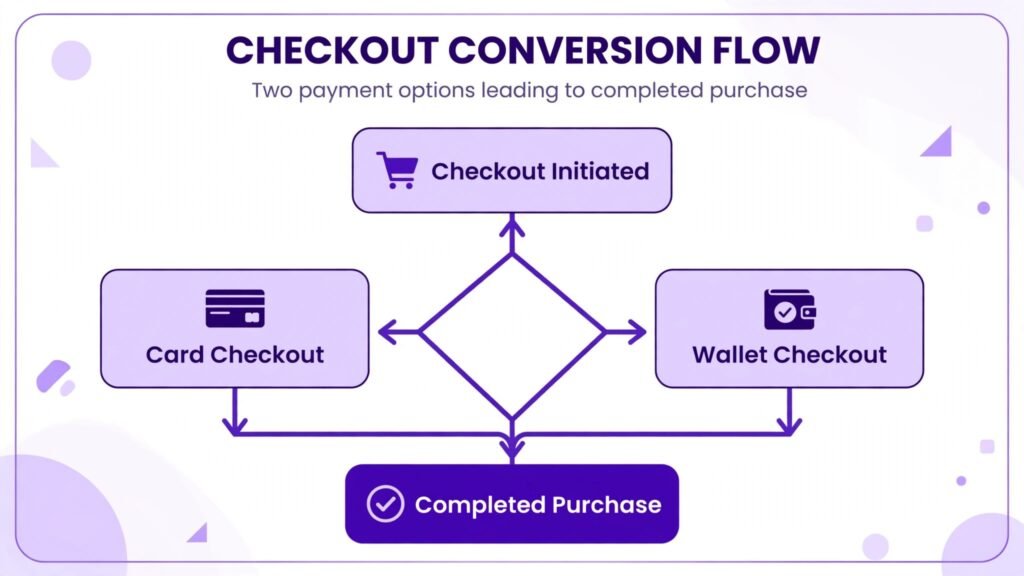
The highest converting setup for many stores is both options side by side: card checkout through Stripe plus PayPal as an alternative. Buyers choose their preferred method, and neither group faces friction. That dual setup adds integration and reconciliation work, but the conversion gain often pays for it. Test it with a simple experiment: run one checkout option for a period, then add the second, and compare completed purchase rate, not just clicks on the checkout button.
Mobile checkout deserves a separate test. Most traffic now arrives on phones, and a checkout that works on desktop can still fail on mobile through cramped fields, slow redirects or wallet prompts that confuse buyers. Complete a test purchase on your own phone for each option, on both wifi and mobile data, before launch. Fix any step that takes more than a few taps or that hides the total cost until the final screen.
Trust signals also affect conversion beyond the payment brand. Clear pricing, shipping and return information, contact details, reviews, security badges and a straightforward refund policy all reassure buyers before they reach checkout. A payment platform cannot compensate for a store that hides its total price or its return policy. Fix trust basics first, then optimise payment options.
Subscriptions, Invoicing and Business Models
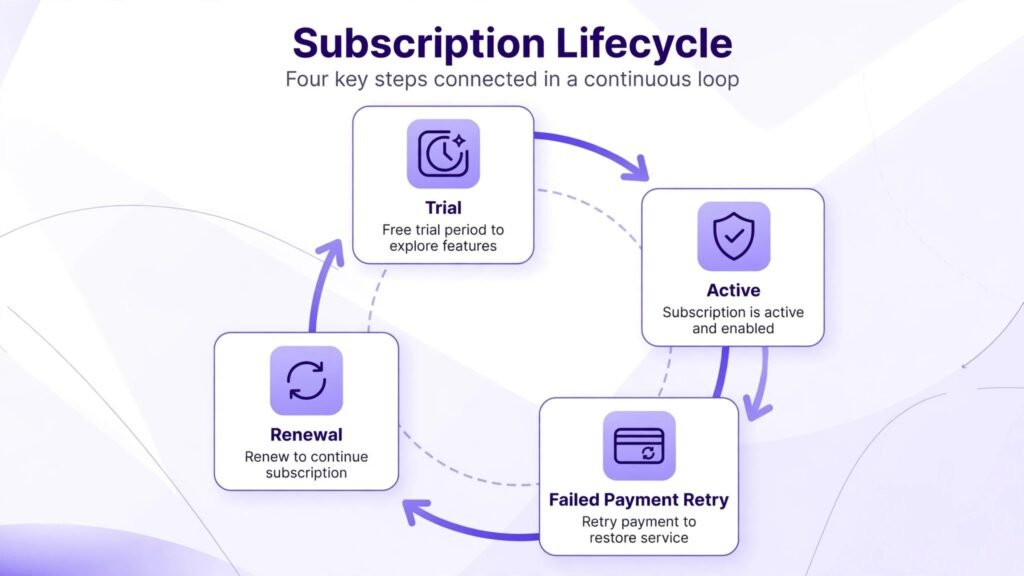
Subscription businesses need billing that handles trials, upgrades, downgrades, pauses, failed payments and cancellations gracefully. Stripe Billing is widely regarded as the stronger subscription system for SaaS and complex recurring models, because it handles proration, usage billing, multi plan subscriptions and revenue reporting in depth. If your business lives or dies on subscription retention, Stripe billing depth is a major advantage.
PayPal subscriptions are strong for simpler recurring models: memberships, donations, coaching retainers and standard monthly products. Setup is faster, and buyers who already use PayPal can subscribe without entering card details. For complex usage based or multi tier SaaS billing, PayPal subscriptions can feel constrained compared with Stripe.
Invoicing favours PayPal for freelancers and service sellers who need to send a professional invoice and get paid quickly. Stripe invoicing is also capable, especially for businesses already on Stripe, with custom branding and automatic payment reminders. Choose invoicing based on where your clients already pay you. If clients already use PayPal, invoicing there reduces friction. If clients pay by card through your site, Stripe invoicing keeps revenue in one system.
Marketplaces and platforms need split payments, connected accounts and payout management. Stripe Connect is built for that job, handling seller onboarding, identity verification, split payouts and compliance workflows. PayPal also supports marketplace and platform payments, but Stripe Connect is more commonly chosen for custom platform builds because of its API depth and flexibility. If you are building a marketplace, evaluate Connect style features before committing, because retrofitting split payments later is painful.
One time product sales, digital downloads and event tickets work well on both platforms. The deciding factors there are checkout trust, fee structure at your average order value, payout speed and dispute handling for your product type. Test a real sale, a refund and a dispute flow on your chosen platform before a major launch, so your team knows the process under pressure.
Payouts, Cash Flow and International Selling
Payout timing affects cash flow as directly as fees affect profit. Stripe payouts typically follow a rolling schedule, with first payouts sometimes delayed for new accounts while the account is verified. PayPal funds are often available in the account quickly, but withdrawals, holds and reserve requirements can delay access to cash for new or high risk sellers. Neither platform guarantees instant access to all funds in all cases, and both can hold funds during reviews.
Plan cash flow around payout reality, not around sale date. If you pay suppliers, creators or ad platforms weekly, a payout delay of several days can create a gap. Keep a cash buffer for the first months on a new payment platform, and confirm payout timing and hold policies for your account type before scaling ad spend.
International selling adds currency, tax and compliance layers. Both platforms support international cards and local payment methods with regional variation, but coverage differs by country and method. Check which local methods matter in your top markets: bank transfers, wallets, cash based methods and instalment options vary widely. A platform that covers your home market perfectly but misses a key method in your second market will lose sales there.
Tax handling is another international factor. Digital products, SaaS and cross border sales can trigger VAT, GST or sales tax obligations depending on buyer location and product type. Payment platforms provide tax tools and integrations, with plan dependent depth, but ultimate tax responsibility remains with the seller. Use a tax tool or accountant for cross border sales, and do not rely on a payment dashboard alone for tax compliance.
Fraud and chargebacks also vary internationally. High risk regions, digital goods and ticket sales attract more fraud attempts. Use address verification, 3D Secure where appropriate, velocity rules and manual review for large or unusual orders. Keep evidence for every order: product delivery proof, tracking, customer communication and refund policy acknowledgement. Evidence wins disputes more often than arguments.

Security, Fraud and Disputes Compared
Security starts with buyer data handling. Both platforms are PCI compliant payment processors, meaning card data is handled within their secure systems rather than stored on your servers when you use standard integrations. Do not build a custom card storage system unless you have a compliance team. Use hosted checkout, payment elements or standard integrations that keep sensitive data with the processor.
Fraud prevention differs in approach. Stripe Radar offers custom rules, machine learning and manual review tools that suit teams willing to tune fraud settings. PayPal fraud and seller protection tools are more automated and buyer focused, with protection on eligible transactions when sellers meet requirements such as shipping to the confirmed address and providing tracking. Read seller protection terms for your product type, because digital goods, services and custom products have different eligibility than shipped physical goods.
Disputes follow a similar pattern. Stripe disputes go through card networks, with evidence submission, deadlines and chargeback fees. PayPal disputes go through PayPal resolution centre, with buyer and seller communication, evidence submission and PayPal decisions on eligible claims. In both systems, fast, polite and documented responses improve outcomes. Respond within deadlines, provide tracking and communication records, and offer a fair resolution where appropriate. Fighting every dispute aggressively costs time and goodwill.
Account stability is a long term concern. Sudden volume spikes, high risk product changes, incomplete business information and high dispute rates can trigger reviews on either platform. Keep business information current, communicate volume changes in advance where possible, maintain a low dispute rate through clear product descriptions and support, and diversify payment options so a review on one platform does not stop all revenue. A business that depends on a single payment processor is fragile by design.
Best For, Watch Out For and the Dual Setup
Best for Stripe: SaaS businesses, subscription products, platforms and marketplaces, custom ecommerce stores, developers building unique billing flows, and scaling businesses that need detailed revenue reporting. Best for PayPal: small sellers, freelancers, new stores, sellers whose customers prefer PayPal, and businesses that need fast setup and instant buyer trust.
Watch out for Stripe: underestimating setup work for custom checkouts, ignoring buyer trust signals for a new brand, and assuming developer flexibility replaces good checkout design. Watch out for PayPal: holds on new accounts, fee and conversion costs on international sales, less checkout customisation, and dispute processes that favour buyers on eligible claims.
The dual setup deserves serious consideration for most stores. Offer card checkout through Stripe and PayPal as a second option, with clear pricing and no surprise fees at the final step. Reconciliation becomes slightly more complex, because revenue arrives through two systems, but accounting tools can consolidate both. Conversion gains from giving buyers a choice usually outweigh that complexity once volume grows.
Choose a single platform only when simplicity outweighs conversion: a freelancer invoicing a few clients, a tiny store with one product, or a SaaS product with a technical audience that prefers cards. Even then, revisit the choice after six months, when volume and customer feedback reveal which payment method buyers actually prefer.
Mistakes Sellers Make With Payment Platforms
The first mistake is choosing on headline fee alone. Model total cost at your average order value, refund rate and international share before deciding.
The second mistake is hiding fees or total cost until the final checkout step. Surprise costs cause abandonment and disputes. Show the full total early, including shipping, taxes and fees where required.
The third mistake is ignoring mobile checkout. Test on a real phone, on mobile data, with each payment option, before launch.
The fourth mistake is neglecting failed payment handling for subscriptions. Set up retry logic, dunning emails and a clear update payment link. Many subscription losses come from expired cards, not from unhappy customers.
The fifth mistake is depending on one processor without a backup. A review, outage or policy change can freeze revenue. Keep a second option ready, even if it processes a small share of sales.
Frequently Asked Questions
Is Stripe cheaper than PayPal?
It depends on your average order value, international share, refund rate and volume. Standard rates can look similar, while fixed fees, conversion charges and dispute costs create the real difference. Model total cost on your actual sales mix, and check current official pricing for your country before deciding.
Should I offer both Stripe and PayPal at checkout?
For most stores, yes. Buyers choose their preferred method, which lifts conversion. Card buyers use Stripe, PayPal users use PayPal, and neither group faces friction. Reconciliation takes slightly more work, but conversion gains usually justify it.
Which platform is better for subscriptions?
Stripe Billing is stronger for complex SaaS and usage based subscriptions, with deep proration, upgrade and revenue reporting tools. PayPal subscriptions work well for simpler memberships and recurring products, especially where buyers already use PayPal.
Which platform is better for a new seller with no brand?
PayPal often converts better at first, because buyers trust the PayPal brand even when they do not know your store. Stripe can work for new sellers too, especially with strong site trust signals, but it does not lend you a consumer brand.
How fast do I get paid on Stripe versus PayPal?
Payout timing varies by account age, region, product and risk profile. Stripe typically uses rolling payout schedules. PayPal funds may appear in your account quickly but can be subject to holds or withdrawal timing for new sellers. Confirm payout and hold terms for your account before scaling.
Can I switch payment platforms later without losing customers?
You can switch, but subscription payment details do not transfer automatically in most cases. Migrating subscriptions often requires customers to re-enter payment details, which causes churn. Choose carefully if subscriptions are core to your business, and keep customer communication clear during any migration.
Do I need a developer to use Stripe?
No for standard checkout and billing, which integrate with major platforms in a few steps. Yes for fully custom checkout flows, marketplace splits or unusual billing models, where developer help makes the flexibility usable. PayPal standard integration usually needs less developer work.
Setting Up Payments Without Regret: A Prelaunch Checklist
Payment setup errors are expensive because they appear after customers try to pay. Work through this checklist before a major launch, on whichever platform you choose. First, complete business verification fully, with accurate legal details, product descriptions and refund policies. Incomplete verification is a common cause of account reviews at the worst possible moment, during a launch spike.
Second, test every payment method your customers use, on desktop and on mobile. Test cards, wallets, Pay Later where available, and local methods in your top markets. Test a successful payment, a failed payment, a refund and a subscription cancellation. Each test should produce a clear customer email and a correct dashboard record. If any test confuses you, it will confuse customers.
Third, set up payout and accounting connections before volume grows. Connect your accounting tool, confirm payout schedule and currency, and reconcile the first ten transactions manually. Manual reconciliation early catches mapping errors that become painful at a hundred transactions. Keep a simple spreadsheet of gross sales, fees, refunds and net payouts for the first month, even if your accounting tool automates later months. That spreadsheet becomes your evidence if a fee or payout ever looks wrong.
Fourth, write customer facing payment help before you need it. A short page covering payment methods, refund policy, subscription management and contact details prevents support tickets and disputes. Link it from checkout and from order confirmation emails. Customers who can find answers themselves dispute less and trust more.
Fifth, plan for outages and reviews. Keep a second payment option configured, even if it is dormant, and keep customer communication templates ready for a payment delay. A business that can switch checkout options in an hour survives a processor issue. A business with no backup stops selling entirely. Resilience is a feature of payment setup, not an afterthought.
Verdict: Brand Trust or Checkout Control
Stripe vs PayPal ends as a choice between checkout control and buyer trust. Stripe wins for businesses that want a custom, brand matched checkout, deep subscription billing and developer flexibility, especially SaaS, platforms and scaling stores. PayPal wins for sellers who want instant buyer trust, wallet speed and the simplest path to first sale, especially small sellers and sellers whose customers already live in PayPal.
For many businesses, the best answer is both: Stripe for cards and subscriptions, PayPal as a trusted alternative at checkout. That dual setup gives buyers choice, protects revenue if one processor has an issue, and lets conversion data, not theory, decide which option deserves prominence. Pick the setup that matches your buyers, model total cost honestly, test checkout on a phone, and keep evidence for every order. Payments should disappear into the background. When they do, customers buy, stay and return.