

The hardest part of doula work is rarely the birth itself. It is everything around it: a client who messages at midnight with a question you answered last week, a contract that still needs a signature, a prenatal visit that moves, a postpartum schedule that changes when a baby arrives early, and a business that has to keep running while you are on call for days at a time. The best AI tools for doulas do not make birth support less personal. They take the admin, scheduling and follow up work off your mind, so you can be fully present when a family actually needs you.
Doulas work in a way most small business tools were not designed for. Clients are few but intense, timelines are unpredictable, and the work mixes emotional support, education, practical help and business admin, often alone and often at night. A doula may support a handful of births a month, plus postpartum visits, childbirth classes and consultations, each with different packages, payment plans and notes. The tools in this guide are grouped by the job they do: client booking and contracts, planning and client notes, and communication and marketing. They are chosen for solo and small doula practices, not for large agencies, because that is how most doulas work.
Pricing changes often, and many tools charge by user, by client or by feature tier, plus payment processing fees. This guide flags where to check the vendor checkout page rather than quoting a price that may be out of date. Trial any client system with a real client journey, from inquiry to contract to payment to postpartum follow up, before you move your whole practice onto it. A tool that looks good for a generic freelancer may fail on the on call, package based reality of doula work.
The Shortlist at a Glance
| Tool | Main job | Best for |
|---|---|---|
| HoneyBook | Client booking, contracts and payments | Doulas who want one client flow from inquiry to payment |
| Dubsado | Contracts, forms, workflows and payments | Doulas who want detailed, automated client workflows |
| Acuity Scheduling | Booking for consultations and visits | Doulas selling consultations, prenatals and postpartum visits |
| Calendly | Simple booking links for calls and visits | Doulas who need a light, fast booking link |
| Notion | Birth plans, client notes and business hub | Doulas who want one organised workspace |
| Canva | Marketing graphics, guides and social posts | Doulas who make their own marketing and client handouts |
| Zoom | Virtual prenatals, classes and check ins | Doulas offering virtual support and classes |
| Mailchimp | Email newsletters and client follow up | Doulas building an audience and staying in touch |
If you are starting out, begin with one booking and contract tool plus one scheduling link. If your practice is established, add Notion for notes and planning, and Mailchimp for staying in touch with past clients, who are your best source of referrals.
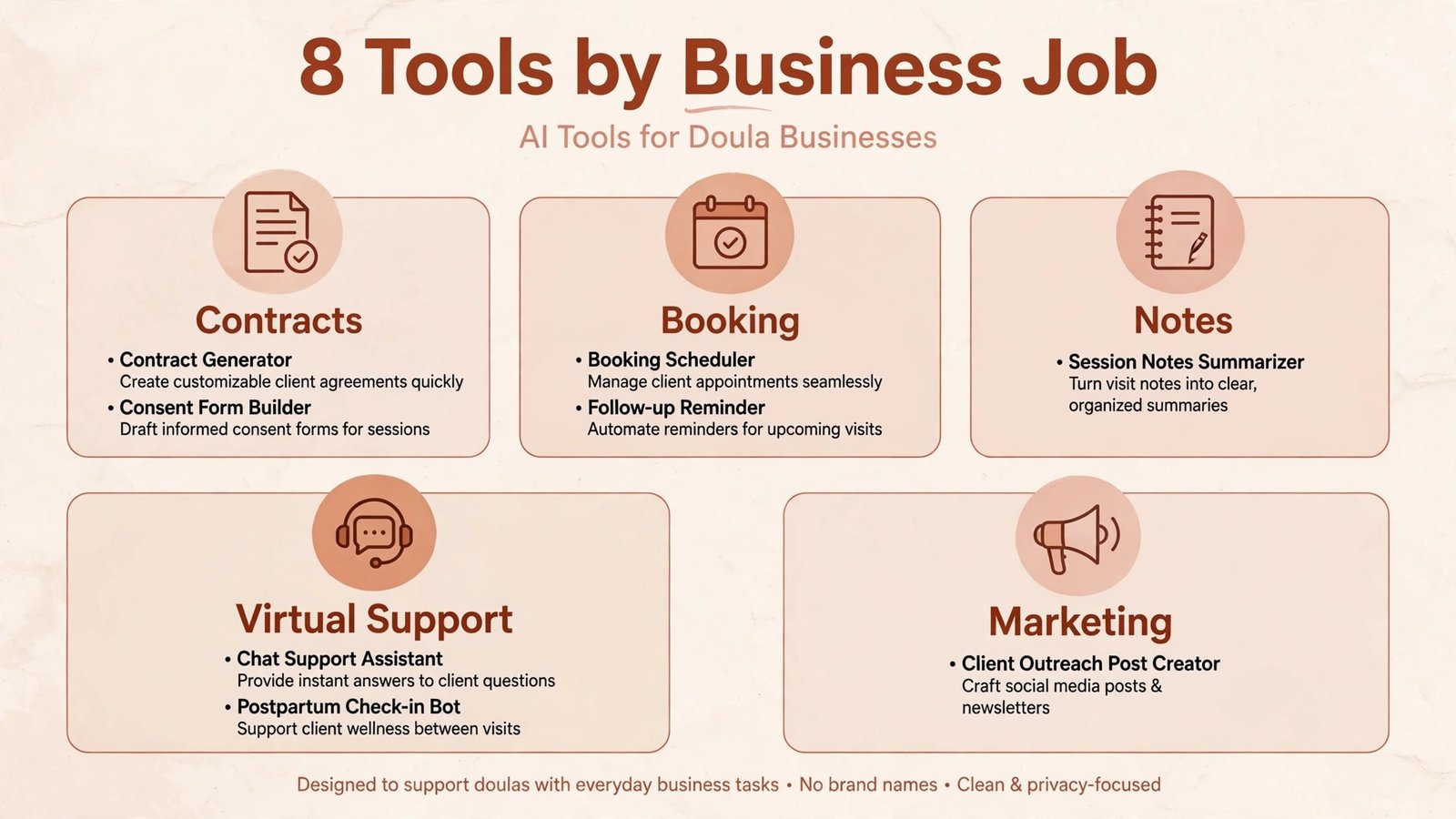
Client Booking, Contracts and Payments

1. HoneyBook
HoneyBook brings inquiry, booking, contracts, invoices and payments into one client flow, which fits doula work well because a client journey has many steps: inquiry, consultation, package choice, contract, deposit, payment plan, and postpartum follow up. Instead of juggling email, a contract app and a payment link, a doula can send one branded flow and see where each client sits in it. Automated reminders for unsigned contracts and overdue invoices also help when you are on call and cannot chase paperwork by hand.
It suits solo doulas and small practices who want a polished, professional client experience without learning a complex system. It suits birth and postpartum doulas who sell packages rather than single sessions. Watch out for: workflow fit for on call work. Set up your packages, payment plans and cancellation terms carefully, because doula work needs clear terms for early births, long labours, backup doula cover and postpartum schedule changes. Test the full flow as a pretend client, including a payment plan and a rescheduled visit, before using it with a real family.
Pricing note: subscription pricing listed on the vendor site, with payment processing fees separate. Check the checkout page for contract, scheduling and automation features, which may sit in different tiers.
2. Dubsado
Dubsado is a deeper client management system for service businesses, with contracts, forms, questionnaires, workflows, scheduling and payments that can be automated step by step. For a doula, that depth allows a full journey to be built once and reused: inquiry form, consultation booking, intake questionnaire, package proposal, contract, payment plan, prenatal visit reminders, birth preferences form, and postpartum check in. Once the workflow is built, each new client moves through it with far less manual chasing.
It suits established doulas with a steady client flow, doulas who offer several packages, and practices with a backup doula or assistant who needs shared client information. Watch out for: setup time. Dubsado rewards careful setup, but building a full doula workflow takes a focused weekend, not an hour. Start with one workflow, such as birth doula onboarding, use it for three clients, then add postpartum and class workflows. A half built workflow that staff and clients find confusing is worse than a simple system used well.
Pricing note: subscription pricing on the vendor site, with a trial available. Check the checkout page for client limits, workflow features and payment processing fees.
Scheduling for an On Call Life
3. Acuity Scheduling
Acuity Scheduling, part of Squarespace, handles booking for consultations, prenatal visits, postpartum visits and classes, with intake forms, payments, reminders and calendar sync. For a doula, its strength is control: different visit types can have different lengths, locations, prices and intake questions, and clients can book, pay and reschedule without a long email exchange. Buffer times between visits and limits on how far ahead clients can book also protect a doula schedule that must leave room for births.
It suits doulas who sell consultations and visits alongside birth packages, and doulas running classes or group sessions. Watch out for: on call conflicts. No scheduling tool knows when a birth will happen, so you still need a clear policy for rescheduling visits around a birth, and a fast way to message affected clients. Set your availability conservatively, keep one buffer day after a due date window where possible, and tell clients in advance how birth related rescheduling works.
Pricing note: subscription pricing listed on the vendor site, by features. Check the checkout page for payment processing, intake forms and calendar sync limits.
4. Calendly
Calendly is the simplest booking tool in this guide: you share a link, a client picks a time from your available slots, and both sides get a confirmation and reminders. For a doula, it works best for the light end of booking, such as free discovery calls, consultation calls and single postpartum check ins, where a full client system would be overkill. It is fast to set up, easy for clients to use on a phone, and it removes the “what time works for you?” email loop that eats an evening.
It suits new doulas, doulas who book most clients through a larger platform or referral, and doulas who need a booking link for a website or Instagram profile. Watch out for: package and contract limits. Calendly books a time. It does not manage contracts, payment plans or a full client journey, so pair it with HoneyBook, Dubsado or a simple contract and payment tool for full birth packages. Used alone for a full package, it will leave paperwork gaps.
Pricing note: free tier plus paid plans on the vendor site. Check the checkout page for event types, payment and reminder features, which differ by tier.
Planning, Notes and Client Support

5. Notion
Notion is a flexible workspace where a doula can keep client notes, birth plans, postpartum visit logs, checklists, business tasks and resource libraries in one searchable place. A doula can build a template for each client, with prenatal visit notes, birth preferences, postpartum goals and follow up tasks, and reuse it for every new family. Shared pages can also give a client their own hub, with visit summaries, handouts and a birth plan draft they can comment on.
It suits organised doulas, doulas who support many clients at different stages, and practices that want a single business brain instead of notes scattered across paper, phone and email. Watch out for: privacy and over building. Client notes contain sensitive health and family information, so use private pages, strong passwords and careful sharing settings, and never share a client workspace link publicly. Also resist building a perfect system for weeks before using it. Start with one client template, use it for a month, then improve it based on what you actually needed.
Pricing note: free tier for individuals plus paid plans for teams on the vendor site. Check the checkout page for sharing, storage and team features if you work with a backup doula or assistant.
6. Zoom
Zoom is the practical default for virtual prenatal visits, postpartum check ins, childbirth classes and doula consultations, because families already know how to join and it works on phones and computers. A virtual visit cannot replace hands on support, but it extends a doula practice: a client in early labour can check in by video, a postpartum family can get a quick feeding and comfort check without a home visit, and a class can reach families outside your city. Recording, with consent, also lets a family revisit a class or a birth plan discussion.
It suits doulas offering virtual packages, hybrid birth and postpartum support, and online classes. Watch out for: boundaries and privacy. Virtual availability can quietly become all hours availability if you do not set it. Publish virtual hours, use a booking link for virtual visits, and agree on how urgent messages are handled outside those hours. Get consent before recording, store recordings securely, and never record a birth or a private family moment without clear, prior agreement.
Pricing note: free and paid plans listed on the vendor site, with meeting length and participant limits by tier. Check the checkout page for recording and webinar features, which suit classes versus one to one visits.
Communication and Marketing

7. Canva
Canva lets a doula create social posts, class flyers, birth package guides, postpartum handouts and website graphics without a designer, using templates adapted to a warm, calm brand. For doulas, marketing is mostly trust building: families choose a doula they feel comfortable with, long before they compare packages. Clear, consistent graphics for services, classes, testimonials and educational posts help a doula look professional and approachable on Instagram, a website and in print, without spending every evening on design.
It suits solo doulas and small practices that make their own marketing, and doulas who give clients printed or digital handouts. Watch out for: generic content and health claims. Templates are a starting point, not a finished post. Write captions in your own voice, use your own photos where families consent, and check any health, feeding or birth claim before publishing. A beautiful graphic with an inaccurate claim damages trust far more than a plain post with accurate information.
Pricing note: free tier plus a paid Pro plan on the vendor site. Check the checkout page for brand kit, scheduling and stock photo features, which sit in the paid tier.
8. Mailchimp
Mailchimp helps a doula stay in touch with past clients, class attendees and interested families through email newsletters, automated welcome sequences and simple landing pages. Past clients are a doula’s best referral source, but they drift away if they never hear from you after the postpartum period. A monthly newsletter with birth stories shared with consent, class dates, postpartum tips and community resources keeps a practice visible without daily social media pressure, and an automated welcome email gives every new inquiry a prompt, warm reply even when you are at a birth.
It suits established doulas with a growing contact list, doulas running classes, and practices that want referrals from past clients. Watch out for: list quality and consent. Only email people who have agreed to hear from you, keep health information out of newsletters, and make unsubscribing easy. A small, engaged list of past clients and genuine inquiries beats a large list bought or scraped from elsewhere, which will harm deliverability and reputation.
Pricing note: free tier plus paid plans on the vendor site, by contacts and features. Check the checkout page for automation and landing page limits at each tier.
Best Pick by Job
| Job | Best pick | Why it wins for that job |
|---|---|---|
| Run the whole client journey | HoneyBook | Inquiry, contract, invoice and payment in one flow |
| Automate a detailed workflow | Dubsado | Step by step workflows for packages and follow up |
| Book visits and classes | Acuity Scheduling | Visit types, intake forms and payments with control |
| Book a quick call fast | Calendly | Simple link, fast setup, easy for clients |
| Keep client notes organised | Notion | Templates for birth plans, visits and business tasks |
| Support clients virtually | Zoom | Families already know it, reliable for classes |
| Look professional online | Canva | Fast, consistent graphics and handouts |
| Stay in touch for referrals | Mailchimp | Newsletters and welcome sequences for past clients |
How to Choose the Right Tools for Your Practice
Start with your client journey on paper. Write the steps from first inquiry to final postpartum visit, including contract, deposit, payment plan, prenatal visits, on call period, birth, postpartum visits and follow up. Mark the steps where you lose time, miss messages or chase paperwork. Those marks are your buying list. If contracts are the pain, buy HoneyBook or Dubsado first. If booking calls are the pain, buy Calendly or Acuity first. If notes are scattered, start with Notion.
Next, protect the on call reality in every choice. A doula tool must work from a phone, at night, with one hand, and with a clear view of who is due, who is in early labour and who needs a rescheduled visit. Test the mobile app, not just the desktop site, and test it during a busy week, not a quiet one. If a tool needs a laptop and a quiet hour to update a client record, it will not survive birth work.
Check total cost, including payment fees, and check data ownership. Add subscription plus payment processing, and confirm you can export your client list, contracts and payment history. A practice built on client trust cannot afford to lose its records if a tool closes or a price rises sharply. Keep a backup of contracts and key client information outside any single platform, in a secure location you control.
Finally, keep the human side first in every automated message. A contract reminder can be automated. A message to a family in early labour, a grieving family, or a postpartum parent who is struggling cannot be. Write automated messages in your own voice, review them regularly, and always give families a direct way to reach you personally. Families remember how a doula made them feel, and good tools should protect time for that feeling, not replace it with templates.
For a related view on running a solo care practice, see the Stratilyze guide to the best AI tools for therapists, which covers scheduling, notes and client portals for one to one care work.
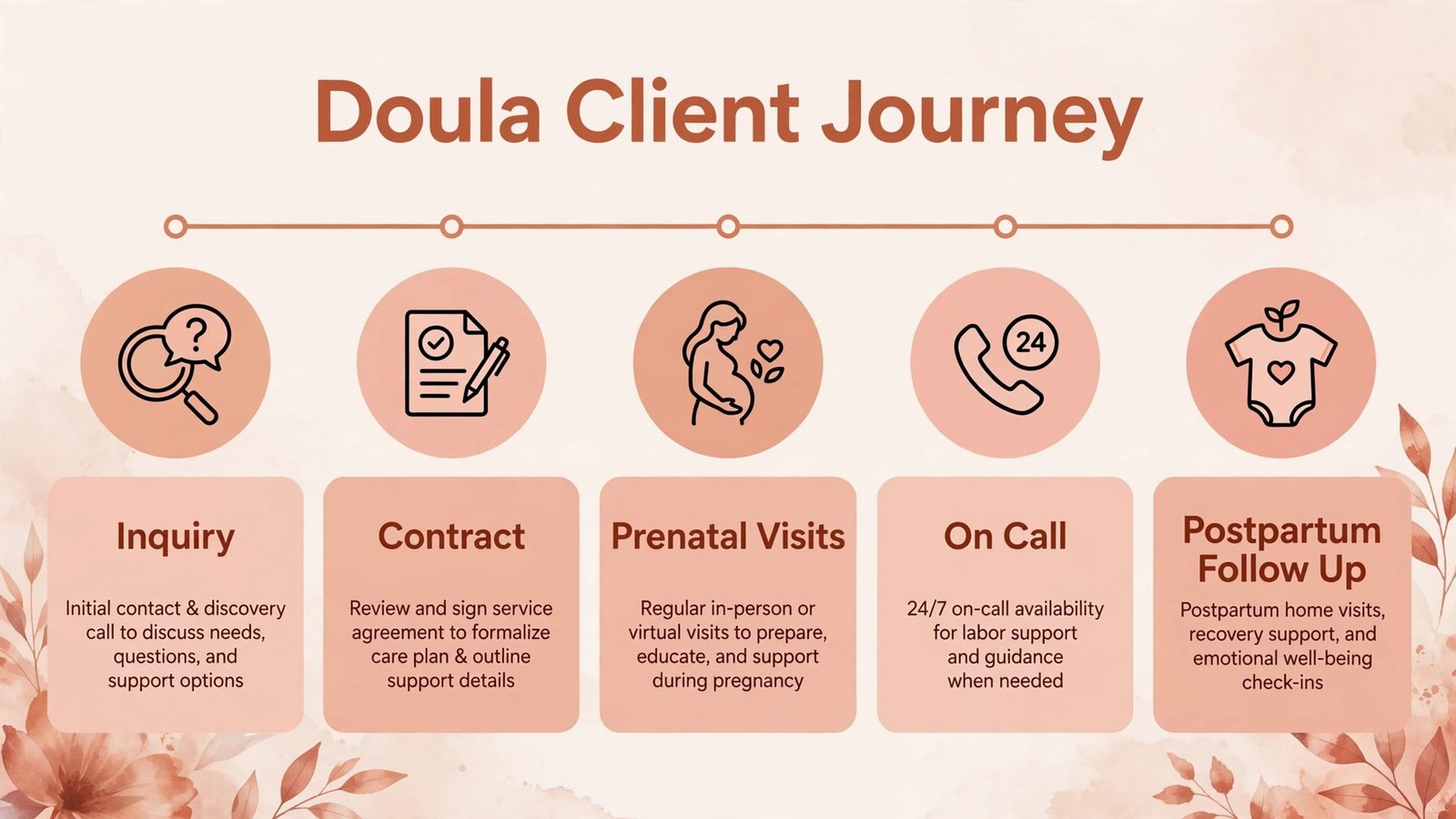
A First Client Journey Checklist
Before you buy a larger system, walk through one full client journey on paper and test each step. Start with inquiry: how does a family find you, how fast do they get a warm reply, and what do they learn about your services and prices? A slow or confusing inquiry step loses families who are comparing several doulas at once, often while pregnant and tired. A clear services page, a simple inquiry form and a prompt personal reply beat a fancy website with no clear next step.
Next, test consultation and booking. Can a family book a consultation in under two minutes on a phone, receive a confirmation, and reschedule without emailing you? Does the consultation lead naturally to a package proposal, a contract and a deposit, or does each step require a separate tool and a separate message? Write down every message a family receives during onboarding and read them as if you were a nervous first time parent. Remove any message that sounds automatic, confusing or pushy, and keep the messages that reassure and clarify.
Then test the on call and postpartum steps. How will you record prenatal visit notes, birth preferences and postpartum goals so a backup doula can step in if needed? How will visits be rescheduled if a birth runs long? How will you follow up after birth, check on feeding and recovery, and ask for a testimonial at the right time, not too early and not months later when the moment has passed? A system that handles inquiry well but fails at handover or follow up will still leave you doing the hardest admin by hand.
Finally, test referrals. After the postpartum period, how will past clients hear from you, and how easy is it for them to recommend you to a friend? A short thank you message, a monthly email with useful information, and a simple referral link or card turn one happy family into several future clients. Build that step into your workflow from the start, because referrals are the most sustainable marketing a doula practice has, and they cost far less than paid advertising.
Packages, Pricing and Backup Planning
Doula packages need clear thinking before they need software. Decide how many prenatal visits, what on call period, how many postpartum visits and what extras each package includes, and write those details in plain language a family can understand without a call to clarify. Price the package by working out your time, travel, on call availability and backup cover, not by copying another doula price from a different city with different costs. A package priced too low fills quickly and burns you out. A package priced too high without clear value sits unsold while you wonder why inquiries do not convert.
Backup planning deserves the same clarity. Name a backup doula for each client, agree how and when the backup is called, share relevant notes securely, and tell the family who the backup is before labour starts. Families feel safer when they meet or at least know the backup in advance, and you feel safer knowing a birth will be covered if you are ill or already attending another birth. Record backup arrangements in your client system, not just in your head, and review them at each prenatal visit as due dates approach. A doula practice with clear packages and a real backup plan is a practice families trust, and trust is what turns a first inquiry into a booked client and then into a referral.
Mistakes to Avoid
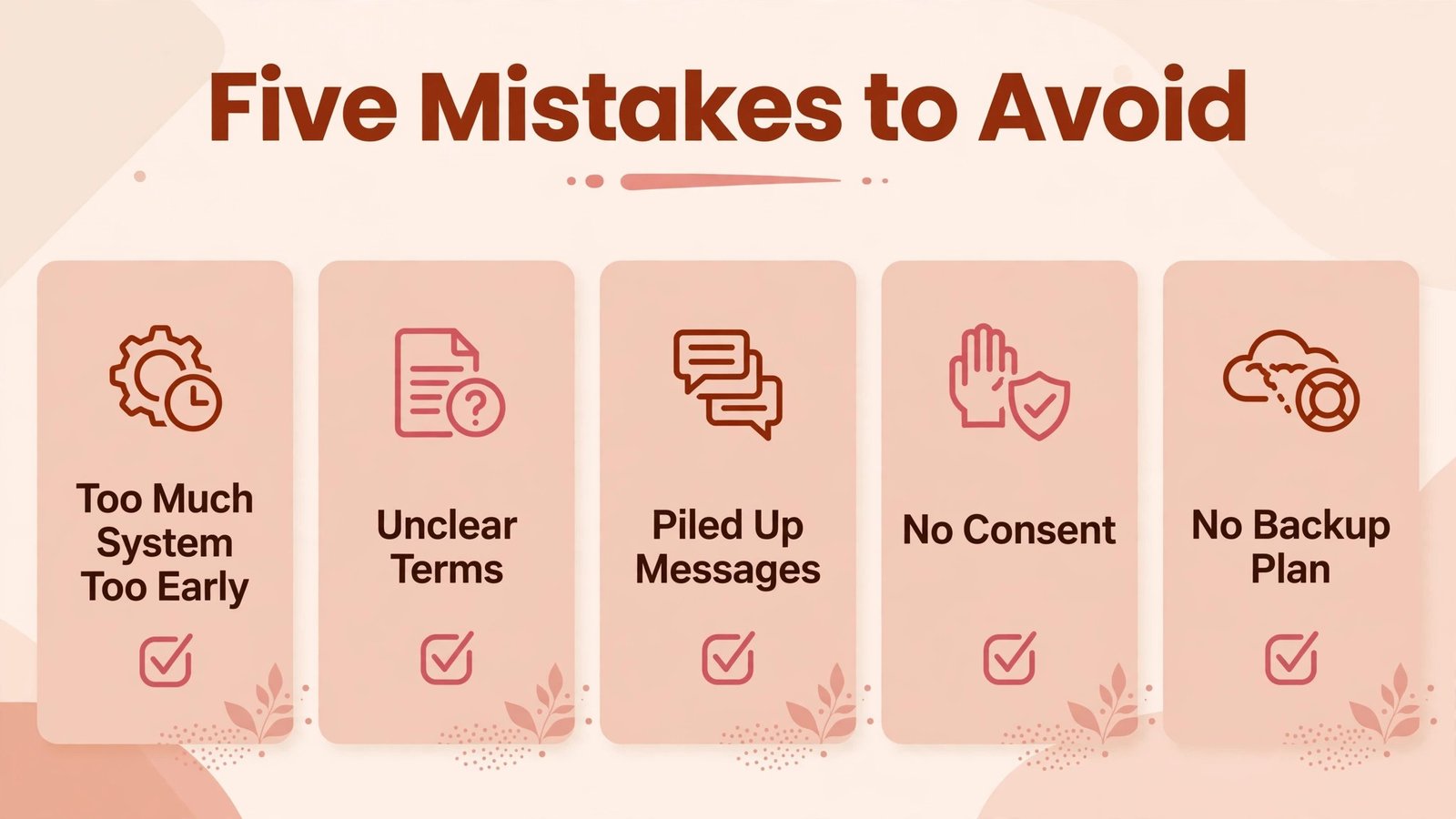
The first mistake is buying a full client system before you have clients to fill it. A new doula with two clients does not need a complex workflow with ten automated steps. Start with a booking link, a simple contract tool and a notes template, and add automation as client volume grows. Complexity too early creates admin work instead of removing it.
The second mistake is unclear package and on call terms. Vague terms about backup cover, long labours, early births, payment plans and rescheduling create conflict at the most stressful moment for a family. Write clear terms before you need them, discuss them in person at the consultation, and put them in the signed contract. A clear contract protects both the doula and the family.
The third mistake is letting admin messages pile up while on call. Families notice slow replies, and slow replies lose bookings. Set an auto reply for on call periods that says when you will respond and how urgent messages are handled, and check messages at set times rather than constantly. Boundaries, communicated kindly, build trust rather than damaging it.
The fourth mistake is sharing client stories or photos without clear consent. Birth and postpartum stories are powerful marketing, but they belong to the family first. Get written consent for any story, photo or testimonial, explain where it will be used and for how long, and respect a family who says no. One consent breach can end a practice faster than any marketing gain.
The fifth mistake is forgetting self care and backup planning in the business system. A doula practice needs a backup doula, a clear handover note system and time off built into the calendar, or burnout will decide the schedule for you. Use your tools to block rest days, record backup arrangements for each client, and protect at least one full day off after a birth where possible. A sustainable doula is a better doula.
Frequently Asked Questions
Do I need a client management system as a new doula?
Not a large one. A new doula needs a booking link, a contract template, a payment method and a simple notes system. Add a full client platform like HoneyBook or Dubsado when inquiries and packages grow to the point where email and spreadsheets start losing track of clients.
How should a doula handle on call scheduling?
Block on call windows in your calendar, limit the number of clients due in the same window, keep buffer days after due dates where possible, and tell clients in advance how visits are rescheduled around a birth. Use a booking tool with clear availability and a fast message template for rescheduling, so a birth does not create a week of confused messages.
Can virtual doula support replace in person support?
Virtual support complements in person support, but it does not replace hands on comfort, presence and practical help during labour and postpartum. Offer virtual visits for prenatals, check ins, classes and early labour support, and be clear with clients about what virtual support includes and what it cannot do.
What should be in a doula contract?
A doula contract should cover services included, number and timing of visits, on call period, backup doula arrangements, fees and payment plan, cancellation and rescheduling terms, scope limits, and privacy and consent for photos and stories. Have a local professional review your contract template, because doula regulations and business rules vary by location.
Referrals from past clients, midwives, childbirth educators and community groups usually bring steadier clients than daily social posting. Keep a simple presence with clear services and testimonials shared with consent, send a monthly email to past clients, and ask happy families, at the right time, if they know someone who might benefit. Consistency beats volume.
Is it safe to keep client notes in a general tool like Notion?
General tools can be used safely if you use private pages, strong passwords, two factor authentication where available, and careful sharing settings, and if you follow your local privacy rules for health related information. Do not put highly sensitive details in a shared or public page, and keep a separate, secure record for anything your local rules require to be handled as a health record.
Conclusion: Best AI Tools for Doulas in 2026
The best AI tools for doulas in 2026 support a practice that is personal, unpredictable and deeply human. HoneyBook and Dubsado organise the client journey from inquiry to payment. Acuity and Calendly make booking simple for consultations, visits and calls. Notion keeps birth plans and notes in one place. Zoom extends support virtually when families need it. Canva and Mailchimp help a doula stay visible and in touch, so referrals keep coming.
Start with your client journey, choose one tool for your biggest admin pain, and test it with real clients before adding more. A doula practice that books cleanly, contracts clearly and follows up kindly will grow by trust, and good tools protect the time and energy that trust is built on: presence, calm and care, when a family needs it most.