

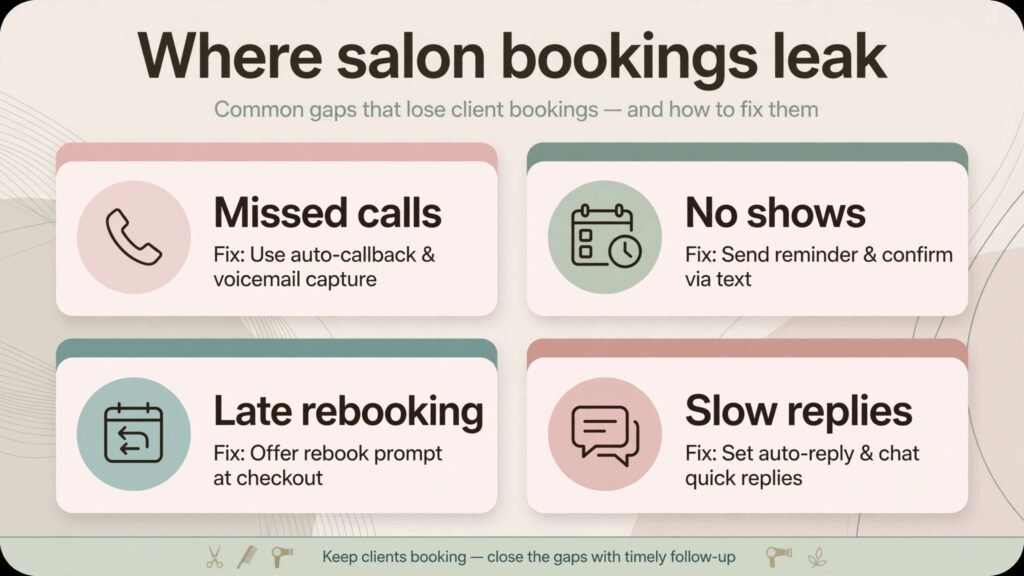
Missed calls cost nail salons real money every week. Industry surveys of appointment based beauty businesses repeatedly find that a large share of bookings happen outside opening hours, when no one is at the desk to answer the phone. That is the core reason the best AI tools for nail salons matter in 2026. The right stack does not replace your technicians. It answers at midnight, fills a cancelled chair by morning, reminds a client about a fill before the nails lift, and asks for a review while the client is still happy with the result. The wrong stack adds another monthly bill, another login, and another place where bookings can go wrong.
This guide compares 14 tools that fit real salons, from a single chair rental to a multi location business. It groups tools by the job they do, names the trade offs plainly, and ends with a practical way to choose without buying everything at once. Pricing changes often, so confirm current pricing at checkout before you commit to any paid plan. The tools here were selected because they solve a booking, payment, marketing, or client care problem that nail salons actually face, not because they carry an AI label.
The best AI tools for nail salons at a glance
| Tool | Best for | What it replaces |
|---|---|---|
| Booksy | All round salon booking | Phone bookings and paper diaries |
| GlossGenius | Solo techs and small salons | Separate booking, payment, and marketing tools |
| Fresha | Commission free booking | Paid booking software for new salons |
| Vagaro | Salons that also sell products | Separate booking and retail systems |
| Square Appointments | Salons already using Square | A separate payment terminal and diary |
| Goldie | Solo techs who want a simple diary | Spreadsheets and direct messages |
| Mangomint | Growing salons that need control | Basic booking apps that lack staff controls |
| Boulevard | Multi location and premium salons | Disconnected booking and client records |
| Zenoti | Larger salon and spa groups | Several systems stitched together |
| Podium | Reviews and client messaging | Manual review requests and missed texts |
| StyleSeat | Finding new clients | Word of mouth alone |
| Ovatu | Small salons that want a simple setup | Overcomplicated software |
| Canva | Social posts and price lists | A designer for every post |
| ChatGPT | Captions, replies, and policies | Hours spent writing from scratch |
Best pick by job
| Job | Best pick | Runner up |
|---|---|---|
| Booking and deposits | Booksy | Fresha |
| Solo tech setup | GlossGenius | Goldie |
| Multi location control | Boulevard | Zenoti |
| Getting more reviews | Podium | StyleSeat |
| Social content | Canva | ChatGPT |
| Retail and memberships | Vagaro | Mangomint |
Booking, deposits, and calendars
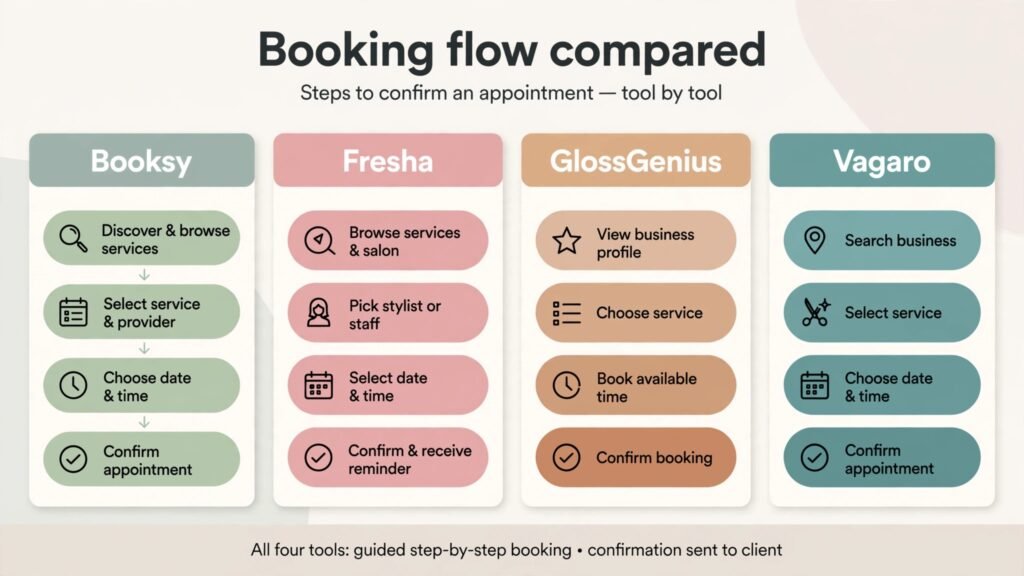
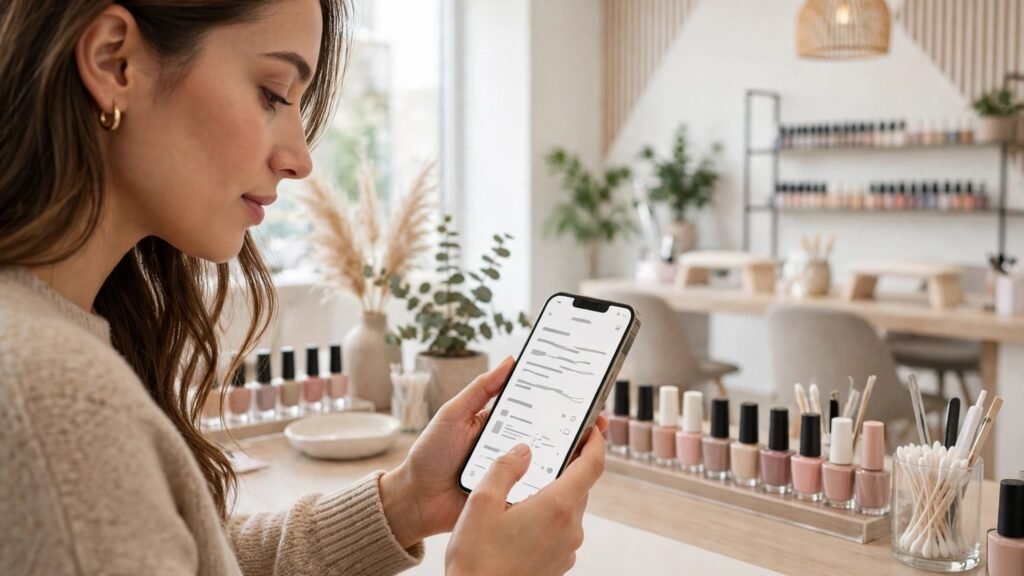
Booking is where most salons lose money first. A client who cannot book in two minutes will book elsewhere. These tools handle that job, and each one fits a different size of salon.
1. Booksy
Booksy is built for beauty bookings, and that focus shows in the details. Clients can book a service, pick a technician, pay a deposit, and get reminders without a phone call. The marketplace side also puts your salon in front of people who are already searching for nail services in your area. For a busy salon, the deposit feature alone is worth testing, because it cuts no shows without turning clients away. The reporting shows which services fill chairs and which sit empty, so you can adjust your price list with evidence instead of guesswork.
Watch out for: marketplace fees and commission style charges can add up, so read the fee terms for your plan and check what you pay on a marketplace booking versus a direct booking.
2. GlossGenius
GlossGenius suits a solo technician or a small team that wants booking, payments, and marketing in one place. The setup is quick, the booking page looks polished on a phone, and clients can tip and rebook from the same flow. It also handles no show protection and client notes, which matter when a client has allergies, prefers a certain shape, or always books a specific technician. For a new salon, that polish matters, because the booking page is often the first impression a client gets.
Watch out for: advanced multi location controls are limited compared with larger platforms, so a salon planning rapid expansion should test the staff and location features before committing.
3. Fresha
Fresha stands out because its core booking software is free to use, with charges on marketplace bookings and add on features. That model suits a new salon that needs a professional booking page without a fixed monthly bill. Clients can book online, receive reminders, and pay deposits where enabled. The marketplace can also bring new clients who search Fresha directly. The trade off is that you need to check which features sit behind paid upgrades, especially marketing and reporting tools that a growing salon will want.
Watch out for: free does not mean free in every case. Check marketplace commission, payment processing terms, and the cost of the add ons you actually need.
4. Vagaro
Vagaro covers booking, point of sale, and retail in one system, which helps salons that sell polish, cuticle oil, and aftercare kits. A client can book a fill, buy a product at checkout, and join a membership or package plan. That matters for revenue, because product and package sales smooth out quiet weeks. Vagaro also supports forms and client records, so intake notes and preferences stay with the client file instead of living in a notebook.
Watch out for: the range of features can feel busy at first. Turn on only the modules you need in month one, then add retail or memberships once booking is stable.
5. Square Appointments
If your salon already takes payments with Square, Square Appointments keeps booking and payment in the same system. Clients book online, pay, and get reminders, while staff see the day in one calendar. The advantage is fewer systems to reconcile at the end of the day. The booking page is clean, and the hardware options suit a front desk that also sells products. It is a sensible choice when you value simplicity over beauty specific marketplace reach.
Watch out for: it is a general booking tool, not a beauty marketplace, so you will need your own marketing to bring clients to the booking page.
6. Goldie
Goldie, formerly Appointfix, is a simple scheduling app that many solo beauty professionals use to manage appointments, reminders, and client lists. It is light, affordable, and easy to learn, which suits a technician who does not want a full salon platform yet. You can set services, working hours, and reminders, and keep client details in one place. For a chair renter starting out, that simplicity is a strength, not a weakness.
Watch out for: payment, marketing, and multi staff features are thinner than full salon platforms, so plan an upgrade path if you hire staff.
Client experience, reviews, and growth
A full chair is only half the job. The salon also needs clients to return, leave reviews, and tell friends. These tools handle that second half.
7. Mangomint
Mangomint is designed for salons and spas that need detailed staff control, custom booking rules, and clean client records. You can set commission structures, control who can edit bookings, and keep notes on each client. That control helps as a salon grows past the point where everyone knows every client by name. The interface is modern and the booking flow is clear, which reduces the messages that ask whether a slot is really booked.
Watch out for: pricing sits above basic booking apps, so it fits a salon with steady volume rather than a salon still testing demand.
8. Boulevard
Boulevard targets premium and multi location salons. It combines booking, client profiles, memberships, and reporting with a focus on the client experience. A returning client sees their history, preferences, and past services, and staff can prepare before the appointment starts. For a group with several locations, central reporting shows which location needs attention without waiting for month end reports.
Watch out for: setup takes more time than a simple booking app, and the price reflects the larger feature set. Get a demo with your real services and staff roles before you sign.
9. Zenoti
Zenoti is an enterprise grade platform for salon, spa, and wellness groups. It handles booking, memberships, packages, inventory, and marketing at scale. A group can run promotions across locations, track product stock, and manage staff performance from one dashboard. That scale is useful when a single salon platform starts to break under the weight of several locations and a large team.
Watch out for: it is more system than a small salon needs. A single location salon will pay for features it never uses, so this pick suits groups, not starters.
10. Podium
Podium helps salons collect reviews and answer client messages from one inbox. After an appointment, it can send a review request by text at the right moment, and it gathers messages from common channels so a question does not sit unanswered. Reviews matter for nail salons because clients check ratings before they trust someone with their nails. Podium also uses AI assisted replies to draft responses, which saves time while keeping the owner in control of the final message.
Watch out for: review tools only work if you ask consistently. Set the request to send after every appointment, and reply to negative reviews quickly and calmly. For messaging habits that work across appointment businesses, see our guide to best AI tools for WhatsApp Business, which covers reply templates and message timing in more detail.
11. StyleSeat
StyleSeat is a marketplace where clients discover beauty professionals and book directly. For a new technician, it can bring clients faster than a standalone website, because clients are already searching there. Profiles show work photos, services, prices, and reviews, which helps a client choose with confidence. It works best when your photos are strong and your service list is clear, because the profile does most of the selling.
Watch out for: marketplace rules and fees apply, and you build your reputation on someone else’s platform. Keep your own booking list as well, so you are not fully dependent on one channel.
12. Ovatu
Ovatu is a smaller booking platform aimed at salons and clinics that want a straightforward setup. It covers online booking, reminders, client records, and payments without a long learning curve. Small salons often prefer this kind of tool because staff can learn it in a day and clients can book without confusion. It is also a useful option when larger platforms feel overbuilt for a two or three chair salon.
Watch out for: as a smaller vendor, check support hours, payment options in your country, and how easily you can export your client list if you later switch.
Marketing, content, and day to day help
The last group does not book appointments. It fills them, by making your salon visible and by saving hours of writing and design work each week.
13. Canva
Canva uses AI assisted design to help salons create social posts, price lists, service menus, and stories without hiring a designer. Templates for beauty businesses give you a starting point, and you can drop in your own photos of real work. That last point matters. Clients trust photos of nails you actually did far more than stock images. Use Canva to present your real work well, with clear prices and a booking link on every post.
Watch out for: templates can make every salon look alike. Change colours, fonts, and photos so your feed looks like your salon, not a template pack. Strong salon photos matter as much as design, so our roundup of best AI tools for photographers is useful for editing work photos, and our guide to best AI tools for Instagram covers posting and reels for visual businesses.
14. ChatGPT
ChatGPT can draft captions, service descriptions, reply templates, and salon policies, and it can turn a rough idea into a clean first draft in minutes. Use it for the writing you repeat, such as cancellation policies, aftercare instructions, holiday opening posts, and answers to common questions about fills, removal, and nail health. Always check the draft for accuracy, local rules, and your own tone before you publish it, because a generic policy can promise something your salon does not offer.
Watch out for: never paste private client details into a public AI tool, and never publish health claims about nails or skin without checking them. Use it for drafting, not for medical advice.
How to choose without buying everything at once
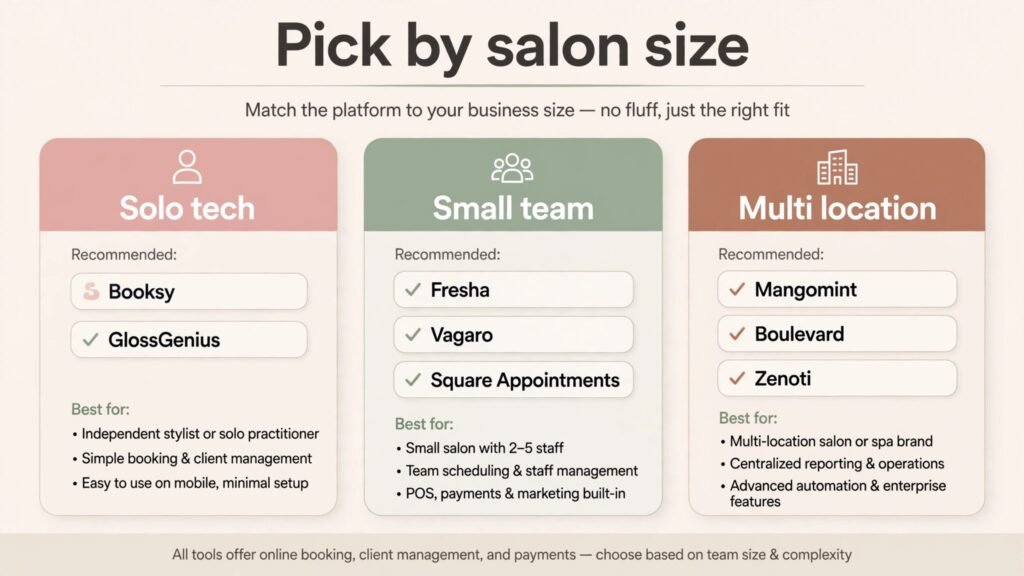
Start with one booking system, not five tools. Pick the booking tool that matches your size today, then add one growth tool only after booking is stable for a month. A solo tech should start with GlossGenius, Goldie, or Fresha, and add Canva for content. A small team should start with Booksy or Vagaro, and add Podium once reviews become a priority. A multi location group should demo Boulevard and Zenoti side by side with real staff roles, because the demo will reveal which workflow your team actually follows.
Test four things before you pay for a year. First, book as a client on your phone and count the steps to a confirmed appointment. Second, cancel and reschedule, because that is where most booking tools fail. Third, check deposit and no show settings, including how refunds work. Fourth, export a client list, because you should always be able to leave with your data. If any of those four steps feels awkward, clients will feel it too.
Budget honestly. Add the monthly fee, payment processing, marketplace commission, and the cost of any add on you need, then compare that total with one extra filled chair per week. Also count staff time, because a tool that saves ten phone calls a day is worth more than a cheaper tool that creates extra messages. Ask staff which tool they actually open without being reminded, because adoption is the real cost. A tool that staff avoid will fail even if its feature list looks perfect on paper. Trial periods exist for this reason, so use them with real clients and real services, not with test data alone. If a vendor will not let you test deposits, reminders, and cancellations before you pay, treat that as a warning sign and move to a vendor that will. Most salons find that a single recovered booking pays for the software, but only if the software actually recovers bookings. Track no shows, online booking share, and rebooking rate for the first 60 days, and keep only the tools that move one of those numbers.
Mistakes to avoid
The most common mistake is choosing a tool for its feature list instead of its booking flow. A long feature list does not help if clients abandon the booking page. Another mistake is running two booking systems at once, which creates double bookings and confused staff. Pick one source of truth for the calendar and stick to it.
A third mistake is ignoring deposits because you worry clients will object. In practice, a clear deposit policy with a fair cancellation window reduces no shows and protects technician income. State the policy on the booking page, in the confirmation message, and at the desk, so no client is surprised. A fourth mistake is buying marketing tools before the basics work. Reviews, social posts, and ads all send people to a booking page. If that page is slow or confusing, marketing spend is wasted.
Finally, do not let AI write your prices, policies, or health advice unchecked. AI drafts are useful, but your salon is responsible for what it publishes. Check every price, every policy date, and every claim about nail care before it goes live. One wrong price on a social post can create a week of awkward conversations at the desk.
What AI actually does inside a salon, in plain terms
AI in a salon is rarely a robot or a futuristic system. In practice it is a set of small automations that handle repetitive work. Smart reminders learn the best time to send a text so a client actually reads it. Review tools draft a reply that the owner edits before sending. Booking tools suggest open slots when a client cancels, and they offer that slot to a waitlisted client without staff making five phone calls. Content tools draft a caption from a photo description, then the owner fixes the price, the service name, and the booking link.
That distinction matters when you compare vendors. Ask what the AI feature does on a normal Tuesday, not in a demo video. Does it answer a booking question at 11 pm, or does it only send a reminder you could already send? Does it draft a review reply that sounds like your salon, or does it produce a generic thank you that clients ignore? The useful features save a named task, such as chasing a no show, filling a gap, or answering a price question. The less useful features add a label to a feature you already had.
AI also helps with patterns that are hard to see from the desk. A booking report can show that Saturday mornings fill fast while Tuesday afternoons sit empty, which suggests a Tuesday offer rather than a price cut across the board. A client record can show that a regular client always books a fill every three weeks, which suggests a reminder at day 18 rather than day 25. A review summary can show that clients praise one technician for gentle removal, which suggests featuring that strength in a post. None of that requires a data team. It requires a tool that records the basics well and surfaces them in a readable report.
There are limits worth stating clearly. AI cannot judge nail health, diagnose a skin problem, or decide whether a client needs a break from enhancements. It cannot replace a consultation when a client has damaged nails, an infection, or an allergy. Use AI for scheduling, reminders, drafts, and summaries, and keep clinical judgement with trained staff. Also keep client photos and personal details inside tools you trust, with clear consent for any photo you post publicly. A salon that treats AI as a helper for admin work, not as a substitute for skill, will get the benefit without the risk.
A 30 day rollout plan that staff can actually follow
Week one is about the calendar only. Move all bookings into the chosen tool, set services and prices correctly, and test booking, cancellation, and rescheduling as a client. Tell staff that the new calendar is the only calendar, and remove old paper diaries from the desk so double booking cannot creep back. At the end of week one, check whether online bookings rose and whether staff spent less time on the phone.
Week two adds deposits and reminders. Set a deposit amount that feels fair for your services, write the cancellation window in plain words, and test it with a few regular clients first. Turn on reminders at two points, such as a day before and a few hours before, and watch the no show rate. If clients complain about too many messages, reduce to one reminder and a single confirmation, because annoyed clients do not rebook.
Week three adds reviews and rebooking. Turn on an automatic review request after each appointment, and add a rebooking prompt at checkout, either in person or by message. Staff should mention the next fill date before the client leaves, because a spoken suggestion converts better than a message alone. Track how many clients rebook at the desk versus later by message, and adjust the script staff use.
Week four adds content and a simple monthly check. Post three times using real photos, each with a service name, a price range, and a booking link. Then review the numbers that matter: online booking share, no show rate, rebooking rate, and review count. Keep the tool if at least two of those moved in the right direction. Drop or downgrade any add on that no one used. That monthly check stops software costs from growing quietly while the salon stays the same size.
Frequently asked questions
Do nail salons really need AI tools, or is a simple booking page enough?
A simple booking page is enough to start, and it is better than no online booking at all. AI features become useful when volume grows, because automated reminders, review requests, and message drafts save hours each week. Start simple, then add AI features that solve a problem you can name, such as missed calls or low review counts.
Which tool is best for a solo nail technician?
GlossGenius and Goldie are the strongest starting points for a solo tech, because setup is quick and the booking page looks professional. Fresha is also worth testing if you want to avoid a fixed monthly fee at the start. Choose based on deposit options and how easily clients can rebook.
How do deposits reduce no shows?
A deposit changes the booking from a vague intention into a paid commitment. Clients who have paid part of the service price are far more likely to show up or reschedule in good time. Keep the deposit fair, state the cancellation window clearly, and make refunds easy when a client cancels early.
Should a salon use a marketplace like Booksy or StyleSeat?
A marketplace can bring new clients faster, especially for a new salon. The trade off is fees and platform rules. Use a marketplace for discovery, but also build your own client list and direct booking page, so you are not dependent on one channel for your whole business.
Yes, for drafting captions, planning posts, and designing price lists. The strongest content still comes from your own photos of real work, with clear service names and prices. Use AI to present that work well, not to replace it with generic images.
What should a salon check before switching booking software?
Check deposit rules, cancellation flow, client data export, payment processing, and staff permissions. Run a test week with real services and a small group of clients before you move your full diary. Tell existing clients about the change, and keep the old system open until the new one is proven.
How much should a small salon budget for booking software?
Budget the monthly fee plus payment processing and any marketplace commission, then compare it with the value of one recovered booking per week. Pricing varies by plan and region, so confirm the total at checkout. Avoid annual contracts until you have used the tool for at least a month.
Conclusion
The best choice for most salons is a booking system that clients find easy, a deposit policy that protects chairs, and one growth tool that brings reviews or new clients. Booksy suits busy salons that want marketplace reach, GlossGenius suits solo techs who want polish without complexity, Fresha suits new salons watching costs, and Boulevard or Zenoti suit groups that need control at scale. Add Podium when reviews matter, Canva when content takes too much time, and ChatGPT for drafting, with a human check on every published word. Start with booking, measure no shows and rebooking for 60 days, and only then add the next tool. That order keeps costs down, keeps staff calm, and keeps chairs full, which is the whole point of the software in the first place.