
Compare two dance studios on a busy September evening. In the first, the owner answers enrolment questions by text, chases costume payments from a spreadsheet, and rebuilds the recital schedule every time a class changes. In the second, parents enrol online, costume fees are tracked in one place, teachers see their class lists on a phone, and the owner spends the evening watching classes instead of fixing admin. The difference is rarely talent or teaching quality. It is systems. The best AI tools for dance studios remove the enrolment, payment, scheduling, and communication work that pulls owners away from the studio floor, while keeping the teaching, choreography, and student care firmly human.
This guide compares 14 tools, from dance specific platforms to general AI helpers that work well for studios. Some suit a small studio with two teachers. Others suit a large studio with hundreds of students and a full recital season. Prices change often, so treat every pricing note as an October 2026 starting point and check at checkout before you buy.
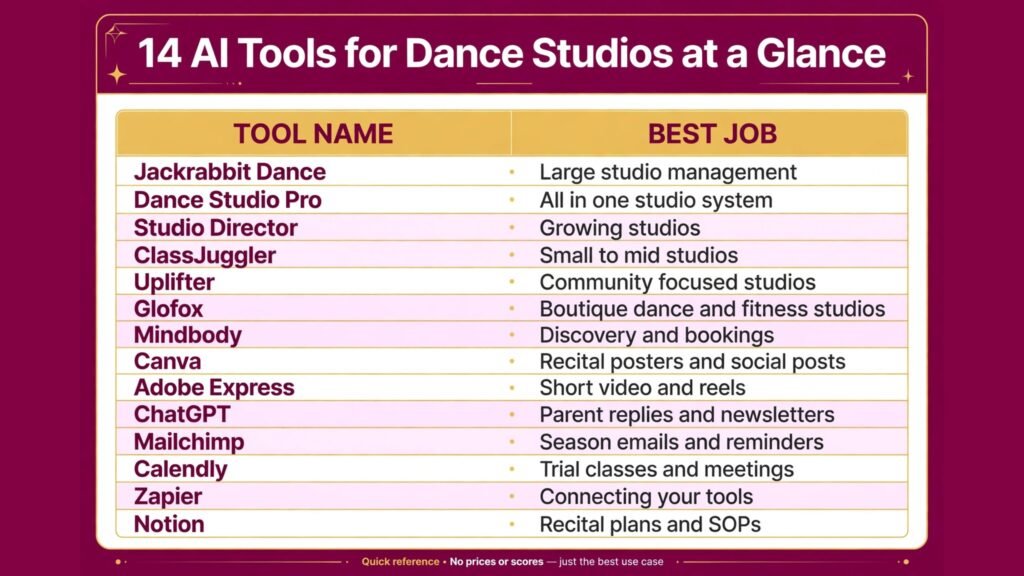
At a Glance: 14 Tools Compared
| Tool | Best for | Main strength | Watch out for |
|---|---|---|---|
| Jackrabbit Dance | Large studio management | Enrolment, billing, and class tools | Setup takes planning |
| Dance Studio Pro | All in one studio system | Enrolment plus website tools | Interface can feel dated |
| Studio Director | Growing studios | Strong class and billing controls | Learning curve for new staff |
| ClassJuggler | Small to mid studios | Simple enrolment and payments | Fewer marketing features |
| Uplifter | Community focused studios | Registration and member tools | Smaller ecosystem |
| Glofox | Boutique dance and fitness studios | Clean booking app | Less dance specific depth |
| Mindbody | Discovery and bookings | Large marketplace reach | Can feel generic for dance |
| Canva | Recital posters and social posts | Fast branded design | Needs your real class photos |
| Adobe Express | Short video and reels | Quick clips from class footage | Do not overuse stock looks |
| ChatGPT | Parent replies and newsletters | Fast drafts with your details | Check dates, fees, and policies |
| Mailchimp | Season emails and reminders | Automated enrolment sequences | Costs rise with list size |
| Calendly | Trial classes and meetings | Clean booking without messages | Needs clear class windows |
| Zapier | Connecting your tools | Automates reminders and lists | Test flows before enrolment season |
| Notion | Recital plans and SOPs | One searchable studio brain | Only works if updated weekly |
Studio Platforms Built for Dance
1. Jackrabbit Dance
Jackrabbit Dance is one of the most established dance studio platforms, covering online enrolment, class management, billing, attendance, and parent communication. For a studio with many classes, levels, and age groups, that depth matters. Parents can enrol siblings, choose classes by age and level, and pay online, while staff see enrolment numbers by class in real time. That visibility helps you decide early whether a class needs promotion, a second section, or a schedule change, rather than discovering a half empty class in week three.
Pricing is subscription based and scales with features and student numbers, so check at checkout. Watch out for setup time. Importing students, building class schedules, and setting tuition rules deserves a focused block before enrolment opens, not a rushed weekend. Run a test enrolment with a few trusted parents first, and fix confusing steps before the full season launch.
2. Dance Studio Pro
Dance Studio Pro combines studio management with website and enrolment tools, which suits owners who want fewer separate systems. It handles class registration, payments, attendance, and communication, and it can power a studio website so parents do not bounce between a site and a separate portal. For a mid sized studio, that single flow reduces questions like “where do I pay” and “which link is for registration”, which are small questions that consume a surprising amount of owner time.
Pricing is subscription based, so check at checkout for the tier that matches your student count. Watch out for design limits. An all in one website may not match a fully custom site, so weigh a polished custom homepage against the time saved on enrolment. For most studios, a clear enrolment path beats a perfect homepage, especially during registration season.
3. Studio Director
Studio Director offers strong class management, billing, and reporting for growing studios. It suits owners who want control over tuition rules, discounts, family accounts, and class capacity, without losing sight of who is enrolled where. Reporting helps you see which age groups grow, which classes retain students, and where pricing or scheduling may need adjustment before the next season.
Pricing is subscription based, so check at checkout. Watch out for staff training. A powerful system only helps if every teacher and front desk person uses it the same way. Create short guides for attendance, enrolment changes, and payment questions, and keep them where staff actually work, not in a folder nobody opens.
4. ClassJuggler
ClassJuggler is a practical option for small to mid sized studios that want enrolment, billing, and attendance without a very large platform. Its strength is clarity. Parents enrol, staff track classes, and payments stay tied to enrolment, which reduces the spreadsheet work that causes double charges and missed costume fees. For a studio owner who also teaches, that simplicity is not a compromise. It is the feature that makes the system usable on a teaching day.
Pricing is subscription based, so check at checkout. Watch out for marketing depth. You may still need separate tools for email and social design, so count those costs in your total. If your studio grows mainly by word of mouth and local search, that trade off is easy. If you need heavy paid marketing, compare the total stack before deciding.
5. Uplifter
Uplifter is a registration and member management platform used by dance, gymnastics, and similar activity businesses. It suits community focused studios that want clean registration, family accounts, and programme management without enterprise complexity. Parents get a clear registration flow, and staff get a clear view of programmes, payments, and participation. For a studio that runs classes, camps, and workshops alongside regular terms, that programme view helps keep different offers organised.
Pricing depends on features and volume, so check at checkout. Watch out for ecosystem size. A smaller platform may have fewer third party integrations than the largest options, so list the tools you must connect, such as email or accounting, and confirm each connection before you commit.
6. Glofox
Glofox brings a clean booking and member app experience to boutique dance and fitness studios. It works well for adult classes, drop in sessions, and studios where members book by class rather than enrolling for a full term. The app experience feels modern, which supports a boutique brand, and staff get a clear view of bookings and revenue without a heavy back office.
Pricing is subscription based, so check at checkout. Watch out for term enrolment depth. If your core model is full season enrolment with costume fees, recitals, and level progression, a dance specific platform may handle those details better than a general booking app. Glofox shines where flexibility and drop in booking matter most.
7. Mindbody
Mindbody offers bookings, memberships, payments, and a large discovery marketplace. For a dance studio that sells adult drop in classes, workshops, or fitness style dance classes, marketplace visibility can bring new students who would not otherwise find a small studio website. It also gives staff a familiar booking and payment flow that many customers already know from other studios and gyms.
Pricing is subscription based and varies by features, so check at checkout including transaction costs. Watch out for fit. Mindbody is a general wellness platform, so term enrolment, recital planning, and costume tracking may need workarounds or extra tools. Test the full parent journey, from discovery to booking to payment, before you rely on it for a whole season.

Marketing, Video, and Parent Communication
8. Canva
Canva is the fastest way to keep a dance studio looking polished across recital posters, class timetables, social posts, and costume information sheets. Build templates for each season, then change only photos, dates, and class names. AI tools help with background removal and resizing, but the real win is consistency. Parents recognise your studio instantly when every notice uses the same colours, fonts, and tone.
Pricing includes a free plan and paid plans for brand controls, so check at checkout. Watch out for generic design. Use real photos of your students, with proper permission, and real class names. Stock dance photos look polished but tell parents nothing about your teachers, your rooms, or your community.
9. Adobe Express
Adobe Express helps studios turn class footage into short, shareable video. A 20 second rehearsal clip, a costume reveal, or a teacher introduction often earns more enrolment interest than a static poster. You can add text, trim clips, and resize for each platform without learning full video editing. For recital season, short behind the scenes clips also build excitement and help parents feel part of the process.
Pricing includes a free tier and paid plans, so check at checkout. Watch out for permissions and privacy. Never post identifiable student video without clear parent consent, and keep a simple consent record by class. Video marketing works best when it is joyful and respectful, not when it creates a privacy problem.
10. ChatGPT
ChatGPT drafts the writing that fills a studio owner’s week: replies to trial class questions, welcome emails, costume fee explanations, recital information, and newsletter updates. Give it your term dates, fees, policies, and tone, and the first draft arrives quickly. The value is speed, especially during enrolment season when the same questions arrive daily from different parents.
Access includes a free tier and paid plans, so check at checkout. Watch out for accuracy. Never send a draft that states a date, fee, or policy without checking it against your current term information. Also keep the tone warm and personal. Parents choose a dance studio for teachers and community, so edit every draft until it sounds like your studio, not a generic business.
11. Mailchimp
Mailchimp turns one time interest into enrolment. Set up a welcome sequence for trial class inquiries, a reminder before registration closes, a costume fee reminder, and a recital information series. AI help with subject lines and send times is useful, but content must stay specific: real dates, real classes, and real teachers. A short email with one clear action, such as “book a trial” or “complete costume payment”, outperforms a long newsletter with five competing links.
Pricing scales with list size, so check at checkout as your list grows. Watch out for over emailing. Parents already receive many school and activity messages. Send fewer, clearer emails, and respect unsubscribes promptly. A small engaged parent list is far more valuable than a large list that ignores you.
12. Calendly
Calendly simplifies trial class bookings and parent meetings. Share a link with available trial times, and parents choose a slot without a long message thread. Add intake questions about age, experience, and class interest, so teachers know what to expect before the student arrives. That preparation makes a trial class feel welcoming rather than chaotic, which matters for conversion.
There is a free tier and paid plans, so check at checkout. Watch out for class capacity. A booking link must reflect real class space. Set clear limits per trial session, and close booking when a class is full, or you risk overcrowding a class that should have sold the studio.

Tools That Connect and Organise the Studio
13. Zapier
Zapier connects studio tools that do not talk to each other. A new enrolment can trigger a welcome task, a costume list update, or a teacher notification. A trial booking can add a follow up reminder for the next day. A payment can trigger a receipt and a record update. These small flows prevent the most common studio errors: a student enrolled but never welcomed, a payment received but never recorded, or a trial student never followed up.
Pricing is tiered by task volume, so check at checkout and estimate enrolment season volume honestly. Watch out for untested flows. Test every automation with a fake student before enrolment opens. A broken flow during registration season creates more work than no automation at all.
14. Notion
Notion holds the studio knowledge that usually lives in one owner’s head: recital timelines, costume supplier contacts, music licensing notes, teacher SOPs, room setup checklists, and season review notes. Build simple pages, keep them short, and update them after each season while lessons are fresh. AI help can draft checklists and summarise notes, but the value comes from having one place where a new teacher or assistant can find answers without asking the owner.
There is a free plan and paid plans for teams, so check at checkout. Watch out for neglect. Assign one update moment after recital season and one before enrolment season. Delete outdated pages, update fees and dates, and keep the system small enough that staff actually use it.
Best Pick by Job
| Job | Best pick | Why it wins |
|---|---|---|
| Large studio management | Jackrabbit Dance | Depth for enrolment, billing, and classes |
| All in one studio system | Dance Studio Pro | Enrolment plus website in one flow |
| Growing studio control | Studio Director | Strong tuition and reporting controls |
| Small studio simplicity | ClassJuggler | Clear enrolment and payments |
| Community programmes | Uplifter | Clean registration for varied programmes |
| Boutique drop in classes | Glofox | Modern booking app experience |
| Discovery and drop ins | Mindbody | Marketplace reach for adult classes |
| Posters and social design | Canva | Fast, consistent, brand controlled |
| Short video | Adobe Express | Quick reels from real class footage |
| Parent writing | ChatGPT | Fast drafts when given real policies |
| Season emails | Mailchimp | Automated enrolment and reminder sequences |
| Trial bookings | Calendly | No message thread for trial times |
| Connecting tools | Zapier | Prevents missed follow ups |
| Studio knowledge | Notion | One searchable place for SOPs and recital plans |
How to Choose the best AI tools for dance studios
Start with your season, not a feature list. Map the year: enrolment, term one, costume ordering, recital planning, recital week, and summer programmes. Then ask where the owner loses the most time in each phase. If enrolment is the pain, prioritise a dance platform with a clean parent flow. If recital season is the pain, prioritise costume tracking, communication, and a shared recital plan. If trial conversion is the pain, prioritise Calendly, fast replies, and a clear trial experience. The right first tool is the one that fixes the worst week of your year.
Next, test with parents, not just staff. Ask three parents to enrol, pay, and find a class timetable without help. Watch where they hesitate. Parent confusion is the most reliable test of a studio platform, because staff learn workarounds that parents never will. Fix those steps before launch, even if it means simplifying your class structure or rewriting instructions in plain language.
Then check total cost and total effort. Add platform fees, payment processing, email costs, and the time to keep data current. A cheaper platform that needs weekly spreadsheet fixes may cost more in owner time than a pricier platform that runs cleanly. Review after one full term, not after one week, because enrolment season and recital season stress different parts of the system. Keep what survived both, and cancel what only looked good in a demo.
Studios that also run adult fitness style classes can compare notes with general gym management tools, and studios that sell heavily through social channels may find useful ideas in the best AI tools for Instagram.
Three Studio Workflows Worth Copying
Workflow 1: Enrolment season without chaos
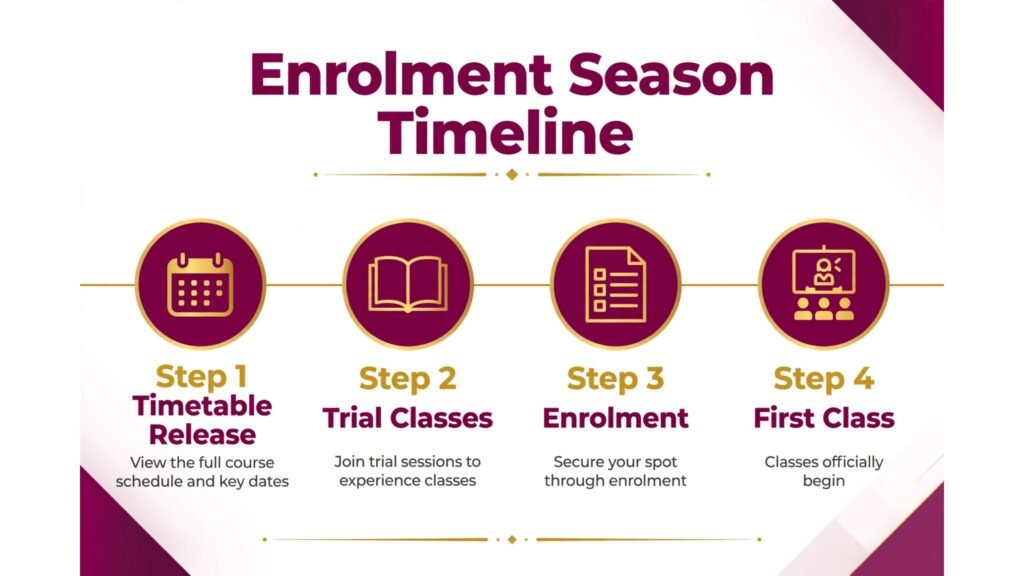
Enrolment season works when parents can complete the whole journey in one sitting. Publish the timetable early, open online enrolment with clear age and level guidance, and send a short welcome email the same day. Use Mailchimp for reminders to families who started but did not finish, and use ChatGPT drafts, edited by you, for common questions about fees, uniforms, and trial classes. Track enrolment by class daily, and promote underfilled classes while there is still time to fill them. The goal is not a perfect launch day. It is a calm first week where teachers know their class lists and parents know what they paid for.
Workflow 2: Recital season with fewer surprises
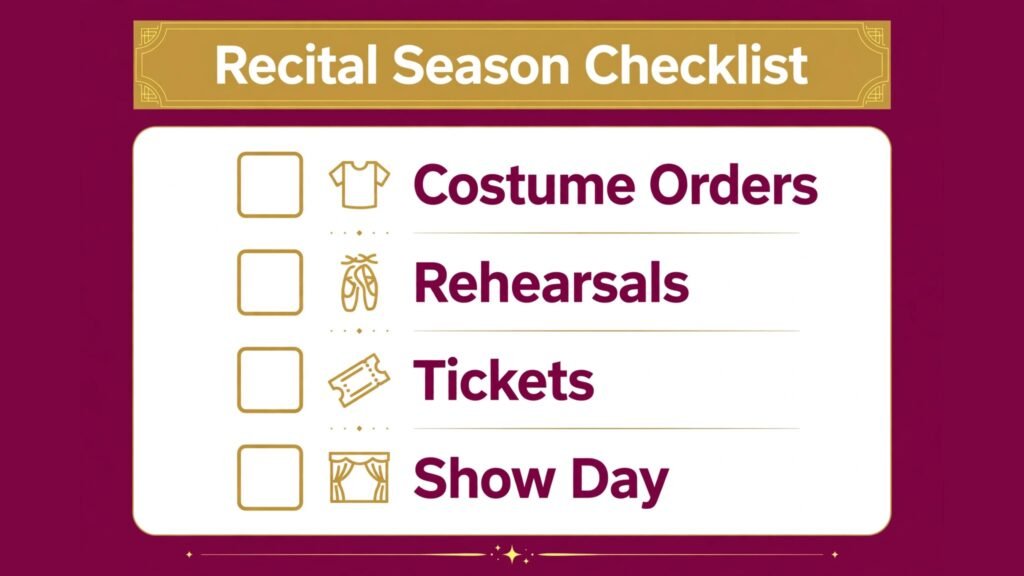
Recital season rewards a timeline built backwards from show day. In Notion, list costume orders, music deadlines, rehearsal dates, ticket information, and volunteer roles, with an owner for each item. Use your studio platform to track costume fees separately from tuition, so no family is surprised by a combined bill. Send recital updates in short, dated messages rather than one long document that parents lose. During show week, keep communication to essential changes only. Parents remember a calm recital week far longer than they remember a perfect poster, and teachers perform better when the backstage plan is clear.
Workflow 3: Trial class to enrolled student
A trial class should feel like a welcome, not an audition. Calendly books the trial with age and experience details. The teacher receives the class list in advance and greets the student by name. After class, the family receives a short personal message, not a generic sales email, with the recommended class, fee, and enrolment link. Follow up once more three days later if there is no reply, then stop. Pushy follow up harms a community studio brand. A warm, clear, single follow up converts far better, and it leaves the door open for a family to return next term even if the timing was wrong this time.
Pricing, Privacy, and Parent Trust
Dance studios handle sensitive information: children’s names, ages, medical notes, payment details, and photos. That makes privacy a core part of tool choice, not an afterthought. Before you adopt a platform, check who can see student data, how staff permissions work, and how data is exported if you leave. Limit access by role, so teachers see their own classes rather than the whole studio database, and front desk staff see payment status without unnecessary personal details. Keep medical and allergy notes in the secure platform, not in group chats or shared documents, and review permissions whenever staff change.
Pricing needs the same clarity. Parents should see tuition, costume costs, registration fees, and recital costs in plain language, in one place, before they enrol. Hidden or late fees are the fastest way to lose a family, even when the teaching is excellent. When you compare platforms, include payment processing fees and any charges for extra admins or students, and test a family with two children in different classes, because sibling discounts and family accounts are where many systems reveal their flaws. A platform that handles a single student well but confuses a family account will create support work all season.
Parent trust also grows from communication rhythm. Families do not need daily messages, but they do need timely ones: term dates before holidays, costume deadlines with enough notice, recital details before tickets sell out, and a clear contact route when something goes wrong. Use your email tool for planned messages, your platform for account facts, and direct messages only for personal or urgent matters. When every channel carries every message, parents stop reading any of them. When each channel has a clear job, parents know where to look, and the studio spends less time repeating the same answer.
Finally, protect teacher time. A new tool should reduce the number of systems a teacher checks, not increase it. If teachers must check a platform, a chat group, an email inbox, and a paper list to run one class, the system has failed, even if the owner dashboard looks impressive. Ask teachers after the first month what they still do twice, what they still write on paper, and what they ignore. Those answers tell you which integrations to fix, which guides to write, and which features to turn off. A studio that listens to teachers keeps its systems simple, and simple systems are the ones that survive a busy season.
Mistakes to Avoid
The first mistake is choosing a platform for recital features while enrolment is broken. Fix enrolment first, because a studio cannot run a recital without students. The second mistake is posting student photos and video without clear consent. Keep consent records current, and respect families who decline. The third mistake is hiding fees in long documents. State tuition, costume, and recital costs plainly, in one place, before parents enrol. Surprise fees damage trust faster than any marketing can repair it. The fourth mistake is letting class lists live in messages. If a teacher only knows a class list from a chat thread, a missed message becomes a missed student. Keep the platform as the single source of truth. The fifth mistake is adding tools during enrolment season. Learn new systems in a quiet month, test with a small group, and launch fully only when staff are confident.
Frequently Asked Questions
What are the best AI tools for dance studios on a small budget?
Start with ClassJuggler or a similar small studio platform, plus Canva and ChatGPT for marketing and replies. Add Mailchimp when your parent list grows large enough to need automation. Keep the stack small until enrolment justifies a larger platform.
Can a general booking app replace a dance studio platform?
It can work for drop in adult classes, but term enrolment, family accounts, costume fees, and level progression are usually handled better by a dance specific platform. Many studios use both: a dance platform for terms, and a booking app for workshops and drop ins.
How do I handle costume payments without confusion?
Track costume fees separately from tuition in your studio platform, state the amount and deadline plainly, and send a reminder before the deadline, not after. A separate line item prevents the most common parent complaint, which is not the cost itself but the surprise.
Should I use AI to write parent messages?
Yes, for first drafts, provided you edit for tone and check every date and fee. Parents trust a studio that sounds personal and accurate. AI helps with speed, but the final message should sound like it came from a teacher who knows their child.
How early should I open enrolment?
Open early enough for parents to plan, usually several weeks before term starts, with a clear closing date. Early opening gives you time to fill weak classes, adjust schedules, and order costumes without rushing. Announce the date in advance so returning families do not miss it.
What matters most for recital season?
A clear timeline, separate costume tracking, short dated updates, and a calm show week plan. Technology helps with each of these, but the real work is deciding dates, owners, and deadlines early, then communicating only what parents need, when they need it.
Final Word: Systems Protect the Teaching
The comparison across 14 tools points to one conclusion. A dance studio does not need every platform on this list. It needs one reliable enrolment and billing system, one clear way to communicate with parents, and one simple way to design and share what the studio offers. Jackrabbit Dance, Dance Studio Pro, and Studio Director suit larger or growing studios. ClassJuggler and Uplifter suit smaller studios that value clarity. General tools like Canva, ChatGPT, Mailchimp, Calendly, Zapier, and Notion fill the gaps around that core. Choose the core first, test it with real parents, and judge it after a full term and a recital season. When enrolment is calm, payments are clear, and teachers know their classes, the owner can return to the work that built the studio in the first place: teaching dance well, and building a community that families want to stay part of.