
Most leading voice cloning tools now need only a short sample, often a minute or a few minutes of clear speech, to build a recognisable clone. That single fact explains both the excitement and the risk around this category. A creator can fix a narration error without re recording, localise a course into new languages with a consistent voice, and keep a character voice steady across a long series. The same capability, used without permission, can impersonate a real person in a scam call, a fake endorsement or a false announcement. The best AI voice cloning tools are therefore judged on two things at once: how natural the clone sounds, and how seriously the vendor treats consent.
This guide reviews thirteen tools across creators, studios, localisation teams and developers. It also gives consent rules you should follow even when a tool does not force you to follow them. If you cannot prove you have permission to clone a voice, do not clone it. That rule protects the voice owner, your audience and your own business, because a single misuse incident can destroy trust faster than any time saved by cloning.
Voice cloning is not the same as text to speech with a stock voice. A stock voice is a voice actor’s licensed voice, used by many customers. A clone is built from a specific person’s voice, and it can be used to say things that person never said. That difference is why consent, labelling and secure storage matter so much here. A good vendor will ask for verification, limit who can use a clone, and provide ways to detect misuse. A vendor that lets anyone clone any voice from a short public clip, with no checks, should be treated as a risk, not as a convenience.
Why the best AI voice cloning tools need a consent first test
Before any quality comparison, apply this test. First, who owns the voice, and have they given clear, written permission for this specific use? Permission to use a voice in one video is not permission to use it in ads, in other languages, or forever. Second, will listeners know they are hearing a clone, or will they reasonably believe they are hearing the real person live? If the answer is the second, labelling is not optional, it is essential. Third, who can access the clone, and how is it stored? A clone stored in a shared account with no access control is a liability.
Consent also applies to deceased voices, celebrity voices and employee voices. A public figure’s voice is not public property. An employee’s voice, recorded for internal training, is not automatically available for public marketing. A family member’s permission is needed for a deceased person’s voice, and even then, the use should be handled with care and transparency. If a vendor or a client pressures you to skip consent because the use is small, internal or funny, that is exactly when to pause. Small uses still create a precedent, and a clip can be copied beyond its original context in seconds.
Misuse risks are real and specific. Cloned voices have been used for impersonation scams, fake customer service calls, false political messages and fake endorsements. The technology is improving faster than many listeners’ ability to detect it, especially on a phone call where audio quality is low and pressure is high. That is why this guide flags vendors with stronger verification, and why it recommends watermarking or labelling where available, and secure handling of voice models at all times.
At a glance: the 13 tools compared
| Tool | Best for | Clone quality focus | Consent and control note |
|---|---|---|---|
| ElevenLabs | Creators and studios | Natural, expressive clones | Verification and voice controls, check vendor terms |
| PlayHT | Content teams | Fast cloning for narration | Account controls, check vendor terms |
| Resemble AI | Custom voice projects | Custom clones with API control | Verification steps, check vendor terms |
| Respeecher | Film and games | High quality voice conversion | Studio grade consent process, check vendor terms |
| Descript Overdub | Podcasters and editors | Fix narration in your own voice | Own voice only workflow, check vendor terms |
| Murf AI | Business narration | Clear, professional clones | Business voice controls, check vendor terms |
| Lovo AI | Video and marketing | Expressive clones for video | Account controls, check vendor terms |
| WellSaid Labs | Enterprise narration | Consistent, studio quality voices | Enterprise controls, check vendor terms |
| Speechify | Reading and accessibility | Personal voice for reading | Own voice focus, check vendor terms |
| HeyGen | Video localisation | Clone plus lip sync video | Verification for avatars, check vendor terms |
| Camb AI | Localisation at scale | Multilingual voice cloning | Enterprise controls, check vendor terms |
| Kits AI | Music and singing voices | Singing voice models | Artist controls, check vendor terms |
| Coqui XTTS | Developers and open source | Open model for custom builds | Self hosted control, you own consent handling |
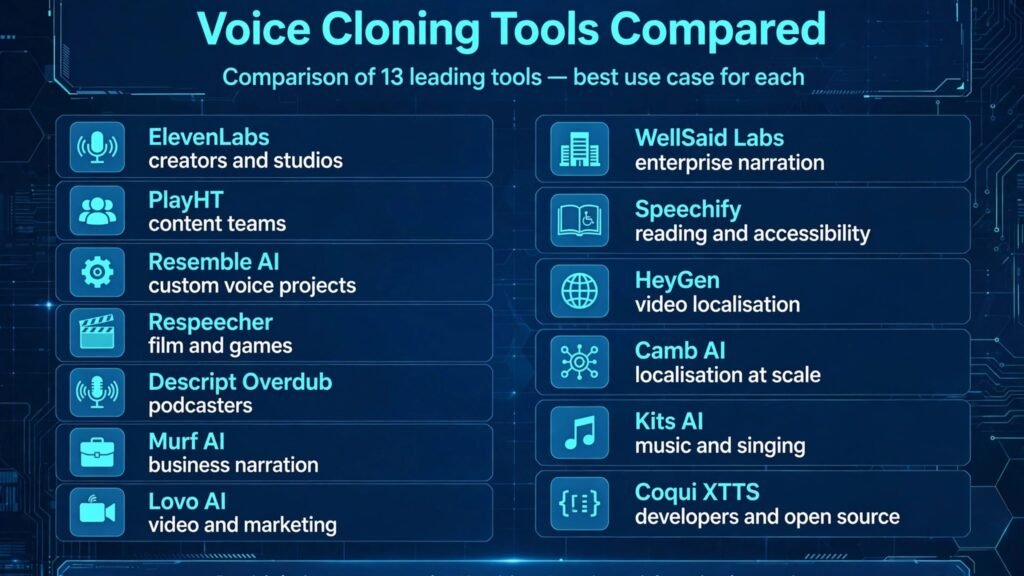
Best pick by job
| Job | Best pick | Why |
|---|---|---|
| Most natural creator clone | ElevenLabs | Strong expression and language range |
| Fix your own podcast narration | Descript Overdub | Designed for own voice correction |
| Film, games and high end conversion | Respeecher | Studio process and quality for character work |
| Business training and explainers | Murf AI or WellSaid Labs | Clear, consistent, professional delivery |
| Video with translated voice | HeyGen or Camb AI | Voice clone tied to video and language work |
| Singing voice work | Kits AI | Built for musical voice models |
| Developer project with full control | Coqui XTTS | Open model you host and control |
Creator and studio tools
1. ElevenLabs
ElevenLabs is the most widely used voice cloning tool in this list, and for most creators it is the starting point. It can create a clone from a short sample, generate speech in multiple languages, adjust style and emotion, and produce long form narration that stays consistent. For audiobooks, YouTube narration, course voiceovers and podcast intros, that consistency is the main benefit. A creator can record once, then update scripts without booking a studio session for every correction.
The platform includes voice controls and verification features. Those controls do not replace your own consent process, but they help.
Watch out for: quality depends heavily on the sample. A noisy, echoey or emotional sample will produce a weaker clone than a clean, neutral recording. Record a dedicated sample in a quiet room, with varied sentences, rather than using a random phone clip. Also, check pricing at checkout, because usage is often charged by characters or minutes, and long form projects can cost more than expected.
Best for: creators, authors and studios that need natural clones across languages.
2. PlayHT
PlayHT is a strong option for content teams that need fast, clear cloning for narration, articles and training. It offers voice cloning alongside a large library of stock voices, so a team can test a script with a stock voice, then switch to a cloned voice for a branded series. That workflow saves time when a team produces many short pieces per week.
PlayHT supports multiple languages and lets teams manage voices and projects in one dashboard. For a marketing or learning team, that organisation matters as much as raw quality, because scripts, approvals and versions can otherwise become messy.
Watch out for: expressive range can vary by voice and language. Test emotional passages, questions and emphasis, not just a neutral paragraph, before committing to a clone for a whole series. A clone that sounds fine on a news style script may sound flat on a story driven script.
Best for: content teams producing regular narration at volume.
3. Resemble AI
Resemble AI is built for custom voice projects and developers who need API control. It allows teams to create custom clones, generate speech through an API, and integrate voice into apps, games and interactive products. For a product team, that API access is the deciding factor. A creator tool with a good web editor is not enough if the voice needs to live inside an app.
Resemble includes verification steps for custom voices, which teams should follow carefully and document. Keep a record of consent for every custom voice in a project, including the scope, duration and languages approved. That record is useful if a client or platform later asks for proof.
Watch out for: Resemble is more technical than a simple creator tool. Teams without developer support may find the API setup slower than expected. Budget time for integration and testing, especially for real time or interactive use.
Best for: developers and product teams building custom voice features.
4. Respeecher
Respeecher is a studio grade voice conversion tool used in film, television and games. Rather than simply generating speech from text, it can convert one person’s performance into another voice, preserving timing, emotion and delivery. That makes it valuable for dubbing, de ageing a voice, or completing a performance when re recording is not possible, with proper permission.
Respeecher works with studios on a project basis, with a consent and approval process that is stricter than many consumer tools. That process is a feature, not a burden, for high stakes work. A film or game project cannot afford a consent dispute after release.
Watch out for: cost and lead time are higher than consumer cloning tools, and the workflow is project based. It is not the right choice for a quick social video. Use Respeecher when quality, performance detail and consent documentation matter more than speed.
Best for: film, games and premium audio projects with formal consent.
5. Descript Overdub
Descript Overdub is different from most tools here, because it is designed for you to clone your own voice, then fix your own recordings. A podcaster or video creator can type a correction, and Overdub generates that correction in their voice, so a small error does not require a full re record. Inside Descript, that correction sits in the same editing timeline as the rest of the audio, which makes the workflow fast.
The own voice focus is also a safety advantage. Overdub is built around training on your voice, with verification, rather than cloning other people on demand. That does not remove the need for labelling when a correction is used in a sensitive context, but it reduces the impersonation risk in normal editing.
Watch out for: Overdub works best for small corrections and short phrases. Long passages generated entirely by Overdub can sound less natural than a real recording, especially for emotional or conversational content. Use it to fix, not to replace, a full performance.
Best for: podcasters, YouTubers and course creators who want to fix their own narration quickly.
For podcast production beyond voice, our guide to the best AI tools for freelance writers covers scripting and editing workflows that pair with Descript.
Business, video and localisation tools
6. Murf AI
Murf AI focuses on clear, professional narration for business use: training videos, explainers, product demos and internal communications. It offers voice cloning alongside stock voices, with controls for pronunciation, pauses and emphasis that matter in instructional content. A training voice needs to be clear first and expressive second, and Murf is tuned for that balance.
Teams can create a consistent brand voice for a course series, so learners hear the same voice across modules, even when scripts are updated. That consistency helps learning, because learners are not distracted by a new voice in every module.
Watch out for: check how a cloned voice is stored and shared across a team account. A business voice that represents a real employee should have clear ownership and a removal process if that employee leaves. Agree that process before you create the clone, not after.
Best for: corporate training, elearning and product explainers.
7. Lovo AI
Lovo AI, also known as Genny, is popular with video creators and marketers who need expressive voices for ads, social video and product content. It combines voice cloning with video focused features, such as script generation and voice styles that suit short form content. For a team producing many short videos, the ability to move from script to voice quickly is valuable.
Lovo supports multiple languages and voice styles, which helps brands that localise ads or social content. Test a clone in each target language before launch.
Watch out for: short form quality can hide long form weaknesses. A clone that sounds good in a fifteen second ad may drift in a ten minute narration. Test long passages before using a clone for courses or audiobooks.
Best for: marketers and video creators who need expressive clones for short form video.
8. WellSaid Labs
WellSaid Labs targets enterprise narration with studio quality voices and consistent delivery. It is used for training, documentation, product narration and customer communications where a reliable, professional voice matters more than a highly emotional performance. For large organisations, the appeal is control: voice libraries, permissions, brand consistency and audit trails.
WellSaid Labs also emphasises responsible voice use, with licensed voices and controls for enterprise accounts. That governance matters when many teams in one company use voice tools, because without central control, different teams can create conflicting voice assets.
Watch out for: enterprise pricing and setup can be higher than creator tools, and the workflow is designed for teams, not solo creators. Small creators may find a simpler tool more cost effective for occasional narration.
Best for: enterprises and large learning teams that need consistent, governed narration.
9. Speechify
Speechify started as a reading and accessibility tool, turning text into speech so users can listen to articles, documents and books. Its voice cloning features focus on personal use, such as creating a voice for reading in your own voice or a licensed voice, rather than cloning other people for public content. That focus makes it a good fit for accessibility, study and personal listening.
Watch out for: Speechify is not primarily a studio cloning tool for public commercial projects. If your goal is to publish cloned narration for a large audience, a creator or studio tool in this list will give you more control over quality and export.
Best for: personal reading, study and accessibility use.
10. HeyGen
HeyGen combines voice cloning with AI video avatars and lip sync, so a cloned voice can be paired with a video presenter speaking in multiple languages. For localisation, that combination is powerful: a training video or marketing message can be delivered by the same presenter, in a new language, with matching lip movement. That keeps the video feeling like one presenter, not a dubbed replacement.
HeyGen requires verification for custom avatars and voices, which teams should complete early, because localisation projects often have tight deadlines. Plan verification time into the project schedule, and keep consent documents for every presenter and voice owner.
Watch out for: video cloning raises the same consent issues as voice cloning, plus visual impersonation risk. Label localised videos clearly when a presenter is speaking a language they did not actually record, especially for public or political content. Transparency protects the presenter and the audience.
Best for: video localisation, training and marketing teams that need voice plus video.
11. Camb AI
Camb AI focuses on localisation at scale, including dubbing, voice cloning and multilingual speech for media, sports and entertainment. It can clone a voice, translate content and generate speech that preserves style across languages, which is valuable for broadcasters, sports leagues and content owners with large libraries.
Watch out for: localisation quality still needs human review by native speakers. Translation, cultural references, humour and timing can all fail in automated dubbing, even when the voice sounds natural. Budget for native review on every language, not just the first one.
Best for: media, sports and entertainment teams localising large content libraries.
Music and developer tools
12. Kits AI
Kits AI is built for music, with voice models for singing, vocal conversion and music production. Artists and producers can create custom vocal models, convert a vocal performance into a different voice, and experiment with harmonies and styles, with proper rights and permissions. For independent musicians, that opens creative options that previously required expensive studio time.
Kits AI includes artist focused controls, because singing voices raise the same consent issues as speaking voices, plus music rights issues. A model trained on an artist’s voice without permission can create unauthorised songs that compete with the real artist. Always confirm rights for both the voice and the underlying song before releasing any AI vocal work.
Watch out for: music quality varies by model, genre and vocal style. A model that works well for pop vocals may struggle with rap, opera or highly ornamented singing. Test with the actual song style, not just a generic sample, and keep a human vocalist in the loop for final releases.
Best for: musicians, producers and music creators experimenting with vocal models, with proper rights.
13. Coqui XTTS
Coqui XTTS is an open source text to speech model that supports voice cloning for developers. Unlike hosted creator tools, it can be run on your own infrastructure, which gives a team full control over data, models and access. For a developer building a product, that control can be essential for privacy, security and customisation.
The trade off is responsibility. With a hosted tool, the vendor handles some verification and safety checks. With a self hosted model, you own those checks entirely. You must build consent verification, access control, logging and misuse prevention into your product, because the open model itself will not do it for you.
Watch out for: open source cloning requires technical skill, computing resources and ongoing maintenance. Quality, language support and safety features will not match a polished hosted tool out of the box. Budget for engineering time, not just model download time.
Best for: developers and research teams that need full control and can build their own safety controls.
How to choose a voice cloning tool safely
Start with the use case, then the consent model, then quality. If you are fixing your own podcast, Descript Overdub is the safest and simplest choice. If you are creating a branded narration series, ElevenLabs, Murf AI or WellSaid Labs are strong starting points. If you are localising video, HeyGen or Camb AI fit better. If you are building a product, Resemble AI or Coqui XTTS give you API and infrastructure control. Choosing by quality alone, without matching the consent and workflow model, is how teams create risk.
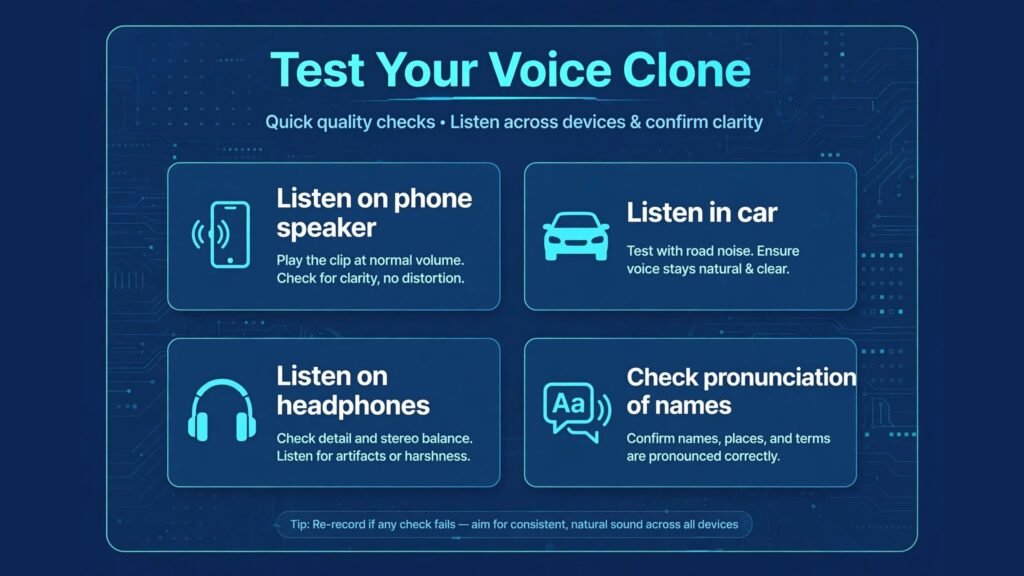
Test with a realistic script, not just a demo sentence. Include questions, numbers, names, emphasis, pauses and emotional shifts. Listen on a phone speaker, in a car and on headphones, because a clone that sounds good on studio headphones may sound robotic on a phone call. Ask a colleague who does not know it is a clone to listen and tell you what sounds unnatural. That blind test is more useful than your own judgement, because you know what the clone is supposed to sound like.
Check the vendor’s verification, labelling and takedown processes before you publish. Can you prove consent if a platform asks? Can you label a clone clearly in the video description, audio intro or article note? Can you remove a clone quickly if consent is withdrawn? If the answers are unclear, do not publish with that vendor for high visibility work.
Check pricing at vendor checkout, because voice cloning is often priced by characters, minutes, seats or API calls, and those models are hard to compare from a marketing page alone. Estimate your monthly volume honestly, including revisions and tests, then ask for a total price for that volume. A tool that looks cheap for a short demo can become expensive for a long audiobook series.
Check data handling for voice samples and clones: where are samples stored, who can access them, and can you delete a sample and a model completely? For employee, customer and celebrity voices, those answers belong in a written agreement.
Mistakes to avoid
The first mistake is cloning a voice without written, specific consent. Verbal permission, a casual message or permission for a different use is not enough for public or commercial work. Get written consent that names the voice owner, the project, the languages, the channels and the duration. Keep that consent with the project files.
The second mistake is failing to label cloned audio. Listeners deserve to know when they are hearing a clone, especially for news, politics, health, finance and customer service. Labelling does not make a clone less useful, it makes it trustworthy. A labelled clone can still be excellent narration. An unlabelled clone that is later exposed will be treated as deception.
The third mistake is using a low quality sample and expecting a high quality clone. A noisy sample, a sample with background music, or a sample of someone speaking over others will produce a clone that sounds wrong in subtle ways. Record a clean sample, in a quiet room, with varied sentences and natural pacing, and keep that sample file safe.
The fourth mistake is letting a clone drift across a long project. Check quality at the start, middle and end of a long narration, because small errors in pronunciation or emphasis can accumulate. Keep a pronunciation guide for names, brands and technical terms, and review those terms specifically in every chapter or module.
The fifth mistake is storing clones in shared accounts with no access control. A clone is a sensitive asset. Limit access to people who need it, use strong account security, and remove access when a team member leaves. If a clone is leaked, it can be used in ways the voice owner never approved.
The sixth mistake is assuming a clone can replace a performer entirely. For emotional storytelling, comedy, acting and live interaction, a real performance still outperforms a clone in most cases. Use cloning for corrections, localisation, consistency and scale, and use real performers for work where performance itself is the value.
Consent checklist for every project
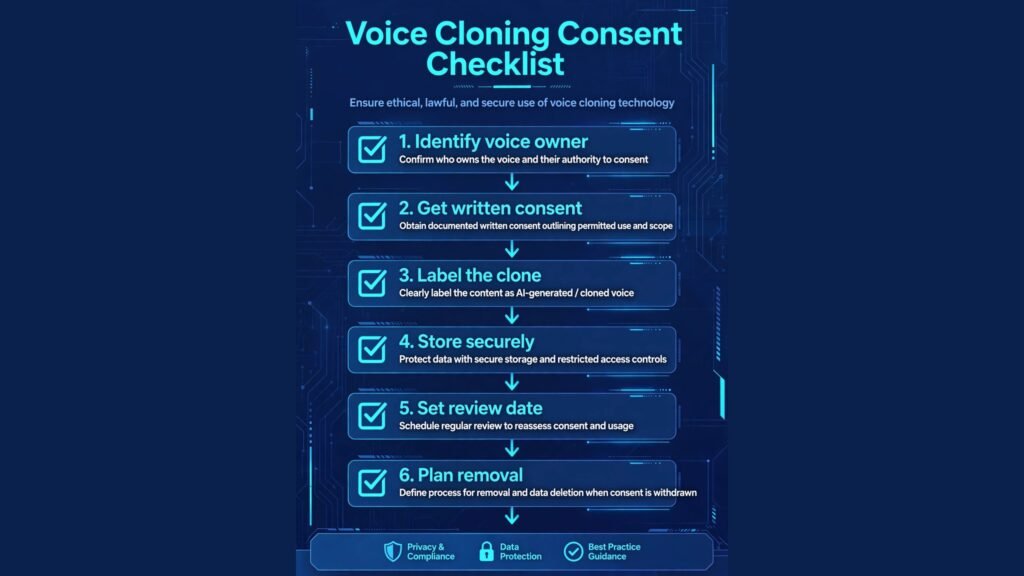
Use this checklist before you create or publish a clone. One, identify the voice owner in writing. Two, obtain written consent for the specific project, languages, channels and duration. Three, confirm whether the voice owner wants labelling, and label even if they do not require it for public work. Four, store the sample and the model securely, with limited access. Five, set an expiry or review date for the consent, especially for employee voices. Six, plan removal: how will you delete the model and stop using it if consent is withdrawn? Seven, keep a copy of the consent with the project, so a platform, client or publisher can verify it later.
For client work, confirm in the contract who owns the clone and what happens if the client wants to reuse it for a new campaign. For internal work, confirm that an employee understands the use, can review the clone, and can withdraw consent for future use.
Frequently asked questions
What are the best AI voice cloning tools for creators?
ElevenLabs is the strongest all round creator choice for natural clones and language range, while Descript Overdub is best for fixing your own narration. PlayHT and Lovo AI are strong for content teams and short form video. Choose based on whether you need long form narration, video, or simple corrections.
Is voice cloning legal?
Legality depends on consent, jurisdiction, use and rights, and it is changing quickly. In general, cloning a voice without permission for public or commercial use creates serious legal and reputational risk, even if the tool allows it technically. Get written consent, label cloned content, and seek legal advice for high value, political, celebrity or deceased voice projects.
How much audio do I need to clone a voice?
Many modern tools need only a short sample, often a minute or a few minutes of clear speech, but quality improves with a clean, varied sample. Record in a quiet room, with natural pacing and varied sentences, and avoid background music or overlapping speech. A dedicated sample will outperform a random clip in almost every case.
Can listeners tell a cloned voice from a real voice?
Sometimes, but not reliably, especially on phone audio or short clips. High quality clones can sound very natural on a first listen, which is why labelling matters. Do not rely on listeners to detect a clone. Label it, and do not use a clone to make listeners believe a real person said something they did not say.
Which tool is best for video localisation?
HeyGen is strong when you need voice plus video avatars and lip sync, while Camb AI suits large scale media localisation. Both need human review by native speakers for translation, timing and cultural fit. Test in each target language before committing to a full series.
Can I clone a celebrity or deceased person’s voice?
Only with proper rights and permission from the rights holder or estate, and with clear labelling. A public voice is not free to clone. For celebrity, political and deceased voices, seek legal advice and written permission before any work, and expect stricter platform and publisher checks.
How do I protect my own voice from cloning?
Use strong account security, limit who can access your voice samples, and be cautious about sharing clean, isolated voice recordings publicly if you are concerned about misuse. If you discover an unauthorised clone, contact the platform, preserve evidence, and seek advice promptly. Some vendors also offer voice protection and takedown processes, so check the vendor’s policy for your voice.
Conclusion: quality plus consent wins
The best AI voice cloning tools in 2026 offer remarkable quality, but quality alone is not enough to choose a tool. The right tool for your project is the one that sounds natural for your specific script, fits your workflow, gives you clear pricing at checkout, and supports a consent process you can document and defend. ElevenLabs leads for most creators, Descript wins for own voice fixes, Respeecher leads for studio work, and HeyGen and Camb AI lead for localisation, but every one of those choices still requires your own consent checklist.
Clone only with permission, label clearly, store models securely, and review long projects for quality drift. Done that way, voice cloning saves time, improves consistency and opens new languages and formats without betraying the trust of the voice owner or the audience. Done without consent or labelling, it creates risk that no time saving can justify.