Your customers are talking about you right now, in places you do not check, in language you would not search for, and often without tagging you at all. That is the problem the best AI social listening tools solve, and it is also why choosing badly hurts. A brand can spend months posting content, running ads, and answering support tickets, while a complaint thread, a comparison post, or a creator review quietly shapes what new buyers believe. By the time that conversation reaches your inbox, the buying decision has often already been made by someone else, in public, without you in the room.
Social listening is not the same as social scheduling. Scheduling tools help you publish. Listening tools help you hear: mentions, untagged brand references, competitor names, product complaints, feature requests, and shifts in sentiment around a launch, a price change, or a crisis. AI adds value when it groups those mentions into themes, separates a real complaint surge from normal noise, detects sarcasm or mixed sentiment better than keyword counts alone, and alerts a human before a small issue becomes a reputation problem. It does not replace judgement. A sentiment score is a signal to investigate, not a verdict on your brand, and a tool that reports only positive mentions is worse than no tool at all, because it creates false comfort.
This guide compares ten tools for brands, agencies, and creators in 2026. It judges them on coverage across platforms, accuracy of sentiment and theme detection, alert speed, reporting that a non analyst can act on, and how well they connect listening to a response, whether that response is a support reply, a product fix, or a content idea. Prices change often, so every pricing note tells you to check the vendor checkout page before you buy, and to confirm which platforms and mention volumes are included in the plan you choose.

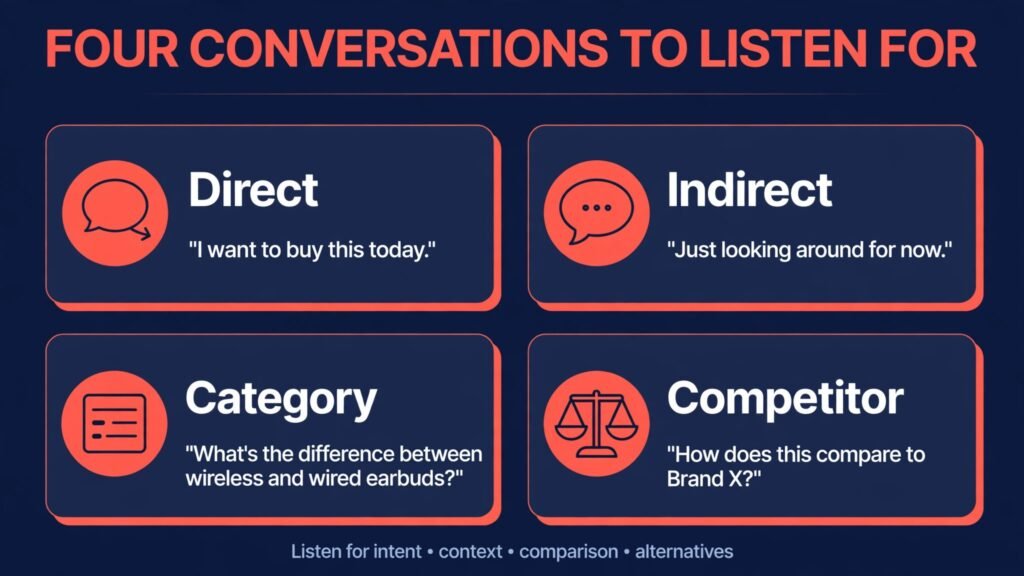
A useful listening tool catches four kinds of conversation. First, direct mentions, including tags, replies, and comments on your own posts. Second, indirect mentions, where people talk about your brand, product, or founder without tagging, often with misspellings, abbreviations, or a product name alone. Third, category conversation, where people discuss a problem your product solves, compare options, or ask for recommendations, without naming you at all. That third kind is where new customers are won, because a helpful reply or a content piece that answers the exact question can reach buyers before competitors do. Fourth, competitor and market signals, such as complaints about a rival, praise for a rival feature, or a shift in what customers expect from the whole category.
AI helps most with the second and third kinds, because keyword search alone misses them. A good tool uses entity recognition to link a product name to your brand, theme grouping to show that fifty separate posts are really one complaint about delivery times, and sentiment analysis that can tell the difference between “this is sick” as praise and “this made me sick” as a complaint, at least most of the time. No tool gets this perfect, especially with slang, sarcasm, and multiple languages, so always read a sample of mentions behind any score before you act. If a sentiment chart shows a sudden drop, open the posts. If a theme jumps, check whether one viral post or many separate customers drive it. That habit separates teams that use listening well from teams that forward charts nobody trusts.
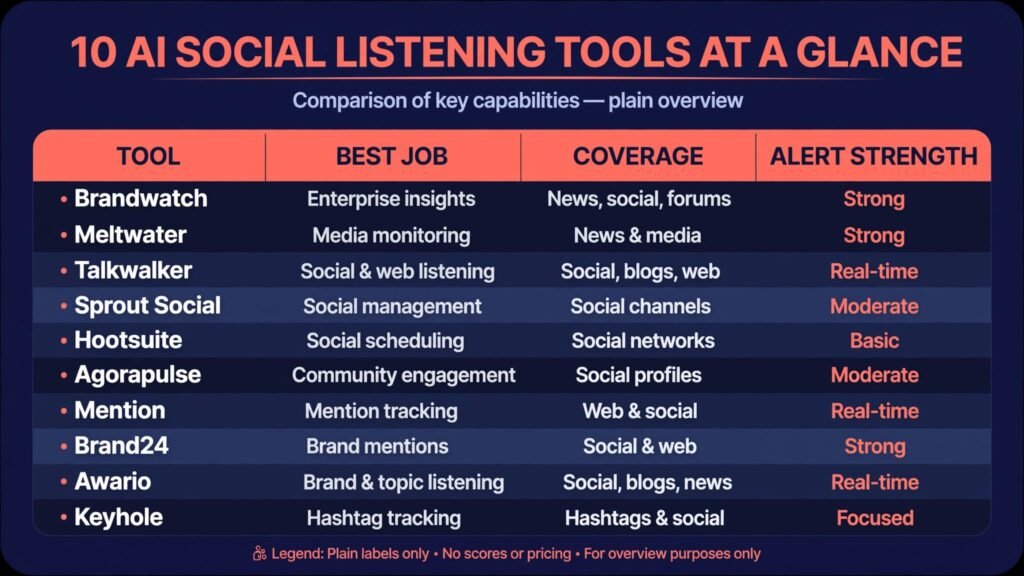
At a glance
| Tool | Best for | Platform coverage | Alert and reporting strength | Check before buying |
|---|---|---|---|---|
| Brandwatch | Large brands, deep research | Broad | Strong, custom dashboards | Mention volume and plan tier on the checkout page |
| Sprout Social | Teams that listen and reply in one place | Broad | Strong, inbox plus reports | Listening add on versus core plan |
| Hootsuite | Agencies, many accounts | Broad | Good, streams plus reports | Listening features in the chosen plan |
| Meltwater | PR and enterprise monitoring | Broad, news plus social | Strong, media reporting | Social versus news coverage in the plan |
| Talkwalker | Visual and trend analysis | Broad | Strong, image and trend tools | Platform and language coverage |
| Mention | Small teams, fast setup | Broad | Good, simple alerts | Mention limits and historical data |
| Brand24 | Affordable brand tracking | Broad | Good, alerts and summaries | Keyword and mention limits |
| Awario | Small businesses, lead finding | Good | Good, alerts | Platform coverage for your audience |
| Agorapulse | Teams that manage and listen together | Good | Good, inbox plus reports | Listening depth versus management features |
| Keyhole | Campaign and hashtag tracking | Good, social focus | Good, campaign reports | Historical and real time data limits |
Best pick by job
| Job | First pick | Why it fits | Second option to test |
|---|---|---|---|
| Large brand, reputation risk | Brandwatch | Depth, dashboards, and research tools for serious monitoring | Meltwater |
| Team that replies as well as listens | Sprout Social | Listening, inbox, and reporting in one workflow | Agorapulse |
| Agency managing many clients | Hootsuite | Many accounts, streams, and client reporting | Sprout Social |
| PR team tracking news and social together | Meltwater | Media plus social coverage in one report | Talkwalker |
| Trend and visual conversation analysis | Talkwalker | Image recognition and trend tools beyond text | Brandwatch |
| Small team, quick start | Mention | Fast setup and clear alerts without a long project | Brand24 |
| Tight budget, core brand tracking | Brand24 | Affordable tracking with useful summaries | Awario |
| Finding buyers in category conversation | Awario | Lead style alerts for people asking for solutions | Keyhole |
| Campaign measurement | Keyhole | Hashtag and campaign tracking with clear reports | Sprout Social |
| Creator tracking a launch | Mention | Simple, fast alerts for a launch window | Brand24 |
For large brands and PR teams
1. Brandwatch
Brandwatch is the research heavy choice in this list, and it suits brands that need more than a mention count. Its strength is depth: large data coverage, custom queries, theme analysis, and dashboards that a strategy or insights team can use to answer questions such as why sentiment fell after a launch, which audience segments complain most, or how a competitor launch changed category conversation. For a large brand, that depth justifies a higher price and a longer setup, because the alternative is a team reading thousands of posts manually and still missing patterns.
The trade off is complexity and cost. Brandwatch needs a clear owner, well written queries, and regular cleaning, or it will return noise. A query that is too broad floods the dashboard. A query that is too narrow misses indirect mentions. Budget time for query setup and for a monthly review of what the tool catches and misses. For enterprises with reputation risk, that work pays off. For a small team that only wants alerts, it may be too much. Visit Brandwatch and check mention volume and tier features on the checkout page.
Watch out for: broad queries that create noise, and dashboards nobody reviews, which turn an expensive tool into an unread report.
2. Meltwater
Meltwater suits PR and communications teams that need news and social monitoring together. A product story rarely lives on social alone. It moves from a news article to social posts, to creator videos, to forum threads, and a team that only watches social misses the origin and the full reach. Meltwater combines media monitoring with social listening, so a PR team can trace a story, measure reach across channels, and report to leadership in one place, instead of stitching together three separate tools.
Check coverage carefully for your markets and languages, because media and social coverage differ by region, and a global plan may still have gaps in smaller markets. Also check whether the social features in your tier match your needs, or whether the strength is mainly in news. Meltwater is strongest when PR reporting matters as much as daily alerts. Visit Meltwater and check social versus news coverage on the current plan page.
Watch out for: assuming global coverage is uniform across markets, and buying media strength when your main need is daily social alerts.
3. Talkwalker
Talkwalker stands out for visual and trend analysis. Many brand conversations now happen in images, video captions, and memes, where the brand appears in a photo or a video frame but not in text. Talkwalker image recognition helps catch those mentions, and its trend tools help a team see a topic rising before it peaks, rather than after. For consumer brands, food, fashion, travel, and entertainment, that visual coverage can reveal conversations text search would miss entirely.
Talkwalker also suits teams that track campaigns and cultural trends, not only their own brand. You can compare share of voice, track a hashtag or topic over time, and spot which creators drive a trend. The check is whether your team will use that depth. Visual and trend tools need queries, filters, and regular review, or they produce interesting charts with no action. Visit Talkwalker and check platform and language coverage for your audience.
Watch out for: trend charts without an owner or an action, and visual mentions that need human checking before you respond.
For teams that listen and reply in one place
Sprout Social is the best choice for teams that want listening and response in the same workflow. Many listening tools produce reports that a separate team must then act on, which creates delay. Sprout Social connects listening to an inbox, so a mention that needs a reply can move from alert to response without copying links between tools. For support, community, and social teams, that speed matters, especially during a launch or a service issue, when customers expect a reply in hours, not days.
Sprout Social also produces reports that managers can understand without analyst training, with sentiment, volume, and theme summaries that are easy to share. The check is plan structure. Listening features may sit in a higher tier or an add on, so confirm exactly what listening depth you get on the plan you buy, including keyword limits, historical data, and platform coverage. For Instagram and TikTok heavy teams, confirm coverage for comments, captions, and video mentions, not only posts. Visit Sprout Social and check the listening tier on the checkout page.
Watch out for: buying a core management plan and assuming full listening is included, and alerts without a named responder for each alert type.
5. Hootsuite
Hootsuite suits agencies and teams managing many accounts, because it combines publishing, streams, and listening in a place the team already uses daily. Instead of checking a separate listening tool once a week, a team can watch streams during normal publishing work, catch a rising mention early, and assign it to the right person. For agencies, Hootsuite reporting also helps, because client reports can show listening volume, sentiment, and response activity together, without exporting from multiple tools.
Listening depth in Hootsuite is good but not as research heavy as Brandwatch or Talkwalker. It is best for ongoing monitoring, campaign tracking, and team response, rather than deep audience research or complex query analysis. If your agency needs both daily monitoring and deep research, pair Hootsuite with a research tool for quarterly analysis, rather than forcing one tool to do everything. Visit Hootsuite and check listening features in the chosen plan.
Watch out for: streams that become background noise, and client reports that show volume without showing what changed or what you did about it.
6. Agorapulse
Agorapulse is similar in spirit to Sprout Social, with a focus on inbox management, publishing, and listening together, at a price that suits mid sized teams. Its strength is organisation: mentions, comments, and messages arrive in one inbox, can be assigned, labelled, and tracked, so nothing important sits unread in a single person’s notifications. For teams that handle customer questions on social every day, that organisation prevents the most common failure, which is not missing data, but missing a reply to data you already saw.
Agorapulse listening is solid for brand and competitor mentions, but check depth for indirect mentions and category conversation, because that is where research tools pull ahead. If your main need is response and daily monitoring, Agorapulse is strong. If your main need is discovering new buyers in category conversation, test Awario or Brand24 alongside it. Visit Agorapulse and check listening depth on the current plan page.
Watch out for: an inbox that grows faster than the team can reply, and labels that nobody cleans up, which make reporting unreliable over time.

For small teams, creators, and tight budgets
7. Mention
Mention is the fastest start in this list. Setup takes minutes, alerts are clear, and a small team or creator can track a brand, a product launch, or a personal name without a project plan. For a launch window, a book release, a course launch, or a small brand that needs to know when people talk about it, Mention gives you the essential answer quickly: who said what, where, and how loud was it. That simplicity is valuable.
Mention limits matter as you grow. Mention volume, keyword count, and historical data are limited on lower plans, so a viral moment can use a monthly allowance quickly. Check those limits before a launch, and consider a higher plan for launch months. Mention is also less suited to deep theme research across a whole category, where Brandwatch or Talkwalker are stronger. Use Mention for what it does best: fast, clear alerts for a defined brand or launch. Visit Mention and check mention limits on the checkout page.
Watch out for: viral spikes using up a monthly allowance, and alerts sent to an inbox nobody owns during a launch.
8. Brand24
Brand24 is the budget friendly workhorse for brand tracking, with alerts, sentiment summaries, and influencer mentions that help a small team understand who drives conversation. It catches brand mentions across social, news, blogs, and forums, and it presents them in a way that a founder or marketing lead can review in minutes a day, rather than needing an analyst. For small businesses that cannot justify an enterprise tool, Brand24 often provides most of the practical value at a fraction of the cost.
The check is keyword and mention limits, and the accuracy of sentiment on your specific language and slang. Test Brand24 with your actual brand name, common misspellings, and product names, and read a sample of mentions before trusting the sentiment chart. Brand24 also helps with sales prospecting style discovery, because category mentions can reveal buyers asking for recommendations, though it is not a dedicated prospecting tool. Visit Brand24 and check keyword limits on the current plan page.
Watch out for: trusting sentiment scores without reading samples, and setting keywords so broad that alerts become noise.
9. Awario
Awario suits small businesses that want to find buyers, not only track their own brand. Its lead style alerts surface people asking for recommendations, complaining about a competitor, or discussing a problem your product solves. For a service business, a software tool, or a local business with a clear category, those alerts can turn listening into pipeline, provided someone replies helpfully rather than pitching aggressively. A useful reply answers the question, shares a relevant resource, and only mentions your product if it genuinely fits.
Awario platform coverage is narrower than the enterprise tools, so check that it covers the places your buyers actually talk. If your audience lives mainly on one platform, confirm depth there before buying. Awario is also a good second tool alongside a management platform, because it focuses on discovery while the main tool handles replies and reporting. Visit Awario and check platform coverage for your audience.
Watch out for: pitching in every category mention, which damages reputation faster than ignoring the mention, and alerts without a reply owner.
10. Keyhole
Keyhole is the campaign specialist in this list. It tracks hashtags, campaigns, and accounts over time, with reports that show reach, engagement, and top posts in a format a client or manager can understand quickly. For a launch, an event, a seasonal campaign, or an influencer push, Keyhole answers the questions that matter after the campaign ends: how far did it travel, who drove it, and what content worked. It is less suited to always on brand monitoring across every platform, where Mention or Brand24 may be simpler.
Check historical and real time limits before a campaign, because a tool that cannot look back to the campaign start, or that caps data during a spike, will produce an incomplete report. Set up tracking before the campaign launches, not after, and define success measures in advance, such as mentions, sentiment shift, or clicks, so the report measures what you actually wanted. Visit Keyhole and check data limits on the current plan page.
Watch out for: setting up tracking after a campaign starts, and reporting reach without reporting sentiment or action taken.

Listening versus scheduling, and why sentiment scores mislead
Many teams buy a scheduling tool, see a mentions tab, and assume they have listening covered. They do not. Scheduling tools show mentions on your own accounts, which is useful, but they often miss untagged mentions, forum threads, blog posts, news comments, and category conversation where your brand is not named. Dedicated listening tools are built to search wider, group mentions into themes, and alert you to changes in volume or sentiment, even when no single post is dramatic on its own. If your goal is reputation protection or new customer discovery, you need that wider search. If your goal is only to reply to comments on your own posts, a management tool inbox may be enough.
Sentiment scores deserve special caution. A single score hides mixed feelings, sarcasm, and context. A post that says “love the product, hate the delivery” is not simply positive or negative, and a tool that forces it into one bucket will mislead you. Language adds another layer. Slang, irony, and regional phrases change meaning, and a tool trained mainly on one language or market may misread another. Use sentiment as a starting point: a falling score means open the posts, read a sample, and look for a theme. A rising score means check whether praise is about your product, a giveaway, or a viral joke. Never report a sentiment score to leadership without a sentence explaining what drove it, with example posts to back it up. That discipline turns a chart into a decision.
Volume also misleads. A spike in mentions can mean a crisis, a successful launch, a viral meme, or a single influencer post that many people shared without adding their own opinion. Before you react, check the source breakdown: how many unique authors, how many original posts versus shares, and which platforms drive the spike. A hundred posts from a hundred customers is a different problem from a hundred shares of one post. The first needs a product or service response. The second may need a single clear reply and monitoring, not a company wide alarm. Good listening teams learn to distinguish those cases quickly, and they write down the thresholds that trigger each level of response.
How to Choose a listening tool for your team size
Start with the platforms your buyers use, not the platform list on a vendor page. List the top five places your customers actually talk, including forums, review sites, and video comments if relevant, and test each shortlisted tool against those places with your real brand name and common misspellings. A tool with broad coverage that misses your main platform is useless, while a narrower tool that covers your main platforms well may be perfect. Also list your languages, because coverage and sentiment accuracy vary by language, and a tool that works well in English may struggle elsewhere.
Next, decide who will act on alerts. A listening tool without a response owner is a reporting tool, and reporting tools get ignored. Assign one owner for reputation alerts, one for support mentions, and one for category conversation that could become sales or content ideas. Define response times for each type: a complaint surge gets a same day response, a feature request gets logged for product review weekly, and a category question gets a helpful reply within a day if it fits. Test the alert flow during a trial, with a real mention, and time how long it takes from alert to reply. That test reveals more than a feature list.
Finally, compare total cost for your mention volume, not only the monthly price. A low price plan with a small mention limit can cost more in overages during a viral month than a higher plan with a larger allowance. Ask vendors about overage pricing, historical data, and what happens when you exceed a limit, whether alerts stop, data is sampled, or you are charged extra. For agencies, also check client limits and reporting exports, because a tool that cannot produce a clean client report will create manual work every month.
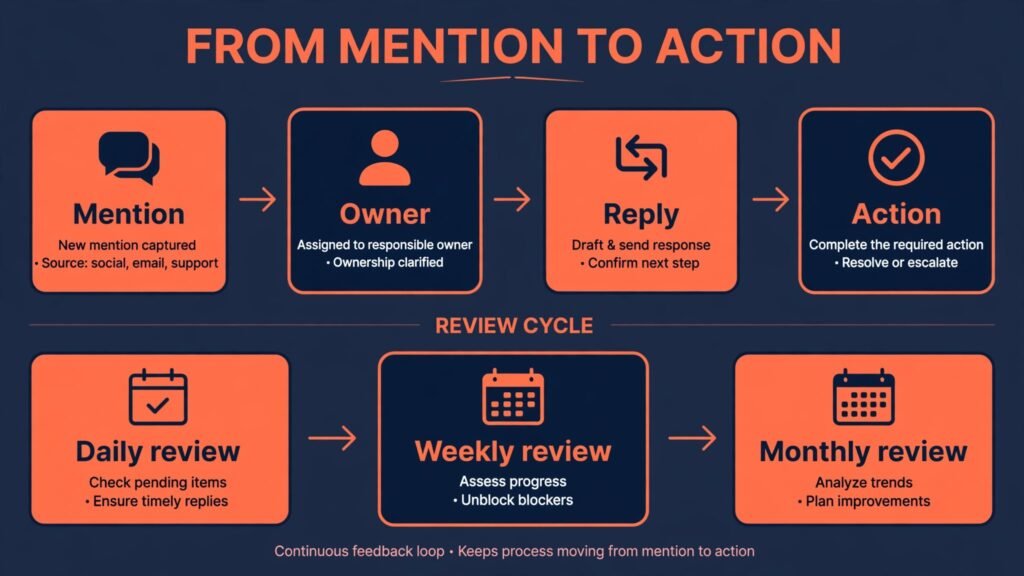
The most common mistake is listening without acting. Teams set up alerts, receive a weekly report, and file it, while complaints repeat and category buyers choose competitors. Listening only pays when it changes a reply, a product fix, a content piece, or a campaign decision. Build a weekly habit: review top themes, pick one action, and record what changed. The second mistake is reacting to every mention. Not every complaint needs a public reply, and not every category mention needs a pitch. Over replying looks desperate and can turn a small thread into a larger argument. Reply where you can help, acknowledge where you cannot, and ignore pure noise.
Other mistakes are technical. Setting keywords too broad creates noise and alert fatigue, so the team stops checking. Setting keywords too narrow misses indirect mentions and misspellings. Forgetting to track competitor names means you miss the moment buyers compare you with a rival. Reporting volume without sentiment or theme means leadership sees activity but not meaning. And copying a sentiment chart into a board report without example posts means nobody trusts the number when it matters. Avoid all of these by reviewing queries monthly, reading samples behind every major change, and always pairing a number with a human explanation and a proposed action.
Frequently asked questions
Monitoring tracks mentions of your brand, usually direct tags and comments, and focuses on replying quickly. Listening goes wider: it analyses themes, sentiment, competitor conversation, and category discussion, and focuses on learning what customers want and how perceptions change. Monitoring is reactive. Listening is reactive plus strategic, because it informs product, content, and campaign decisions, not only replies.
How accurate is AI sentiment analysis?
Useful, but not perfect. Accuracy is highest for clear positive or negative statements in the language and market the tool was trained on, and lower for sarcasm, mixed feelings, slang, and multiple languages. Treat sentiment as a signal to investigate, read samples behind any major change, and avoid reporting a single score without context. Over time, a team that cleans queries and checks samples will get more reliable trends, even if individual posts are sometimes misclassified.
Yes. Tools such as Mention, Brand24, and Awario offer entry plans that suit small teams, and a focused setup tracking your brand, product names, and main competitors can deliver value in minutes a day. Start narrow, with a few keywords and a daily alert habit, and expand only when you act on what you hear. A free trial with your real brand name is the best test, because it shows whether the tool catches the conversations you care about.
Should I reply to every negative mention?
No. Reply where you can help, where the complaint is specific, or where silence would look like indifference to other readers. For vague complaints, trolling, or mentions that are clearly not about your brand, a reply can do more harm than good. For a complaint surge, post one clear public update, reply individually where needed, and fix the underlying issue, rather than arguing post by post.
How do I find new customers with listening?
Track category conversation: people asking for recommendations, complaining about a competitor, or describing a problem your product solves, without naming you. Reply helpfully, answer the question, and share a relevant resource. Mention your product only if it genuinely fits, and disclose your connection. Over time, those helpful replies build reputation and inbound interest far better than cold pitches in every thread.
How often should I review listening reports?
Daily for alerts and reputation risks, weekly for themes and actions, and monthly for trends, competitor shifts, and query cleaning. Daily review prevents a small issue from growing. Weekly review turns themes into product or content actions. Monthly review keeps queries accurate and reports trusted. If no one owns the weekly review, assign an owner before you buy a tool, not after.
Do I need a separate listening tool if I already use a scheduling tool?
It depends on your goal. If you only need to reply to comments on your own accounts, a scheduling tool inbox may be enough. If you need untagged mentions, category conversation, competitor tracking, or reputation alerts, a dedicated listening tool is worth it. Test both during a trial with your real brand name, and choose based on what each tool actually catches, not on feature lists.
Conclusion: hear first, then act fast and helpfully
The best AI social listening tools in 2026 do not win by showing the most charts. They win by catching the conversation that matters, grouping it into a theme a human can understand, and alerting the right person in time to act. For a large brand, Brandwatch or Meltwater provide that depth. For a team that replies as well as listens, Sprout Social or Agorapulse keep the workflow in one place. For a small team or creator, Mention or Brand24 give fast, clear alerts without a long setup. Start with your real platforms and brand names, test two tools for two weeks, and keep the one your team actually checks and acts on. Listening is only valuable when it changes a reply, a fix, or a decision.