
The best AI webinar tools in 2026 are the ones that cut the work after the live session as much as they improve the live session itself. If you only judge a platform by how it streams, you will miss the real cost. That cost sits in writing follow up emails, cutting clips, writing summaries, tagging questions, updating your CRM, and turning one hour of talking into a week of usable content. The strongest platforms in this guide do that second job well, and they do it without forcing you to buy an enterprise plan to get basic automation.
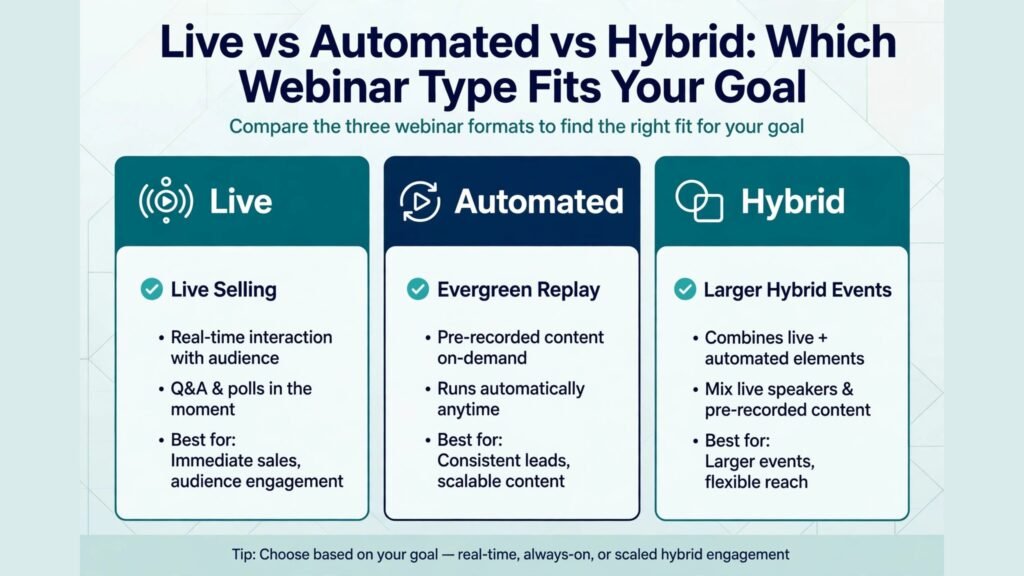
That verdict matters because webinar software has split into three different jobs. Some tools are built for live selling, with polls, offers, and countdown timers front and centre. Others are built for automated webinars that run while you sleep, with registration pages and timed chat that feel live. A third group is built for larger hybrid events, with breakout rooms, expo style pages, and detailed analytics for a team. Buying the wrong type is the most common expensive mistake in this category, and it happens even when the tool itself is good.
This guide compares 13 platforms across those jobs. It includes large names you already know and smaller names that often give smaller teams more for their money. For each tool you get what it does best, who it fits, where it falls short, and what to watch out for before you commit. Pricing changes often in this market, so treat any price note here as a starting point and check the checkout page before you buy. The goal is a decision you can defend, not a ranking you have to trust blindly.
Best AI Webinar Tools at a Glance
| Tool | Best for | Live or automated | AI strengths | Watch out for |
|---|---|---|---|---|
| Livestorm | All round team webinars | Live and on demand | Summaries, chapters, clips | Advanced analytics on higher plans |
| Demio | Simple live marketing webinars | Live and automated | Replay summaries, chat help | Fewer enterprise event features |
| WebinarJam | Live sales webinars | Live | Engagement and replay tools | Interface feels busy for new users |
| EverWebinar | Automated sales webinars | Automated | Simulated live chat, timing | Not built for true live interaction |
| BigMarker | Large hybrid events | Live and on demand | Transcripts, content reuse | Learning curve for first event |
| ClickMeeting | Training and teaching | Live and automated | Transcripts, notes | Design feels dated in places |
| GoTo Webinar | Reliable corporate webinars | Live | Transcripts, polls reporting | Price rises with attendee limits |
| Zoom | Teams already on Zoom | Live | Companion summaries, smart chapters | Webinar add on needed for full features |
| StreamYard | Simple multistream shows | Live | Captions, clip ideas | Limited registration and CRM depth |
| Restream | Multistream reach | Live | Chat aggregation, summaries | Less built for gated registration funnels |
| HeySummit | Multi speaker summits | Live and pre recorded | Speaker pages, replay organisation | Not a full sales webinar funnel |
| WebinarGeek | Simple European friendly webinars | Live and automated | Summaries, easy setup | Smaller integration library |
| Riverside | High quality recorded sessions | Recorded and live | Transcripts, Magic Clips, show notes | Not a registration funnel tool |
Best AI Webinar Tools for Live Selling and Launches
1. WebinarJam
WebinarJam remains a favourite for live selling because it puts engagement controls where the presenter can reach them. Polls, handouts, product offers, and live chat sit in one control panel, so a host does not need to switch tabs during a pitch. The platform supports large live rooms, replay pages, and reminder sequences that reduce no shows. Its AI help shows up mainly after the event, in summaries and in tools that help you reuse the recording.
Watch out for: the interface packs in many options, and new hosts can feel overloaded on the first run. Run a private rehearsal before a paid launch. Check current plan limits for attendees and presenters at checkout, since launch pricing and limits have changed across versions.
2. EverWebinar
EverWebinar is the automated twin of WebinarJam, and it suits sellers who want one strong presentation to run again and again. You record once, set a schedule, and visitors can register for a time that suits them. Timed polls, offers, and chat messages create a live feel without a live host. This model works well for evergreen courses, software demos, and coaching offers where the core pitch rarely changes.
Watch out for: automated webinars are not a substitute for live question handling. If your buyers need detailed answers before they purchase, pair EverWebinar with a live Q and A session each week or a clear support route. Also be transparent in your marketing. Audiences trust automated events more when the page does not pretend a recording is live.
3. Demio
Demio wins fans for simplicity. Registration pages look clean, the presenter view is calm, and attendees join without downloads in most browsers. That simplicity raises show up rates, because fewer steps mean fewer drop offs. Demio supports live and automated events, polls, handouts, and featured actions that let you push an offer at the right moment. Post event summaries help small teams follow up fast.
Watch out for: Demio does not try to be a full virtual conference platform. If you need expo halls, multiple simultaneous tracks, or complex sponsor areas, you will outgrow it. For a single host or a small marketing team running regular lead generation webinars, that focus is a strength, not a weakness.

Best AI Webinar Tools for Teams and Training
4. Livestorm
Livestorm is the strongest all rounder in this guide for teams that run webinars every week. It handles live, on demand, and recurring sessions from one dashboard, with registration pages, email reminders, polls, Q and A, and breakout rooms. Its AI features help after the session: automatic summaries, chapters that make long replays easy to navigate, and clips you can post to social channels. Integrations with common CRMs and email tools keep leads moving without manual exports.
Watch out for: the most useful reporting and AI features sit on higher plans. If your budget only stretches to the entry plan, test whether the summary and clip quality meets your needs during the trial. Teams that publish replays as content will get more value from Livestorm than teams that only run private internal training.
5. ClickMeeting
ClickMeeting suits trainers, teachers, and coaches who run paid workshops and repeatable classes. It offers whiteboards, screen sharing, polls, surveys, and automated webinars, plus paid event options that handle registration and payment in one flow. Transcripts and notes reduce the admin work after a class, and the platform works well for smaller groups where discussion matters more than spectacle.
Watch out for: the design is practical rather than flashy. If your brand depends on a highly polished event page, you may need extra design work or a landing page tool in front of ClickMeeting. For teaching quality and reliability, it remains a solid, lower fuss choice.
6. GoTo Webinar
GoTo Webinar is the safe corporate choice. It is stable under load, familiar to many enterprise attendees, and strong on polls, surveys, handouts, and post event reporting. Large organisations value its admin controls, attendee management, and consistent performance when hundreds of people join at once. AI transcripts and reporting help teams that must document training or compliance sessions.
Watch out for: costs rise as attendee limits rise, so a team that grows from 100 to 1,000 attendees should model the full year cost, not just the first month. It also feels less creative than newer platforms. If your webinar is a brand event with heavy production, pair it with a production tool or choose a more event focused platform below.
7. Zoom
Zoom deserves a place here because so many teams already use it daily. With the webinar add on, you get registration, Q and A, polls, practice sessions, and reporting in a tool your audience already knows how to join. AI Companion can summarise meetings, create smart chapters, and draft follow up notes, which saves real time for teams that run several sessions a week. For internal training and customer onboarding, that familiarity is a genuine advantage.
Watch out for: Zoom webinars are not a full marketing funnel on their own. You will often need a landing page builder, an email tool, or a CRM to match the registration and automation depth of Demio or Livestorm. Check whether your current Zoom plan already includes webinar capacity before you pay for a separate tool.
Best AI Webinar Tools for Larger Events and Summits
8. BigMarker
BigMarker handles events that are bigger than a single webinar. You can run multi session series, virtual summits, and hybrid events with landing pages, breakout rooms, networking areas, and detailed analytics. Its AI transcripts and content tools help teams turn a full day event into blog posts, clips, and email follow ups. Marketing teams like the white label options and the ability to keep an entire series under one brand.
Watch out for: BigMarker rewards preparation. The first event takes longer to set up than a simple Demio webinar, because there are more pages and settings to configure. Assign one owner for the event build, run a full rehearsal with speakers, and test breakout and networking features before the live day.
9. HeySummit
HeySummit is built for multi speaker summits rather than single product launches. It gives each speaker a page, organises talks into a schedule, handles ticket tiers and replay access, and keeps the attendee experience simple across many sessions. For a creator or a small business running a free summit to build an email list, HeySummit removes a lot of manual page building. AI help is lighter here than on Livestorm or BigMarker, but the organisation and replay structure save time in a different way.
Watch out for: HeySummit is not a sales funnel tool. You will still need an email platform and a checkout or CRM for post summit selling. Judge it on summit organisation, not on live selling features, and it performs well.
10. WebinarGeek
WebinarGeek is a smaller, refreshingly simple platform that suits teams in Europe and anyone who wants a clean setup without enterprise complexity. Registration, live and automated webinars, polls, and summaries are easy to find, and the browser based experience keeps attendee friction low. Smaller teams often praise the support and the straightforward pricing structure.
Watch out for: the integration library is smaller than Livestorm or BigMarker. Before you commit, confirm that your email tool and CRM connect directly, or that a webhook or Zapier style route covers the gap. If you only need core webinar features done well, that trade off is easy to accept.
Best AI Webinar Tools for Reach, Streaming and Repurposing
11. StreamYard
StreamYard is the easiest way to look professional on a live show without a studio. You run it in the browser, add guests by link, show comments on screen, add banners and logos, and stream to YouTube, LinkedIn, Facebook, and other destinations at once. Captions and clip ideas help you reuse the show afterwards. For weekly talk shows, interviews, and community events, StreamYard beats heavier webinar platforms on speed and simplicity.
Watch out for: StreamYard is not built for gated registration funnels. If you need detailed lead capture, timed offers, and CRM scoring, use it for reach and pair it with a registration tool, or choose Demio or Livestorm for the funnel itself.
12. Restream
Restream focuses on one job: getting your live video to many places at once, with one chat view that pulls comments together. That reach matters for creators and brands that want maximum live audience without running the same show five times. Restream Studio adds guest links, layouts, and captions, and summaries help you follow up after the stream. It is a strong partner tool for a webinar, not always a replacement for one.
Watch out for: registration, payment, and detailed attendee analytics are lighter than on dedicated webinar platforms. Use Restream when reach is the goal, and use a webinar platform when lead capture and conversion reporting are the goal.
13. Riverside
Riverside earns its place for quality. It records each guest locally in high quality, so a poor connection does not ruin the final video. Transcripts are accurate, Magic Clips suggest short vertical clips, and show notes speed up publishing. Many teams now record a webinar style interview in Riverside, then publish the polished version as an on demand webinar and as social clips. That workflow often produces better content than a raw live recording.
Watch out for: Riverside is not a registration and funnel platform. You need a separate page and email flow to capture leads. If your priority is pristine audio and video that you can reuse for months, Riverside is worth the extra step.
How the AI Features Actually Compare
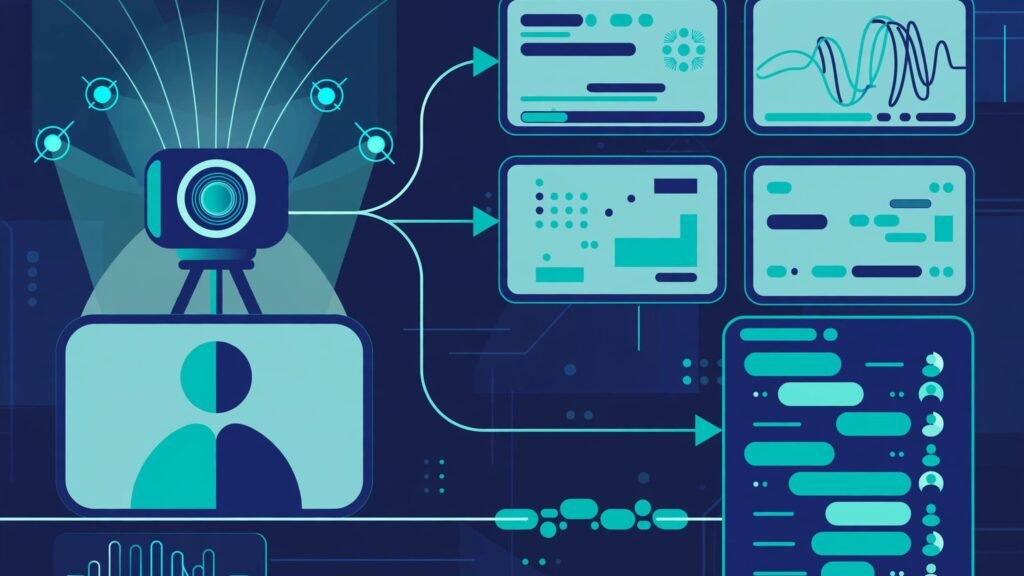
AI marketing can blur real differences, so judge these tools on four practical tests. First, transcription accuracy: does the summary capture decisions, questions, and action items, or does it produce a generic paragraph you still have to rewrite? Second, clip quality: are suggested clips actually usable, with clean starts and ends, or do they cut mid sentence? Third, search: can you find the moment a prospect asked about pricing without rewatching an hour? Fourth, follow up speed: can the tool draft a follow up email, update your CRM, and tag interested attendees without manual copying?
Livestorm, Zoom, and Riverside score well on summaries and chapters. WebinarJam and EverWebinar score well on timed engagement that supports selling. BigMarker scores well when you need to reuse a whole event. StreamYard and Restream score well on live reach and chat. The right winner depends on which of those four tests matters most to your team this quarter.
Also check data and privacy controls before you choose. Ask where recordings are stored, who can access transcripts, how long data is kept, and whether attendees can request deletion. Teams in regulated industries should confirm these points in writing, not just in a marketing page. Good AI help should reduce admin work without creating a new privacy risk.
What Good Webinar AI Looks Like in Practice
Good webinar AI is easy to describe in a demo and harder to prove in a real week. The difference shows up in four everyday moments. The first moment is registration. A strong platform lets you build a page that loads fast on a phone, asks only for the fields you need, and sends a calendar invite without extra steps. If a prospect has to create an account, download software, or fill in ten fields to attend a free 45 minute session, your registration rate will fall even if your topic is strong. Test this on a phone over mobile data, not just on office wifi, because many attendees register during a commute or a break.
The second moment is the live hour itself. Here AI should stay quiet unless it helps. Live captions help attendees in noisy rooms and attendees who process text better than audio. Automatic speaker labelling helps later when you search the transcript. Poll results that appear instantly keep attention in a way that a slide alone cannot. What does not help is a flood of pop ups, auto messages, or chat bots that interrupt the presenter. The best live experience feels calm for the host and clear for the audience, with engagement tools available but not forced.
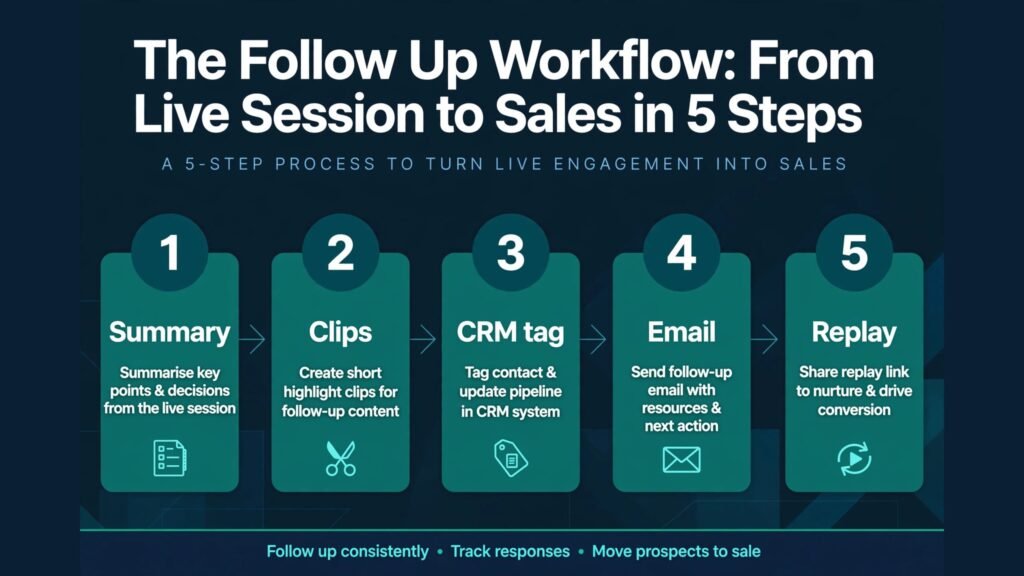
The third moment is the hour after the event. This is where most teams lose value. A good platform produces a clean transcript, a short summary with timestamps, a list of questions that were not answered live, and a set of clip suggestions within minutes. A weak platform produces a raw recording and leaves the rest to you. If you run webinars weekly, that gap becomes several hours of editing and writing each month. Over a quarter, it can decide whether your webinar programme grows or stalls, because the team that publishes fast gets more replay views, more shares, and more follow up replies.
The fourth moment is follow up over the next seven days. Attendees who stayed until the offer need a different email from attendees who left early. No shows need a replay link and a shorter summary, not a repeat of the same pitch. People who asked a pricing question need a direct answer, not a generic newsletter. Platforms that tag these groups automatically let a small team send relevant follow ups without building complex manual lists. Platforms that only export a single attendee list force you to do that sorting by hand, and most teams, under time pressure, simply send one email to everyone. That is how good webinars produce weak results.
Two practical examples show the gap. A training provider that runs the same onboarding webinar four times a month can use automated summaries to update its help centre after each session, because the questions attendees ask reveal where the product confuses new users. Over time, the help articles improve, support tickets fall, and the webinar itself gets shorter and clearer. A software company that runs launch webinars can use chapter markers and clip suggestions to publish three short videos from each event: one that answers the top objection, one that shows the product in use, and one that shares a customer question with a clear answer. Those clips often reach people who would never register for a full webinar, and they keep working long after the live date.
None of this requires an enterprise budget, but it does require testing the full loop before you buy. Run a real test event with colleagues as attendees, then time how long it takes to publish the summary, the clips, and the follow up emails. If that loop takes more than an hour for a 45 minute session, the AI features are not yet saving you time. If it takes under 30 minutes and the output is usable with light editing, you have found a platform that fits a weekly rhythm. That test matters more than any feature comparison table, because it measures your workflow, not a vendor claim.
Choosing the best AI webinar tools for Your Job
Start with the job, not the feature list. If you sell live, choose a tool with strong polls, offers, and replay pages, and test the presenter view under real conditions. If you sell evergreen, choose automated scheduling, timed engagement, and clear reporting on which time slots convert. If you train, choose breakout rooms, whiteboards, and attendance reporting. If you run summits, choose speaker organisation and replay access over sales timers.
Next, test the attendee journey from the outside. Register with a personal email, open the reminder on a phone, join late, ask a question, and watch the replay. Friction you notice in that test is friction your prospects will feel at scale. A tool that looks powerful in a demo can still lose registrations if its join flow is slow or confusing.
Then check the follow up workflow. A webinar that ends with a CSV export and a manual email is not an AI workflow. Look for automatic summaries, CRM tagging, email triggers for attendees who stayed to the offer, and separate follow ups for no shows. That automation is where most teams recover the subscription cost.
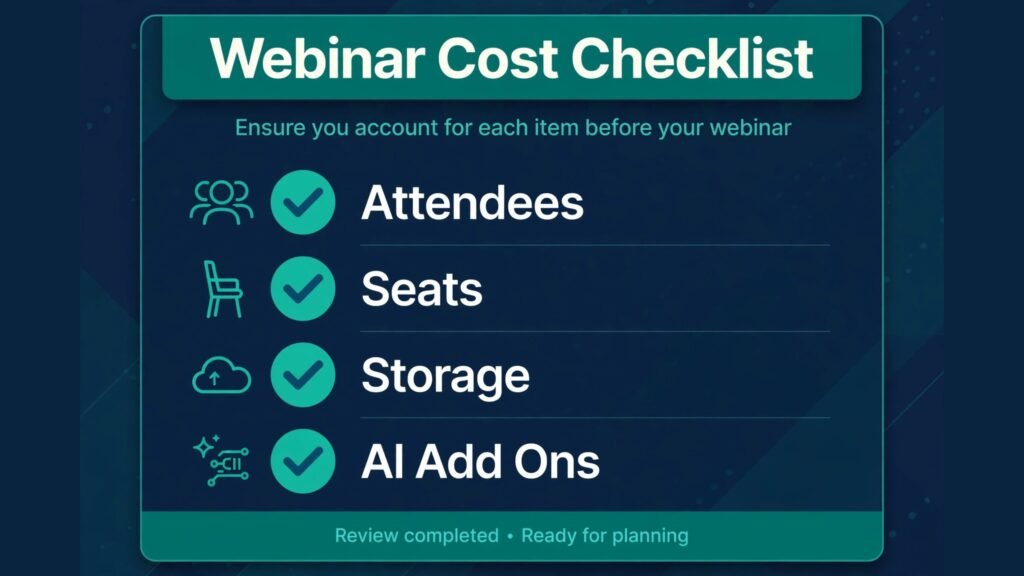
Finally, model total cost for a year. Include attendee limits, presenter seats, storage, AI add ons, and any landing page or email tool you still need. A cheaper platform that forces you to buy two extra tools can cost more than a complete platform at a higher headline price. Check the checkout page for current pricing and limits before you decide, since plans change through the year.
For related planning, readers who create supporting content may also find the guide to best AI tools for course creators useful, and teams that publish clips from webinars often use the same workflow as best AI tools for content agencies.
Mistakes to Avoid With AI Webinar Tools
The first mistake is buying for features you will never use. A virtual expo hall sounds impressive, but if you run one 45 minute demo a week, it adds setup time without adding sales. The second mistake is skipping rehearsal. Audio problems, screen share failures, and offer timing errors are all preventable in a 20 minute practice run.
The third mistake is relying only on AI summaries. Summaries help, but they can miss tone, objections, and the exact wording a prospect used. Read the Q and A log and the chat export before you write follow up copy. The fourth mistake is weak follow up timing. The best follow up window is within hours, not days. Set up automatic emails for attendees, no shows, and offer clickers before the live event, not after.
The fifth mistake is ignoring replay behaviour. Many buyers watch the replay, not the live session. Check where replay viewers drop off, which chapters they rewatch, and which offer moments they click. That data often tells you more about your pitch than live attendance does. The sixth mistake is collecting registrations without a nurture plan. A webinar list that gets no useful email for three weeks will go cold, however good the live session was.
Frequently Asked Questions
What is the best AI webinar tool for small businesses?
For most small businesses, Livestorm or Demio gives the best balance of live quality, automation, and follow up. Livestorm suits teams that also need on demand content, while Demio suits a single host who wants the simplest setup. Test both with a real registration flow before you commit.
Can AI webinar tools replace a live host?
No, not for selling or teaching that needs trust. AI can summarise, clip, transcribe, and draft follow ups, but it cannot read a room, answer a difficult objection with judgement, or build rapport the way a good host can. Use AI to remove admin work so the host can focus on the audience.
Are automated webinars still effective in 2026?
Yes, when they are honest and well made. Automated webinars work for evergreen offers where the core teaching does not change weekly. They fail when the content is dated, the chat feels fake, or there is no live route for questions. Pair automation with a regular live session for best results.
Do I need a separate tool for clips and repurposing?
Not always. Livestorm, Riverside, and Zoom now produce usable summaries and clips, but dedicated editing tools still give more control. If short form video is a core channel for you, Riverside plus a video editor often beats relying only on a webinar platform. Readers comparing video workflows may also check capcut alternatives and descript alternatives.
How many attendees do I really need to plan for?
Plan for registered numbers, not live numbers. Live attendance often sits well below registrations, while replay views can exceed live views over time. Choose a plan that covers your registered peak plus room to grow, and check overage rules at checkout so a successful event does not create a surprise bill.
What should I check about AI data privacy?
Check where recordings and transcripts are stored, how long they are kept, who can access them, and how attendee data can be deleted. If you record in the EU or serve EU attendees, confirm data processing terms with the vendor before you run a paid event.
Is Zoom enough, or do I need a dedicated webinar tool?
Zoom is enough for training, onboarding, and internal sessions, especially if your team already uses it. A dedicated tool is worth it when registration conversion, sales offers, automated funnels, or event branding drive revenue. Many teams use both: Zoom for internal work, and Livestorm or Demio for marketing webinars.
Conclusion: Pick by Job, Then Test the Follow Up
The best AI webinar tools in 2026 do not win on streaming alone. They win on what happens after the live hour ends. Livestorm is the strongest all rounder for teams, Demio is the simplest path to a good live marketing webinar, WebinarJam and EverWebinar remain strong for live and automated selling, BigMarker and HeySummit handle bigger events, and Riverside, StreamYard, and Restream extend reach and reuse. Choose the job first, test the full attendee journey, check the follow up automation, and confirm pricing at checkout. Run one real event before you commit for a year, and let replay and follow up data, not a demo, make the final call.