
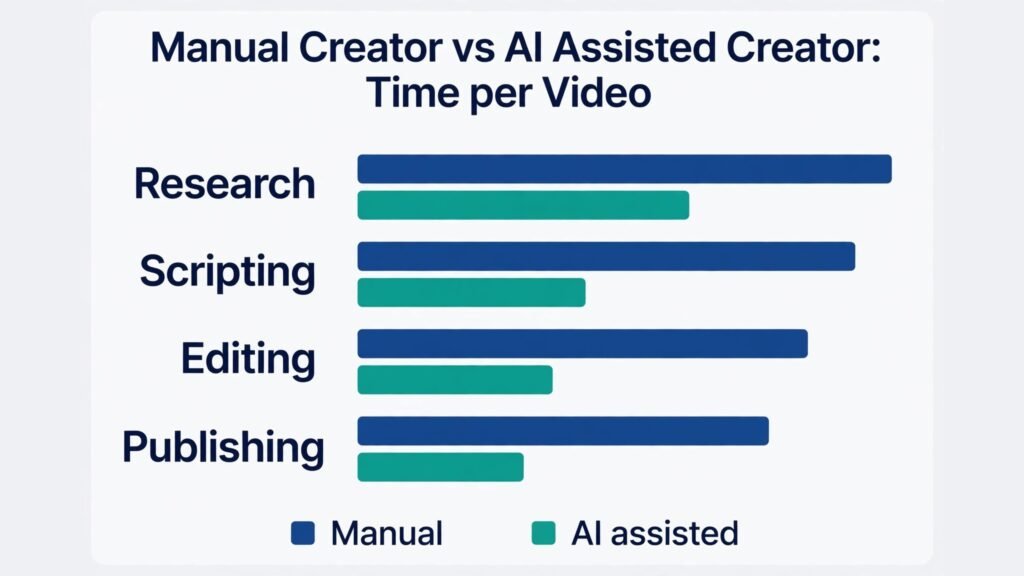
Compare two new creators. The first spends three weeks planning, writes scripts by hand, films on a phone, edits for two days per video, and publishes once, then waits. The second publishes four videos in the same three weeks, because AI helps with research, outlines, editing, captions, and titles, while the creator still decides the ideas, records the voice, and checks every fact. Six months later, the second creator has more data, more feedback, and a clearer sense of what the audience wants. That gap is why so many people now ask how to start a YouTube channel with AI, and why the answer is not about replacing creativity. It is about removing the slow parts so you can publish consistently enough to learn.
AI does not make a channel good on its own. It makes a good process faster. Your niche, your point of view, your honesty about what you know, and your willingness to improve on camera still decide whether people subscribe. What AI changes is the cost of each video. Research that took an afternoon can take an hour. A rough edit that took a day can take an afternoon. A thumbnail test that needed a designer can be drafted in minutes, then refined by you. That speed lets you test ideas instead of guessing for months.
This guide walks through the full process, step by step, from choosing a niche to publishing and growing. It includes a tools comparison, a simple way to choose tools, common mistakes, and answers to questions new creators ask most. Pricing changes often, so check checkout pages before you pay for a tool. Start with free tiers where possible, and only pay for tools that clearly save you time on videos you already publish.
Step 1: Choose a Niche You Can Sustain for 50 Videos
A niche is not just a topic. It is a promise about who the channel helps and what kind of video they will get each week. Before you commit, write down three things: the audience, the problem, and the format. For example, your audience could be beginner home cooks, your problem could be weeknight dinners in 30 minutes, and your format could be one recipe test per video with a clear verdict. If you cannot imagine 50 video ideas in that niche without repeating yourself, the niche is too narrow or too vague.
Use AI for research, not for the decision. Ask a chat tool to list 30 video ideas in your niche, then sort them into groups: beginner guides, comparisons, mistakes, and experiments. Check YouTube search for each idea and look at the top videos. Do they have strong views but weak production? That is an opening. Do they have excellent production and deep expertise you cannot yet match? That is a warning to narrow your angle. For example, instead of general tech reviews, you could focus on budget tools for students, or AI tools for small shops. A narrower angle makes titles clearer and helps YouTube understand who to show your videos to.
Validate before you film a series. Publish three test videos on different angles within your niche, then compare retention, comments, and click through rate. AI can help you draft titles and descriptions for those tests, but the audience data should make the choice. A niche you enjoy, that has search demand, and that you can research honestly will beat a trendy niche you dislike within a month, because consistency beats enthusiasm that fades.

Step 2: Plan Your Channel Identity, Format and Publishing Rhythm
Your channel identity is the set of choices viewers recognise: name, banner, intro style, video length, and tone. Keep it simple at the start. Choose a name that is easy to spell and say, and that still makes sense if your niche shifts slightly. Avoid names tied to one tool or one trend that may fade. Your banner should state who the channel helps in one line, not list every topic you might cover.
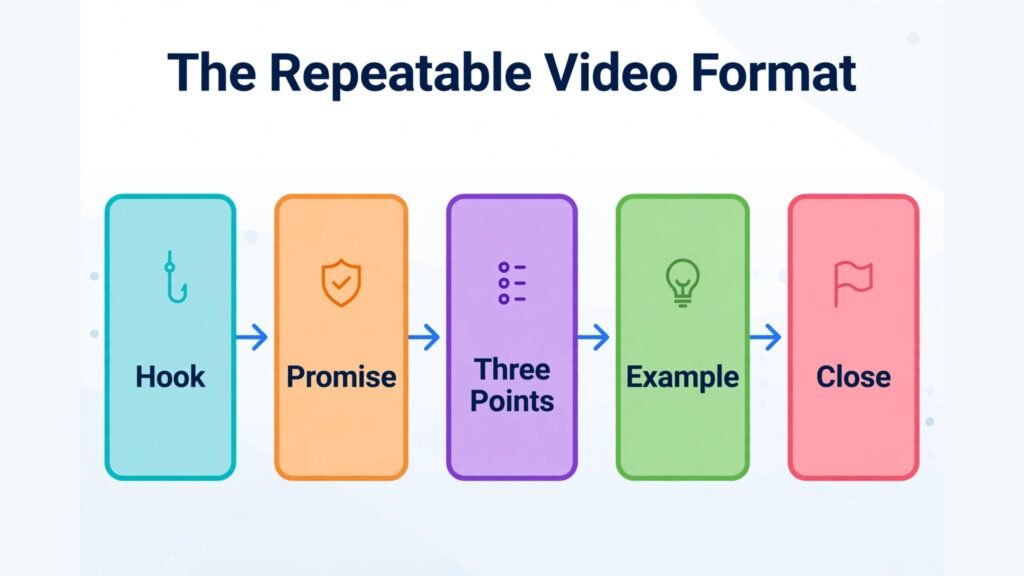
Decide on a format you can repeat. A repeatable format could be: hook in 15 seconds, clear promise, three main points, one example, and a closing question. Or it could be: test, result, verdict, and what to try next. Repeatable formats reduce planning time and help viewers know what to expect. AI can help you outline each video in that format, but keep the format consistent for at least ten videos before you change it. Changing format every week prevents viewers from learning what your channel does.
Publishing rhythm matters more than publishing volume. One good video per week for three months beats four videos in one week followed by silence. Choose a rhythm you can keep alongside work or study, and build a buffer of two finished videos before you launch. That buffer protects you when filming is delayed or editing takes longer than expected. AI editing and scripting help you build that buffer, but they do not remove the need for a realistic schedule.
Step 3: Research Topics, Titles and Search Demand
Good YouTube research combines search data, audience questions, and competitor gaps. Start with YouTube search suggestions. Type your niche topic and note the autocomplete phrases. Those phrases show real searches. Then check the comments on popular videos in your niche. Comments reveal questions the top video did not answer, and those gaps are your video ideas. AI can summarise comment themes from a video you paste in, but read a sample yourself to check tone and accuracy.
Use tools like TubeBuddy or vidIQ for title and tag ideas, search volume signals, and competitor tracking. These tools do not guarantee views, but they help you avoid titles nobody searches for. Draft five title options per video, then test them for clarity: would a stranger understand the benefit in three seconds? AI can generate title variations, but you should pick the one that is honest about the video content. Clickbait titles that overpromise may raise clicks for one video and damage trust for the next ten.
Plan descriptions and chapters early, not as an afterthought. A description should summarise the video in two sentences, list chapters with timestamps, and link to related resources. Chapters help viewers navigate and help YouTube understand the video structure. AI can draft a description from your script or transcript, but check every claim, link, and timestamp before publishing.
Step 4: Write Scripts and Outlines With AI, Then Make Them Yours
Scripting is where AI helps most, and where it can also hurt most if you copy blindly. Start with an outline, not a full script. Ask AI to turn your video idea into an outline with a hook, three main sections, examples, and a conclusion. Then edit that outline with your own knowledge, stories, and opinions. If you cannot explain a point in your own words, research it further before you film. That check protects accuracy and gives your video a voice that AI alone cannot copy.
For talking head videos, a full script can help if you tend to ramble, but it can also make delivery stiff. Many creators do better with a detailed outline plus key lines for the hook and the verdict. For tutorial videos, write step by step instructions and test each step yourself before filming. For comparison videos, build a table first: price, key features, limits, and best for whom. That table becomes the backbone of the script and helps viewers compare without confusion. Check current pricing at checkout pages for any tool you recommend, and say so in the video if prices may change.
Record your voice or face with your own personality. AI voice tools can help for faceless channels, but audiences often trust a real voice more, especially for advice videos. If you use AI voice or AI visuals, be transparent where the platform requires it, and never present AI generated claims as tested facts unless you tested them yourself.
Step 5: Film, Record and Design With Simple, Reliable Gear
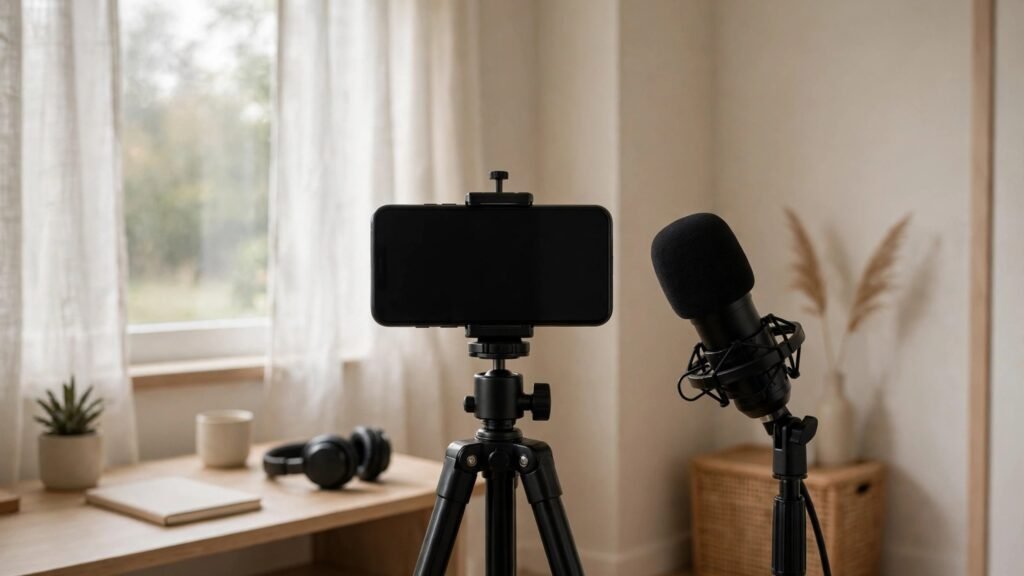
You do not need a studio to start. A modern phone, natural light from a window, and a quiet room will beat expensive gear used badly. If you buy one thing first, buy audio: a lavalier microphone or a USB microphone improves perceived quality more than a new camera. Film in a clean background, keep the camera at eye level, and record a short test clip to check light and sound before a full session.
AI tools can improve footage after filming. Noise removal, auto captions, and colour presets can lift phone footage to a professional level. Tools like Descript can transcribe your video and let you edit by deleting text, which is faster than scrubbing timelines for many creators. Tools like CapCut offer templates, captions, and effects that suit short form clips. For longer tutorials, a desktop editor gives more control, but start with the tool you can learn in a weekend, not the tool professionals use for feature films.
For faceless channels, AI video generators can create visuals from scripts, but use them carefully. Stock style visuals with a clear voiceover work for explainers and news style content, but they rarely build a loyal audience on their own. Add your own screen recordings, examples, and opinions to make the video distinct. Viewers subscribe to a perspective, not just to moving images.
Step 6: Edit Faster With AI, Without Losing Your Style
Editing is often the bottleneck that stops new channels. AI editing helps by removing filler words, adding captions, suggesting cuts, and creating short clips from long videos. Opus Clip and similar tools can find highlight moments and format them for Shorts, TikTok, and Reels. That repurposing extends the life of each long video and brings new viewers to the channel.
Keep a simple editing checklist: cut the first 30 seconds to a strong hook, remove pauses longer than needed, add captions for viewers who watch muted, add chapters and on screen text for key points, and end with a clear next step. AI can draft captions and suggest cuts, but watch the full edit once before publishing. AI sometimes cuts a pause that gave a joke room to land, or keeps a sentence that sounds fine in text but awkward in speech.
Thumbnail and title testing is part of editing, not an afterthought. Design two thumbnail options with different text and image focus, and ask a friend who does not know the video which one they would click and why. AI thumbnail tools can generate drafts, but you should refine the final version for readability at small size. A thumbnail that is clear on a phone, with one main subject and short text, usually beats a busy design with many elements.
Step 7: Publish, Optimise and Promote Each Video Properly
Publishing well means more than pressing upload. Use a clear title with the main benefit, a description that summarises the video and includes chapters, and tags that reflect the topic without stuffing. Add an end screen that points to a related video, and a pinned comment that asks a question or adds a correction. These small steps increase watch time and help YouTube recommend your next video.
Promotion should start with places where your audience already gathers, but avoid spamming links. Share the video in one relevant community with a short note about what problem it solves, not just the title. Turn one long video into three short clips, a blog post outline, and a newsletter note, so each video works across channels. Creators who also write can adapt video scripts into articles, and the guide to how to create a digital product with AI shows how content can be reused beyond video.
Consistency in publishing also means consistency in learning. After each video, note three numbers: click through rate, average view duration, and subscriber change. Then note one lesson: was the hook weak, was the video too long, was the title unclear? AI can summarise comments and suggest lessons, but your own review builds judgement faster. Over ten videos, those lessons compound into a channel that improves visibly, which is what keeps viewers coming back.

Building an Audience in the First 90 Days
The first 90 days are for learning, not for chasing viral success. Set three goals for this period: publish consistently, learn what your audience responds to, and build a small library of videos that new visitors can binge. A library matters because a viewer who finds one good video and then finds five more on the same topic is far more likely to subscribe than a viewer who finds one good video and nothing else. Plan your first twelve videos as a set, with beginner guides, common mistakes, and comparisons that link to each other through end screens and descriptions.
Engagement in the first 90 days should be personal and specific. Reply to early comments with real answers, not generic thanks, and use comment questions as ideas for future videos. When a viewer asks a follow up question, that question is often a video title waiting to happen. AI can summarise comment themes across your first videos, but replying yourself builds the relationship that turns a viewer into a subscriber. Small channels grow through trust in this phase, not through advertising spend.
Collaboration also helps in the first 90 days, even at small scale. A joint video, a guest appearance, or a simple shout out exchange with a creator in a nearby niche can introduce your channel to viewers who already care about the topic. Choose collaborators whose audience overlaps with yours but whose content does not duplicate yours exactly. For example, a budget cooking channel and a meal planning channel can share audiences without competing directly. Keep collaborations simple at first: one shared topic, one clear benefit for each audience, and one link that is easy to follow.
Finally, protect your energy in the first 90 days. Many creators burn out because they try to match the output of a team channel while working alone. A sustainable pace with improving quality will beat an unsustainable pace with declining quality. If a week is busy, publish a Short cut from an existing long video instead of skipping entirely or rushing a weak long video. That keeps the channel active without breaking your standard. After 90 days, review your twelve videos, keep the formats that retained viewers best, drop the formats that consistently lost viewers early, and plan the next twelve with that evidence.
Monetisation Options to Plan Early, Without Rushing Them
Monetisation should be planned early but not rushed. YouTube Partner Programme revenue requires watch time and subscriber thresholds that take time to reach, and it pays unevenly by niche. Affiliate links can earn earlier, because you can recommend tools you actually use in tutorial and comparison videos, with clear disclosure. Sponsorships usually come later, when a brand can see consistent views in its target audience. Digital products, such as templates, guides, or courses, can earn earlier if they solve a specific problem your videos already teach.
Choose monetisation that fits your niche and audience trust. A channel that reviews tools can use affiliate links naturally, because viewers expect recommendations. A channel that teaches a skill can sell a template or a workshop that extends the free video. A channel that entertains may rely more on ads and memberships. In all cases, disclose paid relationships clearly and only recommend products you have tested or researched thoroughly. One misleading recommendation can damage trust that took months to build.
AI can help with monetisation planning by drafting media kits, sponsor pitch outlines, and product descriptions, but do not send a pitch that overstates your audience size or results. Brands check analytics, and honesty about a small but engaged audience often wins over inflated claims. A channel with 2,000 engaged subscribers in a specific niche can be more valuable to a niche brand than a channel with 50,000 casual viewers in a broad niche. Focus on audience fit, retention, and comments quality when you describe your value to sponsors.
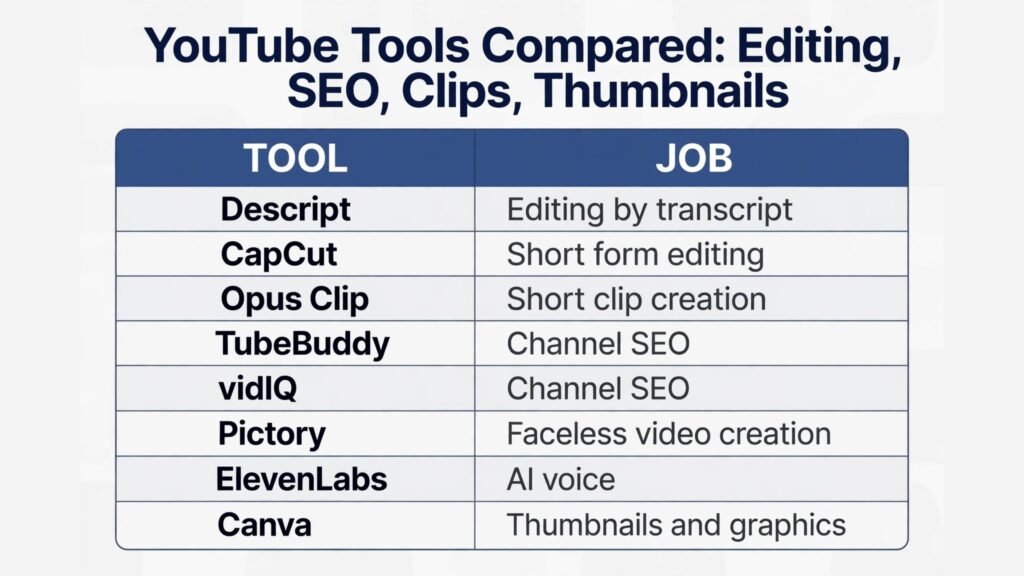
Tools Compared for a New YouTube Channel
| Tool | Job | Strength | Limit | Best for |
|---|---|---|---|---|
| Descript | Editing by transcript | Fast text based editing, captions | Less fine control than pro editors | Talking head and tutorials |
| CapCut | Short form editing | Templates, captions, effects | Watermark or paid features on some plans | Shorts and social clips |
| Opus Clip | Short clip creation | Finds highlights, formats vertical | Clip choice needs review | Repurposing long videos |
| TubeBuddy | Channel SEO | Title, tag and competitor help | Data can overwhelm beginners | Search driven channels |
| vidIQ | Channel SEO | Topic ideas, trend alerts | Premium features add cost | Growth focused creators |
| Pictory | Faceless video creation | Script to video, stock visuals | Less personal than filmed video | Explainers and news style |
| ElevenLabs | AI voice | Natural voices, cloning options | Voice trust varies by niche | Faceless and narration |
| Canva | Thumbnails and graphics | Easy design, templates | Templates can look generic | Thumbnails and channel art |
Check pricing and plan limits at checkout for each tool, since free tiers and paid features change through the year. Start with one editing tool, one SEO tool, and one thumbnail tool. Adding more tools before you publish ten videos usually slows you down rather than speeding you up.
How to Choose Tools for how to start a YouTube channel with AI
Choose tools by bottleneck, not by trend. If scripting is slow, invest in a chat tool and a good outline process. If editing is slow, invest in Descript or CapCut and learn its shortcuts. If ideas are slow, invest in TubeBuddy or vidIQ for research. If thumbnails are slow, invest time in Canva templates you reuse. A tool that does not fix your current bottleneck is a distraction, however popular it is.
Test tools on a real video, not a demo project. Edit one full video with a new tool, time the process, and compare it with your previous method. If it does not save at least 30 minutes per video or clearly improve quality, do not keep paying for it. Also check export quality, caption accuracy, and mobile viewing before you commit. A tool that looks good on desktop but exports captions with errors will cost you viewers who watch muted.
For teams or creators who also run other content, a shared workflow helps. Keep scripts, thumbnails, and published links in one folder per video, with a simple naming system. That organisation makes repurposing easier and helps if you later hire an editor. Readers who make short clips may also compare capcut alternatives and descript alternatives, and creators who add other languages may check best AI video dubbing tools.
Mistakes to Avoid When Starting a YouTube Channel With AI
The first mistake is publishing AI content without checking it. AI scripts can contain outdated prices, wrong steps, and confident claims that are false. Test every tutorial step, verify every price, and remove any claim you cannot support. The second mistake is copying other channels. AI makes imitation easy, but audiences can tell when a channel has no original view. Use AI for structure and research, then add your own tests, opinions, and examples.
The third mistake is chasing trends instead of building a library. Trend videos can spike, but library videos that answer lasting questions bring views for months. Aim for a mix: most videos should be evergreen guides or comparisons, with occasional trend videos to attract new viewers. The fourth mistake is neglecting audio and captions. Viewers forgive imperfect video, but they leave quickly when audio is hard to hear or captions are wrong.
The fifth mistake is inconsistent publishing without a buffer. Life will interrupt filming, so keep two videos ready when possible. The sixth mistake is ignoring analytics. If retention drops at the same point in several videos, that point needs fixing, whether it is a long intro, a slow section, or a confusing explanation. The seventh mistake is buying too many tools early. Tools help a process that exists. They do not create a process on their own.
Frequently Asked Questions
How long does it take to grow a YouTube channel with AI?
Growth varies by niche, consistency, and video quality. Many creators see meaningful traction after 20 to 30 videos published consistently, not after three videos. AI speeds production, but it does not replace the learning that comes from publishing, reading comments, and improving each video. Set a goal of 30 videos in six months, then judge growth on retention and subscriber quality, not just views.
Do I need to show my face to succeed?
No. Faceless channels succeed in explainers, tutorials with screen recordings, and storytelling with visuals. Face channels often build trust faster for advice and reviews, because viewers connect with a person. Choose the style you can sustain. If you dislike being on camera, a faceless format you enjoy will beat a face format you avoid filming.
How much does it cost to start a YouTube channel with AI?
You can start with a phone, free editing tools, and free tiers of AI tools. Costs rise when you add paid editing, SEO tools, or voice tools, but many creators publish successfully for a low monthly cost in the first year. Spend first on audio and on tools that save time on videos you already make. Check checkout pages for current pricing before you commit to annual plans.
Can AI write my whole script?
AI can draft a script, but you should edit it heavily. Add your own tests, examples, and opinions, check facts, and read the script aloud to catch awkward lines. A script that sounds like AI will lose viewers who expect a human perspective. Use AI for outlines and first drafts, then make the final script yours.
How many videos should I publish per week?
One strong video per week is a good starting rhythm for most new creators. Two per week can work if one is a Short and one is a long video. Publishing daily usually reduces quality unless you have a team or a very simple format. Consistency over months matters more than a short burst of daily uploads.
Should I focus on long videos or Shorts?
Use both, but with different goals. Long videos build depth, search traffic, and loyal subscribers. Shorts bring discovery and new viewers quickly. A practical mix is one long video per week plus two or three Shorts cut from that video. Track which Shorts bring subscribers who watch long videos, not just views, because that is the metric that grows a channel.
What is the biggest mistake new AI creators make?
The biggest mistake is publishing too much generic content too fast. AI makes it easy to publish ten similar videos that say little new. Viewers and YouTube both reward videos that add a test, a comparison, a clear example, or an honest verdict. Publish fewer videos with real value, and let AI help you make those videos faster, not more generic.
Conclusion: Publish, Learn, Improve, Repeat
Learning how to start a YouTube channel with AI is less about finding one perfect tool and more about building a repeatable process you can keep for a year. Choose a niche you can sustain, plan a simple format, research real questions, script with AI then edit with your own voice, film with good audio, edit with a clear checklist, and publish with proper titles, descriptions, and promotion. After each video, learn one lesson and apply it to the next. That loop, repeated 30 times, is what turns a new channel into a trusted one. Start with your first three test videos this week, keep the process simple, and let AI remove friction while you focus on helping viewers with something real.