
The verdict is simple. A small pharmacy does not need a bigger stockroom or a more expensive system to stop running out of fast moving lines and losing money to expired stock. It needs earlier warnings, clearer ownership and a reorder routine that happens before a shelf goes empty. When you use AI for pharmacy inventory alerts well, the system watches stock levels and expiry dates in the background, flags the handful of items that need a decision today, and leaves the pharmacist free to check the flagged items, approve the order and serve patients, instead of walking every aisle with a clipboard.
This guide covers that workflow end to end. You will learn how to set stock and expiry thresholds that match real demand, how to build a daily alert routine that takes minutes rather than hours, how to turn an alert into a checked order, and how to choose tools that fit a single store or a small chain. Prices change often, so check the official pricing page and the checkout total before you pay for any tool named here. This guide gives general workflow advice only. Pharmacies must follow their local rules for controlled stock, refrigerated stock, record keeping and returns, and no threshold in this guide should be read as medical or regulatory advice.
Why Pharmacy Stock Problems Are Different From Ordinary Retail
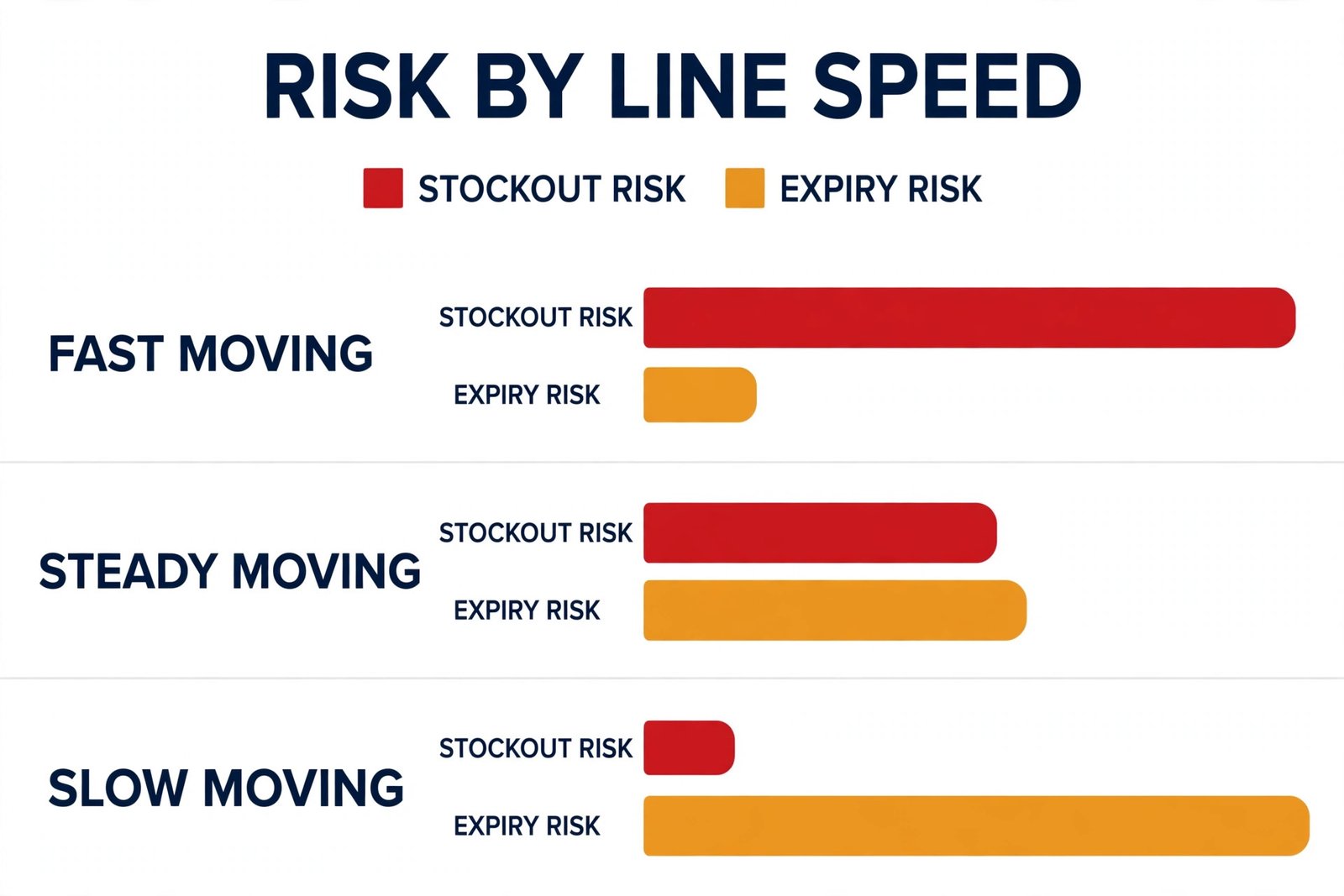
A clothing shop that runs out of a size loses one sale. A pharmacy that runs out of a common medicine can disrupt a treatment plan, send a patient to a competitor and create a repeat problem if the patient does not return. At the other end of the shelf, overstock is not just tied up cash. It is stock that may expire before it sells, especially for seasonal lines, slow moving specialist items and bulk buys made to reach a supplier discount. Both problems come from the same cause, which is late information. By the time a gap is obvious on the shelf, the order is already late.
By the time an expiry date is noticed during a tidy up, the return window may already be closed.
Manual checks make this worse in a predictable way, and this is where teams that use AI for pharmacy inventory alerts gain the most. A weekly full count is thorough but slow, and it still leaves six days when a fast seller can run out unnoticed. A quick visual check is fast but uneven, because the busiest shelves get attention and the quiet back shelves do not. Staff memory fills the gaps, which works until someone is on leave, a new starter takes over, or demand shifts after a local clinic changes its prescribing pattern. An alert system replaces memory with a rule.
It checks every line every day against the same thresholds, and it only asks a human to act when a rule is broken.
What Counts as an Alert Worth Acting On
Not every stock movement deserves an alert. A useful alert has four parts, and if any part is missing, the alert will either be ignored or create extra work. The four parts are the item, the reason, the number behind the reason and the next action. An alert that says only that stock is low is not enough. An alert that says a named item has three days of cover left at current sales, that the supplier needs two days to deliver, and that the suggested action is to approve an order of a stated quantity is an alert a pharmacist can act on in under a minute.
There are five alert types that cover almost all pharmacy stock work. A low stock alert fires when on hand quantity falls to the reorder point. An out of stock alert fires when quantity hits zero or when a line has no usable stock because the remaining units are damaged, quarantined or past expiry. An expiry alert fires at set intervals before the expiry date, for example at 90 days, 60 days and 30 days, so slow stock can be moved, returned or replaced in stages. A slow mover alert fires when an item has not sold for a set period and is tying up shelf space and cash.
A supplier and delivery alert fires when an expected delivery is late, short or damaged, because a missing delivery changes every other threshold for that week.
How to Use AI for Pharmacy Inventory Alerts Without Overhauling Your System
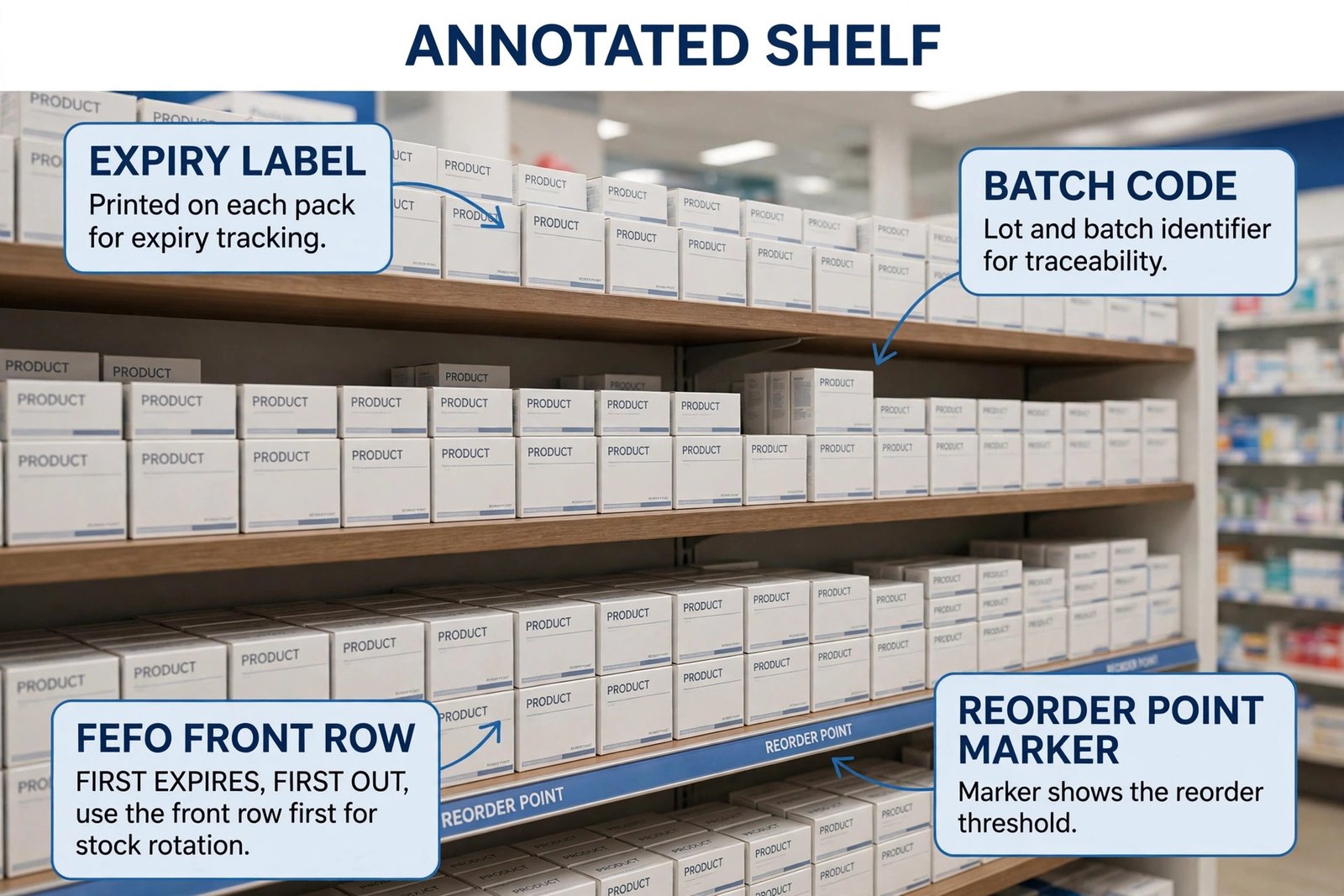
You do not need to replace a dispensing system to get better alerts. Most small pharmacies get the biggest gain from a simple three layer setup. The dispensing or point of sale system remains the record of what was sold. A stock list, whether in that system, a spreadsheet or a small inventory tool, remains the record of what is on hand, including batch and expiry data. An alert layer, which can be built in the inventory tool, a spreadsheet with formulas, or an automation tool, watches the stock list and sends the daily shortlist.
AI helps most in the middle of that setup, by cleaning messy data, spotting demand patterns and drafting the daily summary, not by replacing the pharmacist.
Start with data quality before you buy anything. AI cannot fix a stock list where the same item appears under three spellings, where pack sizes are mixed, or where expiry dates were never entered. Spend one focused week on a clean master list. Give every item one name, one unit of measure and one preferred supplier. Record pack size separately from unit quantity, so an alert for 24 units is never confused with an alert for 24 packs. Enter expiry dates by batch for every line that carries one, and quarantine or remove expired units from usable stock before you set thresholds. That week of cleaning is dull work, but it decides whether every alert after it can be trusted.
Once the list is clean, add the alert layer in stages. Stage one is a daily low stock and expiry report, sent to one inbox or chat channel each morning. Stage two is a demand aware reorder suggestion, where the tool looks at recent sales and suggests a quantity instead of only flagging that stock is low. Stage three is automation, where approved orders are drafted, supplier messages are prepared, or a task is created for the owner. Do not jump to stage three in week one. Let staff learn to trust stage one first, tune the thresholds for two to four weeks, and only automate the steps that are already working by hand.
Setting Thresholds That Match Real Demand
A reorder point is not a guess. It is a small calculation that any pharmacy can run from its own sales history, and AI tools can run it across hundreds of lines in minutes once the data is clean. The basic inputs are average daily sales for the item, supplier lead time in days, and a safety buffer for delivery delays and demand spikes. Multiply average daily sales by lead time, then add the safety buffer, and you have a reorder point that triggers an order early enough for stock to arrive before the shelf empties.
For a line selling two units a day with a three day lead time and a two day buffer, the reorder point is ten units. That number is a starting point, not a permanent rule.
Demand is not flat, so thresholds should not be either. Seasonal lines, such as allergy, cold and flu, and sun care products, need higher thresholds in season and lower thresholds out of season. Lines linked to a local clinic, school or care home need a review when that customer changes its pattern. New lines need a short review cycle, because early sales may overstate or understate steady demand. A practical rhythm is to review the top 50 lines by sales every month, review seasonal lines before each season, and review any line that triggered a false alert twice. False alerts are useful data.
They usually mean the threshold, the pack size or the sales data is wrong, not that the alert system is useless.
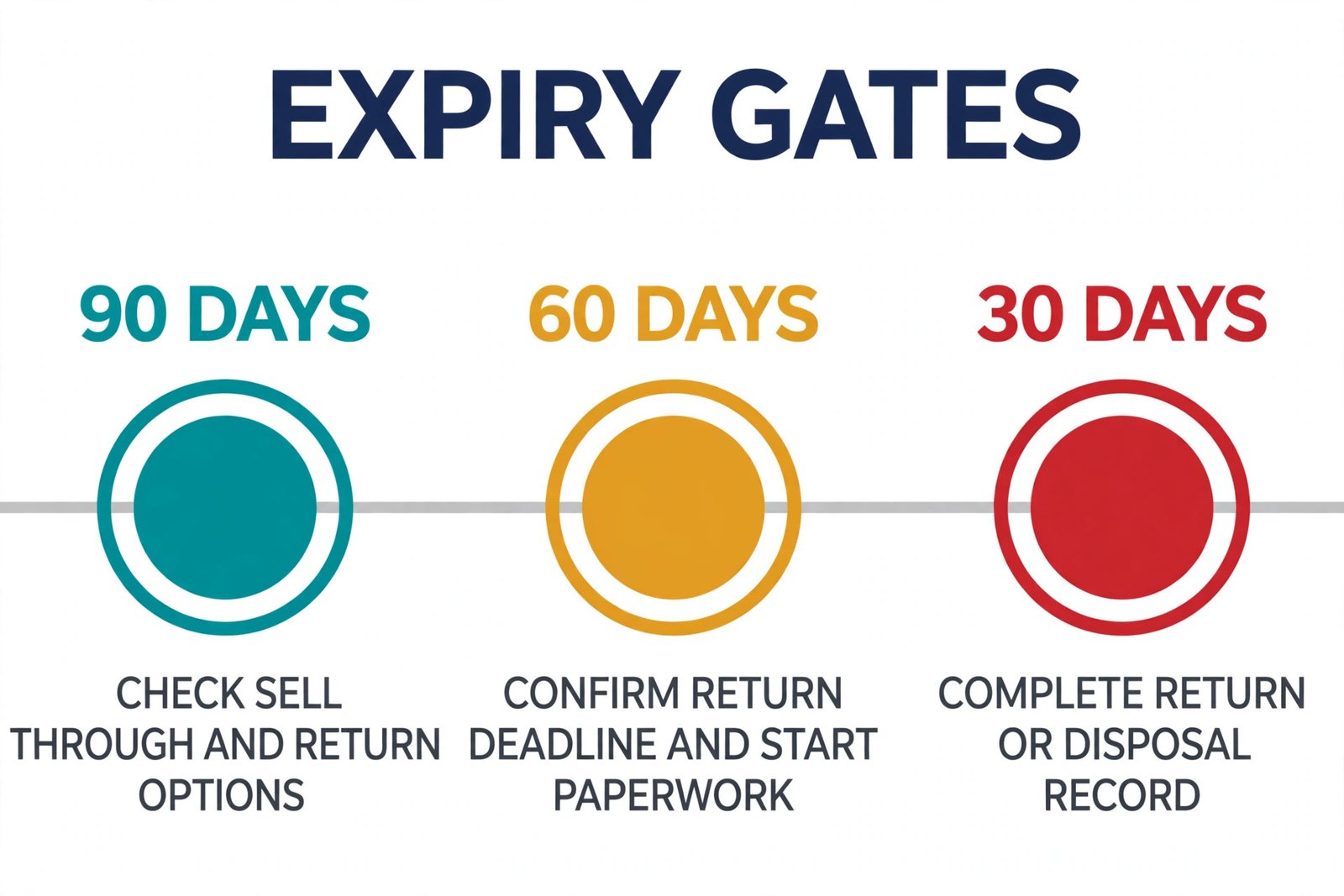
Expiry thresholds work on a different clock. Set three gates for most lines, at 90 days, 60 days and 30 days before expiry, and give each gate a different action. At 90 days, check whether the line will sell through in time at normal pace. If not, plan a return, a transfer to a busier branch where that is allowed, or a promotion where local rules allow it. At 60 days, confirm the return deadline with the supplier and start the paperwork, because supplier return windows often close before the expiry date itself.
At 30 days, remove the line from normal sale if local rules require it, complete the return or disposal record, and order a replacement only if demand justifies it. For refrigerated lines and controlled stock, keep these gates under pharmacist control at every step, and follow local rules for storage, handling and records rather than any generic schedule in a software demo.
| Threshold type | What it watches | A sensible starting gate | First action when it fires |
|---|---|---|---|
| Low stock | Usable quantity on hand | Reorder point from daily sales times lead time plus buffer | Approve or adjust the suggested order quantity |
| Out of stock | Zero usable units | Immediate alert on hitting zero | Check for a substitute, transfer or urgent supplier order |
| Expiry 90 days | Batch expiry date | 90 days before expiry | Check sell through pace and return options |
| Expiry 60 days | Batch expiry date | 60 days before expiry | Confirm supplier return deadline and start paperwork |
| Expiry 30 days | Batch expiry date | 30 days before expiry | Complete return or disposal record under local rules |
| Slow mover | Days since last sale | No sale for 60 to 90 days, adjusted by line type | Review range, quantity and shelf position |
| Delivery | Expected delivery date | One day past expected date | Contact supplier and update expected stock dates |
The Daily Inventory Workflow in Practice
A workflow only works if it fits into a real working day, so when you use AI for pharmacy inventory alerts, design it around a single daily moment and a single owner. The best time for most pharmacies is early morning, before the first rush, when the alert list can be reviewed without interruption. The owner should be a named pharmacist or a trained senior staff member, with a named deputy for leave days. Shared ownership usually means no ownership, and an alert list that nobody owns will be read by everyone and acted on by no one.
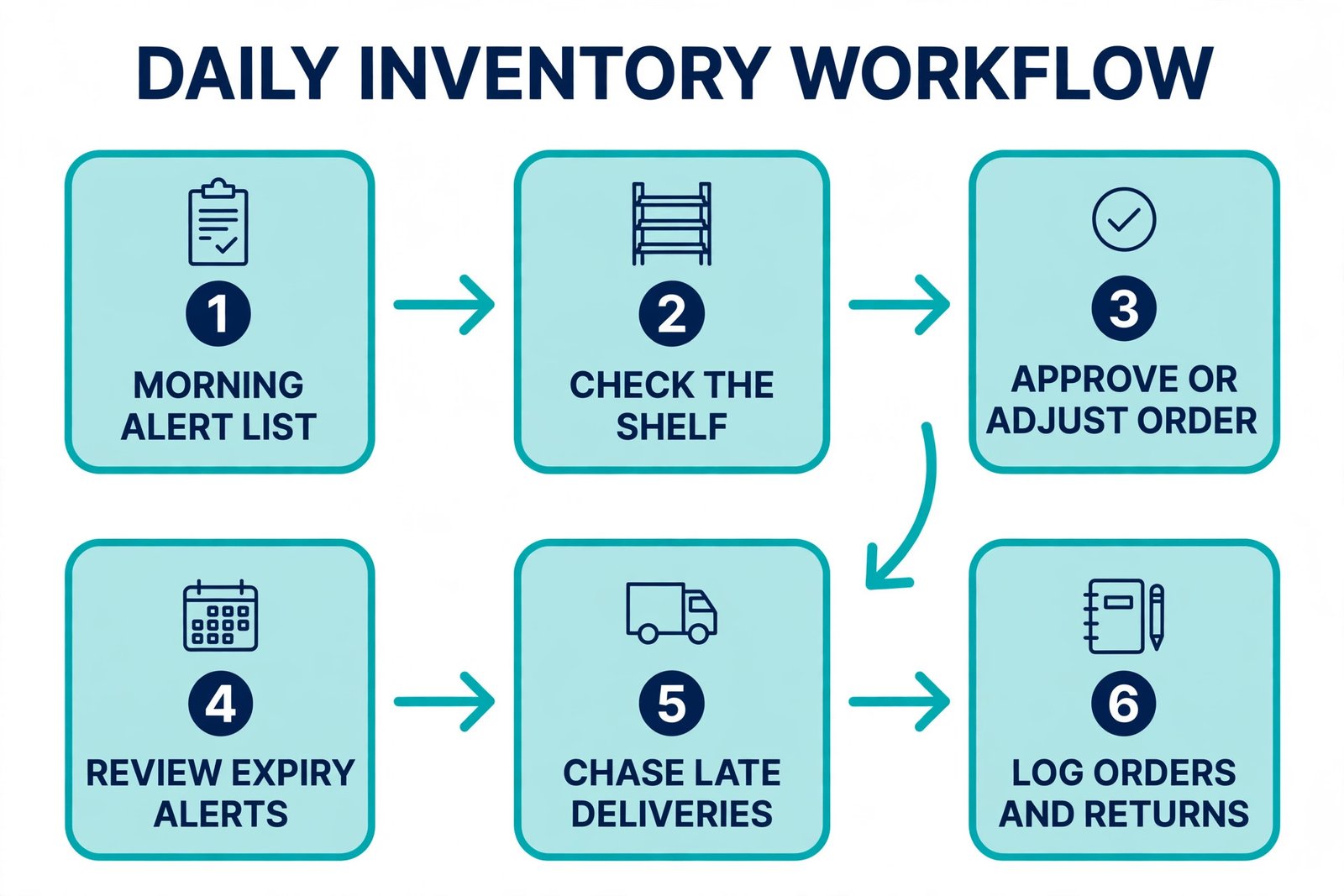
The daily routine has six steps, and it should take 15 to 30 minutes for a single store once thresholds are tuned. First, open the alert list and remove any alert already handled, such as an order already placed or a return already in progress, so the list stays honest. Second, check low stock items against the shelf, because a system count and a physical count can differ after damage, theft, misplacement or a scanning error. Third, approve, adjust or reject each suggested order, and record the reason for any rejection, so the same item is not re debated every day. Fourth, review expiry alerts due that week and start any return paperwork that is time sensitive.
Fifth, check expected deliveries and chase any that are late. Sixth, log what was ordered, what was returned and what was adjusted, so tomorrow starts from a clean list.
Turning an Alert Into a Checked Order
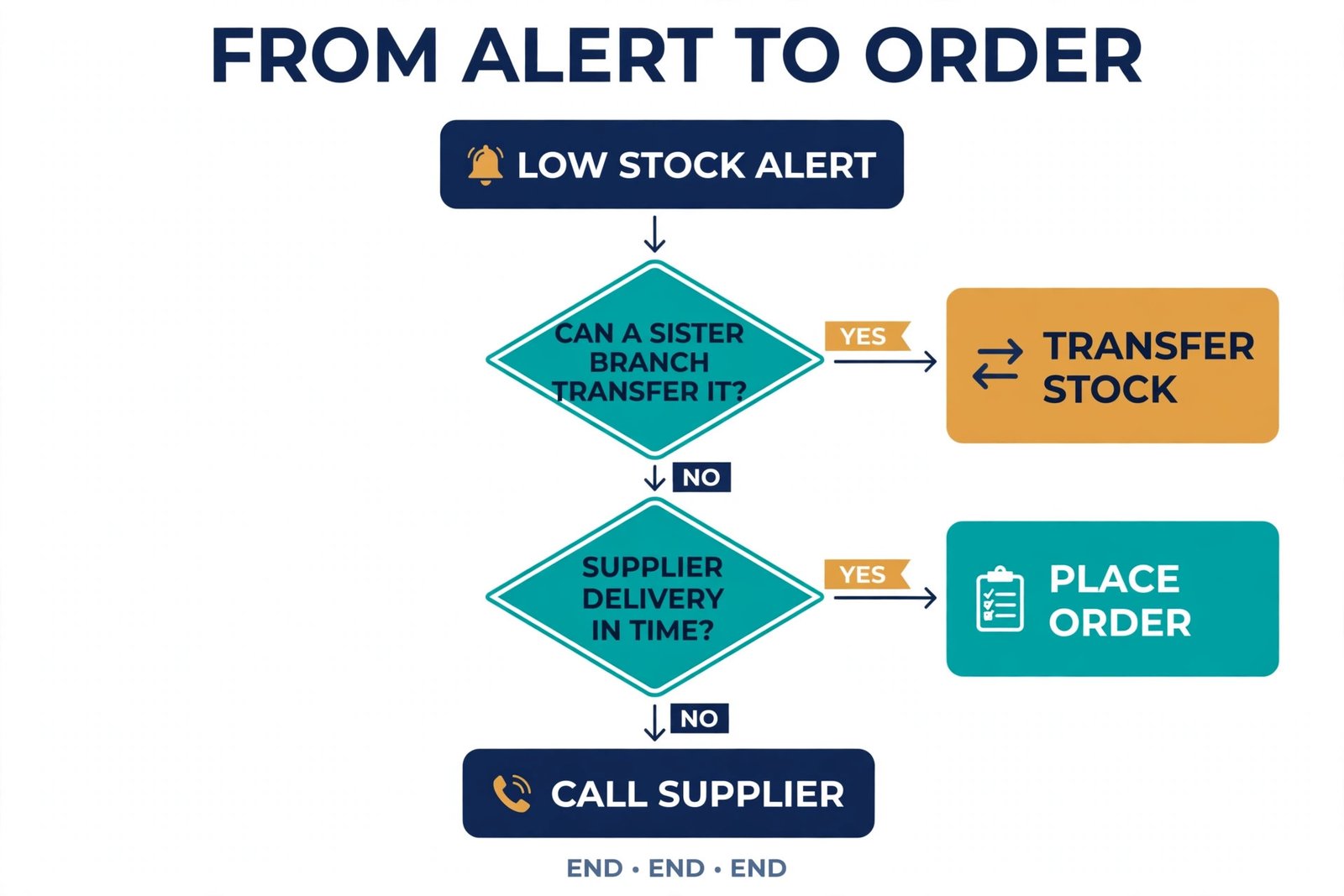
An alert that never becomes an order is just noise, so when you use AI for pharmacy inventory alerts, the step between alert and order needs its own checks. Before approving any order, confirm four things. Confirm the quantity, including pack size and any supplier minimum. Confirm the price and any discount or scheme, because a reorder suggestion based on old prices can quietly erode margin. Confirm the expiry profile of the incoming stock where the supplier can share it, especially for slow lines, because a large order of short dated stock can create the next expiry problem.
Confirm storage, because refrigerated lines, bulky lines and controlled stock each need space and handling that a generic order screen does not show.
Tools That Can Run This Workflow
Tool choice should follow the workflow, not lead it, and teams that use AI for pharmacy inventory alerts should judge tools on the daily shortlist they produce. A pharmacy that already has a dispensing system with stock and expiry tracking should first check what alerts that system already offers, because adding a second system for the same data creates double entry and drift. Many pharmacies find that their existing system already supports low stock reports and expiry lists, and the missing piece is only a daily routine and tuned thresholds. If the existing system cannot send a daily shortlist, a small inventory tool or an automation layer can fill that gap without replacing the core system.
For general stock tracking alongside a pharmacy system, two widely listed options show the price range a small business should expect. Sortly lists a free plan for up to 100 unique items and one user, with its Advanced plan listed at about 49 dollars a month on monthly billing, and a first year annual price of 288 dollars a year, which works out to 24 dollars a month for that first year, before the annual discount changes on renewal. Check the Sortly pricing page at checkout, because that first year discount is a promotion, not the long term rate.
Zoho Inventory lists a free plan for a limited number of orders a month, with paid plans reported in a range from about 29 dollars a month to about 59 dollars a month for entry tiers depending on region and plan version shown, so treat any single figure as a guide and confirm the total shown for your location before subscribing. Both tools offer barcode and QR scanning on paid tiers, which matters for fast and accurate counts.
Spreadsheets still have a place for a single store testing thresholds before paying for software. A sheet with daily sales, on hand quantity, lead time, reorder point and batch expiry dates can produce a usable daily list, and an AI assistant can help spot duplicate names or suggest reorder points from sales history. The limit is discipline. It only works if every sale and delivery is entered promptly, and it breaks quickly with two editors. Move to a shared tool as soon as that happens.
| Tool group | Best fit | Price signal to check at checkout | Main limit to plan for |
|---|---|---|---|
| Existing dispensing system alerts | Pharmacies whose system already tracks stock and expiry | Included in existing subscription, confirm alert features | May lack a daily shortlist or supplier automation |
| Sortly | Visual stock tracking with phone scanning | Free plan limited to 100 unique items, Advanced about 49 dollars a month monthly, 288 dollars first year annual | Item limits rise only with higher tiers |
| Zoho Inventory | Order and stock tracking with purchase orders | Free plan with order limits, paid entry tiers reported from about 29 to about 59 dollars a month | Order and user limits vary by tier and region |
| Zapier automation | Turning a stock signal into a task or message | Free tier available for low volume, paid tiers by task volume, check pricing page | Needs clean source data and approval steps |
| Spreadsheet plus AI assistant | Testing thresholds in a single store | Cost of existing spreadsheet and AI tool, often low | Breaks with multiple editors or poor data entry |
How to Choose the Right Setup for Your Store Size
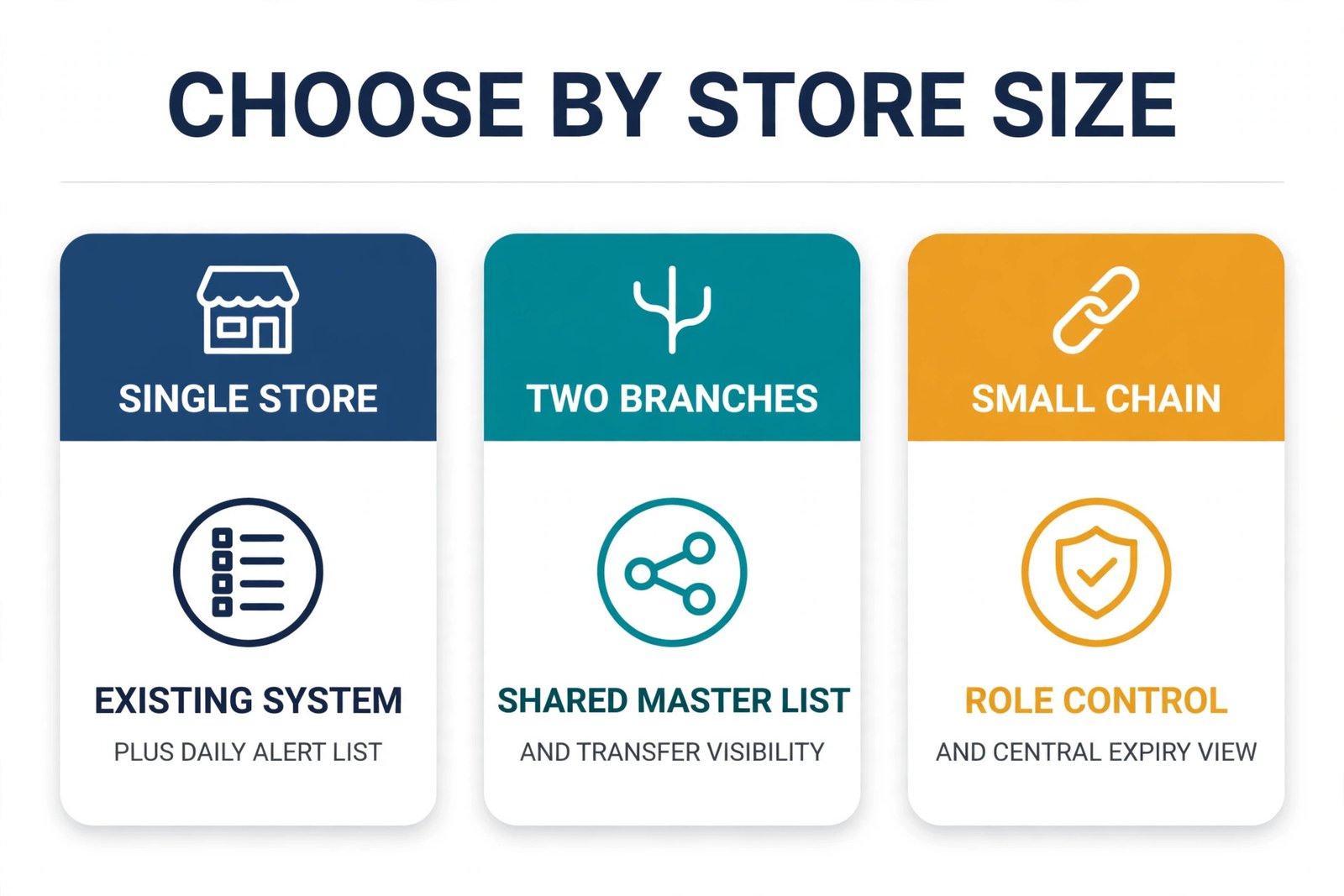
A single independent pharmacy, a two branch group and a small chain need different setups, and buying chain software for one store wastes money and training time. A single store should start with its existing system plus a daily alert list, and add a small inventory tool only if the existing system cannot produce that list. The test is simple. Can the owner see, in one place each morning, the low stock items, the expiry items due this week and the deliveries expected today. If yes, the setup is enough. If no, fix that one gap before adding dashboards, forecasting or multi location features.
A two branch group needs transfer visibility and a shared master list, because the same item under different names in two branches will defeat every alert. Agree one master list, one unit of measure and one preferred supplier per line, and review transfers weekly. A small chain needs role control, so branch staff can act on their own alerts but cannot change thresholds or approve large orders without a manager, and it needs a central view of slow movers and expiry risk across branches, so stock can be moved before it expires. In all three sizes, the pharmacist in charge should approve threshold changes, because a threshold change is a clinical and commercial decision, not just a software setting.
Budget planning should include training and data cleaning, not just the subscription, and that holds true when you use AI for pharmacy inventory alerts. A tool that costs 49 dollars a month but needs two days of staff time to clean data and one hour a week to maintain is still cheap if it prevents one stockout a week or one expired bulk line a month. A tool that costs nothing but needs daily manual entry that staff skip under pressure is expensive in lost trust. Trial any tool with real data for two weeks before committing to a yearly plan. A trial that only tests data entry will not reveal whether alerts are trusted on a busy Monday morning.
Mistakes That Make Alerts Useless
The first mistake, even for teams that use AI for pharmacy inventory alerts, is setting every threshold the same. A fast seller and a slow specialist line cannot share one reorder point, and a single expiry gate for all lines will either create panic for slow lines or miss urgent lines. Set thresholds by demand, lead time and expiry risk, and review them when demand changes. The second mistake is sending alerts to a group inbox with no owner. Group alerts feel like someone else will handle them, and urgent items sit unread. Name one owner per day, with a deputy, and keep the list in one place that the owner checks at a set time.
The third mistake is alert overload from duplicate or stale data. If the same item appears twice, if expired units still count as usable stock, or if an order already placed keeps alerting, staff will learn to ignore the whole list. Clean duplicates, remove expired units from usable counts, and mark orders in progress so they stop alerting. The fourth mistake is automating orders before thresholds are trusted. An automated order based on a wrong pack size, a wrong supplier or a stale sales figure can create overstock faster than manual ordering ever did. Automate only after two to four weeks of accurate manual approvals.
Reorder Checklist and Weekly Review
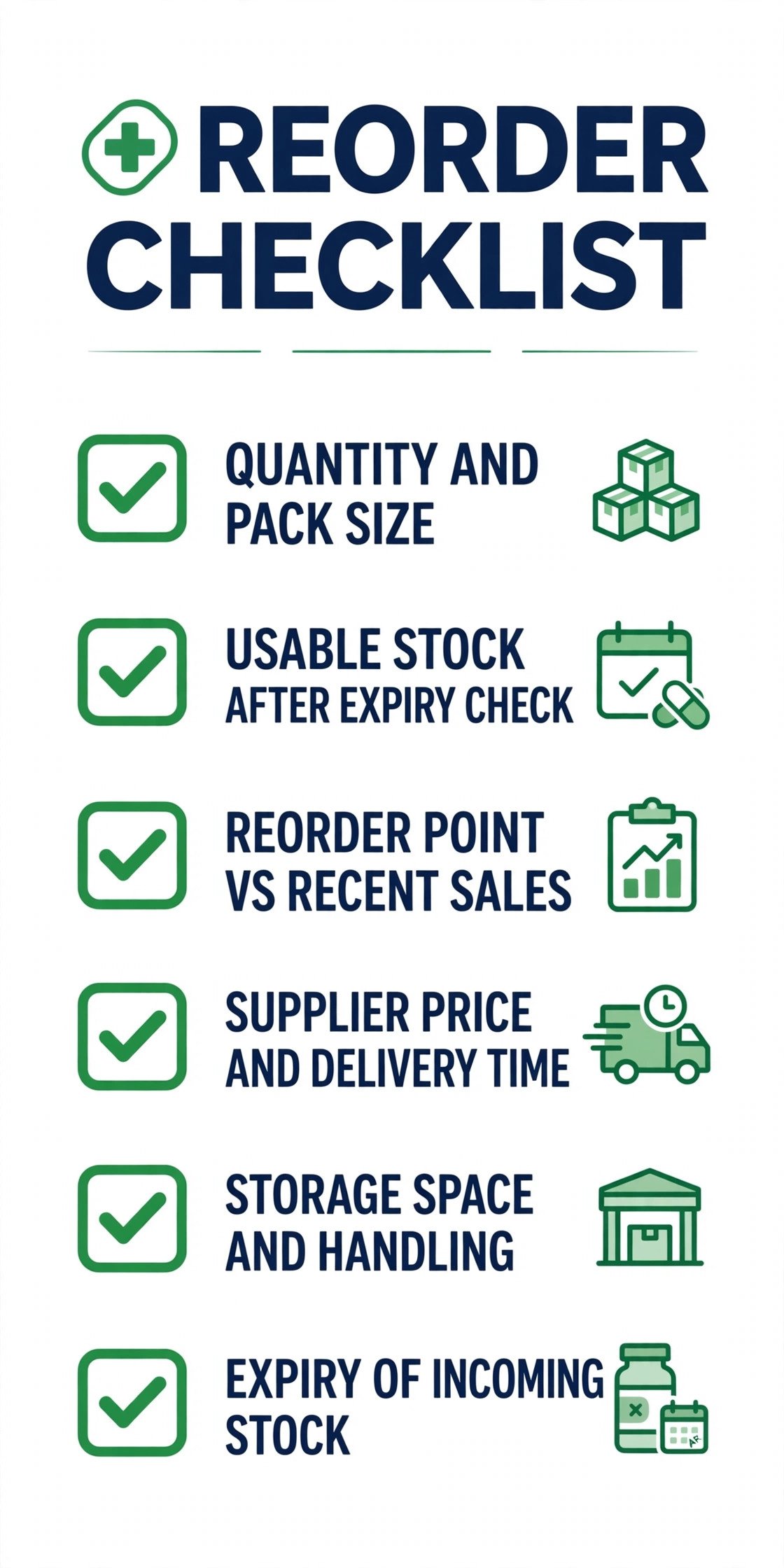
This section is the overview proof element of the guide, because it turns the whole workflow into a repeatable routine that a search summary cannot replace. Use the checklist every time an alert becomes an order, and use the weekly review to keep thresholds honest. Print the checklist for the dispensary or keep it as a shared task template, and update it when suppliers, lead times or local rules change. A checklist that never changes will slowly drift from reality, so review it quarterly with the pharmacist in charge.
Before approving any reorder, work through these checks in order. Confirm the item, strength, pack size and quantity, and check that the alert matches the physical shelf, not just the system count. Confirm usable stock, after removing expired, damaged and quarantined units from the count. Confirm the reorder point and the suggested quantity against recent daily sales, not last year average alone. Confirm the supplier, price, discount and delivery time, and check whether a sister branch transfer would solve the problem faster. Confirm storage space and handling, especially for refrigerated and controlled stock. Confirm the expiry profile of incoming stock where the supplier can share it, and avoid a large order of short dated stock for a slow line.
Record the order, the supplier, the expected delivery date and the name of the approver, so the delivery check tomorrow has a record to match against.
The weekly review uses a different list, and it should take under an hour for a single store. Review slow movers and decide for each one whether to keep, shrink, promote where allowed, transfer or delist. Review overstock lines and check whether a supplier return, transfer or planned sell through is possible. Review lines with repeated alerts and fix the threshold, pack size or data behind the repeat. Review supplier performance, including late, short and damaged deliveries, and note any supplier that needs a conversation. Review expiry gates for the next 90 days and start return paperwork for any line approaching its supplier deadline.
Review the alert list itself, and remove any alert type that fired often but never led to action, because a useless alert trains staff to ignore useful ones.
Safety, Regulation and Data Handling
Pharmacy stock data is sensitive in ways ordinary retail data is not, so the alert setup needs basic protections even in a small store. Keep patient data out of the stock system wherever possible, and never put patient names, prescription details or health information into a general alert channel, a shared spreadsheet or an automation message. If an alert tool needs to reference a patient related workflow, such as a refill or a waiting prescription, keep that workflow in the dispensing system under its existing controls, and let the stock alert carry only the item, quantity and action. That separation protects privacy and keeps the stock list simple.
Frequently Asked Questions
Can a small pharmacy use AI for pharmacy inventory alerts without buying pharmacy specific software?
Yes, in many cases. If the existing dispensing or point of sale system already tracks stock and expiry, the missing piece is often a daily shortlist and tuned thresholds, not a new core system. A small inventory tool, an automation layer or a well built spreadsheet can provide that shortlist, provided the master list is clean and one person owns the daily review. Pharmacy specific software becomes more valuable when a store needs batch level control, supplier integration and multi branch transfers in one place, but it is not a precondition for better alerts.
How often should expiry alerts be reviewed?
Expiry alerts should be reviewed weekly, with three gates at 90 days, 60 days and 30 days before expiry. The 90 day gate checks sell through pace, the 60 day gate confirms the supplier return deadline and starts paperwork, and the 30 day gate completes the return or disposal record under local rules. A monthly only review is too late for many supplier return windows, and it turns expiry work into a large stressful batch instead of a steady routine.
What is a safe starting reorder point for a new line with no sales history?
Start with a small quantity, a short review cycle and a supplier with a fast lead time, then adjust after two to four weeks of real sales. Use comparable lines as a guide, but do not copy their threshold blindly, because strength, pack size and patient demand may differ. Review new lines weekly until sales settle, and keep the order quantity low enough that a wrong guess creates a small stockout risk rather than a large expiry risk.
Should low stock alerts trigger automatic orders?
Automatic orders suit only a small set of fast, low risk, non controlled lines where the pharmacist has set strict quantity and value limits and reviews the orders weekly. For controlled, refrigerated, high value and slow lines, keep a human approval step in every order. Automation without trusted thresholds and clean pack size data can create overstock faster than manual ordering, so prove the thresholds by hand first.
How do you stop staff ignoring alerts?
Keep the daily list short, give it one owner and one review time, remove stale and duplicate alerts promptly, and make every alert carry the item, the reason, the number and the next action. Review any alert type that fires often but never leads to action, and fix or remove it. Staff ignore alerts when the list is long, vague or often wrong, so accuracy and ownership matter more than alert volume.
How should a pharmacy handle a line that is low in one branch but overstocked in another?
Check for a transfer before placing a new order, provided local rules and transport requirements allow it for that category. Record the transfer in the same system as orders, so stock counts stay accurate, and never transfer short dated stock to a branch that cannot sell it in time. For controlled or refrigerated stock, follow local rules for transport, storage and records, and keep pharmacist approval in the transfer step.
The Stockroom Verdict That Keeps Shelves Honest
A pharmacy that runs on alerts is not a pharmacy run by software, and when you use AI for pharmacy inventory alerts, that split between watching and deciding is the whole point. It is a pharmacy where software does the watching and people do the deciding, and that split is the whole point. The system checks every line every day, flags the few items that need a decision, and records what was ordered, returned or adjusted. The pharmacist checks the shelf, approves the order, handles the expiry return and protects the lines that need extra care. When that split is clear, stockouts fall, expiry losses fall, and the daily routine takes minutes instead of hours.
Start with the smallest version that works. Clean the master list, set thresholds for the top 50 lines, run a daily shortlist for two weeks, and tune the thresholds that fired wrongly. Add expiry gates next, then a weekly slow mover review, and only then consider automation for routine lines. That order matters, because each step builds trust for the next one. A pharmacy that tries to automate first will automate its data errors as well, while a pharmacy that earns trust first will find automation easy to add later. The goal is not more alerts. The goal is fewer, better alerts, acted on the same day, every day.
For related reading, the guide to best AI tools for pharmacies covers the wider tool field for pharmacy teams, and automate small business with AI explains how to add automation without losing human control. If your pharmacy also needs broader workflow help, best AI workflow automation tools for small business compares automation options by fit and price.