

The best AI presentation makers all promise the same thing: describe your topic, get a finished deck in minutes. In practice, they split into two camps — AI-first generators like Gamma that build the whole deck for you, and editors like Plus AI and Canva that put AI inside the tools you already use. The output quality, export fidelity, and pricing models differ so much that picking by brand name alone is a mistake.
So we did what we always do: we fed the same 10-slide brief to each tool — a quarterly marketing review deck with a title slide, an agenda, three data-driven content slides (chart, comparison table, KPI dashboard), a timeline, a team slide, two text-heavy argument slides, and a closing call-to-action — then scored design quality, export options (PPT/PDF/Google Slides), and brand-kit support. Pricing verified October 2026. Here is what we found.
Quick Answer
Bottom line: Want a finished deck fastest? Gamma. Live in PowerPoint and need the output to stay native .pptx? Plus AI. Need every deck to look on-brand with zero design effort? Beautiful.ai. Want one subscription for decks, social posts, and docs? Canva. Building decks as a team with sharing analytics? Pitch.
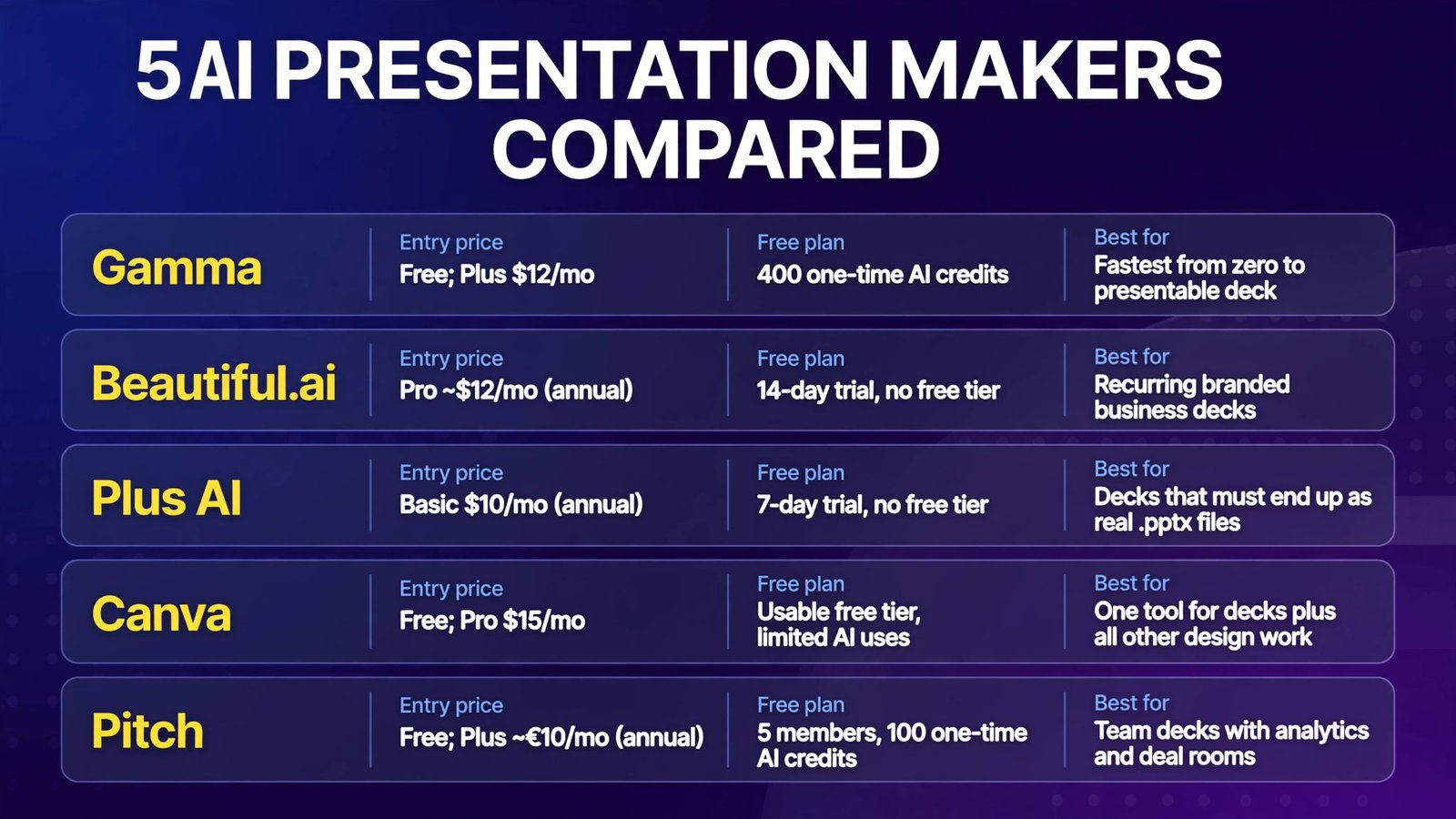
| Tool | Entry price (Oct 2026) | Free plan | Deck generation style | Best for |
|---|---|---|---|---|
| Gamma | Free; Plus $12/mo | 400 one-time AI credits | Full AI deck from a prompt | Fastest from zero to presentable deck |
| Beautiful.ai | Pro ~$12/mo (annual) | 14-day trial, no free tier | Smart Slides that auto-rebalance layout | Recurring branded business decks |
| Plus AI | Basic $10/mo (annual) | 7-day trial, no free tier | AI add-in inside PowerPoint / Google Slides | Decks that must end up as real .pptx files |
| Canva | Free; Pro $15/mo | Usable free tier, limited AI uses | Magic Design inside a template universe | One tool for decks plus all other design work |
| Pitch | Free; Plus ~€10/mo (annual) | 5 members, 100 one-time AI credits | AI draft + collaborative team workspace | Team decks with analytics and deal rooms |
The Test Brief: One 10-Slide Deck for All Five
Every tool got the same prompt and source notes:
Quarterly Marketing Review: A fictional SaaS company reports Q3 results. 10 slides: title, agenda, revenue chart (up 24% QoQ), channel comparison table, KPI dashboard, milestone timeline, team slide with photos, two narrative argument slides, closing CTA. Tone: confident, investor-facing. Brand: navy and orange, sans-serif type.
We judged the generated deck on four scored criteria: design quality (layout, typography, spacing), content fidelity (did charts and tables actually reflect the data?), edit effort (how long to make it presentable), and export quality (PPTX, PDF, Google Slides). Scores out of 10.
1. Gamma — The Fastest AI-First Deck Builder
What it is: Gamma is the reference AI presentation maker of 2026 — prompt or paste in your notes, get a web-native deck of editable “cards” back in under a minute, then restyle everything with one click. It treats presentations as living documents you can share as links, not just slide files.
2026 pricing (verified): Free: 400 one-time AI credits (no monthly refill), up to 10 cards per prompt, Gamma badge on output. Plus: $12/seat/month ($9/mo billed annually) — 1,000 monthly credits, up to 100 cards per prompt, branding removed, exports to PDF, PPTX, PNG, and Google Slides. Pro: $25/mo ($18/mo annual) — 4,000 credits, premium AI models, custom branding, analytics, API, custom domains. Ultra: $100/mo — 20,000 credits and the most advanced models.
Our test: Fastest by a wide margin — the full deck rendered in about 45 seconds. Design quality was the best of the five: clean hierarchy, sensible image placement, and the one-click restyle genuinely turned our “confident, investor-facing” brief into a different visual theme without breaking layout. The revenue chart slide needed manual correction (it hallucinated a Y-axis label), but chart edit effort was low.
Pros:
- Fastest generation of the five tools we tested
- One-click restyle of the entire deck is genuinely excellent
- Generous export set (PDF, PPTX, Google Slides) from Plus upward
- Real free plan — enough to evaluate several real decks
Cons:
- Credit math is opaque: heavy image regeneration burns credits fast
- Free and Plus users grant Gamma broad content-licensing terms — think twice for sensitive decks
- PPTX exports are functional but not pixel-perfect for complex layouts
- Web-native output means you must export to leave Gamma’s ecosystem
Verdict: If you want the shortest path from a blank page to a presentable deck, Gamma is still the tool to beat. Plus is the sensible entry plan.
2. Beautiful.ai — Best for Disciplined, On-Brand Decks
What it is: Beautiful.ai’s Smart Slides enforce design rules automatically — add content and the layout, alignment, and spacing rebalance themselves so you cannot make an ugly slide. It’s less about one-click generation and more about never needing to nudge a text box again.
2026 pricing (verified): No permanent free plan — only a 14-day free trial (credit card required, auto-charges if you forget to cancel). Pro: $12/month billed annually ($144/year) — month-to-month billing jumps to $45/month, so the annual commitment is nearly mandatory. Team: $40/user/month annual for 2–20 seats (shared libraries, analytics, access controls). A $45 one-time single-presentation option exists for one-off decks. Note: Beautiful.ai’s own pricing page has shown both $12 and $14.50 for annual Pro in different sections — confirm at checkout.
Our test: The generated deck was the most layout-disciplined of the five — every slide obeyed its grid, typography was consistent, and nothing looked amateur. But it was also the least creatively varied: the tool nudged our brief toward its standard business-deck look. Chart rendering was accurate (the revenue data survived intact). Edit effort was minimal but editing ambition is capped — fight the templates and you’re working against the tool.
Pros:
- Smart Slides eliminate layout fiddling entirely
- Best-in-class brand consistency across recurring decks
- Editable PPTX export works on paid plans
- Student offer: verified .edu users get a free year of Pro
Cons:
- No real free plan — card-required trial is the only way to test
- The month-to-month price ($45) is a cliff; you’re committing to annual
- Designs can feel samey across different decks
- Exported animations and transitions don’t survive in PPTX or PDF
Verdict: The pick for teams producing recurring branded decks — quarterly reviews, sales updates, board reports — where consistency beats creativity. Avoid for one-off decks (the trial or $45 one-off is the way).
3. Plus AI — Best AI Inside PowerPoint and Google Slides
What it is: Plus AI isn’t a separate canvas — it’s an add-in that lives inside PowerPoint and Google Slides. It generates new decks, inserts single slides, rewrites existing ones, and remixes dense slides into clearer versions, all inside the editor your company already uses.
2026 pricing (verified): No free tier — a 7-day free trial with 1,000 AI credits (card required). Basic: $10/user/month annual ($15 monthly) — 1,500 AI credits/month, deck creation in PowerPoint and Google Slides, slide insert/rewrite/remix. Pro: $20/user/month annual ($25 monthly) — 3,000 credits, document uploads (PDF/DOCX/TXT), 100,000+ character prompts, AI image generation. Team: $30/$40 — 6,000 credits, custom branding, shared presets.
Our test: Scored lower on raw generation design quality than Gamma — the decks it produced looked like a capable junior analyst made them in PowerPoint. But it scored highest on our “does the file survive review?” measure: the output is a native .pptx (or Google Slides file) from the first second. No export step, no fidelity loss, no “I’ll fix it in PowerPoint later.” The single-slide insertion and remix tools were the standout: pasting our timeline slide into an existing deck and asking for a cleaner version worked better than generating from scratch.
Pros:
- Output is a real .pptx from the start — zero export friction
- Excellent for revising existing decks, not just generating new ones
- One plan covers both PowerPoint and Google Slides
- SOC 2 Type II audited — friendlier for corporate IT than most AI-first tools
Cons:
- Generated designs are competent, not inspiring — expect to polish
- Credit budgets (40–170 credits per task) require real usage planning at scale
- Team template imports have limits (25-slide ceiling) — check your corporate template first
- 7-day trial requires a credit card
Verdict: The obvious pick when the deliverable must be an editable PowerPoint in your company’s template. The generation is good; the revision workflow is the real reason to buy.
4. Canva — Best All-Rounder (Decks Plus Everything Else)
What it is: Canva is not primarily an AI presentation maker — it’s the design platform most small businesses already use, and its AI (Magic Design, Magic Write, image generation) sits inside a universe of templates, brand kits, and a content planner. You build decks there because everything else you design already lives there.
2026 pricing (verified): Free plan with limited AI uses. Pro: $15/month ($120/year, ~$10/mo equivalent annually) — full Magic Studio (unlimited Magic Write, 500 text-to-image/month), 1TB storage, brand kit, 100M+ premium assets. Teams: $10/user/month (minimum 3 users). PPTX export works even on the free plan.
Our test: Magic Design generated three full-deck options from our brief in one go — a picker interface we liked better than Gamma’s single-output approach. Design quality was strong and varied, but content fidelity lagged: the revenue chart was decorative rather than data-accurate (it invented its own numbers), and the comparison table needed rebuilding by hand. Edit effort was the real cost — Canva’s freedom means every AI-made slide tempts manual refinement. Where it dominated was brand kit: with a logo and palette saved, regenerated slides stayed on-brand better than any AI-first tool.
Pros:
- Best ecosystem: one subscription covers decks, social, docs, video
- Genuinely useful free plan; PPTX export without paying
- Brand kit keeps AI-generated decks on-brand across the team
- Huge template library for when the AI output isn’t quite right
Cons:
- AI chart/data fidelity is weak — verify every number it renders
- Magic Design quality drops for longer, text-heavy decks
- Free-plan AI usage is metered and runs out mid-project
- Jack-of-all-trades: no single deck feature is class-leading
Verdict: Choose Canva when presentations are one design job among many. If you only need decks, a dedicated tool wins; if decks are 20% of your design life, Canva’s single subscription is the better buy.
5. Pitch — Best for Team Decks and Sharing Analytics
What it is: Pitch is a collaborative presentation workspace — real-time co-editing, teamspaces, comments, and a “Pitch Agent” that drafts decks from prompts. Its differentiator is what happens after the deck exists: advanced link sharing, per-viewer analytics, deal-room-style rooms, and co-presenting on paid plans.
2026 pricing (verified): Free plan: up to 5 members, 100 one-time AI credits, unlimited presentations, branded PDF export. Paid plans are listed in euros on Pitch’s site (verify at checkout): Plus ~€10/month billed yearly (~500 AI credits/month), Team ~€15/seat/month (collaboration workspace, analytics), Business ~€20/seat/month (advanced sharing, rooms, co-presenting). PPTX export starts on paid plans.
Our test: The Pitch Agent produced a clean, professional deck quickly — design quality sat between Plus AI and Gamma, with a modern default aesthetic. The standout was post-generation: sharing the deck as a link with viewer analytics and a per-viewer follow-up note is a workflow none of the other four match. Edit effort was moderate; the editor is slick but the AI generation itself is less ambitious than Gamma’s.
Pros:
- Best collaboration model of the five (teamspaces, roles, comments)
- Per-viewer analytics turn decks into a sales tool
- Generous free plan for small teams (5 members, unlimited presentations)
- Offline access and desktop/mobile apps
Cons:
- Euro-denominated pricing confuses US buyers; monthly rates aren’t published
- PPTX export is paywalled
- AI generation is competent but less powerful than Gamma
- Free-plan exports carry the Pitch logo
Verdict: The sales team’s pick: great when decks are sent, tracked, and iterated with colleagues. For solo deck creation, Gamma or Plus AI edge it.
Scored Results: The Same 10-Slide Deck in All Five Tools
| Criterion (out of 10) | Gamma | Beautiful.ai | Plus AI | Canva | Pitch |
|---|---|---|---|---|---|
| Design quality | 9 | 8 | 7 | 8 | 7.5 |
| Content/data fidelity | 7.5 | 8.5 | 8 | 6 | 7 |
| Edit effort (higher = less effort) | 8 | 9 | 8 | 6.5 | 7.5 |
| Export quality (PPTX/PDF/Slides) | 7.5 | 7 | 10 | 8 | 6.5 |
| Brand-kit support | 7 (Pro+) | 9 | 7 (Team) | 9 | 7.5 |
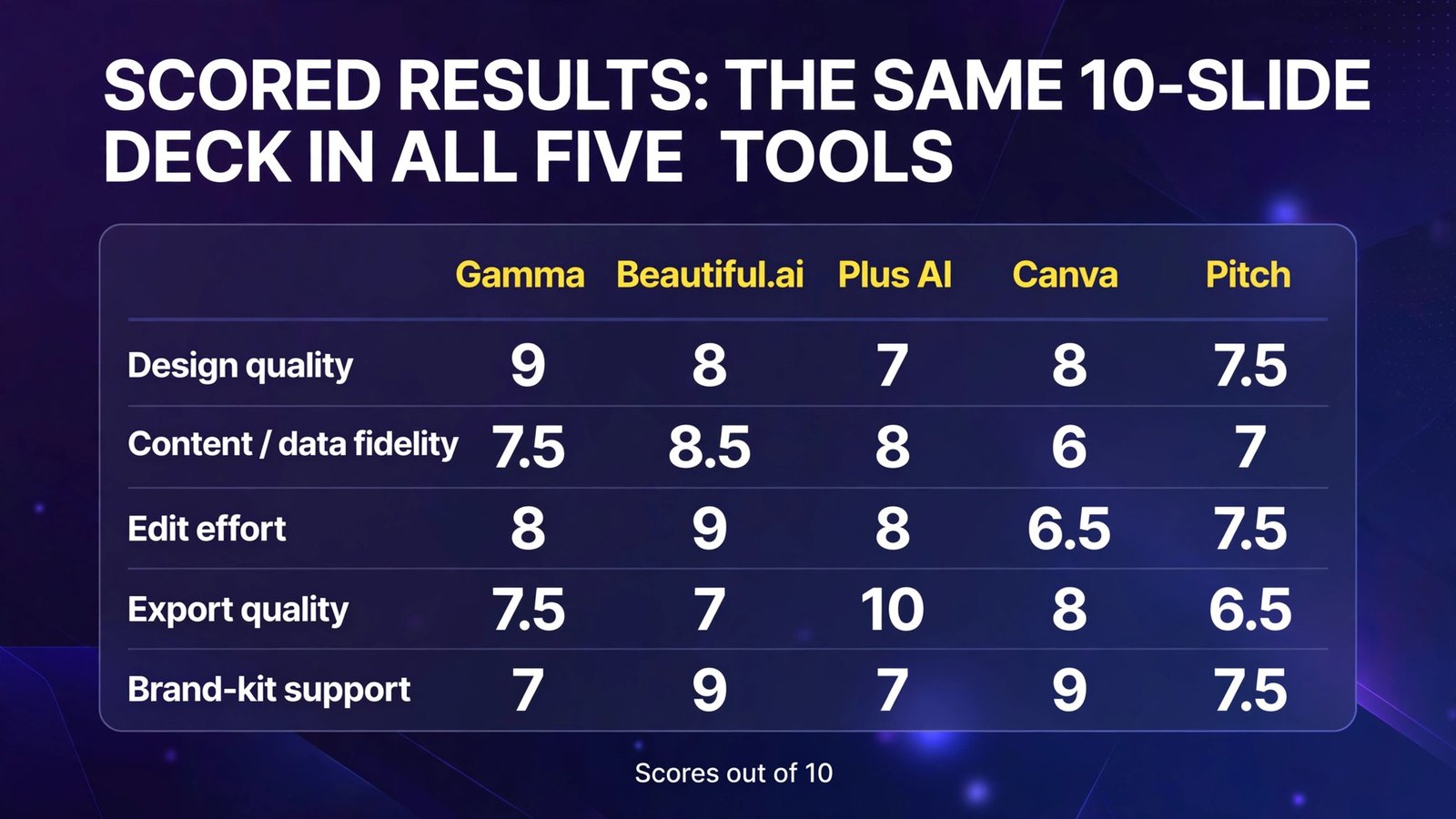
No tool won everything: Gamma led on design and speed, Beautiful.ai on layout discipline and brand consistency, Plus AI on export fidelity (native .pptx), Canva on brand assets across a wider design ecosystem, and Pitch on team sharing.
Pricing Compared (October 2026)
| Tool | Free plan | Entry paid | Sweet-spot plan | Top tier |
|---|---|---|---|---|
| Gamma | 400 one-time credits | Plus $12/mo ($9 annual) | Pro $25/mo ($18 annual) | Ultra $100/mo |
| Beautiful.ai | Trial only (14 days, card required) | Pro ~$12/mo (annual) | Team $40/user/mo | Enterprise custom |
| Plus AI | Trial only (7 days, card required) | Basic $10/user/mo (annual) | Pro $20/user/mo | Team $30/user/mo |
| Canva | Yes, limited AI uses | Pro $15/mo ($10/mo annual) | Teams $10/user/mo | Enterprise custom |
| Pitch | 5 members, 100 one-time AI credits | Plus ~€10/mo (annual) | Team ~€15/seat/mo | Business ~€20/seat/mo |
Full Comparison Table
| Gamma | Beautiful.ai | Plus AI | Canva | Pitch | |
|---|---|---|---|---|---|
| Entry price | Free / $9/mo annual | ~$12/mo annual | $10/user/mo annual | Free / $10/mo annual | Free / ~€10/mo annual |
| AI generation model | Full-deck AI + web canvas | Smart Slides auto-layout | Add-in in PPT/Slides | Magic Design in editor | AI draft + team workspace |
| PPTX export | Plus+ (not pixel-perfect) | Paid plans (editable) | Native — it’s the file itself | Yes, incl. free | Paid plans only |
| Google Slides export | Yes | Supported | Yes (it’s a Slides file) | Limited fidelity | Limited |
| Brand-kit support | Pro+ custom branding | Pro+; Team shared library | Team custom branding | Pro (1 kit); Teams (multi) | Team+ |
| Best scenario | Zero-to-deck speed | Recurring branded decks | Must stay .pptx | Decks + other design work | Team decks with analytics |
How to Choose
- Start from your deliverable, not the AI demo. If the end product is a PowerPoint file in your company’s template, Plus AI saves you the most pain. If it’s a link you present from or export as PDF, Gamma wins.
- Count your decks per month. One deck a month? Gamma Free or Canva Free may suffice. Weekly recurring decks? Beautiful.ai’s annual Pro pays for itself in layout time saved. Daily? Watch credit meters (Gamma, Plus AI) — per-credit costs multiply.
- Audit the free tier before committing to a subscription. Gamma’s 400 credits and Pitch’s 5-member free plan are genuine tests; Beautiful.ai and Plus AI only offer card-required trials — set a cancellation reminder on day one.
- Check brand-kit needs early. If marketing cares about fonts, colors, and logo compliance, Canva (Pro) and Beautiful.ai (Team) handle this best. Gamma only unlocks custom branding at Pro.
- Verify every data number the AI renders. This is universal advice after our test: AI deck generators routinely invent chart numbers that look right. The revenue slide is exactly where your CFO will check.
Frequently Asked Questions
What is the best AI presentation maker overall?
For most users, Gamma — it’s the fastest from a blank brief to a presentable deck, has a real free plan, and exports to PPTX, PDF, and Google Slides. Beautiful.ai wins for recurring branded business decks, and Plus AI wins when the deliverable must stay in PowerPoint or Google Slides.
Is Gamma free?
Yes, with limits. Gamma’s free plan gives you 400 one-time AI credits (enough for several real decks) with Gamma branding and exports to PDF, PPTX, and Google Slides. Credits don’t refill — once they’re gone, you upgrade or earn credits through referrals. Plus starts at $12/month ($9/month billed annually).
Can AI presentation makers export to PowerPoint?
All five can, but the quality differs. Plus AI produces a native .pptx by design. Beautiful.ai exports editable PowerPoint on paid plans (animations don’t survive). Gamma and Canva export PPTX with some fidelity loss on complex layouts. Pitch gates PPTX export behind paid plans.
Gamma vs Beautiful.ai: which should I pick?
Pick Gamma for fast one-off decks, free-tier testing, and AI-first generation with one-click restyling. Pick Beautiful.ai when you produce recurring branded decks and want Smart Slides to enforce layout discipline automatically. Gamma starts cheaper ($9/month annual vs $12/month annual), but Beautiful.ai is stronger on brand consistency.
Which AI presentation maker is best for teams?
Pitch has the best collaboration model — real-time co-editing, teamspaces, and per-viewer analytics on shared links. Beautiful.ai Team ($40/user/month annual) suits teams needing locked templates and shared brand libraries. Canva Teams ($10/user/month) is cheapest for general marketing teams.
Do AI presentation makers keep my content private?
Vary by tool. Plus AI is SOC 2 Type II audited. Notably, Gamma’s terms grant it broad content-licensing rights on Free and Plus plans — don’t upload commercially sensitive decks there without reviewing the terms. For confidential material, check each vendor’s data and training policies before generating.
Conclusion
The best AI presentation makers in 2026 are good enough that the blank-page problem is genuinely solved — our 10-slide brief produced a presentable draft in every tool within minutes. But “presentable” is where the similarities end: Gamma generates the fastest, Beautiful.ai keeps every deck on-brand, Plus AI keeps you in native PowerPoint, Canva covers your entire design life, and Pitch turns decks into a collaborative sales asset.
Our recommendation: generate the same real deck in two of them — Gamma (free, no card needed) plus whichever matches your deliverable (Plus AI if it’s PowerPoint, Beautiful.ai if it’s a recurring branded deck). You’ll know within an hour which one you’d trust with the actual presentation.
Next step: sign up for Gamma’s free plan and generate your next real deck brief there — then export it as a .pptx and compare against the same brief in Plus AI’s 7-day trial (remember to cancel if it doesn’t win).