
The best AI tools for Amazon sellers in 2026 are not the ones with the longest feature lists. They are the ones that protect margin at four points where sellers usually lose it: choosing the wrong product, publishing a weak listing, letting price drift, and spending on ads that never convert. Amazon takes its referral fee, fulfilment fee and storage fee whether a product sells well or not, so a tool only earns its place if it changes a decision that affects profit. That is the test used for every tool in this guide.
Most seller tool stacks grow by accident. A seller adds a research tool for one launch, a repricer for a price war, and an ads tool for a PPC headache, and ends up paying for three dashboards that repeat the same sales data. This guide works the other way round. It starts with the leak, then names the tool that fixes it, then states the price model and the limit honestly. If a tool duplicates something you already own, the Watch out for note says so.
The 12 best AI tools for Amazon sellers at a glance
| Tool | Best job | Free option | Paid model |
|---|---|---|---|
| Helium 10 | Product research and listing research | Limited free plan | Subscription, check checkout |
| Jungle Scout | Product research and opportunity scores | No free plan | Subscription, check checkout |
| AMZScout | Product research on a budget | Free trial | Subscription, check checkout |
| SellerApp | Listing optimisation and keyword tracking | Free trial | Subscription, check checkout |
| DataDive | Listing keyword research from real listings | No free plan | Subscription, check checkout |
| PickFu | Listing image and title testing | No free plan | Pay per poll, check checkout |
| BQool | Repricing with rules | Free trial | Subscription, check checkout |
| Seller Snap | AI repricing for competitive niches | Free trial | Subscription, check checkout |
| Aura | Repricing for larger catalogues | Free trial | Subscription, check checkout |
| Perpetua | Amazon ads management | No free plan | Subscription plus ad spend, check checkout |
| Pacvue | Ads and retail media at scale | No free plan | Subscription, check checkout |
| Scale Insights | Ads rules and profit tracking | Free trial | Subscription, check checkout |

Start here: the right pick for each seller job
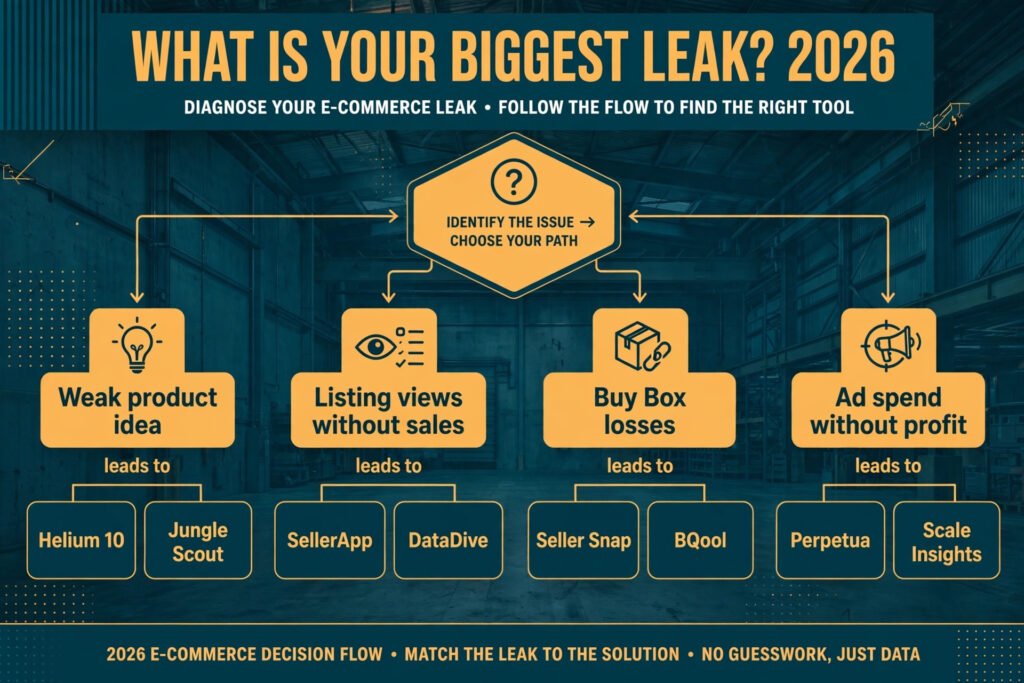
| Your leak | Start with | Why |
|---|---|---|
| You keep launching products that stall | Helium 10 or Jungle Scout | Both score demand, competition and seasonality before you order stock |
| Your listing gets views but few sales | SellerApp or DataDive | Both rebuild titles and bullets from keywords buyers actually use |
| You are unsure which image or title wins | PickFu | A poll answers that question before you change a live listing |
| Your price is either too high or too low | Seller Snap or BQool | Both react to competitor moves without manual price checks |
| Your ad spend grows faster than sales | Perpetua or Scale Insights | Both tie ad spend back to profit, not just clicks |
| You run many products and need one view | Pacvue | It brings ads and sales data together for larger catalogues |
Product research: pick a product with room to win
1. Helium 10
Helium 10 is the broadest research suite on this list, and that is both its strength and its cost. Black Box finds products by sales, review count, price and review rating, while Cerebro reverse engineers the keywords a competing listing ranks for. For a new seller, the value is simple: you can check whether a niche has enough demand and whether the top listings are beatable before you commit to inventory.
Pricing: Limited free plan. Paid plans are subscription based, check checkout for current tiers.
Best for: Sellers who want one suite for research, keyword work and listing checks.
Watch out for: You will pay for tools you may not use in the first months, such as the full keyword tracker and the refund tools. Start with Black Box, Cerebro and Magnet, and add the rest only when you need them.
Try it at: https://www.helium10.com/

2. Jungle Scout
Jungle Scout built its name on the Opportunity Score, a single view of demand against competition for a product idea. Its Product Database and Product Tracker let you follow a niche over time rather than judging it from one snapshot, which matters for seasonal products such as garden goods or holiday items. The Chrome extension also shows estimated sales and revenue while you browse Amazon, so research happens where you already shop.
Pricing: No free plan. Paid plans are subscription based, check checkout for current tiers.
Best for: Sellers who want a clear yes or no on a product idea, with seasonality shown.
Watch out for: Opportunity Scores are estimates, not guarantees. A high score in a niche with heavy brand loyalty or gated categories can still be a hard launch. Check category gating and supplier cost before you trust the score alone.
Try it at: https://www.junglescout.com/
3. AMZScout
AMZScout is the budget research option, and it is honest about that role. Its product database, keyword search and sales estimator cover the core research questions: how many units sell, at what price, and how crowded the niche is. It lacks some of the deeper listing tools of the bigger suites, but for a first or second product, that smaller scope keeps the monthly cost down and the learning curve short.
Pricing: Free trial available. Paid plans are subscription based, check checkout for current tiers.
Best for: New sellers and sellers testing a second niche without a large tool budget.
Watch out for: Sales estimates are less precise in small niches, where a few units a day can swing the estimate. Cross check a promising idea in a second tool before ordering stock.
Try it at: https://amzscout.net/
Listing optimisation: turn views into sales
A listing that ranks but does not convert wastes the research that found the product. The tools in this section fix the words, images and structure that decide whether a visitor buys.
4. SellerApp
SellerApp combines keyword research, listing optimisation and rank tracking in one dashboard. Its keyword tool suggests terms by search volume and relevance, and its listing grader scores a title, bullets and description against those terms. For sellers managing several listings, the rank tracker shows whether a change helped or hurt, which removes the guesswork from listing edits.
Pricing: Free trial available. Paid plans are subscription based, check checkout for current tiers.
Best for: Sellers who want keyword research and rank tracking in the same place as listing edits.
Watch out for: The grader rewards keyword coverage, but a listing stuffed with keywords still reads badly to a human buyer. Keep the title readable first, and use the grader as a check, not as the writer.
Try it at: https://www.sellerapp.com/

5. DataDive
DataDive takes a different approach to listing keywords. Instead of starting from a search volume list, it pulls the keywords that top listings in a niche actually rank for, then shows which terms your listing is missing. That matters because Amazon search rewards relevance to real buyer language, not just high volume terms. The result is a listing built from evidence about what already ranks, which is useful when a niche uses brand names, sizes or use cases that generic keyword tools miss.
Pricing: No free plan. Paid plans are subscription based, check checkout for current tiers.
Best for: Sellers in competitive niches where the winning keywords are not obvious.
Watch out for: DataDive is a research tool, not a full listing editor. You still need to write the copy and upload it yourself, and you may want help with that writing step. If you need outside writing support, a guide to best AI tools for freelance writers can help you brief a writer well.
Try it at: https://www.datadive.tools/
6. PickFu
PickFu answers a question that keyword tools cannot: which image or title would real shoppers pick? You run a poll with a target audience, show two versions, and get ranked answers with short comments. That is valuable before a main image change, because the main image drives click through rate, and a wrong change can cut traffic for weeks. PickFu is also useful for packaging and A+ content choices, where taste matters as much as data.
Pricing: No free plan. Polls are paid per poll, check checkout for current pricing.
Best for: Sellers deciding between two images, titles or packaging designs.
Watch out for: Poll respondents are not your exact buyers, and a poll result is a signal, not a verdict. Use it to pick between close options, then confirm with real click and conversion data after the change.
Try it at: https://www.pickfu.com/
Pricing and repricing: stop losing the Buy Box on price
7. BQool
BQool is a rule based repricer with a long track record on Amazon. You set minimum and maximum prices, choose rules for competing against the Buy Box holder or the lowest price, and let the tool adjust as competitors move. For sellers with stable costs and clear margins, rule based repricing is often enough, and it avoids the risk of an algorithm cutting price below cost in a race to the bottom.
Pricing: Free trial available. Paid plans are subscription based, check checkout for current tiers.
Best for: Sellers who want clear, controllable repricing rules and a price floor they trust.
Watch out for: Rules need care. A rule that always matches the lowest price can erode margin in a niche where a competitor is clearing stock at a loss. Set a firm minimum based on your landed cost plus fees, and review it when supplier costs change.
Try it at: https://www.bqool.com/
8. Seller Snap
Seller Snap uses AI driven repricing that aims to win the Buy Box at the highest price that still wins, rather than simply matching the lowest price. That distinction matters in niches where the Buy Box rotates between sellers at similar prices. The tool also tracks repricing history, so you can see whether a price change actually improved sales or just cut margin.
Pricing: Free trial available. Paid plans are subscription based, check checkout for current tiers.
Best for: Sellers in competitive niches where the Buy Box is contested daily.
Watch out for: AI repricing still needs a correct minimum price and accurate cost data. If your landed cost is wrong in the tool, the algorithm will optimise around a wrong number. Fix costs first, then turn on aggressive repricing.
Try it at: https://www.sellersnap.io/

9. Aura
Aura is built for larger catalogues, where manual price checks across hundreds of listings are not realistic. It reprices across Amazon marketplaces, applies different strategies by product group, and reports on Buy Box share and margin impact. For sellers with a wide catalogue, the value is time saved and consistency: every listing follows the same pricing logic, even when competitors move overnight.
Pricing: Free trial available. Paid plans are subscription based, check checkout for current tiers.
Best for: Sellers with large catalogues or sales in more than one marketplace.
Watch out for: Larger tools bring setup work. Grouping products, setting floors and testing strategies takes time before the tool pays back. Smaller sellers with under twenty listings may get the same result from a simpler repricer at lower cost.
Try it at: https://www.goaura.com/
Ads and analytics: spend where profit follows
10. Perpetua
Perpetua manages Amazon ads with a focus on target cost of sales, known as TACOS, which measures ad spend against total sales, not just ad attributed sales. That view helps sellers judge whether ads are growing the listing or just subsidising sales that would have happened anyway. The platform also handles Sponsored Products, Sponsored Brands and Sponsored Display in one place, with reporting by product and campaign goal.
Pricing: No free plan. Paid plans are subscription based plus your ad spend, check checkout for current tiers.
Best for: Sellers who want ads managed against a profit goal rather than a click goal.
Watch out for: Perpetua works best when listings already convert. If a listing has a low conversion rate, ads will amplify that weakness and burn budget. Fix the listing and price first, then scale ads.
Try it at: https://www.perpetua.io/

11. Pacvue
Pacvue is an enterprise grade retail media platform that covers Amazon ads alongside other marketplaces and retail media networks. Its strength is unified reporting: ad spend, sales and share of voice in one view, with rules and alerts for larger teams. For brands and agencies running ads across channels, that single view replaces several spreadsheets and reduces the chance that one channel is judged in isolation.
Pricing: No free plan. Paid plans are subscription based, check checkout for current tiers.
Best for: Brands, agencies and sellers with large ad budgets across more than one channel.
Watch out for: Pacvue is priced and built for scale. A solo seller with a small ad budget will likely find it expensive and more complex than needed. Perpetua or Scale Insights usually fit better at that size.
Try it at: https://www.pacvue.com/
12. Scale Insights
Scale Insights combines ad automation rules with profit tracking, which is the combination many sellers actually need. You can set rules such as pausing keywords that spend without sales, raising bids on profitable terms, and lowering bids when cost of sales passes a threshold. Because profit data sits next to ad data, the rules react to margin, not just to clicks or impressions.
Pricing: Free trial available. Paid plans are subscription based, check checkout for current tiers.
Best for: Sellers who want automated ad rules tied to profit, without agency fees.
Watch out for: Rules are only as good as the thresholds you set. A rule that pauses a keyword after a small spend can kill a term that needed more data to convert. Start with generous thresholds, review results weekly, and tighten slowly.
Try it at: https://www.scaleinsights.com/
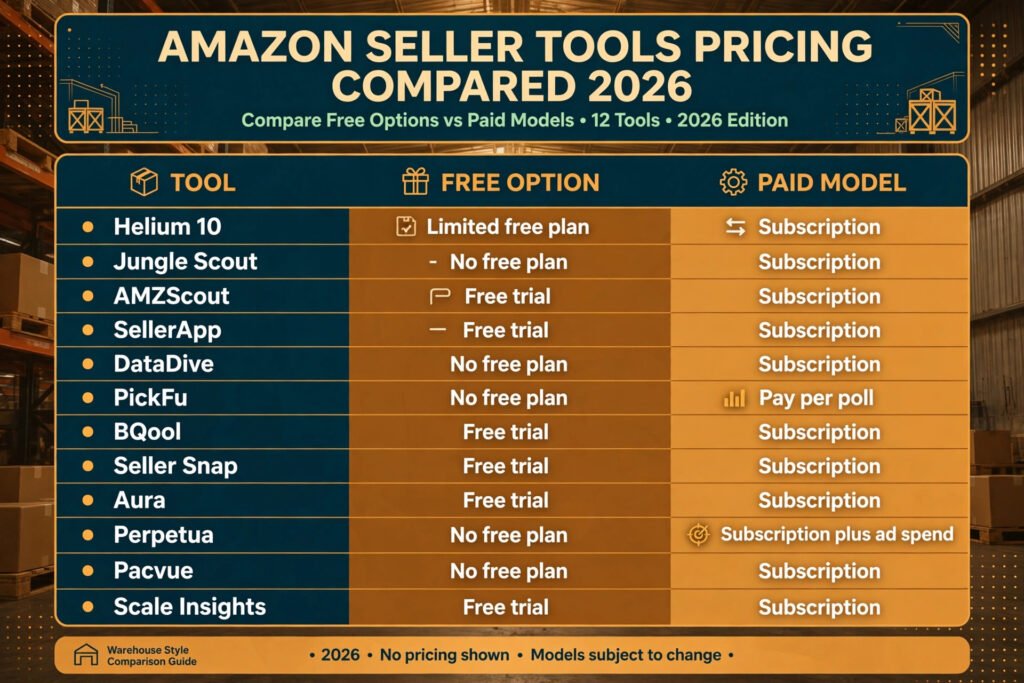
Pricing compared: what a seller actually pays in 2026
| Tool | Free option | Paid model | Cost watchpoint |
|---|---|---|---|
| Helium 10 | Limited free plan | Subscription | Paying for unused tools in the suite |
| Jungle Scout | None | Subscription | Extension and tracker add ons |
| AMZScout | Free trial | Subscription | Estimate limits in small niches |
| SellerApp | Free trial | Subscription | Rank tracking limits on lower tiers |
| DataDive | None | Subscription | Research only, no listing editor |
| PickFu | None | Pay per poll | Poll costs add up with frequent tests |
| BQool | Free trial | Subscription | Per listing limits on lower tiers |
| Seller Snap | Free trial | Subscription | Price rises with catalogue size |
| Aura | Free trial | Subscription | Setup time for large catalogues |
| Perpetua | None | Subscription plus ad spend | Management fee on top of ad budget |
| Pacvue | None | Subscription | Built for larger budgets |
| Scale Insights | Free trial | Subscription | Rule limits on lower tiers |
The pattern is consistent: research and repricing tools charge by subscription, ads tools charge a subscription plus your ad spend, and testing tools charge per use. Before you buy, add the tool cost to your monthly Amazon fees and check that the tool needs to save or earn at least twice its cost to be worth keeping. If it cannot clear that bar in ninety days, cancel it.
How to Choose without buying three tools that do the same thing
Start with one leak, not one tool. Look at your last thirty days and ask which number hurts most: a launch that stalled, a listing with views but no sales, a Buy Box share that fell, or ad spend that grew faster than profit. Buy the tool for that leak first, and use it for a full month before adding anything else. That discipline alone saves many sellers from a stack of overlapping dashboards.
Next, check overlap before checkout. Helium 10 and Jungle Scout overlap heavily on research. SellerApp and DataDive overlap on keywords. Perpetua, Pacvue and Scale Insights overlap on ads. Pick one from each overlapping pair, and only add the second if the first leaves a clear gap, such as a missing marketplace or a missing profit view.
Then, test with a real decision. For research, that means scoring three product ideas and rejecting at least one on the evidence. For listings, it means changing one listing and measuring conversion before and after. For repricing, it means setting a floor from landed cost and checking Buy Box share after two weeks. For ads, it means running one rule for a month and comparing profit, not clicks. If a tool cannot change a real decision, it is a report, not a tool.
Finally, check the total cost of ownership. A subscription is only part of the cost. Add setup time, the time to learn the dashboard, and any per listing or per user limits that force an upgrade as you grow. A cheaper tool that needs hours of manual work each week can cost more than a pricier tool that automates the same job.
Mistakes to avoid when buying seller tools
The first mistake is trusting estimates as facts. Research tools estimate sales, keyword volume and opportunity. Those estimates help you compare ideas, but they do not replace supplier quotes, sample checks and category gating checks. Order a sample before you order a container.
The second mistake is changing a listing on a hunch. A main image change, a title rewrite or a price cut can move conversion in either direction. Use PickFu for close calls, change one element at a time, and wait for enough traffic to judge the result. Changing five things at once tells you nothing about which one worked.
The third mistake is repricing without a floor. Every repricer needs a minimum price built from landed cost, Amazon fees, returns and a margin you can live with. Without that floor, a price war can turn a bestseller into a loss maker while sales look healthy.
The fourth mistake is judging ads by clicks. A campaign with a low cost per click can still lose money if the listing converts poorly or the product margin is thin. Judge ads by profit after fees and ad spend, and pause terms that spend without sales after a fair test period.
The fifth mistake is keeping tools out of loyalty. Seller tools earn their place monthly. Review your stack every quarter, cancel tools you have not used for a decision in thirty days, and keep only the tools that changed a price, a listing or a launch choice.
Frequently asked questions
Do I need all 12 tools to sell on Amazon?
No. Most sellers need three: one research tool, one listing tool and one ads or repricing tool, depending on where their leak is. Start with the leak, add tools only when a clear gap appears, and review the stack quarterly.
Which tool should a new seller buy first?
Helium 10 or Jungle Scout, because product choice decides everything that follows. A good listing tool cannot save a product with no demand, and good ads cannot save a product with no margin. Spend the research time before you spend on inventory.
Are sales estimates from research tools accurate?
They are useful for comparison, not exact. Estimates work best for ranking ideas against each other in the same niche. In small niches or seasonal products, cross check with a second tool and with real supplier and fee data before ordering stock.
Can a repricer lose me money?
Yes, if the minimum price is wrong or missing. A repricer follows the rules you give it, so a floor set below landed cost plus fees will keep winning the Buy Box while losing money on every sale. Set the floor from real costs and review it when costs change.
Should I use an ads tool or manage ads myself?
Manage ads yourself while spend is small and you are learning what converts. Move to a tool like Perpetua or Scale Insights when manual bid checks take more than a few hours a week, or when rules tied to profit would save more than the subscription costs.
How often should I review my seller tool stack?
Every quarter, and after any major change such as a new product launch, a price war or a jump in ad spend. Cancel tools that have not changed a decision in thirty days, and keep the ones that clearly protect margin.
Conclusion: buy the decision, not the dashboard
The best AI tools for Amazon sellers in 2026 earn their place by changing a decision that affects profit: rejecting a weak product, fixing a listing that does not convert, holding a price floor in a price war, or pausing an ad term that spends without sales. Start with your biggest leak, pick one tool for it, test it on a real decision for a month, and only then add the next tool. Sellers who follow that order end up with a smaller stack, lower monthly costs and clearer numbers. Sellers who buy tools first and look for problems later end up paying for dashboards they never open. Choose the first group.