
The best AI tools for product managers in 2026 are not the ones with the longest feature lists. They are the ones that shorten the distance between a customer problem and a decision you can defend in a roadmap review. A product manager loses most of a week not to building, but to chasing evidence: interview notes in one folder, feedback in another, usage data in a third, and a roadmap that nobody trusts because nobody can see how it was made. The tools in this guide were chosen because each one removes a specific part of that work, and because each one is honest about what it cannot do.
This guide groups fifteen tools by the job they actually do. Four tools cover discovery and research, four cover roadmapping, four cover feedback and analytics, and three cover documentation and communication. That grouping matters, because buying two tools that do the same job is the most common waste in a product stack. A team that already has a roadmap tool does not need a second one with a prettier timeline. It needs a discovery tool that feeds the roadmap with evidence, or an analytics tool that tells it whether the last release changed anything.
Prices below are October 2026 figures. Where a vendor prices by seat, usage, or quote, or does not publish a single headline price, this guide says check checkout rather than guessing. Free tiers and trials are noted only where they are a published model. Every tool has a link to its official site, so you can check the current price before you buy.
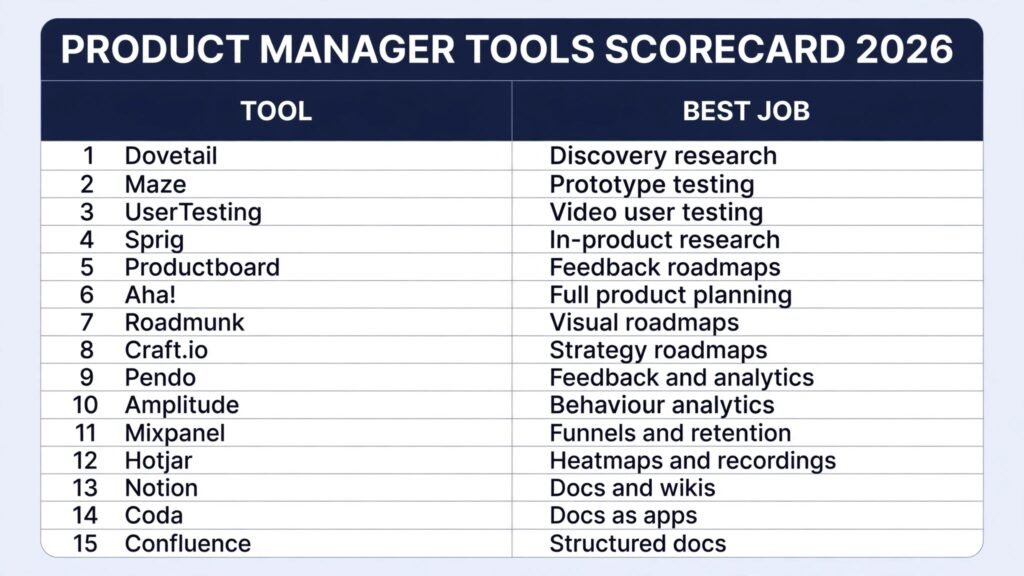
The 15 best AI tools for product managers at a glance
| Tool | Main job | Best for |
|---|---|---|
| Dovetail | Discovery and research | Turning interviews into searchable evidence |
| Maze | Discovery and research | Testing prototypes before you build |
| UserTesting | Discovery and research | Watching real users struggle, on video |
| Sprig | Discovery and research | Quick in-product research studies |
| Productboard | Roadmapping | Roadmaps built from customer feedback |
| Aha! | Roadmapping | Full product planning for larger teams |
| Roadmunk | Roadmapping | Clear visual roadmaps for stakeholders |
| Craft.io | Roadmapping | Strategy roadmaps tied to delivery |
| Pendo | Feedback and analytics | In-product feedback and product analytics |
| Amplitude | Feedback and analytics | Behaviour analytics at scale |
| Mixpanel | Feedback and analytics | Funnels, retention, and event analysis |
| Hotjar | Feedback and analytics | Heatmaps and session recordings |
| Notion | Docs and communication | Product docs, specs, and wikis |
| Coda | Docs and communication | Docs that act like apps |
| Confluence | Docs and communication | Structured docs for larger organisations |
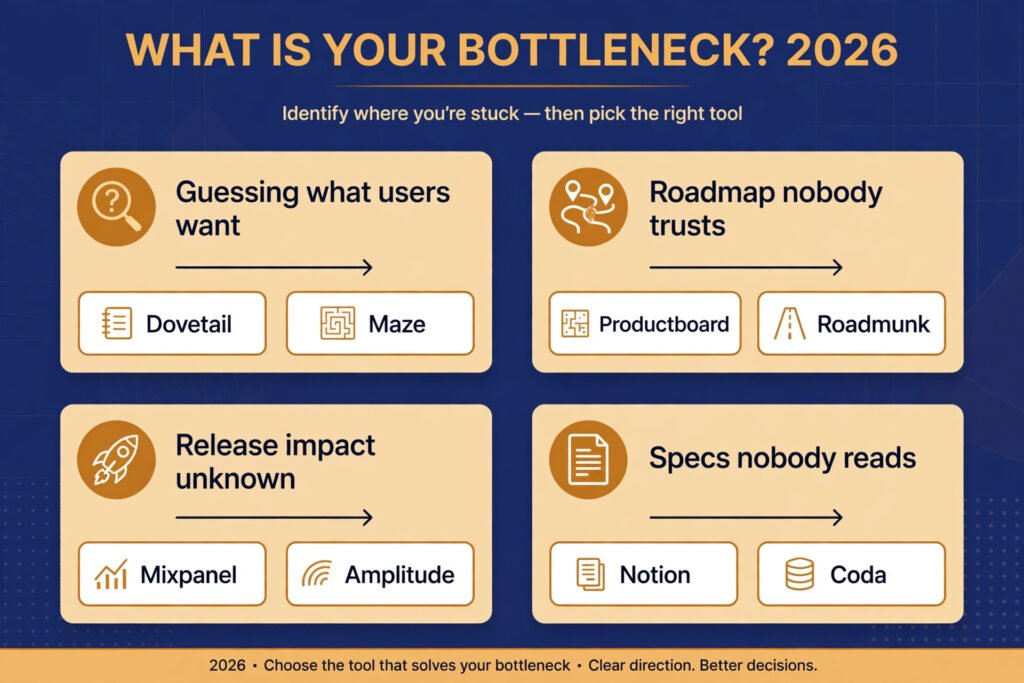
Start here: the right pick for each product job
| Your job this quarter | Start with | Add second if needed |
|---|---|---|
| You are guessing what users want | Dovetail | Maze |
| Your roadmap is a list of opinions | Productboard | Amplitude |
| Nobody reads your specs | Notion | Coda |
| You shipped, but you do not know if it worked | Mixpanel | Pendo |
| Stakeholders want one clear plan | Roadmunk | Aha! |
| Support tickets keep repeating | Pendo | Dovetail |
| You want quick concept tests inside the product | Sprig | UserTesting |
| Your roadmap spans several products | Craft.io | Aha! |
| You want to see where users click and stall | Hotjar | Mixpanel |
Discovery and research: stop guessing what users want
Discovery is where most product mistakes start. A team builds the wrong thing, not because it worked slowly, but because it never checked whether the problem was real. These four tools make that check faster, and they make it visible to the rest of the team.
1. Dovetail
Dovetail is a research repository. You upload interview transcripts, survey answers, support tickets, and call recordings, and it helps you tag themes, search across projects, and pull clips that support a decision. The value is not transcription alone. It is that a claim in a roadmap review can be traced back to five real conversations instead of one strong opinion in the room.
Pricing: Check checkout. Dovetail prices by seat and plan, with a trial available.
Best for: Teams that run regular interviews and need a shared memory of what users actually said.
Watch out for: A repository only helps if someone tags and curates it. An untidy Dovetail workspace becomes a second pile of notes, just a searchable one.
Try it at: https://dovetail.com

2. Maze
Maze lets you test a prototype, a concept, or a live product with users who are not in the room. You set tasks, users complete them, and Maze reports where they got stuck, how long each step took, and where they dropped off. It also uses AI to summarise open responses and group usability issues, which saves the hours usually spent coding test results by hand.
Pricing: Check checkout. Maze offers a free tier for small tests, with paid plans for larger panels and reporting.
Best for: Teams that prototype in Figma and want evidence before engineering time is committed.
Watch out for: Maze tests measure task completion, not desire. A user who can finish a flow may still never pay for the product. Pair Maze results with interviews, not instead of them.
Try it at: https://maze.co
3. UserTesting
UserTesting gives you video of real people using your product or a competitor’s, while they talk through what they expect and where they get confused. That video is hard to argue with in a planning meeting. A chart can be debated. A user saying “I expected this button to save my work, and it did not” ends the debate.
Pricing: Check checkout. UserTesting is quote based, priced by audience, tests, and seats.
Best for: Teams that need qualitative proof for a decision that affects many users, such as a checkout redesign or a pricing page change.
Watch out for: Video is expensive per insight. Use it for high stakes questions, and use Maze or surveys for routine checks.
Try it at: https://www.usertesting.com
4. Sprig
Sprig is a research platform for running studies inside the product itself. You can send targeted surveys at a chosen moment in the user journey, for example after a user finishes onboarding or tries a new feature, and pair answers with session replays and heatmaps. AI summaries group open responses into themes, so a product manager can see the top reasons users hesitate without reading every answer by hand.
Pricing: Check checkout. Sprig offers a free plan with limited studies, with paid plans priced by usage.
Best for: Teams that want fast answers from their own users, especially for concept tests and onboarding questions.
Watch out for: Sprig overlaps with Pendo on in-product surveys. If Pendo already covers your survey needs, use Sprig only for dedicated research studies, not as a second survey tool.
Try it at: https://sprig.com
Roadmapping: turn evidence into a plan people trust
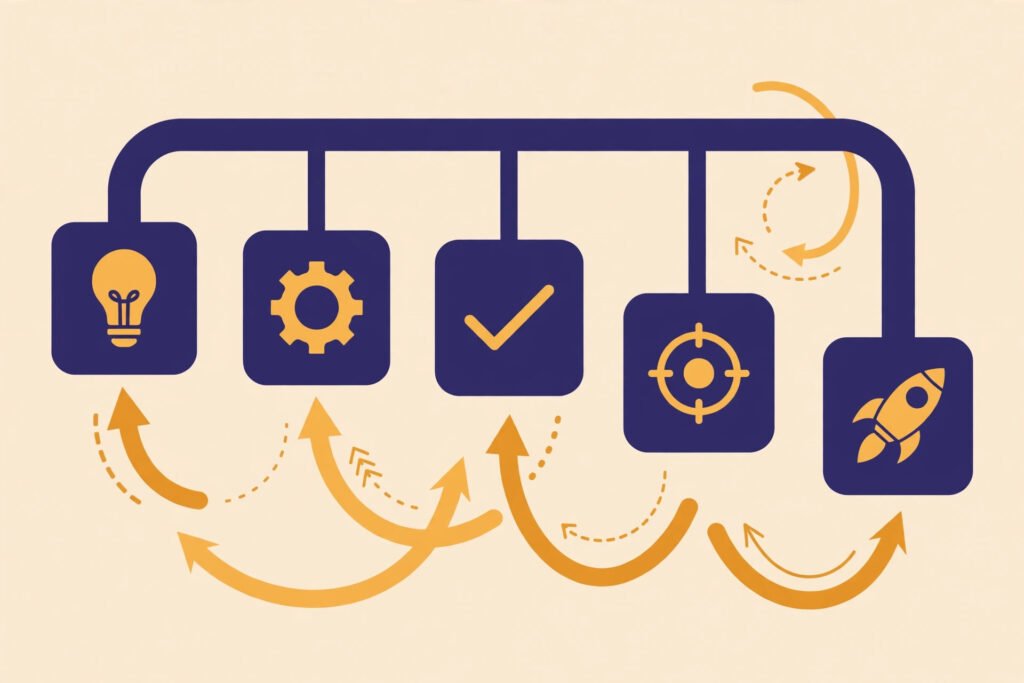
A roadmap is a promise about priorities, and a promise nobody believes is worse than no roadmap at all. These four tools differ in how much structure they impose. Pick the one that matches how your organisation actually decides, not how you wish it decided.
5. Productboard
Productboard connects customer feedback to features, then to roadmap items. Feedback from sales, support, and interviews can be linked to a feature, scored, and shown on a roadmap board. When a stakeholder asks why a feature is on the plan, you can show the feedback behind it, not just your judgment.
Pricing: Check checkout. Productboard prices by maker and plan, with a trial available.
Best for: Product teams that already collect a lot of feedback but lose it in inboxes and spreadsheets.
Watch out for: Scoring systems look objective but hide judgment. If every feature scores high, your scoring criteria are too soft. Review them quarterly.
Try it at: https://www.productboard.com
6. Aha!
Aha! is the most complete planning tool in this guide. It covers strategy, ideas, roadmaps, releases, and reporting in one place. Large teams use it because it can handle multiple products, teams, and portfolios without a patchwork of spreadsheets. Its AI features help draft release notes, summarise ideas, and suggest groupings for large idea lists.
Pricing: Check checkout. Aha! prices by user and product, with a trial available.
Best for: Larger organisations that need one system of record for product planning, with reporting that executives can read without a walkthrough.
Watch out for: Completeness has a cost. Small teams often use a fifth of Aha! and pay for the rest. If your team is under ten people, start with Productboard or Roadmunk and move up only when you feel the limit.
Try it at: https://www.aha.io
7. Roadmunk
Roadmunk does one thing well: it makes roadmaps that stakeholders can read at a glance. Timelines, swimlanes, and milestone views are clean, and sharing a view with a date range is simple. It does not try to be a feedback database or an analytics tool, and that focus is its strength.
Pricing: Check checkout. Roadmunk prices by editor and plan, with a trial available.
Best for: Teams whose main roadmap problem is communication, not prioritisation. If people keep asking “what are we building next quarter,” Roadmunk answers that question in one image.
Watch out for: A beautiful roadmap can still be wrong. Roadmunk will not tell you whether the items on it deserve to be there. Keep a separate evidence source, such as Dovetail or Productboard, for that question.
Try it at: https://roadmunk.com
8. Craft.io
Craft.io is a product management platform that connects strategy to delivery. You set objectives and key results, score features with built-in frameworks such as RICE and MoSCoW, and view the plan as a timeline or swimlane roadmap. The roadmap is a live view of the backlog, so it updates when priorities change, and it syncs with Jira or Azure DevOps for engineering.
Pricing: Check checkout. Craft.io prices by editor and plan.
Best for: Teams that manage several products or portfolios and need one view of strategy, priorities, and delivery.
Watch out for: Craft.io sits close to Productboard and Aha! in scope. Pick it when you need portfolio level planning and live backlog roadmaps, not as an extra layer on top of a roadmap tool you already use.
Try it at: https://craft.io
Feedback and analytics: know whether the release worked
Shipping is not the end of product work. It is the start of the only test that matters: do users behave differently now? These four tools answer that question from different angles. Pendo stays inside the product, Amplitude and Mixpanel follow behaviour across sessions and channels.
9. Pendo
Pendo combines product analytics with in-product guides, surveys, and feedback collection. You can see which features are used, ask users a question inside the product at the moment it matters, and guide new users through a new feature without waiting for a release. For product managers, the combination matters: the same tool that shows low adoption can also ask users why they skipped the feature.
Pricing: Check checkout. Pendo is quote based, priced by monthly active users and modules.
Best for: SaaS teams that want feedback and analytics in the same place, especially for onboarding and feature adoption.
Watch out for: In-product surveys are easy to overuse. Every extra prompt costs goodwill. Set a limit on how often any one user sees a survey, and stick to it.
Try it at: https://www.pendo.io
10. Amplitude
Amplitude is a behaviour analytics platform built for teams that need to understand journeys, not just page views. It answers questions like: which actions predict retention, where do new users drop off in the first week, and which segments behave differently after a release? Its AI features surface anomalies and suggest segments worth a closer look, which helps when you do not know what to ask yet.
Pricing: Check checkout. Amplitude offers a free starter tier, with paid plans priced by events and features.
Best for: Teams with enough traffic to segment meaningfully, and with questions that need cohort and retention analysis rather than simple counts.
Watch out for: Amplitude rewards good event design and punishes sloppy tracking. If your events are named inconsistently, your reports will mislead you. Fix tracking before you buy a bigger plan.
Try it at: https://amplitude.com
11. Mixpanel
Mixpanel focuses on event based analysis: funnels, retention, flows, and A/B test results. It is strong at answering “how many users did X, then Y, then Z” without a data team in the middle. Product managers use it to test a hypothesis quickly, such as whether a new onboarding step raises activation, and to share that result in a board anyone can read.
Pricing: Check checkout. Mixpanel offers a free tier, with paid plans priced by events and features.
Best for: Teams that run frequent experiments and need fast, readable funnel and retention reports.
Watch out for: Mixpanel and Amplitude overlap a lot. Buying both usually means paying twice for the same answer. Pick one as your analytics home, and use the other only if a specific report justifies it.
Try it at: https://mixpanel.com

12. Hotjar
Hotjar shows how users actually behave on a page, through heatmaps, session recordings, and on-page surveys. A heatmap reveals where users click, how far they scroll, and which sections they ignore. Recordings show the stalls and rage clicks that a funnel chart can only hint at. For a product manager, that visual evidence is often what turns a debated redesign into an obvious fix.
Pricing: Check checkout. Hotjar offers a free plan with limited sessions, with paid plans priced by sessions and modules.
Best for: Teams that need visual proof of usability problems on marketing pages, onboarding flows, and key conversion screens.
Watch out for: Hotjar is now part of Contentsquare, so check the current plan structure before you buy, since packaging has changed. Also, recordings show behaviour, not motive. Pair a confusing recording with a survey or interview before you decide what to change.
Try it at: https://www.hotjar.com
Docs and communication: write specs people actually read
A spec that nobody reads is not a spec. It is a ritual. These three tools differ in structure. Notion is flexible, Coda turns docs into working tools, and Confluence suits organisations that need permission controls and long lived pages.
13. Notion
Notion is where many product teams keep specs, roadmaps, research summaries, and team wikis. Its strength is flexibility: a spec can hold text, tables, checklists, embeds, and databases in one page, and AI features can summarise long documents, draft first versions, and turn meeting notes into action items. Templates make it easy to keep specs consistent without a heavy process.
Pricing: Check checkout. Notion offers a free tier for individuals, with paid plans per user.
Best for: Small to mid sized teams that want one flexible home for product docs, and that are happy to design their own structure.
Watch out for: Flexibility can turn into sprawl. Without an owner for the workspace and a simple page template, Notion fills with duplicate pages and stale specs. Appoint someone to prune it monthly.
Try it at: https://www.notion.so

14. Coda
Coda looks like a document but behaves like a lightweight app. Tables can have buttons, formulas, and automations, so a spec can also track decisions, owners, and status without a separate tracker. Product teams use Coda for launch checklists, prioritisation models, and docs that need to stay live as work progresses.
Pricing: Check checkout. Coda offers a free tier, with paid plans per doc maker.
Best for: Teams that keep rebuilding the same tracker in a spreadsheet. If your spec needs live status, Coda removes a whole class of copy and paste work.
Watch out for: Coda’s power invites overbuilding. A doc that tries to be a full project system will confuse the people who just need to read the spec. Keep the reading path simple, and hide the machinery.
Try it at: https://coda.io
15. Confluence
Confluence is Atlassian’s wiki, and it fits organisations that already use Jira. Pages are structured, permissions are granular, and product docs sit close to the tickets that implement them. Its AI features summarise pages, draft content, and help find related docs across a large workspace.
Pricing: Check checkout. Confluence offers a free tier for small teams, with paid plans per user.
Best for: Larger organisations, especially those on Jira, that need durable, permissioned documentation rather than a flexible canvas.
Watch out for: Confluence pages age quietly. A spec from two years ago can look current if nobody owns it. Add a review date to every product page, and archive pages that no longer describe reality.
Try it at: https://www.atlassian.com/software/confluence
Pricing compared: what a product manager actually pays for
| Tool | Free option | Paid model |
|---|---|---|
| Dovetail | None published | Subscription, per seat, check checkout |
| Maze | Free tier for small tests | Subscription, check checkout |
| UserTesting | None published | Quote based, check checkout |
| Sprig | Free plan with limited studies | Subscription, by usage, check checkout |
| Productboard | None published | Subscription, per maker, check checkout |
| Aha! | None published | Subscription, per user, check checkout |
| Roadmunk | None published | Subscription, per editor, check checkout |
| Craft.io | None published | Subscription, per editor, check checkout |
| Pendo | None published | Quote based, by monthly active users, check checkout |
| Amplitude | Free starter tier | Subscription, by events, check checkout |
| Mixpanel | Free tier | Subscription, by events, check checkout |
| Hotjar | Free plan with limited sessions | Subscription, by sessions, check checkout |
| Notion | Free tier for individuals | Subscription, per user, check checkout |
| Coda | Free tier | Subscription, per doc maker, check checkout |
| Confluence | Free tier for small teams | Subscription, per user, check checkout |
The pattern is worth noting. Discovery tools and roadmapping tools usually price per seat, so a small team can start cheaply. Analytics tools price by usage, so costs grow with traffic. That difference should shape your choice: a free analytics tier is generous at first and expensive later, while a per seat roadmap tool stays predictable as you grow.

How to Choose without buying twice
Start from the bottleneck, not the demo. A demo shows a tool at its best, on a clean dataset, with a prepared story. Your week is messier. Pick the one problem that cost you the most time last month, and buy the tool that removes that problem first.
First, name the bottleneck in one sentence. “We do not know why trial users leave” points to Mixpanel or Amplitude. “Our roadmap has no evidence behind it” points to Productboard or Dovetail. “Nobody reads our specs” points to Notion or Coda. If you cannot name the bottleneck, do not buy anything yet. Run two weeks of interviews or a simple funnel report with a free tier, and the bottleneck will name itself.
Second, check the overlap before you pay. List the tools you already own, and write down the job each one does. If a new tool duplicates a job, it needs a clear reason to replace the old one, not just a nicer interface. The most common duplication in this guide is Mixpanel plus Amplitude, and the second is Notion plus Confluence. Either pair can work, but only if each tool has a distinct owner and a distinct job.
Third, test on a real decision, not a toy project. Give the tool one live question with a deadline, such as “should we rebuild onboarding before the next release?” If it cannot help answer that question in two weeks, it will not help on the tenth question either. A trial that only produces sample dashboards proves nothing.
Fourth, count the total cost, including the time to keep the tool useful. A research repository needs curation. An analytics tool needs clean event names. A roadmap tool needs regular scoring reviews. If nobody owns that upkeep, budget for it or pick a simpler tool that needs less care.
Mistakes to avoid when buying product tools
Buying for the demo, not the bottleneck, is the first mistake. A polished demo hides the setup work, the data cleaning, and the habits a team must change. Ask every vendor what the first two weeks look like for a team like yours, and what breaks if you skip the setup.
Trusting a score without reading the evidence is the second. Productboard scores, Amplitude segments, and Maze task rates all look precise. Precision is not truth. Open the underlying interviews, sessions, or events before you present a number to leadership.
Letting tools multiply is the third. Each new tool adds a login, a bill, and a place where information can go stale. Audit your stack every quarter, and retire any tool that has not influenced a decision in the last ninety days.
Skipping compliance and privacy review is the fourth, and it is the one that causes the most trouble later. UserTesting videos, Dovetail transcripts, and Pendo session data all contain real user information. Check your data processing agreements, retention settings, and consent wording before you record your first session, not after.
Judging a tool by its AI label is the fifth. Almost every tool in this guide now claims AI features. The question is not whether a tool has AI, but whether that AI saves a specific hour of your week. Summarising interviews saves hours. Generating a roadmap from a prompt usually does not, because the roadmap still needs your judgment.
Frequently asked questions
Do product managers really need fifteen tools?
No. Most teams need three or four: one for discovery, one for roadmapping, one for analytics, and one for docs. This guide lists fifteen so you can pick the right one in each group, not so you buy all of them. Start with the group that matches your current bottleneck.
Which tool should a solo product manager start with?
Notion, plus a free analytics tier. Notion holds your specs, research notes, and roadmap in one place, and Mixpanel or Amplitude free tiers tell you whether your product is working. Add Dovetail or Maze only when interviews or tests become regular work.
What is the cheapest way to test product ideas?
Maze free tier for usability tests, plus interviews analysed in Notion. That combination costs nothing at first and gives you both task completion data and real user language. Move to UserTesting when a decision is expensive enough to justify video evidence.
How do I stop my roadmap from becoming a wishlist?
Link every roadmap item to evidence: feedback in Productboard, an interview theme in Dovetail, or a metric in Amplitude. Review the roadmap monthly and remove items whose evidence has weakened. A roadmap that never loses items is not a plan. It is a collection.
Should analytics replace user interviews?
No. Analytics tells you what users do. Interviews tell you why. A funnel shows where users drop off, but only a conversation reveals whether they left because of price, confusion, or a missing feature. Use both, and let each one correct the other.
How long does it take to get value from these tools?
A docs tool pays off in days. A usability tool pays off in the first test. A research repository pays off after a month of consistent tagging. An analytics tool pays off only after tracking is clean, which usually takes two to four weeks. Plan your trial around those timelines, not around a vendor’s seven day window.
Conclusion: buy the decision, not the dashboard
The best AI tools for product managers are the ones that make a hard decision easier to make and easier to explain. Dovetail makes interview evidence searchable. Maze, UserTesting, and Sprig make user struggle visible before it costs engineering time. Productboard, Aha!, Roadmunk, and Craft.io turn that evidence into a plan people can read. Pendo, Amplitude, Mixpanel, and Hotjar tell you whether the plan worked and where users stall. Notion, Coda, and Confluence keep the reasoning where the next person can find it.
Start with one bottleneck, test on one real decision, and retire any tool that has not changed a decision in ninety days. A small stack that everyone trusts beats a large stack that nobody opens. That discipline, more than any single tool, is what separates product teams that learn quickly from teams that simply ship quickly.