

A single broken endpoint can take down a checkout page, a mobile app login, or a payment webhook, and the failure usually surfaces at the worst possible hour. That is why the best api testing tools for developers earn their place in every serious workflow. They catch contract drift, slow responses, and broken authentication before customers do, and they turn a manual curl command into a repeatable suite that runs on every pull request. Picking the right tool matters because the wrong one either costs too much per seat or forces your tests into a format nobody on the team wants to maintain.
This guide compares twelve tools that cover the full range of API testing in 2026, from free open source clients to full platforms with mocks, monitors, and contract testing. Prices here come from vendor pricing pages and 2026 comparisons, so check the vendor page before committing, because plans and metered limits change often. The cheapest headline price is rarely the cheapest system once seats, monitors, and CI minutes are added.
The twelve tools differ in one decisive way. Postman, Apidog, and Insomnia sell a complete platform with cloud collaboration. Bruno, Hoppscotch, and Karate sell local files and Git as the source of truth. SoapUI, Katalon, JMeter, and REST Assured sell depth for enterprise test suites and load testing. Your choice should follow how your team actually works today, not which logo looks most familiar.
Why API Testing Breaks Without the Right Tool
API testing looks simple from the outside and breaks in predictable places. A request that works in a browser fails in a test because an auth token expired, a header was missing, or the staging environment returned different data than production. A tool that stores requests as plain files in Git makes those failures easy to trace, while a tool that hides them behind a cloud workspace makes debugging slower when the network is the problem. The right tool keeps the request, the assertion, and the environment in one visible place.
Contract drift is the second break point. A backend team renames a field, changes a status code, or adds a required parameter, and every client that depended on the old shape breaks at once. Contract tests and schema validation catch that drift in CI, but only when the test suite runs automatically and the schema is versioned with the code. Teams that test by hand in a client app discover drift from customer complaints, which is the most expensive way to learn about it.
The third break point is scale. A suite with twenty requests is easy to run by hand. A suite with two thousand requests across ten services needs scheduled runs, parallel execution, and clear failure reports. Tools with monitors, CLI runners, and CI integrations handle that scale, while a simple client app becomes a bottleneck. Choose for the suite you will have in a year, not the one you have this week.
The 12 Tools at a Glance
| Tool | Main job | Best for | Watch out for |
|---|---|---|---|
| Postman | Full API platform | Large teams and enterprises | Free plan limited to one user |
| Bruno | Local-first client | Git-native teams | No hosted cloud option |
| Insomnia | Multi-protocol client | GraphQL and gRPC work | Paid tiers add up per seat |
| Apidog | All-in-one design and test | Replacing several tools | Learning curve on deep features |
| Hoppscotch | Lightweight open client | Fast manual testing | Thinner automation depth |
| SoapUI | Functional and load testing | Enterprise SOAP and REST suites | Dated interface, paid test module |
| Katalon Studio | Scripted test automation | QA teams with mixed skills | Paid tiers start higher |
| JMeter | Load and performance testing | Stress testing APIs at scale | Steep learning curve |
| Karate | API test framework | Developers who like code-driven tests | No visual client |
| REST Assured | Java API test library | Java shops with CI pipelines | Code only, no interface |
| Thunder Client | VS Code API client | Developers who live in VS Code | Smaller feature set |
| Playwright | API plus browser testing | Teams already using Playwright | API testing is one part of a bigger tool |
The best api testing tools for developers cannot be picked from this table alone, because the real cost sits in seats and meters. Postman Team costs 19 dollars per user per month billed annually, with Solo at 9 dollars and Enterprise at 49 dollars. Bruno Pro costs 6 dollars per user per month, with Ultimate at 11 dollars. Insomnia Pro costs 12 dollars per user per month. Apidog Basic costs 9 dollars per user per month, with Professional at 18 dollars and Enterprise at 27 dollars. Check the vendor pricing page for current terms on every figure here.
Best Pick by Job
| Job type | First pick | Second tool | Why this pair works |
|---|---|---|---|
| Solo developer | Bruno | Hoppscotch | Free, fast, and Git friendly |
| Small team | Apidog | Insomnia | Full platform at a fair seat price |
| Enterprise team | Postman | SoapUI | Governance plus deep test suites |
| Load testing | JMeter | Katalon Studio | Free scale plus scripted depth |
A solo developer using the best api testing tools for developers needs speed and zero cost, and Bruno delivers both with local files that live in Git. Hoppscotch adds a browser based client for quick checks without installing anything. Together they cover daily manual testing and versioned collections without a subscription, which is exactly what a single developer wants.
A small team needs shared workspaces, mocks, and CI runs without paying enterprise prices, so Apidog at 9 dollars per user per month is the strongest value pick. Insomnia adds multi-protocol depth for teams that test GraphQL and gRPC alongside REST. Enterprise teams need the governance, SSO, and reporting that Postman provides, with SoapUI covering the deep functional suites that a platform client cannot. Load testing belongs to JMeter, which is free and proven at scale, with Katalon adding scripted automation for QA teams.
How to Judge the Best API Testing Tools for Developers
Start with where your collections live, not with a feature tour. Count how many requests your team runs, how many people edit them, and whether your tests must live in Git alongside application code. A team that reviews API changes in pull requests gains a lot from Bruno or Hoppscotch, while a team that shares collections through a cloud workspace gains more from Postman or Apidog. The right tool matches your version control reality, not a generic best list.
Next, test the protocols you actually use. Send a GraphQL query with variables, open a WebSocket connection, and call a gRPC service if your stack uses one. Watch whether the tool handles all three cleanly or forces you into a second app for one protocol. Insomnia covers the widest protocol range in one client, while Postman covers HTTP, GraphQL, gRPC, WebSocket, and MQTT in its platform. If your stack is REST only, protocol breadth matters less than test depth.
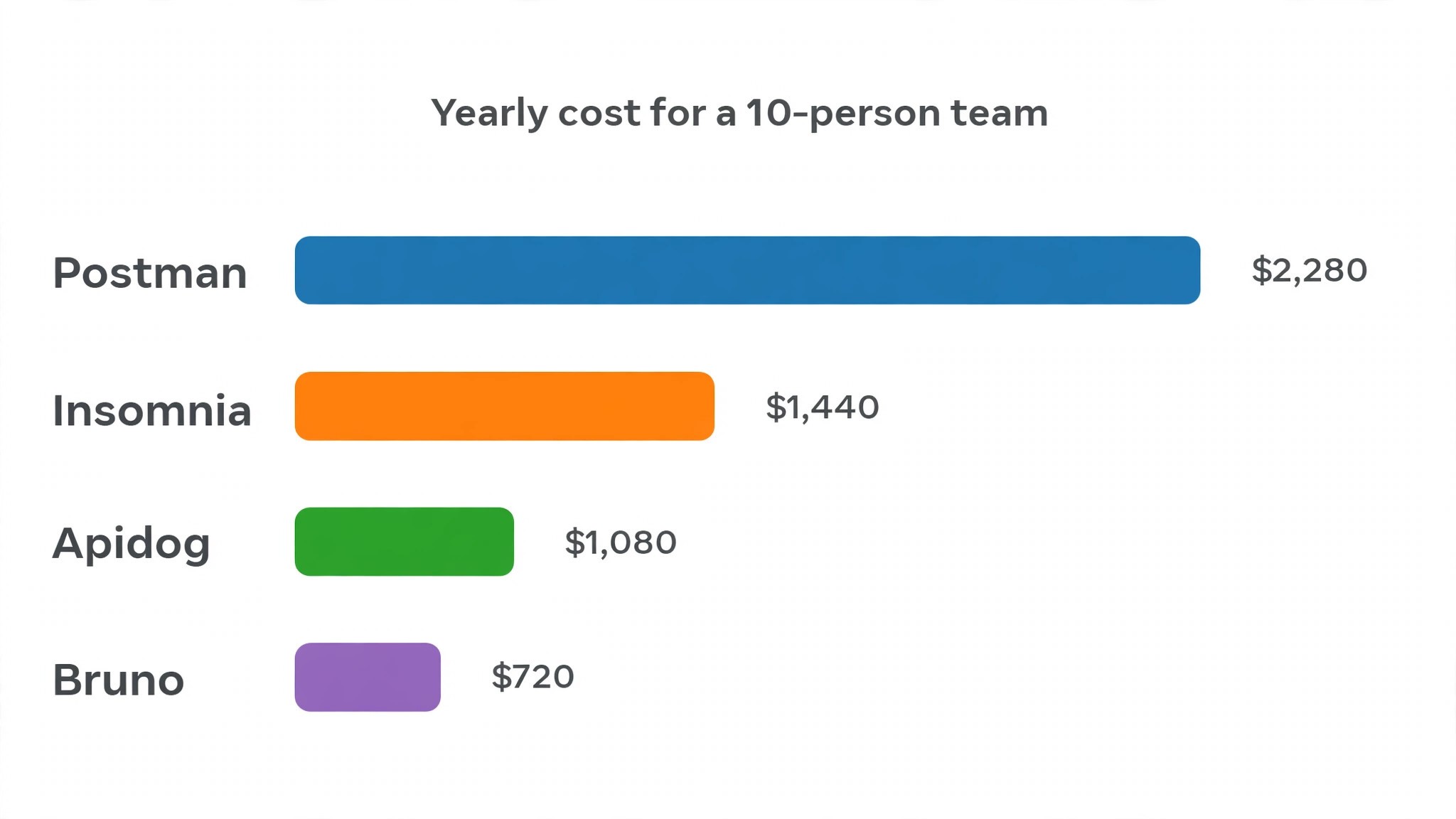
Then model the total yearly cost at your real seat count. A ten person team on Postman Team pays 2,280 dollars a year, while the same team on Bruno Pro pays 720 dollars and on Apidog Basic pays 1,080 dollars. Work through a year with your actual numbers, including monitors and CI minutes, before comparing headline prices. A 10 dollar seat difference becomes thousands of dollars across a team, and a free open source tool with Git sharing can beat a paid platform for teams that do not need cloud governance.
Finally, run your hardest test as a trial. Chain three requests where each depends on the previous response, assert on status, headers, and body shape, and run the suite from CI. Note every step that feels slow or confusing. The best api testing tools for developers make that whole path feel direct, from writing the first assertion to reading a failure report in a pull request.
What a Good API Testing Tool Must Do
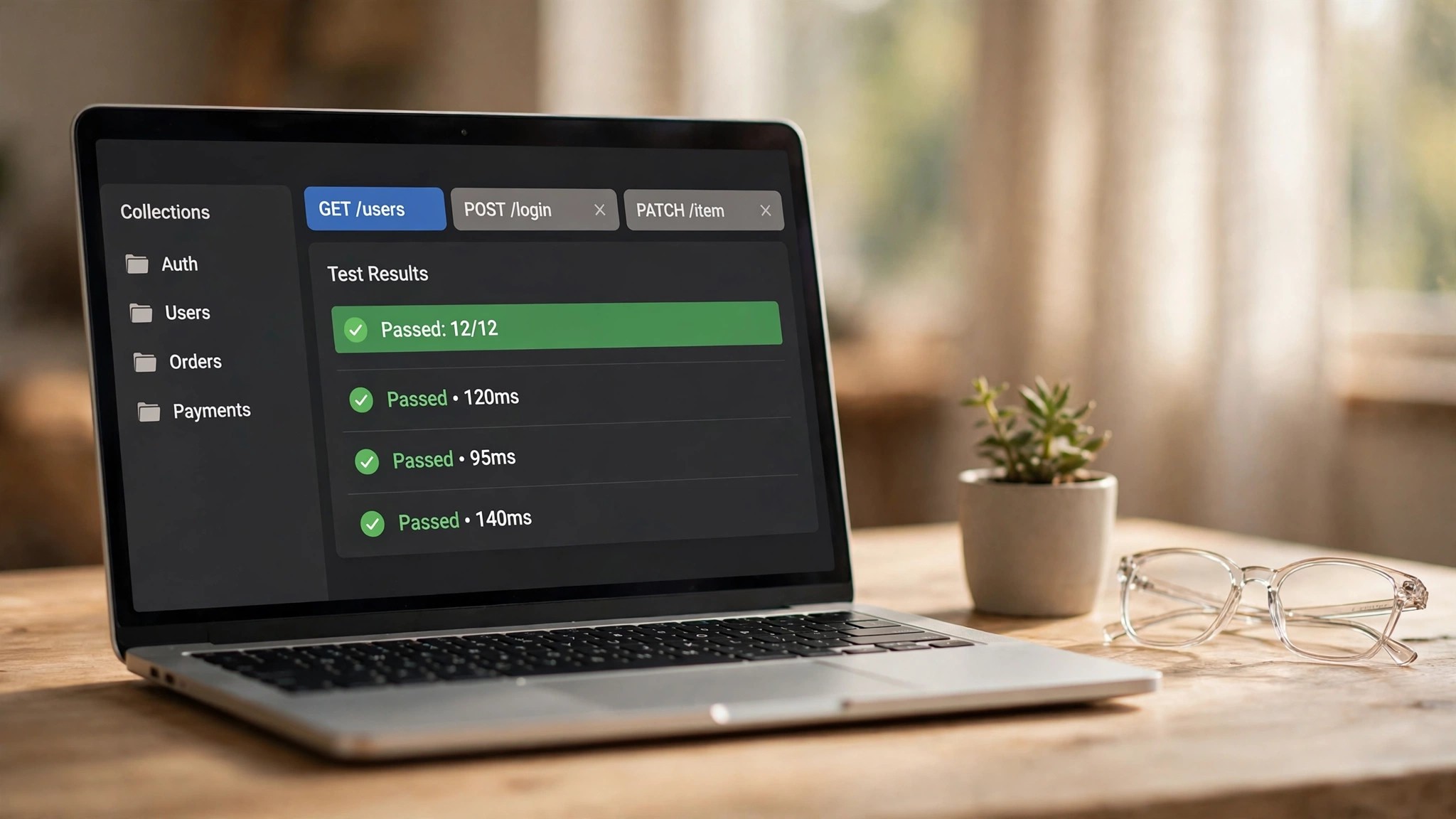
A good API testing tool answers four questions in under a minute. Which requests exist and what do they return. Which assertions guard each response. Which environment values change between staging and production. And how does a failing test report its cause. Tools that hide environments, force account creation before showing a request, or bury failure details lose hours across a team. Bruno wins praise here precisely because its requests are plain files anyone can read.
The tool must also work for the tests teams actually write, including data driven runs, chained requests, and schema validation. A team testing a checkout flow needs a run that creates a cart, adds items, applies a discount, and checks the total, with data from a table. Apidog and Postman both handle chained scenarios well, while Karate and REST Assured handle them in code. Test data driven runs in the trial, since those runs reveal whether the tool treats testing as a first class job or as an afterthought.
Environments and secrets deserve equal attention. Tokens, API keys, and base URLs must be stored safely, scoped per environment, and easy to rotate. A tool that stores secrets in plain text in a shared workspace creates a security problem that no feature list compensates for. Confirm how secrets are stored, who can see them, and whether the tool supports vaults or environment variables before you commit a team to it.
The 12 Tools in Detail
1. Postman
Postman is the API platform most developers learn first, and in 2026 it covers requests, collections, mock servers, monitors, documentation, and flows in one app. Its public API Network holds thousands of published collections, which makes it the fastest way to start calling a new API. The March 2026 relaunch narrowed the free plan to a single user, so teams now need a paid plan for collaboration, and usage is metered in AI credits, flows credits, and monitor requests.
Pricing is free for one user, Solo at 9 dollars a month, Team at 19 dollars per user per month billed annually, and Enterprise at 49 dollars per user per month. That Team price buys shared workspaces, role based access, and governance controls that large organisations need, and for a team weighing the best api testing tools for developers, that governance is the reason to pay. Postman fits enterprise teams and companies that publish public APIs. It fits poorly for small teams that only need a client and Git, since the same workflow costs far less on Bruno or Hoppscotch.
2. Bruno
Bruno is a local-first, open source API client that stores collections as plain files in your Git repository. There is no cloud account, no sync service, and no vendor lock in, which is exactly why developers who care about privacy and version control choose it. Every request, environment, and test lives in a file you can diff, review, and roll back like any other code.
Pricing is free for the open source client, with Pro at 6 dollars per user per month and Ultimate at 11 dollars per user per month billed annually. Paid tiers add features such as load testing, secret vaults, and team collaboration through Git rather than a cloud service. Bruno fits developers and small teams that already live in Git and want zero per seat cost for the core client. It fits poorly for teams that need a hosted cloud workspace with managed sharing.
3. Insomnia
Insomnia, maintained by Kong, is an open source API client and design tool with strong support for REST, GraphQL, gRPC, and WebSocket in one window. Its design editor lets teams write OpenAPI specs and generate requests from them, which shortens the path from spec to test. Git Sync keeps collections versioned, and the local vault keeps secrets on the machine rather than in the cloud.
Pricing is free for core features, with Pro at 12 dollars per user per month and Enterprise at 45 dollars per user per month. The free tier includes Git Sync for up to three collaborators, which is enough for many small teams to test the workflow before paying. Insomnia fits teams that test several protocols and want an open source core with a polished interface. It fits poorly for teams that need deep CI automation, where Apidog or Postman offer more.
4. Apidog
Apidog is an all-in-one platform that combines API design, debugging, mocking, testing, and documentation in a single application. It imports Postman collections and OpenAPI specs, so migration takes hours rather than days, and its test scenarios chain requests, assert visually, and run data driven cases from a table. The same scenarios run in GitHub Actions, GitLab CI, and Jenkins through its CLI.
Pricing is free for up to four users, with Basic at 9 dollars per user per month, Professional at 18 dollars, and Enterprise at 27 dollars billed annually. At 9 dollars per seat it is the cheapest platform that includes real time collaboration, mocks, docs, and CI in one bill. Apidog fits small and mid size teams that want to replace Postman plus a separate docs tool. It fits poorly for teams that only need a simple client, since its depth takes time to learn.
5. Hoppscotch
Hoppscotch is a lightweight, open source API client that runs in the browser and on the desktop, built for speed. It opens fast, sends requests with minimal setup, and supports REST, GraphQL, WebSocket, and SSE without the weight of a full platform. Teams that self host it keep everything inside their own infrastructure, which appeals to privacy conscious organisations.
Pricing is free for the open source self hosted version, with paid cloud tiers for teams that want hosted workspaces and collaboration. Check the vendor pricing page for the current cloud tiers, since they change as the product grows. Hoppscotch fits developers who want a fast manual client and teams that self host their tools. It fits poorly for teams that need deep test automation, monitors, and contract testing in one place.
6. SoapUI
SoapUI is the long running functional testing tool for SOAP and REST APIs, now sold as part of SmartBear ReadyAPI. It supports data driven tests, assertions, mock services, and load testing from one interface, and it handles the enterprise SOAP services that newer clients ignore. Large organisations with legacy services still depend on it for regression suites that must run the same way every release.
Pricing is free for the open source SoapUI edition, while the ReadyAPI test module costs around 749 dollars per user per year, with load and virtualisation modules priced separately. Check the vendor page for exact current pricing. SoapUI fits enterprise QA teams with SOAP services and heavy functional suites. It fits poorly for modern REST only teams, since its interface feels dated and its paid tiers cost far more than newer alternatives.
7. Katalon Studio
Katalon Studio is a scripted test automation platform that covers API, web, mobile, and desktop testing from one interface. Its API testing supports REST and SOAP requests, data driven tests, and CI integration, while its low code recorders help QA engineers who do not write code every day. Teams that test APIs alongside web interfaces get more value from Katalon than from a client only tool.
Pricing is free for the basic Studio edition, with paid tiers starting near 49 dollars per user per month in 2026 guides, so check the vendor pricing page for the current figure. Paid tiers add advanced reporting, TestOps analytics, and team management. Katalon fits QA teams that need API testing inside a broader automation suite. It fits poorly for developers who only need an API client, since its breadth adds setup time and cost.
8. JMeter
JMeter is the free Apache open source tool for load and performance testing, and it remains the standard for stress testing APIs at scale. It sends thousands of concurrent requests, measures response time and error rate, and produces reports that show exactly where an API breaks under load. Every performance engineer has used it, and its plugin ecosystem covers almost every protocol and reporting need.
Pricing is free, with no paid tier, which makes it the cheapest serious load testing option by a wide margin. The cost is learning time, since JMeter has a steep curve and its interface rewards patience. JMeter fits teams that need to prove an API survives traffic spikes before launch. It fits poorly for functional testing, since it is built for load, not for readable assertions and contract checks.
9. Karate
Karate is an open source API test framework that lets developers write tests in a readable plain language syntax, with built in support for HTTP, JSON assertions, and data driven cases. It runs on the JVM, integrates with CI pipelines, and doubles as a mock server, so teams can test against a fake service before the real one exists. Its syntax reads almost like documentation, which makes tests easy to review.
Pricing is free open source, with commercial support available for teams that want it. There is no per seat cost, which makes Karate attractive for teams that already run Java or Kotlin services. Karate fits developers who prefer code driven tests and want their API tests versioned with the application. It fits poorly for non technical testers, since it has no visual client and expects comfort with code.
10. REST Assured
REST Assured is a Java library for testing REST APIs, built for developers who write their tests in the same language as their services. It offers a fluent syntax for sending requests, asserting on status codes and body fields, and validating JSON schemas, and it slots directly into JUnit or TestNG suites. Teams that already test Java services in CI get API coverage with almost no new tooling.
Pricing is free open source, maintained by the community. The cost is developer time, since every test is code and there is no interface for manual exploration. REST Assured fits Java shops that want API tests inside their existing test suite. It fits poorly for teams that need a visual client, shared workspaces, or support for non Java stacks.
11. Thunder Client
Thunder Client is a lightweight API client that runs as an extension inside Visual Studio Code, so developers never leave their editor to test an endpoint. It supports collections, environments, and test scripts, with a clean interface that covers the daily manual testing job. Its appeal is focus, since it does one thing well and stays out of the way.
Pricing is free for the core extension, with a paid Pro tier for advanced features such as team collaboration and extended history. Check the vendor page for the current Pro price. Thunder Client fits developers who live in VS Code and want testing one keystroke away. It fits poorly for teams that need monitors, mocks, and deep CI reporting, which belong in a full platform.
12. Playwright
Playwright is Microsoft free open source framework for browser automation, and its API testing support lets teams test endpoints with the same tool they use for end to end tests. A single suite can call an API to set up test data, run a browser flow, and then verify the result through the API again. That combination is powerful for teams that already use Playwright for UI testing.
Pricing is free open source, with no paid tier. API testing is one part of a bigger framework, so it lacks the dedicated client features of Postman or Insomnia, such as saved workspaces and mock servers. Playwright fits teams that already run Playwright end to end tests and want API setup and verification in the same suite. It fits poorly as a standalone API client for teams that do not use its browser features.
The Total Yearly Cost, Worked Honestly
A testing bill has three parts, and comparing seat prices alone hides two of them. The seat price is the most visible part. Monitor runs and CI minutes are the second part, since platforms meter scheduled runs and charge for overages. The third part is migration cost, since moving hundreds of collections from one tool to another takes days of engineering time.
Work an example with real numbers. A ten person team on Postman Team pays 2,280 dollars a year, while the same team on Apidog Basic pays 1,080 dollars and on Bruno Pro pays 720 dollars. A team that adds monitors on Postman pays extra for monitor requests beyond its allowance, while a team on Bruno pays nothing extra because its collections run from Git and CI. That is why 2026 comparisons rank the best api testing tools for developers by total cost of ownership rather than sticker price, and why your seat count is the most important input.
The practical rule is simple. If your team needs cloud governance, SSO, and published docs, pay for a platform and budget the metered extras. If your team needs a client and Git, choose a free or cheap local tool and spend the savings on CI time. A platform that nobody opens is the most expensive tool in the list, whatever its seat price says.
Mistakes Teams Make When Choosing an API Tool
The first mistake is choosing on brand recognition alone. Postman is the default answer in most conversations, but a team that tests in Git will fight its cloud model every day, and a team that needs deep automation will outgrow a simple client in a month. Match the tool to the workflow, not to the logo your last job used, and run a real trial with your hardest test before committing.
The second mistake is ignoring the free plan limits. Postman free now covers one user only, so a team of three has no free option, and Insomnia free caps Git Sync at three collaborators. A trial that works for one developer can fail for a team of five, and the surprise arrives at the first invoice. Count your seats, check the free limits, and price the plan you will actually end up on.
The third mistake is skipping contract testing. Teams that test endpoints by hand discover breaking changes from customers, while teams that validate schemas in CI catch them in a pull request. Set up schema validation early, version the schema with the code, and run the suite on every change. The habit matters more than the tool, and any tool in this guide can run schema checks if you configure it.
Setup Checklist
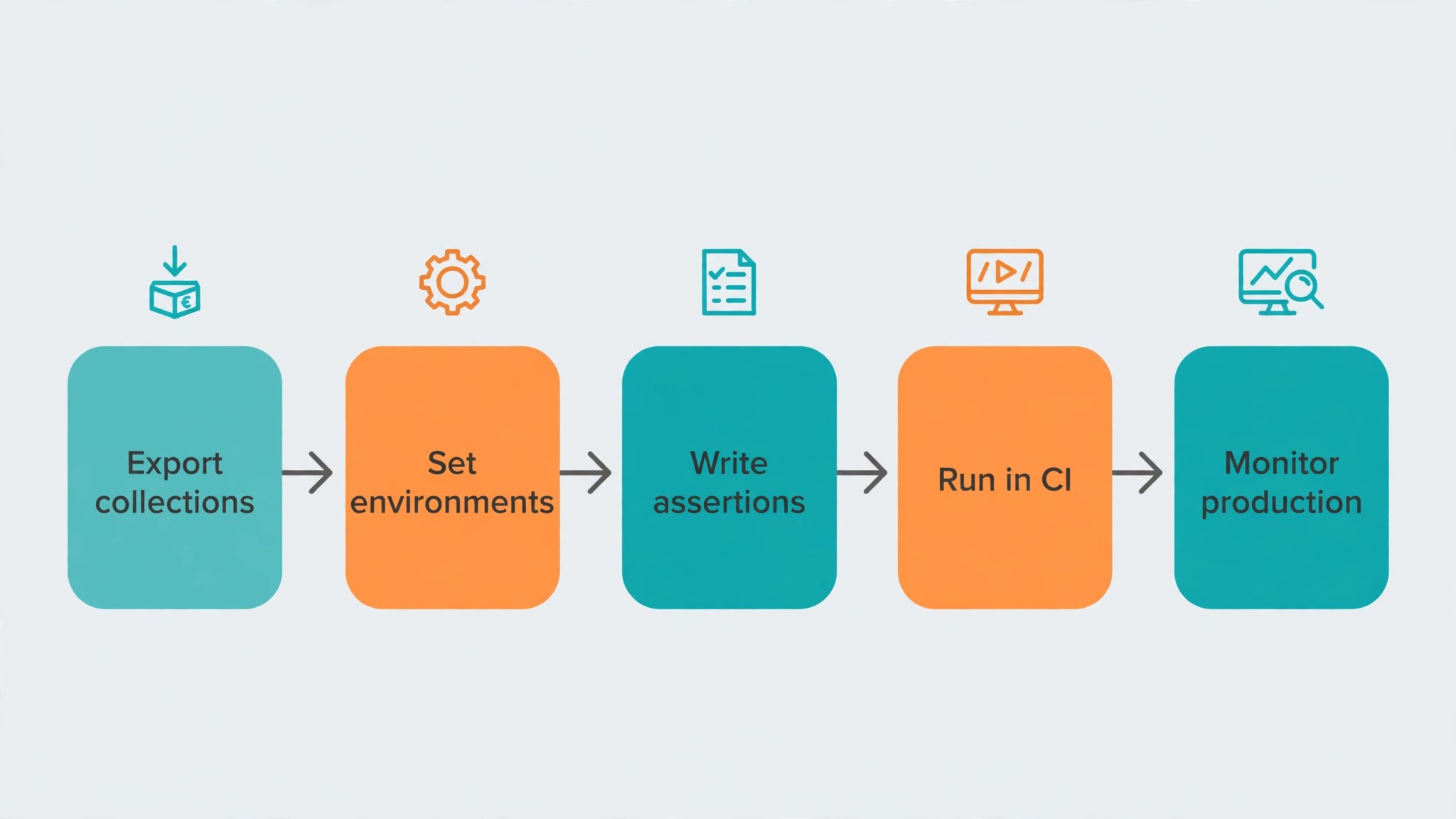
Use this checklist when you move a team to a new API testing tool, and keep a copy in your team wiki.
1. Export existing collections and confirm every request imports cleanly. 2. Set up environments for local, staging, and production with separate secrets. 3. Write assertions for status, headers, and body shape on every critical endpoint. 4. Add schema validation for the endpoints your clients depend on most. 5. Connect the test suite to CI so it runs on every pull request. 6. Schedule monitor runs for production endpoints that customers hit daily. 7. Store secrets in a vault or environment variables, never in plain text. 8. Train the team on the new workflow with a real endpoint, not a demo.
Related Guides
Keep exploring with these guides on Stratilyze:
- Best AI Portfolio Builders for Developers (10 Tools)
- Top 10 AI Testing Tools (10 Tools)
- Best AI Testing Tools for Qa Teams (12 Tools)
Frequently Asked Questions
Which API testing tool is best for beginners?
Bruno is the easiest start for a solo developer, since it is free, stores requests as plain files, and has no account setup. Hoppscotch is the fastest browser option for a quick check. Postman is the best beginner platform for teams that want guided onboarding, shared workspaces, and a huge library of public collections to learn from.
Is Postman still free in 2026?
Postman free is limited to a single user since March 2026, so it works for solo developers but not for teams. Solo costs 9 dollars a month, Team costs 19 dollars per user per month billed annually, and Enterprise costs 49 dollars per user per month. Teams that relied on free collaboration should budget for a paid plan or move to Bruno, Hoppscotch, or Apidog free tiers.
Can I test GraphQL and gRPC with these tools?
Yes, and Insomnia is the strongest single client for both, with Postman and Apidog close behind. Bruno handles GraphQL well and supports gRPC in paid tiers. Check your protocol list before choosing, since a tool that covers REST only will force you into a second app for GraphQL or gRPC work.
What is the cheapest way to test APIs as a team?
Bruno and Hoppscotch are free for teams that share collections through Git, and Apidog free covers up to four users with collaboration included, which makes them the cheapest route among the best api testing tools for developers. JMeter, Karate, REST Assured, and Playwright are free for automation and load testing. The cheapest credible platform with cloud collaboration is Apidog Basic at 9 dollars per user per month.
How do I run API tests in CI?
Most tools in this guide ship a CLI runner. Postman uses Newman, Apidog has its own CLI, Bruno runs through its CLI, and Karate, REST Assured, and Playwright run as code in your CI pipeline. Store collections in Git, run the suite on every pull request, and fail the build when a test fails, so broken endpoints never reach production.
Should small teams use a platform or a local client?
A local client wins when the team is small, works in Git, and needs no governance. A platform wins when the team shares collections across roles, publishes docs, and needs monitors and reporting. The break point sits near five to ten people, where shared workspaces and access control start to matter more than the seat price.
A Final Word Before You Choose
There is no universal winner among these twelve, because the right tool follows how your team works and how many seats you pay for. A solo developer weighing the best api testing tools for developers should start with Bruno or Hoppscotch. A small team should start with Apidog or Insomnia. An enterprise team should start with Postman, with SoapUI for deep suites and JMeter for load. A Java shop should add Karate or REST Assured to its CI pipeline.
Whichever you choose, test your hardest endpoint, model the yearly cost at your real seat count, and set up schema validation before your next release. A testing tool earns its fee in broken endpoints caught in CI, not in a demo. Choose the tool that does that job on your busiest release day, and the rest of the feature list will take care of itself.