

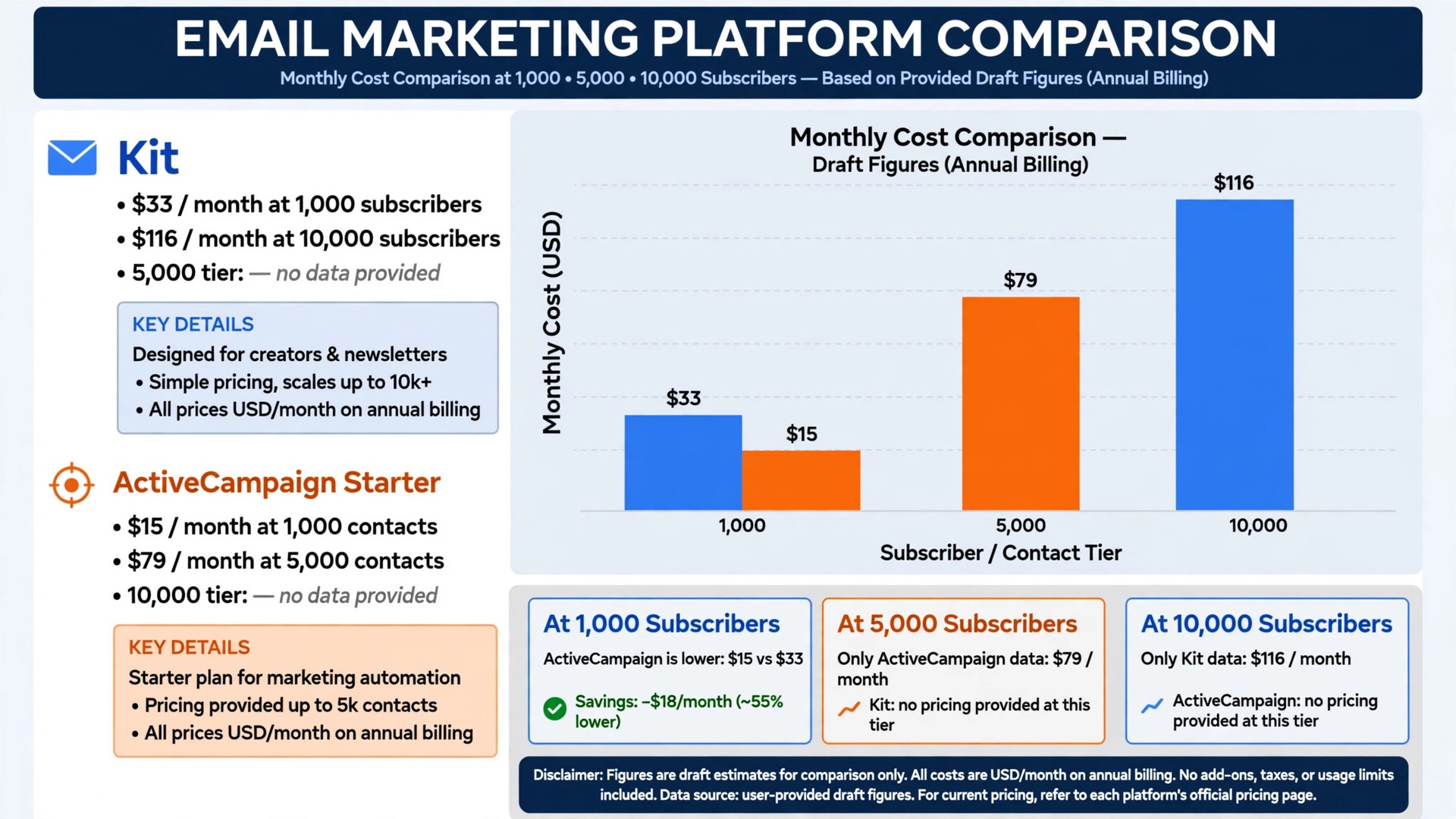
Kit charges 33 dollars a month at 1,000 subscribers and 116 dollars at 10,000 on annual billing in recent comparisons, while ActiveCampaign Starter climbs from 15 dollars at 1,000 contacts to 79 dollars at 5,000, and that price curve is why choosing the best email marketing software for online course creators deserves a spreadsheet before a launch. Email still sells courses, because a launch lives or dies on the sequence that warms, teaches and closes, not on a single announcement post.
Course creators need email to do three jobs at once. Launch sequences must build urgency over days without burning trust, evergreen funnels must sell while the creator sleeps, and student newsletters must keep learners opening lessons instead of drifting away. A general email tool sends broadcasts well and automation poorly, so the creator ends up stitching tags, segments and course platform triggers by hand. That hand work grows with every new course.
This guide compares eleven tools on the same questions. What does the entry plan actually include, how does the bill grow with list size, how well does it handle launches, funnels and student mail, and where does it fall short. Prices below are starting points reported in recent comparisons, so confirm the current price on the vendor page before you buy.
Best Email Marketing Software For Online Course Creators Tools at a Glance
Read the table as a shortlist, not as a ranking. The free tool suits a starting creator perfectly, while the automation led platform suits a creator running several funnels. Pick three finalists, then read their full sections before committing to an annual plan.
| Tool | Starting price | Best for |
|---|---|---|
| Kit | Free plan to 10,000 subscribers, with Creator from 33 dollars a month for 1,000 subscribers on annual billing in recent comparisons | course creators who want creator first email and commerce |
| MailerLite | Free plan to 250 subscribers, with paid plans from 12 dollars a month for 500 subscribers in recent comparisons | creators who want simple newsletters and automation on a budget |
| ActiveCampaign | From 15 dollars a month for 1,000 contacts on annual billing for Starter in recent comparisons | creators running several funnels with advanced automation |
| Mailchimp | Free plan to 250 contacts, with Essentials from 13 dollars a month for 500 contacts in recent comparisons | creators who want a familiar all in one suite |
| Brevo | Free tier at 300 emails a day, with Starter from 9 dollars a month in recent comparisons | creators billed on send volume rather than list size |
| GetResponse | From 19 dollars a month in recent comparisons | creators who want email plus webinars and funnels |
| AWeber | From 15 dollars a month in recent comparisons | creators who want simple, reliable email with strong support |
| Moosend | From 9 dollars a month on annual billing in recent comparisons | creators who want affordable automation |
| Constant Contact | From 12 dollars a month in recent comparisons | creators who want phone support and simple campaigns |
| Beehiiv | Check the vendor page | creators whose course business leads with a newsletter |
| Flodesk | Check the vendor page | creators who want beautiful emails at a flat rate |
Why best email marketing software for online course creators Beats a General Broadcast Tool
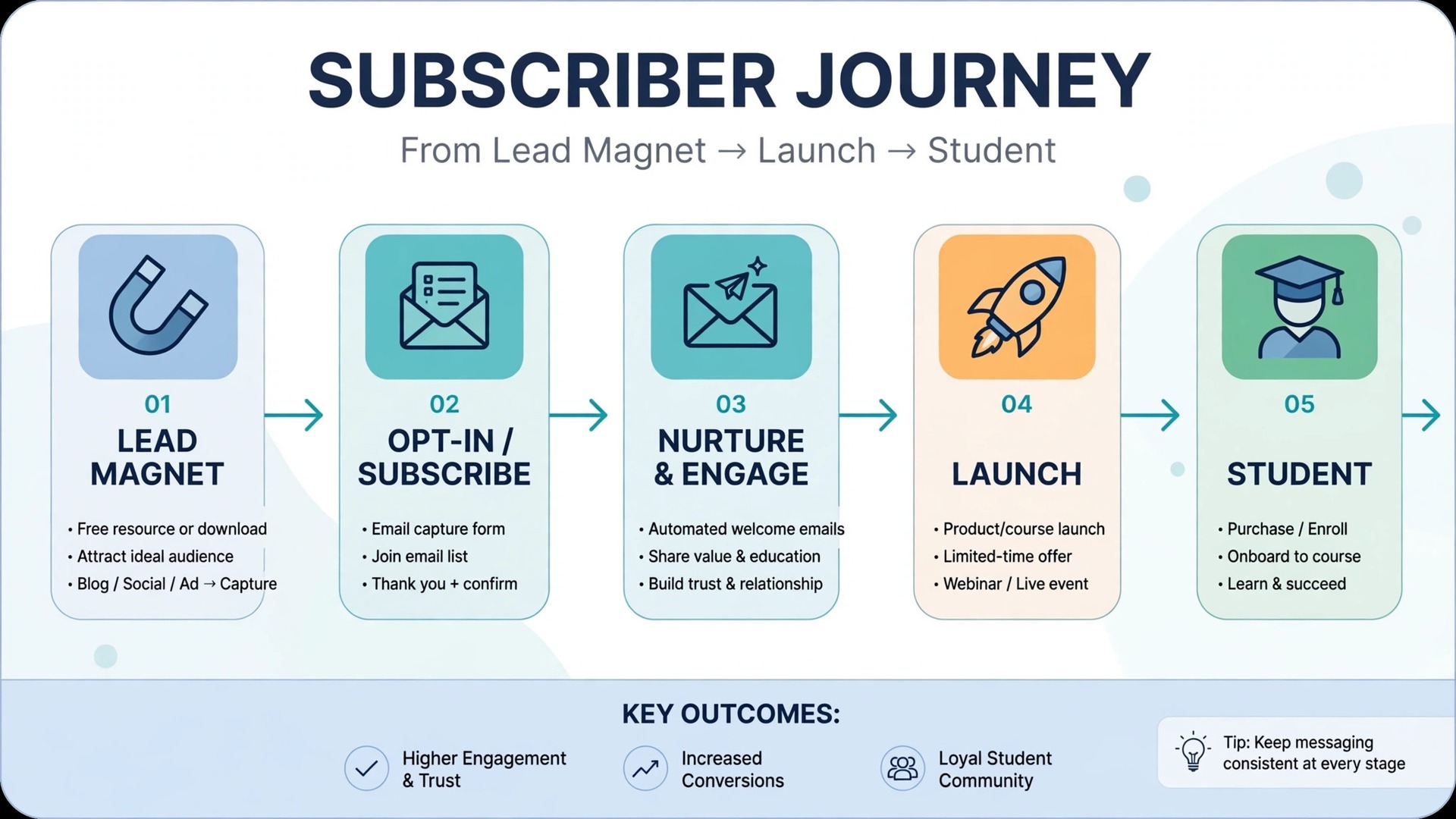
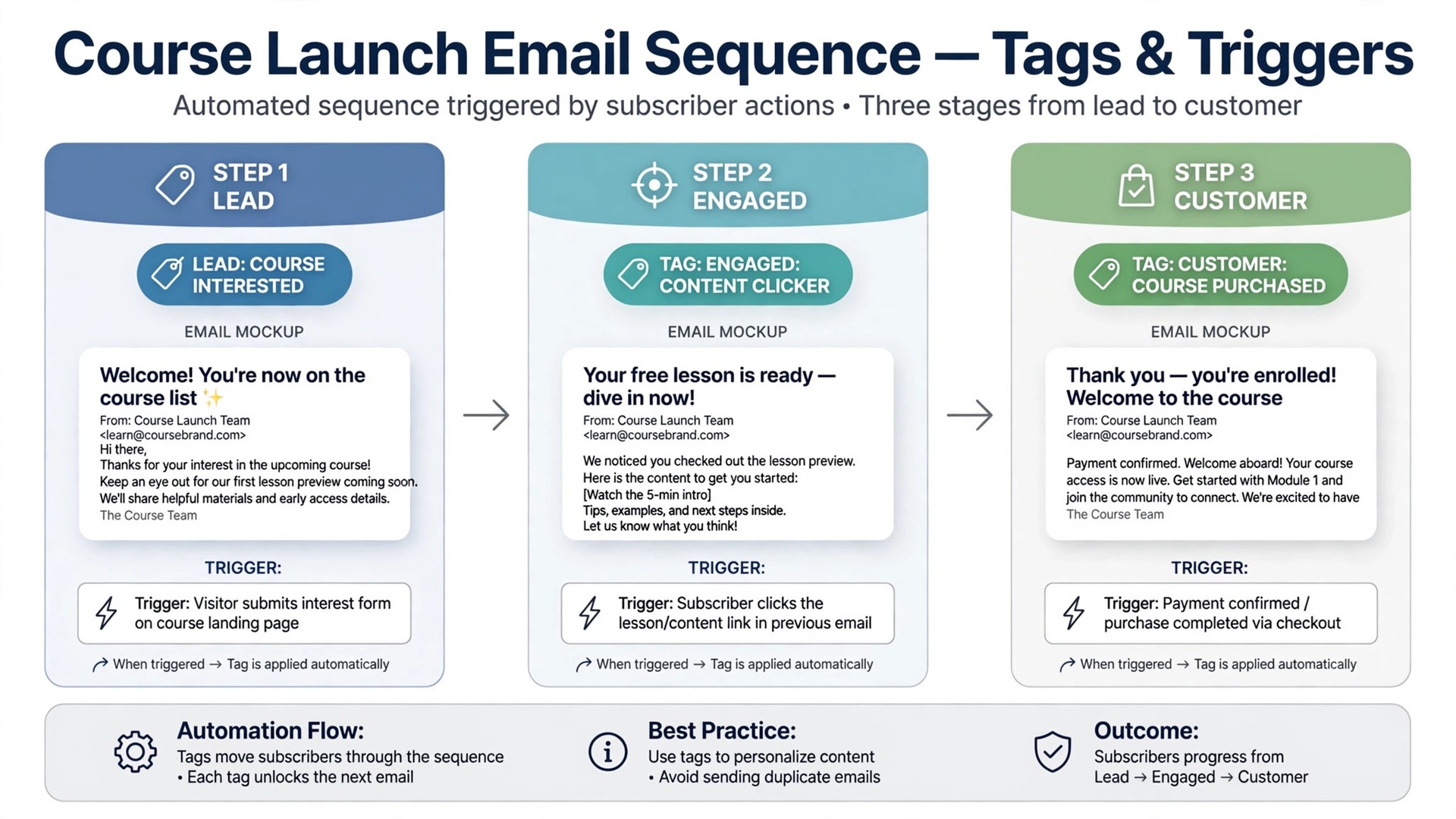
A broadcast tool sends one message to everyone. A creator email system runs journeys that change with behaviour. It tags a subscriber who clicked a lesson preview, moves a buyer into a student sequence, removes a graduate from a sales funnel and sends a nudge to a student who stopped at lesson three. A tool that only broadcasts forces the creator to run those journeys by memory, and memory is where launches leak sales.
Deliverability is the second difference. A launch email that lands in promotions or spam costs more than a month of software fees, because launch revenue concentrates into a few days. Tools with good sending reputations, domain authentication guidance and list hygiene help keep launch mail in the inbox. A cheap tool with poor deliverability is the most expensive tool a creator can buy in launch week.
The third difference is course platform fit. Email must connect to the course platform, the checkout and the payment tool, so purchases trigger student mail and refunds stop sales mail automatically. A tool with native course integrations saves setup hours and prevents embarrassing mistakes, like a sales email reaching a student who already bought. Test the exact integration the creator uses, not a generic integration list.
Start the trial with a real launch, not with a demo account filled with perfect test data. Load your actual list segments, your real lead magnet and your true course prices, then ask a colleague to act as a subscriber and run the full journey from signup to purchase exactly as a student would. A trial that mirrors real work exposes slow screens, missing triggers and confusing steps before any money changes hands.
Eleven Tools, Reviewed One by One
Kit
Kit is the pick for course creators who want creator first email and commerce. It covers landing pages, forms, broadcasts, tags, sequences, visual automations on paid plans and digital product sales. At Free plan to 10,000 subscribers, with Creator from 33 dollars a month for 1,000 subscribers on annual billing in recent comparisons, it sits in a price band a small business can judge against the hours it saves or the revenue it protects.
The limit is free plan limits, because visual automations and sequences begin on the paid Creator plan rather than the free plan. Choose Kit if you sell courses and digital products and want a creator built system. Skip it if you need deep CRM logic, because a marketing automation platform will go further, because a tool bought for one job rarely excels at a different one.
Budget it as Free plan to 10,000 subscribers, with Creator from 33 dollars a month for 1,000 subscribers on annual billing in recent comparisons at entry, and reprice it at your real size before signing, because the entry tier rarely matches a growing team. If course creators who want creator first email and commerce describes your daily work, shortlist Kit for the trial round and test the exact job it will do first.
MailerLite
MailerLite is the pick for creators who want simple newsletters and automation on a budget. It covers landing pages, websites, email automation, AI writing help and segmentation in a lightweight platform. At Free plan to 250 subscribers, with paid plans from 12 dollars a month for 500 subscribers in recent comparisons, it sits in a price band a small business can judge against the hours it saves or the revenue it protects.
The trade-off is advanced automation depth, because complex branching and CRM features are thinner than on automation led rivals. Choose MailerLite if you want the most for the least money with a gentle learning curve. Skip it if you run several branching funnels with CRM logic, because an automation platform fits better, because a tool bought for one job rarely excels at a different one.
Budget it as Free plan to 250 subscribers, with paid plans from 12 dollars a month for 500 subscribers in recent comparisons at entry, and reprice it at your real size before signing, because the entry tier rarely matches a growing team. If creators who want simple newsletters and automation on a budget describes your daily work, shortlist MailerLite for the trial round and test the exact job it will do first.
ActiveCampaign
ActiveCampaign is the pick for creators running several funnels with advanced automation. It covers deep automation, conditional branching, CRM, site tracking and SMS and WhatsApp options on higher tiers. At From 15 dollars a month for 1,000 contacts on annual billing for Starter in recent comparisons, it sits in a price band a small business can judge against the hours it saves or the revenue it protects.
The watch-out is price growth and complexity, because Starter allows only five actions per automation and higher tiers climb fast with contacts. Choose ActiveCampaign if you need serious automation and CRM in one system. Skip it if you are a starting creator, because the learning curve and price exceed what a first launch needs, because a tool bought for one job rarely excels at a different one.
Budget it as From 15 dollars a month for 1,000 contacts on annual billing for Starter in recent comparisons at entry, and reprice it at your real size before signing, because the entry tier rarely matches a growing team. If creators running several funnels with advanced automation describes your daily work, shortlist ActiveCampaign for the trial round and test the exact job it will do first.
Mailchimp
Mailchimp is the pick for creators who want a familiar all in one suite. It covers email, landing pages, automation basics, audience tools and reporting in a widely known platform. At Free plan to 250 contacts, with Essentials from 13 dollars a month for 500 contacts in recent comparisons, it sits in a price band a small business can judge against the hours it saves or the revenue it protects.
The limit is price growth, because costs climb steeply as contacts grow, reaching about 75 dollars at 5,000 in recent comparisons. Choose Mailchimp if familiarity and a wide integration list matter most. Skip it if list growth is rapid, because the price curve will punish success, because a tool bought for one job rarely excels at a different one.
Budget it as Free plan to 250 contacts, with Essentials from 13 dollars a month for 500 contacts in recent comparisons at entry, and reprice it at your real size before signing, because the entry tier rarely matches a growing team. If creators who want a familiar all in one suite describes your daily work, shortlist Mailchimp for the trial round and test the exact job it will do first.
Brevo
Brevo is the pick for creators billed on send volume rather than list size. It covers email, SMS, CRM basics and automation priced by emails sent rather than contacts held. At Free tier at 300 emails a day, with Starter from 9 dollars a month in recent comparisons, it sits in a price band a small business can judge against the hours it saves or the revenue it protects.
The trade-off is automation depth, because it suits volume senders better than creators needing deep branching funnels. Choose Brevo if you send a lot to a modest list and want volume pricing. Skip it if you need deep course funnel branching, because automation led tools go further, because a tool bought for one job rarely excels at a different one.
Budget it as Free tier at 300 emails a day, with Starter from 9 dollars a month in recent comparisons at entry, and reprice it at your real size before signing, because the entry tier rarely matches a growing team. If creators billed on send volume rather than list size describes your daily work, shortlist Brevo for the trial round and test the exact job it will do first.
GetResponse
GetResponse is the pick for creators who want email plus webinars and funnels. It covers email, automation, landing pages, webinars and funnel tools in one marketing suite. At From 19 dollars a month in recent comparisons, it sits in a price band a small business can judge against the hours it saves or the revenue it protects.
The watch-out is creator focus, because it is a general marketing suite rather than a creator first platform, so course commerce is thinner. Choose GetResponse if you want webinars and funnels alongside email. Skip it if course commerce is your core, because a creator tool fits better, because a tool bought for one job rarely excels at a different one.
Budget it as From 19 dollars a month in recent comparisons at entry, and reprice it at your real size before signing, because the entry tier rarely matches a growing team. If creators who want email plus webinars and funnels describes your daily work, shortlist GetResponse for the trial round and test the exact job it will do first.
AWeber
AWeber is the pick for creators who want simple, reliable email with strong support. It covers email, landing pages, automation basics, segmentation and a long record of creator use. At From 15 dollars a month in recent comparisons, it sits in a price band a small business can judge against the hours it saves or the revenue it protects.
The limit is modern automation depth, because advanced branching and CRM features lag automation led rivals. Choose AWeber if you want reliability and human support over cutting edge automation. Skip it if you need deep branching funnels, because an automation platform fits better, because a tool bought for one job rarely excels at a different one.
Budget it as From 15 dollars a month in recent comparisons at entry, and reprice it at your real size before signing, because the entry tier rarely matches a growing team. If creators who want simple, reliable email with strong support describes your daily work, shortlist AWeber for the trial round and test the exact job it will do first.
Moosend
Moosend is the pick for creators who want affordable automation. It covers email, automation, landing pages and segmentation at a low entry price. At From 9 dollars a month on annual billing in recent comparisons, it sits in a price band a small business can judge against the hours it saves or the revenue it protects.
The trade-off is scale and ecosystem, because the integration list and support breadth are smaller than the largest platforms. Choose Moosend if budget matters and automation basics cover your funnels. Skip it if you need a huge integration ecosystem, because larger platforms offer more, because a tool bought for one job rarely excels at a different one.
Budget it as From 9 dollars a month on annual billing in recent comparisons at entry, and reprice it at your real size before signing, because the entry tier rarely matches a growing team. If creators who want affordable automation describes your daily work, shortlist Moosend for the trial round and test the exact job it will do first.
Constant Contact
Constant Contact is the pick for creators who want phone support and simple campaigns. It covers email, templates, event tools and reporting with a reputation for helpful support. At From 12 dollars a month in recent comparisons, it sits in a price band a small business can judge against the hours it saves or the revenue it protects.
The watch-out is automation depth and price growth, because advanced funnels cost more and climb with contacts. Choose Constant Contact if support and simplicity matter most. Skip it if you run complex evergreen funnels, because automation led tools go further, because a tool bought for one job rarely excels at a different one.
Budget it as From 12 dollars a month in recent comparisons at entry, and reprice it at your real size before signing, because the entry tier rarely matches a growing team. If creators who want phone support and simple campaigns describes your daily work, shortlist Constant Contact for the trial round and test the exact job it will do first.
Beehiiv
Beehiiv is the pick for creators whose course business leads with a newsletter. It covers newsletter publishing, paid subscriptions, referral growth and email in a newsletter first platform. At Check the vendor page, it sits in a price band a small business can judge against the hours it saves or the revenue it protects.
The limit is course funnel depth, because it is built for newsletters first rather than full course launch automation. Choose Beehiiv if your newsletter is the main product and courses follow it. Skip it if full launch funnels are your core, because a creator email tool fits better, because a tool bought for one job rarely excels at a different one.
Budget it as Check the vendor page at entry, and reprice it at your real size before signing, because the entry tier rarely matches a growing team. If creators whose course business leads with a newsletter describes your daily work, shortlist Beehiiv for the trial round and test the exact job it will do first.
Flodesk
Flodesk is the pick for creators who want beautiful emails at a flat rate. It covers design led templates, email, automation basics and segments with a flat rate model that does not rise with list size. At Check the vendor page, it sits in a price band a small business can judge against the hours it saves or the revenue it protects.
The trade-off is automation depth, because advanced branching and course commerce are thinner than on creator led rivals. Choose Flodesk if design matters and a flat rate suits a growing list. Skip it if deep funnel branching is your core, because automation led tools go further, because a tool bought for one job rarely excels at a different one.
Budget it as Check the vendor page at entry, and reprice it at your real size before signing, because the entry tier rarely matches a growing team. If creators who want beautiful emails at a flat rate describes your daily work, shortlist Flodesk for the trial round and test the exact job it will do first.
Best Pick by Job for Online Course Creators
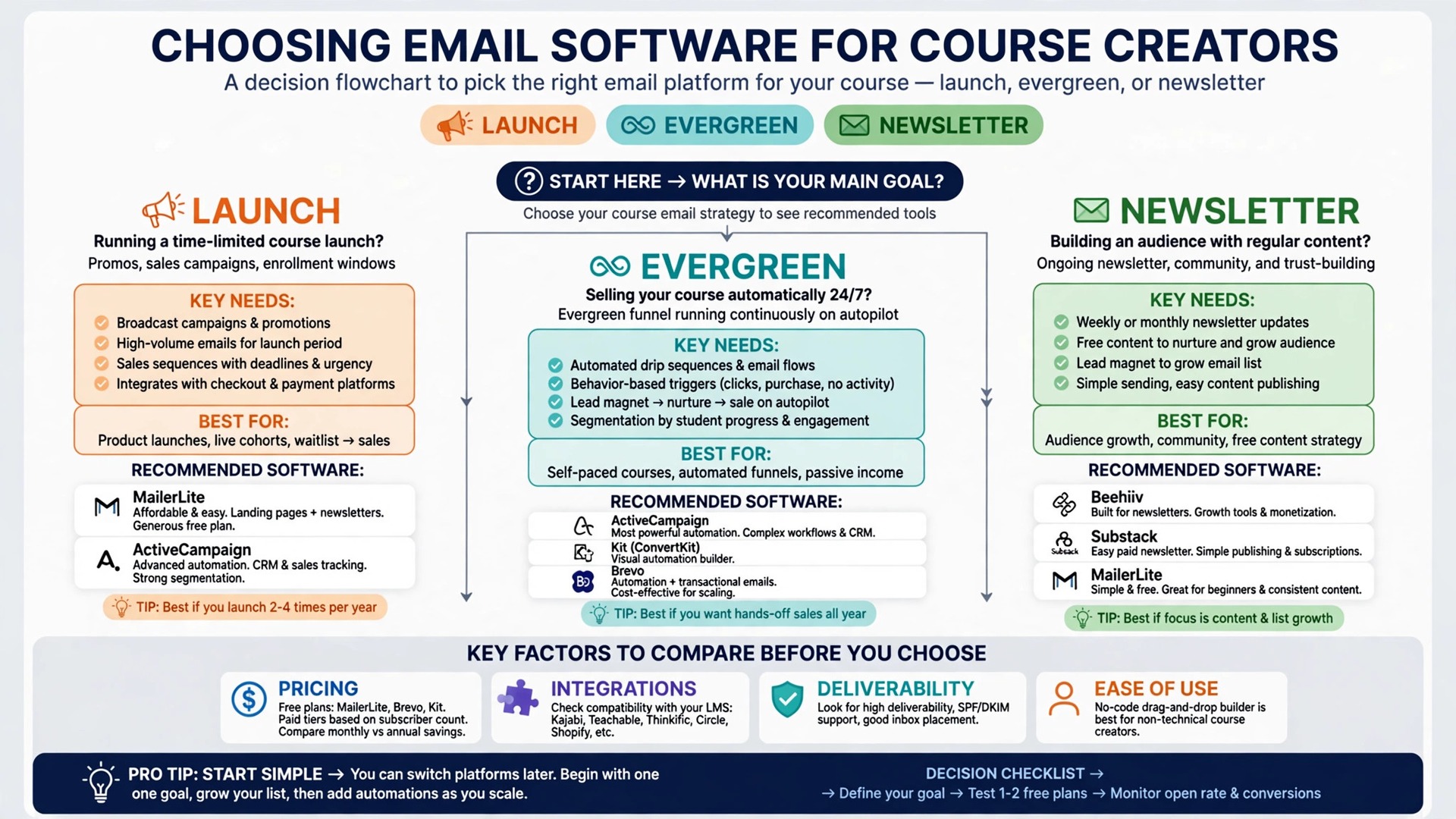
The right tool changes with the job. Use this table to match the pick to the job, then confirm the fit by testing that exact job in a trial. That matching step turns a general search for best email marketing software for online course creators into a shortlist that fits real work.
| Job | Best pick | Why it wins |
|---|---|---|
| Launch sequences | Kit | Creator sequences, tags and product sales built for launches |
| Evergreen funnels | ActiveCampaign | Deep branching automation that sells while the creator sleeps |
| Student newsletters | MailerLite | Simple newsletters, landing pages and automation at low cost |
The Lead Magnet Checklist Before You Pay
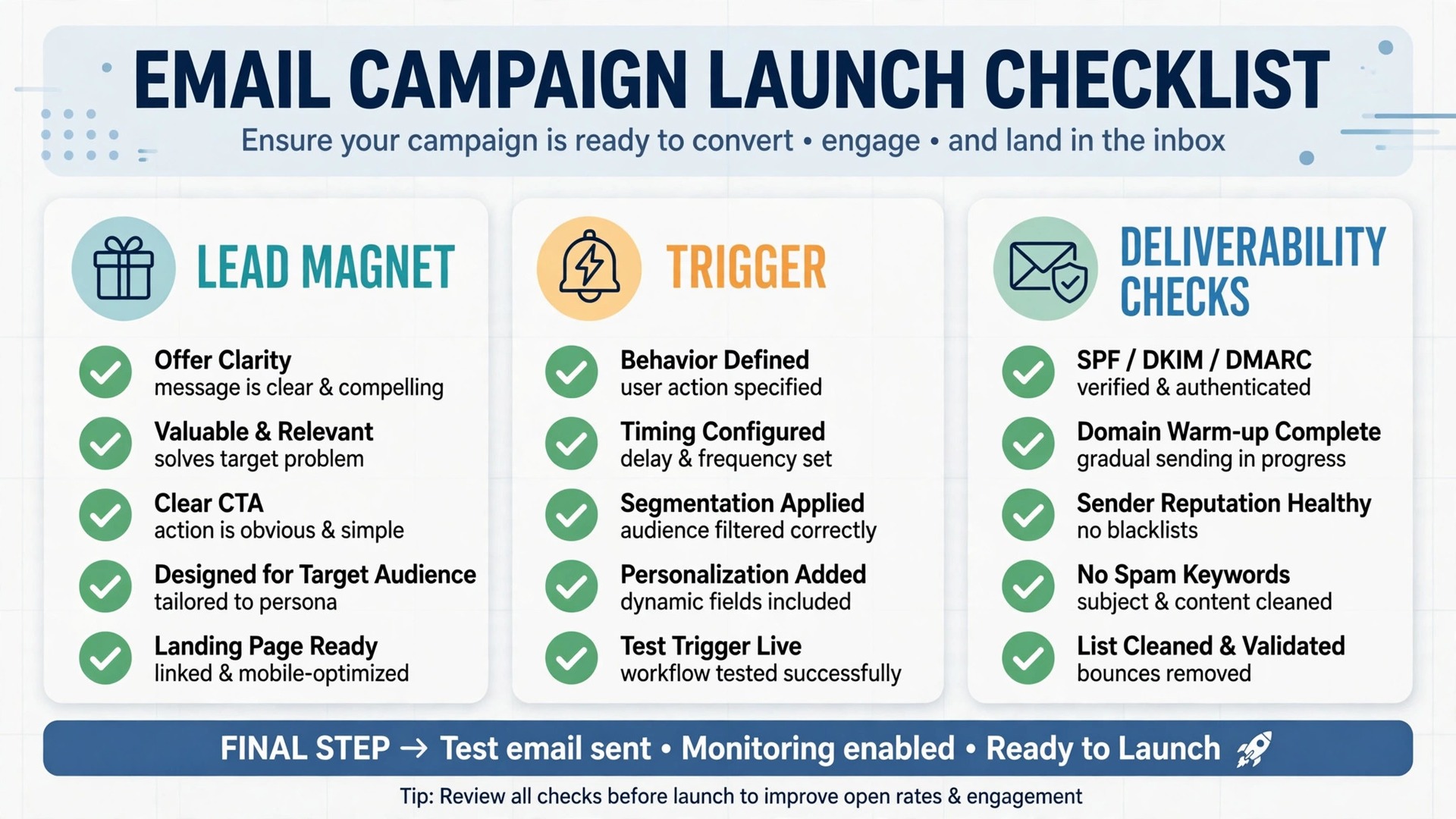
Run through this checklist on every finalist before signing. A platform that fails two or more items will cost more in lost launch sales than it saves in subscription fees, because lead magnets are where creator email systems earn or lose trust. Run the same checks when comparing best email marketing software for online course creators, because a policy that looks fair on paper must also work in daily use.
– Check that the lead magnet delivers instantly, tags the subscriber by topic and starts the right sequence without manual work. – Check that launch sequences, evergreen funnels and student newsletters can run side by side, with buyers removed from sales mail automatically. – Check that course purchases, refunds and lesson progress trigger the correct emails through your exact course platform integration. – Check that domain authentication, list hygiene and unsubscribe handling are clear, so launch mail reaches the inbox. – Check that segments, tags and reports show opens, clicks, sales and student drop off in one place, without exporting to a spreadsheet. – Check that your subscriber list, tags and sequence history can be exported, so the creator is never locked into a tool it cannot leave.
What a Course Creator Really Pays Each Month
The headline plan price hides the real decision, because list growth moves the bill faster than any other factor. A creator at 1,000 subscribers on Kit Creator pays 33 dollars a month, while the same creator at 10,000 pays 116 dollars, a gap of nearly 1,000 dollars a year. On ActiveCampaign Starter the climb is steeper, from 15 dollars at 1,000 contacts to 79 dollars at 5,000. Compare the full monthly total at the list size you expect in a year, not the size you have today.
At a small size, the maths favours a free or low cost start. A starting creator on a free plan keeps almost all launch revenue, while the same creator on a 49 dollar plan needs extra sales to justify the gap. At a larger size, the maths flips, because a platform that improves deliverability, automates student nudges and recovers abandoned carts can pay for itself from one extra sale per launch.
Watch what counts as a contact. Some platforms charge for unsubscribed or duplicate contacts, while others charge only for active subscribers, and that difference can move the bill by a third at scale. Clean the list before migrating, and ask every vendor exactly which contacts count toward the tier.
That total is the real price to compare when choosing best email marketing software for online course creators.
Mistakes That Lose Launch Sales
The most common mistake is choosing on free plan size alone. A free plan without automations cannot run a launch sequence, so the creator pays in lost sales what they saved in subscription. Compare what the free plan actually allows, especially sequences and automations, not only the subscriber limit.
The second mistake is migrating the week before a launch. A migration needs list cleaning, tag mapping, sequence rebuilding and deliverability warm up, and a rushed migration lands launch mail in spam. Migrate at least a month before a launch, and send a warm up sequence first.
The third mistake is emailing the whole list the same message forever. Students, prospects and past buyers need different mail, and a single blast to everyone trains subscribers to ignore the creator. Segment from day one, even with only three tags, because segmentation compounds with every launch.
That student and owner test matters more than any feature list for best email marketing software for online course creators.
How to Choose Between Three Course Creator Finalists
Give each finalist the same real launch work. Load the true list segments, the real lead magnet, the actual course prices and a test purchase, then run signup, launch sequence, purchase and student onboarding through each system. Score each tool on the same sheet, so the decision rests on evidence rather than on the smoothest sales demo.
Test the subscriber journey on a phone, not on a desktop, because most subscribers read launch mail on phones. Check how fast a new subscriber receives the lead magnet, how clear the launch emails feel, and how the purchase confirmation reads. A system that feels fast in week one usually stays fast.
Test the creator journey too, because the creator builds sequences, reads reports and fixes broken triggers. A system that feels fast for a marketer but confusing for a solo creator will be abandoned at the first launch deadline.
A fair trial is the only honest way to compare best email marketing software for online course creators.
The First Thirty Days After You Choose
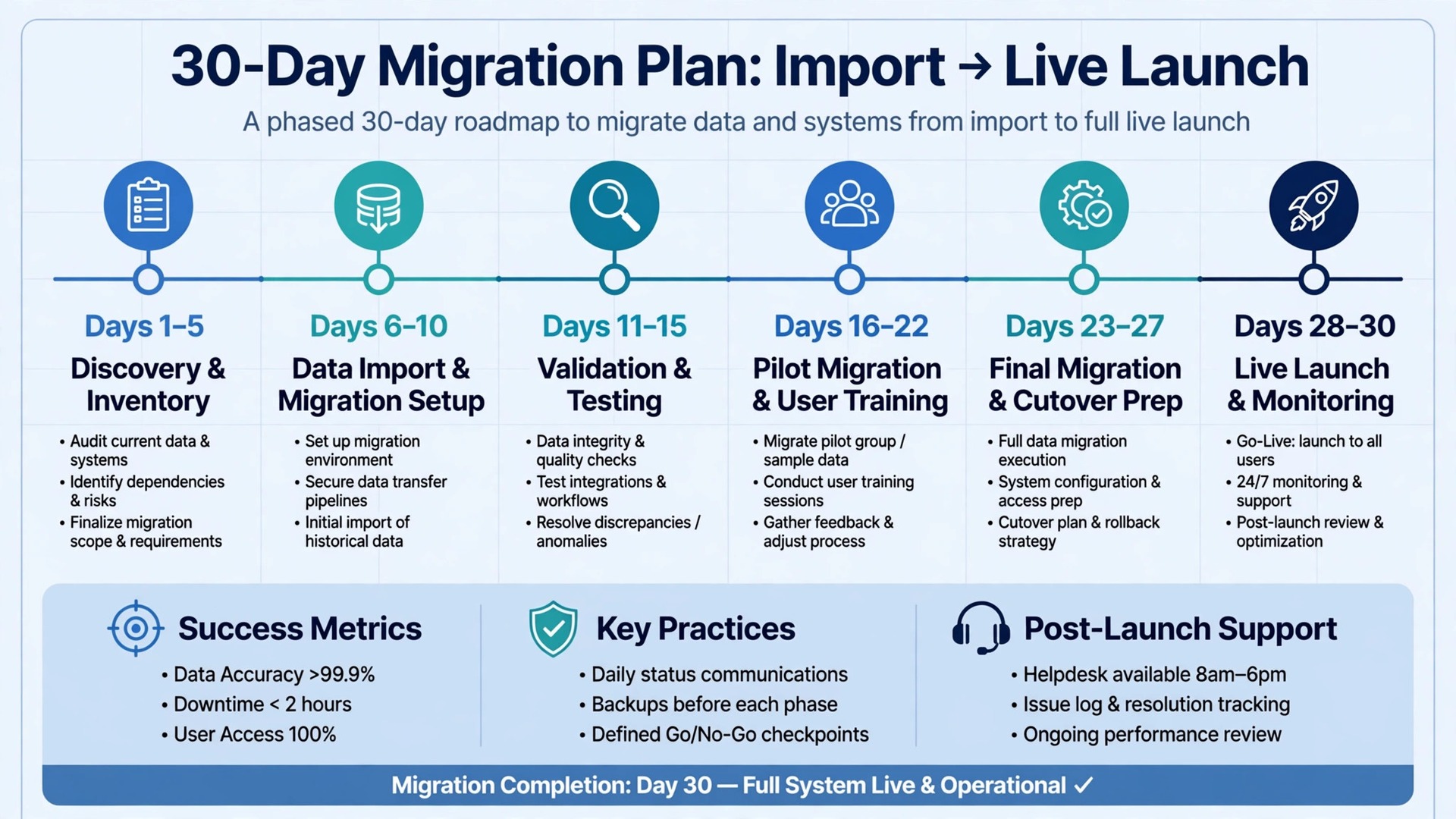
In the first week, import and clean the list, set domain authentication and map tags to topics, courses and student stages. A list imported dirty will punish deliverability for months.
In the second week, rebuild the lead magnet sequence, one launch sequence and one student onboarding sequence, then run a test purchase end to end. Fix every broken trigger before the rest of the list migrates, because early mistakes decide trust.
By day thirty, review opens, clicks, sales and student drop off weekly. The tool earns its keep when the creator can see, in one report, which emails sell and which students need a nudge.
More Reading on Stratilyze
– Best Email Marketing Software for Gyms – Best Email Marketing Software for Real Estate Agents – Best Website Builder for Coaches
Frequently Asked Questions
Social media rents attention, while email owns it, because a launch announced only on social reaches a fraction of followers at the whim of an algorithm. If the creator sells occasionally, social remains honest. If launches drive revenue, email converts better and more predictably.
What is the cheapest honest way to start?
A free plan with clear automation limits is the cheapest honest start for a starting creator, followed by a creator plan once sequences matter. Check whether sequences and automations sit on paid plans, because a generous free subscriber limit can hide the features that sell courses.
How do launch sequences differ from evergreen funnels?
A launch sequence runs for a fixed window with urgency and a closing date, while an evergreen funnel runs continuously for new subscribers at their own pace. A good tool runs both side by side, with buyers removed from sales mail automatically. A weak tool forces the creator to run one or the other by hand.
Can I move my subscriber list if I switch later?
Usually yes, if you check before signing. Ask for a sample export during the trial and open it to confirm that emails, tags, segments and sequence history come out cleanly. A vendor that blocks exports should be treated as a risk, whatever its price.
It can work when the newsletter is the product, but a creator email tool usually fits launches, funnels and student mail better from day one. A newsletter platform suits a writer whose courses follow the audience, where publishing features matter more than funnel depth.
How long does setup usually take?
A solo creator can launch in a few days, while a creator with several courses, funnels and integrations should allow two to three weeks. The slow part is rarely the software itself. It is cleaning the list, rebuilding sequences and testing a purchase before the first live launch.
The Verdict
For most course creators, Kit is the sensible first trial, because it is built for creators, handles launches and product sales, and starts free while the list grows. Creators running several branching funnels should trial ActiveCampaign next, and creators who mainly send student newsletters should trial MailerLite for low cost simplicity.
Whichever tool you shortlist, test it with a real lead magnet, a real launch sequence and a real purchase before you pay for a year. The best system is the one subscribers open without thinking, students learn from without drifting, and creators can leave without losing their list. That test, run properly, will choose the tool for you.
That shortlist is a practical way to choose best email marketing software for online course creators without paying for features you will not use.