
Jobber is the best hvac software for small businesses pick for a one to five truck shop, because it covers scheduling, quoting, invoicing and payments from $29 a month on annual billing. Housecall Pro is the pick for shops that sell memberships and want stronger proposals, and Service Fusion is the pick for shops that want flat pricing with unlimited users. The eight tools below compare price, dispatch and membership features, so a small shop can pick the system its office and its techs will both use.
A small HVAC shop loses money in the gaps between jobs. A missed call becomes a lost install, a paper quote sits unsigned in a truck, and an invoice sent a week late gets paid a month late. The software in this guide exists to close those gaps, and the difference between the tools is not whether they schedule jobs, since all eight do that, but how they handle the parts that make a small shop money.
Those parts are memberships, proposals, dispatch and payments. A shop that sells maintenance agreements needs the agreement tracked, renewed and billed without a spreadsheet. A shop that replaces systems needs a proposal a homeowner can sign on a phone. A shop with three techs needs a board that shows who is free without a phone call to the office. The comparison below weighs those four jobs alongside price, because a cheap tool that cannot sell a membership costs more than an expensive one that can.
The 8 Tools at a Glance
This table lines up the best hvac software for small businesses on the four numbers that decide a purchase, so the price model and the fit are visible before the detail sections begin.
| Tool | Main job | Best for | Starting price |
|---|---|---|---|
| Jobber | Scheduling, quoting and invoicing | One to five truck shops | $29 per month |
| Housecall Pro | Dispatch, proposals and memberships | Shops selling service agreements | $59 per month |
| ServiceTitan | Full operations platform | Shops scaling past ten techs | Quote-based |
| Service Fusion | Flat-price field service | Shops wanting unlimited users | $245 per month |
| FieldEdge | Dispatch and flat-rate pricing | Shops with a pricebook focus | Quote-based |
| Workiz | Scheduling, calls and payments | Small shops wanting call tracking | Quote-based |
| Kickserv | Simple scheduling and invoicing | Solo techs and two-truck shops | $59 per month |
| mHelpDesk | Scheduling, CRM and invoicing | Shops wanting a simple CRM | Quote-based |
Best Pick by Job
| Job type | First pick | Second tool | Why this pair works |
|---|---|---|---|
| Solo tech or two-truck shop | Jobber | Kickserv | Jobber is the simplest full system, Kickserv is cheaper to start |
| Shop selling memberships | Housecall Pro | Jobber | Housecall Pro puts agreements on the top plan, Jobber covers the basics |
| Shop with unlimited-user pricing | Service Fusion | FieldEdge | Service Fusion charges per company, FieldEdge adds pricebook depth |
| Shop scaling past ten techs | ServiceTitan | Service Fusion | ServiceTitan leads on automation, Service Fusion keeps the bill flat |
| Shop that lives on the phone | Workiz | Housecall Pro | Workiz tracks calls to jobs, Housecall Pro adds proposals |
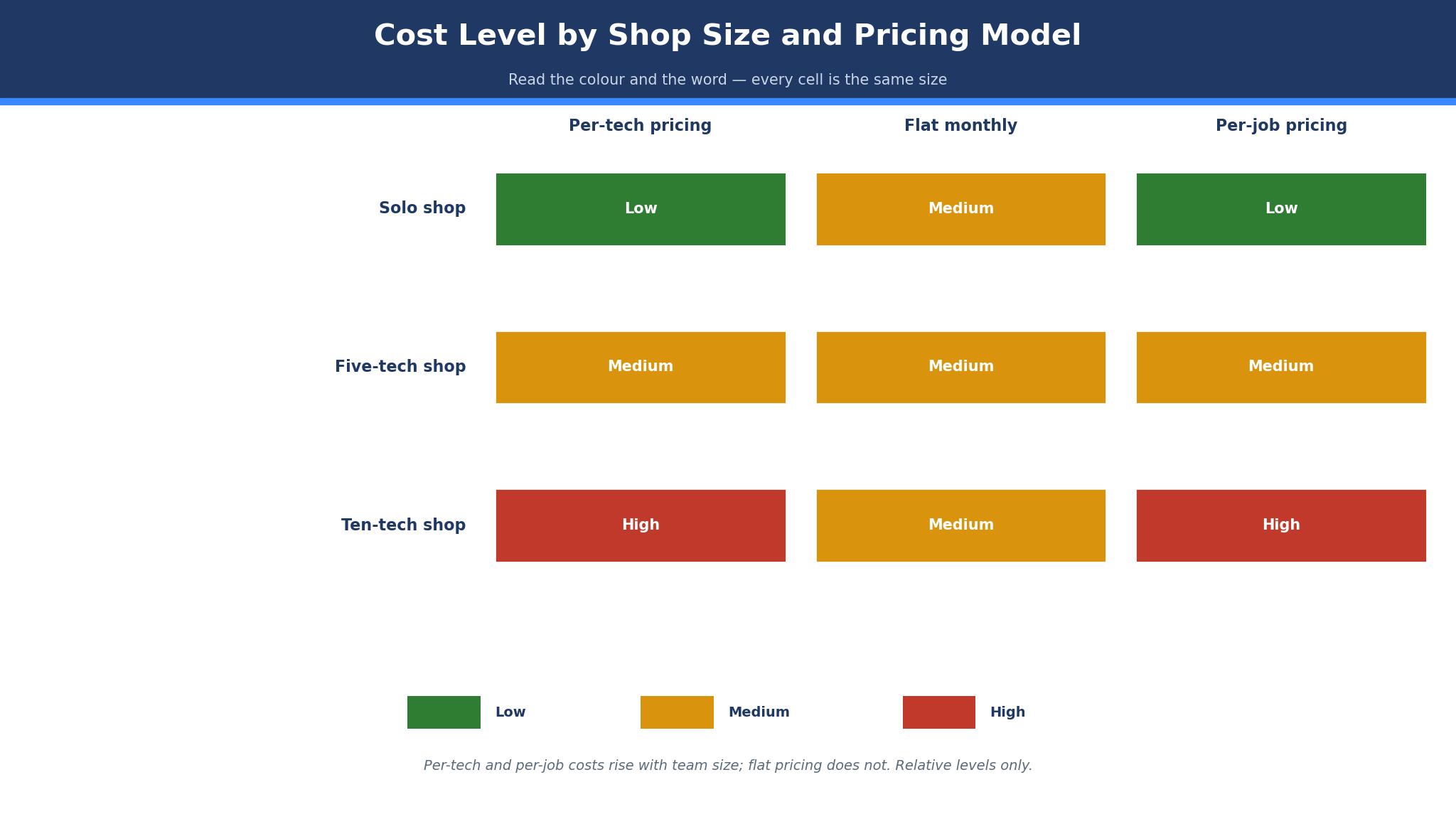
The pattern across this list is that the best hvac software for small businesses splits by price model as much as by feature. Jobber and Housecall Pro charge per user, so the bill grows with every tech. Service Fusion charges per company, so the bill stays flat as the shop grows. ServiceTitan charges per technician by quote, so the bill is the highest here and the automation has to earn it. A shop that knows its headcount in a year will pick faster than a shop that only counts today.
Which HVAC Software Is Best for a Two-Truck Shop?
Jobber is the best pick for a two-truck shop, because the Core plan starts at $29 a month on annual billing for one user, and a second user costs about $29 more, so the whole office runs for roughly $58 a month. Scheduling, quoting, invoicing and online payments are included, and the mobile app lets a tech quote and invoice from the driveway. A shop can sign up, set up its price list, and dispatch a job the same day, which is the speed a two-truck operation needs.
The limit is the membership depth. Jobber handles recurring jobs and reminders, but a shop that wants to sell service agreements with automated renewals and agreement-specific reporting will find more in Housecall Pro. The Connect plan at $99 to $139 a month adds online booking and two-way texting, and Grow at $149 to $199 adds quotes with optional add-ons and automation, so a shop should price the plan that has the features it will use in six months rather than the cheapest tier.
Housecall Pro is the better pick when the shop sells memberships hard. The Essentials plan at $149 a month for up to five users adds service agreements, proposals and estimates, which is the tier a membership shop actually needs. The Basic plan at $59 a month is cheaper, but it lacks the agreement tools, so a shop that buys Basic to save money pays twice when it upgrades. The MAX plan at $299 a month adds advanced reporting and GPS tracking for eight users.
How to Choose the Best HVAC Software For Small Businesses
Start with the headcount a year from now, because the price model follows it. A shop staying under five techs can take Jobber or Housecall Pro and pay per user without pain. A shop planning to reach ten techs should look at Service Fusion, since the flat per-company price stops rising as techs are added. A shop that will stay solo can take Kickserv and keep the bill at $59 a month.
Next, check the membership handling. Ask the vendor to show a service agreement from sale to renewal, including the reminder, the renewal invoice and the report that shows how many agreements are active. If the demo cannot show that flow, the tool will push the work back onto a spreadsheet. Then test the proposal on a phone, because a homeowner signs a system replacement on a phone far more often than on a laptop, and a proposal that looks broken on a small screen loses the sale.
Then check the dispatch board with the office manager, not just the owner. The person who answers the phones will live in the board all day, and a board that needs three clicks to move a job will slow every call. Finally, confirm the payment processing rate in writing, since processing runs about 2.9 percent plus $0.30 per transaction on Jobber and Housecall Pro, and that rate matters more than the subscription once the shop is busy.
The 8 Tools in Detail
The eight tools below cover per-user, flat-price and per-technician systems. Each one is judged on scheduling, memberships, proposals and price, so this roundup of the best hvac software for small businesses stays honest about what a small shop actually pays.
1. Jobber
Jobber is the field service tool most small HVAC shops start with, and it earns that place by being simple to run. Scheduling, quoting, invoicing, client management and payments live in one system, and the mobile app lets a tech see the day, quote a repair and collect payment without calling the office. Online booking, automated reminders and two-way texting arrive on the Connect plan, and the Grow plan adds quote add-ons and automation for a shop that wants to sell more on every visit.
The pricing is published, which is rare in this category. Core costs $29 a month on annual billing for one user, or $49 month to month, and extra users cost about $29 each. Connect runs $99 to $139 a month, Grow $149 to $199, and Plus $399 to $499 for five users. QuickBooks integration costs extra on some plans, and payment processing runs from 2.9 to 3.5 percent depending on volume, so a busy shop should confirm the processing rate before comparing subscriptions.
It suits a one to five truck shop that wants to start fast and pay a published price. The same-day setup and the per-user pricing fit a small team, and the quote and invoice flow is the cleanest in this guide for a tech working from a truck.
Sign up for the trial, build one real quote and one real invoice, and run a full day of jobs on it before moving the whole schedule over.
2. Housecall Pro
Housecall Pro is the field service platform built for residential shops that sell memberships and system replacements. The dispatch board is visual, the proposal builder produces estimates a homeowner can approve on a phone, and the service agreement tools track memberships from sale to renewal. The platform serves more than 40,000 businesses, with HVAC as its largest trade, and it announced an HVAC-specific package in July 2026.
The pricing is published in three tiers. Basic costs $59 a month on annual billing for one user, or $79 month to month, and covers scheduling, invoicing and payments. Essentials costs $149 a month for up to five users and adds service agreements, proposals and estimates, which is the tier a membership shop needs. MAX costs $299 a month for eight users, with extra seats around $35 each, and adds advanced reporting and GPS tracking.
It suits a shop that sells service agreements and wants strong proposals. The agreement tools and the phone-friendly estimates are the reason to pick it over Jobber, and the per-user pricing stays fair until the shop passes eight techs.
Price the Essentials plan rather than Basic, test a membership sale end to end, and confirm the proposal looks right on a phone before committing.
3. ServiceTitan
ServiceTitan is the full operations platform for HVAC shops that have outgrown the small tools, and it is the most capable system in this guide by a wide margin. Dispatch, pricebook, marketing, call tracking, memberships and reporting run in one place, with AI dispatch and more than 180 integrations. The platform went public in December 2024, and it is the standard that larger residential contractors measure themselves against.
The price is the honest problem for a small shop. ServiceTitan publishes no price and sells by quote, per technician, with third-party reports putting it at roughly $245 to $500 per technician per month plus a $5,000 to $15,000 implementation fee, and those figures are user-reported rather than vendor-confirmed. A five-tech shop can spend about $19,500 a year before implementation, which is more than ten times the Jobber bill for the same headcount, so the automation has to earn that gap.
It suits a shop scaling past ten techs with the revenue to match. The marketing scorecards, the pricebook and the call tracking pay for themselves at that size, and a smaller shop should wait until the job volume justifies the contract.
Ask for a written quote on the same scope as the other tools, confirm the implementation fee and the contract length, and talk to a shop of similar size before signing.
4. Service Fusion
Service Fusion prices the way a growing shop wishes every tool priced, with a flat monthly fee per company and unlimited users on every plan. Scheduling, dispatch, estimates, invoicing and payments are included, and the flat model means adding a tech costs nothing in software. The platform sits under the EverPro brand, and it is the clearest answer to the per-user billing that punishes growth on Jobber and Housecall Pro.
The published tiers run about $245 a month for Starter, $382 for Plus and $627 for Pro, all with unlimited users. That entry price is higher than Jobber or Housecall Pro for a solo tech, so a one-truck shop pays more here than on the per-user tools. The maths flips at around five users, where the flat fee undercuts the per-user total, and a ten-tech shop saves thousands a year against the per-user tools.
It suits a shop with three to ten techs that plans to keep growing. The unlimited-user pricing removes the software tax on hiring, and the feature set covers the daily work without the ServiceTitan contract.
Compare the flat fee against the per-user total at the headcount planned for next year, not today, and test the dispatch board with the office manager before deciding.
5. FieldEdge
FieldEdge is the dispatch and flat-rate pricing specialist in this guide, built for shops that live by the pricebook. The flat-rate pricebook, the dispatch board and the QuickBooks integration are the core, and the system handles the estimate-to-invoice flow that a replacement-heavy shop runs all day. The platform is owned by the same group as ServiceTitan, and it sits below ServiceTitan in size while keeping the pricebook depth.
The pricing is quote only, which is the main drawback for a small shop that wants a number before a sales call. The vendor prices by company size and feature set, so a shop must ask for a written quote and compare it against the published Service Fusion tiers. The implementation is shorter than ServiceTitan, and the pricebook tools are the reason a shop picks FieldEdge over a simpler scheduler.
It suits a shop that prices by the book and wants the dispatch board built around it. The flat-rate estimates and the QuickBooks sync keep the office work clean, and the system scales further than the per-user tools.
Ask for a written quote, test the pricebook with ten real jobs, and confirm the QuickBooks sync handles the invoice flow before signing.
6. Workiz
Workiz is the field service tool for small shops that live on the phone, with call tracking and scheduling built around the inbound call. The system ties each call to a job, records the conversation, and shows the office which ads and sources produce booked work. Scheduling, dispatch, invoicing and payments are included, and the mobile app gives techs the day plan with customer history attached.
The pricing is quote based, with the Essentials plan reported from about $65 a month, so a shop should treat that figure as reported rather than a list price and ask for a written quote. The call tracking and the job booking tools are the reason to pick Workiz, and a shop that gets most jobs by phone will use them every day. The membership tools sit on the higher plan, so a shop that sells agreements should price the plan that includes them rather than the entry tier.
It suits a small shop whose jobs start with a phone call and whose office needs to know which calls turn into work. The call-to-job tracking is the strongest in this guide, and the scheduling is simple enough for a tech to learn in a day.
Ask for a written quote, test the call tracking on a real week of calls, and check that the membership plan is included before deciding.
7. Kickserv
Kickserv is the simplest tool in this guide, built for a solo tech or a two-truck shop that wants scheduling and invoicing without a platform to learn. The job board is clean, the customer history is easy to reach, and the invoice flow takes a minute from the truck. There is no heavy automation to configure, which is the point for a shop where the owner still dispatches from memory.
The pricing starts at $59 a month, which is the same entry figure as Housecall Pro Basic but with a simpler system behind it. The trade is depth, since Kickserv lacks the proposal builder and the membership tools that Housecall Pro puts on its higher plans. A shop that outgrows it will move to Jobber or Housecall Pro, and the export should be tested before that day arrives.
It suits a solo tech or a two-truck shop that wants the cheapest simple system and no learning curve. The scheduling and invoicing cover the daily work, and the low price leaves room in the budget for marketing.
Run a week of real jobs on it, test the invoice and payment flow from the truck, and confirm the customer export works before moving the whole book over.
8. mHelpDesk
mHelpDesk is the field service tool with a CRM at its centre, which suits a shop that wants customer history and follow-up in the same place as scheduling. The system covers scheduling, dispatch, estimates, invoicing and payments, with a customer record that tracks every job, call and note. The interface is straightforward, and a small office can learn it without training.
The pricing is quote based, with third-party guides reporting a starting figure near $169 a month, so a shop should treat that number as reported and ask for a written quote. The CRM depth is the reason to pick it, and a shop that chases repeat work and referrals will use the customer record more than the dispatch board. The mobile app is serviceable rather than excellent, so a tech-heavy shop should test it on a real job before committing.
It suits a shop that wants a simple CRM with its scheduling rather than a pure dispatch tool. The customer history and the follow-up reminders help a shop win repeat work, and the quote-based pricing needs a written number before any comparison.
Ask for a written quote, test the mobile app on a real job, and check the customer export before signing a contract.
Jobber vs Housecall Pro: Simplicity Against Membership Muscle
The starting price is the first difference. Jobber Core costs $29 a month on annual billing for one user, while Housecall Pro Basic costs $59, so a solo tech pays half as much on Jobber to start. The gap narrows as the shop grows, since Jobber Grow at $149 to $199 a month and Housecall Pro Essentials at $149 a month for five users land in the same range. A shop should price the plan that has the features it needs, not the entry tier of either tool.
The membership handling is the second difference. Housecall Pro puts service agreements, proposals and estimates on Essentials, and those tools are the reason a membership shop picks it. Jobber handles recurring jobs and reminders well, but the agreement-specific reporting and renewal flow are thinner. A shop that sells ten agreements a month will feel that gap, while a shop that sells two will not.
The deciding factor is what the shop sells. A shop that lives on repairs and replacements should take Jobber, because the lower entry price and the simpler setup fit that work. A shop that builds its revenue on memberships should take Housecall Pro, because the agreement tools repay the higher entry price within a season. That split is the cleanest way to read the best hvac software for small businesses when the choice narrows to two.
What Does HVAC Software Cost a Small Shop?
A small shop pays anywhere from about $29 a month to more than $2,000 a month for the best hvac software for small businesses, and the price model matters more than the sticker. Jobber Core at $29 and Housecall Pro Basic at $59 cover a solo tech, while a five-tech shop pays about $149 a month on Jobber Grow or Housecall Pro Essentials. Service Fusion charges a flat $245 a month with unlimited users, so a ten-tech shop pays less there than on any per-user tool in this guide.
The hidden costs sit outside the subscription. Payment processing runs about 2.9 percent plus $0.30 per transaction on Jobber and Housecall Pro, and a shop that processes $20,000 a month pays about $580 in processing fees alone. ServiceTitan adds a reported $5,000 to $15,000 implementation fee, and texting carries carrier registration and per-message fees on every platform. A shop should budget the processing and the add-ons alongside the subscription, because the subscription is the smaller number once the shop is busy.
The honest way to budget is to price the plan at the headcount and the order volume expected in a year, then add processing at the real monthly revenue. A solo tech should take the cheapest published plan and upgrade when the job count forces it. A growing shop should take the flat-price tool and stop paying a software tax on every hire.
How Long Does It Take to Roll Out HVAC Software?
Days one to ten are the setup. Import the customer list, build the price list with the ten most common jobs, and set up the payment processing so the first invoice can be paid online. Pick one dispatcher and one tech as the pilot pair, and run their jobs on the new system while the rest of the shop stays on the old one. The pilot pair finds the setup mistakes while the risk is small.
Days eleven to twenty are the move. Shift the whole schedule onto the new system, turn on automated reminders, and start sending quotes from the truck instead of the office. Watch the quote-to-sign rate and the invoice-to-pay time daily, because those two numbers show whether the system is working. Fix the price list items that techs keep editing by hand, since a price list the techs distrust is a price list that gets ignored.
Days twenty-one to thirty are the membership push. Load the existing service agreements, set the renewal reminders, and send the first renewal batch from the new system. A shop that finishes the month with its agreements tracked, its quotes signed on phones and its invoices paid online has the system working. A shop that still chases paper at day thirty should fix the price list and the reminders before buying any add-on.

Frequently Asked Questions
Is Jobber good for a solo HVAC tech?
Yes. Jobber Core costs $29 a month on annual billing for one user, and it covers scheduling, quoting, invoicing and payments from the truck, which is why it leads the best hvac software for small businesses for solo techs. A solo tech can run the whole business on it, and the extra user cost of about $29 a month makes the second hire cheap to add.
Does Housecall Pro handle service agreements?
Yes, on the Essentials plan at $149 a month for up to five users. The plan adds service agreements, proposals and estimates, which is the tier a membership shop needs. The Basic plan at $59 a month does not include the agreement tools, so a shop should not buy Basic to sell memberships.
How much does ServiceTitan cost a small shop?
ServiceTitan publishes no price and sells by quote, per technician. Third-party reports put it at roughly $245 to $500 per technician per month plus a $5,000 to $15,000 implementation fee, and those figures are user-reported rather than vendor-confirmed. A small shop should get a written quote and compare it against the flat $245 a month Service Fusion charges.
Can I switch HVAC software without losing customer history?
Yes, if the export is tested first. Export the customer list, the job history and the open agreements from the old system, and import a sample into the new tool before moving the whole book. A shop should never cancel the old system until the new one has run a full week of real jobs with the real customer data.
Does HVAC software include payment processing?
Most tools in this guide include it as an add-on with a per-transaction fee. Jobber and Housecall Pro charge about 2.9 percent plus $0.30 per transaction, so a shop should confirm the rate in writing and budget it against real monthly revenue. The processing fee matters more than the subscription once the shop is busy.
Is flat-price software better than per-user pricing?
It depends on headcount. A solo tech pays less on Jobber or Housecall Pro than on the flat $245 a month Service Fusion charges. A shop with five or more techs pays less on the flat plan, because the per-user total passes $245 and keeps rising with every hire. Price the plan at next year headcount to see which side wins.
The Bottom Line for a Small HVAC Business
A solo tech should take Jobber, because $29 a month buys the whole job flow and the setup takes a day, and that value is why it tops the best hvac software for small businesses for a one-truck operation. A shop that sells memberships should take Housecall Pro Essentials, because the agreement and proposal tools repay the $149 a month within a season. A shop growing past five techs should take Service Fusion, because the flat $245 a month stops the software bill rising with every hire, and that saving is real money every month of the year.