
Week 1, and the filing cabinet is still the system. That is where this search for the best iep software for schools begins, because a school switching from paper IEPs has to move 200 plans without losing one. My pick is SameGoal, because it publishes its price at $2.24 a student for Standard in 2026-27, and it was built for the forms a district actually files.
The 12 Tools at a Glance
The table below is the week-one view, with each tool judged on the same question, which is whether a school can move its plans in and run a meeting on them. SameGoal publishes $2.24 a student for Standard, $2.61 for Plus, and $2.99 for Pro in 2026-27, while most rivals are quote only.
| Tool | Starting price | Best for |
|---|---|---|
| SameGoal | $2.24 per student Standard, $2.61 Plus, $2.99 Pro, 2026-27 | districts that want published pricing |
| Frontline Special Education Management | quote only | large districts already on Frontline |
| PowerSchool Special Programs | quote only | districts on PowerSchool SIS |
| EmbraceIEP | quote only | districts that want a focused IEP tool |
| IEPWriter | from about $99 a month, reported | small schools that write IEPs simply |
| SpedTrack | quote only | districts tracking services and billing |
| Goalbook Toolkit | quote only | schools that want goal banks |
| e-IEP PRO | quote only | districts that want a simple web IEP |
| SEIS | quote only | California districts |
| EasyIEP | quote only | districts that want a familiar workflow |
| IEP Online | quote only | schools outside the US, reported |
| EdPlan | quote only | districts that want a full special-education suite |
Best Pick by Job
The table below matches each job to its pick, and SameGoal leads the list for the most common job in this guide.
| Job | Pick | Why |
|---|---|---|
| A district that wants published pricing | SameGoal | $2.24 a student, Standard |
| A large district on Frontline | Frontline Special Education Management | connects to the Frontline suite |
| A PowerSchool district | PowerSchool Special Programs | shares data with the SIS |
| A small school writing IEPs | IEPWriter | simple writing tools |
| A California district | SEIS | built for California reporting |
The 12 Tools in Detail
The twelve tools below are ranked by the district job they fit, from a paper-to-digital move of 200 plans to California reporting, and the best iep software for schools order puts published pricing first where it matters most.
1. SameGoal
SameGoal costs $2.24 per student Standard, $2.61 Plus, $2.99 Pro, 2026-27, and it is built for districts that want published pricing. Watch the clock on the first IEPs written in SameGoal at $2.24 to $2.99 per student: if the daily work gets slower, teachers will quietly stop using it by the second month.
What stands out is State forms, compliance checks and district reporting sit in one system, and the price is published rather than quoted. Put a live set of state forms, compliance checks and district reports through SameGoal and the published per-student pricing starts to make sense in practice, not just on the price page.
The trade-off is The minimum fees apply, so a very small school pays the minimum rather than the per-student rate. SameGoal’s minimum fees mean a very small school pays the minimum rather than the per-student rate, which is fine if it is known up front and a nasty surprise if it is found later.
Picture a special-education team writing ten IEPs a week and saving 20 minutes on each one inside SameGoal. Over a month that is more than 13 hours back with SameGoal, nearly two working days a district can spend on students instead of forms. Thirteen hours a month back is why SameGoal earns its $2.24 a student.
For a buyer whose work matches districts that want published pricing, SameGoal is worth a trial. The price of SameGoal is $2.24 per student Standard, $2.61 Plus, $2.99 Pro, 2026-27, the core job is solid, and the trial will show whether the limit matters to your work.
2. Frontline Special Education Management
Frontline Special Education Management is the large districts already on Frontline option in this list, at quote only. It does the core job well in Frontline Special Education Management, and the setup is simple enough that a new user can finish the first real task on day one without a manual.
The best part is It connects IEPs to the wider Frontline suite, and the compliance reporting is deep. Frontline’s link between IEPs and the wider suite, plus deep compliance reporting, trims a little time from each case, and a large district feels that saving across a month.
The catch is The price is quote only, so a small district cannot budget from the website. Check it on the Frontline Special Education Management trial, because a limit found in week one on Frontline Special Education Management is a small problem, and a limit found in month three is a migration.
Work a small example with Frontline Special Education Management. A team that saves 30 minutes a day with Frontline Special Education Management, five days a week, saves 150 minutes a week, or 10 hours a month. At $25 an hour, that is $250 a month with Frontline Special Education Management, which is more than the subscription for most teams in this list.
Frontline Special Education Management earns its place for large districts already on Frontline. At quote only Frontline Special Education Management is fair value, and the trial is the right way to test Frontline Special Education Management, because a week of real work says more than any review.
3. PowerSchool Special Programs
At quote only, PowerSchool Special Programs suits districts on PowerSchool SIS. PowerSchool Special Programs keeps its screens plain and its main features close at hand, which suits a district already living inside the PowerSchool SIS.
Here PowerSchool Special Programs shines, because It shares data with the student system, so enrolment and IEP data stay in step. That is the reason PowerSchool Special Programs sits in this list, and it is the reason a buyer should test it before choosing a rival.
The shortfall is The price is quote only, and the implementation is a district project rather than a quick switch. It is not a reason to reject PowerSchool Special Programs, but it is a reason to test the exact job that hits the PowerSchool Special Programs limit before paying.
Here is a worked example for PowerSchool Special Programs. Ten jobs a week on PowerSchool Special Programs, each 15 minutes faster, is 150 minutes a week, or about 10 hours a month. That is a day and a quarter of work, saved by PowerSchool Special Programs, which costs less than a day of labour.
If your work is districts on PowerSchool SIS, put PowerSchool Special Programs on the shortlist at quote only. Try PowerSchool Special Programs on live SIS data first, then hunt for its weak spot, and the choice follows from what you find.
4. EmbraceIEP
EmbraceIEP at quote only is aimed at districts that want a focused IEP tool. EmbraceIEP keeps its state-aligned forms and focused workflow simple enough that a busy special-education team writes IEPs instead of fighting the software.
The clear win is The IEP workflow is focused and clean, and the forms are state-aligned. The value of EmbraceIEP shows in the first finished IEP, where the focused workflow and state-aligned forms do the explaining no sales call could.
The limit is Pricing is quote only, and the wider special-education suite is thinner than SameGoal. Quote-only pricing means the vendor sets the number, so confirm it covers your state forms before judging it cheap, since a thin suite still leaves work undone.
- EmbraceIEP suits a special-education team that wants the IEP itself done, not a rollout project first.
- Run one real IEP through EmbraceIEP before the trial ends, and judge it there.
- A buyer who prefers cheaper focused IEP forms to a pricier full suite gets that deal from EmbraceIEP.
5. IEPWriter
For small schools that write IEPs simply, IEPWriter at from about $99 a month, reported is a solid choice. IEPWriter keeps its writing tools plain and its price near $99 a month, so a small school can start writing IEPs right away and keep going without a district rollout.
The strength is The writing tools are simple, and a small school can start without a district rollout. For IEPWriter the same test applies to the writing job a small school repeats every week, because a simple tool that handles that job well is one the team will keep.
Ten IEPs a week in IEPWriter, each written 20 minutes faster, is the saving a small school should count on. Across a month that works out to more than 13 hours with IEPWriter, close to two full working days a small school no longer spends on paperwork. Those thirteen hours a month are why a small school keeps IEPWriter.
Would this suit a small team?
Yes, a small team can start IEPWriter quickly at its low price and without a project plan, since the setup is short and the writing tools are plain.
What should I test first?
Write a real IEP in IEPWriter first, then push it to its edge, because a low-priced writing tool usually shows its weakness at the limit, not in the middle.
6. SpedTrack
SpedTrack costs quote only, and it is built for districts tracking services and billing. Time the first service-tracking tasks in SpedTrack: if the Medicaid billing beside the IEP slows the day down, a district will stop using it by the second month.
What stands out is Service tracking and Medicaid billing sit beside the IEP, which suits a district that bills for services. A district that bills Medicaid will learn more from one week of service tracking in SpedTrack than from a demo, because the billing beside the IEP is where the tool either earns its keep or it does not.
If your work is districts tracking services and billing, put SpedTrack on the shortlist at quote only. Track one billed service end to end in SpedTrack first, then test its edge before choosing.
7. Goalbook Toolkit
Goalbook Toolkit is the schools that want goal banks option in this list, at quote only. Goalbook Toolkit puts its goal banks front and centre, and a teacher can build a first real IEP goal on day one without training sessions.
The best part is The goal bank is strong, and teachers can build defensible goals fast. Goalbook Toolkit’s goal banks cut the time each IEP goal takes to build, and those minutes add up to real hours for a teacher by month’s end.
For a buyer whose work matches schools that want goal banks, Goalbook Toolkit is worth a trial. The price of Goalbook Toolkit is quote only, the core job is solid, and the trial will show whether the limit matters to your work.
8. e-IEP PRO
At quote only, e-IEP PRO suits districts that want a simple web IEP. e-IEP PRO is a simple web IEP tool with a plain layout, so the forms stay visible and the software fades into the background once the writing starts.
Here e-IEP PRO shines, because The web forms are simple, and the price is built for smaller districts. That is the reason e-IEP PRO sits in this list, and it is the reason a buyer should test it before choosing a rival.
e-IEP PRO earns its place for districts that want a simple web IEP. At quote only e-IEP PRO is fair value, and the trial is the right way to test e-IEP PRO, because a week of real work says more than any review.
9. SEIS
SEIS at quote only is aimed at California districts. SEIS gives California districts the forms and routines they already use, without extra layers a small team would have to learn around.
The clear win is It is built for California SELPA reporting, and the forms match the state. SEIS shows its worth the first time a California district opens its own forms and routines in it, with no sales call needed to explain them.
If your work is California districts, put SEIS on the shortlist at quote only. Open one real California SELPA form in SEIS first, then test its reporting edge before choosing.
10. EasyIEP
For districts that want a familiar workflow, EasyIEP at quote only is a solid choice. EasyIEP follows the paper process teachers already know, so the team is still using it after the first week instead of drifting back to old habits.
The strength is The workflow follows the paper process closely, so teachers learn it fast. For EasyIEP the test is the job teachers do most often, writing and updating IEPs in the familiar paper-like flow, since that daily work decides whether the tool stays or goes.
For a buyer whose work matches districts that want a familiar workflow, EasyIEP is worth a trial. EasyIEP quotes its price rather than publishing it, the workflow itself is sound, and a trial will show whether its limits touch the work your district actually does.
11. IEP Online
IEP Online costs quote only, and it is built for schools outside the US, reported. A week of real IEP writing in IEP Online shows the truth fast: if the local-rule forms slow the work down, a school will drop the tool by the second month.
What stands out is It serves schools in several countries, and the forms adapt to local rules. Run one real caseload through IEP Online and the local-rule forms do the talking: a week of actual IEP writing shows whether the multi-country setup fits your school better than any sales sheet can.
IEP Online earns its place for schools outside the US, reported. IEP Online asks for a quote rather than publishing a price, which is fair for a tool adapting its forms to each country’s rules, and a trial week of real IEP writing tells a school more than any review.
12. EdPlan
EdPlan is the districts that want a full special-education suite option in this list, at quote only. EdPlan handles IEPs, 504 plans and Medicaid billing together, and a new user can still complete a first real task on day one without opening a manual.
The best part is It covers IEPs, 504 plans and Medicaid billing in one suite, and the reporting is strong. EdPlan’s combined IEP, 504 and Medicaid reporting trims a little time from each case, and across a month of caseloads those minutes become hours a district gets back.
If your work is districts that want a full special-education suite, put EdPlan on the shortlist at quote only. Run EdPlan’s IEP, 504 and Medicaid work first, then probe where the suite strains before choosing.
The Meeting Where the Parent Asked a Hard Question
Week 3, and the first IEP meeting on the new tool has a parent who asks a hard question. The parent wants to know what the school has actually done since the last meeting, what the progress data shows, and who saw the plan. The answer has to come from the system, not from memory, and it has to come in the meeting, not a week later.
SameGoal handles this by keeping the plan, the progress data, and the service log in one record, so the teacher can show the parent the numbers in the room. Frontline does the same at district scale. The tools that fail here are the ones that keep the plan in one place and the progress data in another, because the teacher ends up guessing in front of a parent who deserves an answer.
Here is the worked example. A school with 200 IEPs, each needing a meeting a year, runs 200 meetings. If the new tool saves 30 minutes of prep per meeting, that is 100 hours a year, which is more than two working weeks. If it saves an hour per meeting, that is 200 hours, which is five working weeks. The prep time is the real cost of a paper system, and it is the first saving a good tool delivers..
Anyone weighing best iep software for schools should test SameGoal on the exact job above, because the test shows the difference faster than any feature list.
Frequently Asked Questions
These answers cover the questions buyers ask most often about best iep software for schools, and the numbers above are the ones to check on the vendor page before buying.
How much does IEP software cost per student?
SameGoal publishes $2.24 a student for Standard, $2.61 for Plus, and $2.99 for Pro in 2026-27, with minimums from $1,245.20. A school with 200 students pays the minimum on Standard, while a district with 800 students pays about $1,792 a year. Most rivals are quote only, so their price is not public.
Can I import paper IEPs into the new tool?
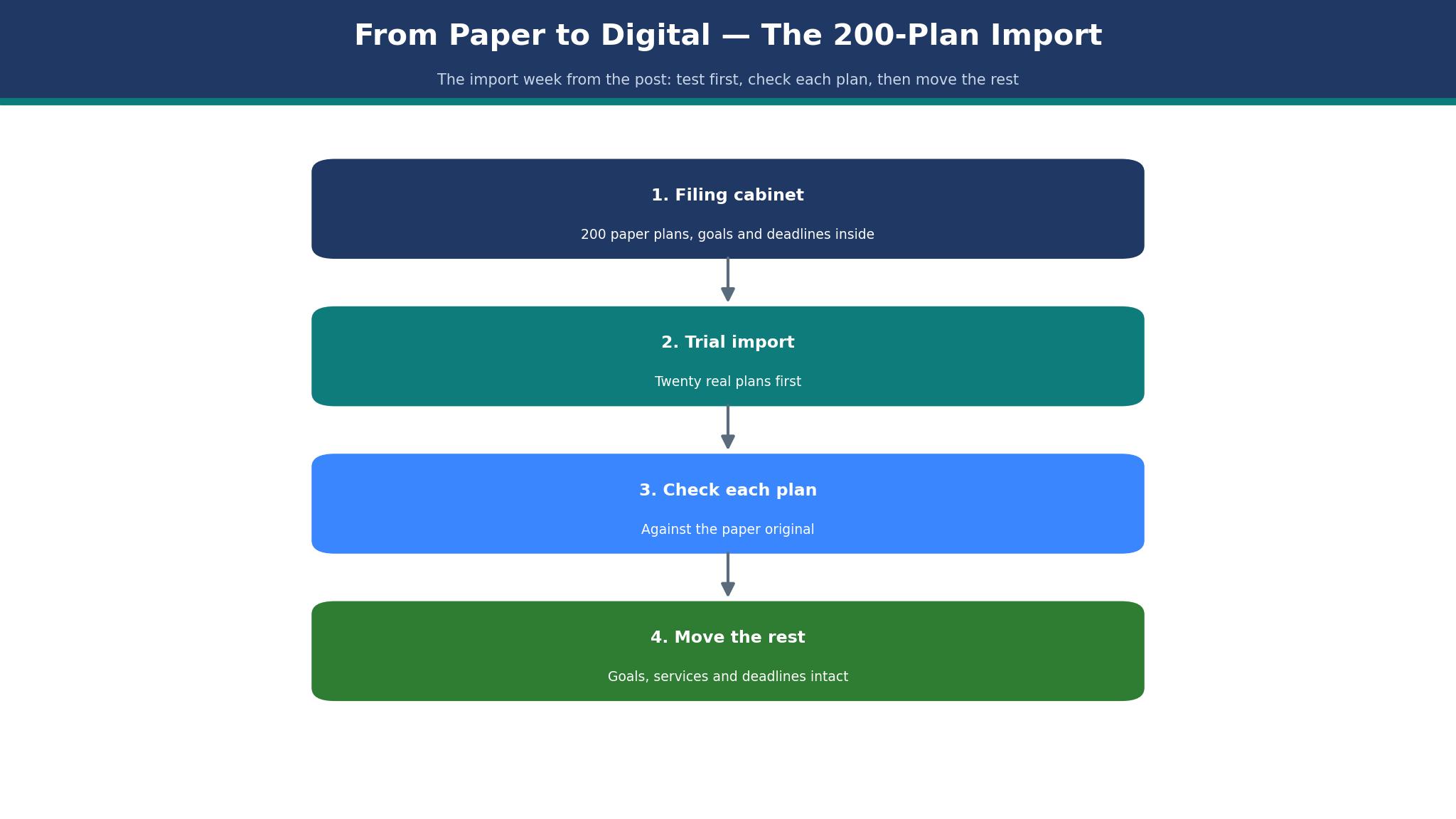
Yes, if the tool has a structured import. SameGoal and Frontline both import plans with goals, services and deadlines intact. Test the import with twenty real plans first, and check each one against the paper original before moving the rest.
Does IEP software track compliance deadlines?
Yes, that is one of its main jobs. The tool should flag a review date, a re-evaluation date, and a progress-report date before they pass. A tool that stores the plan as a flat document cannot do this, because it cannot read the dates inside it.
What happens to the data if we leave the tool?
Ask before you sign. SameGoal and the major tools export plans and progress data, but the format and the completeness vary. A school should test an export of ten plans during the trial, so the exit route is proven before the entry is paid for.
Which IEP tool is best for a small school?
SameGoal is the best fit for a small school that wants published pricing, though the minimum fee applies. IEPWriter suits a small school that only needs writing tools. A small school should avoid the quote-only enterprise tools, because the price and the setup are both district-sized.
How long does it take to switch IEP software?
A small school can switch in four weeks, with week one for the filing cabinet, week two for the import, week three for the first meeting, and week four for the review. A district takes longer, because the import is bigger and the training has to reach every building.
How to Choose the Best IEP Software for Schools
Start with the student count, because the price is per student on SameGoal and per district on the quote-only tools. A school with 200 students on SameGoal Standard pays about $448 a year at $2.24 a student, subject to the $1,245.20 minimum, so the minimum is the real price for a small school. A district with 800 students pays about $1,792 a year on Standard, and $2,392 on Pro at $2.99 a student.
Then check the state forms, because an IEP tool that does not match your state forms is a tool that creates extra work. SameGoal publishes state forms, Frontline covers most states, and SEIS is built for California. Ask the vendor to show your exact state form, filled in, before you sign anything.
Finally, check the import. A school moving 200 paper plans has to import them without losing a goal, a service, or a deadline. Ask for a trial import of twenty plans, check each one against the paper original, and only then move the rest. The import is where switches fail, and it fails quietly..
Can I Switch to SameGoal Without Losing My Work?
Treat the move to SameGoal as a staged handover: export every record from the old tool before the trial begins, then shift caseloads across one at a time. Pull every IEP, 504 plan and service log out of the old system, open the files and check them against SameGoal, and only cancel the old subscription once the records are safe in the new one.
Next, run one live IEP cycle in SameGoal while the old tool keeps running beside it for a week, so the comparison is real work against real work. Run one real IEP cycle in SameGoal while the old system stays live, then shift the next cycle over only if the first one went smoothly. Moving caseloads to SameGoal one cycle at a time keeps the old system running live as backup.
Week 2, Importing 200 Plans
Week 2 is the import week, and it is the week that decides whether the switch works. Two hundred paper plans have to become two hundred digital plans, each with its goals, services, and deadlines intact. A plan that loses a deadline in the move is a plan that misses a compliance date, and a missed date is a legal problem, not a paperwork problem.
SameGoal handles this with a structured import and a 90-day trial, so the school can test the move before committing. The tools that fail here are the ones that import the plan as a flat document, because the goals and services become text that the system cannot track. A plan the system cannot track is a plan the system cannot remind anyone about.
Work the numbers on the import. Two hundred plans at 15 minutes each to check is 50 hours of checking, which is more than a working week. A tool that imports cleanly cuts that to a day, and a tool that imports badly doubles it. The import test, with twenty real plans, is the cheapest insurance a school can buy..
A buyer comparing best iep software for schools should ask SameGoal this question on the demo, because the answer reveals how the tool handles real work.

What Should I Test Before I Pay for SameGoal?
Start with the daily IEP work in SameGoal, since nothing else in the system matters if writing and tracking plans feels slow. Take one real IEP from start to finish in SameGoal with real student data, time it, and put that number beside the time the old tool needed for the same job. SameGoal demo data is clean by design and never shows the messy caseload a real district week throws up.
After the live run, probe where SameGoal strains, because that edge is where a district usually gets its surprise, and finding it in week one costs nothing. Find the SameGoal task that strains its limits, usually a large caseload or a reporting edge, and ask the vendor what removing that limit would cost before the contract is signed. A SameGoal strain spotted in week one is cheap to learn about.
Frontline vs SameGoal
Frontline wins the district round. It connects IEPs to the wider Frontline suite, and a large district that already runs Frontline gets one system for the whole back office. The compliance reporting is deep, and the scale is proven.
SameGoal wins the transparency round and the small-district round. It publishes its price at $2.24 a student for Standard, it was ranked first in a 2026 comparison of special-education tools, and its forms are state-aligned. The trade-off is a smaller suite than Frontline, and a minimum fee that bites a very small school.
What I would do is pick SameGoal for a district that wants to know the price before the sales call, and Frontline for a large district already inside the Frontline suite. The trade-off is openness against scale, and a school that cannot get a price cannot budget, which is a problem before the tool is even bought..
That is why the best iep software for schools decision comes down to SameGoal for most buyers, with the runner-up winning only when its strength matches the job.
How Much Will SameGoal Cost in Year Two?
By year two the SameGoal bill settles into its real shape, once any first-year discount, onboarding fee and introductory rate have all run out. Ask SameGoal three things in writing: the renewal price, whether the per-student rate moves as enrolment grows, and which add-ons sit inside the Standard, Plus or Pro plan rather than on top of it.
SameGoal’s second-year bill is the one that catches districts out, so get the renewal figure on paper now and plan the budget around that number instead of the first-year total. Get SameGoal’s year-two invoice in writing before you commit, put it beside the year-one total, and let the gap between the two decide whether the per-student rate still works for your district.
What the Teachers Actually Felt in Week 4
SameGoal is the pick. It publishes its price, it was ranked first among special-education tools in a 2026 comparison, and it handles the forms, the meetings, and the import in one system. A district with 800 students pays about $1,792 a year on Standard, which is less than the cost of the prep time it saves.
Frontline is the runner-up for a large district already on its suite, and PowerSchool Special Programs is the pick for a district on PowerSchool SIS. Both are quote only, so the budget conversation starts with a sales call rather than a price list. IEPWriter is the pick for a small school that only needs the writing tools.
What I would do is run the 90-day SameGoal trial with twenty real plans, hold one real IEP meeting on the tool, and ask the parent in that meeting whether the answers came faster. If the teacher walks out of the meeting with less prep and the parent walks out with clearer answers, the switch is made. The price, at $2.24 a student, is the smallest part of the decision..
That is the short version of this whole best iep software for schools comparison, and SameGoal is the name to remember from it.
One More Thing to Check Before You Buy SameGoal
One more check before buying SameGoal is the support, because a tool is only as good as the help behind it when something goes wrong. During the trial, send SameGoal support a real question about a state form or a compliance check, time the reply and see whether the answer fixes the problem or only links to a help page. When an IEP deadline is hours away, a SameGoal support reply that arrives the same day beats any extra feature sitting unused on a checklist.
Before signing for SameGoal, test the way out: export a batch of IEPs, open them outside the system and confirm a future move would not strand a single student record. During the SameGoal trial, export a few finished IEPs and open them elsewhere: complete, clear files mean the exit is safe. Clean SameGoal exports that open outside the system prove the exit works before anyone signs up.