

Three owners need the best website builders for small businesses, and each one needs a different answer. A café owner wants bookings and opening hours on one page, a freelance consultant wants a clean portfolio that wins calls, and a small retailer wants a shop that takes money while she sleeps. Wix wins for most of them, because it covers all three jobs without forcing a rebuild later.
The 10 Tools at a Glance
This table compares the best website builders for small businesses on the things that decide a purchase. Price is the entry paid plan on annual billing, checked against vendor pages and recent roundups in November 2026. Where sources disagree, the draft says so plainly rather than hiding the gap.
| Tool | Entry paid plan | Free option | Best for |
|---|---|---|---|
| Wix | $17 a month | Yes | Most small businesses |
| Squarespace | $19 a month | 14-day trial | Design-led service sites |
| WordPress.com | $4 a month | Yes | Content-heavy sites on a budget |
| Design.com | Free to start | Yes | Quick start with a logo to match |
| GoDaddy | $9.99 a month | Trial | Fastest first site |
| Hostinger | $2.99 a month | No | Lowest entry price |
| Weebly | $10 a month | Yes | Simple brochure sites |
| Duda | $19 a month | Trial | Agencies and client sites |
| Webflow | $14 a month | Yes | Design control |
| Jimdo | $9 a month | Yes | Tiny businesses |
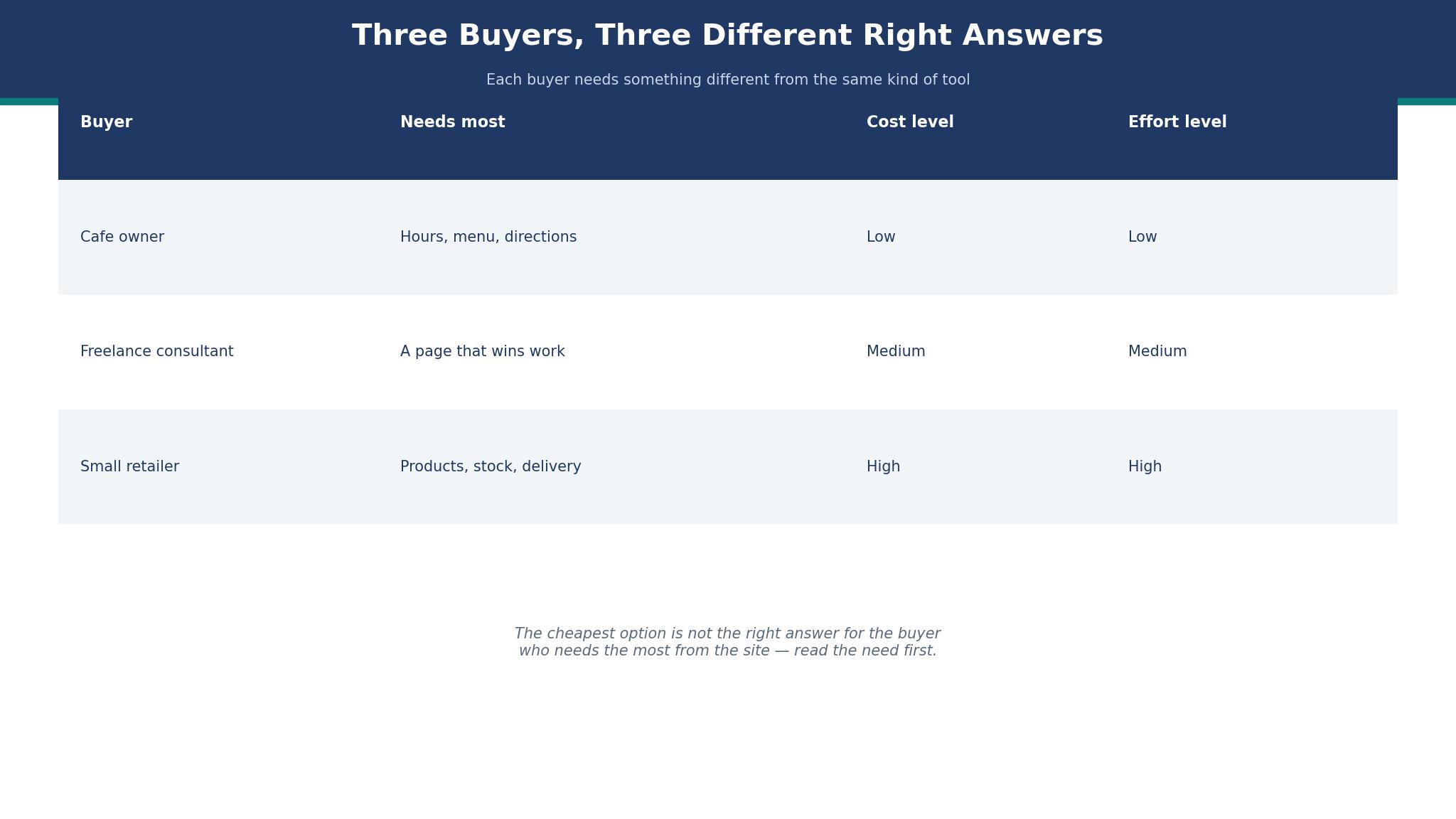
Three Buyers, Three Different Right Answers
The café owner opens at 6 a.m. and closes at 4 p.m., and her site has one job before noon. It must show the address, the hours, the menu, and a way to book a table, all without scrolling through a life story. She does not need a shop, a blog, or a membership area. She needs a page that loads fast on a phone held in one hand outside the door. Wix Core handles that well, because bookings and payments sit in the same place as the pages. Squarespace also works, and its templates make a café look expensive, but the booking add-on costs extra and the owner has to wire it up herself.
The freelance consultant sells trust, not products. Her site is a portfolio, three case studies, a short bio, and a contact form that actually gets answered. She reads every word a visitor sees, and she notices when a template makes her look like everyone else in her field. Squarespace fits her best, because its layouts stay quiet and let the work do the talking. Wix can do the same job, and it gives her more apps to bolt on later, yet the extra choice slows her down in the first week when she only wants five good pages live.
The small retailer has twenty products, a back room full of stock, and a customer who wants to buy at 11 p.m. Her site is a shop first and a brochure second. She needs stock counts that update, a checkout that does not scare people away, and shipping rates she can set once and forget. Wix Core takes payments and manages a small catalogue without a plugin hunt. WordPress.com can do it too, but only on the Business plan at $25 a month on annual billing, and the retailer then has to choose and maintain the shop plugin herself. That is a real cost, paid in evenings, even when the monthly bill looks small.
Best Pick by Job
The table below matches each job to one of the best website builders for small businesses, so you can skip the full comparison once you know your job.
| Job | Pick | Why it wins here |
|---|---|---|
| Café or local service | Wix | Bookings, hours and payments in one place |
| Consultant or portfolio | Squarespace | Quiet layouts that flatter the work |
| Small shop under 50 products | Wix | Payments and stock without plugins |
| Blog-led business | WordPress.com | Cheapest paid plan with a custom domain |
| Tightest budget | Hostinger | Lowest entry price by a wide margin |
| Fastest launch | GoDaddy | Guided setup that finishes in an afternoon |
How to Choose the Best Website Builders for Small Businesses
Start with the job, not the feature list. Write down the three things a visitor must be able to do on your site, in order. For most small businesses the list is short: find the address and hours, see what you sell, and contact you or buy. Any builder that makes those three things hard is the wrong builder, no matter how long its feature page runs. Test each one with those three tasks before you look at templates, because a pretty template cannot fix a checkout buried three clicks deep.
Count the real monthly cost, not the headline. The entry plan is only the start. Add the domain renewal after the free first year, roughly $11 to $15 a year for a .com, and add a business inbox if the plan does not include one. Add booking fees, payment fees, and any app the builder charges for separately. A $17 plan that needs a $10 booking app costs more than a $19 plan that includes bookings, and the gap grows every month you keep paying it.
Check who owns the work if you leave. Wix does not let you export a finished site to another host, and that lock-in is the price of its convenience. WordPress.com lets you move more freely, and Webflow exports code on paid plans, but both ask more of you while you build. Ask yourself how likely you are to switch in two years. If the answer is unlikely, lock-in matters less than speed today. If the answer is maybe, pick the tool that lets you take your content with you.
Wix vs Squarespace: Which One Wins for a Small Business?
Wix wins on breadth among the best website builders for small businesses. It has more templates, more apps, and a builder that lets you drag almost anything anywhere. A café can add bookings, a retailer can add a shop, and a consultant can add a booking calendar, all without leaving Wix. The trade-off is choice overload. New users open the editor, see a hundred options, and spend an evening deciding instead of publishing. The Light plan at $17 a month on annual billing covers a brochure site with a custom domain, and Core at $29 a month adds payments and scheduling, which is the plan most trading businesses actually need.
Squarespace wins on restraint. Its templates are fewer and better edited, and a site built on one looks considered rather than assembled. The editor gives you less freedom, and that limit is a gift for a busy owner who wants to finish. The Basic plan at $19 a month on annual billing includes a custom domain in the first year and a clean shop with a 2% transaction fee, while Core at $29 a month drops that fee to zero. Some roundups list Squarespace Basic lower, at $16 or even $12 a month, and that figure is reported rather than confirmed on the vendor page I checked, so treat the $19 figure as the safer budget number.
The deciding test is simple. Build the same five pages on both free trials and time yourself. If you finish faster on Wix and like the result, stay there. If Squarespace makes you feel calmer and the pages look better, pay the extra few dollars a month. The difference between $17 and $19 is $24 a year, which is less than one lost customer. Choose the editor you will actually open on a tired Tuesday evening, because the builder you avoid is the one that leaves your site out of date.
The Website That Has to Answer the Phone
A visitor arrives with a question that takes ten seconds to answer, and the site either answers it or loses them. They want to know if you are open, where you are, and whether you do the thing they need. A hero image of a smiling team does not answer any of those questions. Put the hours, the address, and the phone number where a thumb can reach them without scrolling, and put the booking or order button beside them. That placement is not a design choice. It is the difference between a site that works and a site that only looks finished.
Test the ten-second rule with a real person. Hand your phone to someone who has never seen the site and ask them to find your opening hours and your phone number. Time them. If they take longer than ten seconds, move the information higher and make the text larger. Repeat the test with the booking button and the price list. Most small business sites fail this test on the first try, and the fix costs nothing except the courage to move a beautiful image down the page and put useful words at the top.

The 10 Tools in Detail
This section tests the best website builders for small businesses one at a time, against the same three jobs. A tool earns its place by making those jobs easy, not by having the longest feature list. Every figure quoted is an entry paid plan on annual billing unless stated otherwise, checked in November 2026.
1. Wix
Wix is the strongest all-rounder in this list, and it earns the top spot by covering the most jobs without a plugin hunt. The editor lets a beginner drag text, images, and buttons into place, and the template library covers cafés, shops, consultants, and trades with real starting points rather than blank pages. A small business can publish a decent site in a weekend, then add bookings, payments, or a shop later without rebuilding. That path matters, because most owners start small.
The price is honest once you read past the headline. Light at $17 a month on annual billing gives you a custom domain, no Wix ads, and 2 GB of storage, which suits a brochure site. Core at $29 a month adds payments, scheduling, and basic ecommerce, and that is the plan most trading businesses end up on. The jump from $17 to $29 is $144 a year, so a café that takes bookings should budget for Core from the start rather than discovering the limit after launch.
A worked example shows the real cost. A retailer on Core pays $348 for the year, plus a domain renewal of about $12 after the free first year, for a year-one total near $360 before payment fees. Payment processing adds roughly 2.9% plus 30 cents per sale, so a $50 order costs about $1.75 in fees. Those fees apply on every builder that takes cards, so they are not a reason to avoid Wix, but they belong in the budget.
The weakness is lock-in. You cannot export a Wix site to another host, so leaving means rebuilding. The editor also offers so much choice that a new owner can spend hours on details nobody sees. Set a deadline before you open it. Publish in two evenings, then improve one page a week. A live site beats a perfect site that never launches.
2. Squarespace
Squarespace is the pick for businesses that sell on looks. Its templates are edited with a firm hand, and the result is a site that looks designed rather than assembled. A consultant, a photographer, or a boutique benefits most, because visitors judge the work by the frame around it. The editor restricts where things can go, and that restriction keeps a busy owner from making a mess of a good layout. You trade freedom for taste, and for many small businesses that trade is worth it.
Pricing is straightforward. Basic at $19 a month on annual billing covers a site with a shop and a 2% transaction fee, while Core at $29 a month removes that fee and adds better selling tools. A shop selling $1,000 a month pays $20 in transaction fees on Basic, so Core pays for itself once monthly sales pass about $500. Do that sum before you choose, because the cheaper plan can cost more once you start selling.
A worked example helps. A consultant on Basic pays $228 for the year, plus a domain renewal near $12 in year two, and no payment fees because she does not sell online. Her year-one cost is $228, which is $120 less than Wix Core, and she never needs the features Core adds. The saving is real only because her job is simple. A retailer with the same plan would pay the transaction fee on every order and erase the saving within months.
Squarespace falls short on breadth. It has fewer apps than Wix, and its booking tool is sold separately through Acuity, which adds cost and another login. A café that needs bookings should price Acuity before committing, because the combined bill can pass Wix Core. The blogging and portfolio tools are excellent, and the analytics are clear enough for a non-technical owner. Choose Squarespace when the site must look expensive and the job is simple. Choose Wix when the job list keeps growing.
3. WordPress.com
WordPress.com is the cheapest credible route to a site with a custom domain, and it suits businesses built around words. Personal at $4 a month on annual billing removes ads, adds a custom domain, and gives you the WordPress editor, which millions of writers already know. Premium at $8 a month adds more design control, and Business at $25 a month opens plugins and full ecommerce. The ladder is clear, and each step buys a real capability rather than a cosmetic upgrade.
The cost story is the best in this list at the bottom and the most confusing at the top. A blog-led business on Personal pays $48 for the year, which is less than two months of Wix Core. That saving buys a lot of content, and content is what brings search visitors. The catch is that selling needs Business at $25 a month, or $300 a year, which costs more than Wix Core. A retailer who starts on Personal to save money and then needs a shop will pay more in the end than if she had started on Wix.
A worked example makes the point. A consultant who writes one article a week on Personal spends $48 in year one and $60 in year two with a domain renewal. She gets search traffic, a professional address, and no ads, for less than a dollar a week. A retailer who needs a shop on Business spends $300 in year one plus payment fees, and still has to choose a shop plugin. The same retailer on Wix Core spends $348 and gets the shop built in. The gap is small, but the work is not.
4. Design.com
Design.com fits this list because a small business often needs a logo and a site from the same place, and starting both together saves a week of back and forth. You can design a logo, pick matching colours, and build a simple site around them without hiring a designer or learning a design tool. The site builder is simpler than Wix or Squarespace, and that simplicity is the point for an owner who wants a tidy online presence rather than a complex one.
The honest limit is depth. Design.com handles a brochure site, a contact page, and a simple shop, but it does not match Wix on bookings or Squarespace on design polish. An owner who outgrows it will move to a bigger builder, and that move means rebuilding. Treat it as a fast, coherent start, not as a forever home. If your job list is short and your brand is still forming, the match between logo and site is a genuine advantage. If your job list is long, start with Wix instead.
Pricing is free to start, with paid options for a custom domain and premium features, and the exact checkout price should be checked before you buy because the plans change. The value is in the bundle rather than any single feature. A new business that needs a logo, a site, and business cards from one account will save time, and time is the resource a new owner has least of.
5. GoDaddy
GoDaddy builds the fastest first site in this list. Its guided setup asks a few questions, picks a template, writes a first draft of the text, and publishes a usable site in an afternoon. An owner who has been putting off a website for a year will finish one here, and that is worth more than any feature comparison. The entry plan is $9.99 a month, and the builder includes basic marketing tools that nudge you to send the first email and post the first update.
The cost stays low only while the job stays simple. GoDaddy adds fees and upsells for email, bookings, and selling tools, and each one is small on its own. Together they can pass the price of Wix Core within a year. Check the checkout total, not the headline plan, and decide whether the guided start is worth the extras. For a tradesperson who needs a phone number and a contact form online by Friday, it is. For a retailer who will need a shop within six months, it is not.
6. Hostinger
Hostinger wins on price and loses on polish. Its entry plan at $2.99 a month on a long term is the cheapest paid builder here by a wide margin, and its AI builder writes a first draft of a site from a few prompts. A business with almost no budget can have a professional-looking site live for less than the cost of a coffee each month. The renewal price rises sharply, reported at $10.99 a month after the term, so budget for the renewal rather than the opening offer.
The builder is capable but plain, and its templates do not match Squarespace for looks. A business that competes on appearance should look elsewhere. A business that competes on price, speed, or local service will find Hostinger more than good enough. The trade-off is clear: you pay less and you get less design flair, and for many small businesses that is a fair exchange.
7. Weebly
Weebly is the quiet option, and it suits a business that wants a simple site and never wants to think about it again. The editor is easy, the templates are clean, and the free plan lets you try before you pay. The paid plan at $10 a month adds a custom domain and removes Weebly branding. A community group, a small charity, or a sole trader with five pages will find everything they need here.
The limit is growth. Weebly has changed hands, its development has slowed, and its app store is thin beside Wix. A business that plans to add a shop, bookings, or a membership area should start elsewhere. A business that plans to stay small will never notice the limits, and the simplicity is a feature rather than a fault.
8. Duda
Duda is built for people who make sites for other people, and it shows in the tools. Client management, white labelling, and team permissions are built in, which makes it the pick for a small agency or a freelancer who builds sites for local businesses. The entry plan at $19 a month is not the cheapest, but the time it saves on client work pays for itself quickly. A single business owner will not use half of what Duda offers, and should not pay for it.
9. Webflow
Webflow gives a designer more control than any other tool in this list, and it asks for more skill in return. The Basic site plan at $14 a month on annual billing covers a simple site, and the CMS plan adds collections for blogs and listings. A business with a designer on staff, or an owner who enjoys design, can build something genuinely distinctive here. A business without design time will find Webflow slow and frustrating, and the result will look worse than a Squarespace template finished in half the time.
The trade-off is stark. Webflow exports clean code, loads fast, and handles animations and layouts that other builders cannot. It also has no built-in booking or shop depth to match Wix, and its ecommerce plans cost more. Use Webflow when design is the product. Use Wix or Squarespace when the site is a tool for the business rather than the business itself.
10. Jimdo
Jimdo is the smallest tool here, and it suits the smallest businesses. The free plan covers a basic site, and the paid plan at $9 a month adds a custom domain and removes ads. Its AI builder creates a first site from a few answers, and the editor is simple enough for an owner who has never built a page. A market stall, a dog walker, or a part-time tutor will find Jimdo enough.
What Does a Small Business Site Really Cost in Year One?
Add the numbers before you choose from the best website builders for small businesses, because the headline plan is never the whole bill. A café on Wix Core pays $348 for the plan, about $12 for a domain renewal in year two, and nothing else in year one if the first-year domain is free. A consultant on Squarespace Basic pays $228. A blog-led business on WordPress.com Personal pays $48. Those three totals differ by $300, and the difference buys either a shop, a design, or a year of writing, depending on the job.
Time is the second cost, and it is larger than the bill. Building a site takes ten to twenty hours for a beginner, and updating it takes an hour a week. A builder that saves five hours a month is worth $50 a month to an owner whose time is worth $10 an hour, which is most owners. Do not choose the cheapest builder if it costs you an evening a week. Choose the one you will actually open, because a site you maintain beats a site you abandon.
Payment fees are the third cost, and they surprise new sellers. A $50 order costs about $1.75 in card fees on most builders, and a shop taking $2,000 a month pays about $70 a month in fees. Those fees are the same across builders, so they do not decide the winner, but they belong in the year-one total. A retailer who budgets $348 for the plan and forgets $840 in card fees has not budgeted at all.
What Would I Do With a $300 Budget?
If I had $300 and a small business that needed a site this month, I would spend it on Wix Core for the year and keep the rest for the domain renewal. I would build five pages in the first weekend, put the phone number and hours at the top, and publish before the site felt finished. Then I would spend one hour a week improving one page, starting with the page visitors actually open, which the analytics will show within a month. That plan beats waiting for a perfect site, because a live site starts working while a perfect site is still a draft.
Frequently Asked Questions
How much should a small business pay for a website builder?
Most small businesses should pay between $4 and $29 a month on annual billing for the plan itself, plus a domain renewal of about $12 a year after the free first year. A brochure site sits at the low end, a shop or booking site at the high end. If the total passes $40 a month before card fees, check whether the extra features match a job you actually do, because many owners pay for tools they never open.
Can I switch website builders later without losing everything?
You can switch, but you will rebuild the design, because builders do not export finished sites to each other. Your words, images, and customer list can move, usually by copying or exporting a file. Your domain moves with you, and your search ranking recovers if you keep the same page addresses. Plan the move for a quiet week, keep the old site live until the new one is ready, and check every link before you switch the domain over.
Do I need a designer to build a small business site?
No, not for a first site. The builders in this guide are made for owners, and a careful owner can publish a good site in a weekend. A designer is worth the fee when the site has to stand apart, when the business wins on looks, or when the owner has no hours to spare. Hire a designer for a refresh in year two, after the site has proved which pages matter, rather than before launch.
Is a free website builder plan good enough for a business?
A free plan is good enough to test, and not good enough to trade on. Free plans show the builder’s branding, use a subdomain, and limit the features a business needs, which tells visitors the business is not yet serious. Pay for the cheapest plan that gives you a custom domain and removes ads, then upgrade when the job grows. The cost is less than one lost customer a month.
How long does it take to build a small business website?
A simple site takes one weekend, or ten to fifteen hours spread over a week. A shop with twenty products takes two to three weeks, because each product needs a photo, a price, and a description. The writing takes longer than the building, so write the words before you open the builder. A site built in a rush with placeholder text stays a placeholder, while a site with real words sells from the first week.
Which builder is easiest for a complete beginner?
GoDaddy is easiest to finish among the best website builders for small businesses, because its guided setup makes most decisions for you. Wix is easiest to grow with, because its editor is forgiving and its help is clear. Squarespace is easiest to make beautiful, because its templates do much of the design work. Pick the ease that matches your weakness: finishing, growing, or looking good.
The Verdict: Wix Takes It for Most Small Businesses
Wix wins this list of the best website builders for small businesses because it covers the most jobs for the most owners, at a price a small business can afford. Squarespace is the better pick for a design-led business with a short job list, and WordPress.com is the better pick for a business built on writing. Hostinger is the pick when money is tight, and GoDaddy is the pick when the site must be live by Friday. Start with the job, count the real year-one cost, and choose the editor you will actually open. A site that is live, honest, and easy to use on a phone will beat a prettier site that never launches, every time.