
For most three-storey homes, the verdict is short. Buy a three-unit mesh system, put one unit on each floor, and stop trying to make one powerful router do a job that physics works against. That is the short answer to the search for the best Wi-Fi router for 3-storey house coverage, and the rest of this guide explains when that answer changes, what to buy for each type of floor plan, and how to place the units so the top floor stops being a dead zone.
A single router can look strong on paper. It may carry a high headline speed, several antennas, and a coverage claim of several thousand square feet. In a tall house, those numbers meet concrete, timber joists, plasterboard, stairwells, metal ducting, and a modem point that is usually stuck in a corner on the ground floor. Signal falls with every floor it must pass through, and it falls faster through dense floors than through open air. A mesh system wins in most tall homes not because each unit is stronger, but because each floor gets a transmitter close to the devices on that floor.
What the best Wi-Fi router for 3-storey house choice looks like by floor plan
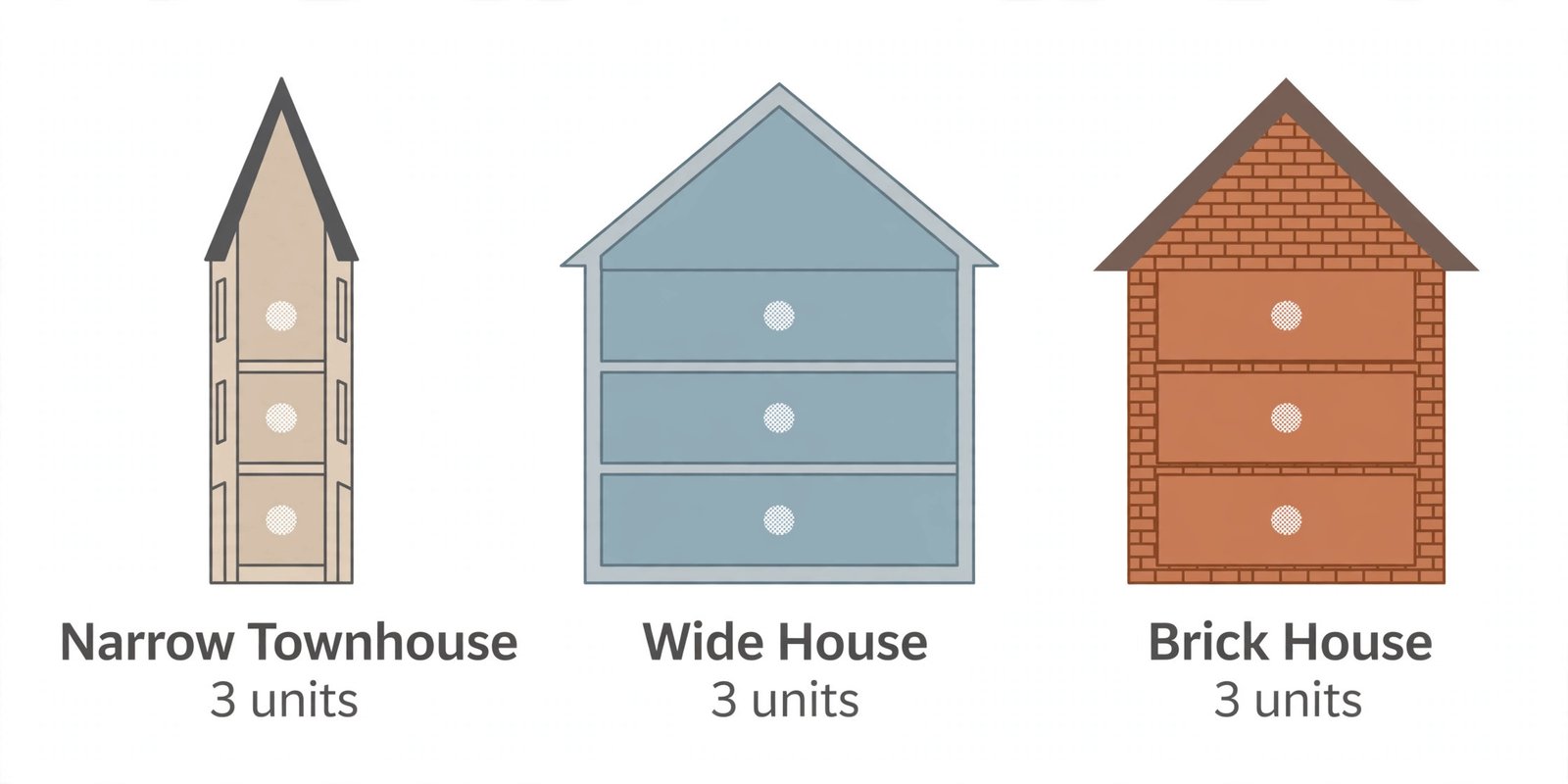
Start with your floor plan, not with a brand. A narrow townhouse with one room per floor behaves very differently from a wide house with four bedrooms on the top floor, a kitchen extension at the back, and a home office in a converted loft. The table below gives a starting point for each common layout. Treat the coverage figures as planning guides, not guarantees, because wall material and unit placement change real results more than any headline specification.
| Floor plan | Usual problem | Starting setup | When to add a fourth unit |
|---|---|---|---|
| Narrow townhouse, one or two rooms per floor | Signal must travel straight up through floors | Three-unit mesh, one unit per floor near the stairwell | Only if a rear extension or basement sits far from the stairwell |
| Wide house, three or more rooms per floor | Side rooms sit far from a central unit | Three-unit mesh, with the middle unit placed centrally, not in a corner | If one wing, such as a far bedroom or a garden room, stays weak after a placement test |
| Open-plan ground floor with bedrooms above | Ground floor is easy, upper floors are patchy | Three-unit mesh, main unit near the modem and the other two near stair landings | If the loft is converted and separated by a thick ceiling or a steel beam |
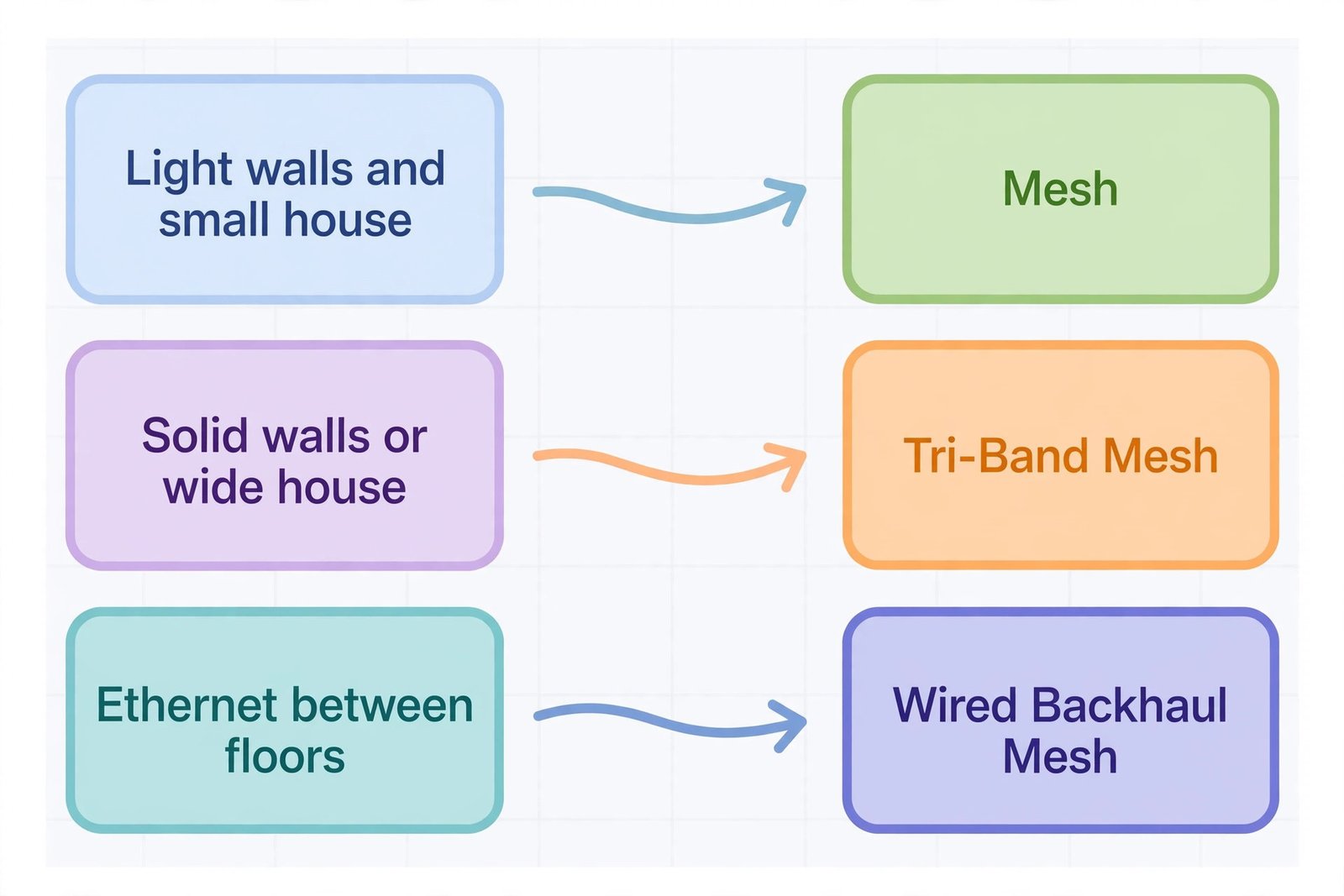
| Brick or concrete floors, older solid construction | Each floor cuts signal sharply | Three-unit mesh with wired backhaul if Ethernet exists, or a tri-band system if it does not | If a single floor is split by a long hallway with solid walls |
| House plus basement office or garden room | The lowest or most distant room becomes the weak point | Three-unit mesh for the main house, then a fourth unit or a wired access point for the extra space | When the basement or garden room is used daily for video calls |
| Small three-storey flat or maisonette | Space is tight and units sit close together | A two-unit mesh can work if floors are light and rooms are small, but test before settling | If the top bedroom still drops calls after moving the second unit closer to the stairs |
The pattern is clear. Three units, one per floor, is the default for a three-storey home. Two units can work in a small, lightly built flat, but leave no margin for a thick floor or a badly placed modem point. Four units make sense only for a wide house, a basement, or a garden room.
Why one router struggles in a tall house
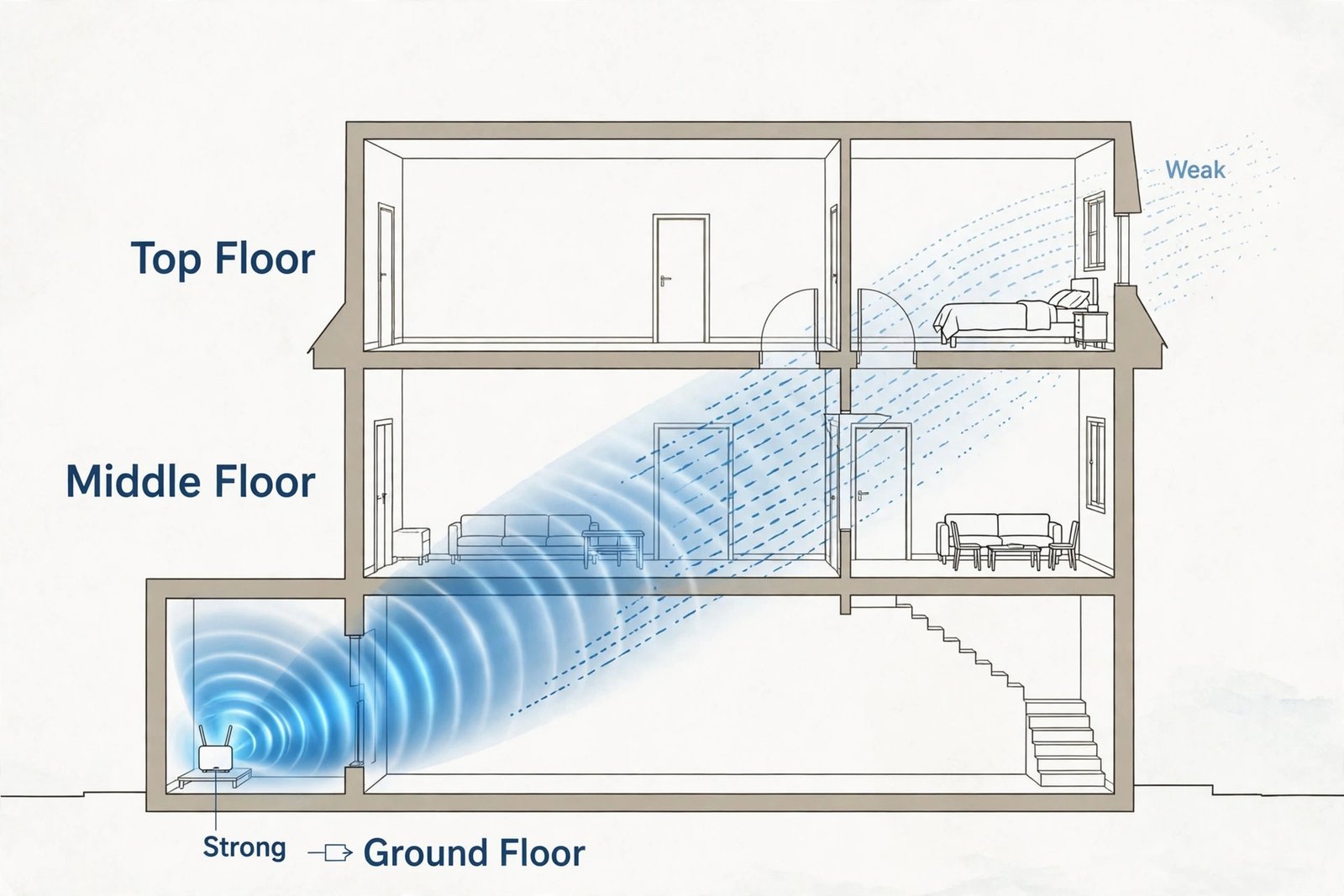
Wi-Fi signal spreads out from a router in all directions, but floors and ceilings are not just distance. They are barriers. A timber floor with plasterboard below it will cut signal less than a concrete slab, a floor with underfloor heating pipes, or a ceiling packed with insulation and metal fixings. Add a hot water cylinder, a metal staircase, a chimney breast, or a kitchen full of appliances, and the path from a ground floor router to a top floor bedroom becomes a series of obstacles rather than a straight line.
Distance matters too. A router in a front corner on the ground floor may be 10 metres or more from a back bedroom on the top floor, measured diagonally through two floors. That is a long way for a 5 GHz signal, which is the band most devices use for fast work. The 2.4 GHz band travels farther, but it is slower and more crowded, so a device on the top floor may stay connected while video calls stutter, even though the Wi-Fi icon looks full.
Placement makes the problem worse in many homes. Providers often install the modem point near the front door, in a hallway cupboard, or beside a television in a corner room. That spot may suit the installer, but it is rarely central. A router tucked behind a television or inside a closed cabinet loses signal before it even reaches the stairs.
Mesh versus a single router, the verdict for tall homes
Mesh wins for most three-storey homes. A single router wins only in narrow cases, and it is worth naming those cases clearly so you do not overspend on mesh you do not need.
Choose mesh if your house has three floors in regular use, if bedrooms or an office sit two floors away from the modem, if walls or floors are brick or concrete, if the modem point is in a corner, or if several people stream, game, and join video calls at the same time on different floors. Mesh also wins if you want one network name throughout the house, so a phone call can move from the kitchen to a top floor bedroom without dropping to mobile data.
Choose a single powerful router only if the house is small, lightly built, and mostly open plan, if the modem point can sit centrally on the middle floor, and if the top floor is used lightly for browsing rather than video calls or gaming. Even then, test the farthest top floor room with a video call and a stream running at the same time. If either falters, mesh is the honest answer.
The key mesh detail is backhaul, which is the link between units. In a dual-band system, units share the same bands for devices and for talking to each other, so heavy use can slow the farthest unit. In a tri-band system, one band is set aside for the link between units. Tri-band costs more, but in a house with thick floors it is often the difference between a top floor that feels fast and one that feels merely connected. If you have Ethernet cabling between floors, wired backhaul is better still.
Wi-Fi generation matters less than node count and placement. Wi-Fi 6 is enough for most households on plans up to 1 Gbps. Wi-Fi 7 makes sense on a multi-gigabit plan or if you plan to keep the system for five years or more. Do not buy Wi-Fi 7 as a fix for bad placement. A well placed Wi-Fi 6 mesh system will beat a badly placed Wi-Fi 7 system on the top floor every time.
How to choose without overspending
Start with your internet plan, because your router cannot deliver more speed than your plan provides. On a plan up to 500 Mbps, a good Wi-Fi 6 mesh system is ample, and money is better spent on a third unit or on wired backhaul than on a flagship pack. That plan-first rule is central to finding the best Wi-Fi router for 3-storey house budgets without overspending. On a 1 Gbps plan, look for gigabit or 2.5 gigabit Ethernet ports on each unit, so a wired desktop, console, or television can use the full plan.
On a plan above 1 Gbps, Wi-Fi 7 and 2.5 gigabit ports become worth paying for, because a gigabit port would cap wired devices below the plan speed.
Count devices honestly. A household with televisions, speakers, cameras, and phones on three floors can easily pass 40 connected devices, and a busy smart home can pass 70. If many devices stream at once, a tri-band system handles the load better than a dual-band system with the same device count on the box.
Check ports before you buy. Each unit should have at least two Ethernet ports if you want wired backhaul or a wired device on that floor. Some compact units have only one port, which forces a choice between wired backhaul and a wired device, or an extra switch purchase.
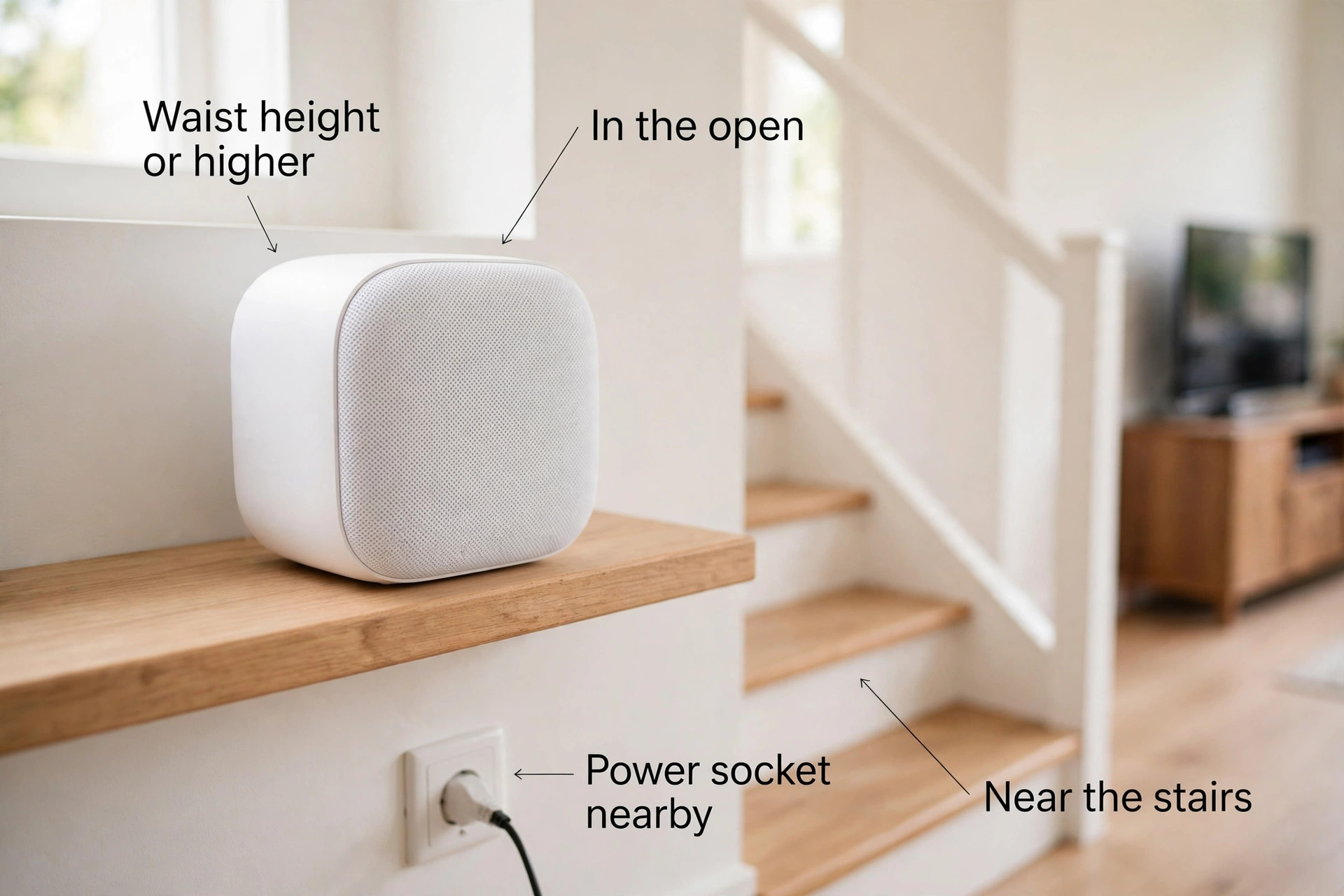
Think about where units will live. Mesh units need a power socket, a clear shelf or table, and space around them, not a closed cupboard or a spot behind a large television. Place each unit no more than two rooms away from the next unit. If the app reports a weak link, move the unit closer to the stairs, not farther into the weak room.
Check security basics too. Look for WPA3 encryption, automatic firmware updates, and a guest network. Paid security subscriptions can add 30 to 70 dollars a year, so check whether the features you want are included or paywalled.
Systems that fit three-storey homes, by budget and need
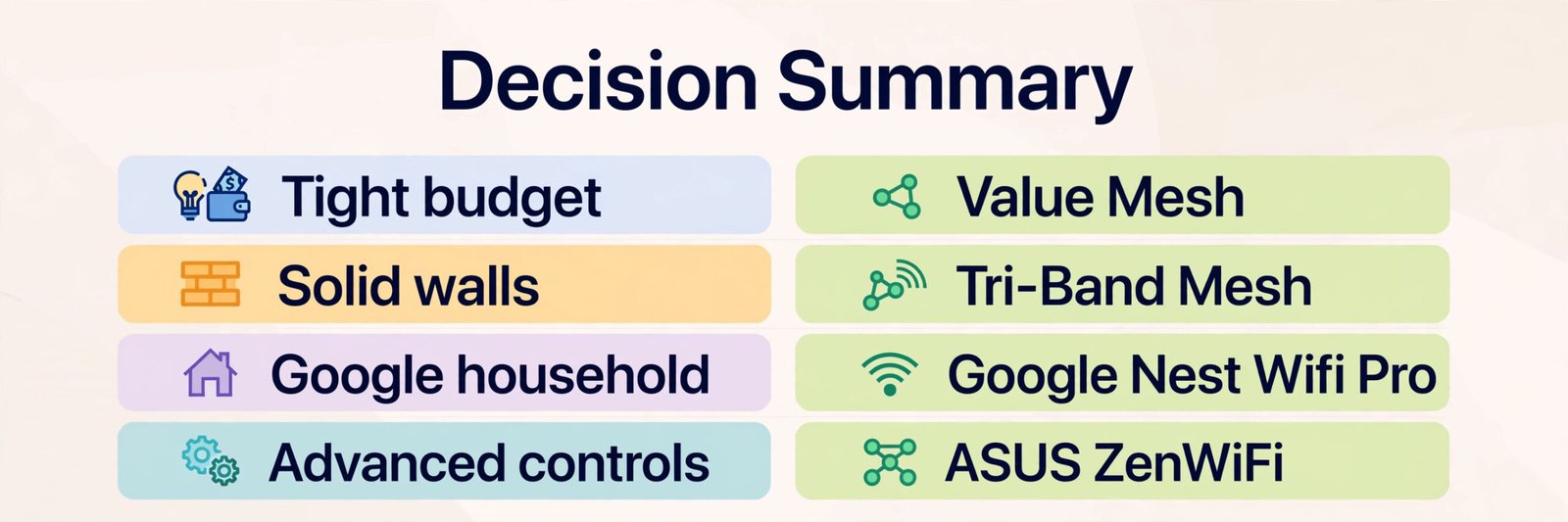
The systems below are grouped by what they do best in a tall house, not by a ranking of raw speed. Prices are retailer ranges seen in October 2026, so check the vendor page and the checkout total before you buy. When judging the best Wi-Fi router for 3-storey house use, pack size matters more than the headline price, because a two-pack price that looks cheap can leave the top floor uncovered.
TP-Link Deco, the value pick for most tall houses
TP-Link Deco systems are the usual value choice, because three-packs are widely available and the app setup is straightforward. The Deco BE25 is a dual-band Wi-Fi 7 system with two 2.5 gigabit ports per unit and a stated coverage of up to 4,600 square feet for a two-pack and up to 6,600 square feet for a three-pack. Retailer listings in October 2026 put the two-pack near 150 dollars and the three-pack near 199 dollars, with prices varying by seller and sale. That makes it a strong budget route into Wi-Fi 7, with the caveat that dual-band backhaul is weaker than tri-band backhaul in thick-walled houses.
The Deco X55 is a Wi-Fi 6 system with a stated coverage of up to 6,500 square feet for a three-pack. It suits households on plans up to 1 Gbps who want a proven, lower cost mesh system and do not need Wi-Fi 7 yet. Retailer ranges for a three-pack commonly sit in the 200 to 300 dollar band. The Deco XE75 adds Wi-Fi 6E and a tri-band design with a 6 GHz backhaul band, and it is the better Deco choice if the top floor must carry video calls and gaming at the same time.
NETGEAR Orbi, the guided setup pick with strong backhaul options
NETGEAR Orbi systems tend to cost more, but the app guidance is clear and the higher tiers offer strong dedicated backhaul. The Orbi 370 is the entry Wi-Fi 7 Orbi, a dual-band system with a stated coverage of up to 6,000 square feet for a three-pack and up to 70 devices. NETGEAR lists the three-pack at 299.99 dollars on its own store, down from a 349.99 dollar list price in recent listings, and retailer prices track close to that range. It suits a household that wants Wi-Fi 7 and a simple app, but it is dual-band, so thick floors remain a test case rather than a certainty.
The older Orbi Wi-Fi 6 tri-band systems, such as the RBK752 two-pack and RBK753 three-pack, remain relevant because tri-band backhaul helps tall houses. Retailer listings in October 2026 put the RBK752 two-pack near 440 dollars. Compare the exact model number, not just the Orbi name, because packs with similar names can differ in band count, ports, and device capacity.
Watch the subscription cost for NETGEAR Armor after its trial, and confirm the port count on the exact pack, because some Orbi satellites carry fewer ports than the main router.
Google Nest Wifi Pro, the simple pick for Google households
Google Nest Wifi Pro is a Wi-Fi 6E tri-band system with a stated coverage of up to 2,200 square feet per unit, up to 4,400 square feet for a two-pack, and up to 6,600 square feet for a three-pack. Google lists a single unit from 199.99 dollars, and retailer listings put the three-pack near 400 dollars, with sales moving that figure. Each unit has two gigabit Ethernet ports, which is enough for wired backhaul on one device per floor but not for several wired devices without a switch.
Nest Wifi Pro suits a household already using Google Home, Matter, or Thread devices, because each unit can act as a Thread border router. The limits are clear. It cannot mix with older Nest Wifi or Google Wifi units, and its ports are gigabit only. For a house on a plan up to 1 Gbps with a Google smart home, it is a clean, low fuss choice. For a multi-gigabit plan, a system with 2.5 gigabit ports is a better fit.
ASUS ZenWiFi, the control pick for advanced households
ASUS ZenWiFi systems suit buyers who want deeper controls, VPN options, and AiMesh expansion with compatible ASUS routers. The ZenWiFi BD4 is a dual-band Wi-Fi 7 system with two 2.5 gigabit ports per unit and a stated coverage of up to 6,500 square feet for a three-pack. Retailer listings in October 2026 put the three-pack in the 220 to 300 dollar range, with some listings near 220 dollars during sales. That makes it a strong rival to the Deco BE25 for buyers who prefer ASUS software and lifetime security features without a separate subscription for the core tools.
The ZenWiFi BT6 is a tri-band Wi-Fi 7 system with a stated coverage of up to 7,600 square feet for a three-pack, and retailer listings in October 2026 put it near 449 dollars. It is the better ASUS choice for a wide or solid-walled house, because tri-band backhaul protects top floor speed under load. Check the official ASUS specifications page before you buy, because ASUS sells several similar packs with different port counts.
A short sources note for the figures above. Deco BE25, Orbi 370, Nest Wifi Pro, and ZenWiFi BD4 coverage and ports come from their official vendor pages. Retailer price ranges come from October 2026 listings and will change, so treat every price in this guide as a range to verify at checkout, not as a fixed quote.
Placement floor by floor
Placement decides whether a good mesh system feels fast or merely adequate. The goal is a chain of strong links, not units pushed into the rooms with the worst signal. That placement rule applies to any best Wi-Fi router for 3-storey house setup, whatever brand you buy.
Put the main unit where the modem lives, but lift it out of a cupboard and off the floor if you can. A shelf at waist height or higher, away from a television and metal objects, is a better start than a low corner. If the modem point is in a front hallway, the middle floor unit becomes the bridge to a rear extension, and its position matters even more.
Put the middle floor unit near the stairwell or landing, not in a far bedroom. The stairwell is the open shaft through which signal travels most easily between floors, and a unit near it can serve both the floor above and the floor below. If the landing has no power socket, a short extension lead to a nearby hallway socket is better than a unit hidden in a bedroom at the far end of the floor. Keep the unit in the open, on a shelf or table, with no large metal object directly beside it.
Put the top floor unit near the top of the stairs or on the landing, then test the farthest bedroom from there. If the farthest bedroom is weak, move the top unit a room closer to that bedroom, but only if the link back to the middle unit stays strong. The common error is to put the top unit inside the weak bedroom itself, where it receives a weak signal from below and then repeats that weak signal to the devices beside it. A unit halfway between the stairs and the weak room usually serves both better.
Test after each move, not just at the end. Use a speed test app in the farthest room on each floor, with a video call running and a video streaming on another device. If the app shows a weak link between units, move the weaker unit closer to its neighbour by one room and test again. Small moves often beat a new purchase.
Wired backhaul, the upgrade that changes everything
If your house has Ethernet cabling between floors, use it. Wired backhaul connects mesh units by cable, so the wireless bands are left free for devices. In a three-storey house, that one change can lift top floor speeds more than a move to a faster Wi-Fi generation. It also makes dual-band mesh systems far more viable, because the weak point of dual-band backhaul disappears when the link runs over cable.
Running one Ethernet cable to each upper floor is a bigger job, but it is the most durable fix for a tall house. A local installer can often run cables through a stairwell void or a service cupboard with less disruption than owners expect. If you are renovating, add Ethernet points on each floor near the stairwell at the same time as other work. Tri-band mesh is the fallback when cabling is not possible. If you must choose between a fourth dual-band unit and a tri-band three-pack, choose the tri-band three-pack, because a stronger link between three units beats a weaker link spread across four.

What a three-storey setup really costs
Budget for the system, not just the headline pack price. For the best Wi-Fi router for 3-storey house value, a three-pack commonly costs 200 to 450 dollars in October 2026 retailer ranges, depending on Wi-Fi generation and band count. Dual-band Wi-Fi 7 three-packs sit near the lower end of that range, tri-band Wi-Fi 6E and Wi-Fi 7 three-packs sit in the middle and upper end, and flagship tri-band Wi-Fi 7 packs can pass 700 dollars. Add a small switch, about 20 to 40 dollars, if a floor needs more wired ports than the unit provides.
Add an extra satellite, commonly 130 to 300 dollars depending on the system, only if a basement, garden room, or far wing stays weak after placement tests.
Running costs are smaller but worth counting. Paid security subscriptions can add 30 to 70 dollars a year, so check what is included free for the life of the product. Do not pay for speed you cannot use. A 700 dollar flagship pack on a 200 Mbps plan will not make video calls faster than a well placed 250 dollar tri-band system, because the plan caps the speed before the router does. Conversely, do not save 100 dollars by buying a two-pack for a three-storey house and then spending months fighting the top floor.
Mistakes that leave the top floor weak
The first mistake is buying on headline speed alone. A single router rated at a very high combined speed can still fail on the top floor, because combined speed adds bands together and no single device uses all bands at once. Judge any best Wi-Fi router for 3-storey house candidate by node count, backhaul bands, ports, and placement, not by the largest number on the box.
The second mistake is hiding units. A mesh unit inside a closed cabinet, behind a television, low on the floor behind a sofa, or inside a metal hallway cupboard loses signal before it serves anyone. Keep units in the open, elevated, and away from large metal objects and water tanks. A unit that looks tidy inside a cupboard is a unit that performs badly.
The third mistake is placing the farthest unit in the dead zone itself. That feels logical, because the dead room needs help, but it gives the unit a weak signal to repeat. Place the unit between the stairs and the dead room, where it can still hear the middle unit clearly, and let it serve the dead room from a stronger position.
The fourth mistake is mixing old and new systems without checking compatibility. Some mesh systems cannot mix with older units from the same brand, and mixing brands in one mesh network usually fails or creates two separate networks. Google Nest Wifi Pro, for example, cannot mix with older Nest Wifi or Google Wifi units. Check compatibility before you buy an extra unit to extend an existing system, or you may end up replacing the whole set.
The fifth mistake is skipping the test with real load. A speed test on one phone in an empty house can look fine, while the same network stutters when three people stream and join calls at once. Test in the evening, when neighbours are also online. The sixth mistake is ignoring the modem and the plan. If speeds are slow on a wired connection directly from the modem, fix that first with the provider.
Set up in an afternoon, in the right order
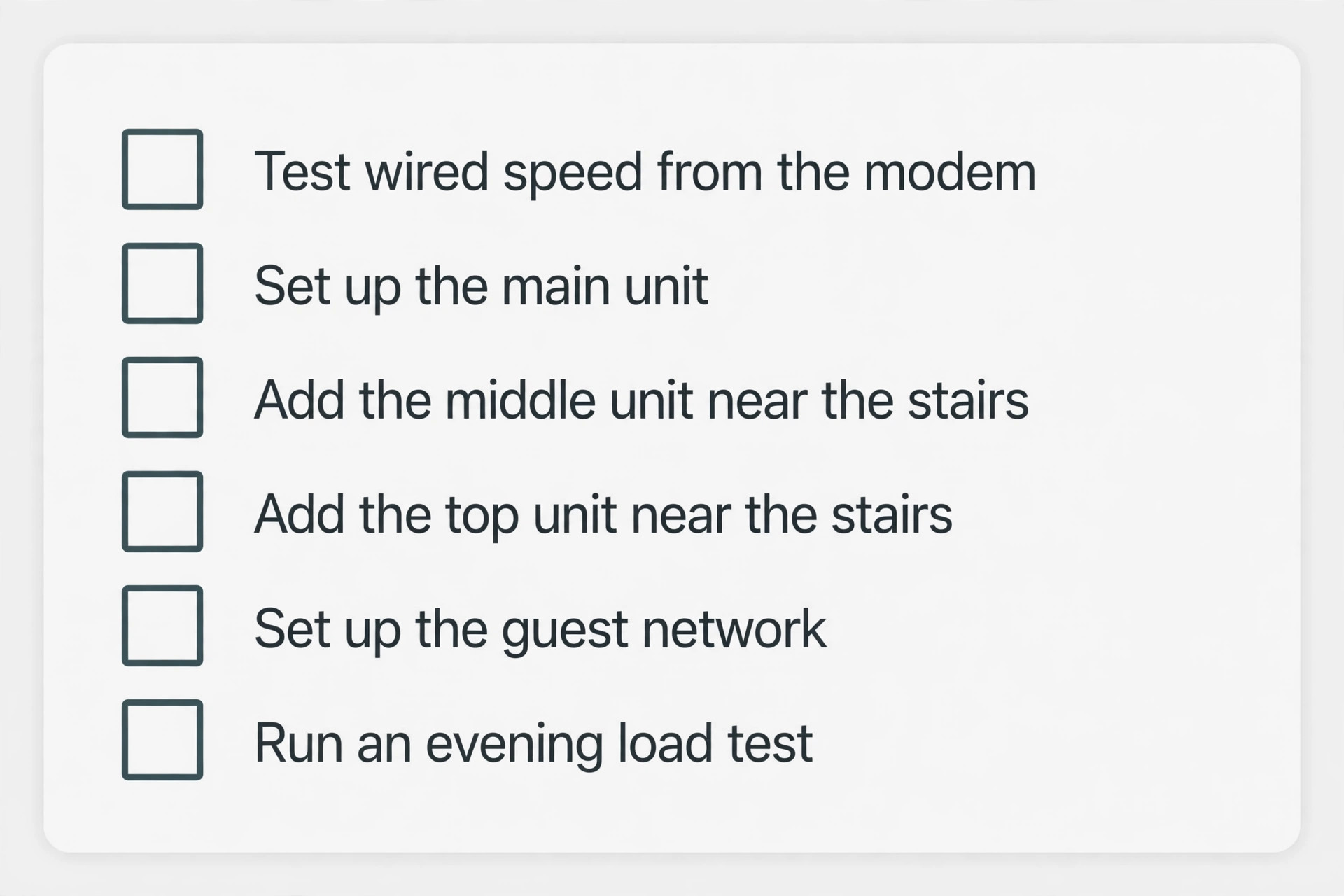
Start by updating the modem and checking the wired speed from the modem itself, so you know the baseline the mesh system must match. Then set up the main mesh unit beside the modem, give the network a new name and a strong password, and test the ground floor. Add the middle floor unit near the stairwell, wait for the app to confirm a strong link, and test the middle floor. Add the top floor unit near the top of the stairs, confirm its link, and test the top floor farthest room. Only then move units in small steps to fix weak spots, testing after each move.
Set up a guest network for visitors, turn on automatic firmware updates, and label each unit by floor in the app if the app allows it. Finally, run an evening test with the household online, and keep the receipt and box for at least two weeks, so a system that fails the real test can be returned without a fight.
For related reading, best smart home devices 2026 covers the devices that will share this network on every floor, and how to use AI to renovate your home is useful if you are planning work that could include Ethernet points on each floor.
Frequently Asked Questions
How many mesh units do I need for a 3-storey house?
Three units, one per floor, is the right starting point for the best Wi-Fi router for 3-storey house coverage. Two units can work in a small, lightly built flat, but they leave little margin for thick floors or a corner modem point. Add a fourth unit only for a basement, a garden room, or a wide wing that stays weak after placement tests.
Is a single powerful router ever enough for three floors?
It can be enough in a small, open-plan, lightly built house with a central modem point on the middle floor and light use on the top floor. Test the farthest top floor room with a video call and a stream running at the same time. If either falters, a mesh system is the honest fix, not a more expensive single router.
Should I buy Wi-Fi 6, Wi-Fi 6E, or Wi-Fi 7 for a tall house?
Wi-Fi 6 is enough on plans up to 1 Gbps for most households and keeps the price down. Wi-Fi 6E helps in crowded streets because the 6 GHz band is less congested. Wi-Fi 7 makes sense on multi-gigabit plans, with many new devices, or if you plan to keep the system for five years or more. Node count and placement matter more than generation in a tall house.
Does mesh slow down my internet?
A well placed tri-band mesh system with a dedicated backhaul band loses little speed at the farthest unit, and wired backhaul loses almost none. A badly placed dual-band mesh system can slow the farthest unit, because devices and the link between units share the same bands. Placement and backhaul type decide this more than the mesh idea itself.
Where should I put the middle unit in a 3-storey house?
Put it near the stairwell or landing, in the open, at waist height or higher, with a power socket nearby. The stairwell is the easiest path for signal between floors. Avoid a far bedroom, a closed cupboard, or a spot behind a large television, because those positions weaken the link to both neighbouring units.
Can I mix an old router with a new mesh system?
You can sometimes use an old router as a separate access point, but it will not join most mesh systems as a true mesh node, and mixing brands usually creates two networks rather than one managed mesh. Check compatibility for your exact models before you buy. Some systems, such as Google Nest Wifi Pro, cannot mix with older units from the same brand at all.
Do I need wired backhaul for a 3-storey house?
You do not need it, but it is the single upgrade most likely to fix a stubborn top floor. If Ethernet exists between floors, use it. If it does not, a tri-band system is the best wireless fallback. Running Ethernet during renovation work is worth doing, because it future proofs every later router upgrade.
Buy One Node Per Floor, Then Stop Shopping
The best Wi-Fi router for 3-storey house buyers is rarely a single box with a bigger claim on the front. It is a three-unit mesh system, placed one unit per floor, near the stairs, in the open, with a backhaul plan that matches your walls. Choose a dual-band Wi-Fi 7 three-pack if the budget is tight and the walls are light. Choose a tri-band system if the floors are solid, the house is wide, or several people work and stream on different floors at once. Add wired backhaul if you can, test in the evening under real load, and return a system that fails that test.
Start with the floor plan table in this guide and buy the system that fits that row rather than the system with the loudest marketing. A top floor that holds a video call without freezing is worth more than a headline speed that only exists beside the router.