
A bakery can have a full display case, a loyal street of regulars, and an Instagram account that still brings in almost no orders. The problem is rarely the baking. Posting happens when someone remembers, photos are taken in bad light at the end of a rush, captions say nothing useful, and the bio link leads nowhere a hungry customer can order from. That gap is exactly what a bakery Instagram marketing workflow is meant to close. It turns random posting into a repeatable week, with a clear job for each day, a small set of formats you can sustain, and a direct path from a post to a paid order.
This guide gives you that week in full, from profile setup and Monday planning to batch shooting, daily Stories, message handling, and a Sunday review. It is written for a small bakery, a home bakery working within local food rules, and a market stall baker selling mostly locally. Tool prices are checked against vendor pages at draft time, and you should still check the price at checkout before you pay, because plans and limits change.
Why Most Bakery Accounts Stall After the First Month
Most bakery accounts start well. The owner posts a beautiful cake, friends share it, a few orders arrive, and then the bakery gets busy. Posting stops for ten days. When it restarts, the feed looks uneven, and the account has lost the small trust it built. If a customer cannot tell from your last three posts whether you are open and how to order, they will buy from the bakery whose feed answers that in ten seconds.
A second reason accounts stall is that every post tries to do every job at once. Give each post one job. One post shows skill, one sells a product with a deadline, one answers a repeated question. Captions get shorter, photos get clearer, and customers know what to do next.
A third reason is time. Baking starts early and service runs all day, so move the work to moments that fit the bakery day and batch it. Photos are taken when the product looks best. Reels are filmed while you are already working. Captions are written once and scheduled. Replies are handled in two short windows a day.
Set Up the Profile So It Can Take Orders
Before you plan content, fix the profile. A profile that looks lovely but cannot take an order wastes every view your best Reel earns. Switch to a professional account, either business or creator, to unlock Insights, scheduling, and contact options. Connect the Instagram account to a Facebook Page if you plan to schedule from Meta Business Suite, the free official desktop scheduling tool for Instagram and Facebook, and confirm the current steps at business.facebook.com, because Meta changes its menus.
Write the bio for a stranger, not for a regular. A stranger needs four facts in the first two lines. What you bake, where you are, when to order by, and where to order. A useful pattern reads like this. City bakery. Sourdough, celebration cakes, and weekend pastry boxes. Order by Thursday for Saturday pickup. Tap the link to order. It removes doubt, and doubt is what kills orders. A bakery Instagram marketing workflow only works when this foundation is right, because no posting schedule can fix a bio that hides the order step.
The link in the bio deserves the same care. Do not send people to a general homepage and expect them to hunt for an order form. Send them to one page with one clear first button, labelled Order. That page can be a simple order form, a shop page, or a link page where Order sits at the top, followed by Menu, Pickup times, and Reviews.
Build Highlights that answer the questions you hear every week. A good starter set is Menu and Prices, How to Order, Pickup and Delivery, Reviews, and This Week. Keep each Highlight short, newest first, and update This Week every Monday. A customer landing on your profile at 9 pm should be able to learn, in under a minute, whether you sell what they want, what it costs, when they can collect it, and how to pay. Add a branded hashtag only if you will use it and check it. Pair it with local tags that name your city or neighbourhood and the product itself, because local tags reach people who can actually collect an order.
The bakery Instagram marketing workflow in One Week
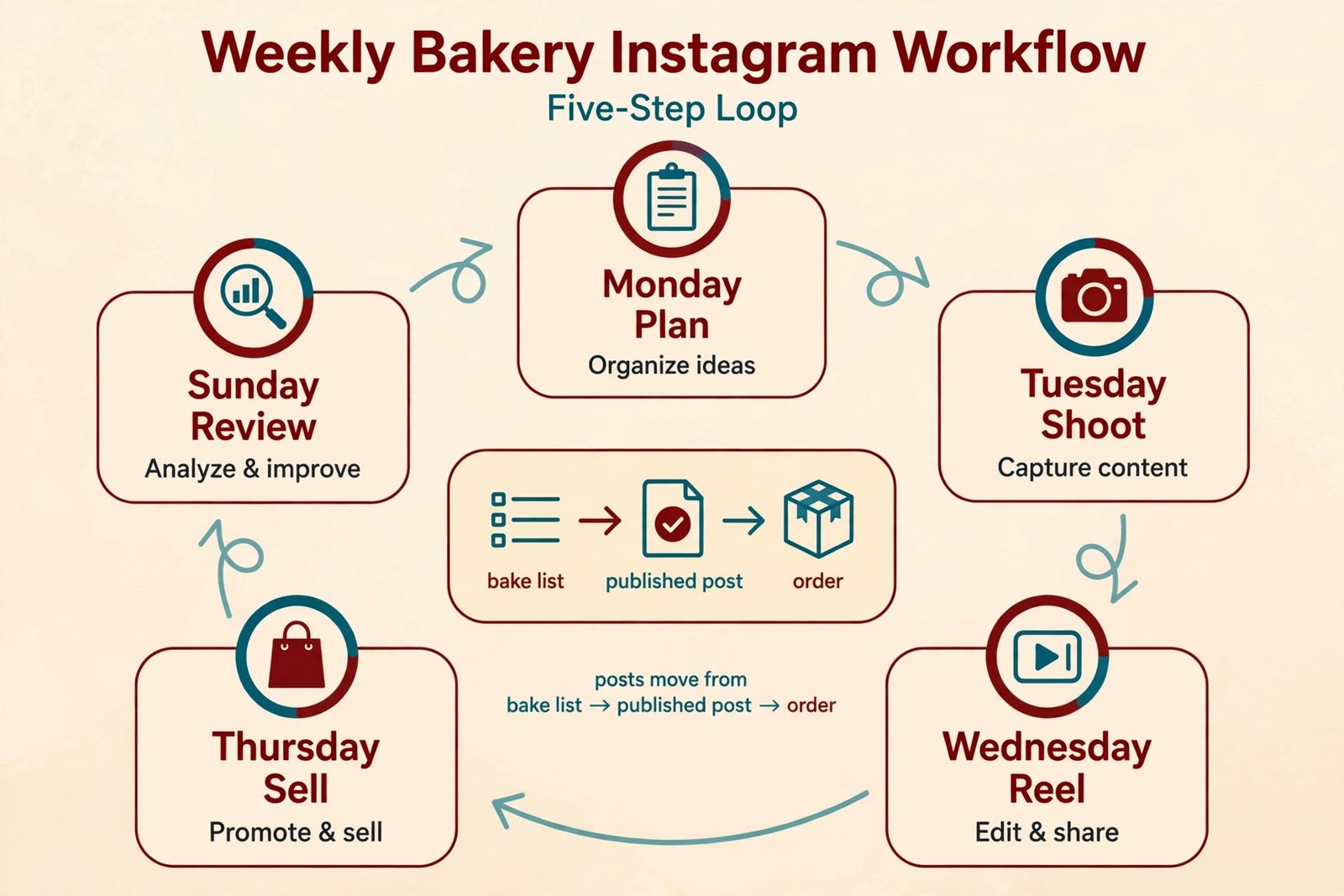
A workable week for a small bakery has five feed posts, daily Stories, and two short reply windows. That is enough to stay visible without turning the bakery into a content studio. The table below is the core of the system. Adjust the days to your baking schedule, but keep the balance. Two Reels for discovery, two photo posts for the catalogue, and one post that answers, proves, or sells with a deadline.
| Day | Feed post | Stories job | Orders job |
|---|---|---|---|
| Monday | Plan and post the week ahead menu | Show the week ahead, poll on flavours | Open the order form for the week |
| Tuesday | Photo post of a signature product | Behind the scenes prep, question box | Reply window one, confirm Thursday orders |
| Wednesday | Reel of a process, such as piping or slicing | Countdown to the weekend cutoff | Reply window two, confirm Friday orders |
| Thursday | Photo post of a customer favourite, with price and cutoff | Show what is left, packing, pickup times | Close weekend orders, confirm deposits |
| Friday | Reel of the weekend bake or a first cut | Fresh from the oven, pickup reminders | Pickup day messages, thank you notes |
| Saturday | No feed post, or a repost with permission | Pickup day, customer reactions, sold out notice | Take next week waitlist names |
| Sunday | Rest, or one evergreen photo from the bank | Rest, or a short poll for next week | Review the week, note what sold |
Notice what this week does not include. It does not ask you to post every day on the feed, film a Reel every morning, or reply to messages all day. It asks for one planning session, one shoot session, two reply windows, and a short review. A bakery Instagram marketing workflow that cannot survive a busy Saturday is not a system. It is a wish. This one is built to survive, because Saturday has almost no feed work, and Sunday is mostly rest.
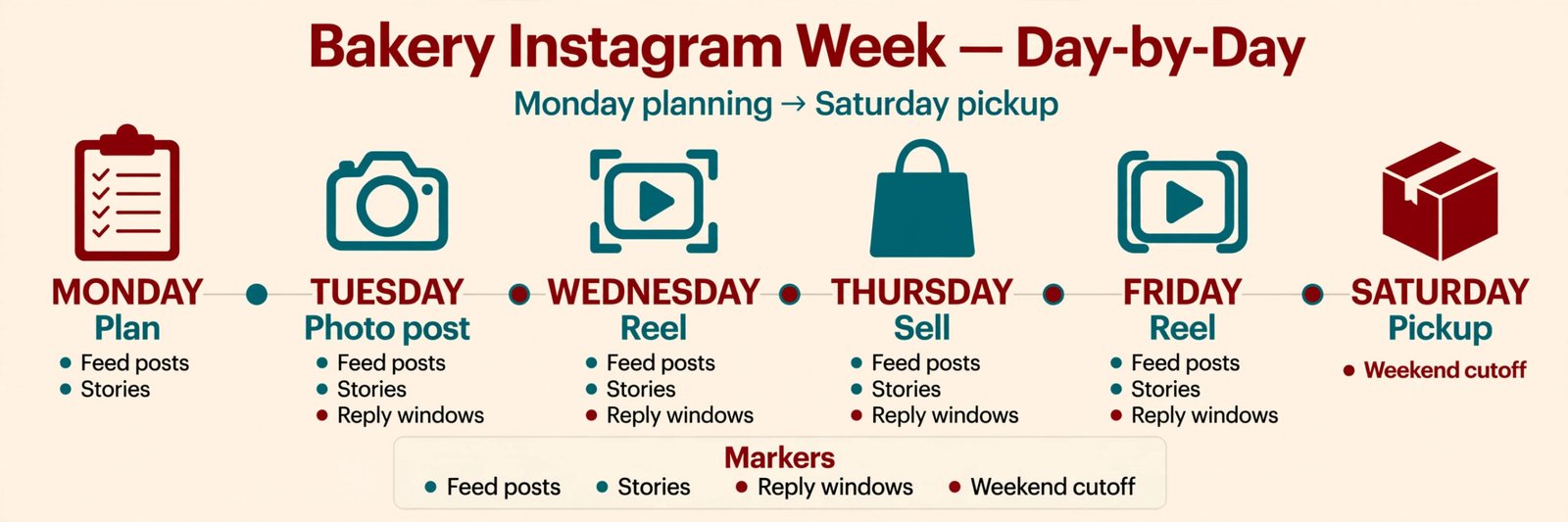
Use the template below for every feed post. First line, the product and the reason to care. Second line, one specific detail, such as flavour or size. Third line, price and serving size. Fourth line, cutoff and pickup details. Final line, one action, such as tap the link to order. If a caption needs more than five lines to explain the offer, simplify the offer, not the caption.
Monday. Plan the Week in One Sitting
Monday is planning day, and it should take under an hour once the system is running. Start with what you are actually baking. List the products, quantities, pickup days, and cutoffs. A celebration cake that needs three days notice cannot be sold on Friday for Saturday, and a weekend pastry box that sells out fast should be announced early. Planning from the bake list, not from content ideas, keeps the feed honest. You post what you can actually sell, in the quantities you can actually make.
Next, choose the five feed posts from the bake list. Pick one signature product for Tuesday, one process worth filming for Wednesday, one customer favourite for Thursday, and one weekend bake for Friday. Monday itself can carry the week ahead menu post, with week ahead products, pickup days, and the order link.
Write all five captions in the Monday session, using the template above, and check each one for product name, price or starting price, cutoff and pickup plan, and one action only. Schedule the feed posts now, using Meta Business Suite for free or a paid scheduler if you need a visual grid planner. Check the scheduled preview on a phone, because most customers will see the post there.
Tuesday. Shoot Photos When the Product Looks Best
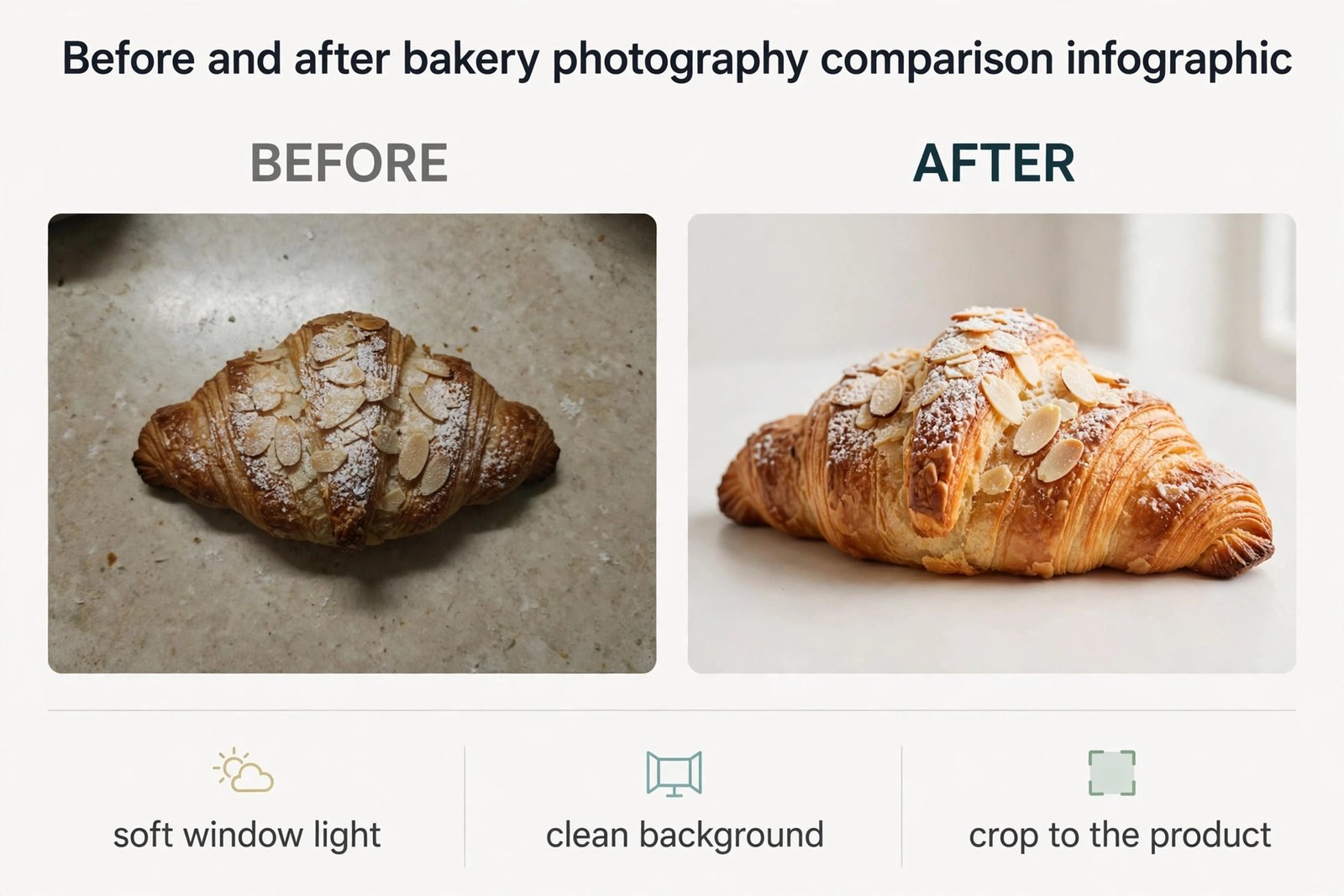
Photography for a bakery is less about equipment and more about light, timing, and restraint. Natural window light, a clean surface, and a simple background will beat a cluttered shot under harsh overhead lights, even on a phone. Shoot near a window in the morning, when the product is fresh and the light is soft. A small folding table near a window, a plain board, and a neutral cloth are enough for most bakery photos.
Shoot the product, not the whole shop. A close photo of a sliced loaf, with the crumb visible, sells bread better than a wide photo of a counter full of unrelated products. A celebration cake should be photographed at eye level, decoration in focus, background out of focus. A pastry box should be photographed open, with each item visible. Take three versions of each key product. One straight product shot, one sliced or served shot, and one in context shot, such as a cake in its box, for Stories and the order page.
Edit lightly and consistently. Brighten the photo a little, correct the warmth so white icing looks white, and crop to the product. Do not over saturate colours until icing looks artificial. In a bakery Instagram marketing workflow, photos act as a catalogue that a new visitor can scroll in thirty seconds and understand. Archive blurry photos and outdated prices, so the first nine squares a visitor sees are current, clear, and shoppable.
Wednesday. Make Reels That Show Process, Not Performance
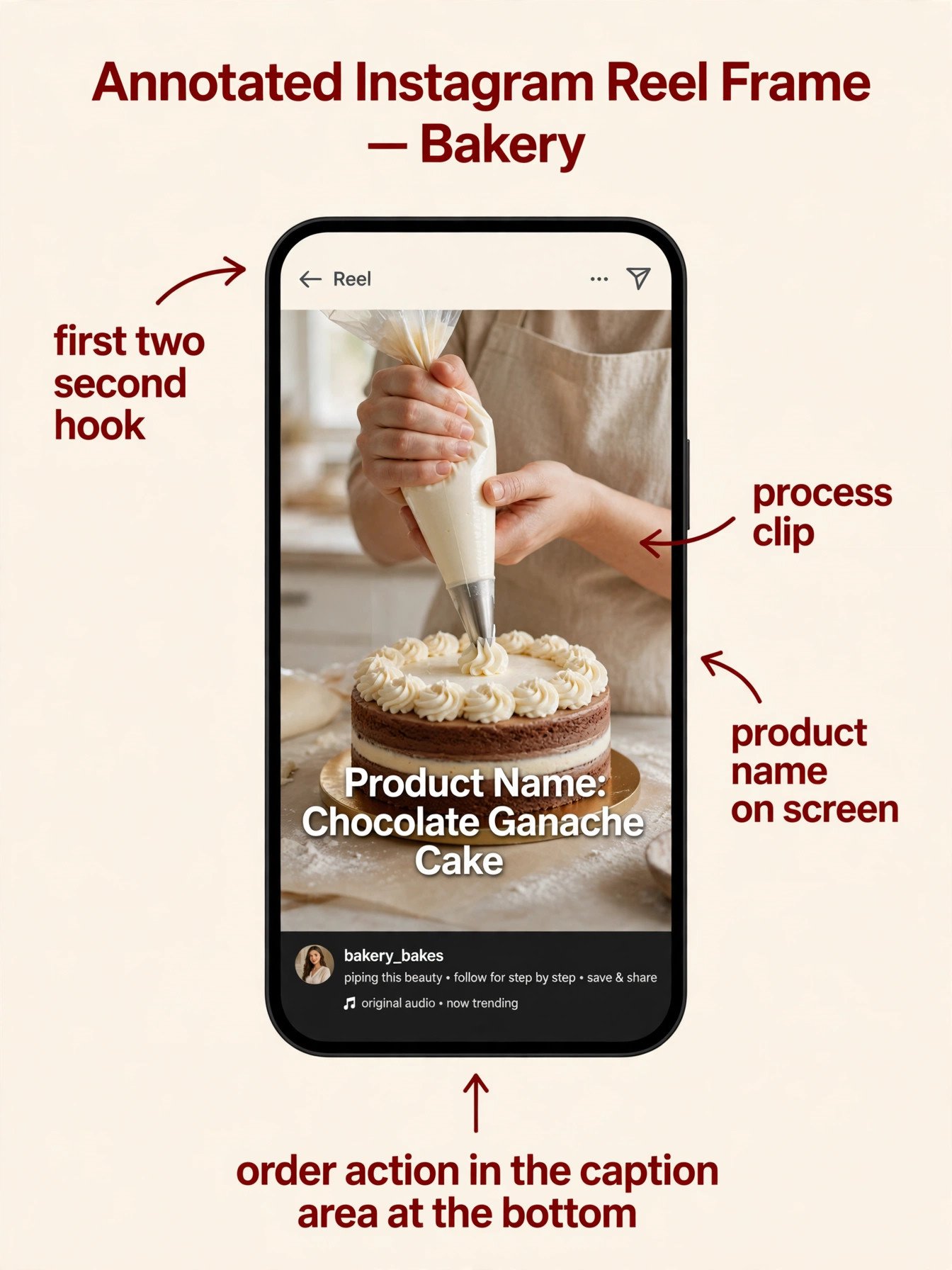
Reels earn discovery because Instagram shows short video to people who do not follow you yet, and bakery process is naturally good short video. Mixing, piping, glazing, slicing, and packing all have movement, sound, and a clear result within seconds. You need a clear first two seconds, one process, and a payoff, such as the first cut, the finished box, or the oven door opening.
Film while you work, with a phone on a small tripod or propped safely away from flour and heat. Film short clips, not one long take. A useful Reel is often six to ten clips, each two to four seconds long, cut together with bakery sound or simple music. Start with the finished product for one second, then show the process, then end on the finished product again. That structure works for bread, cakes, pastries, and packing, without on camera presenting.
Keep Reels short and honest. A Reel under 30 seconds will usually hold attention better than a two minute tutorial. Add on screen text that a viewer can read without sound, naming the product and the action, and a caption with price, cutoff, and order action. Pin your two best Reels, one for your signature product and one for how to order.
Thursday. Sell With a Deadline, Not With Pressure
Thursday is the selling post, and it should be the clearest post of the week. Name the product, give the price, give the cutoff, and give the pickup plan. A post that says weekend boxes are available soon will get likes and few orders. A post that says six pastry boxes are left for Saturday pickup, order by Friday at noon, and tap the link to order, will get orders, because it gives a buyer everything needed to decide. Scarcity should be real. If you say six boxes are left, six boxes should be left.
Use Thursday to answer the question that blocks orders. For cakes, that is price, servings, and lead time. For bread, it is pickup day and loaf size. For pastry boxes, it is what is inside and allergen information. Put the answer in the post itself, not only in messages, because every customer who has to ask the same question costs you time.
Stories on Thursday should show packing and preparation, plus a countdown sticker for the cutoff and a question box for last minute queries. Answer those questions in Stories the same day, because a question answered in public helps the next ten customers who had it but did not ask.
Friday and Saturday. Turn Pickup Day Into Proof
Friday and Saturday are proof days. The work is already sold, and the feed job is to show it being collected, enjoyed, and sold out, without turning customers into content without consent. Photograph the product, the packed box, and the pickup shelf, not customers faces, unless you have clear permission. A customer reaction, with permission, is stronger, and a short video of a first cut, with permission, is strongest, because it shows the product doing its job at the table it was made for.
Stories are the right place for pickup day. Post fresh from the oven in the morning, pickup reminders at midday, and a sold out notice when a product is gone. A sold out notice is marketing for next week, because it tells followers that ordering early matters. Post the next date the product will be available, with a waitlist prompt.
Saturday should be light on purpose. Repost a customer photo with permission, share a Story from the day, and collect waitlist names. That keeps the account active without pulling the baker away from customers standing in the shop.
Stories and Highlights. The Daily Layer That Sells Today
Feed posts sell the week. Stories sell today. A customer who opens Stories wants to know what is fresh now, what is left, and what happens next. Build a simple daily pattern. Morning, what is baking today. Midday, what is ready and what is running low. Evening, tomorrow cutoff or next pickup day. That pattern takes three short Stories a day, and answers the three questions a local customer actually has.
Use interactive stickers with a purpose. A poll on flavours helps you decide what to bake next week and shows demand before you bake it. A question box collects queries you can answer in a batch. A countdown sticker makes a cutoff visible, and a link sticker sends a viewer straight to the order page.
Highlights turn good Stories into a permanent shopfront. Save the best Stories into the right Highlight each week, and delete outdated prices and dates. A How to Order Highlight with a clear three step process, choose, order by the cutoff, collect on the day, will cut message time, because customers arrive knowing the process.
Turn Comments and Messages Into Orders Without Living in the App
Orders by message fail when every message becomes a long negotiation. Fix this with a short order form and a short reply script, used every time. The form should ask for product, date, servings or quantity, flavour, pickup or delivery, name, phone, and allergen notes. Link the form from the bio, from Stories, and from the first reply to any order message, so you are not retyping the same questions all day.
Use two reply windows a day, for example late morning and late afternoon, and say so in the bio or in a pinned Story. Reply windows protect baking time, and they set a fair expectation. In each window, work through messages in order, confirm orders with price, date, and pickup details, and ask for a deposit where your policy requires one. A deposit for custom cakes and large orders protects you from no shows and from baking a cake nobody collects.
Write a reply script for the three messages you receive most. For a custom cake query, ask for date, servings, flavour, and budget, and give a starting price and lead time. For a weekend box, give what is inside, the price, the cutoff, and the order link. For pickup, give address, hours, and what to bring. Read the message first and answer the specific question, then use the script for details. Handle complaints and allergen questions in private, and keep allergen information clear on the menu, form, and packaging.
Choose Tools by the Job, Not by the Advert
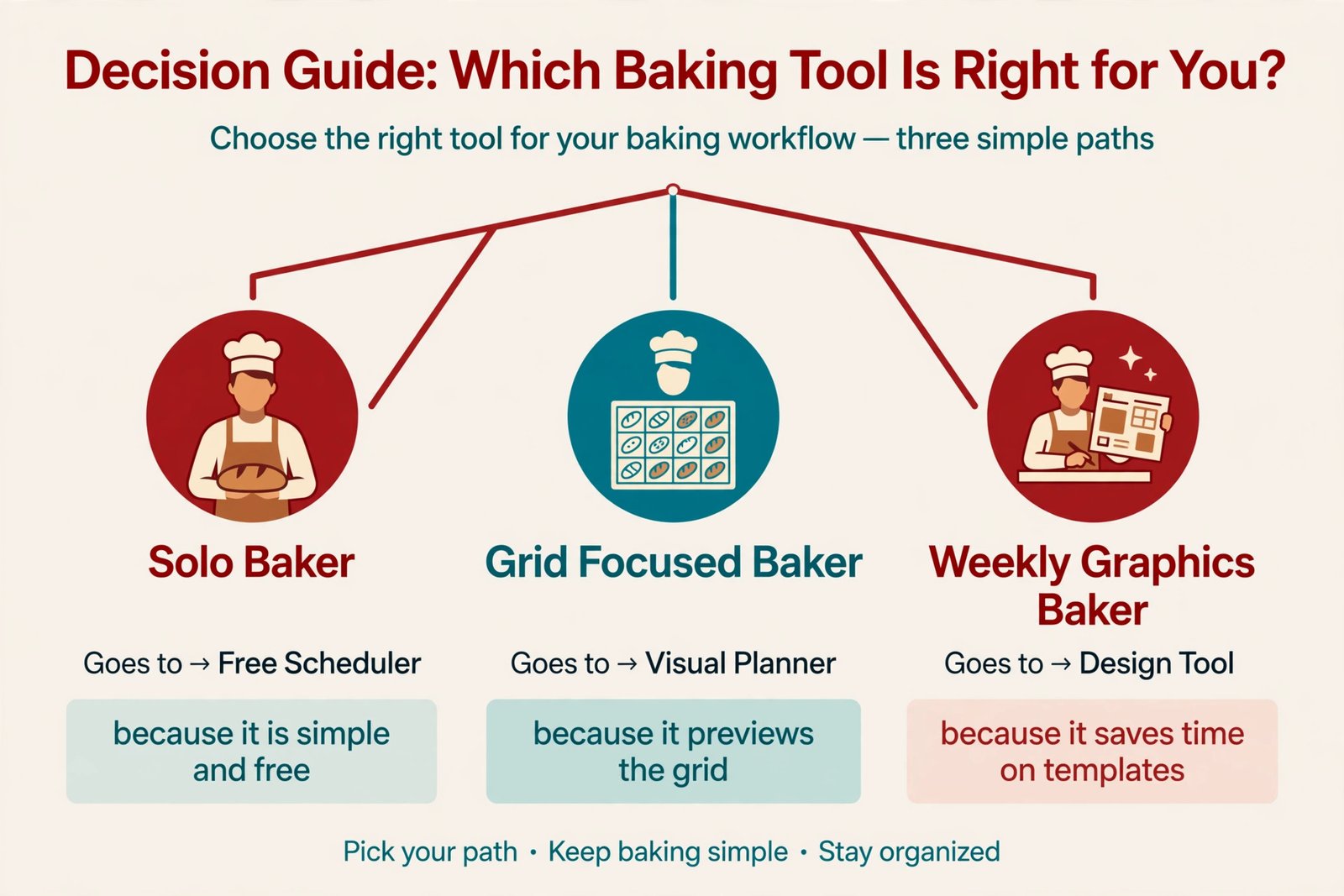
A bakery does not need a large marketing stack. It needs a scheduler, a design tool, and a place to collect orders, and each tool should earn its place by saving time or winning orders. Start free, and pay only when a limit is actually costing you posts or orders. The table below uses prices checked in October 2026 from vendor pricing pages, and you should check the price at checkout before you pay, because plans, limits, and trial terms change.
| Tool | What it does for a bakery | Price checked October 2026 | Best for |
|---|---|---|---|
| Meta Business Suite | Schedule feed posts, Reels, and Stories from desktop | Free | A bakery that only posts to Instagram and Facebook |
| Buffer | Schedule posts, manage a small set of channels, view basic analytics | Free for up to 3 channels and 10 scheduled posts per channel. Essentials from 6 dollars per channel a month on monthly billing, or 5 dollars on annual billing | A solo baker who wants simple scheduling without a large monthly bill |
| Later | Visual grid planner, Linkin.bio page, schedule posts and Reels | Starter from 25 dollars a month on monthly billing, or 18 dollars and 75 cents on annual billing, with 30 posts per profile a month | A bakery that cares about how the grid looks and wants a shoppable bio page |
| Canva | Design menu graphics, price cards, and Story templates with a brand kit | Free plan available. Pro from 18 dollars a month on monthly billing, or 144 dollars a year, for one person, in United States pricing checked October 2026 | A bakery that makes its own graphics weekly and wants consistent templates |
Meta Business Suite is the right starting point for most bakeries, because it is free, official, and covers scheduling. Buffer is the next step when the free queue fills up, because its paid plan is priced per channel. Later is the right choice when the grid matters, because its visual planner shows how a week of photos will look together before you publish.
Canva earns its place only if you design every week. A bakery that makes a menu graphic, price card, and Story templates weekly will save real time with a brand kit and saved templates. A bakery that posts phone photos with short captions may not need Pro at all. Buy it when a weekly design job that takes an hour would take twenty minutes with templates.
Check official pricing pages before you commit. Buffer lists its plans at Buffer pricing. Later lists its plans at Later pricing. Canva lists its plans at Canva pricing. Check trial terms as well as price, because some trials require a card and renew automatically.
A bakery Instagram marketing workflow also benefits from a simple order tool, even if that tool is only a form. A form linked from the bio, with product, date, servings, flavour, pickup, and allergen fields, turns a twenty message thread into one complete order. Every path from a post to an order should take two taps or fewer.
Measure the Week in Fifteen Minutes
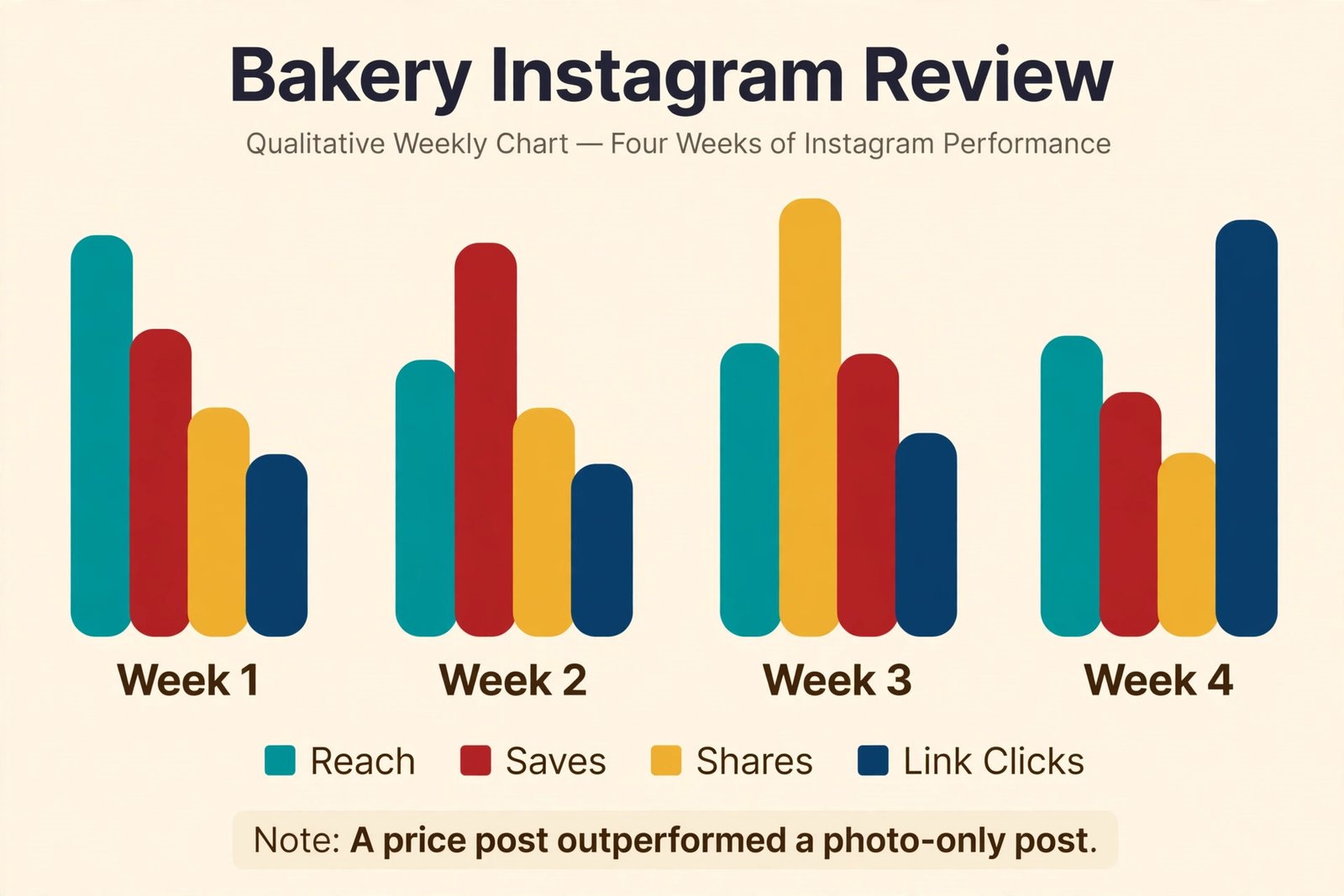
Sunday review should take fifteen minutes, and answer four questions. What reached local people. What got saved and shared. What turned into link clicks and orders. What should change next week. Instagram Insights gives you reach, saves, shares, profile visits, link clicks, and follower growth for each post. Do not judge a post by likes alone. Saves, shares, and link clicks predict orders far better than likes do.
Compare formats, not just posts. After four weeks, check whether process Reels reach more local people than finished product photos, and whether price and cutoff posts convert better than photos with no price. Write the pattern down in one line and use it to plan next month.
Track orders separately from views. Keep a weekly sheet with post, link clicks, orders that mention Instagram, and whether the product sold out. A bread post with modest reach that sells out every Saturday to local customers is a better business post than a cake post with thousands of views from another city. Set one improvement for next week, test it for a full week, and build a bakery Instagram marketing workflow that fits your bakery.
Mistakes That Cost Bakeries Orders
The first mistake is posting only finished products with no price, cutoff, or order action. A beautiful photo without buying information is a gallery, not a shop. The second mistake is inconsistent posting, where a busy week means silence, and a quiet week means five posts in two days. The third mistake is using only global hashtags and no location tags, which brings views from people who cannot collect an order and hides the post from people who can.
The fourth mistake is filming everything and finishing nothing. Film with a plan, edit the next morning at the latest, and publish on schedule, even if the Reel is simple. The fifth mistake is answering every message instantly all day, which breaks baking work. Two focused reply windows will serve customers better than all day distraction.
The sixth mistake is ignoring Stories, where daily selling happens, from sold out notices to pickup reminders. A feed post from Tuesday will not tell a Saturday customer what is left. A Saturday Story will. The seventh mistake is copying another bakery voice and menu, instead of showing your own products, prices, and pickup reality.
How to Choose Your First Month of Content
If you are starting from zero, do not try to launch the full week at once. Start with four foundations in week one. A profile that can take orders, a week ahead menu post, one signature product photo with price and cutoff, and one process Reel. In week two, add the Thursday selling post and daily Stories. In week three, add the Friday weekend Reel and the Sunday review.
Choose products for the first month by what you can make well, in quantity, on a reliable day. A signature loaf that bakes every Saturday, a celebration cake with a clear starting price, and a pastry box with a fixed set of items are better than a rotating menu of experiments, because customers need to learn what you sell before they can order it regularly. Test new flavours with a Story poll before baking a full batch.
Plan seasonal content around real baking dates, not generic holidays you do not serve. If you bake for a local market or festival, plan the post two weeks ahead, with a cutoff that gives you time to bake and pack. If you do not bake for a holiday, a post saying you are closed, with the next open day, is more useful than a generic graphic that promises nothing a customer can buy.
For related reading, this site guide to best AI tools for Instagram covers design and scheduling tools, and how to plan a month of social media content with AI shows how to extend a weekly system into a monthly plan. For nearby food business workflows, see best AI tools for catering businesses, best AI tools for restaurants, and automate small business with AI.
Frequently Asked Questions
How often should a bakery post on Instagram?
Post five feed posts a week at most, with daily Stories, if you can sustain that rhythm for a month. Two Reels, two photo posts, and one selling or menu post is a strong balance for a small bakery. Consistency over four weeks matters more than a busy first week followed by silence.
Should a bakery post Reels or photos?
Post both, for different jobs. Reels are better for discovery, because Instagram shows short video to people who do not follow you yet. Photos are better as a catalogue, because a new visitor can scroll the grid and understand your products, prices, and style in seconds. Use Reels to be found, and photos to be understood.
How do I turn Instagram followers into orders?
Make ordering easy, visible, and specific. Put what you bake, where you are, and the order cutoff in the bio. Link to an order page or form where Order is the first button. Give price, servings, cutoff, and pickup details in the post itself. Reply in two focused windows a day, confirm with price and date, and ask for a deposit on custom and large orders.
How much time should Instagram take each week for a small bakery?
Plan for about three to four hours a week once the system is running. That covers one hour of Monday planning and scheduling, one hour of shooting and editing in a batch, short daily Stories filmed while you work, and two reply windows a day. The first two weeks will take longer, while you build templates, Highlights, and an order form.
Do I need paid tools to run a bakery Instagram account?
No, not at first. Meta Business Suite is free and covers scheduling for Instagram and Facebook, and a phone camera with natural light covers photos and Reels. Pay for a scheduler when the free queue or lack of a grid preview is costing you posts. Pay for a design tool when you make graphics every week and templates would save real time.
How do I handle custom cake orders on Instagram without long message threads?
Use a short order form and a short reply script. The form should ask for date, servings, flavour, budget, pickup or delivery, name, phone, and allergen notes. Answer the specific question first, then send the form link, then confirm with a starting price and lead time once the form is complete. Ask for a deposit for custom cakes, and confirm design, price, date, and pickup details in writing before you bake.
Your Feed, Working as Hard as Your Oven
A good bakery Instagram account is not a separate business. It is the shop window, the menu board, and the order desk, working while you bake. Plan on Monday from the bake list. Shoot photos when the product looks best. Film process while you work. Sell on Thursday with a real deadline. Show pickup day proof on Friday and Saturday. Answer messages in two windows. Review on Sunday, and change one thing next week.
Start with the foundations this week, even if the feed is not perfect. Fix the bio so a stranger can order. Build the order form so a message becomes an order in one step. Schedule the week ahead menu, one signature photo, and one process Reel. Those three actions will do more for orders than a month of random beautiful photos with no price, no cutoff, and no link. A bakery Instagram marketing workflow earns its keep when a customer can find you, trust you, and order from you without having to ask how.