

A small business owner opens the Asana pricing page, sees $10.99 per user, and assumes a five person team costs about $55 a month. That assumption is close on annual billing and wrong in three ways that matter for a real budget. The monthly billing rate is higher, seats are sold in brackets once the team passes five, and time tracking sits in a paid add on. The cost of Asana for small business monthly is therefore not one number, but a set of totals that change with team size, billing choice and add ons.
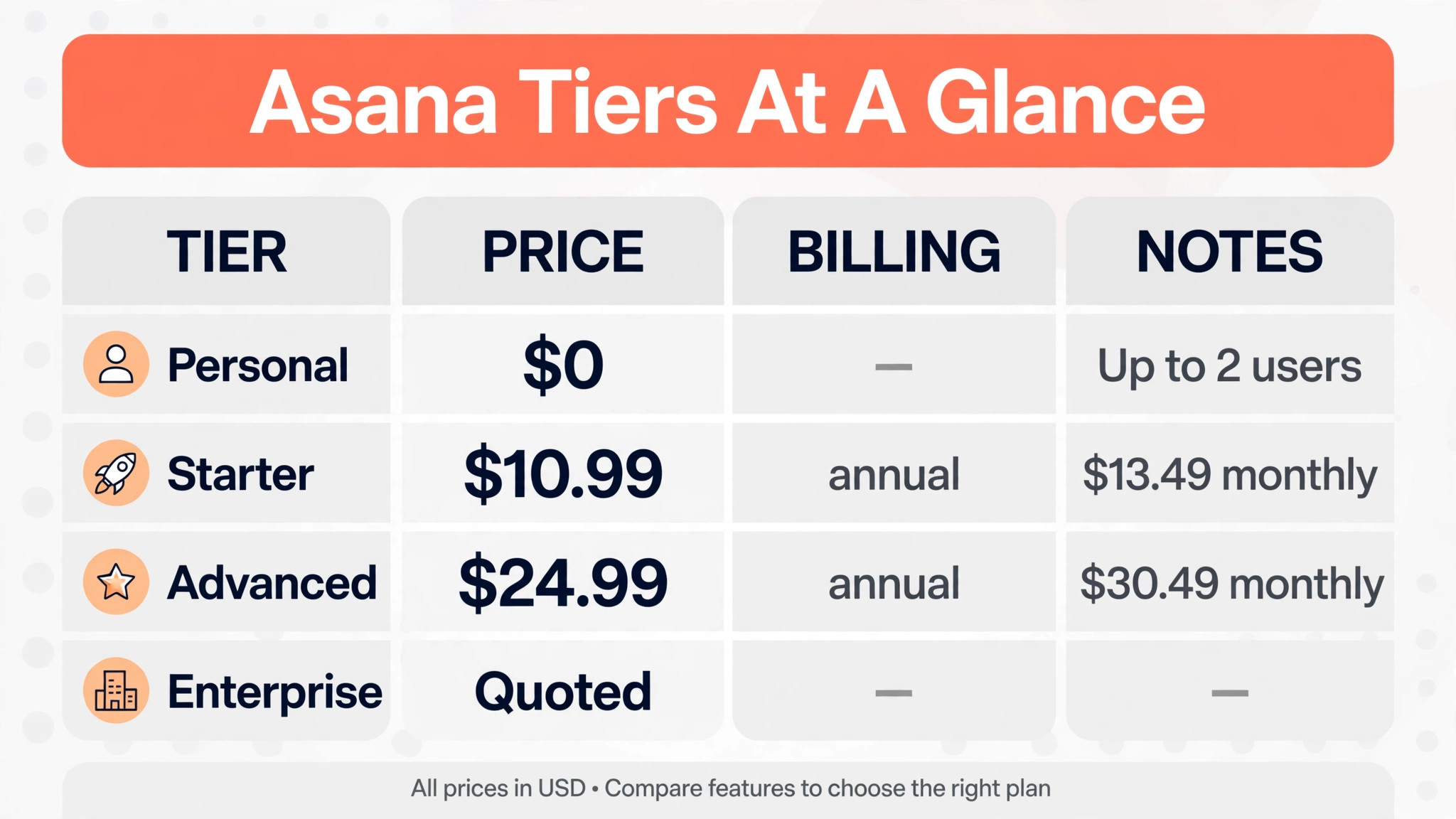
Asana sells five tiers, and only three carry a published price. Personal is free for up to two users. Starter and Advanced carry published per user rates on both annual and monthly billing. Enterprise and Enterprise Plus are quoted, which means a small business cannot model them from the pricing page alone. This guide prices the published tiers exactly, explains the bracket rule, and flags every extra charge that commonly surprises a small buyer.
Prices in this guide come from Asana pricing pages and reputable pricing guides checked at writing time. Asana changes prices and tier names from time to time, so treat every figure as a starting point and confirm the current price on the vendor page before buying. Where a price is reported rather than published, the text says so plainly.
The Monthly Cost at a Glance
| Tier | Annual billing per user | Monthly billing per user | Who it fits |
|---|---|---|---|
| Personal | $0 | $0 | Up to 2 users only |
| Starter | $10.99 | $13.49 | Most small teams |
| Advanced | $24.99 | $30.49 | Multi project teams |
| Enterprise | Quoted | Quoted | Larger organisations |
| Enterprise Plus | Quoted | Quoted | Regulated organisations |
Read the table as a starting point, not a budget. The per user rate only becomes a monthly bill once it is multiplied by billed seats, and billed seats are not always the same as people on the team. The seat bracket section below explains why a team of twelve pays for fifteen seats, and the real cost table prices that effect at the team sizes a small business actually runs.
A practical way to budget is to model three totals before any trial, not one. Model the annual billing total, the monthly billing total, and the total with the add on the team is most likely to need. The cost of Asana for small business monthly only becomes comparable with rivals once all three totals sit side by side, because a rival that looks dearer per seat may include time tracking that Asana charges extra for.
Why the Headline Price Misleads a Small Buyer
The headline price is a per user rate on annual billing, which means the business pays twelve months upfront or in a committed annual term, not month by month at that rate. A team that needs flexibility and chooses monthly billing pays $13.49 instead of $10.99 on Starter, and $30.49 instead of $24.99 on Advanced. That premium is roughly 23 percent on Starter and 22 percent on Advanced, which is a large difference over a year for a team of ten or more.
The second trap is the seat bracket. Asana sells seats singly from two to five users, then in blocks of five from six to thirty users, then in blocks of ten up to one hundred users, according to its help documentation as reported in pricing guides. A six person team therefore pays for ten seats, and a twelve person team pays for fifteen seats. The chosen team sizes in the real cost table avoid that trap, but any team between brackets must budget for the billed count, not the headcount.
The third trap is the free plan limit. Personal is free, but it now caps at two users, down from a larger limit in earlier years. A three person team cannot use the free plan, and a two person team that adds a third member must move to a paid tier for the whole team. That step change catches many small businesses by surprise, because the free plan feels like a team plan until the third person joins. When modelling the cost of Asana for small business monthly, include that jump from zero to a paid tier in the growth budget, rather than treating free as a permanent stage.
Personal, the Free Tier With a Hard Ceiling
Personal costs nothing and covers unlimited tasks, projects and messages, with list, board and calendar views and more than 100 integrations. It suits a freelancer, a founder working with one assistant, or a pair testing whether Asana fits their workflow. It includes no timeline or Gantt view, no automation rules beyond a basic level, and no custom fields at the depth a growing team needs, so it is a task list rather than a project system.
The hard ceiling is two users. Accounts created before a November 2025 change kept an older limit, according to pricing guides, but new accounts face the two user cap. A small business with two people can run on Personal for a long time, provided the work stays simple and nobody needs timeline planning or reporting dashboards. The moment a third person needs full access, the whole team moves to Starter, and the bill jumps from zero to at least the two seat Starter rate.
Choose Personal only as a genuine two person tool or a trial. Do not build a growing business process on it and assume the free tier will stretch, because the seat cap and the missing timeline view will force a paid move at exactly the moment the team is busiest.
Starter, the Tier Most Small Teams Actually Buy
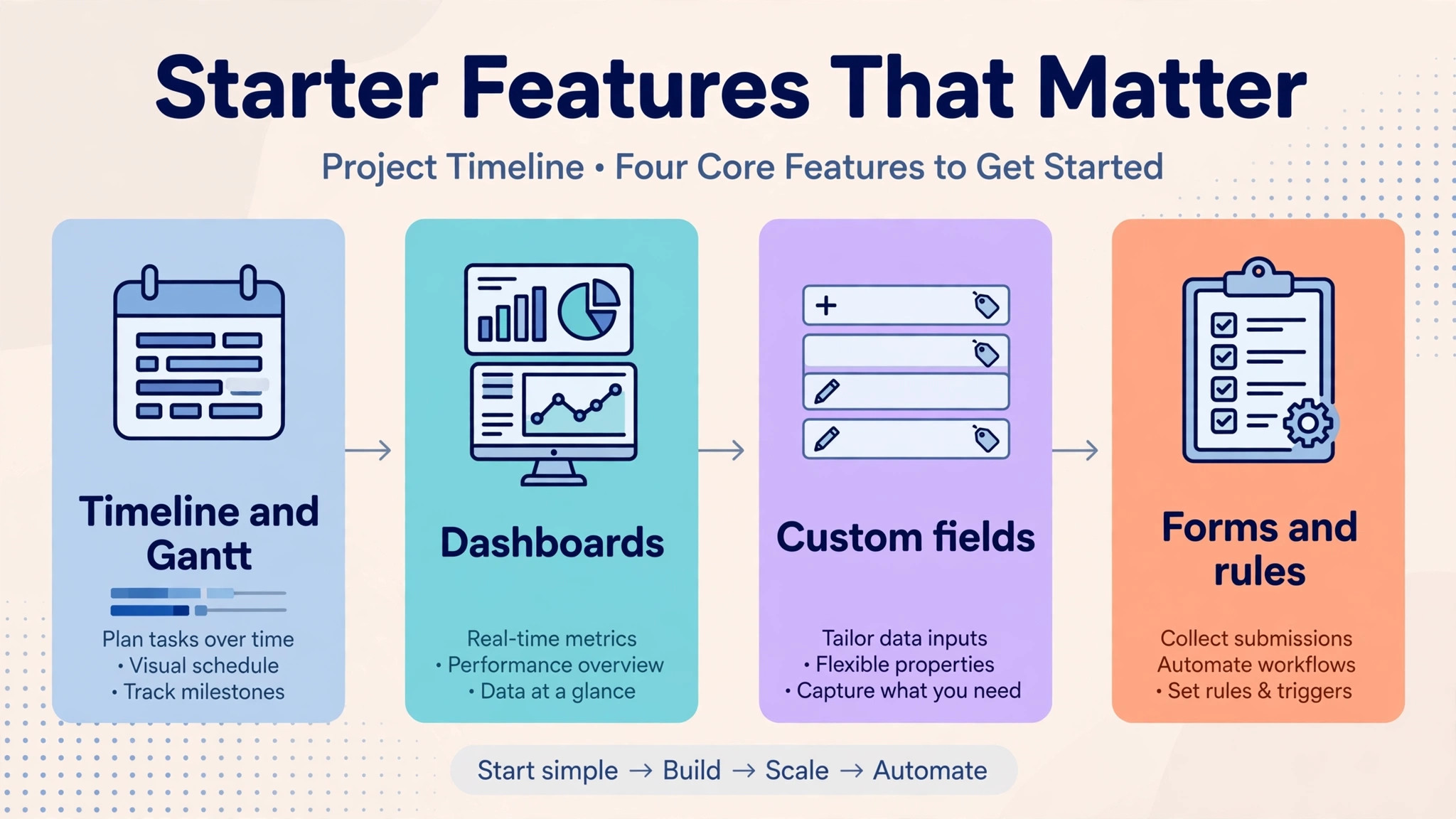
Starter costs $10.99 per user a month on annual billing and $13.49 on monthly billing. It adds timeline and Gantt views, dashboards, custom fields, forms, rules and an admin console, plus unlimited automation rules and unlimited free guests. It also includes AI Studio Basic with 50,000 credits per billing account a month, which is a shared pool rather than a per user allowance, so a busy team can exhaust it before the month ends.
Starter suits a small team running several projects with deadlines, dependencies and reporting needs. The timeline view alone changes planning, because the team can see overlapping work and slipping dates instead of reading a task list. Custom fields let the team track status, priority and client in a structured way, and forms let clients or colleagues submit work without an Asana seat. Those features are why Starter, not Personal, is the realistic entry point for a business with three or more people.
The limits are portfolios, goals and workload management, which sit on Advanced, and single sign on security, which sits on Enterprise. A team that only needs project delivery will not miss those features, but a team that needs to report across many projects to a leadership group will feel the gap quickly. Starter is therefore the right tier for delivery, and the wrong tier for portfolio reporting. Any estimate of the cost of Asana for small business monthly should start here for most teams, then add only the extras the team can name from real work.
Advanced, the Jump That Doubles the Seat Price
Advanced costs $24.99 per user a month on annual billing and $30.49 on monthly billing, which is more than double the Starter rate. It adds portfolios, goals, workload view, approvals, proofing, native time tracking and advanced reporting, plus integrations with tools such as Salesforce, Tableau and Power BI. AI Studio Basic rises to 75,000 credits per billing account a month, but AI request allowances for teammates and dashboard tools stay capped in the same way as on Starter.
The jump is worth paying only if the team uses the portfolio layer every week. Portfolios let a manager see many projects at once, goals connect projects to company targets, and workload shows who is overloaded before a deadline slips. A team running five or more concurrent projects with shared staff will use those views daily, and the extra $14 per user a month on annual billing buys real coordination. A team running one or two projects will pay for views it opens once a month.
Native time tracking is a genuine Advanced benefit, but it is not the same as project budgeting. Budget reporting and timesheets for billing sit in a separate Timesheets and Budgets add on, covered below, even on Advanced. A billable services business should therefore cost Advanced plus the add on, not Advanced alone, when comparing Asana with a tool that includes billing time tracking in its base price. That distinction changes the cost of Asana for small business monthly for service businesses more than any other single factor in this guide.
Enterprise and Enterprise Plus, the Quoted Tiers
Enterprise and Enterprise Plus carry no published price, and a small business must request a quote. Enterprise adds single sign on, user provisioning, universal workload, capacity planning and a larger AI Studio Basic allowance of 200,000 credits per billing account a month. Enterprise Plus adds advanced security, data residency, audit logs and managed workspaces, with round the clock support reported as a differentiator.
For most small businesses, these tiers are not a buying decision but a warning sign. If the business needs single sign on, audit logs or data residency, it has outgrown a small team tool budget and should expect an enterprise sales process, a minimum commitment and a price well above Advanced. If it does not need those controls, paying for them through a quoted tier wastes money that could fund staff or marketing.
The practical rule is simple. Stay on Starter or Advanced until a client, a regulator or an IT policy forces an enterprise control, then get a written quote and compare it with a full year of Advanced plus the cost of meeting the control another way. Many small businesses find the control can be met with a simpler process, and the enterprise quote is never needed.
When a quote is unavoidable, ask for the minimum seat commitment, the term length, and the renewal price in writing, because an enterprise quote that looks reasonable in year one can rise sharply at renewal when switching costs are highest. That written record also lets the business compare the quoted tier with a rival that publishes its enterprise rate, rather than comparing a promise with a price.
The Cost of Asana for Small Business Monthly at 2, 5, 10 and 25 Seats
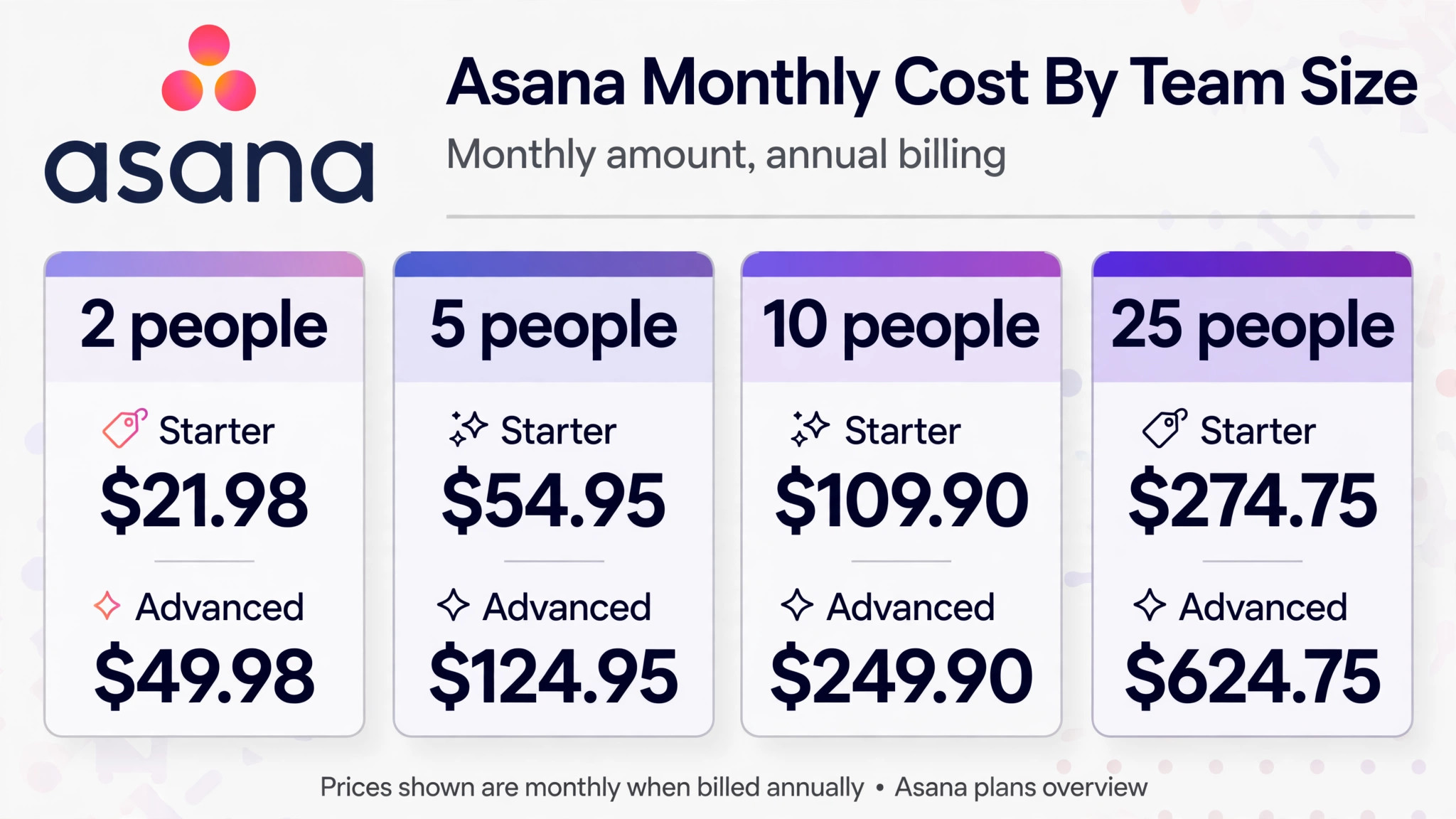
| Team size | Billed seats | Starter annual | Starter monthly | Advanced annual | Advanced monthly |
|---|---|---|---|---|---|
| 2 people | 2 | $21.98 | $26.98 | $49.98 | $60.98 |
| 5 people | 5 | $54.95 | $67.45 | $124.95 | $152.45 |
| 10 people | 10 | $109.90 | $134.90 | $249.90 | $304.90 |
| 25 people | 25 | $274.75 | $337.25 | $624.75 | $762.25 |
The table shows the monthly amount at each billing choice, with annual figures shown as the monthly equivalent of the annual rate. A five person team on Starter therefore pays $54.95 a month in annual billing terms, or $659.40 over a year, against $67.45 a month or $809.40 over a year on monthly billing. The annual saving for that team is $150 a year, which is worth taking once the team is stable, and worth skipping while headcount is still changing.
A ten person team shows the same pattern at larger scale. Starter on annual billing costs $1,318.80 a year, against $1,618.80 on monthly billing, a saving of $300 a year. Advanced on annual billing costs $2,998.80 a year, against $3,658.80 on monthly billing, a saving of $660 a year. Those savings are real, but they require committing to the seat count for a year, and removing seats mid term does not refund the unused portion, according to pricing guides.
A twenty five person team should also check the bracket rule for the next hire. Twenty five seats is a bracket boundary, so the twenty sixth person pushes the billed count to thirty seats, raising the Starter annual monthly equivalent from $274.75 to $329.70 and the Advanced figure from $624.75 to $749.70. That step is the single most surprising invoice in Asana pricing, and it should be in every growth budget before the hire is made. Put simply, the cost of Asana for small business monthly at twenty six people is a thirty seat bill, not a twenty six seat bill, and the difference should never arrive as a surprise.
What the Jump From Starter to Advanced Really Buys
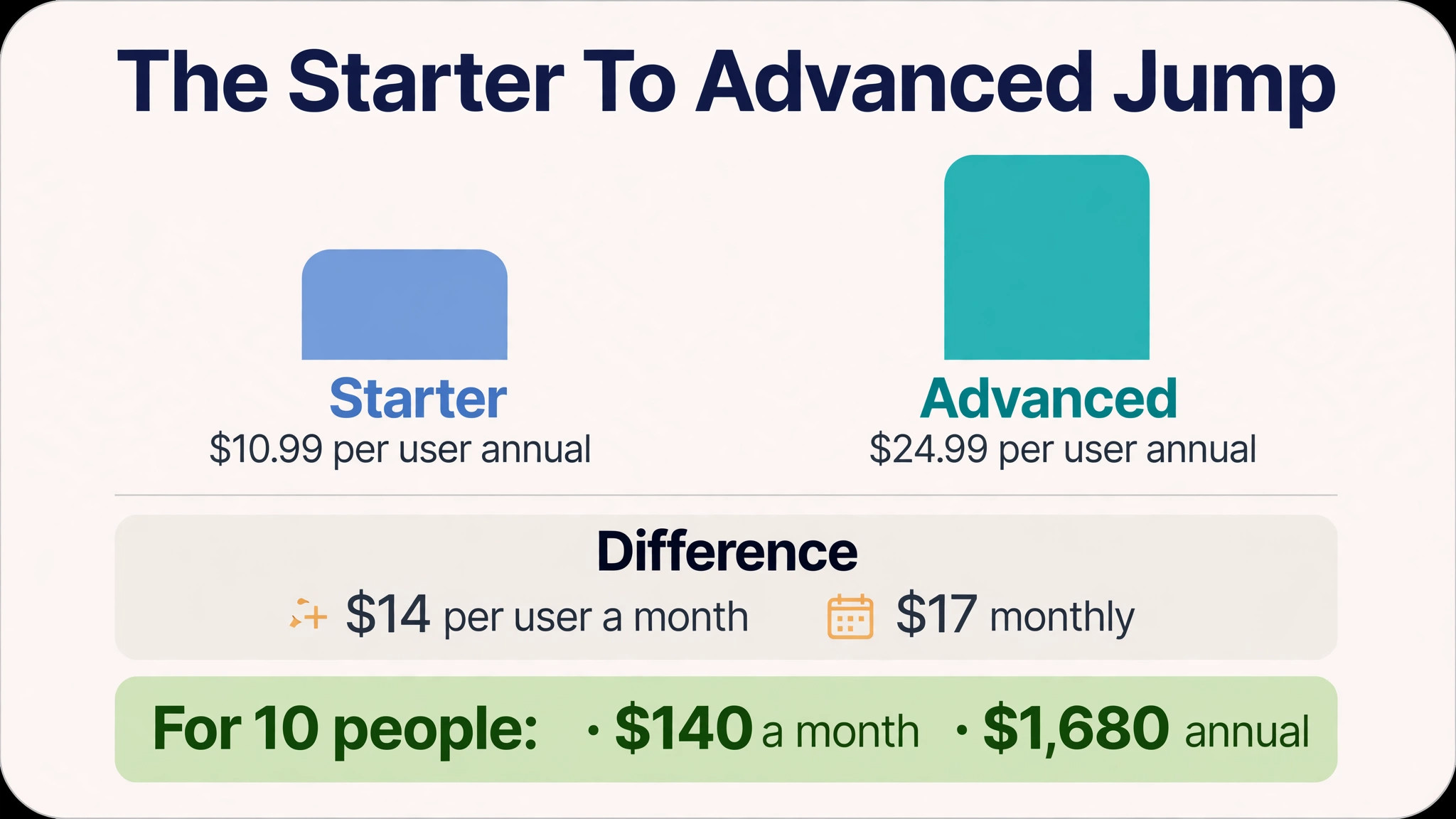
The jump from Starter to Advanced costs $14 per user a month on annual billing, or $17 per user a month on monthly billing. For a ten person team, that is $140 a month or $1,680 a year on annual billing, before any add on. The question is not whether portfolios and goals are nice, but whether the team will use them often enough to justify $1,680 a year, because that money could buy another tool, training, or a part time hire.
Portfolios help when one manager oversees many projects and needs a single status view. Goals help when leadership wants to trace projects to quarterly targets and report progress without manual updates. Workload helps when staff are shared across projects and overallocation is a real risk. Approvals and proofing help when creative or compliance work needs a formal sign off step. If none of those sentences describes a weekly pain, the jump is premature, and Starter plus a simple reporting habit will serve better.
A useful test is to run Starter for ninety days and count how often the team asks for a cross project view, a goal report, or a workload check. If the count is weekly, upgrade. If the count is monthly, stay on Starter and revisit the question at the next renewal. That test prevents the most common Asana overspend, which is buying Advanced for features the team admires in a demo and never opens in real work.
For a five person team, the annual billing difference between Starter and Advanced is $70 a month, or $840 a year, which is a meaningful sum for a small business. That team should be able to name at least two portfolio or workload decisions each week that Starter cannot support, otherwise the extra spend is paying for a demo feature rather than a daily tool. Write those decisions down during the trial, and let the list decide the tier.
Add Ons That Change the Monthly Total
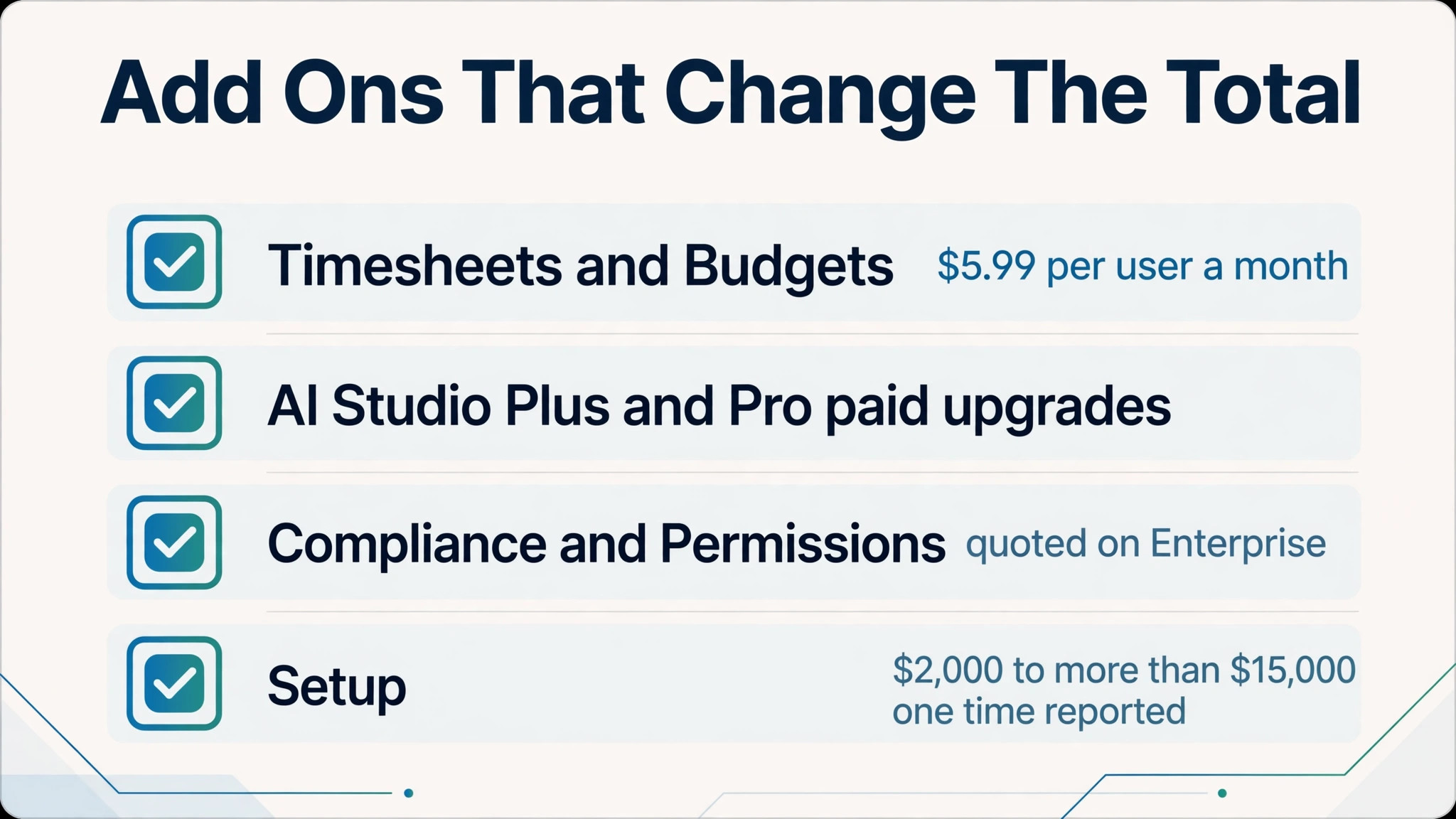
Timesheets and Budgets is the add on most small businesses encounter first. It costs $5.99 per user a month, according to pricing guides, and it adds native time tracking for billing and project budget reporting on any paid plan. A ten person team on Starter therefore pays $109.90 plus $59.90 for the add on, or $169.80 a month in annual billing terms, while the same team on Advanced pays $249.90 plus $59.90, or $309.80 a month.
AI Studio Plus and Pro are paid upgrades above the Basic allowance included in paid plans, and AI Teammates is a quoted add on. A team that builds real AI workflows should pilot on Basic, watch the monthly credit burn, and only commit to a paid tier once the run rate is clear. Buying a paid AI tier before the team has a workflow that needs it is a common waste, because the included Basic credits cover light use well.
Compliance Management and Permissions Management are quoted add ons on Enterprise tiers, and implementation and onboarding services are reported from around $2,000 to more than $15,000 as a one time cost for partner led setup. A small business doing its own setup can avoid that cost entirely, but should budget staff time instead, because a rushed setup creates a messy workspace that the team stops trusting. Self setup is cheaper, but it is not free, and staff time still belongs in any honest view of the cost of Asana for small business monthly in the first quarter.
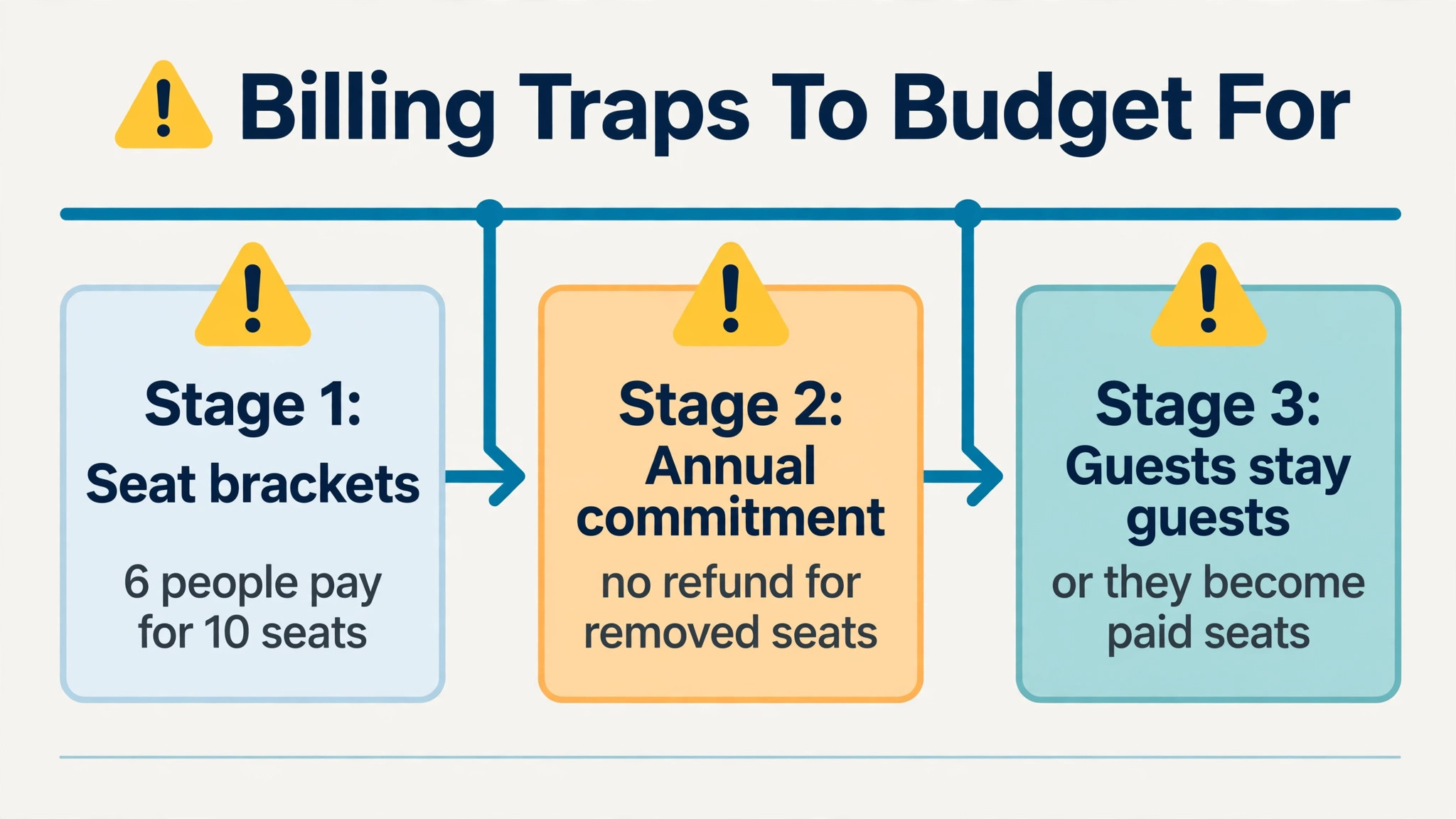
Seat brackets are the largest hidden cost, and they are not hidden in the fine print so much as absent from the pricing card. A team of six pays for ten seats, a team of twelve pays for fifteen, and a team of thirty one pays for forty, under the bracket rules reported in pricing guides. Budget at the billed count, and check the count before every hire, because a hire that crosses a bracket boundary raises the bill for the whole team, not just for the new person.
Annual commitment is the second trap. Adding seats mid term is prorated, but removing seats before renewal refunds nothing, so a team that shrinks in month three pays for the full year anyway. Asana also states that it does not offer refunds, and cancellation keeps paid access until the end of the subscription period rather than returning money. That policy makes a monthly billing start sensible for a team whose size is uncertain, even though the monthly rate is higher.
Guest access deserves a check as well. Unlimited free guests are included on paid plans, which helps for clients and contractors who only view or comment, but anyone who needs full member access counts as a paid seat. A business that invites contractors as members by habit will inflate its seat count quickly, so set a rule that guests stay guests unless they truly need member rights. That single rule can save a bracket jump, and it is one of the easiest ways to keep the cost of Asana for small business monthly close to the advertised per user rate.
Trial Mistakes That Inflate the First Year Bill
The most common mistake is trialling on monthly billing and then forgetting to switch to annual billing once the team is stable. The monthly premium is roughly a fifth of the bill, and a team that stays on monthly billing for a year out of habit pays hundreds of dollars extra for flexibility it no longer needs. Set a calendar reminder at day sixty to review billing, and switch to annual only when headcount has been stable for a full month.
The second mistake is buying Advanced on day one because the demo showed portfolios. A demo portfolio looks impressive with test data, but a real portfolio only helps once the team runs enough concurrent projects to need it. Start on Starter, run real projects for ninety days, and upgrade only when the cross project question keeps arising. The upgrade is instant, while the downgrade refund is not, so the safe direction is up, not down.
The third mistake is ignoring the AI credit pool. AI Studio Basic credits are shared per billing account, not per user, so a team of twenty five shares the same 50,000 Starter credits as a team of five. A team that builds AI workflows for every project can exhaust the pool mid month, and the fix is a paid tier or a wait for the reset. Pilot AI on one project, measure the burn, and budget the paid tier before rolling AI out to the whole team.
The fourth mistake is inviting everyone as a member. Clients, contractors and occasional collaborators often only need guest access, but a team that invites them as members pays for seats that add little value. Audit the member list monthly, move viewers to guest access, and check the billed seat count against the real team size before each renewal. That audit takes ten minutes and can save a full bracket step. A related mistake is migrating years of messy task history on day one. Import only active projects and recent templates, archive the rest, and let the team learn the new structure on live work rather than on a cluttered workspace that mirrors every old habit.
Which Tier Suits Which Small Business
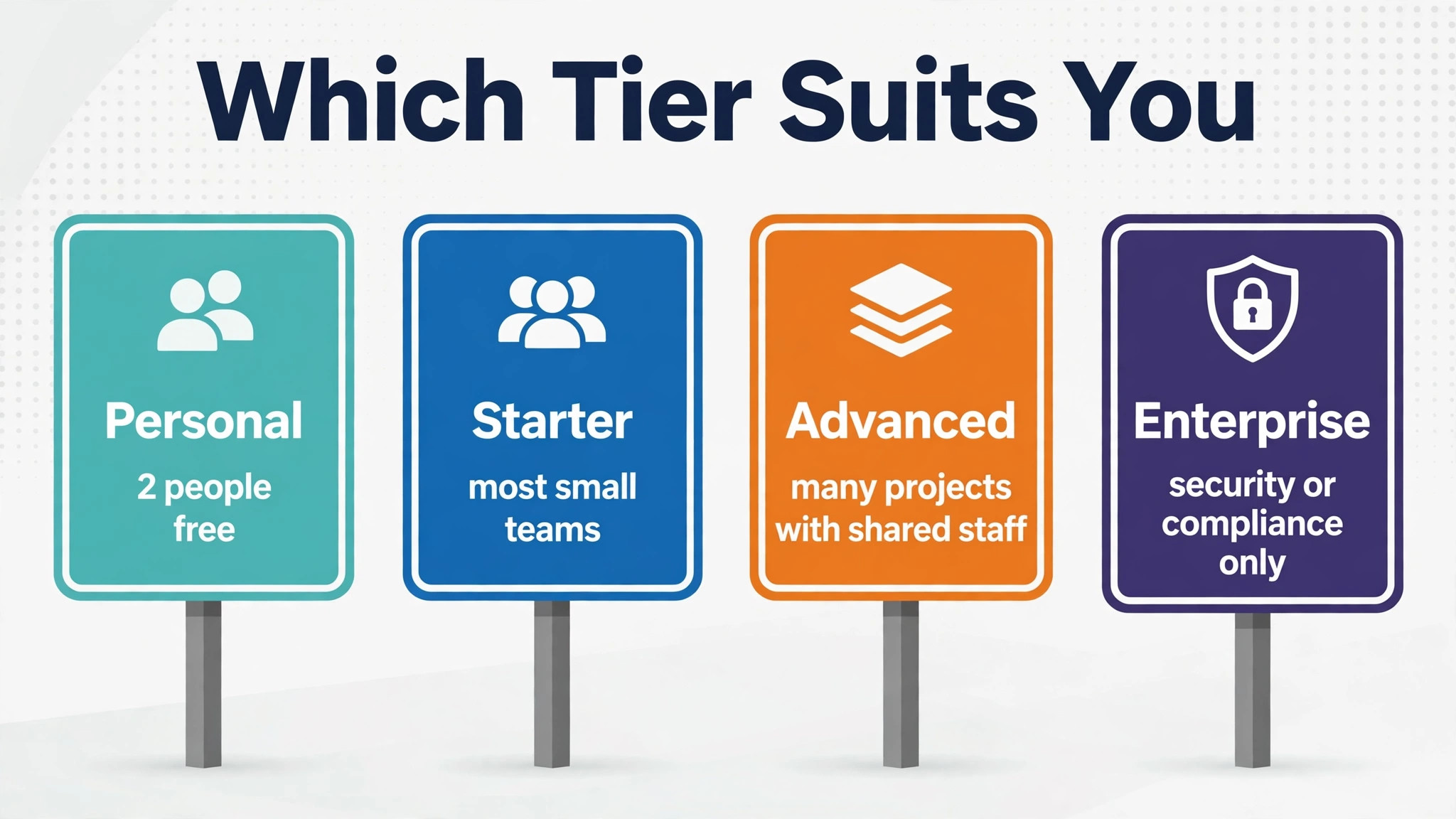
Personal suits a freelancer or a two person partnership with simple task work and no timeline planning. It costs nothing, but it is a ceiling, not a foundation, and any growth beyond two people forces a paid move. Use it to test Asana, not to run a growing business, and plan the Starter budget from the start.
Starter suits most small businesses with three to twenty five people running projects with deadlines and dependencies. It is the best value tier in the range, because it includes timeline planning, dashboards, forms and unlimited automation at a price a small business can defend. A team that delivers client work, marketing campaigns or internal projects without a portfolio reporting need should land here and stay here.
Advanced suits a team running many concurrent projects with shared staff, leadership reporting needs, or formal approval workflows. It is worth the double price only when portfolios, goals and workload are weekly tools, not monthly curiosities. A team of ten or more with a manager overseeing several projects is the classic Advanced buyer, while a team of five on one project is not.
Enterprise suits a business that must meet a security or compliance requirement, such as single sign on or audit logs, and can accept a quoted price and a sales process. Enterprise Plus suits a regulated business with data residency or advanced governance needs. Neither tier suits a typical small business on price, and neither should be bought for features the business hopes to need one day. If the business is unsure, the safer path is Starter for a full quarter, with a written note of the features that were missed. That note becomes the upgrade case, or the proof that no upgrade is needed, and it keeps the decision grounded in real work rather than in a sales presentation.
More Reading on Stratilyze
For a related project tool comparison, read Asana alternatives and Asana versus Monday. For a different project system for a niche team, see project management software for interior designers.
Frequently Asked Questions
How much does Asana cost for a team of 5
A five person team on Starter costs $54.95 a month on annual billing, or $67.45 a month on monthly billing. The same team on Advanced costs $124.95 a month on annual billing, or $152.45 a month on monthly billing. Add $29.95 a month for the Timesheets and Budgets add on across five seats, if time tracking for billing is needed.
Is Asana free for small teams
Asana Personal is free, but only for up to two users, with no timeline view and limited automation. A team of three or more must pay for Starter or Advanced, so a small team with three people cannot run on the free plan, even if the work itself is simple.
Why does Asana charge for more seats than people on the team
Asana sells seats in brackets once the team passes five users, with blocks of five up to thirty users and blocks of ten beyond that, according to its help documentation as reported in pricing guides. A six person team therefore pays for ten seats, and a twelve person team pays for fifteen seats, so the billed count, not the headcount, decides the monthly total.
What is the cheapest way to use Asana as a small business
The cheapest realistic route is Starter on annual billing, with guests used for clients and contractors who only need to view or comment, and no paid add ons until a real workflow needs them. Start on monthly billing only while headcount is uncertain, then switch to annual billing once the team size has been stable for a month.
Does Asana include time tracking in the base price
Advanced includes native time tracking, but project budgeting and timesheets for billing sit in the separate Timesheets and Budgets add on at $5.99 per user a month. A billable services business should therefore budget Starter or Advanced plus the add on, rather than assuming time tracking for billing is included in the seat price.
When should a small business move from Starter to Advanced
Move to Advanced when portfolios, goals or workload checks become a weekly need, such as a manager overseeing many concurrent projects with shared staff. If those views are only needed once a month, Starter remains the better value, and the upgrade can wait until the next renewal without losing any work.