
Our verdict is simple. The cost of Calendly for small business monthly is best judged on the Teams plan for any business that books with a team, and on Standard for a solo operator who only needs unlimited event types and reminders. The free plan looks tempting, but its single event type limit breaks down fast for a real business, and the Enterprise floor is far beyond small team budgets. Start from the job you need done, then match the tier to that job, not to the lowest price on the page.
Calendly charges per seat per month, and every person who hosts meetings needs a seat. That per seat model is the key to the whole budget, because the bill grows with headcount even when meeting volume stays flat. A solo consultant pays for one seat, a five person sales team pays for five, and a business that adds a receptionist, a closer and a support lead will see three new seat charges. The sections below price each tier, show totals by team size, and explain which features force an upgrade.
Calendly Prices at a Glance
Calendly offers a free plan, two self service paid tiers, two Plus bundles that add AI tools, and an Enterprise tier sold by sales. Standard costs 10 dollars per seat per month on annual billing and 12 dollars on monthly billing. Teams costs 16 dollars per seat per month on annual billing and 20 dollars on monthly billing. The Plus bundles add 8 dollars per seat per month on annual billing, taking Standard Plus to 18 dollars and Teams Plus to 24 dollars per seat per month on that term.
Enterprise starts at 15,000 dollars a year, which works out near 1,250 dollars a month, and it carries a 50 seat starting point in published comparisons. That floor puts Enterprise outside small business budgeting, and most small teams should ignore it unless security, single sign-on and admin controls are contractual requirements. The table below gives the licence view for the tiers a small business will actually buy, and later sections add the hidden costs that sit behind those seat prices.
| Plan | Per seat monthly annual billing | Per seat monthly monthly billing | Core use |
|---|---|---|---|
| Free | 0 dollars | 0 dollars | One event type, one calendar |
| Standard | 10 dollars | 12 dollars | Solo booking with reminders |
| Teams | 16 dollars | 20 dollars | Round robin and routing |
| Standard Plus | 18 dollars | 24 dollars | Standard plus AI tools |
| Teams Plus | 24 dollars | 32 dollars | Teams plus AI tools |
Why the Free Plan Rarely Stays Free
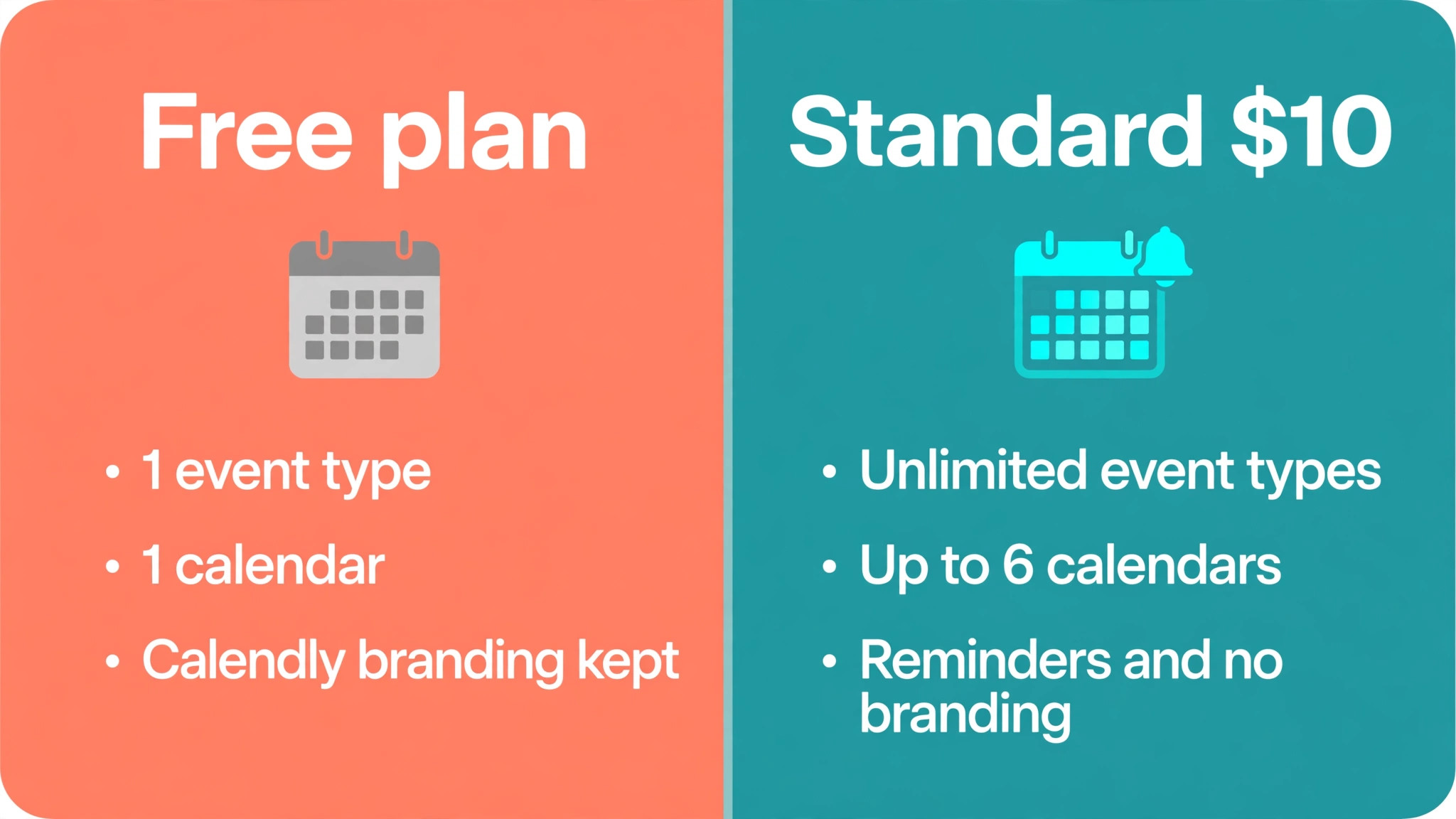
The free plan allows one active event type and one calendar connection, which is enough to test booking links but not enough to run a business. A real small business usually needs separate event types for a discovery call, a paid consultation, a follow-up and a group session, and the free plan forces all of that into a single link. The moment a business adds a second event type, removes Calendly branding, or sends automated reminders, it needs a paid tier. Free is a trial in practice, even though it has no expiry date.
The cost of Calendly for small business monthly on the free plan is zero, but the cost in lost bookings is harder to see and often larger. Without workflows, a guest who books receives no automatic reminder, so no-shows rise and staff time is wasted waiting for meetings that never happen. Without multiple calendars, a host who uses both a work calendar and a personal calendar risks double booking. Those problems feel like scheduling bad luck, but they are really feature limits, and paying for Standard usually fixes them for the price of a single lunch each month.
Annual billing also shapes the free to paid decision, because the advertised 10 dollar and 16 dollar prices assume a yearly commitment. Monthly billing costs 12 dollars for Standard and 20 dollars for Teams, which is a 20 percent premium on Teams and about 17 percent on Standard. A business that is unsure whether Calendly will stick should pay monthly for the first quarter, prove the booking volume, and then switch to annual billing once the seat count is stable. The premium is cheap insurance against a year of unused seats.
Standard, the Solo Professional Tier
Standard is built for one person who books meetings with people outside the business, and it covers the core job well. It allows unlimited event types, up to six calendar connections, automated workflows for reminders and follow-ups, payment collection through Stripe and PayPal, and removal of Calendly branding. A consultant, coach, therapist or freelancer who books one to one meetings all day will find Standard covers nearly every daily need. The tier only starts to strain when a second person must share the booking load.
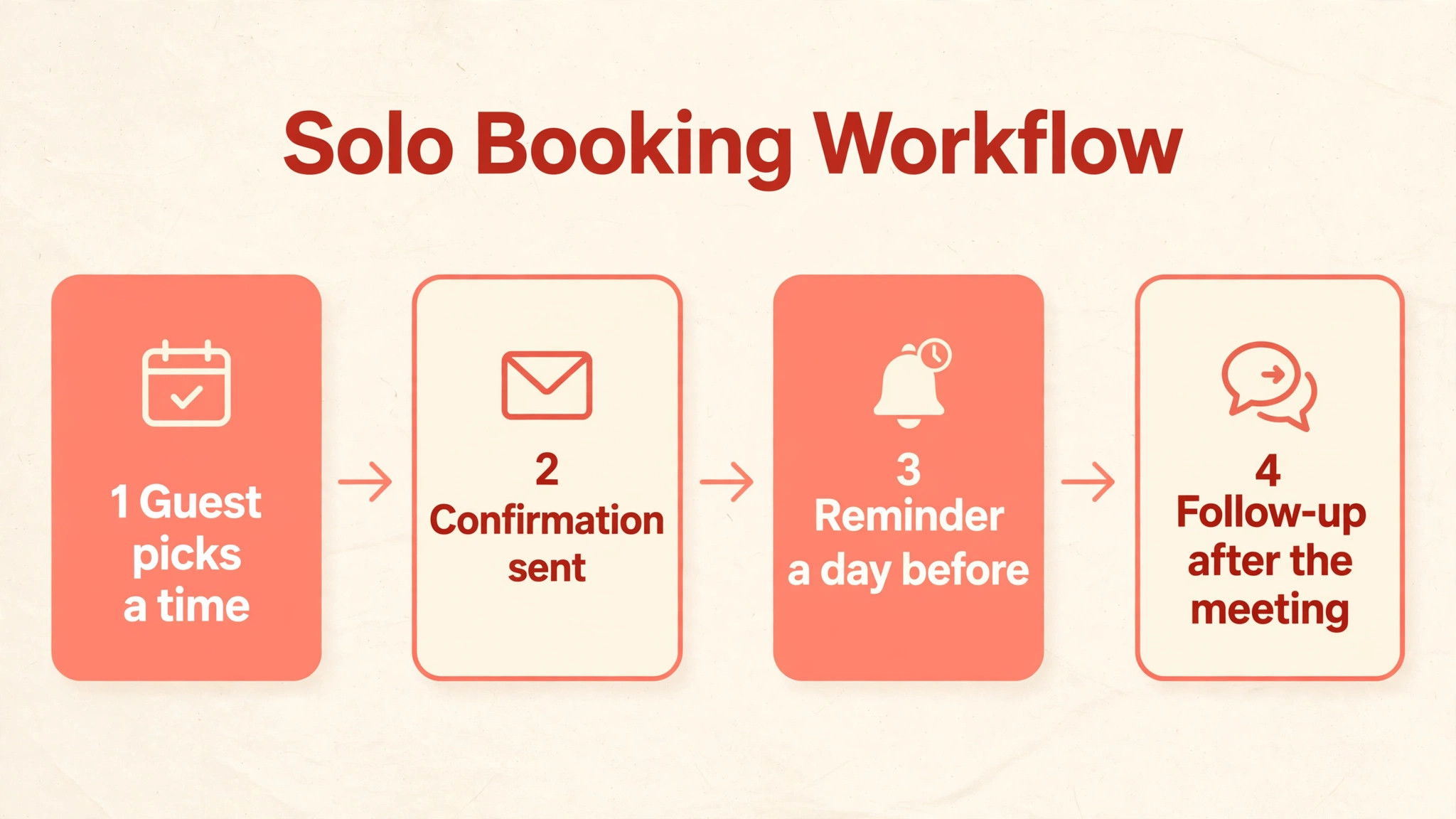
The workflow feature is the part of Standard that saves the most staff time, because it automates the messages around a meeting. A booking can trigger a confirmation, a reminder a day before, a follow-up after the meeting, and a reschedule link if plans change, all without manual emails. Those messages reduce no-shows and cut the back and forth that used to fill an inbox. A solo operator who books twenty meetings a month can save several hours a week on admin alone, which makes the 10 dollar annual price easy to justify.
Standard has clear limits, and they are worth naming before purchase so the upgrade path is no surprise. It does not include round robin distribution, routing forms that qualify and send leads to the right person, or Salesforce integration at the depth Teams offers. A solo user who later hires an assistant or a second consultant will hit those limits quickly, because sharing bookings fairly across two people is a Teams feature. Plan for that move in the budget, rather than treating Standard as a permanent home for a growing team.
For a one person business, the cost of Calendly for small business monthly on Standard is 10 dollars on annual billing, or 12 dollars on monthly billing, which is a modest line for a tool that touches every client. The decision should rest on booking volume, because a business that books only two meetings a month may manage with the free plan, while one that books daily will recover the cost in saved admin within the first week. Count meetings, count no-shows, and count the emails each booking used to need, then compare those numbers with the seat price.
Teams, Where Routing and Round Robin Live
Teams is the tier that turns Calendly from a personal booking link into a team scheduling system, and the 6 dollar jump per seat over Standard buys features a growing business cannot fake. Round robin shares new meetings fairly across a team, so leads do not pile up on one person while another sits idle. Collective events find a time when several hosts are all free, which matters for calls that need two or three staff present. Managed event types let an admin control the booking setup for the whole team instead of letting each seat configure its own links.
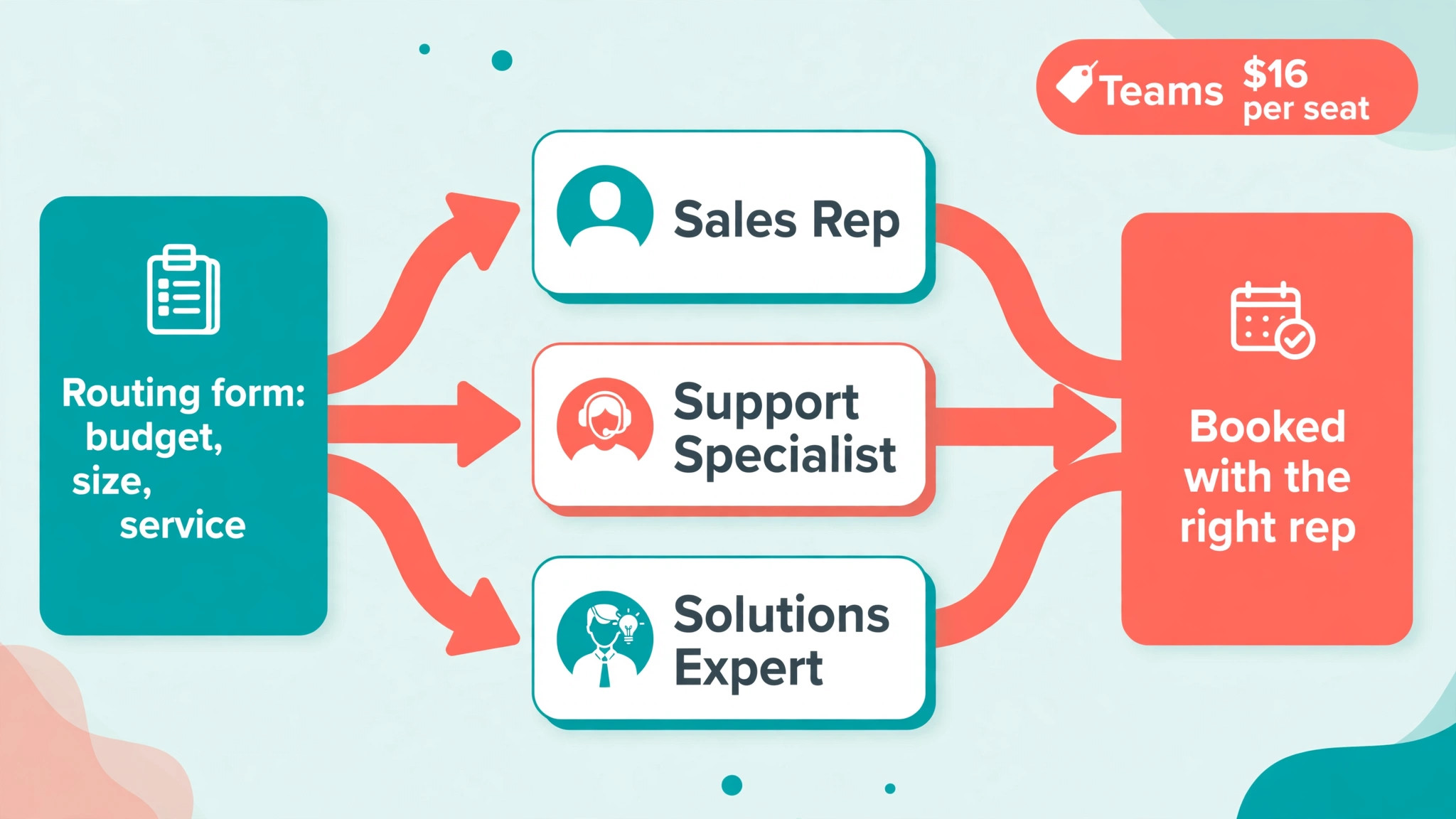
Routing forms are the feature that most often forces the move to Teams, because they qualify a lead before it reaches a calendar. A form can ask about budget, company size or service needed, then send the lead to the right person, team or meeting type based on the answers. That routing replaces manual triage, where a receptionist reads each enquiry and forwards it by hand, and it stops hot leads waiting while a busy inbox is cleared. For a sales led small business, routing alone can justify the Teams premium, because faster routing means faster first contact.
Teams also adds Salesforce integration and team admin features that Standard lacks, which matters once bookings must land in a CRM with the right owner attached. Admin controls let a manager set permissions, view team activity and keep event types consistent across seats, rather than discovering five different booking pages for the same service. Those controls sound like enterprise extras, but for a team of five they prevent the slow drift where each person books differently and reporting becomes unreliable. Consistency is a real cost saver when the team grows.
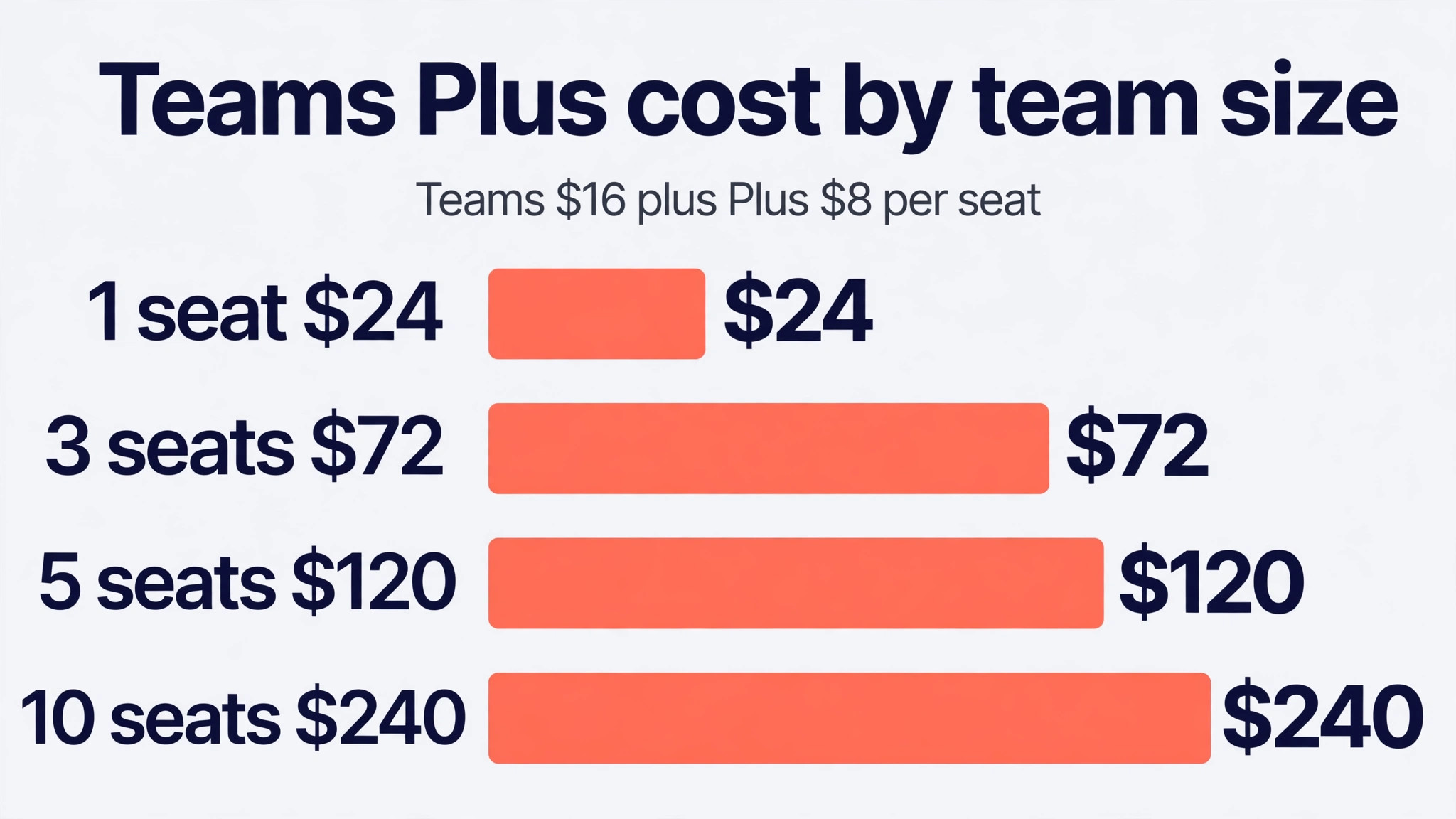
The cost of Calendly for small business monthly on Teams scales directly with headcount, so a business should count seats honestly before committing. Three seats cost 48 dollars a month on annual billing, five seats cost 80 dollars, and ten seats cost 160 dollars, before any Plus bundle. Volume discounts appear after 30 seats on annual plans in published comparisons, but a small team will not reach that threshold, so budget at the full per seat rate. Add seats only for people who host meetings, and keep note only colleagues off the seat list entirely.
Plus Plans, the AI Add-On Bundle
The Plus bundles add two AI tools to the base tiers, and they cost 8 dollars extra per seat per month on annual billing. Standard Plus costs 18 dollars per seat per month on annual billing and 24 dollars on monthly billing, while Teams Plus costs 24 dollars on annual billing and 32 dollars on monthly billing. The two tools are Notetaker, which records meetings and writes recaps and draft follow-ups, and Callie, an assistant that schedules over email. Together they aim to cut the admin around meetings, not just the booking itself.
Notetaker is the easier Plus feature to value, because meeting notes have a clear time cost. A team that spends fifteen minutes after each call writing notes and follow-up actions can save that time on every meeting Notetaker covers, and the recap gives absent colleagues a reliable record. Callie is harder to value for a small team, because email based scheduling only pays when guests reply by email instead of using a link. Trial Plus on one or two seats first, measure note writing time before and after, and roll it out only where the saving beats the 8 dollar uplift.
The cost of Calendly for small business monthly on Plus compounds with headcount, so it deserves the same discipline as the base seat price. Adding Plus to five Teams seats costs 40 dollars extra a month on annual billing, taking the team from 80 dollars to 120 dollars. Adding it to ten seats costs 80 dollars extra a month. That total is still modest against staff costs, but it should be tied to a measured saving, such as fewer no-shows, faster follow-ups or shorter admin per meeting. If the AI tools sit unused, Plus becomes a quiet tax on every seat.
A small business that already pays for a separate meeting notes tool should compare the two before adding Plus. Paying for both a notes tool and Calendly Plus duplicates the same job, and cancelling the standalone tool may fund the Plus upgrade entirely. The same logic applies to email scheduling helpers. List every tool that touches meetings, note what each one actually does, and remove the overlap before adding a bundle that repeats a job already paid for elsewhere.
Enterprise, a Sales Quoted Floor
Enterprise is sold by sales, starts at 15,000 dollars a year, and is aimed at organisations with fifty or more seats and strict security needs. It adds full single sign-on and SAML, SCIM user provisioning, domain control, an audit log, a data deletion API, Microsoft Dynamics integration and the Salesforce routing suite. Those controls matter to large companies with compliance teams, but they solve problems most small businesses do not have. A ten person team would pay the equivalent of 125 dollars per seat per month at the floor price, which is far above the Teams rate.
Small businesses sometimes ask about Enterprise because a client or partner demands single sign-on, and that is the one case where the conversation is legitimate. Before engaging sales, check whether the requirement is truly single sign-on or simply a secure login and admin control, because Teams covers much of the day to day admin need. If single sign-on is contractual, get the Enterprise quote in writing, confirm the seat minimum, and compare the annual floor against the cost of losing that client. In every other case, the cost of Calendly for small business monthly on Enterprise should stay off the small business shortlist.
The Cost of Calendly for Small Business Monthly at 1, 3, 5 and 10 Seats
The table below shows seat only totals on annual billing, which is the cleanest comparison across tiers. A solo user pays 10 dollars on Standard and 16 dollars on Teams, though a solo user rarely needs Teams unless routing matters. A three person team pays 30 dollars on Standard and 48 dollars on Teams each month on annual billing. Those figures are the floor, and Plus or monthly billing will raise them, as the notes below the table explain.
| Seats | Standard annual | Teams annual | Teams Plus annual | Standard monthly | Teams monthly |
|---|---|---|---|---|---|
| 1 | 10 dollars | 16 dollars | 24 dollars | 12 dollars | 20 dollars |
| 3 | 30 dollars | 48 dollars | 72 dollars | 36 dollars | 60 dollars |
| 5 | 50 dollars | 80 dollars | 120 dollars | 60 dollars | 100 dollars |
| 10 | 100 dollars | 160 dollars | 240 dollars | 120 dollars | 200 dollars |
Monthly billing adds 20 dollars a month for a ten person Teams team, taking it from 160 dollars to 200 dollars, and 20 dollars a month for a ten person Standard team, from 100 dollars to 120 dollars. Over a year, monthly billing costs a ten person Teams team an extra 480 dollars against annual billing. That premium is worth paying during a trial or a seasonal swing, but a stable team should switch to annual billing once seat count holds steady for a quarter. Put a ninety day reminder in place so the switch is not forgotten.
The jump from Standard to Teams is 6 dollars per seat per month on annual billing, which is 30 dollars a month for five seats and 60 dollars for ten seats. That jump is smaller than most tier jumps in software, yet it still adds up to 720 dollars a year for a ten person team. The question to ask is whether routing, round robin and Salesforce depth save more than that in staff time or won deals. If routing saves one lost lead a month, the answer is usually yes, and if no one uses routing, Standard remains the better buy.
Routing, Workflows and the Gates That Force an Upgrade
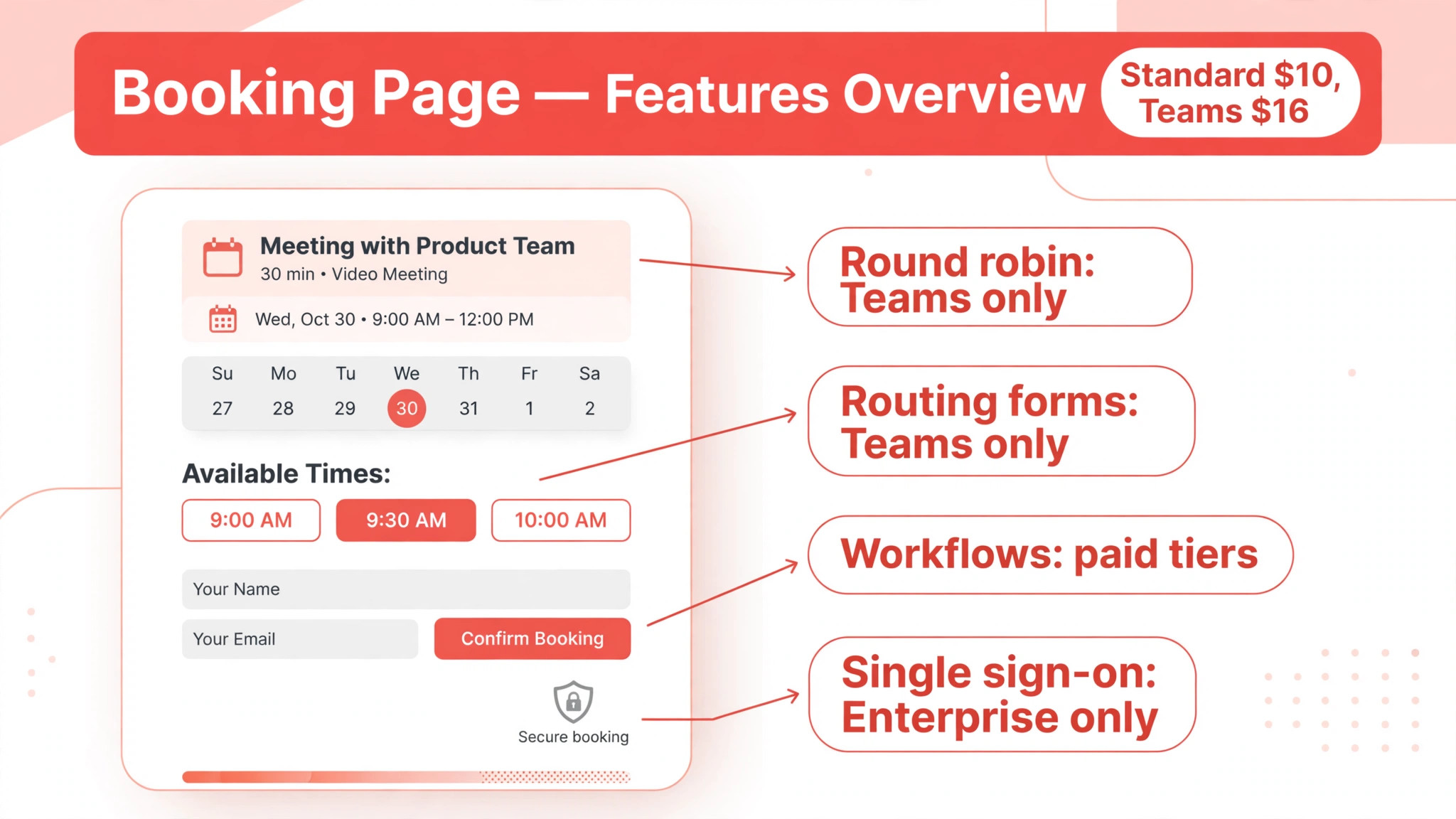
Calendly gates its most valuable team features behind Teams, and understanding those gates prevents a surprise upgrade mid-year. Round robin, routing forms, managed event types and Salesforce integration sit on Teams, while workflows, unlimited event types and payment collection sit on Standard. Single sign-on is gated further, behind Enterprise or a paid add-on whose price is not published on the pricing page. A buyer who maps needed features to tiers before purchase will choose correctly first time, while one who buys on price alone will pay for an upgrade within months.
Workflows deserve special attention, because they are the feature that most reduces no-shows, yet they are easy to underuse. A workflow can send reminders by email and text, request rescheduling when a guest cancels, and follow up after a meeting with next steps. The cost of Calendly for small business monthly includes workflows on paid tiers, so a team that never builds a workflow is paying for value it never collects. Spend an hour setting up three workflows at launch, one for reminders, one for follow-ups and one for cancellations, and measure no-show rates before and after.
Routing is the gate that changes how a sales team works, because it removes the human triage step between enquiry and booking. A lead that completes a routing form and books directly with the right rep can be contacted within minutes, while a lead that waits in a shared inbox may wait hours. That speed difference affects conversion, especially for services where buyers contact several providers at once. If your business competes on response speed, routing is not a luxury feature, it is the reason to buy Teams.
Charges That Hide Behind the Seat Price
The first hidden charge is paying for seats that are not filled, because Calendly bills every seat whether the person books meetings or not. A team that buys five seats and uses four still pays for five, so the seat list should match the hosting roster exactly. Review seats when someone changes role, leaves, or stops hosting meetings, and remove the seat at once rather than at renewal. That single habit can save 16 dollars to 20 dollars a month per unused Teams seat.
The second hidden charge is text messaging inside workflows, where limits and carrier costs can apply depending on the setup. Email reminders are straightforward, but text reminders are the ones guests actually read, so teams lean on them heavily. Check what text volume is included, what happens past the limit, and whether a separate messaging cost appears on the invoice. A team that sends hundreds of texts a month should confirm the text terms before promising clients a text reminder on every booking.
The third hidden charge is the Plus bundle renewing for seats that never use the AI tools. Plus is a per seat uplift, so it follows every seat it is assigned to, and it is easy to assign it to the whole team during setup and forget it. Audit Plus seats quarterly, ask which agents actually open Notetaker recaps or use Callie, and drop Plus from seats where the answer is no one. The same audit applies to single sign-on add-ons and any integration that carries its own fee.
Renewal pricing is the fourth trap, because introductory or discounted annual rates can rise at renewal to the current list price. Calendly has repriced its tiers over time, so a budget built on an old screenshot will be short. Build a small contingency into the second year figure, diarise the renewal date, and re-check the seat list, Plus assignments and billing term before the renewal runs. A fifteen minute review can prevent a year of overpayment.
Booking Mistakes That Waste Seats
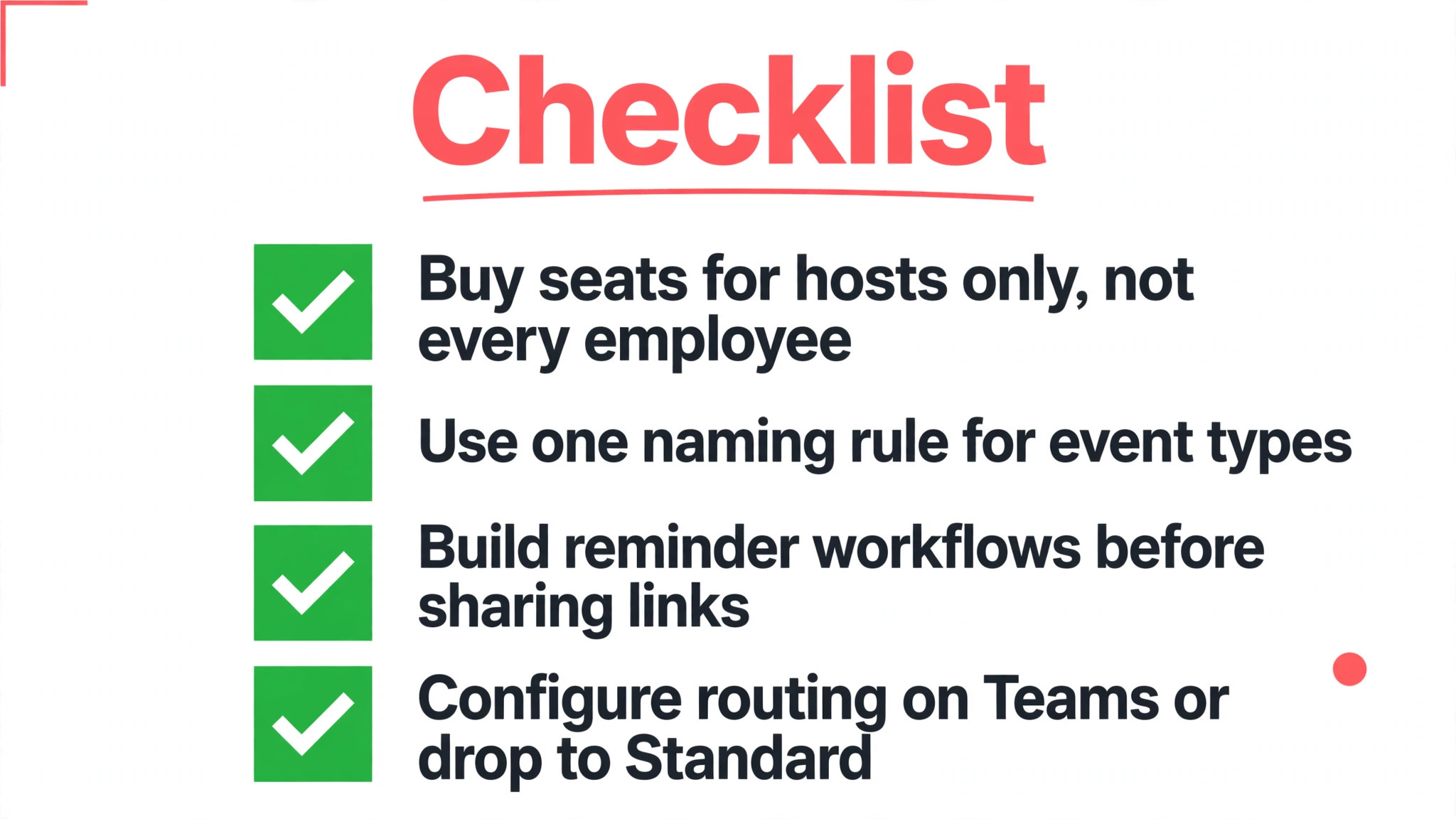
The most common mistake behind a high cost of Calendly for small business monthly is buying a seat for every employee, including people who never host meetings. Calendly seats are for hosts, not for viewers, so reception staff who only check calendars, managers who only read reports, and colleagues who attend but never host do not need seats. List the people who actually share booking links, and buy seats for that list only. That discipline alone can cut a ten seat purchase to six seats for many small teams.
The second mistake is creating too many event types without a naming and ownership system. When each host builds their own links, clients find several pages for the same service, bookings land with the wrong person, and reporting becomes guesswork. On Teams, use managed event types and a simple naming rule, such as service plus duration, and assign one owner per event type. On Standard, agree the same naming rule as a team habit, even though the software cannot enforce it.
The third mistake is skipping workflows and then blaming the tool for no-shows. A booking link without reminders is only half a system, because guests forget, double book and cancel without notice. Build the reminder workflow before sharing the first public link, test it with a colleague booking as a guest, and check that reminders arrive in the right time zone. That test takes ten minutes and prevents the most common complaint about any scheduling tool.
The fourth mistake is leaving routing unconfigured on Teams and running the team like a set of solo Standard accounts. Routing forms, round robin and collective events are the reason Teams costs more, so a team that never configures them is paying a premium for nothing. Spend a morning mapping lead types to owners, building one routing form per lead type, and testing each route with a trial booking. If routing does not fit the business, drop back to Standard and save the difference.
Keeping the Seat Count Honest
Start with a host list, not a headcount, and revisit it whenever the team changes. The host list names every person who shares a booking link, and the seat count should equal that list exactly. When a host leaves, remove the seat the same week, and when a new host joins, add a seat only after their event types are ready. That habit keeps the bill tied to real booking work rather than to the payroll total.
Next, match the billing term to seat stability, because annual billing rewards a stable roster and punishes a changing one. Put permanent hosts on annual billing once their count has held for a quarter, and keep trial or seasonal hosts on monthly terms until their role is certain. The saving on a five seat Teams team is 20 dollars a month, or 240 dollars a year, which is enough to fund a Plus seat or a small integration. Review the mix at the same time as the seat list, so both stay current.
Finally, measure the booking system by no-show rate, time to first booking and admin hours per meeting, not by how many links exist. A healthy system shows fewer no-shows after workflows launch, faster first contact after routing launches, and less inbox traffic per booking. If those numbers do not move, the tier or the setup is wrong, and the fix is usually configuration rather than a higher tier. Spend on setup help before spending on more seats.
Our Call on the Right Tier for Your Size
A solo operator should buy Standard on annual billing once booking volume proves the need, and stay there while working alone. The cost is 10 dollars a month on annual billing, and it buys unlimited event types, workflows, payments and branding removal. Add Plus only if meeting notes eat real time each week, and trial it on the single seat before committing. Free remains a sensible test bed, but it is not a long term home for a business that books daily.
A team of three to ten people that shares bookings should treat the cost of Calendly for small business monthly on Teams as the default, with Plus only for hosts who handle heavy meeting loads. A five person Teams team pays 80 dollars a month on annual billing, and routing plus round robin should earn that premium back in faster lead handling and fairer workload. Keep the seat list to hosts only, build one routing form per lead type, and set up reminder workflows before the first public link goes out. That setup turns Teams from a seat bill into a booking system.
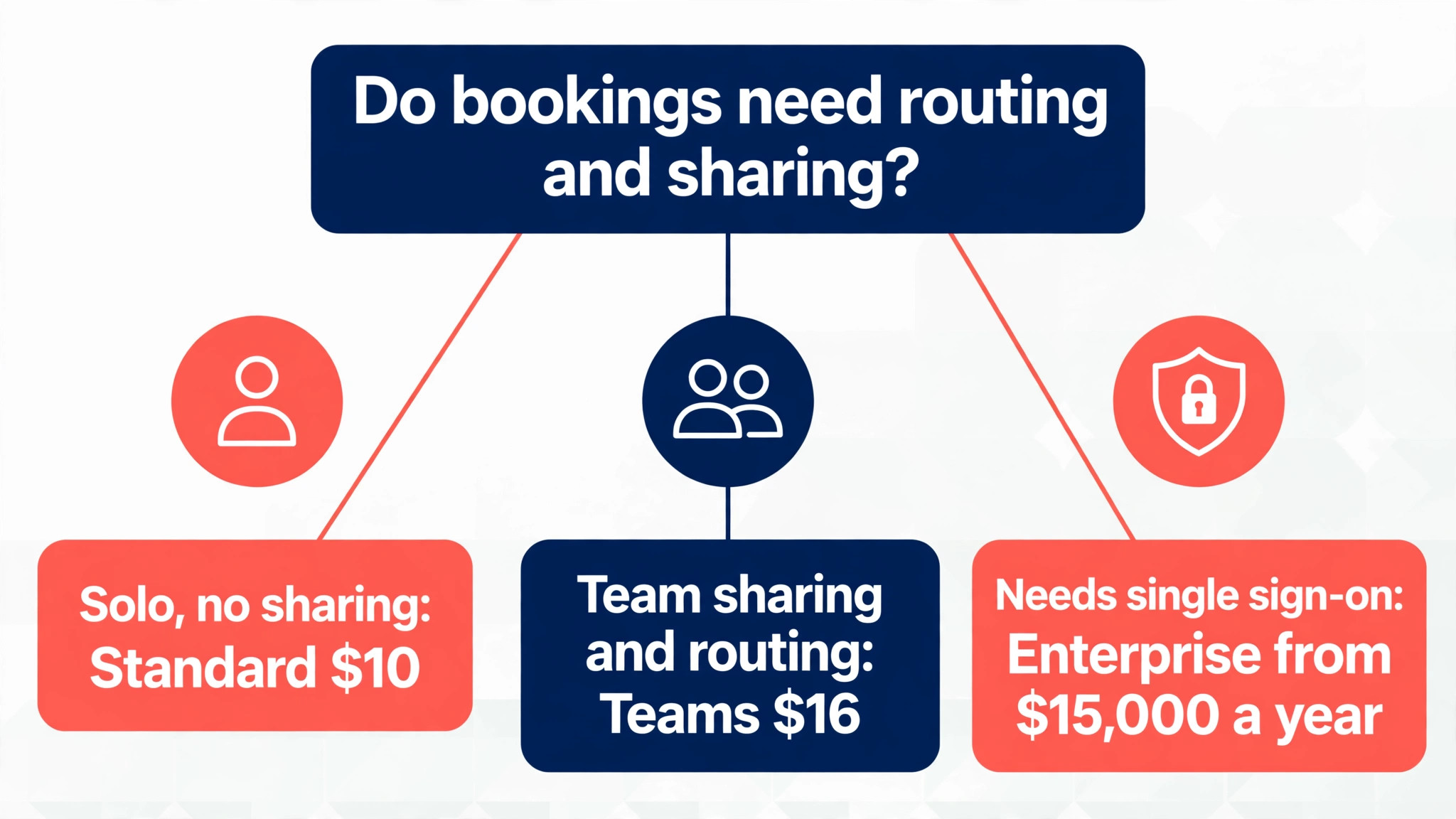
Enterprise should enter the conversation only when single sign-on, SCIM or audit controls are contractual requirements, or when the team passes fifty seats. At the 15,000 dollar annual floor, it is a different purchase from the self service tiers, and it should be quoted and justified in writing. Every other small business should choose between Standard and Teams on one question, which is whether bookings need routing and sharing. If the answer is no, Standard wins, and if the answer is yes, Teams wins.
More Reading on Stratilyze
Read more about related tools in online booking software for service businesses.
Read more about related tools in booking software for med spas.
Read more about related tools in scheduling software for home care agencies.
Frequently Asked Questions
Is Calendly really free for a small business?
Calendly offers a free plan with no expiry date, but it allows only one active event type and one calendar connection, and it keeps Calendly branding on the page. That covers a personal link or a short trial, but most businesses need more event types, reminders and branding removal. Budget for Standard once booking becomes a daily job, and treat free as a test rather than a permanent tier.
How much does Calendly cost for a team of five?
A five person team pays 50 dollars a month on Standard or 80 dollars on Teams with annual billing, and 60 dollars or 100 dollars with monthly billing. Adding Plus takes those annual totals to 90 dollars on Standard Plus and 120 dollars on Teams Plus. Count only hosts as seats, because viewers and attendees who never share a link do not need a paid seat.
What is the difference between Teams and Teams Plus?
Teams adds round robin, routing forms, managed event types and Salesforce integration to the Standard base. Teams Plus adds the same AI bundle as Standard Plus, namely Notetaker for meeting recaps and Callie for email scheduling, for 8 dollars extra per seat per month on annual billing. Buy Teams for routing, and add Plus only where meeting notes or email scheduling save measurable time.
Do I pay for seats that are not used?
Yes, Calendly bills every seat whether the person hosts meetings or not, so an unused seat is a wasted charge. Review the seat list when roles change or staff leave, and remove seats at once rather than waiting for renewal. That habit saves 16 dollars to 20 dollars a month per unused Teams seat, which adds up quickly across a team.
Is monthly billing worth the extra cost over annual billing?
Monthly billing costs 12 dollars against 10 dollars for Standard and 20 dollars against 16 dollars for Teams, a premium of about 17 to 20 percent. It is worth paying during a trial, a seasonal swing or a period of changing headcount, because it lets the team drop seats without paying for a full year. Switch to annual billing once the host list has held steady for a quarter.
When does Calendly Enterprise make sense for a small business?
Enterprise starts at 15,000 dollars a year with a fifty seat starting point in published comparisons, so it rarely fits a small business. It makes sense only when single sign-on, SCIM provisioning, audit logs or similar controls are contractual requirements, or when the team is large enough to clear the seat floor. For most small teams, Teams covers the admin and routing needs at a fraction of that floor.